


Setting up a surround sound system transforms ordinary movie nights into immersive theater experiences, but routing cables and configuring digital audio menus can feel overwhelming. Many listeners struggle with how to connect lg home theater speakers when trying to integrate modern televisions, older receivers, or standalone wireless subwoofers. Whether you are installing a multichannel soundbar setup with wireless rear satellites or wiring traditional passive cabinets, establishing the correct physical signal path is the essential first step. Exploring options like dedicated stereo loudspeakers highlights how connection methods have evolved from basic analog copper wires to high-bandwidth digital links. Taking time to map out your audio ports prevents hardware mismatches and ensures your room receives balanced audio without unexpected dropouts.
Modern systems from LG often incorporate intelligent pairing features, yet physical cable connections and TV output settings still dictate overall sound performance. Identifying whether your gear uses HDMI ARC, digital optical ports, or specialized wireless receivers determines the exact steps needed for a clean installation. Selecting the proper audio format inside your television menu prevents common frustrations such as missing center-channel dialogue or silent rear speakers. Understanding these core principles allows you to configure your surround sound gear quickly and enjoy expansive multi-channel dynamics without unnecessary technical friction.


Pros
- Bundled dual wireless microphones turn your living room into an effortless karaoke hub.
- Dedicated 5.5-inch subwoofer yields noticeably deeper, more impactful bass than standalone TV speakers.
- HDMI ARC and Bluetooth 5.3 ensure quick setup with minimal audio delay.
- Dialogue-enhancing equalizer presets improve speech clarity in movies and news broadcasts.
Cons
- The subwoofer connects to the soundbar via an audio cable, which restricts placement flexibility compared to wireless subs.
- Peak 240W rating represents momentary maximum output, making it best suited for small to medium-sized rooms.
- Lacks advanced spatial audio codecs such as Dolby Atmos or DTS:X.
The SunTrok 2.1-channel soundbar system occupies a uniquely fun niche in the home audio market, blending cinematic TV sound with party-ready karaoke capabilities. Designed specifically for households that want to replace tinny television speakers without committing to bulky AV receivers, this compact system comes packaged with an external subwoofer and two rechargeable wireless microphones. It delivers a comprehensive entertainment package ready for family gatherings, casual gaming, and movie marathons right out of the box.
During typical everyday watching, the soundbar makes a strong case for itself through vocal clarity and midrange separation. Spoken dialogue in dramas, podcasts, and sports matches projects forward cleanly, eliminating the muffled character common to rear-firing TV drivers. When action films or party playlists take center stage, the wired 5.5-inch subwoofer delivers respectable low-end weight, giving impacts and basslines a tactile presence that enriches the entire listening space.
The centerpiece feature for casual entertainers is undoubtedly the pair of 2.4GHz wireless microphones. With pre-paired connectivity, customizable echo levels, and onboard volume adjustments, setting up impromptu karaoke sessions is completely frictionless. Vocals pass through the system with minimal latency, and the integrated noise reduction keeps feedback manageable even in modest room configurations.
Overall, the SunTrok soundbar represents a practical, high-value audio solution for apartments, dens, and living rooms. While it does not claim audiophile-grade high-resolution decoding, it executes its primary mission admirably by offering clear speech, spirited bass, and an instant social party experience in a single purchase.
Acoustically, the SunTrok system is built around dual 2.5-inch full-range drivers housed within the soundbar bar chassis, crossed over to a standalone 5.5-inch bass driver in the subwoofer cabinet. Covering a stated frequency spectrum from 20Hz to 20kHz, the acoustic tuning leans toward a punchy V-shaped signature that emphasizes vibrant low-end rumble and clear upper-register vocal presence. The subwoofer handles low-frequency sweeps smoothly, avoiding the hollow, boxy distortion that frequently plagues ultra-slim soundbars.
Capable of hitting 240W peak power, the system produces more than enough acoustic volume to fill standard residential spaces without harsh clipping at moderate-to-high volumes. Integrated digital signal processing provides dedicated presets for Movie, Music, and News listening. Movie mode broadens the virtual soundstage for better atmospheric immersion, while News mode tightens the low-end to place absolute focus on spoken-word intelligibility.
Crafted with a clean, low-profile dark chassis, the soundbar measures roughly 32 inches across and under 3 inches in height. This slim profile ensures it sits comfortably beneath most television bezels without encroaching on screen real estate or obstructing infrared remote receivers. For wall-mounted displays, the package includes dedicated mounting screws and foam pads, allowing for an uncluttered floating installation.
Connectivity options are well-rounded and straightforward. The rear panel accommodates HDMI ARC, digital Optical, 3.5mm AUX, and USB inputs, guaranteeing plug-and-play capability with both modern smart TVs and older media players. Wireless audio transmission is handled by efficient Bluetooth 5.3, providing low power consumption and a dependable 50-foot wireless range, while the microphones recharge via standard USB to keep you untethered during performances.

Pros
- Wireless rear speakers and subwoofer simplify surround sound installation
- Dolby Audio enhances movies and music with immersive detail
- WOW Interface allows single-remote control with LG TV
- Clear Voice Plus ensures dialogue stands out clearly
- Smart Up-Mixer expands 2-channel audio to full surround
Cons
- Full WOW features optimized for LG TVs only
- Requires adequate room space for rear speaker placement
- New release with limited user feedback available
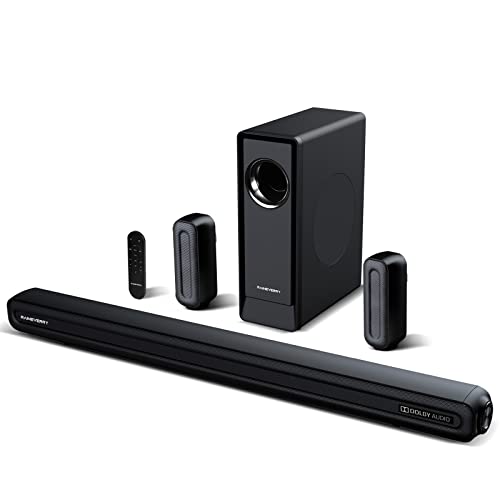
The LG S40TR is a compact 4.1-channel home theater soundbar system featuring a main bar, wireless subwoofer, and rear surround speakers, designed to deliver big-screen audio without a bulky receiver. Perfect for American households wanting to upgrade TV sound on a budget, it targets casual movie buffs and streaming fans who crave immersion in living rooms of any size.
In real-world use, it punches above its price with dimensional sound that fills spaces, making action scenes heart-pounding and dialogues crisp. The wireless components mean quick setup, syncing effortlessly for surround effects during Netflix marathons or sports nights.
While versatile for music and shows, it shines brightest with Dolby content, creating a theater-like vibe at home. Overall verdict: a smart pick for value-driven buyers seeking hassle-free home audio elevation.
Bass depth from the wireless subwoofer delivers booming lows that rattle during explosions, paired with 4 channels for wide soundstaging. Vocal clarity excels via Clear Voice Plus, ensuring every line in dramas or comedies cuts through without muddiness.
Volume levels handle large rooms effortlessly, with AI Sound Pro adapting to content for optimal punch. Smart Up-Mixer converts stereo sources into surround, enhancing music and older films seamlessly.
Connectivity relies on wireless rears and sub for stable performance, with WOW Orchestra providing TV-synced audio harmony for reliable, lag-free playback.
The crest design offers a sleek, modern look with a metal grill that resists dust for lasting appeal in any home setup. Compact bar and wireless components keep cables minimal, fitting small to medium rooms without dominating space.
Rear speakers mount easily for flexible placement, emphasizing style alongside function. As a powered home system, it runs continuously without battery limits, ideal for all-day TV sessions.
Build quality feels premium yet accessible, with the app enabling quick tweaks for a tailored fit in daily living room use.
Complete Guide to Connecting LG Home Theater Speakers
Connecting audio components properly ensures you experience the dynamic surround effects engineered into modern films and television broadcasts. The process of connecting LG home theater speakers depends largely on the age of your equipment, ranging from modern soundbars with wireless rear satellites to legacy all-in-one receiver systems. Selecting the correct audio cables, verifying output formats, and positioning each speaker properly avoids muffled dialogue or missing surround channels. Following a methodical setup process guarantees that every speaker in your configuration operates in phase and at full fidelity.
Identifying Your LG Home Theater Architecture
Audio gear from LG generally falls into two distinct categories: modern soundbar packages with wireless satellite units or legacy home-theater-in-a-box packages. Contemporary packages like the LG S40TR 4.1 ch system feature an active soundbar that serves as the central hub, paired with a wireless subwoofer and dedicated wireless rear speakers. In contrast, older LG theater systems utilize a central disc player or AV receiver that powers passive satellite speakers through physical copper cables. Determining which design you own dictates whether your primary task involves digital cable routing or manual speaker wire termination.
Active components contain built-in amplification modules, meaning they require their own independent connections to standard wall power outlets. Passive speakers rely entirely on amplified audio signals sent through speaker wire from an external receiver or main soundbar module. Mixing up these configurations can lead to equipment damage or a complete lack of audio output. Checking the back panel of your speakers for power cords or simple spring-clip terminals immediately clarifies how the system must be routed.
Connecting via HDMI ARC and eARC Connections
The HDMI Audio Return Channel, commonly labeled as ARC or eARC, represents the most efficient single-cable connection between your television and an LG soundbar or receiver. Locate the specific HDMI port on your television marked with the ARC or eARC designation, as standard HDMI input ports do not send audio back to external speakers. Insert a high-speed HDMI cable into this dedicated television jack, then plug the opposite end into the HDMI OUT (TV ARC) port on your LG audio system. This bidirectional digital channel transmits high-fidelity multichannel audio streams without requiring extra analog or optical leads.
Once the physical cable sits firmly in both ports, enabling Consumer Electronics Control allows unified control across your equipment. LG refers to this protocol as SIMPLINK, which permits your television remote to adjust soundbar volume and synchronize power states automatically. Navigate to your television general settings menu, locate the external device options, and switch SIMPLINK on. This integration simplifies daily operation by eliminating the need to balance separate remotes for volume adjustments and power cycles.
Establishing an Optical Digital Audio (Toslink) Connection
Optical digital audio cables offer a dependable alternative when connecting an LG home theater system to a television that lacks HDMI ARC functionality. This fiber-optic cable transmits digital audio using pulses of red light, making it immune to electrical interference and ground loops. Before inserting the cable, carefully remove the small clear plastic protective caps from both ends of the optical connector. Forgetting to remove these protective caps prevents the cable from seating properly and can damage the sensitive optical ports on your equipment.
Optical ports are keyed with a specific geometric shape that includes flat edges and angled corners. Align the connector carefully with the optical input port on your LG soundbar or receiver, pressing gently until you hear or feel a firm click. Optical audio connections capably deliver 5.1-channel compressed audio formats such as Dolby Digital and DTS to your speaker system. Note that optical leads do not carry volume commands from your television remote, requiring you to use the audio system remote control for listening adjustments.
Pairing LG Wireless Subwoofers and Rear Surround Speakers
Contemporary surround sound systems often eliminate long cable runs across living rooms by utilizing wireless radio-frequency transmission for rear satellites and subwoofers. In modern configurations such as the LG S40TR system, the subwoofer and rear speaker receiver unit link automatically with the soundbar upon startup. When you plug the main soundbar and wireless modules into electrical outlets, their internal transceivers establish a dedicated wireless connection. Solid green LED indicator lights on the rear panels confirm that wireless pairing has completed successfully.
If the LED light on your wireless subwoofer or rear receiver box blinks green slowly or glows solid red, the wireless connection has failed to synchronize. Manual pairing becomes necessary if the modules fail to link automatically after initial startup. To initiate manual pairing, press and hold the designated pairing button on the back of the subwoofer or wireless rear receiver box for several seconds until the LED flashes rapidly. While that light blinks, turn on the main soundbar unit to align frequencies, causing the indicator light to shift to a steady green.
Wiring Traditional Color-Coded Speaker Terminals
Older LG all-in-one home theater systems frequently employ physical copper speaker wire connected to dedicated spring-clip terminals on the main receiver. Many of these legacy units feature color-coded proprietary plastic plugs designed to prevent accidental miswiring of specific surround channels. The standard color layout typically assigns green to the center speaker, red to the front right, white to the front left, grey to the surround right, blue to the surround left, and purple to the passive subwoofer. Matching each colored plug to its corresponding port ensures audio reaches the correct spatial channel.
If your setup uses bare speaker wire instead of molded plastic plugs, maintaining correct electrical polarity is essential for proper acoustic performance. Connect the marked positive lead to the red terminal on both the LG receiver and the speaker cabinet, connecting the negative lead to the black terminal. Reversing polarity will not harm your equipment, but it causes acoustic phase cancellation that creates thin sound and severely diminishes bass response. Twist stripped wire ends tightly before inserting them into spring clips to prevent stray copper strands from causing electrical short circuits.
Using Audio Extractors for Legacy Amplifiers and Auxiliary Speakers
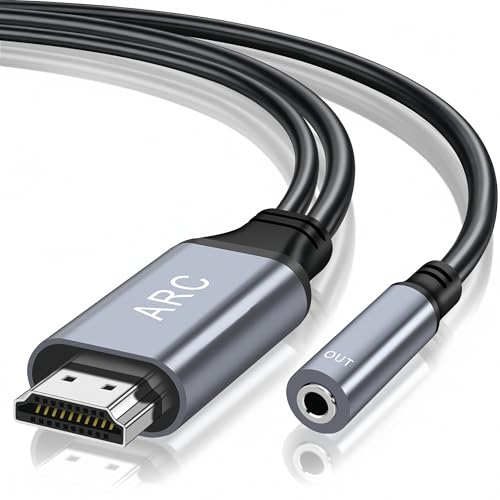
Integrating older stereo amplifiers or analog-only speaker systems with a modern television often reveals an absence of traditional analog outputs. Modern flat-panel displays rarely include red and white RCA jacks or 3.5mm headphone outputs, relying instead solely on digital connections. In such situations, installing a compact converter such as the MEEKI 192KHz HDMI ARC to 3.5mm Audio Extractor or the MEEKI 192KHz HDMI ARC to 3.5mm Female Audio Extractor bridges the hardware gap cleanly. These dedicated hardware extractors convert the digital audio stream coming from your television ARC port into an analog stereo signal compatible with legacy gear.
Operating an analog extractor requires continuous power through an attached USB cable and introduces specific signal requirements. These compact stereo converters decode standard two-channel PCM audio rather than multichannel bitstreams like Dolby Digital or DTS. You must access your television sound settings menu and force the digital audio output format to PCM, otherwise the converter will produce loud static or no sound. Additionally, the television remote control typically cannot adjust the volume passing through the ARC extractor, requiring you to control listening levels directly on your connected amplifier or powered speakers.
Configuring LG TV Audio Settings for Multichannel Output
Making the physical cable connections is only half the battle; configuring your television internal software menu dictates whether sound reaches the external speakers properly. On an LG television running webOS, press the settings button on your remote control and open the Sound Output menu. Switch the audio output setting from internal television speakers to Optical/HDMI ARC or Wired External Speaker. Failing to change this primary output setting leaves your home theater speakers silent despite having cables plugged in securely.
Deep within the advanced sound options lies the Digital Sound Output setting, which usually offers choices labeled PCM, Auto, or Pass Through. Setting this option to Auto or Pass Through allows multi-channel soundbars like the LG S40TR to receive discrete Dolby Audio or DTS bitstreams directly from streaming services and disc players. If your setup supports advanced features like WOW Orchestra, you can synchronize the television internal drivers with the soundbar drivers to produce an expanded vertical soundstage. Enabling the WOW Interface also displays soundbar settings directly on your television screen for effortless adjustments.
Comparing Compact Entertainment Alternatives
While dedicated multi-channel surround setups provide expansive cinematic sound, compact spaces may benefit from simpler audio configurations. Systems such as the SunTrok Soundbar with Subwoofer for TV present an alternative approach by combining a 2.1-channel soundbar and wired subwoofer with dual wireless karaoke microphones. This type of unit integrates dual full-range drivers with a dedicated low-frequency enclosure, offering versatile connections including HDMI ARC, optical, AUX, and USB. Comparing these configurations helps listeners choose between a multi-satellite surround layout or a multi-functional entertainment soundbar suited for singing and casual listening.
Diagnosing Common Audio Dropouts, Delays, and Silent Channels
Encountering unexpected silence from your rear surround speakers or subwoofer is a common issue that often traces back to source material rather than hardware failure. Standard broadcast television shows, older movies, and YouTube videos are frequently encoded in two-channel stereo, leaving rear surround speakers inactive unless an audio up-mixing mode is engaged. Enabling smart up-mixing algorithms or multi-channel surround modes on your LG soundbar converts two-channel sources into full surround output. Testing your configuration with a verified multichannel 5.1 film soundtrack confirms whether all physical channels are functioning correctly.
Lip-sync errors, where on-screen dialogue does not match the actor mouth movements, can occur when digital video processing takes longer than audio rendering. If the sound arrives slightly ahead of or behind the television picture, locate the AV Sync or Audio Delay adjustment in your television audio settings. Adjusting this slider forward or backward in millisecond increments aligns the sound wave delivery with the visual display. This simple timing calibration restores comfortable, cohesive viewing across high-definition broadcasts and gaming consoles.
Wireless dropouts on rear speakers can occasionally stem from crowded radio frequencies in your home entertainment room. Unlike simple wireless Bluetooth speakers that handle basic two-channel music streaming over short ranges, wireless surround sound setups rely on continuous, low-latency multichannel transmission. Heavy Wi-Fi traffic or operating high-powered wireless devices near the speaker receiver module can cause brief audio stuttering or popping noises. Relocating wireless network hubs and maintaining clear line-of-sight between your audio modules stabilizes the transmission link.
Practical Placement and Final System Verification
Proper physical placement of your speakers is just as vital as securing clean cable connections. Position the primary soundbar or center speaker directly below your television at seated ear level, centered with the middle of the screen. Place the wireless subwoofer on the floor near a front wall or room corner, which reinforces deep low-frequency bass output without decoupling from the soundbar. Rear surround satellite speakers should sit slightly behind and to the sides of your primary listening position, elevated approximately one to two feet above ear level for an immersive surround envelope.
Completing your installation requires running a quick audio verification check to confirm proper channel separation and volume balance. Play a movie scene with distinct directional sound effects, listening carefully to ensure off-screen action pans seamlessly from the front soundbar to the rear satellites. If specific surround channels seem quiet, utilize your LG remote control or mobile management application to increase the independent rear channel gain. Taking a few moments to fine-tune speaker levels and verify digital settings guarantees that your home theater delivers powerful, immersive sound for years to come.







Write Your Review
No reviews yet. Be the first to share your experience!