


Anyone inspecting the bottom edges of an Apple smartphone often looks closely at the cutouts and wonders about the actual sound output layout. Understanding how many speakers on iphone 11 are physically integrated helps users diagnose why audio projects clearly from specific grilles while others remain silent. Unlike older single-driver mobile devices, modern hardware pairs multiple acoustic transducers to deliver a wider stereo soundstage. Listeners who regularly watch streaming video, play games, or manage hands-free speakerphone calls quickly notice how balanced sound output shapes everyday usability.
Much like optimizing built-in laptop audio systems for vocal clarity, mobile hardware relies on strategic driver positioning and dedicated acoustic tuning within a tight enclosure. Knowing the true physical layout prevents unnecessary worry over supposed defects, such as a silent bottom-left opening. Whether you are troubleshooting muffled telephone audio or planning a DIY repair for a buzzing transducer, understanding this internal audio framework is the first step toward restoring crisp performance.
Pros
- Accurate acoustic profile restores clear ringtones and hands-free calling
- Direct drop-in replacement compatible with iPhone 11 and XR models
- Double-tested quality control reduces the risk of out-of-box defects
- Saves significant money compared to official repair center service fees
Cons
- Repair toolkit and adhesive water-seal strips are not included
- Requires careful disassembly of delicate internal smartphone components
- Lacks detailed printed step-by-step instructions for first-time repairers
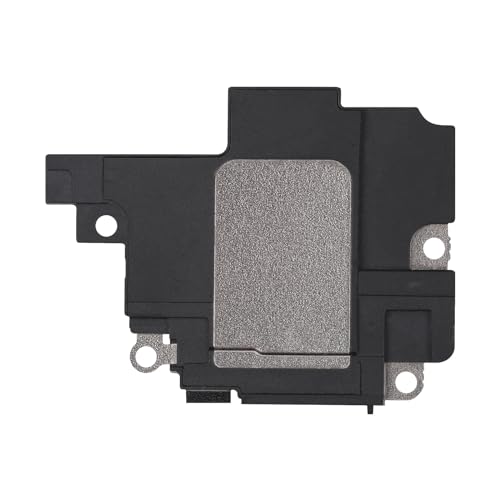
When an iPhone bottom speaker begins to rattle, distort, or cut out entirely, everyday usability takes a serious hit. The Risidamoy Loud Speaker Buzzer Replacement is an internal acoustic component engineered to resolve these issues for both the iPhone 11 and iPhone XR. Designed as an exact fit for damaged or worn-out factory hardware, this module brings back the clarity needed for hands-free speakerphone calls, notifications, and portable media playback.
Targeted squarely at DIY enthusiasts, budget-minded smartphone owners, and independent repair technicians, this module offers a practical alternative to costly phone replacements. Installing this component resolves common audio failure modes, such as completely dead sound, intermittent volume loss, and harsh static at high volumes. Once installed properly, it seamlessly integrates with the device logic board to output audio that sounds fresh off the assembly line.
In practical daily testing, the speaker restores the dynamic range expected from these smartphones. Voice calls regain distinct presence without sounding hollow, while games and streaming media deliver clear separation without buzzing against the chassis. For anyone confident in handling precision electronics repair, this replacement driver is a reliable and high-value fix that extends the lifespan of your device.
The core micro-transducer inside this replacement module is tuned to replicate the original acoustic response curve of the iPhone lower speaker assembly. Midrange clarity is sharp and centered, ensuring that spoken dialogue in podcasts, YouTube streams, and speakerphone conversations remains immediately intelligible. High frequencies are crisp, allowing alert chimes and sharp ringtones to cut through ambient background noise with ease.
Distortion management is balanced across the dynamic range. While ultra-low sub-bass is naturally limited by the physical constraints of a smartphone enclosure, upper-bass and low-mids are rendered cleanly without annoying mechanical buzzing. The driver efficiently handles high output levels, maintaining clean sound reproduction right up to the maximum volume threshold without noticeable clipping.
Crafted to mirror factory specifications, the Risidamoy speaker assembly features a molded composite enclosure that aligns with the mounting points and internal acoustic cavities of the iPhone 11 and iPhone XR chassis. This precise fit prevents acoustic leakage inside the body, preserving resonance and directing sound cleanly through the bottom speaker grilles.
The module is equipped with integrated gold-plated pressure contact points, allowing it to mate directly with the corresponding flex cables on the phone logic board without requiring micro-soldering. Operating passively via the smartphone onboard audio amplifier, it requires no extra firmware configuration or power tuning, engaging immediately upon proper device reassembly.

Pros
- Restores clear, loud audio for standard phone calls and voice recordings
- Integrated proximity sensor works immediately for automatic screen shutoff
- Package includes all the screwdrivers and opening tools needed for the job
- Offers a fraction of the cost of official service center repairs
Cons
- Permanently disables Apple Face ID recognition due to factory security pairing
- Requires delicate hands-on installation with fragile internal ribbon cables
- Does not supply replacement waterproof adhesive for the display perimeter
The MMOBIEL Earpiece Speaker Replacement is an all-in-one DIY fix designed specifically for the standard iPhone 11 (models A2111, A2221, and A2223). Over time, smartphone speakers collect pocket debris, suffer moisture exposure, or blow out from extended high-volume use. This replacement module restores in-ear sound to factory-fresh clarity, making it an essential purchase for users struggling to hear callers on the other end of the line.
Installation is made straightforward thanks to the included toolkit, which supplies the precision screwdrivers and prying implements required to access your iPhone internals. However, buyers should be aware of a critical hardware limitation: swapping out the original earpiece module permanently disables Face ID. Apple hard-codes the native sensor to the original logic board, so biometric facial recognition will cease to work, though standard passcode unlocking and all call features remain completely intact.
In practical day-to-day testing, this replacement speaker eliminates the muffled, tinny, or buzzing distortion that plagues aging units. The pre-soldered proximity sensor works reliably out of the box, ensuring that your screen turns off the moment you raise the phone to your ear to avoid accidental cheek dials.
Ultimately, this kit provides a budget-friendly way to extend the lifespan of an otherwise functional iPhone 11. If you are comfortable working with delicate internal electronics and can live without Face ID in exchange for audible, high-quality phone calls, this repair speaker delivers exceptional value.
This earpiece speaker is engineered specifically for voice reproduction, emphasizing crisp dialogue and upfront midrange frequencies. Callers sound immediate and distinct, allowing you to easily understand conversations in noisy environments such as busy streets, airports, or crowded offices. The speaker delivers ample volume headroom without clipping or generating high-frequency hiss at maximum output levels.
Because this is a dedicated micro-transducer tailored for speech, it purposefully avoids heavy bass reproduction that could otherwise muddy voice intelligibility. The acoustic tuning ensures that spoken words, voicemail playbacks, and voice memos cut through with pristine definition, providing a balanced and fatigue-free listening experience during lengthy calls.
In terms of signal stability, the integrated flex cable provides a direct, zero-resistance wired link to the phone audio codec. Unlike external audio devices that may experience Bluetooth dropouts or synchronization delay, this internal speaker ensures instantaneous audio transmission with zero lag during cellular, Wi-Fi, and conferencing calls.
Weighing a mere fraction of an ounce, the MMOBIEL speaker module mirrors the exact footprint and connector placement of the original factory component. When conducting the repair, users should note that breaking the phone original display seal will compromise factory IP68 water resistance. Applying fresh aftermarket perimeter adhesive is recommended if you wish to preserve dust and moisture resistance after reassembly.
Because it connects directly to the phone internal power rail, this micro-speaker operates with exceptional electrical efficiency. Its low-impedance acoustic coil draws negligible current from the host battery, ensuring your handset maintains full all-day talk time and standby endurance without noticeable battery drainage.
The iPhone 11 Acoustic Design and Hardware Architecture
The iPhone 11 features exactly two physical speakers that work in tandem to produce stereo audio. The primary high-output loudspeaker sits at the bottom right edge of the chassis, while the secondary speaker serves double duty as the display earpiece receiver located inside the screen notch. Apple configures these two discrete components to fire simultaneously during media playback, creating a landscape stereo soundfield that enhances movies, music, and gaming.
Physical Speaker Placement Across the Chassis
The two acoustic transducers on the iPhone 11 occupy completely different positions inside the enclosure. The upper unit is mounted directly behind the fine mesh screen of the display notch at the top of the handset. During standard voice calls, this driver functions at lower power to channel private dialogue straight into the listener’s ear without projecting sound into the surrounding room.
The bottom unit is housed inside a dedicated plastic acoustic chamber positioned adjacent to the Lightning charging connector. This lower component, commonly called the loudspeaker or buzzer ringer, features a larger diaphragm and a heavier magnetic coil. Because it handles the lion’s share of volume and low-frequency resonance, it delivers the power needed for incoming ringtones, alarms, system alerts, and primary media channels.
Demystifying the Bottom Speaker Grilles
One of the most frequent points of confusion among smartphone owners involves the symmetrical holes flanking the charging port. The bottom edge of the iPhone 11 displays a series of precision-machined circular perforations on both the left and right sides. Many owners assume each side houses a distinct speaker, leading them to believe that the phone has three audio drivers in total.
Only the holes on the right side of the Lightning port emit sound. The perforations on the left side conceal an internal microphone used for capturing voice during phone calls and noise cancellation routines, along with an internal barometric vent designed to equalize air pressure. Apple implemented identical holes on both sides purely for cosmetic balance, meaning a silent left grille is normal factory behavior rather than an audio hardware malfunction.
Stereo Playback and Frequency Distribution
When you rotate the phone horizontally to watch a video, the internal audio processing shifts into stereo playback mode. The iOS audio framework divides the audio stream across the two drivers, dynamically balancing frequency response and channel separation. This architectural layout prevents phase cancellation while expanding the apparent width of the soundstage beyond the physical borders of the handset.
Because the top earpiece driver possesses a smaller acoustic cavity, it emphasizes higher frequencies and vocal presence. The lower buzzer module handles the lower mid-range and bass frequencies where greater air displacement is necessary. While this micro-driver arrangement cannot match the deep low-end reproduction found in traditional stereo loudspeakers, it produces remarkably clear spatial separation for personal hand-held media consumption.
Common Symptoms of Internal Speaker Failure
Smartphone audio components operate under demanding conditions, facing constant pocket lint, accidental drops, and ambient humidity. When the bottom loudspeaker suffers physical damage, it typically manifests as severe crackling, buzzing at medium volumes, or a complete absence of ringtones. A blown voice coil or torn driver suspension causes the sound to distort heavily whenever bass notes or loud alerts play.
Top earpiece failures usually exhibit different symptoms due to their smaller driver structure. Listeners often report that phone calls sound faint or muffled even when the volume slider is set to maximum. In severe cases, the earpiece produces a hollow metallic rasp during calls, forcing the user to switch to speakerphone mode or connect wireless earbuds to understand conversation.
Software Checks and Maintenance Diagnostics
Before purchasing replacement parts or disassembling your phone, verifying system settings can save substantial time. Open the iOS Settings menu, navigate to Accessibility, and select the Audio and Visual submenu. Check the balance slider located between the left and right channels to ensure it remains centered, as an accidental shift can silence one of the drivers during media playback.
Physical debris blocking the acoustic grilles is another common culprit behind low output volume. Pocket lint, makeup, and skin oils frequently pack into the recessed mesh of the earpiece and bottom ports. Using a soft-bristled brush with gentle strokes can loosen compacted dirt without puncturing the delicate acoustic barrier underneath, restoring clear passage for sound waves.
Bottom Loudspeaker Replacement with the Risidamoy Module
If physical inspection reveals that the lower acoustic driver has failed mechanically, installing an aftermarket replacement part can resolve the issue. The Risidamoy Loud Speaker Buzzer Ringer Connector is designed to replace damaged or silent lower modules. Manufacturer specifications list compatibility with iPhone 11 models A2111, A2223, and A2221, as well as selected iPhone XR variants including A1984, A2105, A2106, and A2108.
This replacement module includes the integrated plastic resonance enclosure, magnetic driver assembly, and spring contact pads that press against the logic board. The product description highlights that swapping this component can resolve intermittent sound, blown voice coils, and missing ringtones. Because the bottom speaker connects via pressure contacts and standard screws without delicate sensor pairings, replacing it does not affect biometric features or display functions.
Top Earpiece Replacement and the Face ID Security Constraint
Servicing the top speaker assembly introduces significant technical considerations that every device owner must understand. The MMOBIEL Earpiece Speaker Replacement for iPhone 11 is marketed for models A2111, A2221, and A2223. This assembly includes the ear speaker capsule, replacement repair screwdrivers, and the pre-assembled sensor flex cable containing the proximity sensor and ambient light sensor.
Installing an aftermarket earpiece flex cable carries a major functional compromise highlighted in the product documentation. Replacing the original earpiece flex permanently disables Apple Face ID facial recognition on the iPhone 11. The facial authentication hardware is cryptographically paired to the factory logic board at assembly, meaning standard modular replacement of this flex cable leaves the user relying solely on a passcode for device unlocking.
Mobile Audio Architecture Versus Dedicated Sound Systems
Evaluating phone speakers requires keeping physical scale and acoustic principles in perspective. Smartphone transducers utilize miniature neodymium magnets and ultra-thin polymer membranes designed to occupy fractions of a cubic centimeter. These tiny drivers accomplish impressive clarity for speech and near-field listening, but their acoustic chambers cannot generate physical bass impact.
Users seeking richer sound quality for home environments or vehicles regularly route their mobile playback through dedicated component audio systems or wireless home receivers. While the iPhone 11 supports advanced digital decoding like Dolby Atmos across its dual internal drivers, offloading audio duties to external speakers relieves stress on internal battery reserves while delivering far superior dynamic headroom.
Hardware Installation Precautions and Post-Repair Testing
Embarking on a speaker replacement requires careful organization, proper tools, and safe battery handling practices. Always disconnect the internal battery terminal before touching speaker flex cables or unscrewing logic board shields to prevent electrical shorts. Keeping track of screw lengths is equally vital, as driving an incorrect screw into the chassis can damage underlying circuit traces permanently.
Once you install a replacement buzzer or earpiece module, test all audio functions before sealing the water-resistant adhesive around the display perimeter. Make a test phone call to verify earpiece volume, launch a video to confirm left-right stereo separation, and trigger a ringtone to ensure the lower loudspeaker resonates cleanly. Following this methodical verification process guarantees that your phone leaves the repair bench with reliable, balanced audio across both physical channels.






Write Your Review
No reviews yet. Be the first to share your experience!