


Setting up a home studio or audio workstation often leads to questions about audio interfaces, monitor inputs, and cable compatibility. When routing audio signals to active studio monitors, many producers wonder whether can u ts cables on krk speakers without degrading sound quality or causing interference. KRK Rokit monitors and similar active monitors rely on internal power amplifiers, which makes their input stage sensitive to incoming signal types. Choosing the right patch cord ensures you avoid unwanted buzzing, ground hum, and signal loss during critical listening sessions.
While connecting studio monitors might seem as straightforward as wiring passive home music speakers, the difference between balanced and unbalanced connections plays a major role in performance. Active monitor systems process line-level audio rather than amplified speaker signals, demanding proper shielding and correct termination. Understanding the mechanical fit of a standard quarter-inch connector and the electrical behavior of the signal path helps protect your equipment while delivering clean audio.

Pros
- Full copper wire eliminates buzzing and static
- Industrial-grade construction for long-term reliability
- Spring-loaded latches ensure dependable connections
- 25ft reach ideal for most live sound setups
- Soft yet tough for repeated stage abuse
Cons
- 1/4-inch TS connectors lack XLR versatility
- 25ft length excessive for small venue or home use
- Black color only, no options for custom labeling
These Yuyaokk speaker cables come as a 2-pack of 25-foot, true 12AWG patch cords with 1/4-inch male TS connectors, crafted for DJ, PA, and live sound pros. Made with full copper wire and premium PVC-85P jacket, they prioritize durability and clean audio delivery in demanding environments.
Targeted at musicians, event sound engineers, and performers who run high-power speakers, monitors, and subwoofers, the 25ft length supports energetic stage movement while maintaining signal integrity. They shine in live gigs where cables face constant wear from foot traffic and setup hassles.
Real-world performance stands out with zero noise, static, or buzzing, even under high current loads. The quick-lock system and flexibility make them a go-to for pros needing gear that performs gig after gig.
Verdict: Top-tier choice for reliable, pro-grade cabling that elevates live audio setups without fail.
Yuyaokk cables ensure premium sound quality through full copper 12AWG construction, delivering undistorted highs, punchy bass, and clear vocals over the full 25ft run. They eliminate interference, static, or hum, keeping your mix pristine at any volume.
Built for high-power PA applications, the twist-lock 1/4-inch connectors handle heavy currents for mains, subs, and monitors, providing stable transmission that captures every detail from source to speaker.
Perfect for live events, they maintain performance consistency, letting DJs and bands focus on the show with confidence in their audio chain.
The rugged PVC-85P jacket offers superior wear resistance, shrugging off tugs, steps, twists, pulls, and drags typical of stage life. Lightweight yet tough, they flex easily for routing around gear and coil neatly for transport.
At 12AWG and 25ft per cable, the design strikes a balance of power capability and usability, with black TS plugs for a clean, pro look. No bulk or stiffness hinders quick setups at venues or rehearsals.
Passive design means no batteries or charging ever needed - always powered up and ready for back-to-back events with zero downtime.
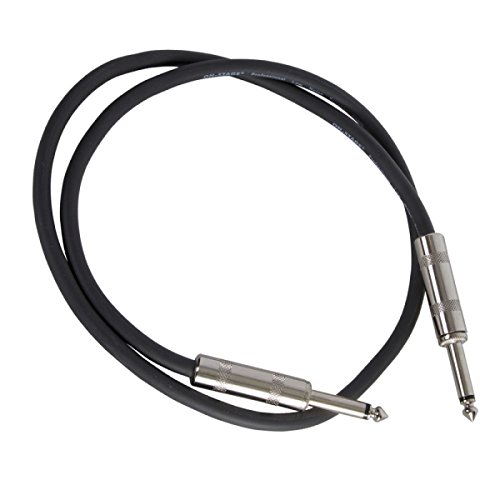
Pros
- Thick 14-gauge copper conductors handle high-wattage tube and solid-state amplifiers with ease
- Robust metal connector barrels provide exceptional shielding and long-term durability
- Clean 3-foot length creates an ultra-tidy stage setup for stacked amplifier heads
- Remarkably flexible 7mm outer jacket makes it easy to route behind tight speaker cabinets
Cons
- Short 3-foot run is strictly suited for stacked rigs and will not reach distant passive speakers
- Features standard 1/4-inch TS jacks rather than twist-lock Speakon connectors
- Heavier gauge wire adds a bit of bulk compared to cheap, unrated patch cords
When connecting high-output power amplifiers to passive speaker cabinets, standard guitar patch cords simply will not cut it. The On-Stage SP14-3 1/4-Inch Speaker Cable is purpose-built to bridge that gap, offering musicians, sound technicians, and audiophiles an exceptionally durable connection engineered specifically for high-current speaker-level signals. Designed to sit neatly between stacked amplifier heads and speaker enclosures, this 3-foot cable ensures your amplifier's full dynamic energy reaches your drivers without choking or overheating.
In real-world live and rehearsal setups, the SP14-3 shines through its no-nonsense reliability. The heavy 14AWG copper conductors provide substantial current-carrying capacity, which is critical when driving high-wattage tube heads or solid-state PA power blocks. The cable locks securely into standard quarter-inch cabinet jacks, resisting accidental pull-outs and delivering clean, uninterrupted audio throughout high-vibration stage environments.
For guitarists and bassists, the short 3-foot footprint is an outstanding asset. Long, coiled cables draped behind an amplifier stack create unwanted clutter and can act as antennas for stage noise. The SP14-3 provides just enough reach to connect an amp head directly to a speaker cab or an intermediate power attenuator, maintaining a tidy, professional look while keeping signal runs as short and direct as possible.
Ultimately, the On-Stage SP14-3 balances heavy-duty performance with an accessible price point, backed by a limited lifetime warranty. Whether you are gigging at local venues, setting up a boutique studio tracking room, or hooking up powered monitor wedges, this cable is a rock-solid workhorse that belongs in every audio professional's gear bag.
The acoustic performance of a speaker cable comes down to resistance, capacitance, and signal transparency. Thanks to its heavy-duty 14AWG copper conductors, the On-Stage SP14-3 delivers near-zero resistance over its 3-foot run. This low impedance ensures optimal damping factor between the amplifier and speaker drivers, allowing your woofer cones to stop and start instantaneously. The result is punchy, articulate bass notes without the muddy low-end smear that thin or poorly shielded cables introduce.
Across the midrange and treble spectrum, the SP14-3 keeps the amplifier's true tonal character fully intact. Highs remain crisp, detailed, and uncolored, giving guitar solos singing clarity and vocal reproduction natural presence. Because it handles high-voltage power loads without signal compression, dynamic transients such as aggressive snare hits, picked bass lines, and heavy chords hit your cabinet with absolute fidelity.
Built to handle the demands of life on the road, the On-Stage SP14-3 features a rugged 7mm outer PVC jacket that protects the internal wiring against crushing, abrasion, and repeated bending. Inside, the 14-gauge pure copper conductors are carefully insulated to prevent short circuits and thermal breakdown under continuous high-wattage operation.
At either end, the cable is terminated with heavy-duty, nickel-plated 1/4-inch (6.35mm) TS metal connectors. These sturdy quarter-inch plugs feature internal strain relief to protect sensitive internal solder points from tugs and yanks. With its lightweight 0.29-pound profile and compact 3-foot length, this cable fits seamlessly into any amplifier back panel without sagging, kinking, or exerting unnecessary mechanical stress on your equipment jacks.
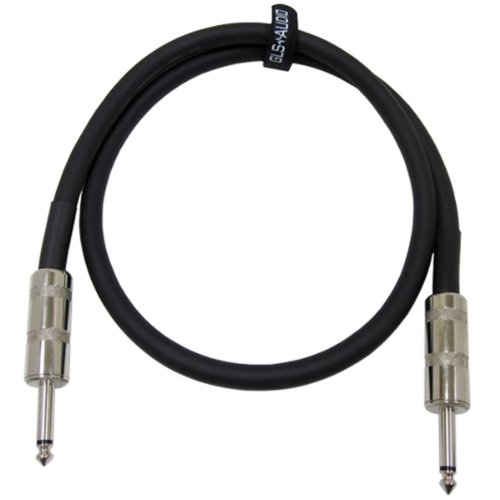
Pros
- Premium copper ensures zero signal loss for full-range sound
- Ultra-flexible jacket for hassle-free coiling and setup
- Convenient hook-and-loop strap for organized storage
- Heavy-duty 12 AWG build supports pro-level power demands
- Short 3 ft design ideal for pedalboard or amp head connections
Cons
- 3 ft length too short for longer stage runs without extensions
- 1/4-inch ends limit use with modern XLR or combo inputs
- Rubber jacket may stiffen in extreme cold conditions
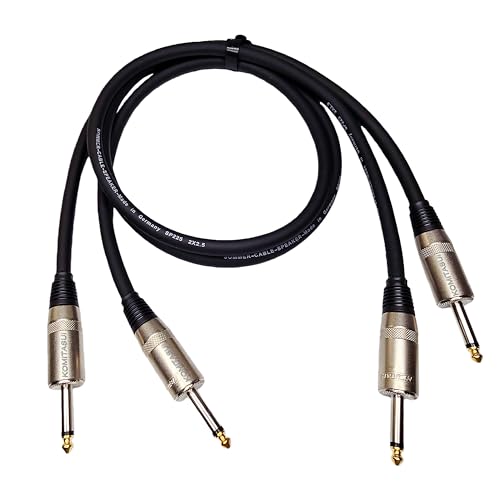
Pros
- Low signal distortion delivers accurate sound for guitars and bass
- Corrosion-resistant copper ensures long-term clarity
- Gold-plated TS plugs for secure high-current connections
- Durable jacket offers flexibility and abrasion protection
Cons
- 3-foot length best for short patch runs, not long stage setups
- Designed for speaker-level high current, not line-level signals
- 12AWG thickness prioritizes power over ultra-slim portability
The KOMITASUI Professional Speaker Cables are heavy-duty 1/4-inch TS to 1/4-inch TS cords, measuring 3 feet each in a convenient 2-pack. Built with 12AWG true American Wire Gauge and 99.9% oxygen-free copper, they excel in delivering clean, undistorted signals for demanding audio applications.
Perfect for professional musicians, DJs, PA system operators, and home audio enthusiasts, these cables connect guitar amps, bass rigs, subwoofers, and center channel speakers with reliability. Their gold-plated connectors and robust PVC-85P rubber jacket make them ideal for both stage and studio environments where durability matters.
In real-world use, they maintain sound accuracy across high-current setups, preventing signal loss that plagues cheaper cables. Whether patching a bass amp at a gig or linking home stereo components, they provide consistent performance without corrosion or flexibility issues.
Overall verdict: A smart buy for anyone serious about audio integrity, offering pro-grade quality at an accessible price with a 12-month guarantee.
These cables shine in preserving bass depth and overall sound accuracy thanks to their high-purity oxygen-free copper construction, minimizing distortion even in high-current PA and guitar amp applications. They handle powerful lows from subwoofers and bass guitars without muddiness, keeping your mixes tight.
Vocal clarity and midrange detail come through with precision, as the 12AWG gauge supports maximum signal integrity for live sound or home systems. Volume levels stay clean at peak output, making them reliable for DJ booths or band practices.
Connection stability is rock-solid with gold-plated TS plugs, ensuring no dropouts during extended performances or critical audio chains.
The rugged heavy-duty PVC-85P rubber jacket provides excellent abrasion resistance while staying flexible for easy routing behind amps or across stages. Gold-plated connectors resist corrosion, enhancing longevity in humid venues or dusty home setups.
At 12AWG, these cables prioritize power handling over lightweight portability, weighing in sturdy for pro use without unnecessary bulk. No IP rating needed as the jacket shields against everyday wear in music environments.
As passive cables, they require no battery or charging, delivering endless performance powered solely by your amps for non-stop gigs or home listening sessions.
Audio Setup Guide: Using 1/4-Inch Cables on KRK Monitors
Connecting audio equipment requires a clear understanding of signal levels, connector wiring, and internal amplifier designs. Powered studio monitors like KRK Rokit models provide versatile input options, but choosing the wrong cable type can introduce noise or reduce clarity. This guide explains the technical realities of using quarter-inch connections, how balanced circuits protect sound fidelity, and why cable construction matters.
The Direct Answer: Can You Use TS Cables on KRK Speakers?
Technically, you can physically plug a tip-sleeve (TS) cable into the combo input of most modern KRK monitors. The quarter-inch jack on KRK speakers is engineered as a combo receptacle that mechanically accepts both TS and TRS plugs. When you insert a standard two-conductor TS plug, the sleeve makes contact with both the ring and sleeve terminals inside the speaker input. This bridges the inverted audio line to ground, allowing the monitor to reproduce the incoming unbalanced line-level signal without physical damage to the jack.
However, running an unbalanced TS connection means sacrificing the primary noise-rejection advantage of active studio monitors. Balanced connections use differential signaling to cancel out radio frequency interference, electromagnetic noise, and electrical hum before amplification occurs. When you switch to a standard TS cable, the input circuit operates in single-ended mode, leaving the line vulnerable to stray interference from nearby computers, power strips, and lighting equipment. Unbalanced line connections also generally result in a lower nominal signal level compared to balanced lines.
If you only have an unbalanced TS patch cable available, your KRK speakers will still produce sound. For short runs of under six feet in an environment free of heavy electrical noise, the audio can sound clean enough for basic tracking or playback. Long-term monitoring, critical mixing, and longer cable runs demand balanced cables to maintain dynamic range and prevent background noise floor elevation.
Balanced TRS Versus Unbalanced TS Connections Explained
Understanding audio connectors requires looking closely at how electrical signals travel through conductors. A tip-sleeve cable contains two distinct conductors: a central core carrying the hot audio signal and an outer braided shield acting as the electrical ground return. Because there is only one audio conductor, any noise picked up along the cable length gets amplified directly along with your music. This setup works reliably for high-impedance electric guitars and short instrument patch leads, but it provides minimal defense across longer distances.
In contrast, a tip-ring-sleeve (TRS) cable incorporates three conductors within its protective jacket. The tip carries the positive polarity audio signal, the ring carries an inverted copy of the exact same signal, and the sleeve provides the ground shield. When both polarities arrive at the differential amplifier inside your KRK monitor, the receiver flips the inverted signal back into phase and combines it with the positive signal. Any external noise that leaked into the cable along the journey hits both conductors identically, causing the differential receiver to cancel out the interference completely.
This common-mode rejection process is why professional recording environments avoid long unbalanced runs whenever possible. In balanced operation, the audio signal maintains optimal strength while common interference drops away into silence. When configuring stereo listening stations or stereo and 2.1 speaker setups, maintaining balanced cabling across all channels preserves stereo imaging and prevents ground loops between the left and right monitors.
The Critical Difference Between Speaker Cables and Instrument Patch Cords
A very common and costly point of confusion involves the physical appearance of quarter-inch connectors. Many heavy-duty cables, such as 12AWG or 14AWG patch leads, share identical quarter-inch TS plugs with standard instrument cords. Products like the Yuyaokk 2Pack 25 ft Speaker Cables and the OnStage SP14-3 1/4″ Speaker Cable use thick copper conductors specifically built to carry massive electrical current from a high-power amplifier head to a passive speaker cabinet. These products are true passive speaker cables, not shielded instrument or line-level patch cords.
The internal architecture of a heavy-gauge speaker cable features two parallel unshielded conductors designed strictly for high-voltage, low-impedance signals. Because passive speaker signals operate at many watts of power, stray electromagnetic interference is practically negligible relative to the massive voltage driving the speaker cone. Consequently, manufacturers do not include braided copper or foil shielding inside dedicated speaker cables. Heavy-duty options like the KOMITASUI Professional Speaker Cables 1/4″ to 1/4″ and the GLS Audio Speaker Cable 1/4 inch to 1/4 inch focus entirely on thick 12-gauge oxygen-free copper to handle current flow without resistance.
Active studio monitors, including the KRK Rokit series, operate on completely different principles because they house internal power amplifiers. The inputs on active monitors expect low-voltage line-level audio signals originating from an audio interface, mixing console, or preamplifier. If you plug an unshielded 12AWG or 14AWG speaker cable into an active monitor input, the unshielded wire behaves like an antenna. It captures radio waves, AC hum from wall outlets, and digital hash from computer monitors, dumping that noise straight into the sensitive internal input circuit.
Active monitor inputs must always receive shielded audio cables, whether you use balanced TRS cords or unbalanced TS instrument leads. Never use unshielded speaker cables intended for guitar amplifier cabinets to connect line-level audio to powered studio monitors. Keeping passive speaker cables separated from studio monitor line cords prevents intense buzzing, hiss, and potential ground noise problems in your playback system.
Ground Loops, EMI, and Noise Vulnerability in Studio Environments
Electromagnetic interference and radio frequency interference represent constant challenges in modern music production spaces. Modern production desks house high-powered computers, switching power supplies, Wi-Fi routers, video monitors, and audio interfaces within inches of each other. An unbalanced TS cable lacks the common-mode rejection necessary to repel the electromagnetic fields radiating from these electronics. Even a slight proximity to a power adapter can introduce a persistent low-frequency hum into an unbalanced monitor line.
Ground loops create an even more frustrating audio symptom when using unbalanced cables between audio hardware. When your computer, audio interface, and KRK monitors are plugged into separate wall outlets, small differences in ground potential develop along the safety earth lines. An unbalanced TS cable ties the audio reference ground directly to the chassis ground through its single shield conductor. This allows stray current to circulate through the audio shield, resulting in high-pitched whine, mouse-movement buzz, or low-frequency ground hum through the speakers.
Balanced cabling breaks ground loop vulnerability by decoupling the audio reference ground from the chassis return path. The differential input circuitry on KRK monitors ignores voltage fluctuations present on the ground conductor. If your studio suffers from background noise that shifts when your computer processor experiences heavy load, replacing unbalanced TS cords with balanced TRS or XLR cables often resolves the issue.
KRK Monitor Input Panel Anatomy and Proper Connection Choices
Modern KRK studio monitors, such as the Rokit Generation 4 series, feature combination input receptacles. These combo jacks accommodate both a three-pin XLR male plug and a quarter-inch phone plug in the exact same physical housing. The internal contacts are precision-molded to route three electrical pathways for balanced signals, providing maximum flexibility for studio routing.
When inspecting the rear panel of your KRK monitor, you will notice input sensitivity ratings and volume level indicators. KRK calibrates its balanced inputs for standard professional line levels, typically referenced at plus four dBu. The unbalanced inputs, such as RCA or bridged TS connections, are usually matched to consumer line levels around minus ten dBV. Connecting an unbalanced TS cable into the combo jack creates an impedance and voltage mismatch that lowers your overall output volume and requires turning up the monitor gain, which in turn raises the background noise floor.
For optimal audio performance, audio interfaces should connect to KRK monitors using either TRS-to-TRS cables or TRS-to-XLR male cables. If your audio interface only offers quarter-inch balanced outputs, a pair of quality TRS cables ensures clean signal transfer across both channels. Using the correct balanced termination preserves headroom, ensures clean transient response, and matches the internal amplifier stages cleanly.
Step-by-Step Guide to Connecting KRK Studio Monitors Safely
Before adjusting connections or plugging new cables into your studio monitors, you should always power down all hardware. Turn off the power switches on the back of your KRK monitors and disconnect power cords if you are rewiring an entire desk. Lower the master volume knob on your audio interface or monitor controller all the way to zero. These basic safety precautions prevent sudden voltage spikes and loud pops that could damage delicate high-frequency tweeters.
Next, examine the output jacks on your audio source device to identify the connection standard. Look for labels indicating balanced outputs, which typically read balanced, TRS, or line out. If you must use unbalanced equipment, verify whether the source outputs line-level audio rather than headphone-level or amplified speaker-level audio. Connect the cable firmly into the output of your audio interface until the plug clicks into place.
Route the audio cable away from high-current power strips, computer power bricks, and alternating current mains cables. Run the cord directly to the rear combo jack of the corresponding KRK speaker, ensuring the plug seats securely in the jack. Avoid bending the cable sharply near the strain relief boot, as internal solder joints can weaken under excessive mechanical tension. Repeat the same cable routing steps for the second monitor to maintain balanced stereo symmetry.
Once all audio cables are firmly connected, power on your source computer and audio interface first. Allow your computer operating system to initialize the audio driver completely before powering on your studio monitors. Finally, flip the power switches on the KRK speakers, slowly bring up the interface output knob, and verify that both channels produce clean, distortion-free sound.
Troubleshooting Unwanted Buzzing, Static, and Signal Loss
If your KRK monitors emit an unexpected buzz, clicking sound, or background hiss, methodical troubleshooting will isolate the source quickly. Begin by disconnecting the audio input cable completely while leaving the monitor powered on. If the speaker goes silent without the input cable attached, the noise originates upstream in your audio interface, computer, or cabling. If the noise persists even with no input cord connected, the problem may stem from dirty wall power or an internal electronics fault.
When the noise appears only when the cable is plugged in, swap the left and right audio cables to see if the problem follows the wire. A damaged cable with a fractured internal shield or broken solder joint often introduces intermittent static or radio reception. If you are currently using an unbalanced TS cable, replacing it with a balanced TRS cable is the fastest way to confirm whether environmental interference was responsible for the noise.
Check your computer power setup if you hear a high-pitched digital whine that changes pitch when you scroll with a mouse. Plug both studio monitors and your computer tower into the same heavy-duty, surge-protected power conditioner to ensure a common ground reference. Avoid plugging monitors into wall outlets shared with refrigerators, air conditioners, or dimmer switches, as these appliances introduce substantial electrical hash into local wiring.
Understanding Cable Construction: Shielding, Conductors, and Gauges
Selecting the right cable involves understanding how conductor thickness and shielding techniques affect audio performance. Signal patch cords designed for line-level studio monitoring rely on twisted pairs of 20AWG to 24AWG copper conductors surrounded by a protective spiral or braided shield. The shield reflects and drains stray electromagnetic fields before they can penetrate the central signal wires. High-purity oxygen-free copper conductors ensure low internal capacitance, preventing high-frequency rolloff across longer runs.
Heavy-gauge cables like 12AWG or 14AWG cords prioritize low electrical resistance for moving wattage rather than rejecting delicate interference. Products featuring thick 10.5mm outer rubber jackets, such as the GLS Audio Speaker Cable, provide extraordinary physical durability and abrasion resistance under energetic stage environments. While these heavy copper conductors excel when carrying power from an amplifier head to an instrument cabinet, their lack of a differential twisted pair makes them unsuitable for low-level balanced studio monitoring.
Connectors also play an essential role in preserving audio integrity and mechanical longevity. Gold-plated quarter-inch plugs resist surface oxidation and corrosion over years of studio use, ensuring low contact resistance. Rugged metal connector housings with integrated strain relief protect internal solder connections from flexing and strain when monitors are repositioned. Choosing cables with flexible rubber jackets simplifies cable routing behind tight studio desks without kinking or pinching the internal wiring.
Best Practices for Studio Monitor Placement and Cable Management
Proper studio monitor setup requires thoughtful cable management alongside acoustic positioning. Place your KRK monitors on dedicated desktop stands or isolation pads to decouple mechanical vibrations from your desk surface. Arrange the speakers so the tweeters sit at ear level, forming an equilateral triangle between your head and the left and right monitors. Position the monitors at least a few inches away from boundary walls to prevent exaggerated low-frequency room modes from muddying your bass response.
When dressing your studio cables, keep audio signal lines physically separated from alternating current power cords whenever possible. If an audio cable and a power cable must intersect, cross them at a ninety-degree angle to minimize electromagnetic coupling between the conductors. Use reusable hook-and-loop cable ties to bundle your left and right audio lines neatly along the monitor stands. Avoid coiling excess cable length in tight circles, as tight coils can act as small inductors that capture electromagnetic noise.
Finally, avoid putting mechanical tension on the rear combo jacks of your KRK speakers. Allow enough cable slack so the weight of the cord does not pull down on the jack or stress the internal circuit board solder joints. By investing in proper balanced TRS or XLR cables and maintaining organized routing, your KRK monitors will deliver clean, reliable, and transparent acoustic performance for everyday listening and mixing.




Write Your Review
No reviews yet. Be the first to share your experience!