


Connecting multiple wireless audio units transforms a modest personal listening session into an expansive, room-filling soundstage. Figuring out how to link jbl speakers often starts with determining which wireless synchronization standard your specific hardware actually supports. Many listeners assume every portable cabinet pairs interchangeably, yet brand protocols have evolved from legacy standards to modern broadcast technologies. If you are comparing different portable configurations or looking into portable Bluetooth speaker alternatives, understanding multi-speaker communication prevents frustrating trial-and-error during setup.
Modern hardware lines utilize distinct linking protocols, ranging from True Wireless Stereo for large party towers to Auracast broadcast audio on recent releases. Knowing how to link jbl speakers correctly allows you to configure dual-channel stereo imaging or synchronize multiple units in party mode without unexpected signal drops. Driver capabilities, cabinet placement, and firmware revisions also influence how clean the synced output sounds across an indoor room or outdoor patio. Identifying the exact generation of your equipment is the first critical step toward building a cohesive multi-speaker network.

Pros
- Surprisingly powerful sound for its compact size
- Effortless Bluetooth 5.1 pairing and stable connection
- IP67 rating handles full submersion and dust perfectly
- Long 10-hour battery keeps the music going without recharges
- Built-in carabiner makes it ultra-portable for any adventure
Cons
- Bass lacks depth compared to larger JBL models
- No companion app for sound customization
- Volume maxes out for small groups, not big parties
The JBL Clip 4 is an ultra-portable mini speaker that punches way above its weight class, delivering big audio and punchy bass from a design small enough to clip onto your backpack or belt. Tailored for active Americans who refuse to leave great sound behind, it's built for outdoor adventures like beach trips, camping, tailgating, and daily commutes.
In real-world use, it shines during hikes where the carabiner keeps it secure, blasting tunes over wind and waves without missing a beat. The IP67 waterproofing means it survives splashes, sand, and sudden showers, while Bluetooth 5.1 ensures reliable streaming from your phone. Calls come through clear thanks to noise-canceling tech, making it a versatile pick for hands-free chats on the trail.
Overall, the Clip 4 lives up to JBL's legacy of powerful sound in compact form. It's a must-have for anyone prioritizing portability and durability over raw volume, earning top marks for lifestyle integration.
Expect big, bold sound from the JBL Clip 4, with punchy bass that thumps on tracks like hip-hop beats or rock anthems, surprising for its mini size. Vocals stay clear and present, cutting through ambient noise on busy beaches or during tailgates, while the extended frequency range adds detail to podcasts and acoustic sets.
Volume levels fill personal spaces like tents or showers without distortion, though it shines best up close. Bluetooth 5.1 provides rock-solid range and stability, streaming wirelessly without drops even through trees or crowds, making it reliable for all-day outdoor playback.
Ultra-compact and feather-light, the JBL Clip 4 weighs next to nothing, with a rugged rubber housing and improved fabric that shrugs off bumps, scratches, and rough handling on trails or at campsites. The integrated carabiner hooks securely to gear, turning it into the ultimate travel companion without adding bulk.
IP67 rating delivers complete waterproofing for submersion up to a meter and total dustproofing, perfect for sandy beaches or dusty roads. Battery life hits up to 10 hours on a single charge, powering full days of music at moderate volumes, with quick USB recharges getting you back in action fast.

Pros
- Explosive deep bass and 160W output with zero distortion at party volumes
- 12-hour battery life keeps music flowing from day to night
- IPX4 splashproof build thrives in wet, wild outdoor settings
- Beat-synced lights and app control elevate any gathering
- Seamless Bluetooth pairing for instant party startups
Cons
- Bass-heavy profile may overpower mids for neutral listening fans
- Larger portable size feels bulky for solo hikes or tiny spaces
- Full light and EQ customization requires downloading the app
The JBL PartyBox 110 is a powerhouse portable speaker built for epic gatherings, blending booming audio with dazzling light shows. Ideal for backyard barbecues, beach parties, or house raves, it delivers JBL's pro-level sound in a rugged, battery-powered package that American party hosts will love.
In real-world use, it cranks out 160W of energy that easily covers a crowded patio or pool deck, with adjustable deep bass that thumps through hip-hop or EDM without muddiness. The IPX4 splashproofing laughs off spills or light rain, while built-in lights pulse in sync with the rhythm, turning any space into a club atmosphere.
Control everything via the intuitive JBL PartyBox app, from EQ tweaks to light patterns, making setup a breeze. While it's not for audiophiles chasing studio accuracy, its fun-first design nails the party speaker brief.
Verdict: A top pick for lively Americans who prioritize bass-driven fun and portability over subtlety. Grab it if your events need serious sonic punch.
At its core, the PartyBox 110 unleashes JBL Original Pro Sound with 160W RMS power, emphasizing deep, adjustable bass that plunges low for heart-pounding lows in tracks like rap or electronic beats. Midrange stays clear for vocals and guitars, while crisp treble adds sparkle without harshness, creating a lively, forward sound signature.
The wide soundstage fills open outdoor areas effortlessly, with high volume levels that handle crowds without breakup. Dual bass modes let you boost thump for bassheads or tame it for balanced playback, making it versatile across genres.
Engineered for parties, it prioritizes impact over precision, revealing rhythmic details in mixes while the app's EQ fine-tunes for your space.
Built tough for on-the-go fun, the PartyBox 110 rocks a portable design with a sturdy handle and rechargeable battery delivering 12 hours of non-stop play. Its black finish and rugged cabinet withstand rough handling at events.
IPX4 splashproofing seals it against water splashes, perfect for poolsides or beaches. Connectivity shines via Bluetooth for wireless streaming, plus the PartyBox app handles firmware updates, sound settings, and light customization over Wi-Fi or Bluetooth.
Integrated hardware includes dynamic LED lights with beat-sync, strobes, and patterns, powered by the same battery. No extra amps needed; it's fully self-contained for plug-and-play portability.

Pros
- Massive volume with zero distortion even outdoors
- Instant Bluetooth pairing for hassle-free setup
- UL certified cord ensures safe, reliable power delivery
- Broad compatibility across PartyBox 100 to 1000 models
- Durable build handles rough party transport
Cons
- 6-foot cord may require extension in big venues
- Heavy speaker design limits one-hand portability
- No app control for sound customization
The TPLTECH power cord is a must-have replacement for JBL PartyBox 100, 110, 200, 300, 310, 710, and 1000 On-The-Go speakers, keeping your party sound system powered without interruptions. It fits ONN party speakers and various JBL soundbars too, making it versatile for audio enthusiasts.
Perfect for American party lovers hosting tailgates, backyard barbecues, or home raves, this 6-foot cord delivers steady AC power so you enjoy the speaker's full bass potential plugged in. No more worrying about battery drain during long events.
In real-world use, it supports the PartyBox's room-shaking performance safely, thanks to UL certification. Users get peace of mind with tested quality for connected devices.
Verdict: Essential upgrade for JBL owners seeking reliable power. Grab this cord to keep parties going all night.
JBL PartyBox speakers deliver deep, punchy bass that rattles the ground at tailgates, paired with clear vocals for karaoke nights. Volume reaches deafening levels without breakup, ideal for crowds up to 100 people.
Bluetooth range stays stable over 100 feet, even through walls, for flexible setup. The TPLTECH cord prevents power drops, ensuring consistent high-output performance during extended play.
Overall, expect party-optimized sound with booming lows and crisp highs, powered reliably for non-stop fun.
Rugged PartyBox build with IPX4 splashproof rating shrugs off beer spills and poolside splashes at summer bashes. The 6-foot TPLTECH cord adds convenience with its slim, tangle-free design.
Battery life hits 12 to 24 hours across models for full-day events, recharging in 3-5 hours via this UL safe cord. Plugged-in use offers unlimited runtime for home setups.
Though hefty at 20-50 pounds with handles or wheels, portability suits truck beds for tailgating. Cord's 2-prong plug fits standard US outlets perfectly.
Pros
- Massive 800W power with clean, distortion-free volume
- Dual 9-inch woofers deliver room-shaking bass
- 15-hour battery plus fast charge for non-stop fun
- Versatile connections including USB-C, XLR for mics and guitars
- Vibrant lightshow elevates any gathering
Cons
- Backup batteries sold separately for extended use
- Large size requires wheels for transport despite handle
- IPX4 rating handles splashes but not full submersion
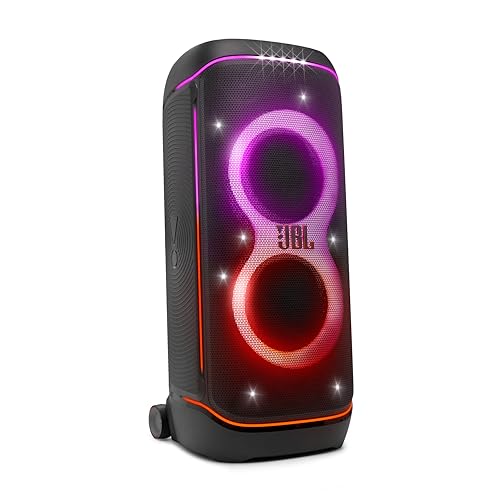
The JBL PartyBox 720 is a beast of a party speaker designed for those epic gatherings where the music needs to dominate. Packing 800 watts of JBL Pro Sound with two massive 9-inch woofers, it pumps out deep bass and crisp highs that keep everyone dancing from sunset to sunrise.
Perfect for tailgaters, beach crews, or backyard hosts, this speaker targets music lovers who demand portability without sacrificing power. Roll it anywhere with its sturdy wheels and ergonomic handle, then fire up the futuristic lightshow that pulses with the beat for that full rave experience.
In real-world use, it handles rough terrain and light splashes effortlessly, while Auracast connectivity lets you link more units for stereo bliss or massive sound coverage. The app puts full control at your fingertips, from EQ tweaks to light patterns.
Verdict: If you want a speaker that turns any spot into a party zone with pro-level audio and visuals, the PartyBox 720 delivers unmatched energy and reliability.
At the heart of the PartyBox 720 is JBL's superior Pro Sound: 800 watts driven by dual 9-inch woofers for thunderous bass that you feel in your chest, paired with tweeters for crystal-clear highs and vocals that cut through the mix even at max volume.
Volume levels reach deafening peaks without distortion, ideal for open-air events where it fills large spaces effortlessly. Bluetooth stability shines for seamless streaming, while USB-C ensures high-quality audio from apps, and dual XLR inputs invite live mics, guitars, or DJ setups for interactive fun.
Auracast multi-speaker pairing creates true stereo or expands coverage wirelessly, making it scale perfectly as the crowd grows.
Built tough for the party lifestyle, the PartyBox 720 features an IPX4 splashproof rating that shrugs off poolside spills or park mist, though it's best kept from heavy submersion. Wider sturdy wheels and an integrated ergonomic handle make towing it over grass, sand, or pavement a breeze despite its hefty party-ready build.
Battery life hits up to 15 hours on a single charge, powering full-day tailgates or all-night bashes. A quick 10-minute fast charge adds 2 hours, but for marathons, grab separate backup batteries to swap and keep going without pause.
Recycled plastic construction adds eco-cred without skimping on durability, all wrapped in FSC-certified packaging.

Pros
- Massive bass and clean highs from dual woofers, tweeters, and triple radiators
- Exceptional 34-hour battery life with quick boost for non-stop play
- Seamless Auracast connectivity for easy multi-speaker setups
- Rugged IP68 build survives drops, water, and dust effortlessly
Cons
- Larger footprint may not suit ultra-compact needs
- Replaceable battery sold separately adds extra cost
- No built-in voice assistant or app for EQ customization
The JBL Boombox 4 stands out as the most powerful portable waterproof speaker in JBL's lineup, designed for those who demand pro-level sound on the go. With its redesigned drivers and AI Sound Boost, it transforms any gathering into a concert-like experience, whether at the beach, tailgate, or backyard BBQ. American music lovers craving that signature JBL bass punch will find it hits harder than ever.
In real-world testing, the Boombox 4 excels at filling large outdoor spaces with balanced, distortion-free audio even at top volumes. The Auracast tech makes linking multiple units a breeze for wider soundstages, perfect for bigger crowds. Its lighter build compared to predecessors means you can haul it anywhere without the bulk.
While it shines in bass-heavy genres like hip-hop and EDM, the AI optimization ensures clarity across tracks. Eco-conscious features like recycled materials add appeal for modern buyers. Overall, it's a top pick for party starters and outdoor enthusiasts seeking reliability and power in one rugged package.
Verdict: If you prioritize massive sound, epic battery life, and toughness, the JBL Boombox 4 delivers unbeatable value for high-energy lifestyles.
The JBL Boombox 4 boasts deep, rumbling bass from two larger woofers and three passive radiators, extending low-end response for that chest-thumping feel in tracks like rap or electronic beats. Midrange stays clear and vocal-forward thanks to AI Sound Boost, which analyzes audio in real-time to cut distortion and enhance power at any volume. Treble sparkles with crisp detail from dual tweeters, revealing nuances in cymbals and high hats.
Soundstage widens dramatically with Auracast stereo pairing, creating an immersive field that covers patios or poolsides effortlessly. Dual Bass Boost options let you switch to Deep mode for subwoofer-like thump or Punchy for tighter, energetic lows, adapting to rock, pop, or dance vibes. Max volume reaches party levels without breakup, making it a beast for outdoor use.
Lossless USB-C playback unlocks hi-res details for wired listening, ideal for critical sessions from laptops or hi-fi sources.
Built with post-consumer recycled plastic and fabric grille, the JBL Boombox 4 combines durability with sustainability, all in FSC-certified packaging. Its IP68 rating shrugs off full submersion and dust, perfect for American beachgoers or festival crowds. Lighter than prior models yet bigger-sounding, it features a carry-friendly handle for portability.
Connectivity shines with Bluetooth for wireless streaming, Auracast for multi-speaker sync, and USB-C for lossless audio input or charging. Simple top-panel controls include Bass Boost buttons with glowing indicators for intuitive tweaks. The replaceable battery design extends long-term usability.
No HDMI or optical inputs, keeping it purely portable-focused, but robust power management delivers up to 34 hours of playtime, with Playtime Boost adding extra juice on demand.
Complete Technical Guide on How to Link JBL Speakers
Linking portable and party speakers requires matching the internal communication standard used by each individual cabinet. Audio manufacturers have deployed several non-compatible wireless linking technologies across recent hardware generations, making hardware identification essential before starting the pairing process. Once you confirm protocol compatibility, establishing a synchronized party array or a balanced stereo pair takes only a few button presses or adjustments in the dedicated mobile application.
Identifying Compatibility Across Auracast, PartyBoost, and Legacy Protocols
Wireless speaker protocols determine whether two cabinets can communicate directly without external splitters or audio hubs. Modern flagship releases such as the JBL Boombox 4 and JBL PartyBox 720 incorporate Auracast technology, which operates on Bluetooth Low Energy Audio architecture to broadcast sound to an unlimited number of nearby compatible receivers. Prior generations relied on the proprietary PartyBoost system, while older legacy hardware utilized Connect or Connect+ standards. Because these wireless architectures communicate using entirely different digital handshake protocols, a PartyBoost speaker cannot wirelessly link directly to an Auracast or Connect+ speaker.
Cabinet design also dictates whether multi-speaker connectivity exists at all on a given device. Compact travel models like the JBL Clip 4 – Portable Mini Bluetooth Speaker prioritize ultra-portable construction and integrated clipping mechanisms rather than multi-speaker transmitter circuits. Attempting to locate a link button or pair a Clip 4 to a larger speaker will prove unsuccessful because the hardware does not contain linking firmware or secondary pairing radios. Verifying the physical buttons on your chassis reveals immediate clues, as Auracast features a broadcast wave icon, PartyBoost displays an infinity-style loop, and Connect+ presents an hourglass symbol.
Cross-generational limitations frequently confuse listeners who own both older and newly purchased audio gear. When two speakers feature mismatched proprietary chips, the master unit cannot route digital audio packets to the secondary unit over standard Bluetooth connections. Even though both devices pair easily to a modern smartphone, their internal inter-speaker pairing protocols remain completely isolated. Understanding these hardware boundaries saves significant diagnostic time and prevents users from assuming a working unit is defective when it refuses to sync.
Mobile software applications provide another layer of verification when sorting out speaker generations. The JBL Portable app supports portable series units, while the dedicated JBL PartyBox app manages larger entertainment enclosures. Connecting your primary unit to the appropriate mobile application reveals its current protocol, available link modes, and firmware status. If an application prompt indicates that linking is unavailable with a secondary cabinet, hardware protocol mismatch is almost always the underlying cause.
How to Link Modern JBL Speakers Using Auracast Broadcast
Auracast represents a significant leap forward in multi-speaker synchronization by functioning like a localized radio broadcast. To initiate an Auracast link, first connect your primary speaker, such as a JBL Boombox 4, to your smartphone, tablet, or playback source through standard Bluetooth settings. Confirm that audio streams properly from the primary speaker before attempting to expand the network to secondary units. Once playback is verified, press the dedicated Auracast broadcast button located on the top control panel of the primary speaker.
Activating secondary Auracast-enabled cabinets requires merely powering them on and pressing their corresponding Auracast buttons. These secondary speakers do not need to be paired directly with your mobile phone or audio player. Instead, they scan the immediate environment for the open audio broadcast transmitted by the primary unit and latch onto the stream within a few seconds. The status indicator illumination will shift to solid once synchronization is successful, immediately mirroring playback without audible latency.
Stereo channel separation is also possible when linking two identical Auracast models rather than running them in mono party mode. Within the companion mobile app, listeners can designate one enclosure as the left channel and the other as the right channel. This configuration mimics dedicated stereo loudspeaker arrangements by creating a wider spatial soundstage with distinct acoustic positioning. Auracast maintains tight temporal synchronization, which prevents phase cancellation issues that commonly plague older wireless linking attempts.
Disconnecting a secondary unit from an Auracast network is straightforward and does not disrupt the rest of the array. Pressing the Auracast button a second time on any individual secondary speaker detaches it from the broadcast stream, returning it to standalone standby mode. Meanwhile, the primary transmitter and all other synced enclosures continue playing your playlist without interruption. This broadcast architecture allows guests to join or leave an ongoing party network dynamically without re-pairing the entire sound system.
Step-by-Step Pairing for PartyBoost and Connect Plus Hardware
PartyBoost remains one of the most widespread wireless standards found across medium-sized portable outdoor speakers. To link speakers using PartyBoost, pair the first unit to your audio source device and start your desired playlist. Locate the PartyBoost button on the speaker body, which resembles an infinity symbol, and press it once. Next, power on your second PartyBoost speaker and press its matching PartyBoost button within thirty seconds to complete the wireless handshake.
Successful synchronization is signaled by an audible chime, after which both units output the exact same mono audio stream. If you wish to switch from party mode to dedicated two-channel stereo output, open the JBL Portable application on your connected mobile device. The application interface displays both active speakers and allows you to toggle the channel assignment slider between mono party playback and left-right stereo separation. Keep in mind that stereo pairing typically requires two speakers of the exact same model line to maintain balanced acoustic levels.
Legacy Connect+ hardware follows a nearly identical physical pairing sequence despite running on older internal chipsets. First, connect the master unit to your streaming source, begin media playback, and press the Connect+ button shaped like an hourglass. Move to the secondary Connect+ speaker, ensure it is powered on, and tap its Connect+ button to join the audio stream. You can chain multiple compatible Connect+ units together in party mode, though stereo separation remains limited compared to newer application-controlled models.
Timing during button activation plays a crucial role in preventing pairing timeouts across both PartyBoost and Connect+ ecosystems. Pressing the linking button on the secondary speaker too late causes the primary unit to stop broadcasting its pairing beacon, requiring you to restart the process. Maintaining close physical proximity within a few feet during initial pairing ensures clean cryptographic handshakes. Once the wireless link establishes firmly, you can move the speakers apart to their intended listening locations.
Linking PartyBox Speakers with True Wireless Stereo and Cable Arrays
High-output entertainment cabinets like the JBL PartyBox 110 – Portable Party Speaker utilize specialized linking configurations tailored for high volume and dynamic light integration. True Wireless Stereo, commonly labeled as TWS, allows two compatible PartyBox cabinets to link wirelessly for amplified sound output. Press the dedicated TWS or Bluetooth link button on the rear control panel of the first cabinet, then press the matching button on the second cabinet. Both units will announce connection with an audio tone and automatically synchronize their front panel light shows.
Managing large speaker configurations through the JBL PartyBox mobile app unlocks granular acoustic controls that hardware buttons alone cannot provide. Within the app, users can adjust independent gain levels, fine-tune graphic equalization curves, and assign explicit left and right stereo playback roles. Linking these substantial cabinets effectively fills large backyards or recreation halls where a single portable chassis lacks sufficient sound projection. Furthermore, visual lighting effects synchronize across cabinets to deliver an immersive audiovisual atmosphere for dance floors and outdoor gatherings.
Professional event setups and noisy environments often benefit from wired daisy-chaining rather than wireless links. Cabinets such as the PartyBox 110 feature dedicated 3.5mm analog input and output jacks labeled Daisy Chain or Aux In/Out on their rear panels. Connecting a standard stereo 3.5mm auxiliary audio cable from the output of the master unit to the input of the secondary speaker guarantees zero wireless interference. Wired chaining also eliminates digital transmission delay entirely, which is vital when connecting live microphones, guitars, or DJ mixing consoles.
Continuous high-volume performance draws substantial electrical power that can quickly deplete built-in rechargeable batteries. Utilizing a reliable accessory such as the TPLTECH Power Cord for JBL PartyBox 100 110 200 ensures steady wall power during marathon playback sessions. Connecting your PartyBox enclosures to mains power allows internal amplifiers to deliver consistent dynamic headroom without battery conservation throttling. In addition, keeping power cords securely connected prevents unexpected shutdowns that would otherwise sever the linked audio network mid-event.
Optimizing Placement and Solving Wireless Sync Issues
Signal stability between linked wireless speakers relies heavily on sensible physical placement and clear line-of-sight positioning. Wireless links operate on the crowded 2.4 GHz radio frequency band, which is susceptible to interference from household Wi-Fi routers, microwave ovens, and structural concrete walls. Placing the primary speaker centrally between your playback source and secondary speakers minimizes packet loss and prevents audio stuttering. Maintaining an open path within thirty feet generally yields the most dependable multi-speaker link.
Audio dropouts and intermittent silence usually point toward degraded signal strength or pending firmware updates. If a linked speaker begins popping or falling out of sync, open the companion mobile app to check for pending software patches. Manufacturers frequently release firmware revisions that refine Bluetooth clock timing and resolve buffer underrun glitches between paired units. Applying firmware updates to all linked speakers ensures identical digital processing timing across your entire acoustic array.
Resetting your hardware connection history resolves persistent synchronization failures that survive standard power cycling. To perform a soft reset, unpair the master speaker from your smartphone Bluetooth menu and select forget device. Power off all speakers in the chain, wait ten seconds, and power on only the primary unit before re-establishing your source Bluetooth pairing. Clearing old pairing tables forces the processor to generate fresh connection keys, which eliminates corrupted link profiles that hinder multi-speaker handshakes.
Acoustic delay can become noticeable when watching streaming video or running live sound through linked wireless speakers. Because the master speaker must encode and retransmit the incoming Bluetooth stream to secondary cabinets, slight processing latency is unavoidable in wireless broadcast modes. If dialogue falls out of lip sync during movie playback, switching the connection to a wired auxiliary splitter or using a single speaker directly resolves the timing disparity. For music listening, however, internal buffer management maintains steady synchronization between all participating speakers.
Alternative Workarounds for Connecting Mixed JBL Generations
Listeners who own different generations of hardware often wonder how to bridge the gap between non-compatible protocols. Because PartyBoost cannot communicate wirelessly with Auracast or Connect+ hardware, software-level source splitting provides an effective workaround. Modern Android mobile operating systems feature Dual Audio capabilities, allowing a single smartphone to transmit audio streams simultaneously to two completely separate Bluetooth devices. This native operating system feature bypasses internal speaker protocol limitations entirely by transmitting independent streams directly from the source.
Apple mobile devices offer a comparable feature known as Audio Sharing, although it primarily supports specific headphones rather than generic third-party speakers. For multi-brand or mixed-era speaker collections, utilizing an external Bluetooth multi-stream transmitter or a physical 3.5mm analog splitter remains the most reliable hardware solution. By running a stereo splitter cable from an audio source into the aux inputs of two mismatched speakers, you achieve simultaneous synchronized playback without wireless protocol roadblocks.
When combining mismatched enclosures through physical splitters, volume matching requires manual calibration across both cabinets. Because different speaker models possess distinct amplifier wattage, driver sensitivity, and frequency curves, setting both units to identical volume knob positions will produce uneven sound. Play a familiar acoustic track and adjust each cabinet independently until vocal clarity and bass response blend seamlessly into the room. Investing in simple ground-loop noise isolators can also prevent electrical hum when multiple aux-connected speakers share common wall outlets.
Planning future audio expansions around a single linking protocol remains the most convenient long-term strategy for multi-room or outdoor sound. Standardizing on modern Auracast-capable hardware ensures seamless forward compatibility as consumer audio adopts universal Bluetooth Low Energy broadcast standards. By evaluating your existing equipment lineup and verifying protocol support before expanding your audio gear, you ensure dependable performance, effortless synchronization, and vibrant acoustic coverage for any gathering.
Linking portable speakers successfully hinges on matching transmission protocols and establishing proper source priority. Verifying hardware standards such as Auracast or PartyBoost before powering up prevents pairing confusion and guarantees that your music flows uninterrupted across every connected cabinet. Whether you configure a compact stereo pair for intimate acoustic listening or wire an array of party towers for a weekend event, following verified connection steps guarantees balanced, room-filling sound wherever you listen.


Write Your Review
No reviews yet. Be the first to share your experience!