


Setting up mobile playback across modern audio equipment often leads listeners to ask %how to connect phone to sonos speakers% without dropping sound quality or complicating daily playback. Unlike standard standalone Bluetooth accessories, the Sonos platform functions primarily across home Wi-Fi networks to stream media directly from cloud servers or mobile device storage. This architecture allows your phone to act as a centralized controller rather than an active audio transmitter, which preserves phone battery life and prevents incoming calls from interrupting music. Whether configuring a compact television soundbar, an outdoor setup, or a portable speaker, understanding the available connection methods ensures smooth everyday performance.
Listeners using iOS or Android devices have several paths to link their devices to the broader Sonos ecosystem, including direct application pairing, local wireless casting, and hardware line-in options. While some listeners explore computer wireless speaker setups for desk listening, whole-home audio gear relies on distinct protocols such as Apple AirPlay 2, Spotify Connect, and Bluetooth audio. Choosing the right method depends on the specific speaker hardware, your operating system, and whether you are streaming at home or traveling outdoors. Reviewing network requirements, hardware inputs, and application settings makes it straightforward to establish a stable connection across every room in your home.


Pros
- Effortlessly integrates vintage audio gear with modern smart speaker setups
- Pristine, uncolored audio conversion with high-fidelity digital output
- Rock-solid multi-room synchronization with zero latency across zones
- Instant setup and smooth streaming via Apple AirPlay 2 and the Sonos app
Cons
- Requires external amplification or active powered speakers to produce audio
- Lacks native Bluetooth audio input, relying strictly on Wi-Fi and AirPlay 2
- Higher investment cost compared to entry-level streaming adapters
The Sonos Port is a dedicated wireless streaming component engineered to bridge the gap between traditional stereo gear and modern smart multi-room speaker systems. Whether you have high-end vintage floorstanders, an integrated amplifier, or an audio-video receiver, the Port plugs into your existing setup to provide full access to streaming music services, internet radio, and multi-room grouping.
This device is tailor-made for audio enthusiasts who already own beloved traditional speaker rigs or turntables and want the convenience of Sonos without abandoning their existing components. Thanks to the integrated analog audio line-in, you can hook up a vinyl turntable or CD player and stream that physical media wirelessly to other Sonos smart speakers located throughout your home.
In everyday use, the Sonos Port delivers rock-solid connectivity and hassle-free operation through the Sonos app or Apple AirPlay 2. Setting it up takes only minutes, and the included 12V trigger output can automatically wake up compatible power amps when you start streaming from your smartphone or tablet, providing an intuitive, hands-off listening experience.
If you want to expand your home audio without sacrificing the power and tone of your current speaker setup, the Sonos Port is the premier smart audio bridge on the market today. It provides reliable performance, pristine sound transfer, and unmatched ecosystem integration that justifies the investment for any dedicated home audio setup.
The Sonos Port features an upgraded digital-to-analog converter that preserves the original depth of your tracks, delivering deep, well-defined bass notes and clear, textured vocals. Because it acts as a transparent audio bridge, it does not color or compress the signal, allowing your connected amplifier and speaker system to reproduce dynamic, room-filling sound with complete detail.
Operating over high-speed Wi-Fi rather than standard Bluetooth, the Sonos Port ensures lossless transmission across vast home spaces without dropouts or range limitations. You get full output volume control directly through the Sonos app, maintaining pristine audio clarity from whisper-quiet background acoustics up to concert-level amplification with zero audible hiss or background hum.
Built with a minimalist, matte-black finish, the Sonos Port measures just 1.61 inches high and weighs just over one pound, making it easy to tuck onto an AV rack, bookshelf, or media console alongside your speaker gear. While not designed for outdoor poolside use or rugged off-grid portability, its durable polycarbonate chassis protects the internal audio components from dust and daily wear in indoor home environments.
Unlike portable battery-powered speakers that require frequent recharging and face battery degradation over time, the Sonos Port is engineered for continuous, always-on household operation using an included AC power adapter. This permanent power connection ensures zero downtime and instant wake times, keeping your entire multi-room speaker network ready to stream music 24 hours a day without ever worrying about battery limits.

Pros
- Upgraded dual-tweeter design creates genuine stereo imaging from a single chassis
- Substantial 24-hour battery endurance effortlessly handles long outdoor gatherings
- Automatic Trueplay calibration adapts to changing environments without manual app adjustments
- Rugged, drop-resistant construction backed by an IP56 water and dust protection rating
- Seamlessly links with existing Sonos multi-room ecosystems over Wi-Fi
Cons
- At 6.6 pounds, the speaker is fairly hefty for carrying on long walking commutes
- Auxiliary line-in connectivity requires purchasing a separate proprietary USB-C adapter
The Sonos Move 2 sets a high standard for premium hybrid portable speakers, bridging the gap between high-end home sound systems and rugged outdoor audio. While the original Move proved that Sonos could venture beyond the power outlet, the Move 2 refines the formula with a comprehensively re-engineered internal acoustic layout. It solves the narrow dispersion of traditional portables by delivering true stereo sound from an all-in-one enclosure, making it a compelling option for audiophiles who refuse to compromise on fidelity when moving from the kitchen to the backyard patio.
Everyday use is remarkably seamless. Switching between your home Wi-Fi network and standalone Bluetooth pairing happens automatically, allowing uninterrupted streaming regardless of where your day takes you. The inclusion of automatic Trueplay tuning continuously optimizes performance in the background. Far-field microphones monitor the acoustic boundaries of your space, automatically adjusting the output whether the speaker is backed against a tiled kitchen wall or resting on an open patio table.
Though its 6.6-pound weight and generous frame make it a speaker meant for carrying around the property rather than packing into an ultralight hiking pack, the ergonomic rear handle makes room-to-room transit natural. Combined with a sleek drop-in wireless charging base, the Sonos Move 2 stands out as a versatile, powerful centerpiece that delivers reference-grade playback in any setting.
Acoustic performance on the Sonos Move 2 is headlined by its dual-angled tweeter array, replacing the mono tweeter of its predecessor. This driver configuration directs high frequencies outward to the left and right, creating a noticeably wide, immersive stereo soundstage. Vocals sit squarely in the center with immaculate clarity, while acoustic guitars, brass, and percussion transients maintain sparkling detail without becoming overly bright or fatiguing during extended listening sessions.
Low-end reproduction is handled by a precision-tuned, long-throw mid-woofer housed inside a sealed acoustic cabinet. Bass response is punchy, musical, and remarkably authoritative, supplying palpable low-frequency energy that remains clean even when pushing volume levels upward. Thanks to custom digital signal processing and responsive Trueplay calibration, the Move 2 retains low-end definition outdoors without sounding hollow or anemic.
Built using shock-absorbent polymer plastics and a heavy-duty front grille, the Sonos Move 2 is built to endure everyday bumps, drops, and outdoor hazards. Certified to an IP56 standard, the cabinet prevents intrusion from fine sand, windblown dust, and direct water sprays, making it well-suited for poolside use or unexpected rain showers. Measuring 9.49 inches high by 6.3 inches wide, the speaker feels substantial, anchored by a weighted silicone base that prevents accidental tip-overs.
Hardware features are centered around contemporary wireless standards, including Wi-Fi 6 and Bluetooth 5.0 for low-latency transmission. Power management is greatly improved, delivering up to 24 hours of playback from a single cycle. The unit includes a minimalist drop-and-go charging cradle equipped with a detachable USB-C power adapter. The versatile rear USB-C port also supports USB-PD pass-through, allowing you to charge your phone directly from the speaker during outdoor trips.


Pros
- Exceptional clarity and bass from precision drivers
- Rugged IP67 build survives water and dust exposure
- 10-hour rechargeable battery with fast USB-C or wireless charging
- Seamless Bluetooth and WiFi for stable, versatile connectivity
- Tactile buttons prevent accidental presses during active use
Cons
- Full features require WiFi and Sonos app setup
- No auxiliary input for wired connections
- Battery life shortens at max volume outdoors
The Sonos Roam 2 is a powerhouse portable speaker that brings premium Sonos audio to your on-the-go lifestyle. Ultra-compact and lightweight, it packs precision-engineered drivers for impressive clarity and bass that defies its size, making it perfect for beach outings, tailgating, or backyard barbecues.
Designed for active users, it features IP67 waterproof and dustproof protection, ensuring it thrives in harsh conditions like splashes, sand, or dust storms. With up to 10 hours of playtime, hands-free voice control via Alexa or Sonos Voice Control, and automatic Trueplay tuning, it adapts effortlessly to new environments for optimal sound.
In real-world use, the Roam 2 shines with stable Bluetooth connectivity and the option to expand into a multiroom system over WiFi. Its versatile design and tactile controls add practicality for everyday adventures. Verdict: A top pick for quality-conscious Americans seeking rugged, high-fidelity portable audio.
Precision drivers deliver deep, size-defying bass and exceptional vocal clarity, filling outdoor spaces with rich, balanced sound. Automatic Trueplay fine-tunes acoustics in real-time for every setting, from echoing patios to quiet home offices.
Volume reaches party levels without distortion, and Bluetooth range stays reliable up to 30 feet even through obstacles. WiFi mode enhances stability for multi-speaker setups, while voice controls keep hands-free operation smooth during hikes or workouts.
Overall, it excels in dynamic playback, making it a go-to for bass lovers and audiophiles who demand portability without compromise.
Built rugged with IP67 waterproof and dustproof ratings, the Roam 2 survives full submersion, drops, and dusty trails, ideal for beach days or construction sites. Its ultra-compact, lightweight form stands upright or lies on its side for flexible placement.
Tactile buttons offer intuitive control without accidental presses, and it charges via included USB-C cable or any compatible wireless pad for convenience on the road. The rechargeable battery provides up to 10 hours of playback, though real-world use at high volumes may trim it to 8 hours.
Charging takes about 2 hours to full, keeping downtime minimal for non-stop adventures.
Pros
- Revitalizes existing high-end speakers and stereo receivers with modern wireless streaming
- Zero-latency multi-room audio synchronization across the entire Sonos ecosystem
- Clean, bit-perfect digital audio outputs maintain pristine sound fidelity
- Straightforward setup with intuitive app control and streaming service integration
Cons
- Requires constant AC wall power with no internal battery for portable outdoor use
- Renewed condition may exhibit minor cosmetic blemishes or arrive in generic packaging
- Relies strictly on Wi-Fi and local networks rather than direct device pairing
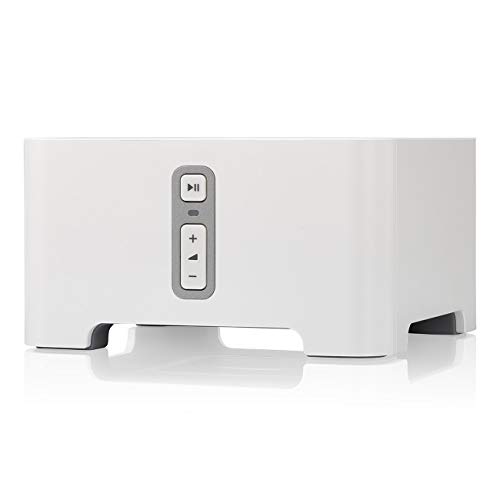
The Sonos Connect gives traditional audio setups a powerful new lease on life by bridging the gap between vintage hi-fi gear and the modern streaming era. If you have invested in high-quality receivers, turntables, or passive stereo speakers over the years, this dedicated streaming component integrates directly into your existing hardware. It bypasses the need to replace your beloved equipment, acting as a smart digital bridge that brings your living room or media room into the Sonos multi-room ecosystem.
Tailored for audio enthusiasts and everyday listeners alike, setup is straightforward using the companion app. Once plugged into your stereo receiver via optical, digital coaxial, or analog RCA cables, the device immediately shows up on your home Wi-Fi network. Pairing it with an Amazon Echo or Alexa device allows for effortless voice commands, making music selection as simple as asking for your favorite album, artist, or curated radio station.
In everyday use, the unit delivers rock-solid audio stability. Whether you are blasting lively beats during family gatherings or running ambient background music during quiet evenings, the synchronization across multiple Sonos devices is virtually instantaneous with zero audio drift. For anyone wanting to modernize their current home speaker setup without sacrificing physical amplifier performance, this renewed unit represents an intelligent, cost-effective solution.
Because the Sonos Connect acts as a pure audio streamer and digital pre-amp, its sound signature depends on your attached amplifier and speakers, but its internal digital-to-analog converter preserves superb sonic accuracy. Bass reproduction is deep and controlled, driving subwoofers with clean low-end authority. High frequencies and vocal tracks remain transparent and articulate, ensuring that acoustic sets and classical arrangements retain their natural spatial separation.
Network stability is stellar, easily outperforming traditional wireless methods. By streaming directly over your home Wi-Fi network or dual-band Ethernet, the unit avoids the compression, stutter, and limited range typically associated with standard wireless links. Phone notifications and incoming calls will never interrupt your music playback, giving you uninterrupted, high-fidelity sound throughout the home.
The Sonos Connect features a clean, minimalist design finished in a discreet light gray casing that blends effortlessly alongside modern AV receivers and media center shelving. Measuring just over five inches wide and under three inches tall, its compact footprint fits into tight entertainment centers without cluttering your room. The build is sturdy and well-ventilated, ensuring cool, whisper-quiet operation during extended all-day listening sessions.
Engineered specifically as a stationary home component, the device operates on continuous AC wall power rather than an internal rechargeable battery. While this means it is not intended for rugged outdoor use or beach excursions, it completely eliminates battery degradation and the hassle of frequent recharging. You get dependable 24/7 power readiness, ensuring your home speaker system is always primed to play whenever you press start.
Comprehensive Guide to Linking Your Smartphone to Sonos Audio Systems
Connecting a mobile phone to home audio gear requires understanding how modern multiroom platforms route digital signals. Unlike conventional wireless hardware that pairs only over point-to-point wireless links, the Sonos ecosystem relies primarily on local network connectivity to deliver uncompressed audio streams. When you initiate playback from your smartphone, the speaker hardware pulls audio directly from cloud service endpoints or home media servers. This approach preserves higher audio fidelity and prevents phone notifications, calls, and message alerts from interrupting your music.
Initial Network Configuration and the Sonos App
The primary method for linking any iOS or Android handset to your sound system involves the official Sonos controller software. Download the application from your mobile app store and verify that your smartphone connects to your primary residential Wi-Fi network before opening the setup wizard. During initial configuration, the application searches for nearby hardware using low-energy wireless beacons to detect powered units such as the compact Sonos Ray soundbar or portable models. The software guides you through pressing specific hardware buttons to authenticate device ownership and link the speaker to your secure household network.
Once linked, the software serves as a universal control station rather than an active audio encoder. You can browse connected music libraries, search across integrated subscription providers, and manage distinct playback zones throughout your household. The phone merely transmits command instructions, while the speaker hardware handles decoding and continuous buffering internally. This architecture preserves mobile battery life and ensures music continues playing uninterrupted even if your phone disconnects, takes a phone call, or leaves the premises.
Managing Mobile Permissions and Discovery Settings
Proper operating system permissions play an essential role in establishing a reliable connection between your handheld device and your audio equipment. Modern mobile operating systems require explicit user permission for local network discovery, nearby device scanning, and microphone access if you intend to calibrate room acoustics. If you deny local network access on an iPhone or Android handset, the application cannot locate active audio hardware even when connected to the identical router. Reviewing your mobile operating system settings to confirm full network access resolves most detection failures during initial discovery.
Background data restrictions and aggressive battery management profiles can also disrupt communication between your phone and active speakers. Some mobile operating systems suspend background application processes to conserve battery life, causing the controller app to lose track of current playback states. Disabling aggressive battery optimization for your audio software in your phone settings ensures that volume sliders and track queues remain responsive. Allowing unrestricted background communication helps the handset maintain immediate control over room grouping and volume adjustments.
Streaming from iPhone Using Apple AirPlay 2
Apple users enjoy an alternative direct connection method through native AirPlay 2 integration built into modern Sonos components. Models such as the Sonos Port, the Sonos Ray, and the Sonos Move 2 support direct streaming without requiring the proprietary Sonos controller for everyday listening. To send audio from your phone, swipe down to open the iOS Control Center and tap the AirPlay icon to view available output destinations. Selecting your desired room transmits clear audio directly from any media app running on your device, including video players, social feeds, and audiobook players.
AirPlay 2 also enables multiroom grouping directly from your mobile screen across disparate AirPlay-compatible audio devices. You can select multiple rooms simultaneously, adjust individual volume levels on each speaker, or set a unified output level across the entire house. Older legacy hardware models may lack direct AirPlay 2 certification, but grouping an older unit with a modern speaker inside the Sonos software resolves this constraint. The modern speaker receives the AirPlay stream from your phone and rebroadcasts the synchronized audio to legacy hardware over your home network.
Direct Streaming via Spotify Connect and Native Apps
Many music enthusiasts prefer using native streaming applications rather than switching to an external manufacturer application to manage playlists. Cloud casting protocols like Spotify Connect and Tidal Connect allow your handset to establish a direct playback link with your home speakers. When you tap the devices menu within Spotify, your available home zones appear alongside other compatible media renderers on your local network. Selecting a room commands the speaker to fetch that specific audio stream directly from cloud servers.
This direct connection offers notable advantages for households with multiple listeners sharing audio control. Anyone connected to your household Wi-Fi can view current song queues and add tracks without installing the dedicated Sonos controller software. Volume controls within native streaming applications sync directly with the hardware amplifiers inside your speakers, responding smoothly to your phone physical volume rocker. If you leave the house while playback is active, the speakers continue streaming uninterrupted until the playlist ends or another household member takes control.
Bluetooth Audio Pairing on Portable Sonos Hardware
While home-focused components rely entirely on local Wi-Fi networks, portable hardware like the Move 2 and Roam 2 incorporate dedicated Bluetooth radios for travel flexibility. Many listeners seeking flexible sound compare these designs against standard portable Bluetooth audio devices to balance battery life and wireless versatility. The compact Roam 2 features an IP67 waterproof and dustproof shell designed for outdoor adventures, while the larger Move 2 provides dual-tweeter stereo playback and up to 24 hours of battery runtime. These battery-powered models allow you to stream audio anywhere, even when local network routers are out of reach.
Pairing your mobile phone over Bluetooth requires putting the portable speaker into discovery mode using its rear physical controls. On the Move 2 and Roam 2, pressing and holding the dedicated Bluetooth button initiates audio pairing, indicated by a status chime and LED sequence. Open the Bluetooth settings menu on your iPhone or Android phone, locate the speaker model name in the nearby devices list, and confirm the pairing request. Modern portable units can also bridge incoming Bluetooth streams into your wider home Wi-Fi network, sharing guest audio across multiple rooms.
Physical Line-In Connections with Adapters and Streaming Hubs
Certain dedicated audio components and streaming receivers provide physical analog line-in jacks to accept direct cable feeds from mobile phones. Dedicated hub units such as the Sonos Port and the legacy Sonos Connect include stereo RCA inputs engineered to integrate external audio sources into the digital ecosystem. Because modern smartphones omit 3.5mm analog headphone jacks, connecting your phone requires a quality USB-C or Lightning to 3.5mm adapter paired with an auxiliary-to-RCA cable. This wired route bypasses wireless compression, delivering pure analog signals directly to the input stage.
Configuring a wired phone connection requires adjusting input sensitivity settings within the controller software. The application allows users to set input levels between Level 1 and Level 10 to match the output voltage of portable devices without inducing digital clipping or distortion. Enabling the Autoplay feature instructs the system to switch the selected room to the line-in feed immediately when your phone sends an audio signal. You can also configure the line-in component to rebroadcast its analog signal wirelessly to any other speaker zone in your house.
Driving Architectural and Outdoor Audio from a Mobile Device
Connecting your phone to permanent outdoor or in-wall architectural speakers involves a slightly different physical architecture. Passive hardware such as the Sonos Outdoor by Sonance relies on an external amplifier to supply driving power and wireless network intelligence. These weather-resistant outdoor speakers feature custom acoustic components built to withstand extreme heat, humidity, UV exposure, and freezing temperatures without degrading sound fidelity. When wired to a dedicated amplifier, these passive cabinets integrate smoothly into your mobile control software alongside your standalone speakers.
Operating outdoor audio zones from your smartphone gives you full control over backyard volume, equalization, and source selection from your patio or lawn. You can group outdoor zones with indoor living spaces during gatherings or maintain independent playback for relaxing al fresco. Because the amplifier powers the speakers and handles wireless network communication, your phone is never tied down by restrictive physical speaker wire runs. High-output outdoor listening remains stable as long as your phone maintains a reliable Wi-Fi signal to issue playback commands.
Integrating Compact Soundbars and Television Systems
Television soundbars serve as central audio hubs in living rooms and bedrooms, fulfilling dual roles for both screen entertainment and mobile music playback. Compact units like the Sonos Ray deliver dynamic sound and dialogue clarity through optical inputs while maintaining full integration with mobile streaming protocols. Unlike standalone immersive home theater speakers that require complex receiver processing, a compact soundbar can switch seamlessly between television audio and smartphone streaming. This multifunctionality maximizes utility in smaller media spaces where floor space remains at a premium.
Switching from television audio to mobile playback occurs automatically when you cast music from your phone. Tapping play in the Sonos app, Spotify Connect, or AirPlay 2 overrides the optical television signal and begins streaming your chosen tracks instantly. When you power on the television, the soundbar senses the optical audio signal and switches back to screen playback according to your TV Autoplay preferences. This automated signal management eliminates manual input switching, making daily operation intuitive for every member of the household.
Troubleshooting Mobile Connection and Network Isolation
When a smartphone fails to discover or communicate with network speakers, local Wi-Fi router settings are frequently the underlying cause. Many modern mesh systems operate dual-band networks combining 2.4 GHz and 5 GHz frequencies under a unified network name. If a router prevents communication across different bands or isolates wireless clients, your phone cannot discover hardware located on the alternate frequency band. Disabling client isolation and verifying that your phone does not connect to an isolated guest network resolves the vast majority of discovery errors.
If your audio hardware stops responding entirely to mobile commands, executing a safe power cycle restores normal network negotiation. Unplug the speaker power cord from the wall outlet, wait approximately ten seconds for internal capacitors to discharge, and reconnect power. Avoid factory resetting your hardware as an initial troubleshooting step, since resetting deletes saved room configurations, streaming service logins, and Trueplay acoustic calibrations. Power cycling your home router alongside the speaker clears stale IP address assignments and re-establishes clean communication paths across all devices.
Verifying System Performance and Acoustic Calibration
After establishing a reliable link between your phone and your audio hardware, verifying audio calibration ensures balanced acoustic output throughout your listening space. iOS users can take advantage of Trueplay tuning, which utilizes the calibrated microphone on an iPhone to measure acoustic reflections and optimize speaker output for room boundaries. Portable models like the Move 2 and Roam 2 incorporate automatic Trueplay technology that adjusts sound balance dynamically using internal microphones whenever the speaker moves to a new location. Confirming these calibration features are active helps deliver clean midrange clarity and articulate bass response.
Establishing a smooth connection between your smartphone and your home speakers ultimately depends on choosing the proper method for your listening scenario. Utilize local Wi-Fi streaming and native app casting for lossless home playback, switch to direct Bluetooth pairing when venturing outdoors, and leverage line-in components for analog audio gear. By matching your connection protocol to your hardware capabilities, you ensure reliable, high-fidelity sound that responds instantly to every tap on your phone screen.


Write Your Review
No reviews yet. Be the first to share your experience!