


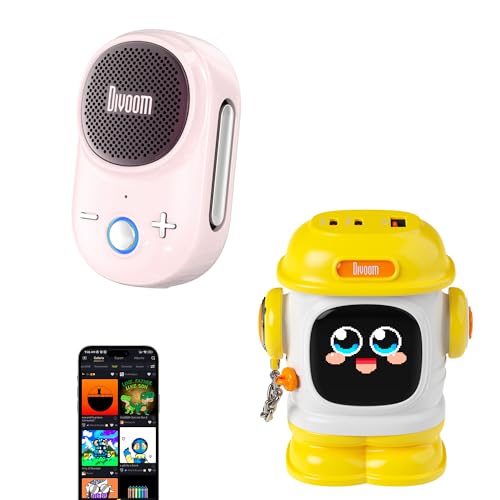
Connecting a smartphone to a compact lifestyle speaker should ideally take only a few moments, yet minor pairing hurdles can quickly disrupt an exciting listening session. Many listeners wonder how do i connect my iphone to a divoom speaker without running into unresponsive Bluetooth menus or confusing signal dropouts. Modern portable options, including bundled kits like the Divoom Portable Bluetooth Speaker & Fast Charging package, combine travel-ready audio drivers with rapid recharging gear to keep music playing anywhere. When configured properly, these miniature systems deliver clear and lively audio for home desks, patio gatherings, and active travel.
Modern iOS releases handle wireless peripherals efficiently, but compact third-party speakers often require a specific operational sequence to establish a solid handshake. Whether you are exploring standard portable wireless speaker options or setting up an interactive pixel-display model for the first time, following the right steps ensures immediate audio routing. Distinguishing between general system-level Bluetooth pairing and secondary companion app features eliminates common discovery headaches before they start. This walkthrough explains how to pair your iPhone reliably, manage continuous playback power, and resolve wireless audio glitches quickly.
Pros
- Convenient bundle supplies both a portable speaker and a high-speed charger in one purchase.
- Clear, distortion-free audio for spoken word, video calls, and acoustic music.
- Exceptionally small and lightweight footprint that travels anywhere effortlessly.
- Fast and reliable wireless pairing with immediate reconnection.
Cons
- Compact driver cannot produce deep, room-shaking sub-bass for heavy EDM or hip-hop.
- Lacks an official IP waterproof rating for pool immersion or heavy rain.
- No dedicated companion app for personalized graphic EQ adjustments.
The Divoom Portable Speaker and Fast Charging Bundle offers a smart, travel-ready solution for mobile audio lovers. Instead of forcing you to hunt down a separate power brick and cable, this kit pairs a miniature speaker with an efficient high-speed charger. The result is an all-in-one package aimed squarely at active professionals, students, and travelers who prioritize convenience and space efficiency.
In real-world use, this speaker excels in personal listening environments. Whether resting on a desk during workday calls, sitting on a nightstand in a hotel room, or serenading a small group on an outdoor patio, it provides dependable background audio. Setup takes only seconds, and the straightforward physical controls make playback adjustment completely seamless without having to unlock your phone.
The standout advantage here is convenience. Having a high-speed charger matched with your audio device eliminates packing clutter, ensuring you can quickly recharge the unit alongside your other everyday essentials. It is an organized, dependable audio companion that fits smoothly into any modern backpack or tote.
Ultimately, this bundle is ideal for shoppers who want clear sound without carrying heavy gear. While it is not designed to replace large tailgate systems, it delivers exceptional everyday practicality for personal entertainment on the move.
Despite its small stature, this speaker produces a balanced, mid-forward sound signature that gives dialogue and melodic instruments plenty of presence. Vocals cut through clearly, making it particularly enjoyable for podcasts, indie rock, and vocal jazz. Treble is rolled off smoothly at the top to prevent listener fatigue during extended playback sessions.
Bass response is tight and punchy within its physical capabilities, though physics naturally limits deep sub-bass frequencies. You will not get chest-thumping low-end rumble, but the speaker maintains composure across volume levels, resisting the tinny harshness or buzzing distortion that often plagues micro-sized units at higher output.
Wireless stability is rock solid, maintaining a clean connection through typical household ranges. Whether streaming high-resolution audio tracks from your phone or watching movies on a tablet, the audio remains synchronized with virtually unnoticeable latency.
Crafted with durability in mind, the speaker features a resilient chassis that easily handles the friction of travel bags, desk drops, and glove compartments. Its micro form factor takes up minimal real estate, fitting comfortably into palms or cup holders without tipping over.
Battery life is well-matched to day-long adventures, providing ample playtime for uninterrupted gym workouts, remote work sessions, or an afternoon in the park. The true star of the setup is the bundled fast charger, which rapidly replenishes the battery pack and significantly reduces wait times between listening sessions.
While the casing is sturdy enough for general outdoor environments, the unit is best suited for dry conditions such as picnics, desks, and patio tables rather than poolside splashes. For users needing dependable portability and rapid power turnaround, this setup delivers exactly what it promises.

Pros
- Convenient bundle includes both a compact speaker and a dedicated high-speed charger.
- Crisp mid-tones and clean highs make spoken audio and acoustic tracks sound detailed.
- Pocketable footprint is ideal for frequent flyers, commuters, and students.
- Quick and reliable wireless connection with steady range.
Cons
- Ultra-compact driver naturally limits deep sub-bass response in open outdoor areas.
- Does not offer app-based multi-band EQ adjustments.
- Lacks full submersion waterproofing for poolside float use.
The Divoom Portable Speaker and Fast Charging Bundle combines personal audio and rapid device charging into a single convenient package. Designed for users who are constantly on the move, this bundle tackles two major daily tech needs: dependable audio playback and the power required to keep mobile devices energized all day. Rather than packing separate bulky adapters and oversized speakers, travelers get a coordinated solution ready for any trip.
Built primarily for students, business travelers, and fitness enthusiasts, this setup excels in personal environments like hotel rooms, office cubicles, or dorm spaces. The speaker prioritizes vocal definition and clear mid-range presence, ensuring podcasts, calls, and acoustic tracks sound vibrant rather than hollow or tinny. Setting up the connection takes seconds thanks to a straightforward wireless pairing interface that links smoothly with modern devices.
In real-world use, the included high-speed charger provides tremendous everyday value. While the speaker provides the background soundtrack to your workday or workout, the fast charger rapidly tops off your smartphone or tablet battery without lengthy delays. The resilient exterior protects internal components from the minor bumps and friction of daily transit inside a crowded bag.
Ultimately, this bundle represents a smart, utilitarian audio solution for commuters and minimalists. While listeners seeking thunderous club bass will want a much heavier cabinet, shoppers looking for crisp, dependable sound combined with practical fast-charging utility will find this kit delivers outstanding convenience.
Acoustically, this compact speaker is tuned to maximize vocal clarity and audio projection from a small form factor. High and mid frequencies are given center stage, resulting in articulate dialogue on podcasts, bright acoustic guitars, and punchy pop melodies. While the ultra-compact driver cannot generate deep sub-bass vibrations, lower-mid frequencies remain full enough to keep music sounding lively and engaging without distorting at moderate volume levels.
Wireless performance remains stable and dependable across typical room distances. You can place your phone on a desk and move freely around an office or bedroom without experiencing dropouts, stuttering, or noticeable lag during video playback. The overall volume ceiling is surprisingly potent for its size, easily filling personal workspaces and offering a clear upgrade over standard phone speakers.
Engineered with mobile lifestyles in mind, the speaker features a compact, sturdy housing built to withstand frequent transit. Its lightweight profile slips effortlessly into jacket pockets, gym bags, or carry-on pouches without adding unnecessary bulk. Tactile controls are cleanly integrated into the frame, allowing you to manage playback and power without needing to check your phone constantly.
Battery efficiency complements the overall travel utility of the package. The speaker delivers hours of steady playback on a single charge at everyday listening volumes, while the included high-speed wall charger slashes replenishment times. Having dedicated fast-charging gear ready to go ensures both your speaker and your mobile devices spend less time plugged into a wall and more time in active use.
Complete Step-by-Step Guide to Connecting Your iPhone to a Divoom Speaker
Pairing an iPhone to a Divoom speaker requires activating discovery mode on the speaker and selecting it in iOS Bluetooth settings. Many Divoom units provide standard Bluetooth audio alongside separate data channels for auxiliary screen features. Securing the core audio connection first guarantees that music, podcasts, and videos stream immediately through the speaker driver. Following this setup sequence prevents pairing failures and keeps your audio streaming reliably.
Preparing the Speaker and iPhone for Clean Bluetooth Discovery
Proper hardware preparation resolves most wireless connection snags before they cause frustration. Press and hold the power button on your Divoom speaker until the chime sounds and the indicator LED flashes. A blinking status light confirms the speaker is broadcasting its discovery signal rather than resting in standby mode. If the speaker was recently used with an iPad or another phone, it may reconnect to that device automatically. Temporarily disabling Bluetooth on those secondary devices allows the speaker to enter pairing mode without interference.
Your iPhone also needs a quick check before starting the scan. Open the iOS Settings app, tap Bluetooth, and confirm the main switch is toggled on. Opening the full Settings menu forces a fresh device scan, whereas the Control Center shortcut sometimes fails to show new hardware. Toggling Bluetooth off for two seconds and back on clears temporary cache data that might delay recognition. Keeping your phone close to the speaker during setup ensures a fast and stable handshake.
Executing the iOS Bluetooth Audio Connection Step by Step
Establishing the wireless audio link takes only a few quick taps once both devices are ready. In the iOS Bluetooth menu, scroll down past your existing devices to the Other Devices header. The Divoom speaker should appear in this lower section within seconds, identified by its brand or model name. Tap the speaker name once to begin the connection process. Avoid tapping repeatedly while the loading spinner rotates, as multiple requests can interrupt the initial handshake.
Once the connection is complete, iOS moves the speaker into the My Devices list marked as Connected. The speaker will typically emit a short confirmation chime, and its blinking indicator will turn solid. This confirms that the primary Bluetooth audio channel is locked to your iPhone. If iOS asks to sync contacts or share notifications, you can decline unless you plan to use speakerphone features on supported models.
Testing audio playback confirms that sound routes through the external speaker rather than the phone. Swipe down from the top right corner of your iPhone screen to open Control Center, then tap the AirPlay icon on the playback card. Make sure the checkmark is next to your Divoom speaker rather than your internal iPhone speakers. Start playing audio in your favorite music app and raise the volume gradually using the phone buttons.
Understanding Dual-Connection Architecture on Interactive Divoom Models
Many Divoom products feature interactive LED pixel displays and smart features that function differently from standard portable speakers. These multifunction units use a dual-connection system that divides wireless tasks across two separate links. Standard Bluetooth handles high-bandwidth music streaming, while Bluetooth Low Energy manages background data for pixel art and notifications. Connecting solely through iOS settings enables audio playback, but visual display tools remain unlinked until the companion app is paired.
To enable custom lighting designs and pixel animations, install the official companion app from the Apple App Store after completing basic audio pairing. Open the app, go to the device menu, and grant Bluetooth permissions when prompted. The application will scan for the data channel independently and link display features without interrupting your music stream. Unlike conventional rugged outdoor wireless speakers that use a single audio link, interactive lifestyle speakers maintain both channels simultaneously.
Managing iOS privacy permissions keeps both links working smoothly over extended sessions. In your iPhone Settings under the companion app tab, verify that Bluetooth and Local Network permissions remain enabled. Restricting these permissions can cause custom display graphics to freeze even while music playback continues through the primary channel. If you only plan to play music without decorative lighting, leaving the companion app unconfigured will not affect basic sound reproduction.
Troubleshooting Common iPhone and Speaker Pairing Hurdles
If your Divoom speaker does not appear in the Other Devices list, it is likely still connected to a nearby tablet or computer. Most compact speakers remember multiple devices but can only link actively to one source at a time. To clear this connection hold, press and hold the dedicated Bluetooth button on the speaker until an alert tone sounds. This disconnects the previous host and forces the speaker to broadcast a fresh pairing beacon.
Physical obstacles and wireless traffic can also disrupt pairing or cause unexpected audio cutouts. Bluetooth operates on the 2.4 GHz frequency band, which is shared by home Wi-Fi routers and computer peripherals. If your audio signal drops, move the speaker away from metal objects and active Wi-Fi hardware. Keeping an open line of sight between your iPhone and the speaker prevents signal loss caused by dense walls or furniture.
Stored connection records in iOS can occasionally prevent a previously linked speaker from reconnecting cleanly. If your phone shows the speaker as Not Connected and tapping it produces an error, open Settings, select Bluetooth, and tap the blue info icon next to the speaker. Tap Forget This Device to remove the old profile from your iPhone. Restart your phone, power cycle the speaker, and complete the pairing process again to create a fresh connection.
Volume level confusion can also make it seem like a connection failed when audio is actually playing silently. Unlike stationary systems where gain staging follows fixed principles, portable devices divide level control between software sliders and physical buttons. Readers exploring home setups often review powered speaker setup basics to understand gain structure, but portable gear requires a simpler check. Always make sure both your iPhone media volume and the speaker hardware buttons are raised to an audible setting.
Power Management, Fast Charging Bundles, and Battery Health
Portable speakers depend on steady battery power to maintain clear audio and reliable wireless range. Low battery reserves can cause Bluetooth chipsets to drop data packets, resulting in stuttering audio, sudden shutdowns, or pairing failures. Bundled options like the Divoom Portable Bluetooth Speaker & Fast Charging kit supply useful charging accessories to keep hardware ready for daily travel. Because animated displays and higher volume levels draw power quickly, keeping the battery charged prevents unexpected dropouts during listening sessions.
Using a reliable fast charging adapter replenishes battery capacity quickly without stressing internal components. Modern portable speakers contain protective battery management boards that regulate incoming current and shield internal cells from power surges. Connect your charging cable to a verified USB wall charger or trusted power bank rather than ungrounded power outlets. While most units support playback while charging, placing the speaker in a well-ventilated space prevents excessive heat buildup around the battery enclosure.
Monitoring battery levels through iOS helps you anticipate when your speaker needs a recharge. Your iPhone displays a battery icon next to connected Bluetooth audio devices in Control Center and on home screen widgets. While these software readouts provide a helpful estimate based on standard Bluetooth reporting, actual runtime varies based on volume and display brightness. Lowering volume slightly and dimming bright display panels during travel extends listening time considerably on a single charge.
Acoustic Placement, Latency, and Audio Optimization
Compact audio drivers produce impressive sound for their size, but placement plays a major role in overall acoustic performance. Setting a miniature speaker on a solid wooden desk, shelf, or tabletop allows reflective surfaces to reinforce lower frequencies naturally. Placing the unit near an interior wall or room corner enhances bass response even further without overdriving the driver. Avoid placing the speaker behind thick books or monitors that can block treble frequencies and interfere with wireless reception.
Wireless latency is an inherent trait of Bluetooth that can occasionally cause a slight delay between video and audio tracks. Modern iOS software automatically compensates for audio delay when streaming video through apps like Apple TV, YouTube, and Netflix. Fast-paced mobile games and live social feeds may still show minor lag because real-time audio cannot be buffered in advance. Keeping your iPhone close to the speaker and minimizing background Wi-Fi traffic helps keep audio synchronized.
Streaming audio quality inside your mobile music apps also affects what you hear from portable speaker drivers. In your iPhone audio settings, configure streaming bitrates to higher quality tiers so source files retain clear detail before wireless encoding. While Bluetooth uses codecs like AAC or SBC to transmit data wirelessly, providing a clean source file prevents distortion across vocal and acoustic frequencies. These simple source adjustments help compact speakers deliver balanced, enjoyable sound across varied music genres.
Clean Disconnections, Device Switching, and Routine Care
Switching your Divoom speaker between an iPhone, a tablet, or a laptop requires an orderly disconnection routine. Rather than walking out of wireless range until the signal drops, disconnect through the iOS Control Center by tapping the Bluetooth icon. You can also toggle Bluetooth off briefly in Settings, releasing the speaker radio so another household device can pair immediately. Clean disconnections stop the speaker from remaining locked to a ghost signal where it ignores new hardware pairing requests.
Installing firmware updates through the companion app keeps your speaker compatible with new iOS updates over time. Manufacturers release occasional microcode improvements to address Bluetooth handshake issues, improve power efficiency, and maintain smooth connectivity with modern smartphones. Check the device settings menu in your companion app every few months while connected to Wi-Fi to see if updates are available. Keeping both iOS and speaker firmware updated supports consistent wireless stability and long-term hardware satisfaction.
Routine physical care also protects connection ports and buttons over months of regular use. Lint and dust can collect inside open USB charging ports or around hardware buttons, potentially causing charging faults or sticky controls. Wipe the speaker exterior periodically with a soft, dry microfiber cloth, and ensure charging cables seat firmly without force. Maintaining clean hardware and orderly wireless profiles ensures that connecting your iPhone to your Divoom speaker remains quick and dependable every day.
Following this structured pairing routine removes the guesswork from connecting an iPhone to any Divoom speaker model. By securing the primary audio channel before configuring optional companion software, you establish a stable connection built for dependable playback. Keeping your speaker powered with its bundled charging accessories and maintaining clear physical placement ensures that your music, podcasts, and media sound clear wherever you listen.




Write Your Review
No reviews yet. Be the first to share your experience!