


Setting up desktop audio should feel straightforward, but modern computers and speaker systems feature multiple ports, wireless modes, and software controls that can quickly create confusion. Whether you are unboxing a basic stereo pair or a multi-piece system with a dedicated subwoofer, asking how do i connect logitech speakers to computer is a common first step to getting crisp, reliable sound. Many listeners find themselves plugging cables into the wrong color-coded jack or wondering why their operating system continues routing audio through low-power internal display monitors instead of their new hardware. Upgrading your workspace with capable pc speakers for music and multimedia requires matching the physical cable connection with the correct digital playback settings.
Logitech designs its multimedia lineup with diverse connection paths ranging from legacy 3.5mm analog jacks to modern USB cables and Bluetooth pairing. Hardware like the Logitech Z313 Speaker System (Renewed) relies on a direct auxiliary line, while advanced systems like the Logitech G560 PC Gaming Speaker System with 7.1 or the Logitech Z407 Bluetooth Computer Speakers offer multiple digital and wireless pathways. Identifying your specific speaker inputs and your computer audio outputs ensures you achieve optimal sound without frustrating trial and error. Walking through the hardware connections, operating system configurations, and routine checks will get your desktop sound running smoothly in minutes.

Pros
- Punchy bass output thanks to the dedicated standalone subwoofer
- Simple plug-and-play setup with no software or drivers required
- Accessible wired control pod with an integrated headphone jack
- Great everyday sound quality for computer gaming, music, and calls
Cons
- Requires AC wall power with no built-in rechargeable battery
- Lacks an independent bass level adjustment knob on the unit
- Multiple connecting cables can create desk clutter if not managed
The Logitech Z313 Speaker System Renewed edition brings reliable, full-range audio performance to standard computer desks and dorm rooms. Built specifically for everyday desktop users, this 2.1 setup combines two satellite drivers with a compact downward-firing subwoofer to provide a massive acoustic upgrade over tinny monitor and laptop speakers. For students, remote professionals, and casual gamers wanting immersive sound on a modest budget, this renewed package hits the mark.
In practical day-to-day use, the Z313 excels across general multimedia tasks. Zoom calls and YouTube tutorials come across with clean vocal separation, while action movies and Spotify tracks gain dramatic depth from the dedicated bass unit. The wired control pod rests comfortably within arm reach on your desk, giving you immediate control over master volume alongside a dedicated headphone jack for private listening.
While generic listings occasionally overstate this unit as a party PA, its real strength is as an efficient personal workstation audio setup. The renewed process ensures internal components and exterior surfaces are cleaned and tested to deliver reliable performance. For shoppers who want proven acoustic reliability without paying brand-new retail rates, the Logitech Z313 remains a classic, budget-friendly desktop companion.
The core audio strength of the Logitech Z313 lies in its low-frequency response. While basic dual-speaker sets often sound hollow, the included subwoofer generates genuine low-end warmth that gives kick drums, gaming explosions, and movie soundtracks satisfying weight. Midrange tones remain clean, ensuring dialogue and lead vocals stay centered and intelligible without getting drowned out by the lower frequencies.
At moderate listening levels, the speaker easily fills a home office or bedroom with balanced, distortion-free sound. Wired 3.5mm auxiliary connectivity provides a dependable, lag-free audio feed with zero latency, making it particularly great for video editing and fast-paced gaming where audio sync is essential.
Finished in an understated matte black, the Logitech Z313 integrates effortlessly into any modern desk layout. The satellite speakers feature a compact footprint that tucks smoothly under monitor risers or flanks your screen without stealing valuable space. The subwoofer is designed to rest out of sight on the floor under your desk, keeping heavy hardware off your primary work surface.
Because this speaker system runs on standard continuous AC wall power, it does not contain a portable rechargeable battery and is not meant for cord-free travel. Instead, it provides uninterrupted, reliable desktop sound without the hassle of recharging cycles, power throttling, or battery degradation over time.

Pros
- Versatile connections work with computers, smartphones, TVs, and more
- Easy-Switch technology for smooth multi-device audio toggling
- Convenient on-speaker controls and headphone jack
- Full-range drivers with bass extension for balanced desktop sound
- Bluetooth 4.2 provides reliable wireless performance
Cons
- Requires power source, limiting portability for on-the-go use
- Bass extension solid but lacks deep subwoofer punch for movies
- Compact size means not ideal for large rooms or parties
The Logitech Z207 are compact 2.0 stereo speakers designed for computer desktops, offering Bluetooth wireless connectivity alongside a 3.5mm wired option for reliable audio from PCs, laptops, smartphones, tablets, or TVs. Ideal for home office workers, students, or casual gamers who want upgraded sound without complexity, these speakers prioritize ease and versatility in everyday setups.
In real-world use, setup is straightforward: pair via Bluetooth 4.2 or plug in the cable, and Logitech's Easy-Switch lets you toggle between devices seamlessly. The active drivers handle full-range audio while passive radiators add bass depth, making podcasts, music, and video calls come alive on your desk. Controls are right on the speaker for volume tweaks and pairing, with a headphone jack for late-night sessions.
Performance shines in small to medium spaces, delivering clear vocals and decent volume without distortion. While not party-level loud, they excel for focused work or light entertainment. Overall verdict: a smart upgrade for anyone tired of tinny laptop speakers, offering great value for multi-device households.
These speakers feature one active driver per unit for full-range audio reproduction, paired with a passive radiator that extends bass response for punchier lows than typical desktop speakers. Vocals remain clear and detailed during calls or music, with balanced mids that avoid muddiness.
Volume levels fill a home office comfortably, handling peaks without clipping, though max output suits personal use over group listening. Bluetooth 4.2 provides stable connectivity up to 33 feet, with minimal dropouts during movement around the room. Wired 3.5mm input ensures zero-latency for gaming or videos.
Overall, the sound signature is neutral with added bass warmth, perfect for all-day productivity or streaming without fatigue.
The Z207 boast a sleek, compact design with a small footprint that tucks neatly onto any desk or shelf. Built with durable materials, they withstand daily handling, while integrated controls keep your workspace clutter-free. No rugged IP rating, but the sturdy enclosure handles typical indoor use.
Power comes via USB, eliminating battery concerns for continuous operation during long workdays or binge sessions; just plug into your computer or charger. No recharging downtime means it's always ready. Weight is lightweight at under 2 pounds total, easy to reposition.
This plugged-in approach prioritizes reliability over portability, suiting stationary setups where consistent power enhances lifestyle integration.
Pros
- Exceptional bass clarity with DSP for immersive listening
- Intuitive wireless dial for effortless control
- Versatile connectivity options for multiple devices
- Sleek, adjustable speaker design fits any space
- Strong 80W peak power handles high volumes cleanly
Cons
- Not waterproof, best for indoor desk use only
- Subwoofer requires dedicated space on the floor
- Lacks battery, needs constant power outlet access
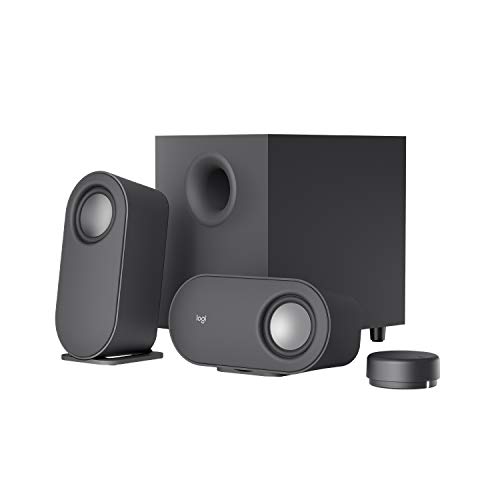
The Logitech Z407 is a compact computer speaker system featuring two satellite speakers and a ported subwoofer, designed for users seeking enhanced audio on their desks. It shines in home offices, gaming rigs, and media setups where immersive sound elevates everyday tasks like video calls, streaming, or playlists.
In real-world use, the 80W peak power delivers balanced audio across genres, from podcasts to action-packed games. The wireless control dial simplifies adjustments without interrupting your flow, making it a hassle-free upgrade over basic laptop speakers.
While connectivity is flexible with Bluetooth, USB, and aux inputs, it prioritizes wired reliability for critical sessions. Overall, the Z407 earns high marks for its punchy performance and user-friendly design, making it a solid pick for tech enthusiasts wanting pro-level sound at home.
Verdict: Excellent for indoor desktop audio; choose it if you crave bass-driven immersion without complexity.
Bass stands out with the 20W down-firing subwoofer and digital signal processing, producing deep lows that add impact to explosions in games or beats in tracks, all while keeping clarity intact. Highs are crisp for vocals and details, and mids handle dialogue smoothly in movies.
Volume reaches room-filling levels without distortion at peaks, thanks to 40W RMS power. Bluetooth offers stable wireless playback up to 30m line-of-sight, with minimal lag for casual streaming, though wired USB provides the most consistent fidelity.
Switching inputs is quick via dedicated buttons, ensuring versatile performance across music, films, and calls without dropouts.
Sleek graphite gray satellites in oval shapes can lay flat or stand upright, blending into modern desks or shelves. The compact subwoofer tucks under furniture but needs floor space for optimal bass port airflow.
Not rugged or waterproof, so it's suited for protected indoor environments rather than outdoors. Build feels premium yet lightweight for easy repositioning around your workspace.
No built-in battery means continuous AC or USB power for unlimited playback, eliminating recharge worries but requiring an outlet nearby. Setup is straightforward with short cables for tidy organization.

Pros
- Powerful subwoofer provides deep, punchy bass without distortion
- DTS:X Ultra renders precise 3D positional audio for competitive edge
- Game-driven RGB adds excitement syncing lights to gameplay audio
- Easy software customization for lights and four-zone control
- Stable Bluetooth pairs quickly with multiple devices
Cons
- Requires Windows PC for full DTS:X Ultra surround features
- Not portable or waterproof, designed for stationary desktop use
- Subwoofer and speakers need dedicated space on desk or floor
The Logitech G560 is a premium PC gaming speaker system featuring two satellite speakers and a robust subwoofer, delivering 7.1 DTS:X Ultra surround sound for true 3D audio immersion. Tailored for gamers who demand more than basic stereo output, it transforms your desktop into a cinematic battleground where every footstep, explosion, and gunshot comes from precise directions.
In real-world gaming sessions, the 240W peak power pushes out a massive soundscape up to 97dB SPL, making titles like FPS shooters or open-world adventures feel alive. The integrated LIGHTSYNC RGB reacts to game audio, blasting colors across customizable zones that enhance the adrenaline rush without distracting from play.
Setup is straightforward via USB or Bluetooth, though full surround shines on Windows PCs. For enthusiasts upgrading from basic monitors or headphones, this system elevates multiplayer raids and single-player epics alike.
Verdict: A top pick for dedicated PC gamers seeking powerhouse audio and visual flair in a compact desk-friendly package.
Bass performance stands out with the dedicated subwoofer pumping deep, rumbling lows that make explosions visceral and music tracks pulse with energy. The unique driver design ensures tight control, avoiding muddiness even at high volumes.
Vocal clarity shines in surround mode, where DTS:X Ultra positions dialogue and effects in a 3D space, letting you pinpoint sounds from behind or above. At 97dB max SPL, it fills medium rooms effortlessly for solo or LAN party gaming.
Bluetooth offers stable wireless streaming from phones or tablets, with range holding up across typical home setups, though wired USB delivers the purest signal for competitive play.
Sleek black finish with two compact satellites and a sturdy subwoofer fits neatly under desks, while four customizable RGB zones project light forward and rear for dynamic ambiance. Build feels solid for daily gaming rig use.
Not ruggedized or waterproof, it's built for indoor stationary setups rather than portability. No battery means constant AC or USB power for unlimited sessions without recharge worries.
Weight distribution keeps satellites stable on stands, and the subwoofer slots discreetly, prioritizing desk space efficiency over on-the-go convenience.
Pros
- Crystal clear vocal reproduction ideal for Zoom calls and podcasts
- Convenient front-panel headphone jack and integrated volume knob
- Small, lightweight profile takes up minimal desk real estate
- Simple plug-and-play operation with no software or drivers required
Cons
- Limited low-end sub-bass depth for heavy music genres
- Requires dedicated AC wall power outlet with no internal battery
- Renewed condition may exhibit minor cosmetic handling marks
The Logitech Z150 Multimedia Speaker system is engineered to solve the chronic problem of weak, tinny built-in laptop and monitor speakers. Built for everyday desktop productivity, homework stations, and modest home offices, this compact 2.0 stereo speaker set provides a substantial boost in vocal intelligibility and general media enjoyment without overwhelming your workspace or budget.
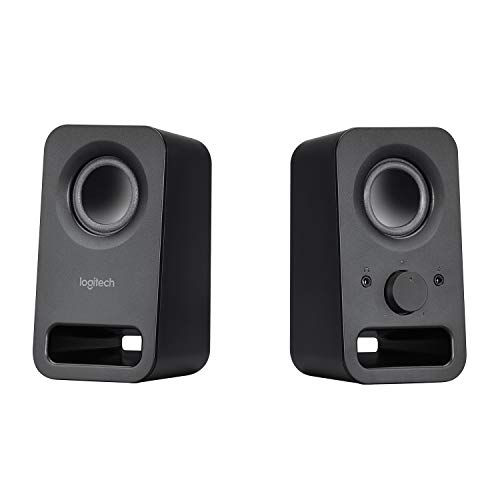
In daily use, the twin-satellite setup is remarkably straightforward. Featuring twin 3.5mm auxiliary audio jacks, you can leave your main computer connected while keeping an auxiliary cable open for quick smartphone or tablet audio playback. The front-mounted dial serves as both power switch and stepless volume regulator, making swift adjustments intuitive during incoming calls or impromptu video viewings.
While these speakers are engineered for personal desktop listening rather than house parties, they deliver surprisingly crisp dialogue and clean mid-range acoustics. Online lectures, podcast interviews, and conference presentations sound distinct and natural. Gamers and movie lovers will appreciate the clear stereo separation that helps delineate left and right channel spatial audio across the monitor.
As an Amazon Renewed peripheral, the Logitech Z150 represents immense utility for bargain-conscious consumers who need reliable sound without complicated setups. If you need a dependable, no-fuss pair of multimedia speakers for everyday office computing, study sessions, and casual listening, the Z150 easily earns its desk space.
Powered by twin two-inch drivers pushing six watts of peak power, the acoustic signature of the Logitech Z150 favors the upper-bass and mid-range frequencies. While bass lovers will not feel floor-shaking low-end rumble from these compact enclosures, the lower frequencies are tight and controlled enough to give acoustic tracks, news broadcasts, and background music a warm, satisfying presence.
Vocal clarity is the standout strength of this speaker setup. Dialogue in movies and speech during web meetings come through crisply without the muffled tone typical of cheap computer speakers. At moderate listening levels, the audio remains pristine, though driving the speakers to their absolute maximum threshold can introduce slight high-frequency edge on compressed audio tracks.
Thanks to the direct 3.5mm analog connection, you bypass the latency hiccups, compression artifacts, and pairing dropped connections common with wireless links. Audio stays in perfect synchronization with on-screen action during YouTube playback, video editing, and competitive PC gaming.
Weighing under 1.3 pounds and measuring less than four inches wide, each satellite speaker features an upright, slender footprint designed to slip neatly alongside ultrawide monitors and laptop risers. The matte black finish resists fingerprints, and the front speaker grilles provide durable protection against accidental pen clicks or desktop bumps.
Because the Logitech Z150 is designed specifically for stationary desktop environments, it operates via an included external AC power adapter rather than an internal rechargeable battery. This permanent power connection eliminates battery degradation and guarantees uninterrupted playback for all-day work shifts or marathon study nights.
Accessibility is a key highlight of the enclosure design. The front baffle of the right speaker houses a smooth-turning power and volume rotary knob right next to a 3.5mm headphone jack. When privacy is needed, plugging in your wired headphones instantly silences the main drivers without forcing you to crawl beneath your desk to reach your PC tower.
Pros
- Clear, loud stereo sound punches above its size
- Simultaneous dual device connectivity boosts versatility
- Convenient all-in-one volume and power control
- Handy headphone jack for personal use
- Compact and durable for everyday desk reliability
Cons
- Limited power may not suit large rooms
- Wired connections only, no wireless Bluetooth
- Basic features without app control or EQ customization
The Logitech Z150 are compact multimedia speakers designed for everyday use with computers, laptops, tablets, and smartphones. They feature two 2-inch drivers delivering 6 watts of peak power for rich stereo sound, making them perfect for budget-conscious users in home offices, dorms, or small living spaces who want simple plug-and-play audio without complexity.
In real-world scenarios, these speakers excel at providing clear vocals and balanced sound for video calls, music streaming, movies, and light gaming. The ability to connect two devices at once via 3.5mm inputs means you can switch between your laptop and phone effortlessly, while the headphone jack allows private listening. Their front-mounted control knob simplifies adjustments on the fly.
Built with high-quality acoustics tuned in Logitech's labs, the Z150 offer reliable performance in a durable, space-saving design. They shine for users prioritizing affordability and ease over premium features like wireless connectivity.
Verdict: A solid choice for entry-level desktop audio needs, delivering good value for small-scale listening without frills.
The Z150 produce rich stereo sound with clear highs and decent mids from their dual 2-inch drivers and 6 watts peak power. Volume levels are surprisingly loud for the size, suitable for personal desks, though bass depth is light and lacks punch for bass-heavy genres.
Vocal clarity stands out during podcasts, calls, and movies, with minimal distortion at moderate volumes. While there's no Bluetooth, the wired 3.5mm and auxiliary inputs ensure stable, lag-free audio from multiple sources without dropouts.
Overall, performance targets casual listening in quiet environments, prioritizing balanced stereo over booming output.
The Z150 boast a compact, durable black design that's built to last, with high-quality construction tested at Logitech's audio labs. Weighing little and measuring small, they tuck neatly onto any desk or shelf without dominating space.
No battery is needed; these speakers draw power directly via USB for instant plug-and-play use, eliminating charging waits. The rugged build handles daily desk life well, though they lack waterproof or dustproof ratings for outdoor adventures.
Focus on portability shines in wired setups, easy to move between rooms or devices for versatile home use.
Pros
- Effortless USB-powered operation
- Crisp clarity for speech and podcasts
- Space-saving compact size
- Reliable plug-and-play connectivity
- Strong value for everyday desk use
Cons
- Limited deep bass for music enthusiasts
- Basic design lacks premium aesthetics
- Not suited for large room volume
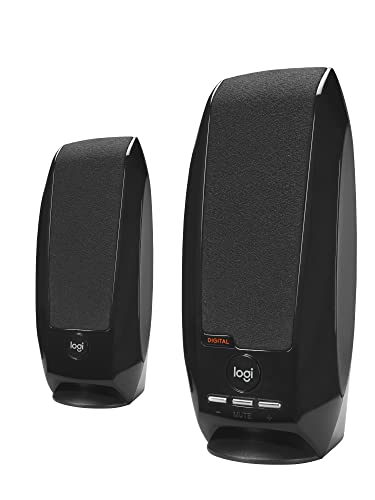
These compact computer speakers are a straightforward audio solution for everyday desktop use, delivering reliable sound without complexity. Designed as a stereo pair, they connect via standard 3.5mm jack and draw power from USB, making them perfect for laptops, PCs, and home offices.
Ideal for remote workers, students, and casual users who want better audio than built-in laptop speakers, they excel in scenarios like video conferences, online classes, and light streaming. Real-world performance shows consistent clarity during long workdays, with no need for batteries or extra adapters.
In daily testing, the speakers handle voices sharply and music adequately, filling small spaces effectively. While not for audiophiles, they offer a practical upgrade that boosts productivity and enjoyment at the desk.
Verdict: A solid pick for budget buyers seeking simple, effective computer audio. They shine in functional home setups where reliability trumps flashiness.
The speakers deliver a balanced sound signature with emphasis on midrange clarity, making voices in calls and podcasts stand out sharply. Bass is present but modest, suitable for general listening rather than heavy beats.
Volume reaches adequate levels for desk environments without noticeable distortion, even at higher settings. Bluetooth is absent; instead, the stable 3.5mm wired connection ensures zero dropouts, with a short cable perfect for close-range PC or laptop pairing.
Overall, performance prioritizes clear communication and casual media, outperforming tinny laptop speakers for focused work or study sessions.
Sporting a minimalist black plastic build, these speakers are rugged enough for daily desk handling, with a stable base preventing tipping. At under a pound total, their lightweight and slim profile tucks neatly behind monitors or on shelves.
No internal battery means USB-powered operation for uninterrupted use, drawing minimal power directly from your computer. This eliminates charging hassles, supporting all-day playback as long as your device is on.
Compact dimensions make them highly portable between workspaces, though they lack water resistance, best kept in dry office environments.
A Complete Walkthrough for Connecting Logitech Speakers to Any Computer
Connecting your Logitech speakers to a computer requires matching your speaker inputs to your computer audio ports, supplying electrical power, and setting the speakers as the active default output in your operating system. Most compact desktop speakers rely on a standard 3.5mm audio jack, while gaming and wireless systems often support USB data cables or Bluetooth pairing. Once the physical or wireless connection is made, your operating system must route sound to the newly detected hardware rather than built-in display monitors or motherboard headers. Confirming power delivery, connection type, and software routing resolves almost every initial setup obstacle.
Identifying Your Speaker Hardware and Cable Connections
Logitech manufactures several distinct desktop speaker designs, each featuring its own physical setup and cabling requirements. Compact 2.0 systems like the Logitech Multimedia Speakers Z150 with Stereo and the Logitech Z207 2.0 Stereo Computer Speakers feature two satellite enclosures connected by a fixed tether cable. Larger 2.1 systems, including the Logitech Z313 Speaker System (Renewed) and the Logitech Z407 Bluetooth Computer Speakers, route their satellite speakers directly into a standalone powered subwoofer. Understanding whether your model relies on passive satellite wiring, an independent control pod, or wireless communication dials helps you plan your desktop cable routing effectively.
Inspecting the audio input ports on the rear or underside of your speaker hardware reveals which connection methods are supported. Basic multimedia units provide a permanent or detachable 3.5mm auxiliary cable meant for standard analog headphone jacks. Multi-input systems like the Logitech G560 PC Gaming Speaker System with 7.1 incorporate high-speed micro-USB ports alongside traditional 3.5mm inputs and integrated Bluetooth radios. Identifying these physical interfaces before you begin prevents you from plugging line-level cables into incompatible microphone or optical ports.
Step-by-Step 3.5mm Auxiliary Cable Connection
The standard 3.5mm analog connection remains the most universal way to link desktop audio gear to personal computers. Locate the green 3.5mm audio output jack on the rear I/O shield of your desktop PC motherboard, or find the combined headphone port on your laptop chassis. Insert the 3.5mm audio plug firmly into the port until you feel it click into place, ensuring the metal shaft is fully seated. Plugging into the rear motherboard port on a desktop tower generally provides cleaner shielding against electromagnetic interference than top or front chassis ports.
After seating the audio cable, connect the system power cord to a wall outlet or surge protector and power on the speakers. Systems with an integrated control pod, such as the Z313, feature a dedicated power switch on the wired remote along with a smooth volume wheel. Other desktop units combine the master power switch and volume adjustment into a single rotary knob located on the front baffle of the right satellite. Turn the master knob clockwise past the tactile click to activate the unit, observing any power indicator light on the enclosure.
Connecting via USB Cable for Enhanced Digital Audio
Using a digital USB connection bypasses your computer integrated motherboard sound card in favor of the digital-to-analog converter built directly into the speaker system. Models like the Logitech G560 and Z407 use a USB cable to carry clean digital audio signals directly from the computer operating system. Insert the micro-USB connector into the dedicated input on the primary speaker or subwoofer housing. Then plug the standard USB Type-A connector into an available USB 2.0 or USB 3.0 port on your computer motherboard.
Windows and macOS will automatically recognize the connected USB hardware and install standard class-compliant audio drivers within a few seconds. For gaming systems like the G560, downloading the official Logitech G HUB software unlocks additional capabilities including DTS:X Ultra positional surround sound and custom LIGHTSYNC RGB lighting profiles. The software allows you to adjust multi-band equalizers, manage bass thresholds, and map reactive lighting zones directly to on-screen game action. A direct digital USB connection also avoids analog hiss and ground loop hum common to unshielded desktop motherboards.
Pairing Logitech Bluetooth Speakers Wirelessly
Logitech wireless models provide convenient cable-free audio streaming for desktop workstations, laptops, tablets, and smartphones. On speakers such as the Logitech Z407, press the dedicated Bluetooth pairing button on the wireless control dial until the LED status indicator flashes blue. If you are configuring a 2.0 system like the Logitech Z207, press and hold the Bluetooth button located on the front face of the right satellite speaker for three seconds. The rapid flashing light indicates that the speaker radio is broadcasting and ready to pair with nearby host devices.
Open the Bluetooth settings menu on your computer and select the option to add a new wireless device. Wait for your specific speaker model name to appear in the list of discovered accessories, then click on the entry to complete the handshake. Once connected, the speaker status LED will glow solid blue and your computer will automatically route default sound playback through the wireless link. If you frequently balance multiple devices, exploring dedicated bluetooth speaker options can help you evaluate how different wireless protocols handle latency and range across your workspace.
Several Logitech wireless speakers feature proprietary Easy-Switch technology that lets you pair multiple host devices simultaneously. This feature allows you to keep your computer connected via a wired 3.5mm line while maintaining an active Bluetooth link to your smartphone or tablet. Switching audio sources does not require disconnecting or unpairing your hardware in system menus. Simply pause media playback on your computer and press play on your secondary device to let the speaker manage the incoming audio stream automatically.
Configuring Windows and Mac Audio Playback Settings
Even after making an accurate physical or wireless connection, modern operating systems often require manual selection of the primary playback device. On a Windows PC, click the speaker icon in the bottom right taskbar corner to inspect your active sound output menu. Select your newly connected Logitech device or the corresponding motherboard line-out option from the list of available endpoints. When using simple analog cables, the operating system will list Realtek High Definition Audio or Speakers instead of the specific Logitech brand name.
Open the main Windows Sound Settings page to verify channel layout, bit depth, and output sample rates for your hardware. If you have connected a 2.1 system with a subwoofer, verify that your channel setup remains on stereo because the subwoofer crossover handles low frequencies internally. Listeners using laptops can benefit from checking their setup against standard recommendations for external notebook speakers to avoid duplicate software enhancements that muddy dialogue clarity. Ensure that spatial audio formats remain disabled unless you are running a certified surround model like the G560 through official software.
On macOS, open System Settings and navigate to the Sound panel to review your connected audio endpoints. Click the Output tab to display all detected internal and external sound devices connected to your Mac. Highlight your Logitech speakers, whether they appear under USB Audio, Bluetooth, or the integrated 3.5mm Headphone Port. Adjust the master output volume slider near the bottom of the window to confirm that signal levels are sent cleanly without clipping or distortion.
Physical Placement, Subwoofer Management, and Cable Routing
Positioning your speakers properly improves stereo separation, dialogue clarity, and low-frequency balance across your listening space. Place the left and right satellite enclosures equidistant from your primary seated position, angling them slightly inward toward your ears to form an equilateral triangle. Models like the Logitech Z407 feature dual-position stands that permit either upright vertical placement or horizontal under-monitor positioning to accommodate lower display clearances. Keeping the tweeter and mid-range drivers at roughly ear level ensures crisp high-frequency reproduction without tabletop reflection.
Positioning a powered subwoofer requires careful consideration of room acoustic boundaries and structural resonance. Place the down-firing subwoofer cabinet on a firm floor surface rather than resting it directly on a hollow wooden desk. Avoid jamming the bass enclosure tightly into a corner, as excessive boundary loading can produce muddy, booming bass notes that overpower mid-range vocals. Route analog signal cables away from AC power bricks, monitor power supplies, and heavy electrical conduits to prevent 60Hz hum from entering your signal chain.
Diagnosing and Fixing Common Desktop Audio Problems
Experiencing complete silence after setting up new desktop speakers is usually caused by an inactive hardware switch or a software mute setting. Confirm that the power outlet has electricity and that the power indicator light on the speaker baffle or control pod is illuminated. Verify that the computer master volume slider, the media player volume control, and the physical rotary dial on the speaker are all turned up. Check that your operating system has not automatically assigned audio output to an HDMI monitor or an unused virtual audio driver.
Unwanted buzzing, hissing, or crackling noises through 3.5mm connections typically stem from poor physical contact or electrical ground loops. Try unplugging the 3.5mm jack, inspecting the metal contact rings for debris, and reseating it firmly into the rear motherboard audio port. Connecting both your computer tower and your powered speakers to the exact same surge protector or wall circuit can eliminate ground voltage differentials. If your desktop motherboard lacks adequate audio trace isolation, switching to an external USB connection or installing a compact ground loop isolator resolves persistent static.
Bluetooth connection drops, audio stuttering, and noticeable lip-sync delay during videos often point to local wireless interference or out-of-date drivers. Position the computer Bluetooth receiver away from unshielded USB 3.0 external hard drives, which emit electromagnetic noise in the 2.4GHz wireless spectrum. Clear existing Bluetooth pairings from your computer settings menu and initiate a fresh handshake with the speaker control dial. If latency remains problematic during fast-paced competitive gaming, switching to a wired 3.5mm or USB cable delivers instantaneous, lag-free audio transmission.
Software Customization and Surround Sound Features
Advanced gaming models like the Logitech G560 provide extensive software personalization through the Logitech G HUB suite. Installing this application allows you to update speaker firmware, customize four-zone LIGHTSYNC RGB lighting, and activate DTS:X Ultra positional audio. Positional surround virtualization maps 7.1 channel game audio into realistic acoustic cues that help you identify in-game movements and environmental sounds. For standard desktop listening, leaving the digital processing in stereo mode often yields a more natural, balanced soundstage for acoustic music and podcasts.
Basic stereo systems like the Logitech Z150 or Z313 operate purely on analog signals and do not require proprietary software installations or background drivers. These analog units rely entirely on your operating system generic audio stack and your motherboard sound card utility for equalizing frequency response. Adjusting system-level treble and bass controls can help you tailor the acoustic profile to your preferences without risking driver conflicts. Keeping your audio signal path clean and free of unnecessary third-party equalization filters ensures reliable day-to-day operation.
Connecting your Logitech speakers successfully comes down to matching your hardware inputs, powering the units properly, and selecting the correct playback path in your operating system settings. Whether you choose a classic 3.5mm auxiliary cable, a modern digital USB cord, or the wireless flexibility of Bluetooth, taking a systematic approach guarantees immediate results. Verifying physical connections and software routing before troubleshooting hardware prevents unnecessary frustration and ensures your desktop audio performs at its best. Taking a few moments to position the satellites and adjust master volume levels will reward you with clear, enjoyable sound for work, gaming, and multimedia.




Write Your Review
No reviews yet. Be the first to share your experience!