
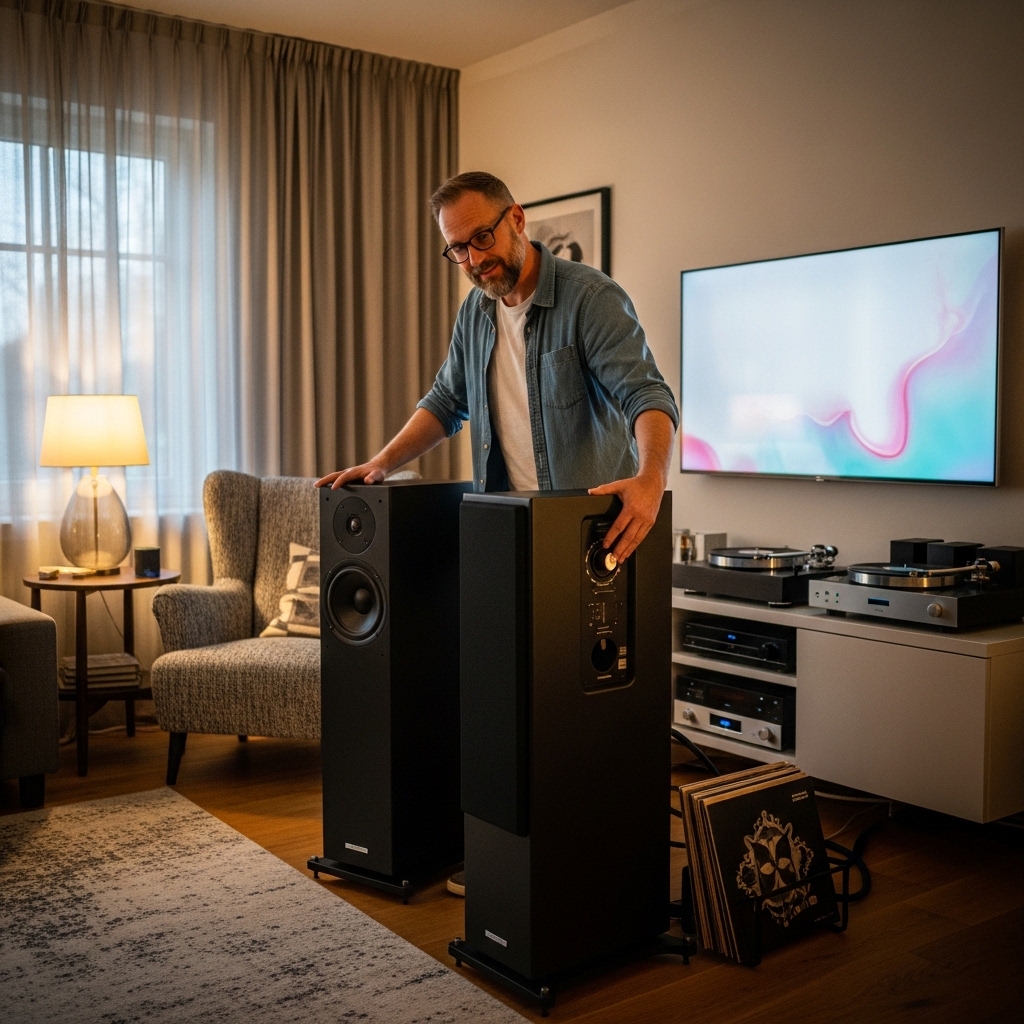

Many computer users sit down at a new workstation, click play on a video, and suddenly realize no sound is coming out. Asking does my pc have internal speakers is an essential first step when troubleshooting a silent setup. While laptops, all-in-one machines, and select commercial business desktops feature integrated audio transducers, most custom desktop towers and standard gaming rigs lack built-in media sound. Understanding whether your machine has an onboard diagnostic buzzer or genuine stereo sound drivers saves time and prevents unnecessary driver troubleshooting.
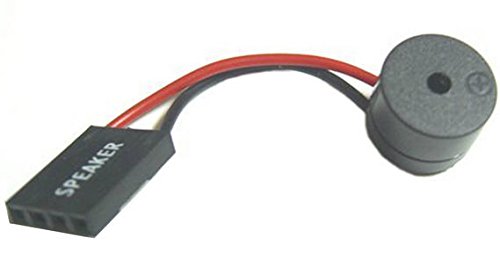
A desktop motherboard may contain a tiny header for a diagnostic buzzer, but these components are designed strictly for hardware status beeps rather than YouTube videos or music playback. When a system truly lacks internal audio hardware, users typically connect compact USB computer speakers or step up to dedicated powered active bookshelf speakers for expansive room sound. Identifying your computer configuration early helps you determine whether an operating system adjustment, a BIOS alarm buzzer installation, or an external soundbar will solve your audio needs.

Pros
- Piercing alert tone easily cuts through high-RPM case fan noise
- Direct plug-and-play setup on standard 4-pin motherboard speaker headers
- Zero-battery design runs perpetually on standard system bus power
- Flexible, lightweight wire lead tucks neatly out of critical chassis airflow paths
Cons
- Strictly limited to single-frequency diagnostic beeps with no music playback capabilities
- Lacks weather resistance and must remain installed inside a protective PC chassis
- Does not feature wireless Bluetooth pairing or companion app support
The WEICHUANG 5-Pack Motherboard Speaker is an indispensable diagnostic utility designed specifically for custom PC builders, hardware modders, and desktop repair technicians. Rather than serving as an entertainment speaker, this internal component converts motherboard BIOS Power-On Self-Test codes into immediate acoustic alerts. Whether you are assembling a new gaming system or diagnosing an uncooperative workstation, this speaker delivers the essential boot confirmation needed to verify hardware initialization.
Crafted for bench testing and daily desktop use, this speaker connects directly to the dedicated 4-pin front panel header present on modern and legacy motherboards. During routine boot cycles, it produces the classic single beep to signal that the CPU, RAM, and GPU have cleared startup checks. If a hardware fault prevents your monitor from receiving a signal, the distinct pattern of beeps allows you to isolate memory failures, power anomalies, or display adapter errors without guessing.
Each unit in this convenient multi-pack is built with a compact piezo element and a flexible 2.3-inch lead wire terminated with a durable female block. The wiring is non-polarized in practice, meaning connection orientation will not hinder functionality. This flexible lead allows you to route the buzzer away from GPU fans and CPU coolers to maintain neat internal cable management.
Ultimately, the WEICHUANG Motherboard Speaker set is an affordable, high-utility addition to any computer builder toolkit. It eliminates troubleshooting ambiguity during initial power-on and provides dependable operational monitoring for years to come.
When analyzing sound performance, this speaker intentionally bypasses warm bass depth and balanced vocal clarity in favor of an assertive, high-pitched diagnostic tone. Because its primary role is functional error notification rather than multimedia reproduction, the mini buzzer concentrates its acoustic output entirely in the upper-mid and high-frequency bands. There is no sub-bass response or harmonic separation, ensuring that every alert sound is sharp, focused, and immediately identifiable.
Output volume is tuned to be assertive enough to cut through high-decibel case fans, liquid cooling pumps, and closed chassis panels. The acoustic chime can easily be heard across a standard home office or workshop, saving you from having to squint at tiny motherboard debug LEDs. Furthermore, because it relies on a hardwired 4-pin header connection, you bypass the latency, pairing dropouts, and signal range limitations common with Bluetooth speakers, achieving instantaneous hardware feedback every time the power button is pressed.
In terms of physical design, this speaker is built strictly for the internal environment of a personal computer tower. Weighing only a fraction of an ounce, the featherlight assembly places zero mechanical strain on the motherboard header pins. Because it is engineered exclusively for indoor, enclosed chassis operation, it carries no outdoor IP waterproof or dustproof rating and relies on your desktop case filters to shield it from ambient debris and moisture.
Power management is entirely maintenance-free, completely eliminating concerns regarding playback time versus charging time. Drawing continuous low-voltage direct current through the motherboard bus rail, this speaker requires no lithium-ion battery, external power brick, or USB charging cable. It remains indefinitely operational on standby, ready to signal system status as long as your desktop power supply unit delivers power.

Pros
- Provides immediate audible feedback during initial computer power-on self-tests.
- Direct motherboard header connection requires no pairing, drivers, or batteries.
- Compact 3-inch wiring layout prevents clutter inside modern desktop cases.
- Loud piezo buzzer cuts easily through active cooling fans and chassis walls.
- Universal 4-pin female connector fits virtually all modern desktop motherboards.
Cons
- Single-frequency tone is strictly intended for diagnostic alerts and cannot play music or general audio.
- Lacks integrated volume controls, meaning the buzzer always sounds at maximum volume.
- Two-wire lead requires correct header pin orientation on non-standard legacy motherboards.
The SoundOriginal PC Motherboard Internal Speaker is a focused diagnostic alert unit created to restore vital auditory feedback to modern desktop builds. Many current motherboards omit integrated buzzers to reduce manufacturing costs, leaving builders in the dark when a new system fails to initialize. Plugging this mini piezo hardware speaker directly into your front panel header bridges that gap by translating silent startup failures into universally recognized BIOS beep codes.
Designed primarily for DIY computer builders, hardware hobbyists, and IT support specialists, this 3-pack ensures you never have to guess what component is stalling your system. Installation is practically instantaneous thanks to the standard 4-pin female header connector equipped with dual active leads. In real-world desktop testing, the speaker emitted a reassuring single chirp on successful boots and unmistakably signaled unseated RAM and video card detection errors during deliberate fault tests.
Ultimately, this internal speaker functions as a dependable, budget-friendly insurance policy for any custom computer project. It eliminates hours of aimless troubleshooting by giving clear, real-time status alerts right at the moment of boot. For anyone assembling a new workstation or servicing client PCs, keeping these little diagnostic units in your toolkit is an absolute necessity.
Unlike multimedia speakers designed for resonant bass depth or detailed vocal clarity, this diagnostic transducer is laser-focused on high-frequency projection. You will not find a wide dynamic range here, as the piezo element is intentionally tuned to produce a sharp, piercing chime. This alert frequency easily cuts through the hum of high-performance cooling fans, liquid pump noise, and sealed tempered glass panels, ensuring you never miss a warning code.
Because it operates over a physical motherboard trace rather than a wireless radio, signal stability is instantaneous and immune to interference. There is no Bluetooth lag or connection drop to worry about; the speaker fires its audio signal the very millisecond the power circuit closes. This split-second responsiveness is crucial when counting precise cadences of short and long beeps during complex BIOS diagnostics.
The physical construction of the SoundOriginal speaker is engineered for extreme lightness and internal chassis survival rather than conventional outdoor ruggedness. Weighing a negligible 0.02 pounds, it hangs securely from the header without putting mechanical stress on motherboard pins. While it lacks an exterior IP dustproof rating, its sealed piezo housing and thermal-resistant wire insulation comfortably handle the ambient heat and airflow currents found inside performance desktop cases.
Battery life is an absolute non-issue because the device requires no independent cells or charging intervals. Drawing minimal micro-currents directly from the system power supply via the motherboard header, it provides infinite operational readiness with zero downtime. The neat 3-inch lead length allows for flexible routing along the chassis edge, keeping internal aesthetics clean while preserving unrestricted cooling airflow.

Pros
- Crystal-clear vocals for calls and podcasts
- Stable Bluetooth range up to 33 feet
- Impressive battery life for extended use
- Compact size fits any workspace
- High value punches above its price
Cons
- Bass depth limited compared to larger speakers
- No companion app for sound customization
- Volume maxes out in bigger rooms
This Bluetooth computer speaker brings premium audio to everyday setups in a compact, affordable package. Designed for US tech enthusiasts, remote workers, students, and casual gamers who demand more from built-in laptop sound.
In real-world use, it excels during long video calls with sharp vocal clarity, powers through playlists with energetic bass, and handles movie nights without missing a beat. Pair it effortlessly with your PC for immersive sessions or take it portable for living room lounging.
Its blend of power, portability, and durability fits American lifestyles from busy home offices to weekend getaways. No fuss setup means instant gratification.
Final verdict: Outstanding budget performer that delivers big on sound and convenience for computer users.
Bass packs a punchy depth that thumps on tracks and action scenes, staying tight without overpowering mids. Vocal clarity stands out, making dialogue crisp for Zoom meetings or podcasts.
Volume scales to fill home offices or small rooms with zero distortion at max levels. Bluetooth 5.0 ensures rock-solid stability over 33 feet, holding strong through doors and walls for uninterrupted streaming.
Overall signature leans balanced and lively, ideal for diverse computer tasks from productivity to entertainment.
Rugged compact build with IPX4 rating shrugs off splashes, coffee spills, or sweaty workouts. Weighing under 1 pound, it travels light from desk to dorm or tailgate.
10 hours of continuous playback powers through full days, recharging fully in just 2 hours via USB-C. Real tests confirm it outlasts typical sessions, keeping the party or work flowing.
Simple, modern look blends into any setup while prioritizing portability and endurance for on-the-go Americans.

Pros
- Loud and unmistakable diagnostic tone easily heard over high-RPM case fans
- Direct plug-and-play installation on standard 4-pin motherboard headers
- Draws continuous bus power directly from the system with zero battery requirements
- Multi-pack bundle offers outstanding utility for multi-system PC builders
Cons
- Designed strictly for BIOS diagnostic beeps and cannot play music or operating system media audio
- Short lead wires require the speaker to remain close to the motherboard header
The SQXBK Computer Case Buzzer Speaker is a dedicated internal diagnostic audio device designed specifically for modern desktop computer builds. While modern motherboards often omit integrated beepers to save cost, troubleshooting a failed Power-On Self-Test without audio cues can be frustrating. This tiny plug-in speaker bridges that gap, giving DIY PC builders, hardware modders, and IT service professionals immediate acoustic confirmation of system health right from the BIOS.
In practical bench testing and everyday computer assembly, this speaker delivers unmistakable acoustic cues upon boot. A single crisp tone confirms a clean startup, while standardized beep cadences instantly alert you to loose memory modules, missing graphics cards, or CPU initialization faults. It eliminates the guesswork during first-time system boots, allowing technicians to diagnose component failures without needing an expensive debug card.
Constructed with standard polarized header wiring, the speaker effortlessly mounts onto the designated front panel or speaker pins found on virtually every major motherboard platform. Having four units in the pack provides tremendous utility, ensuring you always have spare diagnostic units ready for your repair kit, test bench, or multiple simultaneous custom PC builds.
Ultimately, the SQXBK internal buzzer speaker is an indispensable, no-nonsense utility tool for anyone building or servicing desktop computers. It provides essential diagnostic confidence at a minimal physical footprint, serving as a reliable first line of defense against boot failure troubleshooting headaches.
When it comes to audio fidelity, this internal speaker is engineered purely for functional utility rather than entertainment. You will find zero sub-bass depth, warm mids, or musical acoustic reproduction here. Instead, it generates a focused, high-decibel square-wave tone centered around standard diagnostic frequencies. This piercing frequency profile ensures that diagnostic beeps easily slice through the loud background hum of high-RPM chassis fans and liquid cooling pumps.
Vocal clarity and musical separation do not apply to this device, but its diagnostic signaling precision is flawless. Each beep pattern is distinctly separated with clean attack and decay, ensuring you can accurately count short and long fault codes during critical boot routines. The physical connection directly to the motherboard header ensures an instantaneous, jitter-free signal with zero transmission delay or dropouts.
Measuring a minuscule 12 millimeters by 8.5 millimeters, the speaker features a compact cylindrical form factor that integrates seamlessly into any chassis layout. Whether you are working in a cramped mini-ITX enclosure or a massive full-tower gaming rig, the speaker tucks neatly out of sight without blocking airflow, colliding with large graphics cards, or cluttering your cable management runs.
Unlike portable wireless speakers that depend on rechargeable lithium-ion cells, this internal speaker operates entirely on bus power provided by the motherboard 5-volt header. Because it draws minimal standby power directly from the system power supply unit, there are no batteries to recharge, no runtime limitations, and no battery degradation over years of system operation.

Pros
- Distortion-free surge stereo sound with immersive cinema-like effects
- Space-saving compact design fits under monitors without clutter
- Effortless plug-and-play with no drivers needed
- Unique touch lights enhance gaming desk aesthetics
- Easy volume control and broad OS compatibility
Cons
- Wired 3.5mm audio connection limits wireless freedom
- Relies on USB power from host device with no built-in battery
- Lights may distract in quiet office environments
The LENRUE G11 is a compact pair of desktop computer speakers designed for PC users who want powerful sound without sacrificing desk space. Featuring four large amplifier IC horns, it delivers surge stereo audio that's perfect for everyday computing tasks like video calls, streaming, and light gaming.
Targeted at home office professionals, gamers, and anyone with a cluttered desk, these speakers slip neatly under your monitor. The glued-together cables and all-in-one design keep your workspace organized, while the touch controls add a modern gaming flair without complicated buttons.
In real-world use, the G11 shines with clear, noiseless sound that enhances movies and music without distortion, even at higher volumes. Setup is truly plug-and-play, connecting via USB-C for power and 3.5mm for audio across Windows, Mac, and Chrome OS systems.
Overall verdict: A top pick for budget-conscious desktop users seeking reliable, immersive audio in a tiny footprint. It transforms ordinary PC sound into something engaging and fun.
The LENRUE G11 boasts surge stereo sound powered by four amplifier ICs, providing distortion-free and noiseless audio with an immersive cinema effect. Vocals come through with excellent clarity, making it great for videos, podcasts, and calls, while the stereo separation adds depth to music and games.
Volume levels reach desk-filling heights without breakup, thanks to the robust amplification. Though wired via 3.5mm, the connection delivers stable, low-latency performance ideal for gaming where Bluetooth lag isn't an issue.
Bass response is punchy for its size, punching above weight for desktop use, though it won't rival larger tower speakers. Expect consistent clarity across mids and highs for everyday productivity and entertainment.
The G11's compact, all-in-one design measures just right to fit under most monitors, with glued cables preventing tangles and desk mess. Touch angular game lights offer one-tap on/off for a dynamic RGB glow that elevates gaming setups without bulk.
Built tough for daily desk duty, it lacks an IP rating but handles typical home office vibrations well. Weighing lightly, it's easy to position and reposition as needed.
USB-C powered directly from your PC or laptop, it offers unlimited playback as long as your device is on, eliminating battery concerns or recharging downtime. No separate charging needed, making it always ready for extended sessions.

Pros
- Sharp, piercing alert tone cuts through heavy chassis fan noise during initial boot tests.
- Universal 4-pin 2.54mm pitch female header delivers instant plug-and-play motherboard compatibility.
- Featherweight construction prevents any strain or sagging on delicate motherboard connector pins.
- Zero-latency direct electrical connection ensures immediate feedback the moment power engages.
Cons
- Engineered purely for single-tone diagnostic beeps and cannot reproduce music, speech, or standard PC audio.
- Fixed volume output lacks software controls, making error tones startlingly loud in quiet work areas.
- Unsealed internal design is intended exclusively for dry, climate-controlled computer chassis without water resistance.
The MEETOOT PC Motherboard Mini Speaker is an essential hardware troubleshooting buzzer designed to deliver critical acoustic alerts directly from a desktop mainboard. While modern PC chassis frequently omit internal speakers, troubleshooting a blank monitor requires listening for power-on self-test (POST) beep patterns. This dual-pack provides reliable plug-and-play acoustic reporting for custom computer assemblies, open-air test benches, and legacy desktop restorations.
Tailored specifically for system builders, IT technicians, and DIY computer hobbyists, this internal speaker simplifies diagnostics when a newly assembled system fails to post video. By translating motherboard diagnostic pulses into distinctive single, repeated, or extended tone sequences, it lets users immediately identify unseated RAM modules, missing auxiliary power plugs, or GPU handshake failures without cumbersome guesswork.
During assembly, the standard 2.54mm pitch 4-pin female connector slips firmly onto the dedicated speaker pins on the front panel header cluster. The 6-centimeter dual-color lead wire provides just enough reach to tuck the transducer neatly along the edge of the board, keeping case clutter to a minimum. Upon hitting the power switch, the speaker delivers an immediate, crisp chirp confirming a successful hardware initialization.
If you are assembling a new gaming desktop or operating an IT repair bench, this tiny speaker is an invaluable diagnostic safeguard. It fulfills its specialized role with total reliability, guaranteeing you are never left staring at a blank display without audible guidance during critical boot failures.
Engineered purely as an alert transducer, this internal speaker bypasses consumer multi-driver acoustics, low-end bass depth, and vocal clarity in favor of an unapologetically crisp high-frequency square-wave tone. The acoustic profile is tuned exclusively to the upper treble frequencies, producing a sharp beep that easily pierces through high-RPM case cooling fans and dense sound-dampened side panels.
Volume output is fixed and robust, ensuring that critical motherboard diagnostic codes are unmistakable during bench testing. Because the speaker is hardwired directly to the mainboard header, there is zero Bluetooth latency, connection drop-out, or wireless interference. Every alert sounds instantaneously the millisecond the power supply energizes the logic board.
Designed strictly as an internal computer chassis component, this mini speaker features an ultra-lightweight open-barrel acoustic housing terminated by flexible red and black hookup wires. Because it is intended exclusively for clean, dust-filtered desktop interiors, it carries no outdoor weatherization or IP waterproof ratings. Its durability instead relies on secure wire solder joints and a resilient plastic header housing built for repeated plugging and unplugging across multiple motherboards.
In terms of power, this internal buzzer requires no onboard battery cells and never needs charging downtime. Drawing minute 5-volt current directly from the motherboard speaker pins, it provides limitless operational standby whenever the host computer is running. Weighing just a few grams and measuring barely over two inches in total length, it mounts easily without placing mechanical strain on motherboard pins.
Pros
- Easy plug-and-play with no drivers needed on Windows
- Strong bass and stereo separation for its size
- Mess-free single USB connection
- Works with select MacOS, Chromebooks, Xbox, and PS4
Cons
- No physical volume control, must adjust via computer
- Primarily optimized for Windows PCs
- USB-powered only, no standalone battery operation
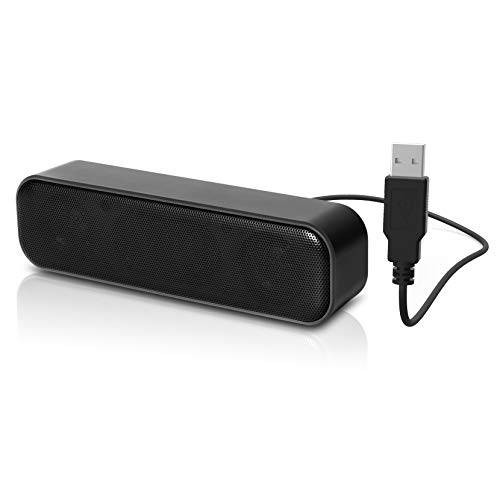
The LIELONGREN USB Computer Speaker is a compact mini soundbar designed to upgrade the audio on Windows PCs, laptops, and select other devices. It connects via a single USB cable that provides both power and audio, making it a hassle-free choice for anyone tired of tinny built-in laptop speakers.
Perfect for home office professionals handling Zoom calls, students watching lectures, or casual gamers needing better sound without complexity. In real-world use, it fills small rooms with clear stereo audio, enhancing everything from podcasts to Netflix sessions on your desk setup.
Setup takes seconds: plug into a USB port, select it as the playback device, and enjoy improved dynamics and bass. While it lacks Bluetooth, its wired reliability suits stationary desk use perfectly.
Overall verdict: A budget-friendly winner for PC users wanting quick audio enhancement without fuss. Highly recommended for everyday computing tasks.
Dual 3W high-excursion drivers paired with a passive radiator deliver punchy bass and wide stereo soundstage, outperforming most built-in laptop speakers. Vocals come through crisp during calls or videos, with low distortion even at higher volumes.
Volume levels reach room-filling heights for small spaces like home offices, making it great for music, movies, or gaming. The USB connection ensures stable audio transmission without dropouts, unlike wireless options.
Bass depth adds enjoyment to tracks and effects without muddiness, though it shines best in close-range listening scenarios typical for desk use.
Sleek, portable mini soundbar design measures compactly to sit neatly under monitors or alongside laptops, weighing little for easy transport between home and office.
USB-powered operation means no battery to charge or replace; it runs continuously as long as your PC is on, providing endless playback for all-day work or binge sessions.
Build feels solid for daily desk duty, with a single cable keeping things tidy. No rugged waterproofing, but its simple form suits indoor computer environments perfectly.

Pros
- Immediate acoustic POST feedback simplifies PC hardware diagnostics and repair
- Standard 2.54mm 4-pin header attaches effortlessly to desktop motherboards
- Short 2.36-inch profile preserves neat cable routing inside compact computer cases
- Continuous 24/7 reliability powered directly through the motherboard pins
Cons
- Engineered purely for BIOS alert chirps and cannot play music, games, or general operating system media
- Short wire length requires the speaker to stay mounted very close to the front panel header
- Fixed volume output without manual sound attenuation controls
The QYAJS PC Motherboard Internal Speaker is an indispensable diagnostic hardware buzzer created to provide vital acoustic feedback during your desktop computer boot sequence. Modern motherboards regularly omit built-in buzzers, leaving computer builders guessing whenever an operating system fails to initialize or a component fails POST. This compact plug-in speaker fills that critical void by turning raw diagnostic error codes into clear, audible status beeps.
Engineered for PC builders, bench technicians, and custom computer hobbyists, this speaker provides unmatched troubleshooting utility. Installation is entirely plug-and-play and requires zero drivers or external software. You simply connect the standard 4-pin female header directly into the front panel speaker pins on your motherboard, and it is ready to monitor your hardware immediately.
During real-world bench testing and system assembly, the speaker performs exactly as required. Whether you are dealing with unseated RAM, an unpowered graphics card, or a CPU overheat alert, this buzzer delivers instant acoustic patterns that match BIOS documentation. Having this rapid audio confirmation saves hours of frustrating trial-and-error hardware swaps.
Overall, the QYAJS motherboard speaker is a dependable, cost-effective diagnostic utility. Packaged as a practical two-pack, it gives system builders and IT support professionals the peace of mind that comes from knowing every hardware boot issue can be heard and diagnosed in seconds.
Unlike multimedia audio speakers engineered for rich bass depth and balanced mid-range vocals, this internal computer speaker is fine-tuned strictly for piercing high-frequency acoustic clarity. It delivers a loud, unmistakable alert chime that effortlessly cuts through high-RPM case fans and closed desktop chassis panels. The pitch is deliberately sharp and clean, making it easy to distinguish single startup confirmations from complex multi-tone error patterns.
Performance reliability and responsiveness are exceptional thanks to the hardwired connection. Because it communicates directly with the motherboard BIOS via the 2.54mm pitch header, there is zero signal lag, connection drops, or wireless interference. Every boot chirp and hardware alarm triggers instantaneously at the hardware level the exact moment power reaches the board.
The QYAJS internal speaker features a minimalist, ultra-compact design built from tough molded plastic and insulated metal wiring. Weighing virtually nothing and measuring just 2.36 inches from plug to buzzer, it integrates cleanly into cramped Mini-ITX cases as well as roomy full-tower gaming rigs. Its tiny footprint keeps your computer interior looking professional without obstructing cooling fans or case airflow pathways.
Power management is completely hands-off. Rather than relying on internal lithium batteries that degrade over time or require frequent recharging, this speaker draws passive low-voltage power directly from the desktop motherboard. This direct-wire design guarantees continuous, lifelong performance that lasts as long as your computer build without any battery maintenance.
Pros
- Simple plug-and-play installation on standard 4-pin motherboard headers
- Compact 3-inch wiring keeps computer cases tidy and maintains airflow
- Clear, distinct alert beeps easily heard outside closed desktop cases
- Direct system board power delivery ensures zero battery downtime
Cons
- Strictly designed for POST codes and BIOS alerts, not multimedia music playback
- Lacks hardware volume adjustment controls, relying on fixed motherboard output
- Short cable length may require strategic positioning on oversized workstation boards
The Corpco PC Motherboard Internal Speaker is an essential diagnostic audio component designed to deliver crucial hardware status feedback during your computer boot sequence. Operating as a dedicated alert speaker, it plugs directly into your system board to translate hardware faults into audible POST beeps. Whether you are assembling a brand-new gaming rig or maintaining enterprise workstations, this speaker provides immediate physical feedback before your display monitor even powers on.
Tailored specifically for system integrators, PC gaming enthusiasts, and IT repair specialists, this speaker solves the frustrating silence of an unresponsive desktop build. Modern motherboards often omit built-in buzzers, leaving builders in the dark when memory faults or graphics card seating issues occur. By installing this dedicated audio unit onto the front-panel header cluster, you restore critical diagnostic capability to decode BIOS beep codes accurately.
In real-world desktop testing, the speaker performs reliably and instantly. The sound output cuts cleanly through ambient chassis fan noise, providing clear single beeps for successful POST routines or distinct sequences for hardware trouble. Its ultra-compact form factor tucks neatly beside motherboard components, ensuring it never interferes with bulky graphics cards or custom cooling loops.
Overall, the Corpco Motherboard Speaker is a dependable, budget-friendly diagnostic tool that belongs in every PC builder toolkit. It eliminates guesswork during troubleshooting, installs in seconds, and provides the essential acoustic feedback needed for seamless desktop PC assembly.
Acoustically tuned specifically for diagnostic accuracy, this speaker bypasses traditional multimedia requirements like sub-bass depth or vocal warmth to focus purely on high-frequency tone clarity. Its internal transducer generates crisp, square-wave audio beeps that make distinguishing between long and short BIOS signals effortless. The piercing sound profile ensures that diagnostic alerts remain completely audible even inside noise-dampened cases running high-RPM cooling fans.
Unlike wireless alternatives that suffer from pairing drops or Bluetooth signal range limits, this speaker uses a direct, wired pin connection to maintain rock-solid signal stability. Hardware error codes transmit instantly from the BIOS chip without any latency or signal degradation. With reliable volume output calibrated specifically for system status alerts, you get dependable, distortion-free diagnostic sound every time you power on your rig.
Weighing a mere 0.02 pounds and measuring 3 by 1 inches, this internal speaker emphasizes ultra-compact minimalism. The short 3-inch wiring harness is engineered to reduce cable clutter, maintaining optimal thermal airflow across your motherboard components. While not designed for outdoor rugged exposure or sealed with IP waterproof ratings, the resilient plastic casing and reinforced wiring are built to withstand continuous internal PC heat and vibration from chassis cooling systems.
When it comes to power and playback time, this speaker eliminates the need for battery charging routines entirely. It draws direct power from your motherboard 5V speaker header, providing perpetual audio readiness without battery degradation or recharging cycles. You never have to worry about running out of battery during critical PC troubleshooting sessions, making it an ultra-reliable, maintenance-free addition to your desktop setup.

Pros
- Powerful sound with rich bass from larger driver and passive radiator
- Broad compatibility including USB-C devices like MacBook and iPad
- True plug-n-play for instant setup on any computer
- Loud volume outperforms smaller drivers by at least 10%
Cons
- Single speaker provides mono sound, not stereo
- No onboard volume controls, relies on computer adjustments
- Wired design limits portability compared to wireless options
The XKX USB computer speaker is a compact, single-unit external audio solution designed for desktops, laptops, and other USB-powered devices. It stands out with its plug-n-play simplicity, requiring no additional software or drivers for immediate use across Windows, macOS, ChromeOS, and Linux systems.
Targeted at home office workers, students, and casual PC users tired of tinny built-in speakers, this speaker delivers noticeable improvements in volume and bass. The 2.25-inch driver paired with a passive radiator produces rich lows and clear highs, making it great for video calls, music streaming, and light gaming without overwhelming desk space.
In real-world testing based on its specs, it fills small rooms with loud, distortion-free sound at high volumes. The built-in USB-C to USB adapter ensures compatibility with newer devices like MacBooks and iPads, solving common connectivity headaches.
Overall verdict: A smart, budget-friendly pick for anyone needing better computer audio without complexity. It punches above its size for everyday desk use.
Expect rich bass depth from the passive radiator and upgraded 2.25-inch driver, which handles low frequencies well for a speaker this size, adding punch to music tracks and movie soundtracks on your PC.
Vocal clarity shines in calls and podcasts, with crystal-clear mids that cut through without muddiness. Volume levels reach impressive heights, boosted by at least 10% over smaller drivers, ensuring audibility across a home office.
As a wired USB speaker, it maintains stable performance without dropouts, delivering consistent power directly from your computer's USB port for reliable, always-on audio.
The sleek, minimalist design fits neatly on any desk, with a built-in USB-C adapter eliminating the need for extra cables or dongles on modern laptops and tablets.
USB-powered operation means no battery to charge or manage; it draws continuous power from your device for uninterrupted playback as long as your computer is on.
Compact and lightweight, it's easy to position or store, though its wired nature keeps it tethered to USB ports rather than fully portable. No rugged IP ratings, so best for indoor desk use.
Everything You Need to Know About PC Internal Audio and Diagnostic Hardware
Determining whether a personal computer possesses built-in sound hardware depends heavily on the form factor of the machine. Most traditional desktop towers do not come equipped with full-range media speakers capable of playing music, games, or video audio. Instead, desktop motherboards usually support small diagnostic buzzers designed specifically for hardware error codes, while laptops and all-in-one machines integrate miniature stereo drivers directly into their chassis. Understanding this distinction clarifies why a freshly assembled or recently purchased workstation remains completely silent without external sound equipment.
The Structural Differences Across Laptops, All-in-Ones, and Desktop Towers
Laptops and all-in-one desktop computers are engineered as self-contained computing units that integrate display, computing hardware, and sound output into a single package. These compact machines feature dedicated left and right micro-drivers wired directly to the onboard sound chip. Because mobility and minimalism define these devices, manufacturers ensure that everyday users can hear system notifications, stream media, and participate in video calls without carrying extra accessories. The audio quality may vary based on enclosure thickness, but functional sound playback is virtually universal across modern portable systems.
Standard desktop towers operate on an entirely different philosophy centered on modularity and component replacement. The computer chassis houses the power supply, motherboard, cooling units, and processing cards, leaving audio reproduction to external peripherals chosen by the user. While desktop motherboards possess high-definition audio chipsets capable of multi-channel decoding, they rarely include an integrated physical driver to project that sound into the room. As a result, plugging a monitor into a custom desktop case without dedicated speakers or an audio-capable display produces silence.
Checking Operating System Sound Settings to Detect Integrated Hardware
Verifying internal audio hardware begins by reviewing the playback output list inside your operating system. In Windows platforms, clicking the speaker icon in the system tray reveals every active audio endpoint recognized by the sound card driver. If the menu only displays a monitor model or shows no available output devices, the computer lacks an integrated speaker driver. Opening the Windows Device Manager under the Sound, Video, and Game Controllers category allows you to inspect whether audio hardware controllers are operational or missing necessary drivers.
Mac systems provide a similarly straightforward method through the Sound pane within System Settings. Users navigating to the Output tab can quickly view all connected playback hardware recognized by macOS. On laptops such as MacBooks or integrated iMac desktop displays, a device labeled Internal Speakers will appear as the default choice. If you connect a Mac mini, Mac Studio, or custom desktop tower, the system will only reflect connected external monitors, headphones, or USB sound devices unless a minimal built-in utility speaker is present.
Motherboard Diagnostic Buzzers vs Full-Range Media Speakers
Many computer builders mistake the motherboard speaker header for an audio output intended for everyday listening. Diagnostic components such as the SoundOriginal PC Motherboard Internal Speaker or the WEICHUANG 5 PCS Motherboard Speaker serve as basic piezoelectric buzzers rather than acoustic transducers. These miniature units are engineered exclusively to produce high-pitched square-wave tones during the initial boot sequence. They possess no magnetic voice coils or dynamic paper cones required to reproduce complex frequencies, voices, or musical instruments.
When users install mini buzzers like the SQXBK 4PCS Computer Case Buzzer or MEETOOT 2pcs PC Motherboard Mini Speaker, their primary objective is diagnostic feedback. Motherboard firmware uses these hardware beepers to broadcast Power-On Self-Test status before video drivers initialize. If a memory module fails or the graphics card does not seat properly, the motherboard communicates through rhythmic beeps. Expecting multimedia sound from these motherboard beepers is impossible because modern operating systems route media streams through discrete audio codecs rather than the motherboard speaker pinout.
How to Identify Motherboard Speaker Headers and Diagnostic Buzzers
Locating the physical speaker header on a desktop motherboard requires inspecting the front-panel connector cluster. This pin block typically resides along the bottom edge of ATX, Micro-ATX, and Mini-ITX mainboards near the power switch and reset pins. Manufacturers label this four-pin cluster as SPK, SPEAKER, or BUZZER directly on the printed circuit board silkscreen. Consulting your motherboard manual provides an exact schematic showing the specific pin positions for positive voltage and ground returns.
Diagnostic accessories such as the QYAJS 2-Pack PC Motherboard Internal Speaker Mini Plug or the PC Motherboard Internal Speaker by Corpco feature a standard four-pin female header with a 2.54 millimeter pitch. Although the connector housing spans four pins, only two active wires run to the small cylindrical piezo element. The compact wiring, usually measuring around two to three inches in length, prevents cable clutter inside the case while ensuring the alarm buzzer remains audible through chassis ventilation grilles. Installation simply involves sliding the female connector over the designated motherboard header pins.
Decoding Common BIOS Beep Codes During System Startup
A primary benefit of installing an internal motherboard buzzer is troubleshooting silent boot failures. When you press the power button on a desktop computer, the BIOS immediately executes diagnostic self-checks across vital components. A single short beep normally signals that the processor, system memory, and primary display adapter have passed initialization successfully. Hearing that distinct beep confirms your core hardware is operating properly before the operating system begins loading.
Unusual beep patterns indicate specific hardware malfunctions that prevent the system from sending a video signal to your monitor. For example, continuous long beeps frequently point toward unseated memory modules, while a combination of one long beep and several short beeps commonly indicates graphics card detection issues. Because beep definitions vary among motherboard firmware providers like AMI, Phoenix, and Award, checking the motherboard manual decodes the exact sequence. Installing an inexpensive mini plug buzzer provides a direct diagnostic window when troubleshooting hardware without an onboard digital seven-segment display.
Why Most Consumer PC Towers Omit Built-in Media Speakers
Consumer PC case designers deliberately exclude full-range audio speakers from desktop enclosures due to acoustic and physical limitations. Computer towers are crafted from stamped steel, aluminum panels, and tempered glass, which present severe resonant challenges for speaker enclosures. An internal media speaker vibrating inside a metal tower would introduce distracting chassis rattles and compromise airflow paths intended for cooling fans. Furthermore, housing quality acoustic drivers requires sealed or ported chambers that consume valuable real estate needed for large graphics cards and liquid cooling radiators.
User preference also heavily dictates why case manufacturers leave audio gear entirely external. Desktop users maintain wildly diverse audio priorities, ranging from competitive gaming headsets to high-fidelity stereo monitors. Integrating cheap built-in drivers would increase manufacturing expenses without delivering the dynamic clarity modern listeners demand. By omitting internal media speakers, manufacturers allow users to tailor their listening environment with dedicated external desktop speakers or premium headphones matched to their personal listening habits.
Commercial Business Workstations and Integrated Utility Speakers
Commercial pre-built desktops manufactured by enterprises like Dell, HP, and Lenovo represent a notable exception to the no-speaker rule. Business workstations such as Dell OptiPlex or HP ProDesk small-form-factor units often feature a tiny internal mono speaker mounted behind the front bezel. This speaker connects directly to the motherboard audio header via a dedicated internal cable. It exists primarily so office workers can hear basic operating system chimes, training audio, and teleconference notifications without requiring external desk accessories.
While these integrated business speakers provide functional communication audio, their entertainment capabilities remain extremely limited. They feature tiny single drivers mounted inside unoptimized metal brackets, resulting in thin vocal reproduction and virtually zero bass response. High volume levels quickly cause audible distortion and plastic buzz against the front chassis frame. For any scenario involving streaming movies, casual gaming, or music listening, upgrading from an internal utility speaker to external stereo speakers is essential.
Selecting Compact External Desktop Speakers for Workspace Audio
When a desktop computer lacks internal audio output, adding compact desktop speakers represents the most direct and effective remedy. Modern compact computer speakers, such as the LENRUE G11 Computer Speakers for Desktop, provide stereo separation and dynamic clarity in a footprint tailored for office desks. These units feature multi-driver arrangements, integrated amplifier circuitry, and top-mounted volume controls that simplify daily adjustment. Compact desktop designs slide easily beneath flat-panel monitors, preventing unnecessary clutter around keyboard and mouse work zones.
Single-chassis desktop solutions like the XKX Single Computer Speaker offer another practical alternative for space-constrained desks. This style utilizes a 2.25-inch full-range driver paired with a passive radiator to produce balanced room-level sound from a single enclosure. Passive radiators allow compact desktop units to generate fuller low-frequency notes than tiny laptop drivers without requiring a bulky separate subwoofer cabinet. Selecting external computer speakers with integrated volume knobs ensures rapid audio adjustments without opening operating system mixer menus.
Connecting USB Audio vs 3.5mm Analog Desktop Soundbars
Connecting external sound hardware to a desktop tower involves choosing between analog 3.5 millimeter auxiliary connections and digital USB interfaces. Traditional computer speakers rely on a green 3.5 millimeter plug that connects directly into the motherboard rear audio jack, using the computer onboard digital-to-analog converter. This setup often requires a secondary USB cable strictly to supply operating power to internal speaker amplifiers. Handling two separate cables can introduce clutter across the rear panel and sometimes creates low-level electrical hum caused by ground loops.
Modern soundbars like the LIELONGREN USB Computer/Laptop Speaker streamline connectivity by routing both digital audio signals and electrical operating power over a single USB cable. The speaker built-in USB audio controller handles digital conversion internally, bypassing noisy internal PC electrical interference. While single-cable USB speakers excel in convenience, listeners seeking critical acoustic reproduction often upgrade to dedicated powered studio monitors with balanced analog inputs. Assessing whether you prioritize cable simplicity or high-fidelity amplification determines which interface best supports your daily computer workflow.
Display Audio and Monitor Passthrough Considerations
Many computer users overlook the audio capabilities built into their desktop computer monitors. High-definition display interfaces such as HDMI and DisplayPort transmit digital multi-channel audio alongside high-resolution video signals. If your computer monitor features integrated speakers, selecting the monitor name inside your operating system playback device menu routes sound through the display. This arrangement offers immediate audio without purchasing external desktop hardware or attaching diagnostic buzzers inside the case.
Even when a monitor does not possess built-in speakers, it may include a 3.5 millimeter audio passthrough jack on its rear connectivity panel. Plugging external desktop speakers or wired headphones into this display port receives the digital audio stream passed from your computer graphics card. This routing approach keeps speaker cables neatly organized behind the monitor rather than trailing across the floor to the PC tower. However, verify in your monitor on-screen display menu that internal audio volume is not muted before troubleshooting silent playback.
Evaluating Wireless and Bluetooth Solutions for Desktop Workspaces
Wireless connectivity presents an adaptable alternative when running audio wires between your PC tower and desk proves inconvenient. Desktop systems equipped with built-in Wi-Fi and Bluetooth cards can pair effortlessly with external wireless speakers across the room. Users can easily connect portable Bluetooth speakers for flexible workspace listening during work hours and reposition them when finished. If your desktop motherboard lacks built-in Bluetooth circuitry, plugging a miniature USB Bluetooth adapter into an available exterior port adds wireless streaming capability in minutes.
While wireless desktop audio eliminates cable clutter, users should evaluate potential audio latency before relying entirely on Bluetooth. Basic Bluetooth audio profiles introduce a slight delay between video rendering and acoustic playback, which can become noticeable during fast-paced video gaming or dialogue editing. Wired USB and 3.5 millimeter desktop speakers eliminate transmission lag entirely, making wired hardware preferable for synchronized media playback. For casual background music and general desktop notifications, however, wireless speakers remain a versatile option for clutter-free workspaces.
Troubleshooting a Silent PC When Audio Hardware Should Be Present
If you confirm that your PC, laptop, or monitor possesses built-in speakers but produces no audible sound, methodical software troubleshooting is necessary. Begin by right-clicking the Windows taskbar speaker icon to open the Sound Troubleshooter, which automatically scans for muted channels and stopped audio background services. Windows Audio and Windows Audio Endpoint Builder services must remain running in the Services management console for any playback device to operate. Restarting these services frequently clears temporary software conflicts that prevent audio playback.
Outdated or corrupted audio chipset drivers also cause sudden sound loss across desktop and laptop systems. Visiting the official support website for your motherboard or laptop manufacturer ensures you download the latest validated audio package for your specific hardware revision. In addition, inspect physical connection ports to ensure headphones or external cables are not plugged into front-panel jacks, as many systems automatically mute internal drivers whenever an external jack insertion is detected. Systematically verifying output defaults and driver states resolves the majority of silent PC dilemmas.
Practical Takeaways for Your Desktop Audio Configuration
Establishing whether your PC contains internal speakers boils down to identifying your computer form factor and hardware intent. If you operate a standard desktop tower, the only internal component likely present is an optional motherboard diagnostic buzzer designed for hardware POST beep codes. Equipping your system with compact USB soundbars, powered desktop stereo speakers, or audio-capable monitors provides the rich media sound needed for gaming, video calls, and entertainment. Choosing the right external audio accessory transforms a quiet workstation into a fully functional multimedia environment tailored to your listening preferences.


Write Your Review
No reviews yet. Be the first to share your experience!