

Connecting personal audio to a desktop or laptop often leads to questions about operating system support and wireless transmission standards. Many listeners wonder are bose bluetooth speakers windows 10 compatible when upgrading their workspace sound or pairing an existing portable unit. Bose Bluetooth speakers work smoothly with Windows 10 systems, provided your computer features an active internal Bluetooth transceiver or a connected USB adapter. Whether you plan to set up a compact desktop speaker or connect larger Bluetooth home speaker system components, the Windows operating system handles standard Bluetooth audio profiles reliably across diverse hardware configurations.
Setup challenges rarely stem from fundamental hardware incompatibility between the two brands. Instead, common friction points usually involve Windows 10 audio settings, device profile mismatches, or outdated Bluetooth drivers on the host PC. Bose speakers adhere to universal wireless audio protocols, meaning any PC running modern Windows software can transmit high-fidelity audio without specialized proprietary transmitters. Understanding how Windows 10 categorizes wireless audio devices ensures you achieve clear stereo output, low latency, and consistent reconnections during everyday listening.


Pros
- Exceptional clarity and balanced highs with deep bass for a portable speaker
- Rugged IP67 build withstands water, dust, drops, and shocks effortlessly
- Long 12-hour battery and quick USB-C charging for all-day use
- Advanced Bluetooth 5.3 ensures stable connections and multipoint convenience
- PositionIQ delivers optimal sound whether standing, laying, or hanging
Cons
- Lacks wired aux input, relying solely on Bluetooth connectivity
- No companion app for EQ customization or advanced sound tweaks
- Battery life shortens at maximum volume with heavy bass usage
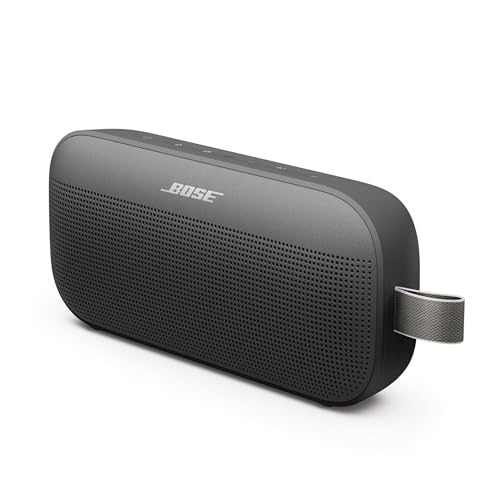
The Bose SoundLink Flex (2nd Gen) is a compact powerhouse designed for adventurers who refuse to compromise on sound quality. This portable Bluetooth speaker fits in your hand or clips to your bag, making it the ultimate companion for beach outings, hikes, camping trips, or poolside lounging. Its hi-fi audio shines in real-world scenarios, delivering bold tunes that cut through ambient noise without distortion.
For outdoor enthusiasts and casual listeners alike, it excels where larger speakers falter. Pair two units for stereo separation or party mode to amplify the fun, and PositionIQ ensures pristine sound regardless of how you position it, even in the shower. Bluetooth 5.3 provides rock-solid connectivity up to 30 feet, supporting multipoint for effortless switching between phone and tablet.
In performance tests, the Flex impresses with its balanced profile, revealing nuances in podcasts, playlists, and calls alike. While not a home audio substitute, it outperforms competitors in portability and durability. Verdict: A top pick for active Americans craving premium portable sound.
Bose tunes the SoundLink Flex for a clear, balanced signature with high-fidelity detail across the spectrum. Deep bass extends impressively for its size, providing punchy lows that thump on tracks like hip-hop or EDM without muddiness. Midrange clarity brings vocals and instruments to life, while crisp treble avoids harshness even at high volumes.
PositionIQ technology detects orientation and recalibrates the soundstage for consistent width and imaging, whether upright on a table or hanging from a shower caddy. Volume levels reach loud without breakup, filling medium spaces like patios or tents. Stereo mode with a second unit creates a wide, immersive stage perfect for gatherings.
Advanced Bluetooth 5.3 minimizes dropouts, and multipoint handles calls seamlessly mid-playback, making it versatile for music and hands-free use.
Rugged silicone exterior wraps the Bose SoundLink Flex in IP67-rated protection against water, dust, drops, shocks, and corrosion, ideal for harsh outdoor conditions. Its palm-sized form includes a utility loop for secure attachment to backpacks or belts, with dimensions small enough for pocket carry.
Connectivity centers on Bluetooth 5.3 for wireless pairing up to 30 feet, with multipoint for two devices. USB-C handles charging and playback, but no aux or other wired options are available. No power outlet needed; the built-in battery delivers up to 12 hours per charge, recharging quickly.
Hardware emphasizes portability over complexity, with no visible drivers or ports beyond essentials. This durable build prioritizes on-the-go reliability for US travelers and outdoor lovers.


Pros
- Remarkably wide soundstage with balanced, room-filling acoustic dispersion
- Dual compatibility with both Apple AirPlay and Google Cast for frictionless streaming
- Includes a physical AUX input for connecting turntables and legacy audio gear
- Effortless multiroom linking and stereo pairing through the companion app
Cons
- Requires constant AC wall power with no internal battery for portable use
- Lacks an RJ-45 Ethernet port for hardwired local network connections
- Reaching the ideal acoustic balance requires initial configuration within the mobile app
The Bose Lifestyle Ultra represents a modern evolution in premium wireless home audio, combining high-resolution digital playback with intuitive daily operation. Designed to anchor living rooms, home offices, and open kitchen layouts, this speaker delivers substantial acoustic power from an understated enclosure. It bridges the divide between convenience-focused smart tech and serious home listening, giving music enthusiasts an all-in-one solution that integrates seamlessly into any living space.
Day-to-day usability is where this speaker truly shines. Equipped with Alexa+ voice intelligence and responsive top-plate touch controls, managing playlists, adjusting volume, or commanding smart home devices feels natural and responsive. Listeners who prefer fine-tuning their audio will appreciate the companion Bose app, which makes it simple to switch between rooms, organize multiroom groups, and adjust frequency curves to suit specific musical styles.
In real-world environments, the speaker demonstrates remarkable flexibility. You can deploy a single unit on a credenza for effortless background ambiance or critical foreground listening, pair two together for true wide-channel stereo, or sync several throughout the home for unified party audio. The inclusion of an analog 3.5mm auxiliary input provides a critical edge over purely wireless competitors, allowing vinyl enthusiasts to hook up a preamplified turntable without extra hardware.
Ultimately, the Bose Lifestyle Ultra succeeds by offering a refined balance of acoustic weight, sleek visual aesthetics, and cross-platform versatility. For shoppers seeking a durable, feature-packed tabletop speaker that sounds far larger than its footprint suggests, it stands out as an outstanding home audio centerpiece.
Acoustic performance on the Bose Lifestyle Ultra is anchored by proprietary CleanBass technology. Rather than relying on exaggerated lower-frequency boosts that create boomy, muddy playback, the internal acoustic architecture keeps basslines tight, punchy, and fast. Low frequencies remain articulate across a broad range of genres, providing satisfying sub-bass rumble in modern electronic tracks while preserving the woody resonance of upright acoustic bass.
Midrange and treble frequencies receive equal care, driven by precision-angled transducers and TrueSpatial Audio processing. Vocals sit front and center with natural presence, avoiding the hollow or boxy artifacts commonly found in single-enclosure smart speakers. High frequencies are crisp and airy without introducing harsh sibilance at upper volumes, allowing cymbals and string overtones to decay smoothly across the listening space.
The speaker excels at high volume levels, maintaining composure without aggressive compression or harmonic distortion. When room dynamics pose acoustic challenges, the adjustable EQ within the Bose app allows users to easily raise or lower bass, mid, and treble levels to compensate for corner placements, deep bookshelves, or open living areas.
Constructed with premium materials, the Lifestyle Ultra features an elegant black finish that complements contemporary home decor. Measuring 6.594 inches long, 4.767 inches wide, and 7.27 inches tall, and weighing in at 3.66 pounds, the cabinet has enough physical heft to resist unwanted enclosure resonance while remaining compact enough to fit neatly onto shelves, end tables, or kitchen islands.
Hardware connectivity options are notably generous for a modern smart speaker. In addition to robust dual-band Wi-Fi and Bluetooth wireless radios, the rear chassis includes an auxiliary 3.5mm stereo input jack for direct analog connections. This makes it simple to run audio cables from portable music players, laptops, or vinyl turntables without latency or compression.
The unit runs on steady AC mains power, ensuring continuous, dynamic performance without the output throttling common in battery-operated speakers. Top-mounted capacitive touch panels provide tactile, immediate control over playback, volume, and voice assistants, making physical operation smooth and intuitive even without your smartphone nearby.
Windows 10 Compatibility Guide for Bose Bluetooth Speakers
Bose Bluetooth speakers are fully compatible with Windows 10 desktop and laptop computers. Because Bose implements universal Advanced Audio Distribution Profile (A2DP) specifications, standard audio streaming requires no proprietary software locks or specialized drivers. However, achieving smooth wireless playback depends on how Windows 10 interacts with the speaker internal hardware, communication drivers, and available operating system audio endpoints.
Core Compatibility and System Requirements
Windows 10 supports all standard wireless profiles required for modern stereo playback, including A2DP and Audio/Video Remote Control Profile (AVRCP). Bose speakers, spanning from compact travel units to powered tabletop systems, broadcast these exact standard profiles during discovery. As long as your PC features a functional Bluetooth radio, the operating system can detect, pair, and stream sound directly to the speaker without supplementary third-party transmitters.
Hardware variations among Windows 10 computers represent the primary variable in connection stability. Many custom desktop motherboards lack integrated wireless antennas, requiring either a motherboard external antenna attachment or a dedicated USB Bluetooth adapter. Laptop computers generally feature integrated wireless cards that manage both Wi-Fi and Bluetooth on a shared chipset. Ensuring your computer supports at least Bluetooth 4.0 or higher guarantees that connection handshakes proceed without protocol mismatches.
Step-by-Step Pairing Process in Windows 10
Initiating a successful connection requires placing your Bose speaker into active pairing mode before searching for it on the computer. On most Bose models, pressing and holding the dedicated Bluetooth button until the status indicator blinks blue or an audible voice prompt speaks indicates readiness. If the speaker remains in reconnection mode seeking a previously paired smartphone, the Windows scanning utility cannot detect the broadcast beacon.
Once the speaker is broadcasting, open the Windows Settings application by pressing the Windows key and selecting the gear icon. Navigate to Devices, confirm that the primary Bluetooth toggle is switched on, and click on the option to add a Bluetooth or other device. Select Bluetooth from the prompt window, wait for the speaker model name to appear in the list, and click to complete the pairing sequence.
Windows 10 will automatically configure the audio drivers and register the speaker as both an audio output device and a multimedia controller. You should hear a confirmation tone from the speaker, and the status indicator will turn solid white or emit a steady chime. Testing playback through Windows Sound Settings ensures that the speaker is selected as your primary playback device rather than integrated monitor speakers.
Resolving the Hands-Free Audio Profile Glitch
One of the most common user frustrations when connecting wireless speakers to Windows 10 involves muffled sound or hollow, low-bitrate audio. This issue occurs because Windows 10 creates two separate endpoints for Bluetooth audio hardware: a Stereo profile and a Hands-Free AG profile. The Hands-Free profile is designed for two-way communication during voice calls, which drastically compresses audio bandwidth to handle microphone input simultaneously.
If your Bose speaker incorporates a built-in microphone for speakerphone functions, Windows often defaults communications applications to that lower-quality profile. To ensure consistent high-fidelity music playback, navigate to the classic Windows Control Panel, select Devices and Printers, and locate your connected Bose speaker. Right-click the device, choose Properties, open the Services tab, and uncheck the option for Hands-Free Telephony.
Disabling this background telephone service forces Windows 10 to treat the hardware strictly as a high-resolution stereo output device. After unchecking the service and applying the changes, restart your media playback software to lock in the uncompressed audio stream. This simple adjustment prevents unexpected volume drops and eliminates robotic voice distortion while enjoying dedicated music speakers at your workstation.
Addressing Bluetooth Driver and Hardware Limitations
Operating system updates and aging hardware drivers frequently cause intermittent audio dropouts or failed pairing attempts. Windows 10 relies on vendor-supplied drivers from chipset manufacturers such as Intel, Realtek, or Qualcomm to manage the wireless radio. When generic or outdated drivers remain installed, the system may struggle to maintain continuous data packets, resulting in stuttering sound.
Opening Device Manager allows you to inspect the Bluetooth category and check the date of the installed radio driver. Visiting the official support website for your computer manufacturer or motherboard brand provides access to the latest certified driver packages. Installing updated drivers directly from the component vendor resolves many chronic disconnections that standard Windows updates overlook.
Power management settings within Windows 10 can also sever wireless audio connections when the system attempts to conserve energy. Inside Device Manager, double-clicking your primary Bluetooth adapter opens its properties window where you can view the Power Management tab. Unchecking the box that permits Windows to turn off the device to save power ensures that streaming audio remains uninterrupted during quiet listening sessions.
Audio Latency and Codec Behavior on Desktop Systems
Wireless audio transmission introduces inherent processing latency between the computer transmitting the digital signal and the speaker acoustic drivers producing sound. Windows 10 primarily utilizes the Subband Coding (SBC) codec and AAC codec for standard Bluetooth audio transmission. While these codecs deliver balanced dynamic range for music listening, they introduce a slight delay that may become noticeable during video playback or competitive gaming.
Modern video players and web streaming platforms often compensate for wireless latency by automatically delaying the video track to match audio delivery. However, real-time gaming or video editing applications cannot predict audio timing, leading to slight synchronization offsets between visual cues and sound effects. If your workflow requires immediate acoustic feedback, switching to an analog auxiliary connection provides zero latency while preserving the speaker sound profile.
Newer models in the Bose lineup utilize advanced Bluetooth versions, such as Bluetooth 5.3 found on the Bose SoundLink Flex (2nd Gen). These modern chipsets provide wider operational bandwidth, faster reconnection handshakes, and improved wireless stability across typical desktop distances. Pairing modern wireless speakers with an updated desktop system minimizes packet loss even when multiple wireless peripherals operate within the same physical room.
Model-Specific Considerations Across the Bose Lineup
Different Bose speaker families approach desktop integration with distinct feature sets and connectivity options. Portable models like the Bose SoundLink Flex (2nd Gen) focus entirely on direct Bluetooth streaming, durable outdoor utility, and orientation-aware sound processing. These battery-powered units pair directly through standard Windows menus without requiring background desktop applications or network logins.
Home multiroom systems, such as the Bose SoundTouch 10 Wireless Speaker, provide both Bluetooth pairing and local Wi-Fi streaming capabilities. While Bluetooth offers a quick method for computer audio, the SoundTouch platform was originally engineered around local network streaming. Understanding whether you plan to use local wireless pairing or synchronized network audio helps determine how the speaker responds to computer control.
Premium tabletop options like the Bose New Lifestyle Ultra Speaker combine extensive multiroom wireless tech with auxiliary inputs and smart assistant integration. For listeners evaluating budget-friendly Bluetooth speakers versus more permanent desktop audio systems, considering wired inputs alongside Bluetooth provides flexible backup options if your computer wireless hardware experiences interference.
Wi-Fi Streaming Versus Bluetooth on Hybrid Systems
Several Bose models incorporate dual wireless connectivity, allowing listeners to choose between Bluetooth pairing and Wi-Fi streaming over a home network. The SoundTouch family, including standalone units and stereo multi-pack configurations, supports direct playback management via the Bose SoundTouch desktop application for Windows. This software allows users to access stored music libraries and internet radio stations directly over local network bandwidth.
Streaming over local Wi-Fi eliminates the range restrictions and operating system notification interruptions associated with standard Bluetooth playback. When streaming music through network protocols, system sounds like email alerts or notification chimes do not interrupt your audio track. In contrast, Bluetooth treats the speaker as the universal system sound card, routing all computer audio output through the wireless channel.
Listeners who primarily want an external monitor speaker for general computer use will find standard Bluetooth more straightforward than network streaming. Bluetooth captures audio from web browsers, media players, and system games without requiring application-specific network handshakes. Selecting the right connection mode depends on whether you desire full computer audio mirroring or isolated music streaming.
Systematic Troubleshooting for Connection Drops and Pairing Failures
If your Bose speaker fails to connect or repeatedly drops offline, beginning with a clean pairing profile often resolves the conflict. Bose speakers retain an internal memory of paired devices, and exceeding the stored device capacity can confuse connection priority. Holding the speaker Bluetooth button down for approximately ten seconds clears its stored memory, allowing you to establish a fresh handshake with Windows 10.
You should also remove the existing speaker entry from Windows 10 before attempting to reconnect. Open Windows Settings, navigate to Devices, select the Bose speaker under the audio list, and choose Remove device. Restarting both the computer and the speaker resets temporary communication caches, clearing out corrupted handshake data before pairing again.
Checking underlying Windows audio services provides another non-destructive diagnostic path when sound fails to play through a connected device. Pressing the Windows key and typing services opens the background system management console. Verifying that the Windows Audio service, Windows Audio Endpoint Builder, and Bluetooth Audio Gateway Service are running and set to automatic startup guarantees that the operating system handles incoming audio streams correctly.
Practical Desktop Placement and Multipoint Management
Physical placement of your speaker relative to the computer chassis plays a significant role in sustaining steady Bluetooth throughput. Metal computer cases, dense desktop monitors, and nearby Wi-Fi routers can introduce radio frequency interference that weakens low-power Bluetooth signals. Elevating the speaker slightly and maintaining a direct line of sight between the PC antenna and the speaker enclosure prevents packet dropouts.
Multipoint connectivity, featured on several Bose portable units, allows the speaker to maintain connections to two source devices simultaneously. While convenient, this feature can cause playback conflicts if a paired smartphone receives notifications while you are streaming audio from Windows 10. Disconnecting the secondary device or temporarily disabling phone Bluetooth ensures that your computer retains full audio priority during work sessions.
Bose Bluetooth speakers provide reliable compatibility with Windows 10 when paired using standard operating system protocols and correct driver settings. Verifying your computer hardware capabilities, configuring your primary audio device, and clearing telephony profiles ensures high-quality sound for work and recreation.


Write Your Review
No reviews yet. Be the first to share your experience!