


Dancing water speakers combine visual entertainment with desktop audio, using fluid jets and multi-colored LEDs that react directly to music. Setting up these multimedia units might seem slightly confusing at first glance because they rely on multiple cables for power, audio signaling, and inter-speaker synchronization. Learning how to connect soundsoul water speakers allows you to establish a secure link with your computer, smartphone, or tablet without dealing with audio lag or static. A proper connection ensures that both sound reproduction and the illuminated water show work in perfect tandem on your desk.
Most water dancing systems operate with an active master speaker and a passive satellite unit powered by a standard five-volt USB line. Depending on the exact model, audio signals travel either through a traditional 3.5mm auxiliary cable or through wireless pairing channels similar to modern Bluetooth PC speakers. Taking a few moments to inspect the ports and understand how power delivery interacts with the internal water pumps prevents common issues like ground loop buzzing or unresponsive fluid jets. This guide walks you through every connection method so you can enjoy your audio setup right away.
Pros
- Captivating fluid motion and vibrant LED illumination create an engaging visual display
- Compact footprint fits neatly on crowded work and study desks
- Straightforward plug-and-play USB power simplifies everyday cable management
- Strong vocal intelligibility makes them well suited for podcasts and video streaming
Cons
- Narrow 220Hz low-frequency threshold prevents deep bass or sub-bass reproduction
- High treble rolls off at 13,000Hz, limiting micro-detail in complex acoustic recordings
- Lightweight plastic construction is intended for stationary indoor use rather than portable travel
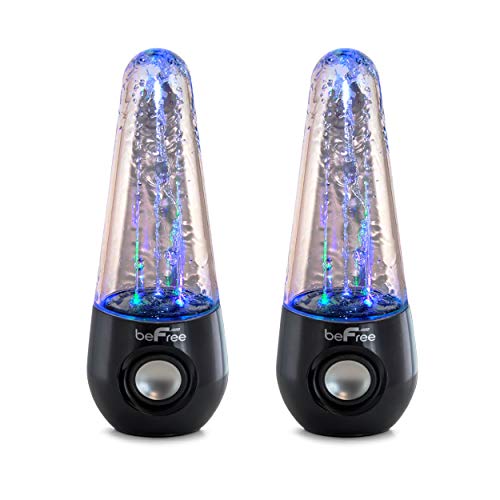
The beFree Sound BFS dancing water speakers blend sensory entertainment with casual audio output. Designed as a dual-tower desktop system, each unit houses clear fluid chambers containing multi-colored LED water jets that react dynamically to the beat of your music. Rather than focusing solely on sterile acoustic engineering, this speaker set is built to provide an engaging, ambient desk centerpiece that enlivens study spaces and gaming setups alike.
In everyday use, the system excels as a visual and auditory desktop companion. Connecting to laptops, smartphones, or tablets via Bluetooth is straightforward, giving users wireless freedom without tethering mobile devices to the desk. When playing tracks with prominent percussion or dynamic peaks, the water jets pulse higher and faster, casting an attractive light pattern on nearby walls in dim or dark rooms.
For casual entertainment, YouTube videos, and vocal-heavy playlists, the audio output is intelligible and forward. The internal amplifier ensures the towers produce enough volume to fill a small bedroom or office cubicle comfortably. While serious audiophiles will notice the absence of chest-thumping bass, casual listeners will appreciate the unique blend of novelty visuals and hassle-free wireless performance.
Ultimately, the beFree Sound water speakers serve as an accessible, gift-worthy upgrade for anyone looking to add flair to their daily workspace. They fulfill a specific niche: delivering sufficient audio quality for background listening while providing an entertaining, music-synchronized light show that never fails to spark conversations.
Acoustically, the beFree Sound speakers feature an operating frequency response of 220Hz to 13,000Hz with a 4-ohm nominal impedance. Because the low-end spectrum begins around 220Hz, deep sub-bass and heavy low-frequency impacts are deliberately rolled off. Instead, the acoustic tuning concentrates firmly on the mid-bass and upper midrange, allowing speaking voices, podcasts, and acoustic instruments to remain intelligible and clean at moderate listening levels.
The high-frequency ceiling reaches up to 13,000Hz, which prevents the speakers from sounding shrill or fatiguing during long work sessions. While tracks rich in high-hats or orchestral overtones will lack the ultra-airy shimmer found on reference monitors, this rounded treble keeps compressed streaming audio sounding smooth. The built-in amplifier provides enough clean gain to reach comfortable room levels without excessive harmonic distortion, provided the volume is kept within reasonable nearfield boundaries.
The BFS towers measure approximately 8.5 inches tall, 6 inches wide, and 3 inches deep, striking a balance between desk presence and footprint economy. Weighing just around 1.5 pounds for the set, the housings consist of durable black plastic pedestals capped with sealed, impact-resistant transparent acrylic fluid reservoirs. Inside each reservoir, five precision water nozzles are paired with multicolor LEDs that illuminate the choreographed water movement.
Power delivery is handled via an included standard USB cable, allowing the speakers to draw energy directly from a PC tower, powered USB hub, or standard USB wall adapter. Audio transmission relies on low-latency wireless Bluetooth for cable-free streaming from modern source devices. The completely sealed fluid chambers require zero refilling or maintenance, ensuring the water jet mechanism remains reliable and mess-free over the lifespan of the system.
Step-by-Step Setup and Connection Guide for Water Dancing Speakers
Setting up water dancing speakers requires managing three distinct functions: power delivery, inter-speaker communication, and incoming audio signal routing. Because these compact systems integrate mechanical pumps, LED circuits, and audio drivers into a single enclosure, each connection plays a specific role. Understanding the physical layout of the cables and connectors eliminates guesswork during initial setup. Following the proper sequence ensures clear audio playback and responsive fluid motion from the moment you turn on the system.
Identifying Hardware Components and Included Cables
Water dancing speaker sets generally arrive as a two-piece stereo system consisting of an active primary speaker and a passive satellite speaker. The primary unit houses the main amplifier board, power input jack, volume controls, and either an auxiliary port or a wireless receiver. In contrast, the secondary speaker contains only the audio driver, LED lighting array, and water pump mechanism. Distinguishing between these two enclosures is the first step toward connecting the entire system correctly.
Connecting the two enclosures requires a specialized bridge cable that typically uses a mini-USB connector or a multi-pin plug. This bridge cable does not just carry the right-channel audio signal; it also delivers electrical current to power the secondary speaker’s LEDs and water jets. Failing to plug this interconnect cable firmly into both housings leaves one speaker completely silent and dark. Inspect both ends of this cord before installation to ensure the small connector pins are clean and straight.
The package also includes a standard USB power cable and a standard 3.5mm stereo auxiliary cord. The USB cable supplies the five-volt direct current required to drive the internal amplifier, illumination, and fluid motors. Meanwhile, the auxiliary cable transfers line-level analog audio from your playback hardware straight into the primary speaker’s preamplifier. Keeping these cables organized makes routing them across your desk much simpler.
Step-by-Step Wired Connection to Computers and Mobile Devices
Begin your setup by placing both speakers upright on a flat, stable surface with the transparent fluid chambers pointing upward. Position the active unit on whichever side best accommodates your desk layout and gives you easy access to power sources. Keep enough slack in the connecting cables to avoid strain on the input ports located near the base of each housing. Giving the enclosures a stable resting spot prevents accidental tipping while you manipulate the cords.
Insert the secondary speaker bridge cable firmly into the designated output port on the back of the active speaker. Run the opposite end of this cable directly into the input jack on the passive satellite speaker until it sits flush against the housing. Establishing this physical link first ensures both channels receive balanced electrical power and coordinated pump commands before you introduce live audio. A loose connection here is the most frequent reason one speaker fails to operate.
Next, connect the small end of the supplied USB power cable into the power port on the master speaker. Plug the full-sized USB connector into an external power source, such as a dedicated USB wall adapter or an available computer port. If your model features a physical power switch, leave it off while you finish connecting your audio source. This precaution prevents unwanted pops or electrical spikes from reaching the drivers during cable insertion.
Connect one end of the 3.5mm stereo cable to the auxiliary input jack on the master speaker. Plug the other end into the headphone jack or line-out port of your computer, phone, or tablet. For users integrating these units with portable computers, reviewing connections for compact notebook speakers can clarify how headphone ports handle auxiliary output levels. Turn on the power switch, and your wired stereo system is ready for sound checks.
Pairing Bluetooth-Enabled Water Dancing Speakers
Wireless water dancing models, such as the beFree Sound Bluetooth LED dancing water units, offer cordless playback alongside traditional auxiliary inputs. To initiate wireless pairing, ensure that the bridge cable between both speakers remains firmly attached so the satellite unit receives signals. Turn on the master speaker’s power switch and set the input selector to wireless mode if a dedicated switch exists. The internal amplifier will power on the lighting circuits to indicate the unit is active.
Most units indicate pairing readiness through a flashing blue indicator light or an audible chime emitted through the drivers. Access the Bluetooth settings menu on your smartphone, tablet, or laptop and enable the wireless scanning function. Look through the list of discovered devices for the speaker’s model identifier, and select it to establish the link. Pairing typically takes only a few seconds once the source registers the speaker’s broadcast beacon.
A steady indicator light or a confirmation tone signals a successful connection between your source device and the speaker system. Keep the source device within standard operating range, usually within thirty feet of the primary unit, to prevent audio stuttering or dropped packets. If the speaker does not appear in your device’s pairing list, power cycle both the speaker and your source device before attempting to scan again. Clearing old wireless profiles on your phone can also resolve stubborn pairing conflicts.
Inserting a physical 3.5mm auxiliary cable into some dual-mode models will automatically override the Bluetooth connection. If you want to stream audio wirelessly, disconnect any physical auxiliary plugs from the primary speaker’s jack. This step ensures the internal circuitry routes audio data from the wireless antenna straight to the onboard amplifier. Removing the analog cable allows the wireless receiver to maintain uninterrupted control over your audio stream.
Managing Power Delivery and Preventing Audio Hum
Proper power delivery is essential because water dancing speakers draw more current than standard desktop speakers due to their motorized pumps. While these units run on standard five-volt USB power, the source of that power directly affects both audio fidelity and pump performance. Plugging the USB power cable into an unpowered USB hub can result in weak water movement, dim LEDs, or audio cutouts during loud passages. Using a stable power supply prevents performance drops when the music gets lively.
Powering the speakers directly from a computer USB port while simultaneously connecting the computer’s 3.5mm headphone jack frequently introduces a buzzing sound known as a ground loop. This electrical interference occurs because the audio ground and the USB power ground share a common path through the computer’s motherboard. The rapid switching of the water pump motors can also inject mechanical noise directly into the analog audio path. The resulting buzz can become distracting during quiet musical passages.
The easiest way to eliminate this background hum is to plug the USB power cable into a separate USB wall charger rated for at least one to two amps. Isolating the power supply from the audio playback device breaks the electrical loop and provides clean direct current to the internal amplifier. Listeners exploring options like desktop speakers for music often employ this same isolation technique to maintain pristine audio clarity across their workspaces. Dedicated wall power keeps the audio quiet and the water pumps running smoothly.
Tuning Volume Levels to Optimize the Water Dance Effect
Water dancing speakers use an internal sensor circuit that triggers the mini-pumps based on the amplitude and frequency of incoming audio. With a typical frequency response spanning roughly 220Hz to 13,000Hz, the pumps usually react most strongly to rhythmic bass pulses and lower midrange beats. If the incoming audio signal is too weak, the fluid jets remain static at the bottom of the acrylic chamber even though music plays audibly. Understanding this signal threshold is key to getting the best visual reaction.
To achieve vigorous, rhythmic water movement, raise the volume level on your source device to around seventy-five or eighty percent. This strong input signal gives the internal trigger circuit enough dynamic voltage to activate the motor drivers on every musical accent. Once the source volume is properly calibrated, adjust the physical volume dial on the speaker itself to achieve your desired listening loudness in the room. This dual-stage adjustment keeps the water dancing without making the room uncomfortably loud.
Setting the source volume to maximum can occasionally cause clipping distortion in small drivers with a 4-ohm nominal impedance. If you hear crackling or harshness during punchy tracks, slightly back off the source volume until the sound cleans up. Finding the sweet spot between source output and speaker amplification ensures lively water action without sacrificing acoustic clarity. A balanced signal produces crisp high notes, punchy beats, and energetic water fountains simultaneously.
Diagnosing Common Connection and Playback Difficulties
If your speakers produce clear sound but the water fails to dance, the issue almost always stems from an insufficient audio input level or inadequate power. Verify that the track being played contains noticeable low-end rhythm, as ambient or speech-only audio rarely provides enough pulse energy to trigger the pumps. Also confirm that the USB power source provides steady voltage and is not being shared across multiple high-draw peripherals. Testing a different music track with distinct drum hits will quickly show whether the pump sensors are working.
When sound emerges from only one speaker while the other stays silent, immediately inspect the inter-speaker bridge cable. The small connectors on these bridge cables can easily work loose or sit partially unseated if bumped on a busy desk. Unplug the bridge cable from both ends, inspect the pins for debris or bending, and firmly reinsert each connector until fully seated. Swapping the cable ends or gently wiggling the wire will help determine if an internal wire fracture has occurred.
Persistent crackling or audio dropouts during wireless playback typically indicate local wireless interference or excessive distance from the source. Microwave ovens, thick walls, and crowded Wi-Fi routers can degrade the Bluetooth connection between your phone and the master unit. Move the audio source closer to the primary speaker and ensure no large metal objects sit directly between the devices. Unpairing and reconnecting the speaker refreshes the digital link and often resolves minor wireless handshake errors.
Safe Placement, Maintenance, and Enclosure Care
The transparent visual chambers on water dancing speakers are sealed factory units filled with specialized fluid, typically purified water or non-toxic mineral oil. You should never attempt to unscrew, puncture, or open these chambers to add or replace fluid, as breaking the hermetic seal will permanently ruin the mechanism. Always keep the speakers upright to ensure the pump impellers stay fully submerged and primed for smooth operation. Operating the speakers on their sides can trap air bubbles near the jets and stop the fluid from spraying properly.
Position the speakers away from direct sunlight, heating radiators, and excessive temperature fluctuations. High ambient heat can cause the fluid inside the sealed acrylic columns to expand, potentially stressing the adhesive seams and causing small leaks. Similarly, keep the units away from edges where pets, children, or stray cables could accidentally tip them over onto hard flooring. Stable placement protects the delicate internal electronics and ensures the fluid chambers remain completely watertight.
Clean the outer acrylic surfaces using a soft microfiber cloth slightly dampened with clean water or an anti-static display cleaner. Avoid harsh chemical solvents, alcohol wipes, or abrasive pads, which can scratch the transparent acrylic and leave cloudy marks that obscure the LED lights. Periodically inspect the rear cable connections to ensure dust has not accumulated inside unused auxiliary ports or USB jacks. Regular dusting maintains the visual clarity of the water jets and extends the life of your hardware.
Final Verification and Listening Checks
Once all physical cables or wireless links are in place, performing a quick verification test confirms that your setup is fully operational. Play a well-recorded track with a steady rhythm and watch for immediate synchronization between the audio beats, the LED color pulses, and the water jet height. Listen closely to both the primary and satellite speakers to verify that stereo separation is working properly across both channels. A balanced presentation indicates that your power supply, audio source, and inter-speaker bridge cables are all performing as expected.
Taking a methodical approach to connecting your water dancing speakers guarantees reliable sound reproduction alongside an engaging visual display. Linking the secondary speaker securely, providing dedicated wall power to avoid ground loops, and calibrating your source volume eliminate virtually every common setup headache. Following these practical checks ensures you get the most out of your multimedia setup without dealing with distorted audio, noisy hums, or inactive water jets. With proper connections and thoughtful placement, your illuminated desk speakers will deliver clean audio and lively visual effects every time you press play.





Write Your Review
No reviews yet. Be the first to share your experience!