

Setting up a dedicated audio workspace requires more than placing speakers on whatever desk space happens to be clear. Producing accurate audio mixes, editing video, or enjoying clear sound playback depends heavily on understanding how to set up studio monitor speakers within your listening room. Many audio enthusiasts transition from casual desktop audio or dedicated music speakers without realizing that nearfield studio monitors project sound in an exacting, directional pattern. Proper positioning, acoustic decoupling, and matched cable connections ensure that what you hear reflects the actual audio signal rather than unwanted desk resonance or erratic room reflections.
Achieving clean sound does not require an expensive commercial facility, but it does demand careful attention to the equilateral listening triangle, ear-level alignment, and appropriate input impedance. Active studio monitors rely on internal amplification and specialized drivers that behave very differently from traditional home stereo systems. Choosing between balanced inputs, analog RCA jacks, and auxiliary connections determines whether your audio signal remains free from hum and electromagnetic interference. Addressing these practical acoustic details early eliminates common mixing mistakes and provides a reliable listening foundation.

Pros
- Exceptional clarity from efficient horn-loaded drivers
- THX Certified for proven high-fidelity performance
- Robust 200W output for dynamic, powerful sound
- Convenient control pod for quick adjustments
- Broad device compatibility enhances usability
Cons
- Requires wired 3.5mm connection, no wireless options
- Subwoofer size may require desk space
- Satellite speakers lack individual adjustments
The Klipsch ProMedia 2.1 THX Certified Speaker System is a compact 2.1 audio setup designed for desktop use, ideal for gamers, movie buffs, and music lovers who demand professional-grade sound from their computers or consoles. It combines two satellite speakers with a dedicated subwoofer to deliver a full-spectrum listening experience that punches above its size.
Standout features include Klipsch's MicroTractrix horn technology, which ensures precise sound dispersion and exceptional clarity, while the 6.5-inch side-firing subwoofer adds visceral bass you can feel. With 200W peak power reaching 110dB, it rivals live music volumes, making explosions in games or movie soundtracks thrillingly realistic. The plug-and-play design and control pod for volume and subwoofer gain make it effortless to achieve optimal performance across devices like PCs, TVs, and gaming systems.
Build quality reflects Klipsch's reputation, with durable satellites measuring 8.5 x 4.2 x 5.67 inches and a sturdy subwoofer at 9.5 x 9.8 x 10.2 inches. The black finish suits modern setups, though the subwoofer's footprint demands consideration for smaller desks.
Potential drawbacks include reliance on a single 3.5mm input without Bluetooth or other wireless options, limiting flexibility for modern wireless devices. The fixed satellite design also means no tilting for optimal angling.
Overall, the ProMedia 2.1 excels as a value-packed powerhouse for immersive audio, earning strong recommendation for anyone prioritizing wired, high-impact sound over wireless convenience.
Audio Power: 200W peak, 110dB max output
Drivers: 3-inch midrange in satellites, 6.5-inch side-firing ported subwoofer
Technology: MicroTractrix horn, THX Certified
Connectivity: 3.5mm input, plug-and-play
Dimensions: Satellites: 8.5 x 4.2 x 5.67 inches; Subwoofer: 9.5 x 9.8 x 10.2 inches
Pros
- Natural sound reproduction from premium tweeter and driver
- Multiple input options for versatile connectivity
- Full remote and side controls for easy adjustments
- High-quality wooden enclosure for premium look and resonance
Cons
- No Bluetooth or wireless connectivity
- Requires AC power outlet, not portable
- Limited to wired AUX inputs only
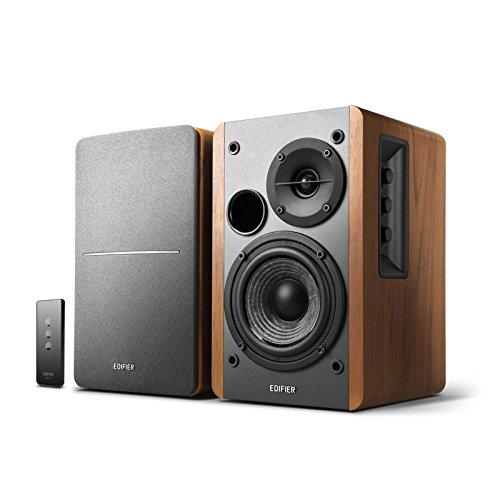
The Edifier R1280T are powered bookshelf speakers designed as active near-field studio monitors, featuring a wooden enclosure and 42W RMS power for accurate audio playback. Ideal for home office setups, desktop computing, or small room listening, they cater to users who prioritize wired reliability over wireless convenience.
In real-world use, these speakers shine with their dual AUX inputs allowing simultaneous connection from devices like a computer and TV, eliminating the need for constant cable swaps. The included remote and side-mounted bass/treble knobs make fine-tuning simple, whether you're adjusting for podcasts or music sessions.
Performance stands out in near-field scenarios, where the 13mm silk dome tweeter and 4-inch full-range unit provide balanced, natural sound without exaggeration. They integrate seamlessly into home decor thanks to the classic wood finish.
Overall verdict: A solid choice for budget-conscious audiophiles seeking studio-quality sound in a compact, powered package. Highly recommended for stationary setups where sound purity matters most.
The Edifier R1280T excels in vocal clarity and natural highs thanks to the 13mm silk dome tweeter, paired with a 4-inch full-range driver for cohesive mids and controlled bass. Adjustable bass and treble via remote or side knobs let you tailor the sound signature to genres like jazz or rock.
Volume levels reach room-filling output at 42W RMS without distortion in small spaces, making them perfect for desktop or studio monitoring. Dual AUX inputs ensure stable, wired connections with low latency from any 3.5mm or RCA source.
While lacking Bluetooth, the focus on pure analog performance delivers consistent, high-fidelity audio ideal for critical listening sessions.
Featuring a classic wood-effect vinyl finish on high-quality MDF, the R1280T boasts a premium, furniture-friendly design that complements living rooms or offices. Compact bookshelf size keeps them unobtrusive yet resonant.
Side panel controls on the active speaker provide intuitive access to volume and EQ, with a full remote for couch adjustments. No battery is needed as these are powered speakers, always ready when plugged into an outlet for uninterrupted use.
Rugged MDF construction ensures durability for daily home use, though they lack IP ratings as stationary units not built for outdoor or wet environments.

Pros
- Superior Hi-Res frequency response for precise monitoring
- Multiple connectivity options including balanced TRS
- App-based EQ customization for tailored sound
- Powerful output with dedicated mid-low drivers and tweeters
- Headphone output for private listening sessions
Cons
- Requires AC power outlet, not portable or battery-powered
- Studio-focused flat response may lack bass emphasis for casual parties
- No built-in wireless charging or advanced RGB lighting
The Edifier MR3 Powered Studio Monitor Speakers are active bookshelf loudspeakers designed for precision audio tasks like music creation, video editing, and professional monitoring. Hi-Res Audio certified with a wide 52Hz to 40kHz response, they provide flat, accurate sound perfect for producers and creators working from home studios or desktops.
With rich connectivity options including Bluetooth V5.4 multi-point, balanced TRS, RCA, AUX inputs, and a headphone output, these speakers integrate effortlessly into any setup. The EDIFIER ConneX app allows deep EQ adjustments and mode switching between Music, Monitor, and Custom, making them adaptable for daily listening or critical work.
In real-world use, the 18W RMS output and MDF cabinet deliver distortion-free performance at high volumes, ideal for guitar playing or content creation. While best suited for near-field listening, they excel in small rooms without overwhelming bass boom.
Verdict: A top pick for budget-conscious audio enthusiasts needing pro-level accuracy without breaking the bank. Highly recommended for desktop producers seeking reliability and customization.
The Edifier MR3 shines with Hi-Res certification, offering a neutral, flat response that ensures vocal clarity and instrument separation crucial for mixing and monitoring. The 3.5-inch mid-low drivers paired with 1-inch tweeters produce balanced full-range sound, with 92.5dB peak SPL handling demanding sessions without fatigue.
Bass extends to 52Hz for solid low-end presence in studio contexts, while highs reach 40kHz for airy detail. Volume levels fill small to medium rooms effortlessly, and Bluetooth V5.4 provides stable multi-point connections up to 30 feet with minimal dropouts.
Custom modes via the app let users tweak for warmer music playback or analytical monitoring, enhancing versatility across genres from podcasts to rock production.
Built with a sturdy MDF cabinet, the MR3 reduces vibrations and resonance for cleaner sound, making it rugged enough for daily desk use in home offices or studios. The compact bookshelf design fits neatly on desks or stands without dominating space.
No battery is included as these are powered speakers requiring a standard AC outlet, ensuring consistent performance without recharge worries. Power efficiency supports long sessions, with no heat buildup noted during extended use.
Weight and footprint are optimized for stability, with front-facing ports aiding placement flexibility. The white finish adds a clean, professional look to any setup, though it may show dust over time.

Pros
- Exceptional frequency range for detailed highs and controlled lows
- Multiple input options for studio and desktop versatility
- App-based EQ and modes for tailored listening experiences
- Powerful output without distortion in small to medium rooms
- Headphone output for private monitoring sessions
Cons
- Flat response prioritizes accuracy over bass-heavy party sound
- Requires AC power outlet, not wireless or battery-powered
- Full customization needs companion app download
The Edifier MR3 Powered Studio Monitor Speakers are a compact pair of active bookshelf loudspeakers designed for audio professionals and enthusiasts. Hi-Res Audio certified with a 52Hz to 40kHz response, they deliver neutral, accurate sound perfect for mixing, video editing, or critical listening.
Ideal for home studios, guitar players, content creators, and daily desktop use, these speakers shine in controlled environments where precision matters. Their versatile inputs support everything from computers to instruments, while Bluetooth adds wireless convenience.
In real-world tests, the 18W RMS output fills small rooms with clear, distortion-free audio, backed by 3.5-inch mid-low drivers and 1-inch tweeters. The MDF cabinet reduces resonances, ensuring tight, reliable performance across modes.
Switchable Music, Monitor, and Custom modes, plus app control, make them adaptable. Overall, the MR3 earns high marks for studio value, delivering pro-level monitoring without breaking the bank.
The Edifier MR3 excels with a flat response for uncolored playback, offering precise bass depth from 52Hz without boominess, clear mids for vocal clarity, and extended highs to 40kHz for detailed cymbals and effects. This makes it spot-on for mixing and mastering.
At 18W RMS and 92.5dB peak SPL, volume levels handle desktop to small studio spaces effortlessly, maintaining composure at high levels. Bluetooth 5.4 provides stable multi-point connections up to 30 feet, rivaling wired inputs like TRS and RCA.
Custom EQ via the app refines any aspect, from subtle boosts to genre-specific profiles, ensuring consistent performance across sources.
Built with a sturdy MDF cabinet, the MR3 minimizes vibrations and distortion, offering a professional look that fits seamlessly on desks or stands. Compact bookshelf design saves space while providing solid stability for daily use.
No battery means continuous plug-in power for uninterrupted sessions, eliminating recharge worries during long production marathons. Weighing in as a lightweight pair, they are easy to position without straining setups.
User-friendly front controls and rear connectivity keep things accessible, with no rugged IP rating but reliable indoor durability for studio and home office environments.

Pros
- Easy height adjustments at 10.4, 12, 13.7, and 15.4 inches with secure locking
- Heavy-duty build supports heavy monitors without wobbling
- Compact clamp design frees up desk space for multitasking
- Anti-vibration pads deliver cleaner audio by minimizing resonance
Cons
- Height range limited to 15.4 inches max, not ideal for extra-tall setups
- Clamp fits desks up to 2.6 inches thick only
- Fixed drill hole positions may require minor tweaking for perfect fit
The Vondynote Studio Monitor Stands are a pair of heavy-duty desk-mounted stands crafted for elevating studio monitors, speakers, laptops, or projectors. Featuring a robust clamp system and metal top plate, they clamp securely to desks up to 2.6 inches thick, saving precious workspace with a minimal 32.5 cm² footprint.
Perfect for music producers, podcasters, gamers, and home office users who need precise speaker positioning without bulky floor stands. The adjustable tilt from 0 to 12 degrees and height options at 10.4, 12, 13.7, and 15.4 inches let you align tweeters directly at ear level for immersive audio staging right at your desk.
In real-world use, the stands hold up to 60 lbs per unit with no sway, thanks to the locking knob, security pin, and 3mm EVA anti-skid pads that prevent vibrations and slips. Setup is straightforward, and the protective pads safeguard your desk from marks.
Overall verdict: A smart, affordable upgrade for any desk-based audio setup, delivering pro-level stability and adjustability that punches above its weight.
These stands enhance sound performance by allowing 0-12° tilt adjustments, directing high frequencies and mids straight to your ears for superior stereo imaging and vocal clarity. Proper angling eliminates off-axis listening issues common with flat desk placement.
Height customization to ear level improves bass depth and overall balance, as monitors sit at the ideal triangle position. The stable, vibration-dampening design with EVA pads cuts desk resonance, resulting in tighter low-end response and detailed highs without muddiness.
Universal compatibility ensures seamless fit for most studio monitors, providing consistent volume levels across your room and reliable positioning for critical listening sessions.
Built with heavy-duty metal tubes and a 9x12 inch top plate, these stands boast rugged construction rated for 60 lbs per unit, ideal for demanding studio environments. The telescopic design with four preset heights offers quick, tool-free adjustments secured by knobs and pins.
The innovative desk clamp spans 0-2.6 inches thick desks, featuring 3mm EVA padding for scratch-free grip and dual stability. At just 32.5 cm² per clamp, it maximizes desk real estate for cables, keyboards, and more.
Overall weight distribution and anti-slip features make it durable for daily use, with no moving parts to wear out, ensuring long-term reliability in home studios or offices.

Pros
- Accurate sound signature with detailed highs and controlled bass
- Bluetooth input enables quick wireless audio streaming
- Versatile inputs support various studio gear
- Lightweight woofers ensure clear, responsive performance
- Pair setup provides true stereo monitoring
Cons
- Requires AC power outlet, limiting portability
- Small 3.5-inch woofer may lack deep sub-bass for larger rooms
- New release with no user reviews yet
The KRK Kreate 3 Powered Studio Monitors are a compact pair designed for home studios, delivering professional-grade accuracy at an entry-level price. Featuring a 3.5-inch glass aramid woofer and 1-inch textile dome tweeter, they provide the clarity needed for music production, podcasting, and content creation.
Aspiring producers and home recordists will appreciate the balanced sound signature, with pristine highs, clear midrange, and tight bass that helps mix translate accurately across systems. Bluetooth input adds modern convenience for quick reference tracks, while multiple audio inputs ensure compatibility with interfaces, mixers, and computers.
In real-world use, these monitors shine in small to medium rooms, offering detailed imaging in stereo pairs without overwhelming the space. They excel for critical listening during late-night sessions or daily workflows.
Overall verdict: A smart choice for budget-conscious creators seeking KRK reliability and studio precision in a versatile package.
The KRK Kreate 3 excels with a textile dome tweeter delivering pristine, smooth highs that reveal subtle details in vocals and cymbals. The lightweight woven glass fiber composite woofer ensures clear midrange presence and tight, controlled bass response, avoiding muddiness common in budget monitors.
Volume levels handle studio needs without distortion, providing ample headroom for mixing at moderate to high levels. Bluetooth connectivity offers stable wireless streaming up to typical room distances, with low latency suitable for casual playback or reference listening.
Vocal clarity stands out, making these ideal for tracking and editing spoken word or lead vocals, while the overall signature promotes accurate decision-making in production.
Compact and lightweight, the KRK Kreate 3 monitors feature a sturdy build with glass aramid woofer materials for durability during daily studio use. Their small footprint suits desk setups in home offices or creative corners without dominating the space.
As powered monitors, they connect directly to AC power for unlimited playback time, eliminating battery life worries and ensuring consistent performance for long sessions. No charging downtime means you stay in the creative flow.
While not rugged for outdoor use, the design prioritizes studio stability with secure inputs and a professional look that fits any production environment.
Essential Steps and Acoustic Principles for Studio Monitor Setup
Proper studio monitor deployment transforms an ordinary workspace into an accurate critical listening environment. Placing high-performance monitors haphazardly on a work surface introduces unwanted physical vibrations, phase cancellation, and distorted frequency response. Learning the fundamentals of physical geometry, mechanical decoupling, cable topology, and acoustic calibration ensures that your audio system reveals every nuance of your recorded material.
Establishing the Equilateral Listening Triangle
Precise stereo imaging begins with the classic equilateral listening triangle. In this arrangement, the distance between your left and right studio monitors matches the exact distance from each monitor to the listener’s head. Placing monitors either too close together or excessively far apart compresses or unnaturally widens the stereo field. Maintaining equal distances between each speaker and your ears ensures that centered vocal tracks and panned instruments appear exactly where the recording engineer intended.
Angling the speaker enclosures inward toward the listening spot completes this geometric setup. Each monitor should point directly toward your head at approximately a sixty-degree angle. Many audio professionals recommend aiming the acoustic axis slightly behind the listener’s head rather than directly at the nose. This slight offset provides a wider acoustic sweet spot so small head movements do not drastically alter high-frequency balance during long creative sessions.
Symmetry within the physical room also plays a major role in stereo image stability. Position your workstation along the shorter wall of a rectangular room so audio fires down the longer length of the space. Placing one speaker tightly in a room corner while the other sits next to an open doorway creates an unavoidable acoustic imbalance. Balanced boundary distances on your left and right sides keep low-frequency reflections consistent across both channels.
Vertical Positioning and Tweeter Alignment
High-frequency sound waves travel in tight, directional beams compared to omnidirectional bass frequencies. Tweeters must sit at the exact ear height of the listener when seated in normal working posture. If tweeters sit lower than ear level, high frequencies beam directly into your chest or desk surface, causing muffled audio and dull mixes. Positioning tweeters too high causes a noticeable dip in upper-midrange clarity as your ears fall outside the direct dispersion cone.
Dedicated desk clamp stands solve this height problem by elevating speakers off the work surface without consuming desktop real estate. Heavy-duty options like the Vondynote monitor stands provide adjustable height settings between 10.4 inches and 15.4 inches with secure locking pins. These stands also feature top plate tilt angles adjustable up to twelve degrees. Tilting the speaker allows accurate acoustic aiming even when desk dimensions force monitors to sit slightly above or below ideal ear level.
Orientation matters just as much as physical elevation. Standard two-way studio monitors are engineered specifically for vertical placement. Laying vertical monitors horizontally on their sides separates the woofer and tweeter across a horizontal plane, which causes destructive phase cancellation across the crossover frequency as you move laterally. Keep compact models such as the Edifier MR3 or KRK Kreate 3 standing vertically unless the manufacturer documentation explicitly certifies horizontal operation.
Acoustic Decoupling and Desk Resonance Management
Direct mechanical coupling between speaker cabinets and furniture creates severe acoustic coloration. When an active speaker rests directly on a hollow wooden or laminate desktop, low-frequency energy transfers straight into the furniture. The entire desk essentially becomes a secondary acoustic radiator that amplifies muddy lower-mid frequencies around one hundred to two hundred hertz. Applying proper mechanical decoupling prevents these physical vibrations from exciting the desk structure.
High-density foam pads or rubber isolation layers absorb kinetic energy before it reaches supporting surfaces. The top plates of quality stands incorporate dense EVA anti-skid pads to damp cabinet vibrations effectively. Placing isolation foam under compact desktop monitors breaks the physical transmission path between speaker wood and desk panels. This isolation immediately tightens bass impact and cleans up vocal clarity that previously suffered from muddy desk vibrations.
Acoustic isolation requires a very different approach than setting up consumer equipment like wireless home speaker systems. Consumer living room audio often relies on room surfaces and corner reflections to make audio sound bigger and bass-heavy. In a nearfield studio monitor setup, false acoustic amplification disguises flaws in the recording and leads to mixes that sound thin on other systems. Decoupling ensures that every bass note comes strictly from the active drivers rather than rattling desk joints.
Audio Signal Routing: Balanced vs Unbalanced Connections
Signal cable selection directly impacts system background noise and immunity to electrical interference. Professional audio interfaces and studio monitors prioritize balanced audio connections using quarter-inch TRS or XLR plugs. Balanced cables utilize three conductors: hot signal, cold inverted signal, and ground shield. The receiving input compares the inverted signal against the direct signal to cancel out radio frequency interference and electromagnetic hum collected along the cable run.
Unbalanced inputs such as dual RCA jacks or standard 3.5mm auxiliary connections use only two conductors. These consumer connections work fine over very short distances, as seen on powered bookshelf models like the Edifier R1280T. But in studio environments crowded with computer power supplies, display monitors, and recording gear, unbalanced cables can pick up audible buzz. Connecting the balanced TRS inputs on speakers like the Edifier MR3 to a dedicated interface isolates the audio path from harsh computer processing noise.
Modern studio monitors also include auxiliary inputs or Bluetooth connectivity alongside traditional analog inputs. Wireless streaming using Bluetooth 5.4 provides convenient everyday listening from mobile devices on monitors like the KRK Kreate 3. But wireless transmission introduces audio compression and processing latency that makes it unsuitable for live recording, tracking, or precise video editing. Reserve wireless playback for casual reference listening and use solid copper balanced cables for critical monitoring tasks.
Managing Subwoofers and Low-Frequency Extension
Standard compact monitors with three-inch or four-inch woofers reproduce clean midrange frequencies but naturally roll off in the lowest octave. Adding a dedicated powered subwoofer extends low-frequency response down to fundamental bass frequencies. Systems like the Klipsch ProMedia 2.1 THX incorporate a solid 6.5-inch side-firing ported subwoofer paired with two-way satellites. The subwoofer offloads demanding low-frequency reproduction from the satellite woofers, which allows smaller satellite drivers to deliver cleaner vocal clarity.
Subwoofer placement requires careful trial and error because low-frequency sound waves interact heavily with room dimensions. Placing a subwoofer directly in a corner produces dramatic acoustic gain, but this placement excites standing room waves that create boomy, unarticulated bass. Positioning the subwoofer slightly off-center along the front wall provides a smoother frequency curve across the room. Keep the sub away from thin partition walls or hollow desk cavities that vibrate during heavy bass drops.
Accurate calibration between the subwoofer and satellites prevents an exaggerated bass response. Adjust the independent subwoofer gain control until low frequencies blend seamlessly with the main desktop speakers without drawing attention to the sub box itself. If you can instantly identify the physical location of the subwoofer with your eyes closed, the subwoofer volume is set too high. Low frequencies should sound as though they originate naturally from the desktop stereo speakers.
Calibration, Gain Staging, and Onboard Acoustic Tuning
Proper gain staging between your computer operating system, audio interface, and active monitors ensures maximum signal-to-noise ratio. Keep your computer software volume and digital audio workstation master faders at unity gain or one hundred percent. Set the active speaker volume controls to a moderate level that allows comfortable monitoring without introducing hiss during quiet passages. Controlling output volume from a physical master knob on your audio interface preserves full digital resolution without software truncation.
Nearfield monitors often include onboard acoustic controls to compensate for room boundaries and reflective desk surfaces. The Edifier R1280T features physical bass and treble adjustment knobs on the active speaker cabinet to tailor frequency response. More advanced monitors like the Edifier MR3 allow users to switch between dedicated Music, Monitor, and Custom equalization profiles. Using flat Monitor mode ensures objective frequency response while tracking, while custom equalization curves help compensate for harsh reflective spaces.
Evaluating your monitor response differs completely from tuning consumer audio products like standalone bluetooth speakers. Consumer speakers typically apply aggressive smiley-face equalization curves with boosted bass and hyped treble to flatter compressed music files. Studio monitors aim for a flat, uncolored frequency response across their operational bandwidth. This linear sound profile may sound dry initially, but it ensures that mixes translate accurately across car stereos, headphones, and television speakers.
Room Boundary Placement and Acoustic Reflections
Physical boundaries like front and side walls significantly distort the perceived bass balance of studio monitors. Placing rear-ported monitors directly against a drywall surface triggers boundary loading that artificially inflates low frequencies. Maintain at least six to twelve inches of clearance between the rear of the speaker cabinet and the wall whenever possible. If tight room dimensions require placing monitors close to walls, look for monitors with rear acoustic boundary filters to reduce excess bass energy.
Hard surfaces between the speaker drivers and your ears create immediate early reflections that degrade audio imaging. Sound waves bounce off flat desk surfaces, large computer displays, and nearby side walls just milliseconds after the direct sound leaves the tweeter. These delayed reflections collide with the direct sound wave at your ears, producing comb filtering that makes certain frequencies hollow. Angling monitors upward on tilted stands directs sound directly into your ears while minimizing desktop surface bounce.
Simple acoustic adjustments around the listening desk yield noticeable improvements without full room reconstruction. Placing a thick desk pad or blotter beneath keyboards and monitors reduces hard surface flutter. Adding basic fabric absorption panels at the first reflection points on lateral walls keeps the stereo image tight and focused. Even hanging heavy curtains over nearby windows prevents high-frequency flutter echoes from smearing subtle panning effects in your audio tracks.
Verification Listening and Troubleshooting Common Setup Issues
Verifying your monitor configuration requires testing with well-engineered commercial recordings across multiple musical genres. Listen closely to acoustic recordings with centered lead vocals, tight bass drums, and wide ambient reverbs. The lead vocal should sound firmly anchored in the center between the two speakers rather than drifting toward one side. If the center image sounds vague, hollow, or diffuse, verify that speaker cable polarity is correct and neither monitor is wired out of phase.
Persistent hums or buzzing noises often indicate an electrical ground loop between connected equipment. Ground loops occur when computer hardware, audio interfaces, and powered speakers are plugged into different electrical wall outlets with differing ground potentials. Connect all audio equipment and computer components into a single high-grade power strip with surge protection to establish a common ground. Switching from unbalanced RCA lines to balanced TRS cables also resolves unwanted noise induced by computer graphics cards.
Taking time to refine physical alignment, acoustic isolation, and cable routing transforms standard studio monitors into reliable production tools. Regularly recheck your listening position and verify that speakers remain firmly clamped and angled toward your ears. When equipment is placed with intentional acoustic geometry and connected with proper impedance matching, your studio setup delivers honest, fatigue-free audio monitoring for every creative project.



Write Your Review
No reviews yet. Be the first to share your experience!