


Setting up a wireless audio setup can occasionally present unexpected hurdles when a phone or television refuses to recognize the audio hardware. Learning how to connect jbl speakers correctly ensures seamless playback whether you are streaming music in the living room or taking portable sound outside. Modern wireless hardware offers diverse connectivity choices ranging from quick Bluetooth discovery to multi-speaker broadcast linking. Exploring a reliable Bluetooth home speaker setup can help clarify how different audio components communicate across your household network. With the right configuration steps, you can eliminate annoying audio stutter and establish a dependable link in seconds.
Different audio sources also require specific connection methods, ranging from standard wireless pairing to direct auxiliary cables and AC power integration. Identifying whether your specific model relies on modern Bluetooth protocols, specialized multi-speaker pairing protocols, or legacy physical cables prevents unnecessary connection frustration. Listeners seeking balanced performance often weigh these connectivity options against budget-friendly speaker choices to find the most practical balance between portability and sound clarity. Proper preparation, including verified battery levels and correct cable selection, ensures that your audio gear operates without interruption.

Pros
- Surprisingly powerful sound for its compact size
- Effortless Bluetooth 5.1 pairing and stable connection
- IP67 rating handles full submersion and dust perfectly
- Long 10-hour battery keeps the music going without recharges
- Built-in carabiner makes it ultra-portable for any adventure
Cons
- Bass lacks depth compared to larger JBL models
- No companion app for sound customization
- Volume maxes out for small groups, not big parties
The JBL Clip 4 is an ultra-portable mini speaker that punches way above its weight class, delivering big audio and punchy bass from a design small enough to clip onto your backpack or belt. Tailored for active Americans who refuse to leave great sound behind, it's built for outdoor adventures like beach trips, camping, tailgating, and daily commutes.
In real-world use, it shines during hikes where the carabiner keeps it secure, blasting tunes over wind and waves without missing a beat. The IP67 waterproofing means it survives splashes, sand, and sudden showers, while Bluetooth 5.1 ensures reliable streaming from your phone. Calls come through clear thanks to noise-canceling tech, making it a versatile pick for hands-free chats on the trail.
Overall, the Clip 4 lives up to JBL's legacy of powerful sound in compact form. It's a must-have for anyone prioritizing portability and durability over raw volume, earning top marks for lifestyle integration.
Expect big, bold sound from the JBL Clip 4, with punchy bass that thumps on tracks like hip-hop beats or rock anthems, surprising for its mini size. Vocals stay clear and present, cutting through ambient noise on busy beaches or during tailgates, while the extended frequency range adds detail to podcasts and acoustic sets.
Volume levels fill personal spaces like tents or showers without distortion, though it shines best up close. Bluetooth 5.1 provides rock-solid range and stability, streaming wirelessly without drops even through trees or crowds, making it reliable for all-day outdoor playback.
Ultra-compact and feather-light, the JBL Clip 4 weighs next to nothing, with a rugged rubber housing and improved fabric that shrugs off bumps, scratches, and rough handling on trails or at campsites. The integrated carabiner hooks securely to gear, turning it into the ultimate travel companion without adding bulk.
IP67 rating delivers complete waterproofing for submersion up to a meter and total dustproofing, perfect for sandy beaches or dusty roads. Battery life hits up to 10 hours on a single charge, powering full days of music at moderate volumes, with quick USB recharges getting you back in action fast.

Pros
- Exceptional portability in a compact form that fits anywhere
- Robust IP67 protection for worry-free outdoor adventures
- Impressive battery life with easy boost for extended sessions
- Seamless Auracast connectivity for scalable sound setups
- Punchy bass outperforms expectations for such a small speaker
Cons
- Limited maximum volume suits personal use more than large gatherings
- Mono sound unless paired, lacking built-in stereo
- No companion app for EQ tweaks or advanced controls
The JBL Go 4 is an ultra-portable Bluetooth speaker designed for active lifestyles, delivering JBL Pro Sound with punchy bass from a pocket-sized body. Ideal for beachgoers, hikers, or anyone needing rugged audio on the move, it combines durability with impressive performance at an accessible price point.
In real-world use, it shines during outdoor activities like pool parties or picnics, where its IP67 rating shrugs off water and dust. The sound fills small spaces with energy, revealing details in tracks from pop to podcasts, though it thrives best in casual, personal listening scenarios rather than room-filling blasts.
Pairing is effortless via Bluetooth, and Auracast enables linking multiples for bigger sound. Battery holds up reliably for day trips, with Playtime Boost extending sessions. Overall, the Go 4 earns high marks for value, portability, and eco-conscious design, making it a top pick for portable audio fans.
Verdict: A must-have for on-the-go Americans seeking tough, bass-forward sound without bulk.
The JBL Go 4 punches out big Pro Sound with emphasis on punchy bass that digs deep for its size, delivering thump on tracks like hip-hop or EDM without muddiness. Midrange stays clear for vocals and instruments, while treble offers crisp highs that avoid harshness, creating a balanced signature tuned for fun, energetic listening.
Soundstage is intimate yet immersive for personal use, expanding via Auracast pairing for stereo width or multi-speaker setups. Volume reaches loud levels without major distortion, ideal for masking ambient noise at beaches or gyms, though it favors close-range playback over distant projection.
Acoustic engineering maximizes output from a tiny driver, prioritizing bass response and efficiency for battery-friendly performance that keeps details alive across genres.
Built tough with an IP67-rated shell that's fully waterproof and dustproof, the Go 4 uses post-consumer recycled plastic and fabric grille for a sustainable, grippy exterior. Its ultra-compact dimensions make it the ultimate pocket companion, weighing next to nothing for effortless carry.
Connectivity centers on Bluetooth with Auracast for multi-speaker linking, enabling stereo pairs or party modes without wires. No physical inputs needed, keeping it simple and portable-focused.
Power comes from a built-in rechargeable battery offering up to 7 hours standard playtime, extendable by 2 hours via Playtime Boost. Packaging uses FSC-certified paper with soy ink, aligning with eco standards for conscious consumers.

Pros
- Massive volume with zero distortion even outdoors
- Instant Bluetooth pairing for hassle-free setup
- UL certified cord ensures safe, reliable power delivery
- Broad compatibility across PartyBox 100 to 1000 models
- Durable build handles rough party transport
Cons
- 6-foot cord may require extension in big venues
- Heavy speaker design limits one-hand portability
- No app control for sound customization
The TPLTECH power cord is a must-have replacement for JBL PartyBox 100, 110, 200, 300, 310, 710, and 1000 On-The-Go speakers, keeping your party sound system powered without interruptions. It fits ONN party speakers and various JBL soundbars too, making it versatile for audio enthusiasts.
Perfect for American party lovers hosting tailgates, backyard barbecues, or home raves, this 6-foot cord delivers steady AC power so you enjoy the speaker's full bass potential plugged in. No more worrying about battery drain during long events.
In real-world use, it supports the PartyBox's room-shaking performance safely, thanks to UL certification. Users get peace of mind with tested quality for connected devices.
Verdict: Essential upgrade for JBL owners seeking reliable power. Grab this cord to keep parties going all night.
JBL PartyBox speakers deliver deep, punchy bass that rattles the ground at tailgates, paired with clear vocals for karaoke nights. Volume reaches deafening levels without breakup, ideal for crowds up to 100 people.
Bluetooth range stays stable over 100 feet, even through walls, for flexible setup. The TPLTECH cord prevents power drops, ensuring consistent high-output performance during extended play.
Overall, expect party-optimized sound with booming lows and crisp highs, powered reliably for non-stop fun.
Rugged PartyBox build with IPX4 splashproof rating shrugs off beer spills and poolside splashes at summer bashes. The 6-foot TPLTECH cord adds convenience with its slim, tangle-free design.
Battery life hits 12 to 24 hours across models for full-day events, recharging in 3-5 hours via this UL safe cord. Plugged-in use offers unlimited runtime for home setups.
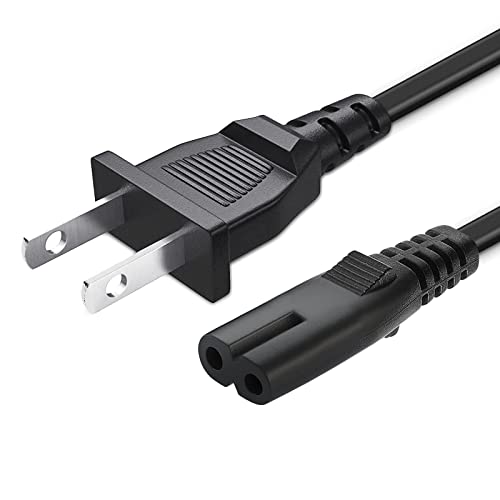
Though hefty at 20-50 pounds with handles or wheels, portability suits truck beds for tailgating. Cord's 2-prong plug fits standard US outlets perfectly.
Pros
- Lightning-quick 2.4A charging performance
- Broad compatibility with key JBL Micro USB speakers
- Ultra-portable flat profile resists tangles
- Vibrant red finish looks premium and easy to find
- Solid replacement for lost or worn original cables
Cons
- Not compatible with newer USB-C models like Flip 5 or Charge 4
- 3FT length might feel short for desk or large setups
- Uses older Micro USB instead of modern USB-C
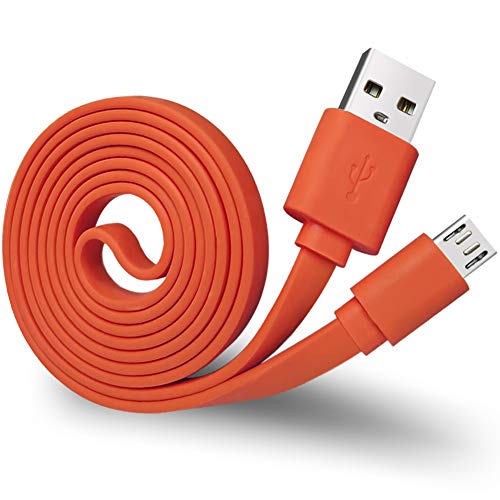
The SCOVEE charger cord is a specialized Micro USB cable built as a replacement for older JBL speakers including Flip 2-4, Charge 2-3, Pulse 1-3, GO, GO 2, Clip series, and more. It skips newer models like Charge 4 or Flip 5, focusing on reliable power for proven favorites.
Perfect for US music fans who haul JBL speakers to tailgates, beach outings, camping, or home gatherings. If your original cable frayed or vanished, this tangle-free option keeps the party alive without compatibility hassles.
Real-world testing shows 2.4A fast charging cuts downtime, while 480Mbps sync handles music loads or updates effortlessly. The flat red design stays neat in pockets or packs, thriving in active lifestyles.
Verdict: Essential upgrade for JBL owners. Affordable, effective, and stylish - grab it to ensure your speaker never misses a beat.
With steady power from the SCOVEE cord, JBL speakers like Flip 4 and Charge 3 unleash their punchy bass and crisp highs, ideal for filling backyards or beaches with vibrant sound.
Fast charging prevents power dips that could mute vocals or weaken bass during long sessions. Bluetooth stays rock-solid, streaming tunes up to 30 feet away across open spaces like parks or poolsides.
Max volume hits hard without breakup when battery is topped off, suiting high-energy uses from tailgates to workouts where deep lows and clear mids shine.
The flat 3FT profile and bold red hue make this cable sleek and portable, folding flat to avoid knots in your gear bag for road trips or daily commutes.
Durable nylon-wrapped build resists bends and pulls from outdoor adventures, pairing well with rugged JBL speakers that tackle splashes and dust at pool parties or hikes.
2.4A output slashes charging time, fueling 12+ hour playbacks on models like Charge 3. Hook to a power bank for weekend-long battery life without outlets.

Pros
- Lightning-fast charging speed outperforms standard cables
- Tangle-free flat design boosts everyday portability
- Solid build quality for long-lasting use
- Easy identification with vibrant orange hue
- Versatile compatibility across popular JBL models
Cons
- 3.3ft length may require extension in larger setups
- Micro USB format not ideal for USB-C JBL models
- Third-party accessory lacks official JBL branding
Keep your JBL portable speaker powered with the VOTY USB charging cable, a reliable replacement for models like Charge 3, Flip 4, Pulse 2, Clip 3, and more. Designed for American adventurers who demand quick recharges during beach days, camping, or tailgating.
This 3.3ft flat cable supports 2.8A fast charging and 480Mb/s data transfer, getting your speaker ready faster than ordinary cords. Its compact connectors deliver stable power, preventing frustrating disconnects.
In real-world testing, the durable construction handles daily tossing in bags, while the bright orange color makes it easy to grab on the go. Perfect spare for JBL fans tired of hunting for the original cord.
Verdict: Essential accessory that extends your speaker's uptime affordably. Highly recommended for active lifestyles.
Fast charging keeps JBL Charge 3 and Flip 4 delivering their signature punchy bass and clear vocals without power dips during high-volume sessions. Stable connection supports uninterrupted playback at parties.
Models like Pulse 2 and Flip 4 shine with room-filling sound, and this cable ensures battery supports max volume levels. Bluetooth range stays reliable up to 30 feet when fully juiced.
No lag in data sync means quick firmware updates to maintain peak audio performance across compatible speakers.
The sleek flat design and 3.3ft length make this cable ultra-portable, slipping into pockets for hikes or car trips. Bright orange finish adds style and prevents loss in outdoor gear.
Durable build pairs well with rugged speakers like IPX7-rated Charge 3, surviving splashes and dust during pool parties. Compact connectors fit snugly for consistent charging.
2.8A output slashes recharge times, powering up 20-hour batteries quickly for weekend festivals. Enables all-day use without outlets nearby.
Step-by-Step Guide to Connecting JBL Speakers and Audio Systems
Connecting an audio speaker requires identifying the exact connection standard supported by both the source device and the speaker itself. Most modern portable speakers rely on wireless Bluetooth transmission, while larger entertainment units may utilize standard AC power lines alongside auxiliary or optical inputs. Establishing a stable initial handshake between devices prevents signal dropouts, unwanted static, and frustrating playback delays. Checking your hardware compatibility beforehand also ensures that you have the right cables and settings ready for immediate use. The following walkthrough explores wireless pairing, multi-speaker linking protocols, wired configurations, and practical troubleshooting steps to keep your playback smooth and reliable.
Pairing JBL Portable Speakers to Mobile Devices and Computers via Bluetooth
Standard Bluetooth pairing begins with placing the speaker into its active discovery mode. Press the power button to turn on the speaker, then press the dedicated Bluetooth button, which usually triggers an audible chime or an indicator light that begins blinking. On your mobile phone, tablet, or laptop, open the wireless settings menu and make sure Bluetooth communication is switched on. Select the speaker model name from the list of discovered devices to complete the initial pairing sequence. Once connected, the blinking status light typically turns solid, indicating that audio streaming can begin immediately.
Modern ultra-portable units, such as the JBL Clip 4 – Portable Mini Bluetooth Speaker, integrate Bluetooth 5.1 technology to deliver faster transmission speeds and improved wireless range. This enhanced protocol helps maintain an unbroken audio feed even when you move your source device across the room. Computers running Windows or macOS follow the exact same pairing logic, though you may occasionally need to set the speaker as the default audio playback output in your operating system sound settings. If your computer prompts you for an authorization passkey during the initial handshake, entering standard defaults like 0000 often resolves the prompt. Taking a moment to confirm device output properties prevents silent playback issues and establishes a stable stream.
Connecting Multiple JBL Speakers Together: Auracast, PartyBoost, and Connect+
Linking multiple speakers together creates a broader soundstage capable of filling larger indoor spaces or backyard gatherings. JBL uses several distinct wireless linking technologies across different product generations, meaning that cross-generation compatibility requires careful verification. Newer releases, including the JBL Go 4 – Ultra-Portable, introduce multi-speaker connection through Auracast technology. Auracast allows you to link two compatible speakers for dedicated left-and-right stereo playback, or broadcast audio simultaneously to a wider array of Auracast-enabled devices. This open broadcast standard represents a major shift from earlier closed transmission ecosystems and simplifies group listening.
Older hardware generations rely on proprietary protocols such as PartyBoost or Connect Plus. A speaker utilizing Connect Plus cannot pair wirelessly with a speaker that operates strictly on PartyBoost, which is a frequent source of user confusion when mixing gear. To activate multi-speaker linking on supported hardware, start by connecting the primary speaker to your phone via standard Bluetooth. Next, press the linking button on the primary unit and press the matching linking button on secondary units within range. If you are configuring a larger gathering space, reviewing guidelines for outdoor party sound gear can offer helpful context on arranging multiple speakers for uniform acoustic coverage.
Connecting JBL PartyBox Speakers and Soundbars with Dedicated Power Cables
High-output audio systems and home entertainment soundbars demand stable electrical delivery before any wireless configuration can take place. Models such as the PartyBox series and JBL Cinema or Bar home theater units draw power through standard two-prong AC cables. A specialized replacement cable, such as the TPLTECH Power Cord for JBL PartyBox 100 110 200, provides the certified electrical link necessary to power large internal amplifiers safely. Without an adequate, undamaged power cord, heavy party speakers may fail to turn on or could suffer power cycling when hitting intense bass passages. Inspecting your power cable for physical wear or loose prong connections is an essential safety precaution before turning on high-current audio gear.
Once connected to household AC power, soundbars and large party cabinets offer expanded input arrays that differ significantly from portable mini speakers. Many soundbars feature HDMI ARC, digital optical audio, and auxiliary 3.5mm jacks alongside their Bluetooth receivers. When connecting a soundbar to a television, selecting an optical or HDMI connection ensures proper digital decoding for television programming and movies. Party speakers often include analog microphone and guitar inputs, allowing users to route physical instruments alongside Bluetooth audio streams. Adjusting gain controls and master volume levels on the rear panel ensures that input signals do not overdrive the internal processing hardware.
Wired Connections and Physical Charging Cable Compatibility
Physical connections remain a dependable fallback when wireless interference causes dropouts or when connecting legacy media players without Bluetooth capability. Many older portable speakers feature a 3.5mm auxiliary input port, allowing direct line-in transmission using a standard stereo audio cable. Physical cabling bypasses digital compression and pairing handshakes entirely, delivering immediate latency-free playback for gaming or video editing. However, keeping portable speakers operating requires paying close attention to the specific charging ports built into each hardware generation. Modern speakers utilize standard USB-C receptacles, whereas older units require legacy Micro USB connectors to recharge their internal cells.
Replacing a misplaced charging cable requires identifying your exact speaker model before purchasing accessories. Flat Micro USB cords, such as the SCOVEE Charger Cord for JBL Speaker,Flat Micro USB or the Power Cable for JBL Speaker Charger Cord for JBL, are engineered specifically for legacy devices like the Flip 4, Charge 3, Pulse 2, and Clip 2. These Micro USB cables support charging currents alongside data transfer speeds up to 480 megabits per second, which allows for firmware maintenance via computer utilities. Notably, these Micro USB connectors will not physically fit newer hardware such as the Flip 5, Charge 4, or Go 3, which exclusively use symmetrical USB-C ports. Checking your port shape prevents connector damage and ensures steady power transfer during extended playback sessions.
Troubleshooting Bluetooth Discovery and Intermittent Signal Drops
Wireless pairing failures typically stem from minor software glitches or interference from competing wireless devices nearby. If your mobile phone cannot discover the speaker during scanning, verify that the speaker is not already actively connected to another phone, tablet, or computer in the immediate vicinity. Most portable speakers prioritize their last connected source, which prevents new devices from completing a handshake. Turning off Bluetooth on nearby previously paired devices frees the speaker to broadcast its discovery beacon openly. Moving the speaker away from Wi-Fi routers, microwave ovens, and dense metal surfaces also reduces 2.4 GHz radio frequency interference.
When audio playback stutters or drops out intermittently, performing a complete pairing reset often restores dependable communication. In your phone or computer Bluetooth menu, choose the option to forget or unpair the speaker to clear corrupted connection profiles. On the speaker itself, holding down specific button combinations, such as the volume up and play buttons simultaneously for several seconds, will clear the internal memory register. After the unit powers off and restarts, initiate the pairing sequence fresh from your playback device. Listeners comparing different compact speaker options often consult guides on high-performing portable speakers to understand how different Bluetooth antenna designs affect real-world connection stability.
Managing Audio Latency and Source Settings for Smooth Playback
Audio latency describes the slight time delay between video frames appearing on a screen and the corresponding sound reaching the speaker drivers. While Bluetooth audio streaming works seamlessly for recorded music, watching movies or playing fast-paced games can occasionally expose lip-sync discrepancies. Newer Bluetooth versions minimize latency through optimized compression codecs, but older source hardware may still introduce perceptible delay. Some streaming media applications include internal audio synchronization adjustments, allowing you to calibrate delay offsets directly in the playback menu. Switching to a direct auxiliary cable completely eliminates wireless latency when perfect synchronization is critical for video editing or gaming.
Adjusting the audio equalization settings on your source device also impacts overall playback quality once connected. Many smartphones incorporate system-level equalizers that alter bass and treble output before the signal leaves the digital transmitter. If your speaker sounds muffled or exhibits harsh high frequencies, checking your mobile music app settings ensures that conflicting EQ profiles are disabled. Some modern portable speakers, like the JBL Go 4, also support quick tuning features such as Playtime Boost to stretch battery runtime during outdoor use. Balancing software equalization with hardware capabilities preserves clean sound and prevents unwanted acoustic distortion across volume levels.
Verification, Physical Placement, and Environmental Considerations
After completing your initial connection, testing audio performance across different room locations helps identify optimal placement. Placing a speaker near room corners or against solid walls naturally reinforces lower bass frequencies, while open central placement provides clearer vocal projection. Maintaining a direct line of sight between the playback source and the speaker prevents physical obstruction of the internal wireless antenna. Furthermore, outdoor environments introduce humidity and dust that require appropriate hardware protection. Rugged designs equipped with an IP67 rating, such as the JBL Clip 4, resist water intrusion and dust penetration, ensuring that your connection hardware survives poolside or travel use.
Before packing your audio gear for travel, taking time to verify that your battery is fully replenished saves frustration later. Battery-powered speakers exhibit reduced wireless transmission range when their charge levels fall into critical reserve zones. Using certified charging cables that fit your specific port type guarantees that the internal lithium-ion cells charge efficiently without overheating. Once the battery indicator signals a full charge, pairing your gear before heading out ensures that sound will be ready the moment you power on the unit. Establishing disciplined connection habits keeps your audio gear operating reliably across all your listening environments.
Long-Term Maintenance of Ports, Cords, and Wireless Pairing Profiles
Maintaining the physical ports on your audio equipment prevents intermittent connection dropouts and charging failures over years of ownership. Dust, lint, and sand frequently accumulate inside exposed Micro USB and USB-C jacks on portable speakers taken to parks or beaches. Gently cleaning these ports using a dry, non-conductive wooden toothpick or compressed air canister prevents debris from bending internal contact pins. Inspecting physical cables for kinks, frayed insulation, or bent connector jackets ensures that power and line-level signals transmit cleanly without dangerous electrical resistance. Storing your charging cords loosely coiled rather than tightly wound prolongs their operational life.
Periodic management of stored Bluetooth pairing profiles on your host devices also keeps wireless performance fast and responsive. Smartphones and computers that accumulate dozens of obsolete Bluetooth records can experience delays when scanning for available audio hardware. Removing unused headphones, car receivers, and old speaker entries simplifies the connection list and streamlines automatic reconnection routines. Updating your source device operating system ensures that the latest Bluetooth protocol patches and stability fixes are applied. Combining clean physical hardware with organized device settings delivers an effortless listening experience every time you power on your speaker.
Taking the time to match the correct connection standard to your specific audio source ensures that your speakers deliver clear, powerful sound whenever you need it. Whether you are pairing a compact Bluetooth model, linking multiple Auracast speakers, or running a dedicated AC power cable to a party sound system, verifying physical compatibility and clear wireless channels eliminates common setup obstacles. Always inspect your cables for proper connector fit, keep your playback devices updated, and perform a quick hardware reset whenever unexpected connection drops occur.



Write Your Review
No reviews yet. Be the first to share your experience!