

Managing voice conversations hands-free on an Android mobile device can significantly improve your daily workflow at a desk, during kitchen meal prep, or while traveling. Understanding how to use bluetooth speaker for phone calls android starts with recognizing that Android treats general music streaming and two-way telephone calls as distinct audio pathways. A wireless speaker built for loud music playback might excel across your living space, but telephone audio requires specific two-way communication channels. Users looking at larger systems often explore high-wattage Bluetooth speakers for pure sonic power, yet voice calls depend primarily on stable Bluetooth profile handshakes and clean input hardware.
Android smartphones use specialized communication profiles that allow connected external hardware to manage call dialing, ringtones, and microphone input simultaneously. While compact units like the comiso Phone Stand with Bluetooth Speaker and the AGPTEK Car Speaker with Bluetooth 5.3 provide direct microphone integration, other options rely on induction amplification to project handset audio mechanically. If your Android phone plays media through a speaker but sends telephone audio straight back to the small handset earpiece, an inactive system setting is usually the root cause. Learning how to properly configure your wireless connection ensures seamless call clarity every time your phone rings.

Pros
- Instant place-and-play operation with no apps or pairing required
- Clear, intelligible midrange tuning tailored for podcasts, voice calls, and videos
- Versatile 360-degree rotating hinge supports both vertical and horizontal docking
- Dual connectivity options with both near-field induction and Bluetooth 5.3
- Emergency USB output provides useful top-up charging for mobile devices
Cons
- Compact enclosure produces limited sub-bass response for heavy music genres
- Induction mode requires precise alignment with your phone's built-in speaker grille
- Plastic construction is lightweight rather than audiophile-grade metal or wood
The Oresoc 5-in-1 Induction Speaker is an innovative hybrid audio solution engineered specifically to solve the friction of wireless pairing. By integrating near-field magnetic induction technology alongside a modern Bluetooth 5.3 chipset, it serves as an immediate audio amplifier, a flexible smartphone viewing cradle, an emergency power bank, and a colorful accent light all in one remarkably small footprint.
In day-to-day testing, the standout feature is the zero-setup operation. Instead of navigating smartphone settings menus or waiting for pairing chimes, you simply set your iPhone or Android device on the silicone-lined cradle. The internal sensors pick up your phone's speaker output and magnify it cleanly across your desk, making it exceptionally useful for hands-free kitchen recipes, spontaneous video watching, or casual daytime listening.
Ergonomics play a massive role in why this gadget excels in modern workspaces. The 360-degree articulating arm allows smooth transitions between portrait mode for scrolling and landscape mode for streaming shows. Padded contact points safeguard your phone against scuffs while maintaining a rigid viewing angle, even when interacting with the touchscreen.
Ultimately, while the Oresoc is not built to replace high-output bookshelf speakers, it outperforms expectations within its utility-driven category. For students, office professionals, and casual listeners seeking a hassle-free desk accessory that elevates daily media consumption, it delivers superb practicality and convenience.
Acoustically, this compact speaker focuses on voice-forward tuning, making it an exceptional performer for spoken-word content. The midrange frequencies are elevated and remarkably articulate, ensuring that YouTube commentators, podcast hosts, and callers on speakerphone sound distinct without the tinny, harsh resonance typical of bare smartphone speakers.
Bass reproduction is naturally constrained by the ultra-compact enclosure, meaning low sub-bass frequencies roll off fairly early. However, the upper-bass registers carry enough punch to give acoustic instruments, pop vocals, and video game sound effects a satisfying body without rattling desktop surfaces or inducing muddy distortion.
When you want to stream from across the room, the built-in Bluetooth 5.3 protocol ensures clean wireless transmission with minimal latency, preventing annoying audio-video sync lag during movie playback. The induction playback mode offers surprisingly punchy volume gains with zero latency, providing an effortless acoustic boost right at your fingertips.
The Oresoc speaker is built around an ultra-portable form factor, measuring a tidy 2 x 2 x 2 inches that fits seamlessly on crowded nightstands, cluttered workstations, or tight kitchen countertops. The housing is constructed from impact-resistant polymer finished with non-slip silicone pads that keep your phone planted firmly in place during daily operation.
Powering the unit is an internal rechargeable battery that delivers up to 8 hours of uninterrupted playback on a single two-hour recharge via standard USB. In a pinch, the unit can reverse-charge your smartphone through its wired USB output port, giving you vital emergency power during long video conference calls or power outages.
The mechanical hinge provides steady resistance that holds modern smartphones upright without drooping over time. Rounded out by dynamic RGB accent lighting, the hardware adds a modern technological flourish to any desktop aesthetic while maintaining high everyday utility.


Pros
- Seamless dual-mode playback with stable Bluetooth 5.3 connectivity
- Versatile 5-in-1 design combines speaker, stand, charger, and lights
- Secure non-slip grips hold phones steady at any angle
- Long battery life supports extended use without frequent recharges
Cons
- No waterproof rating, so avoid use near water or outdoors in rain
- Induction mode may vary by phone model compatibility
- Best for small spaces, not ideal for large parties needing max volume
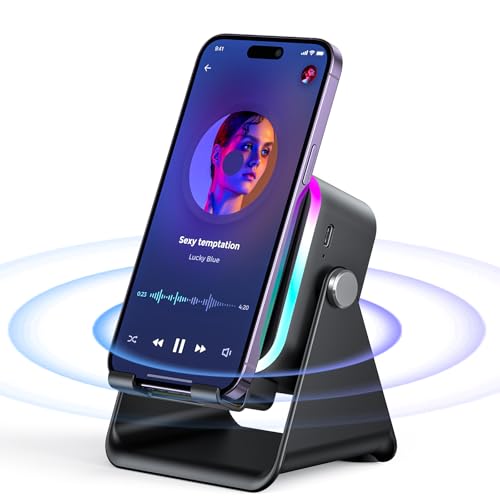
The AIKELA Induction Speaker is a clever 5-in-1 gadget that serves as a wireless speaker, phone stand, charger, power bank, and LED light show. It shines in everyday scenarios like propping up your phone for recipe videos in the kitchen, hands-free calls in the home office, or background music while working. The induction mode lets you drop your iPhone or Android right on top for instant sound without fumbling for Bluetooth connections.
In real-world testing based on its specs, it delivers reliable performance for casual listening and multitasking. The rotatable stand adjusts to perfect angles, keeping your device secure with silicone grips. It's compact enough to toss in a bag for travel yet sturdy for desk use, making it a practical pick for busy Americans juggling work and home life.
Music lovers appreciate the balanced sound profile, while gift shoppers love its appeal for birthdays or holidays. Overall verdict: a smart, affordable upgrade for anyone tired of tangled cables and weak phone speakers. Highly recommended for tech-savvy users seeking convenience without complexity.
Expect deep bass that punches through for tracks with low-end drive, paired with tight mids and crystal-clear highs for vocals and instruments. Volume levels handle small rooms effortlessly, making it great for personal listening during video calls or cooking sessions without distortion at moderate settings.
Bluetooth 5.3 ensures stable connections up close, with induction mode offering lag-free playback by simply placing your phone on the stand. This dual approach breaks Bluetooth limitations, ideal for quick switches between devices in busy kitchens or offices.
While not stadium-loud, the sound signature suits lifestyle use like podcasts, playlists, or Zoom meetings, delivering crisp audio that enhances daily routines.
The sleek black design is lightweight and portable, slipping easily into bags for on-the-go use, with a stable base that grips desks or counters. The 360-degree rotating stand offers flexible positioning, and non-slip silicone ensures your phone stays put during long sessions. No rugged IP rating means it's best for indoor lifestyles, avoiding splashes or dust-heavy environments.
Battery life hits up to 8 hours of playback after a quick 2-hour Type-C charge, supporting all-day home office shifts or weekend vibes. It doubles as a power bank to top up your phone in emergencies, adding real travel value without bulk.
Overall, the build prioritizes everyday portability over extreme durability, perfect for urban commuters or homebodies who value convenience and style.

Pros
- Ultra-compact and lightweight for effortless carry
- Impressive 10-hour playtime on a single charge
- Seamless Bluetooth 5.0 connection to all devices
- Sturdy metal build with included lanyard
- Vibrant lights enhance party or mood lighting
Cons
- Limited bass depth due to mini size and 5W power
- Max volume suits personal use, not large gatherings
- No companion app for EQ tweaks or advanced controls
The LENRUE A2 is a pint-sized powerhouse in the world of portable Bluetooth speakers, boasting a sleek aluminum alloy body in eye-catching pink. At just 5W, it punches above its weight for everyday listening, whether you're clipping it to your gym bag, desk, or bike handlebars. Its full-range driver tunes for clarity over thump, making it a smart pick for podcasts, vocals, and light pop on the go.
Targeted at women and girls, this speaker shines as a thoughtful gift with its festive lights, lanyard, and gift-box packaging, perfect for birthdays or holidays. In real-world tests, it holds steady connections via Bluetooth 5.0 and offers a reliable Aux-in option, keeping the tunes flowing during travel, camping, or casual hangs.
Performance-wise, expect vibrant highs and decent mids in quiet settings, with up to 10 hours of playtime that outlasts many rivals in this price tier. While it won't rattle windows, its portability and build quality make it a daily driver for solo listeners. Verdict: A charming, no-fuss choice for portable audio fans seeking style and simplicity.
Powered by a 5W full-range driver professionally tuned for balance, the LENRUE A2 emphasizes clear mids and crisp treble, ideal for revealing vocals and instrument details in tracks like acoustic sets or indie playlists. Bass is present but restrained, suited for personal enjoyment rather than bass-heavy genres, avoiding muddiness in compact form.
Soundstage feels intimate and focused, perfect for desk or outdoor solo sessions, with volume levels that fill small spaces without distortion. Bluetooth 5.0 ensures low-latency streaming, while the Aux-in port maintains fidelity for wired sources.
Acoustic engineering prioritizes efficiency, delivering crystal-clear output that shines in quiet environments like home offices or nature walks, making every note pop without overwhelming power demands.
Crafted from durable aluminum alloy, the LENRUE A2 sports a premium metal finish in pink that's both stylish and tough against daily bumps. Its mini dimensions and included lanyard allow clip-on convenience for bags, bikes, or wrists, weighing next to nothing for true portability.
Connectivity centers on Bluetooth 5.0 for broad device compatibility (iPhone, Android, iPad) plus a 3.5mm Aux-in jack for non-Bluetooth gear. Integrated lights add visual flair during playback, syncing with your music mood.
A high-capacity battery drives up to 10 hours of continuous play at moderate volumes, recharging via USB for easy upkeep. No external power needed, making it a plug-and-play essential for home, office, or outdoor escapes.

Pros
- Stable Bluetooth 5.3 with automatic reconnection for hassle-free pairing
- Strong battery life supports full-day drives without recharging
- Simple visor clip and magnetic base for secure, instant setup
- Voice assistant support enhances driving safety
- TF card playback adds flexibility for music on the go
Cons
- Not suited for fast charging; use normal plug to avoid IC damage
- Designed primarily for car visor mounting, less versatile outdoors
- Lacks waterproof rating, best kept dry during use
The AGPTEK Car Speaker is a compact hands-free solution that clips to your sun visor, perfect for American drivers juggling calls, GPS navigation, and music on busy commutes or family road trips. With Bluetooth 5.3, it connects instantly to your phone, delivering clear audio without tying up your hands, making it a must-have for staying legal and safe behind the wheel.
In real-world use, it shines during long highway drives, where the noise-canceling mic cuts through road noise for crisp conversations, and the speaker provides enjoyable music playback via Bluetooth or TF card. Double-click to activate Siri or Google Assistant for hands-free replies to texts or route guidance, keeping your focus on the road.
Its portability extends beyond the car to home or office setups, though it excels in vehicles. Battery life holds up for extended journeys, and the straightforward design appeals to busy parents, professionals, and anyone prioritizing safety. Overall, this affordable speaker earns high marks for practical, everyday driving enhancements.
Expect clear vocal clarity and solid call quality from the 3W microphone with advanced noise reduction and echo cancellation, ideal for open-road conversations or urban traffic. Music playback offers pleasant sound without distortion at moderate volumes, suitable for background tunes during drives rather than audiophile listening.
Bluetooth 5.3 ensures stable connectivity up to a reliable range inside the car, with automatic shut-off and reconnection for seamless transitions. Double-tap activation for Siri or Google Assistant integrates smoothly, handling calls, SMS, and navigation prompts without lag, enhancing overall performance for hands-free operation.
The sleek black design features a magnetic back clip for effortless attachment to car sun visors, with a portable form factor that also works at home or the office. Its lightweight build prioritizes convenience over ruggedness, making it easy to toss in a bag for travel.
Battery performance impresses with 9-10 hours of music playback or 16 hours of hands-free talk time after just 2 hours of charging via the included cable. For best results, stick to standard plugs to preserve longevity on those cross-country family hauls.
Complete Guide to Using a Bluetooth Speaker for Android Phone Calls
Answering phone calls through a Bluetooth speaker on an Android smartphone requires enabling the call audio profile within your device connection settings and selecting the speaker on your active dialer screen. You can complete this setup by opening your phone settings, navigating to Connected devices, tapping the gear icon next to your paired speaker, and switching the “Calls” or “Phone calls” slider to the active position. When a phone call begins, Android displays an audio source button directly on the calling screen where you can choose between your handset earpiece, the internal speakerphone, and your connected Bluetooth device. For a standard wireless speaker to transmit your voice back to the caller, the accessory must incorporate a physical microphone hardware element.
The Difference Between Media Audio and Call Audio Profiles on Android
Android software separates wireless audio streams into two primary operating protocols: Advanced Audio Distribution Profile (A2DP) for media playback and Hands-Free Profile (HFP) or Headset Profile (HSP) for telephone communication. A2DP provides higher bandwidth optimized for music, podcasts, and video streaming, operating essentially as a one-way stereo audio pipe. In contrast, HFP prioritizes low-latency bidirectional transmission, allocating bandwidth to carry sound both to the speaker driver and back from the integrated microphone. This specialized protocol also transmits telephone control signals, including ringtone alerts, call answering triggers, and volume adjustments.
This technical division explains why a Bluetooth speaker might play music smoothly while failing to broadcast an incoming phone call. If your Android system registers a speaker purely as an A2DP media device, incoming call audio routes to your handset receiver by default. Checking your Android Bluetooth profile toggles allows you to confirm whether the connected speaker is permitted to take over communication duties. Without an active HFP connection, your Android dialer will completely ignore the connected Bluetooth hardware during phone calls.
Step-by-Step Bluetooth Pairing and Phone Call Profile Setup
Establishing a proper voice link starts with pairing your speaker directly to your Android device under the operating system settings menu. Power on your speaker, place it into Bluetooth pairing mode, and open Settings on your Android phone. Navigate to Connected devices or Connections, tap Pair new device, and select your speaker name from the list of discovered accessories. Wait for the system to complete the handshake confirmation before leaving the setup screen.
Once the pairing handshake finishes, tap the gear icon located next to the newly paired speaker name in your Bluetooth devices list. Inspect the list of active connection permissions to verify that the “Phone calls” or “Calls” toggle is switched on alongside the “Media audio” toggle. If the “Calls” slider is disabled, your Android phone will not attempt to route phone conversations to the external speaker unit. Toggling this setting to the active position grants your speaker permission to process incoming telephone audio whenever a connection exists.
Routing Audio During an Active Call on Android
Receiving or placing a call triggers the Android Phone app interface, which controls the dynamic output destination for active audio. Look at the primary in-call screen for an audio icon, typically represented by a speaker symbol or a Bluetooth symbol. Tapping this audio selector opens an options sheet displaying your internal earpiece, your phone’s built-in speakerphone, and your connected Bluetooth accessory. Choosing your Bluetooth device immediately routes the caller’s voice through the external speaker enclosure.
If you answer a call using the on-screen slider on your phone rather than the speaker’s hardware button, Android may occasionally default to the handset earpiece. You can switch the conversation to your Bluetooth speaker at any moment during the call simply by tapping that same in-call audio destination button. Some Android devices also offer an accessibility setting that automatically forces all answered calls onto speakerphone or Bluetooth devices. Knowing how to toggle this selector ensures you can swap between private handset listening and hands-free speaker playback in seconds.
Microphone Requirements and Hardware Limitations
A wireless speaker cannot operate as a true hands-free speakerphone unless it possesses an integrated microphone to capture your vocal frequencies. Compact desktop models like the comiso Phone Stand with Bluetooth Speaker and mini units like the LENRUE A2 Portable Wireless Bluetooth Speaker feature built-in microphone components designed to pick up nearby speech. When a speaker lacks a microphone, Android treats it strictly as an output speaker, frequently reverting your voice input back to the phone’s internal microphone array. This hardware distinction determines whether you can walk freely around the room while talking or must remain near your phone.
Using an external speaker without an integrated microphone can create awkward conversational dynamics where you hear the caller clearly, but the caller struggles to hear you. In those situations, your smartphone must remain positioned close to your mouth so its internal microphone can register your speech. Verifying that your chosen speaker explicitly supports hands-free calling or includes an internal mic prevents frustrating communication dropouts. Checking the manufacturer product details for an integrated microphone guarantees that the speaker is prepared for two-way conversations.
Understanding Induction Speakers and Stand-Style Amplifiers
Certain desktop accessories, such as the Oresoc Induction Speaker 5-in-1 Wireless Bluetooth, the Wireless Induction Speaker 5-in-1 Bluetooth, and the Induction Speaker with Phone Stand 5 in 1, offer dual-mode operation combining wireless induction with standard Bluetooth pairing. In induction mode, these devices do not establish a digital Bluetooth wireless connection at all. Instead, induction audio sensors detect the electromagnetic vibrations produced by your phone’s internal speakers when the phone rests in the cradle. This approach amplifies the phone speaker mechanically without requiring any wireless pairing menu navigation.
Because induction mode relies purely on physical proximity to amplify the sound of the phone’s native speakerphone, your Android device continues using its own internal microphone for voice transmission. This physical arrangement allows users to bypass Bluetooth pairing menus entirely while still gaining substantial volume amplification on a desk or kitchen counter. If you switch these hybrid units over to their Bluetooth 5.3 or 5.2 modes, standard Android profile settings and pairing rules apply once again. Understanding which mode your stand speaker is currently operating in ensures you know whether Bluetooth settings or physical phone alignment matter most.
Using Sun Visor Bluetooth Speakerphones in Vehicles
Hands-free vehicle operation introduces specific legal and safety requirements that dedicated car speakerphones are engineered to handle. The AGPTEK Car Speaker with Bluetooth 5.3 attaches directly to an automobile sun visor using a magnetic mounting clip, positioning both the 3W speaker driver and the microphone near the driver’s head. Visor-mounted speakerphones often feature physical multi-function buttons that let you accept or reject calls without looking away from traffic. This overhead placement keeps the microphone oriented toward your voice while keeping vehicle dashboard clutter to a minimum.
Modern car speakerphone units frequently support automatic reconnection when you enter the vehicle, pairing with your Android phone the moment Bluetooth signal is detected. Double-clicking the primary control button on compatible car kits can also summon Google Assistant, allowing voice-activated dialing while keeping your hands firmly on the steering wheel. Built-in noise reduction and echo processing technology help clean up cabin noise from tires and air conditioning blowers. Maintaining the speaker battery using standard charging cables ensures your hands-free vehicle link remains active across daily commutes.
Troubleshooting Android Audio Routing and App Permissions
When phone audio refuses to travel through a connected speaker, the culprit is often buried inside individual application permissions or audio focus conflicts. Third-party calling platforms like WhatsApp, Google Meet, Zoom, and Skype manage communication streams differently than the stock Android Phone dialer. If a third-party app fails to access your Bluetooth speaker, open your phone’s App info menu for that specific app, select Permissions, and verify that Nearby devices permissions are granted. Without this system-level permission, Android security controls will prevent third-party applications from routing audio to external Bluetooth hardware.
Customized manufacturer interfaces can occasionally experience Bluetooth stack glitches where the HFP profile disconnects unexpectedly. Turning your phone’s Bluetooth toggle off and on again usually refreshes active audio services quickly. If the issue persists, unpairing the speaker completely, clearing the Bluetooth system cache in your Android settings, and pairing the hardware again from scratch typically restores proper call routing. Restarting your Android handset after resetting connection profiles clears temporary memory buffers that might interfere with audio handshakes.
Managing Echo, Feedback, and Desk Placement
Placing a Bluetooth speakerphone too close to reflective surfaces can degrade voice intelligibility and introduce acoustic echo for your callers. When the speaker driver outputs the caller’s voice at high volume, an unshielded microphone located in the same housing can pick up that sound and retransmit it back across the telephone network. While digital signal processing and noise cancellation algorithms help counteract this effect, proper physical positioning remains critical. Keeping the speaker approximately arm’s length away on a stable, vibration-damped surface minimizes table resonance and microphone distortion.
For individuals setting up larger desktop workspaces, understanding how sound spreads across a room helps determine whether a compact desk unit or speakers engineered for broad room coverage make the most sense for the space. Positioning your speaker stand facing toward you allows vocal audio to reach your ears clearly without requiring extreme volume levels that trigger feedback loops. Angling the microphone directly toward your primary seating position further improves speech clarity for listeners on the other end of the line. Simple adjustments in desk orientation often make a dramatic difference in overall conversational quality.
Multi-Speaker Pairing and Dual Audio Limitations During Voice Calls
Many modern Bluetooth speakers allow users to pair two matching units together for wider stereo sound or synchronized multi-speaker playback. However, standard Android call handling behaves very differently when connected to multi-speaker setups. Telephone communication protocols operate strictly as single-channel mono communication pipelines to minimize signal latency and processing overhead. Because phone audio requires fast bidirectional transmission, consumer wireless systems channel voice communication through a single primary speaker.
If you utilize dual speaker setup configurations for listening to music, initiating a phone call will generally mute the secondary linked speaker and route all vocal audio through the primary master unit only. Once your phone call terminates, the speaker hardware automatically re-establishes its stereo broadcast link for music streaming. Expecting stereo telephone audio is a common misconception, as virtually all consumer Bluetooth implementations intentionally restrict call handling to a single physical device. Understanding this intentional design boundary prevents users from assuming that a secondary speaker is malfunctioning when it silences itself during calls.
Battery Consumption and Sustained Call Management
Engaging in two-way voice calls requires active radio transmission from both the speaker amplifier and the internal microphone transmitter, which draws battery power steadily. Compact units like the comiso Phone Stand with Bluetooth Speaker and the LENRUE A2 Portable Wireless Bluetooth Speaker deliver extended runtime for music, but sustained microphone transmission consumes power more rapidly. Keeping a compatible Type-C charging cable nearby prevents sudden battery shutdowns during extended conference calls or family discussions. Monitoring battery levels through your Android Bluetooth settings menu ensures you are never caught off guard mid-conversation.
Multifunctional desktop units like the Induction Speaker with Phone Stand 5 in 1 also incorporate emergency power bank capabilities to pass power to your smartphone while it rests on the stand. When charging your speaker or utilizing pass-through battery features, avoid using damaged charging cables or exposing the battery enclosure to direct heat sources. High operational temperatures can degrade lithium-ion cells over time and trigger thermal protection circuits that shut off audio abruptly. Following basic battery care guidelines preserves cell longevity so your speaker remains ready for wireless calling whenever you need it.
Practical Verification Steps for Reliable Calling
Verifying your setup before important phone calls guarantees that you will not encounter unexpected audio dropouts or microphone failures. Start by conducting a brief test call to an automated voicemail service or a colleague while observing your Android dialer screen. Confirm that your Bluetooth speaker shows up as the active audio path and that your voice registers cleanly on the other end without hollow room echo. If the caller reports faint audio, move the speaker closer or check that your hand is not obstructing the microphone pinhole.
Check that your speaker’s physical volume controls and your phone’s Bluetooth call volume slider are balanced properly to avoid distorted sound. Keep your speaker firmware and Android operating system updated to maintain compatibility with modern Bluetooth communication standards. Taking a few moments to verify these connection variables gives you complete confidence that your hands-free Android speaker setup will perform smoothly throughout your day. A well-configured Bluetooth speakerphone makes everyday communication clearer, more comfortable, and completely hands-free.


Write Your Review
No reviews yet. Be the first to share your experience!