


Streaming music from a phone or laptop often leads listeners to seek compact wireless hardware that fits neatly on a bedside table or work desk. Many smart device owners specifically wonder can you use echo pop as a bluetooth speaker without relying entirely on voice commands or active cloud services. The compact Amazon hardware includes internal Bluetooth hardware designed to pair directly with external media sources like smartphones, tablets, and laptops. Understanding how this wireless audio connection functions ensures you get straightforward audio streaming whenever you want local playback.
While standard Alexa features depend on Wi-Fi connectivity, the hardware onboard receiver handles local audio streaming much like an ordinary wireless player. Users configuring a small room or considering a broader dual speaker audio setup can leverage this pairing flexibility to stream podcasts, personal audio files, and video soundtracks. Evaluating wireless latency, driver output, and power options helps determine whether this compact device fits your everyday listening routine.


Understanding Echo Pop Bluetooth Playback and Wireless Capabilities
Yes, you can use the Amazon Echo Pop as a standard Bluetooth speaker with virtually any compatible phone, tablet, or computer. The device features an internal Bluetooth receiver that accepts streaming audio signals without requiring continuous voice interaction. While the hardware relies on cloud connectivity for initial setup, local wireless playback functions through standard Bluetooth protocols once pairing is complete. This capability transforms the compact smart device into an accessible bedside or desktop audio companion for your personal devices.
How Echo Pop Operates as a Standalone Bluetooth Audio Receiver
The internal Bluetooth receiver inside the Echo Pop connects to standard Bluetooth transmission protocols supported by modern iOS, Android, macOS, and Windows hardware. When placed into pairing mode, the device broadcasts a recognizable discovery signal that appears within your source device wireless menu. Audio sent across this local link routes directly through the internal amplifier and driver without passing through voice command analysis. This direct audio transmission bypasses cloud streaming latency while allowing you to play personal audio files, browser content, and independent streaming platforms.
Operating the speaker in Bluetooth mode preserves basic hardware controls while altering how you manage music playback. Physical volume buttons located along the top edge of the hemisphere chassis remain completely functional during an active stream. Track navigation, play, and pause commands typically remain managed on your connected smartphone or laptop screen. The hardware does not require an active voice command to maintain audio flow once the initial pairing handshake establishes a stable wireless link.
Maintaining a direct Bluetooth connection also means the speaker functions regardless of which media player application you prefer. Listeners who store offline tracks, stream niche internet radio broadcasts, or play mobile gaming audio can hear everything clearly through the speaker. The device simply acts as a wireless output terminal for whatever sounds your source device transmits. This local flexibility makes the compact unit far more versatile than a cloud-only voice appliance.
Step-by-Step Instructions to Pair Your Phone or Computer
Pairing an external device begins by ensuring your Echo Pop is plugged into mains power and has completed its initial Wi-Fi setup. Once the hardware is idling normally, you can activate wireless discovery by saying, “Alexa, pair,” to trigger pairing mode directly. The light bar along the curved top rim will pulse to indicate that the receiver is actively scanning for nearby connections. At this stage, open the Bluetooth settings on your phone, tablet, or computer to begin scanning for available devices.
Select the Echo Pop from your device list once its name appears in the available hardware menu. Your phone or computer will establish the wireless handshake within a few seconds, accompanied by an audible confirmation chime from the speaker. If you prefer not to use voice commands, you can initiate the exact same pairing process through the Alexa mobile application. Navigating to the device settings menu and selecting Bluetooth Connections allows manual discovery without speaking aloud.
Completing the handshake establishes the speaker as your default audio output device until you manually disconnect it. Any notification sound, video track, podcast stream, or stored music will route immediately through the hemispherical grille. Should your source device fail to connect on the first attempt, toggling your phone wireless toggle off and on resolves most temporary handshake hiccups. Keeping your transmitting device within clear line of sight during setup ensures a rapid and reliable initial pairing.
Audio Driver Capabilities and Bedroom Listening Expectations
The acoustic architecture of the compact Echo Pop centers around a single front-facing directional driver designed specifically for small rooms. Its angled chassis projects sound forward across a desk, nightstand, or bookshelf rather than spreading audio in a full omnidirectional circle. This layout provides clear vocal articulation and crisp mid-range delivery, making spoken podcasts and acoustic melodies remarkably legible. Listeners seeking room-filling volume for entertaining large crowds often discover that speakers designed for large areas provide significantly greater acoustic dispersion than this small bedside sphere.
Bass frequencies from this compact hemisphere remain modest due to the physical limitations of its small sealed enclosure. While the internal driver delivers enough low-end punch for casual pop tracks and background work melodies, it does not reproduce sub-bass rumbles found in club music. Pushing the volume to its absolute upper limits can introduce slight compression or vocal harshness as the internal amplifier manages power delivery. Keeping the volume level within moderate thresholds preserves clean vocal clarity without overwhelming the compact hardware.
Special editions like the Baltimore Ravens Echo Pop (newest model) deliver this exact same acoustic profile within specialized team-themed exterior aesthetics. Bundled faceplates and branded sleeves customize the visual presentation without altering the underlying amplifier output or internal speaker diaphragm. Whether using a standard solid hue or a sports franchise edition, the acoustic output remains tailored for personal desk listening and compact living quarters. Managing realistic audio expectations ensures the speaker performs comfortably within its designed operational parameters.
Disconnecting and Reconnecting Bluetooth Streams Efficiently
Ending an active wireless stream is straightforward and can be handled through either voice prompts or source settings. Saying, “Alexa, disconnect,” prompts the speaker to sever the active Bluetooth session immediately and return to standard standby operation. Alternatively, turning off the Bluetooth toggle on your smartphone or choosing to disconnect in system settings accomplishes the same outcome. The speaker issues a gentle audio prompt signaling that the link has terminated, leaving the hardware ready for standalone Alexa requests.
Reconnecting your previously paired device requires minimal effort once the initial configuration profile is saved in memory. Simply ensuring your phone has Bluetooth enabled and speaking the command, “Alexa, connect to my phone,” triggers an automatic reconnect sequence. The Echo Pop searches its stored profiles and links with the nearest recognized device in moments. You can also re-establish the connection by tapping the speaker name in your phone Bluetooth settings menu without speaking a single word.
Managing multiple paired source devices requires a small amount of attention because the speaker prioritizes active incoming connections. If two previously paired smartphones sit nearby with active Bluetooth radios, the speaker typically links to whichever device initiates connection first. Disconnecting an active phone before attempting to connect a tablet or laptop avoids wireless conflicts. Taking a few seconds to verify the active source prevents frustrating playback interruptions during busy workdays.
Key Distinctions Between Cloud Streaming and Local Bluetooth Playback
Understanding the structural differences between Wi-Fi cloud streaming and local Bluetooth playback explains how the speaker handles your commands. During cloud streaming via voice requests, the Echo Pop pulls audio streams directly from online servers over your home Wi-Fi network. Your smartphone remains completely uninvolved in cloud playback, leaving your phone battery free to handle other tasks without audio interference. In contrast, Bluetooth playback requires your transmitting device to decode and send every single audio packet across local radio frequencies.
Transmitting media across Bluetooth means incoming phone calls, social media notification alerts, and keyboard clicks will route directly through the speaker. If you receive an alert chime while enjoying music, that sound interrupts or pauses the playing track momentarily. Cloud streaming avoids this issue entirely by keeping notification sounds strictly confined to your personal smartphone handset. Furthermore, stepping out of wireless radio range with your phone will cause Bluetooth audio to stutter and eventually drop out completely.
Audio fidelity can also exhibit subtle differences depending on the streaming transmission route you utilize. Wi-Fi cloud playback pulls high-bitrate data streams directly from supported streaming service catalogs without intermediate compression. Bluetooth streaming introduces an extra stage of wireless encoding between your source device and the speaker receiver. For casual listening in bedrooms or study spaces, most listeners will find the acoustic difference between these two transmission paths relatively subtle.
Addressing Portability and Power Demands for Flexible Placement
The standard Echo Pop design is engineered primarily as a stationary household appliance that requires continuous power from an electrical wall outlet. It relies on a proprietary barrel-plug power adapter plugged into mains electricity to maintain standby readiness and drive its internal components. Because there is no internal rechargeable lithium battery inside the factory housing, unplugging the cord immediately powers down the unit. This stationary architecture contrasts sharply with mobile wireless players designed specifically for outdoor travel, camping, or beach excursions.
Accessory hardware like the Liboer Echo Pop Battery Base For Echo Pop Speaker transforms this stationary hemisphere into a transportable wireless player. The custom base cradles the speaker rounded housing and delivers independent power through a 5200mAh internal battery capacity. Manufacturer specifications state that this accessory provides up to 8 hours of playback time alongside 18 hours of standby duration. Adding this battery base provides the physical freedom to carry the speaker out to a patio, kitchen counter, or workshop table without hunting for an electrical socket.
Using a battery base introduces new operating habits that listeners should observe to preserve overall battery longevity. Powering down the base with a long button press when playback finishes prevents the speaker continuous standby draw from draining the reserve cells. The accessory also allows recharging via standard USB connections, enabling flexible top-ups from computers or vehicle adapters. When planning portable placement, remember that the speaker chassis lacks water resistance, making indoor and covered patio use the safest choices.
Comparing Compact Smart Speakers to Dedicated Portable Alternatives
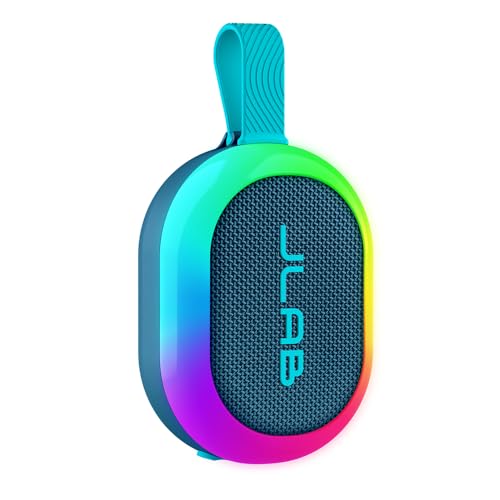
Evaluating your daily audio needs helps determine whether repurposing a smart speaker or purchasing a purpose-built Bluetooth unit makes more sense. Purpose-built wireless options like the JLab, Pop Party, Portable Bluetooth Speaker feature integrated rechargeable batteries and rugged environmental protection directly out of the box. That particular portable speaker carries an IP55 rating against water splashes and dust ingress, alongside an integrated loop handle for hanging from bags or hooks. In contrast, the Echo Pop remains strictly an indoor design that requires secondary accessories to achieve portability.
Acoustic power and driver designs also diverge significantly between compact smart speakers and dedicated high-output mobile gear. The JLab Pop Party incorporates a 5W full-range driver backed by a passive woofer, delivering tailored equalizer modes and party-linking capabilities for up to 100 synchronized speakers. Listeners needing serious volume for outdoor gatherings or open living areas often gravitate toward dedicated high-wattage Bluetooth speakers that provide substantial acoustic output and deep bass dynamics. The Echo Pop prioritizes intimate near-field clarity rather than expansive outdoor projection.
Smart integration remains the decisive advantage that keeps the Echo Pop appealing for multi-use desktop setups. Even when used primarily as a Bluetooth receiver, the microphone hardware allows instant access to smart home automation, timers, and weather updates. Dedicated Bluetooth travel speakers omit voice control systems in exchange for rugged enclosures, waterproof seals, and extended standalone battery runtimes. Balancing stationary smart convenience against rugged outdoor portability clarifies which hardware design best satisfies your routine listening habits.
Practical Troubleshooting for Stuttering or Disconnected Wireless Audio
Wireless playback interruptions typically arise from physical radio interference, excessive distance, or corrupted pairing profiles. Bluetooth transmissions operate reliably within approximately thirty feet of clear space, but thick walls, metal furniture, and dense plaster weaken signals rapidly. If your audio begins skipping, moving your phone closer to the front face of the speaker often eliminates packet drops immediately. Keeping the speaker away from active microwave ovens, Wi-Fi routers, and cordless phones minimizes competing radio frequency congestion.
Persistent connection failures can often be cleared by wiping the wireless pairing cache and executing a clean reconnection. Instruct your smartphone or laptop operating system to “Forget This Device” within its Bluetooth settings menu. Afterwards, speak, “Alexa, disconnect Bluetooth,” or access the Alexa mobile application to clear stored devices from the speaker internal memory. Initiating a fresh discovery sequence establishes a clean cryptographic handshake that frequently rectifies lingering software communication faults.
Audio lag during video streaming represents another common concern when using wireless speakers for television or computer audio. While casual music tracks hide wireless transmission delay, spoken movie dialogue or fast-paced video games may reveal a slight lip-sync offset. Disabling battery-saving modes on your source device and ensuring minimal background applications run during playback can help optimize streaming buffer latency. If severe latency persists, adjusting the audio delay compensation slider within your media player software restores perfect visual and vocal synchronization.
Using the Echo Pop as an external Bluetooth speaker provides a remarkably practical way to expand your daily listening options without purchasing additional desktop audio equipment. Straightforward voice commands make initial pairing and reconnection seamless, while third-party battery accessories unlock unexpected room-to-room mobility. By keeping expectations grounded regarding near-field acoustic output and indoor environmental protection, you can enjoy dependable wireless audio from virtually any Bluetooth-enabled source device in your home.



Write Your Review
No reviews yet. Be the first to share your experience!