


Setting up home television audio often leads listeners to search for richer dialogue and punchier movie dynamics. Built-in television drivers frequently struggle with shallow enclosures, yet many viewers still wonder how to play soundbar and tv speakers simultaneously to combine upfront clarity with external power. While standard television setups route audio exclusively to one device, integrating both sources can create a fuller listening space or assist viewers who need clearer spoken lines. Comparing this approach with traditional stereo loudspeakers highlights how modern compact soundbars deliver concentrated sound without the footprint of separate floorstanding cabinets.
Achieving simultaneous playback requires adjusting specific television audio menus, choosing the right digital connection, or employing specialized converter hardware. Simple wiring mistakes or incorrect digital output formats frequently result in echo, lip-sync delay, or muted drivers. Understanding how digital optical signals, audio return channels, and internal television audio processors interact enables you to unlock dual sound output smoothly. With compatible hardware from brands like TCL, Amazon, and RIOWOIS, balancing room acoustics and synchronizing playback becomes a straightforward home project.

Pros
- Crisp, intelligible dialogue that drastically outperforms stock TV speakers
- Slim 17-inch footprint fits easily into tight entertainment centers and dorms
- Straightforward plug-and-play setup with optical and analog cables included
- Convenient Fire TV remote pairing saves you from juggling remotes
Cons
- Requires manual PCM audio configuration on TVs; does not decode native Dolby Digital or DTS
- Lacks deep sub-bass frequencies, requiring reasonable expectations for action movies
- No HDMI ARC port for HDMI-based single-cable CEC control
Modern flat-screen televisions deliver stunning 4K visuals, but their ultra-slim chassis inevitably leaves internal speakers sounding thin, boxy, and indistinct. The RIOWOIS 17-Inch Sound Bar solves this issue directly, focusing on acoustic efficiency and crisp vocal presentation without swallowing up valuable living space. Designed specifically for smaller master bedrooms, college dorms, and desktop setups, this compact audio unit elevates spoken dialogue and everyday streaming audio to high clarity standards.
Setting up the system takes mere minutes thanks to the supplied optical and 3.5mm AUX cables. Because the internal sound processor expects a stereo feed, users must ensure their TV audio output is set to standard PCM rather than bitstream formats like Dolby Digital or DTS. Once properly configured, the soundbar syncs seamlessly with popular streaming accessories, including Fire TV remotes, reducing remote control clutter on your nightstand or coffee table.
In real-world testing, the soundbar makes immediate improvements to streaming dramas, broadcast news, and YouTube videos where clear articulation is critical. While it cannot simulate the bone-rattling low-end of a dedicated external subwoofer, it provides a well-balanced mid-tier acoustic upgrade. For budget-conscious shoppers looking for an unobtrusive audio solution that outperforms built-in display speakers, this soundbar delivers dependable performance backed by generous warranty coverage.
Acoustically tuned with an integrated Digital Signal Processor (DSP), the RIOWOIS 17-inch soundbar emphasizes intelligible mid-range frequencies and defined upper-register details. The acoustic architecture features three dedicated EQ modes tailored to your media: Movie mode widens the soundstage for cinematic panning, Music mode smooths out tonal balance for acoustic and vocal tracks, and News mode boosts vocal frequencies while attenuating distracting ambient effects.
Given its compact 17-inch enclosure, the low-end performance focuses on tight, punchy mid-bass rather than room-shaking rumble. Treble performance is lively and bright without turning harsh or sibilant at everyday volume levels. It provides plenty of clean volume to fill a small-to-medium bedroom or home office without falling into noticeable acoustic distortion.
Crafted in a sleek matte gray enclosure, the soundbar measures 17 inches wide, 3.5 inches deep, and just 2.5 inches high. This ultra-low-profile form factor prevents the unit from obstructing lower screen bezels or blocking infrared remote receivers on modern television frames. Integrated keyhole slots on the back panel also allow for clean wall-mounted installations below a hanging display.
Hardware connectivity includes an optical SPDIF digital port and a standard 3.5mm analog AUX jack, accommodating both older televisions and modern streaming boxes. Powered via an included DC adapter, the soundbar keeps power consumption low while delivering robust output, making it an efficient everyday audio component for any secondary entertainment space.

Pros
- Noticeably sharpens muffled television dialogue and movie speech
- Compact 17-inch profile fits tight entertainment centers and desktop monitor setups
- Versatile input array including HDMI-ARC, Optical, Bluetooth, and AUX
- Convenient volume sync compatibility with Fire TV remotes
Cons
- Does not include an HDMI cable in the packaging
- Compact cabinet lacks the deep sub-bass punch required for thunderous action scenes
- Engineered primarily for small to medium rooms rather than large open-concept living spaces
The Saiyin 17-inch Soundbar provides a streamlined solution designed to resolve the most common complaint with modern flat-panel televisions: hollow, muffled, unintelligible dialogue. By packing four dedicated acoustic drivers into a compact 17-inch enclosure, this speaker substantially clarifies speech articulation and directional stereo effects without crowding your entertainment stand.
Tailored specifically for secondary viewing rooms, guest suites, dorm rooms, and home office desktop setups, this soundbar is perfect for viewers who struggle to hear whisper-quiet conversation over loud background scores. It also doubles effectively as an elevated desktop speaker for PC gaming and multimedia workstations where space is at a premium.
In everyday use, connecting through HDMI-ARC or Optical allows the soundbar to wake with your screen and handle complex media mixes. While it does not recreate the earth-shaking rumble of a standalone subwoofer, it provides dependable midrange presence, pleasant high-frequency clarity, and respectable room-filling volume for streaming, broadcast news, and casual gaming.
For listeners hunting for an uncomplicated, highly functional, and space-saving TV audio upgrade, this compact unit hits the sweet spot. It delivers solid build quality, broad connectivity, and crisp dialogue clarity in a remarkably compact form factor.
The acoustic performance of this soundbar centers around vocal fidelity and midrange separation. With four dedicated drivers firing forward, human speech is elevated out of dense audio tracks, ensuring you never have to repeatedly raise the volume during quiet scenes only to be blasted by loud commercial breaks.
High frequencies are rendered cleanly without harsh sibilance, making dialogue, acoustic tracks, and classical scoring comfortable for extended listening sessions. Because the enclosure spans just 17 inches, extreme sub-bass frequencies are naturally restrained, but mid-bass reproduction maintains enough punch to give dialogue body and soundtracks decent warmth.
Stereo imaging is surprisingly broad for such a short bar, utilizing digital processing to simulate a wider soundstage. It easily projects across bedroom-sized spaces and office nooks, retaining clean reproduction without noticeable harmonic distortion at moderate to high listening thresholds.
Built with a resilient matte black housing and a protective front mesh grille, the soundbar measures 17 inches wide, 3.1 inches deep, and 3.2 inches high. Its low clearance lets it slip beneath the bottom bezel of most 24-inch to 43-inch TVs, while integrated rear brackets make wall installation fast and straightforward.
The rear port bay is well equipped for both modern and legacy gear, offering HDMI-ARC, digital Optical (TOSLINK), and a 3.5mm analog AUX input. Wireless duty is handled by responsive Bluetooth streaming for phones and tablets, allowing you to instantly switch from TV streaming to music playback.
Power is supplied through an included external DC adapter, keeping the internal chassis cool and free of electrical hum. Conveniently, the package includes an optical cord, a 3.5mm aux lead, and a full-function remote control that works alongside supported Fire TV remote signals.

Pros
- Powerful 80W output with no distortion for immersive home theater
- Seamless Bluetooth 5.0 and ARC connectivity with TV remote control
- 3 customizable EQ modes for optimized movie, music, and news audio
- Versatile placements including wall mount for flexible setups
- Auto volume boost clarifies whispers and roars effortlessly
Cons
- Lacks deep subwoofer bass for ultra-low rumble effects
- No companion app for advanced sound customization
- Requires AC power, limiting true portability
The Assistrust Soundbar is a compact 2-in-1 audio solution designed to upgrade sound from smart TVs, PCs, gaming consoles, and projectors. Its detachable design and four placement options - horizontal, vertical, tabletop, or wall-mounted - make it incredibly versatile for any living room or office setup.
Ideal for everyday viewers and gamers who want big-screen audio without the complexity of full surround systems, it shines in delivering detailed sound that pulls you into movies, music, and virtual worlds. The auto volume boost ensures no dialogue gets lost, while 3 EQ modes let you switch effortlessly between cinematic bass, melodic tunes, or clear news broadcasts.
In real-world use, setup is a breeze via Bluetooth or wired connections, and the 80W output fills rooms evenly for shared viewing. Though it's a newer entrant, its feature set punches above its weight for home entertainment upgrades.
Verdict: A smart pick for budget-conscious Americans seeking immersive, hassle-free sound that turns ordinary TV time into theater nights.
With 80W from four high-performance drivers, this speaker produces rich, detailed audio that captures soft whispers, subtle croons, deep thunders, and sonorous roars. Volume levels stay distortion-free even at high outputs, boosted automatically for consistent clarity across faint and loud scenes.
Vocal clarity excels in news and dialogue-heavy content, while the 3 EQ modes - movie for cinematic depth, music for luxurious melodies, and news for crisp speech - fine-tune every listen. Sound spreads evenly for room-filling immersion, perfect for gaming where subtle cues matter.
Bluetooth 5.0 offers stable wireless range up to 30 feet, with ARC enabling TV remote control for lag-free performance during action-packed sessions.
The sleek, detachable 2-in-1 design supports four placements: horizontal for focused audio, vertical or tabletop for vibrant room fill, and wall mount for 360-degree cinematic spread. Its compact build fits seamlessly under TVs or on desks without cluttering spaces.
Built for stationary home use, it lacks an IP rating or rugged outdoor features, prioritizing indoor versatility over portability. Weight is lightweight for easy repositioning, with stable mounting options ensuring secure setups.
Powered via AC adapter for unlimited playback, it eliminates battery concerns but requires a nearby outlet. Charging is irrelevant as it runs continuously on plug-in power, ideal for all-day TV marathons or gaming sessions.

Pros
- Instant setup with included HDMI cable
- Works with Fire TV, smart TVs, and streaming players
- Dual speakers provide fuller sound in a small package
- Stable Bluetooth for wireless music playback
- Always-in-sync audio enhances movie nights
Cons
- Lacks a dedicated subwoofer for ultra-deep bass
- Requires HDMI ARC port on TV for full features
- No companion app for sound customization
The Amazon Fire TV Soundbar is a compact 2.0-channel speaker designed to elevate your TV audio experience. It features dual speakers that deliver fuller sound, clearer dialogue, and deeper bass, making it perfect for casual home entertainment setups.
Ideal for Fire TV users or anyone with a smart TV, this soundbar plugs directly into your TV's HDMI eARC/ARC port for instant setup and lip-sync perfection. Its Bluetooth connectivity lets you stream music from your phone, turning your living room into a versatile audio zone.
In real-world use, it shines during movie nights and streaming sessions, providing immersive DTS Virtual:X surround sound without needing extra speakers. The compact size ensures it blends into most setups effortlessly.
Verdict: A budget-friendly upgrade for TV audio that punches above its weight in clarity and convenience, especially for Amazon ecosystem fans.
Bass response offers noticeable depth from its dual speakers, suitable for everyday TV shows and movies, though it won't rival larger systems with subwoofers. Vocal clarity stands out, ensuring dialogue cuts through action scenes effortlessly thanks to Dolby Audio processing.
DTS Virtual:X creates a convincing three-dimensional surround effect, filling the room with sound from a single bar. Volume levels reach room-filling heights without distortion, perfect for family gatherings or late-night binge-watching.
Bluetooth connectivity is reliable for music streaming from phones or tablets, with stable pairing and decent range around the home. Audio stays in perfect sync with your TV content via HDMI.
Measuring 24 inches long and just 2.5 inches high, this sleek soundbar fits neatly on most TV stands or consoles without dominating the space. Its minimalist design complements modern home setups.
Built for durability in everyday use, it incorporates 18% recycled materials, appealing to eco-conscious buyers. No IP rating, but its solid construction handles typical living room placement well.
As a powered soundbar, it draws power through the HDMI connection, eliminating battery concerns for continuous play. Always ready when your TV is on, with no charging downtime.

Pros
- Exceptional dialogue clarity and wide spatial soundstage for an entry-level 2.0 bar.
- Quick, seamless HDMI eARC setup with single-remote volume control support.
- Low-profile, sleek chassis fits neatly beneath modern TVs without obstructing viewing angles.
- Smartphone app with AI room calibration optimizes acoustics for irregular room layouts.
Cons
- Lacks a dedicated subwoofer, resulting in limited deep sub-bass impact for action movies.
- Virtualized Dolby Atmos cannot fully match the spatial realism of physical upward-firing height drivers.
- App-based calibration requires a mobile device setup rather than automated on-device hardware tuning.
The TCL S45H 2.0 Sound Bar represents an accessible entry point into home theater audio, providing an immediate upgrade over tinny built-in TV speakers. Engineered as a clean, self-contained soundbar, it incorporates advanced processing including Dolby Atmos and DTS Virtual:X to simulate three-dimensional spatial effects from a compact enclosure. It is specifically aimed at media lovers who crave clear sound and elevated movie dynamics without the clutter of rear speakers or a freestanding subwoofer.
In everyday use, this soundbar shines in small to mid-sized spaces like apartments, bedrooms, and home offices. Setting it up takes only minutes thanks to the single-cable HDMI eARC connection, which enables seamless volume adjustments via your existing TV remote. Users can also utilize the companion TCL app to run AI Sonic Auto Room Calibration, an unusual and welcome feature at this price point that analyzes your room reflections to balance the sound output accordingly.
Whether streaming dialogue-heavy dramas, casual sitcoms, or competitive video games, the S45H delivers clean vocal definition and satisfying volume. Bluetooth connectivity further transforms the unit into an effortless music speaker for smartphones and tablets. While it naturally misses the earth-shaking sub-bass that a dedicated sub box produces, its tuned acoustic cavity provides enough punch to keep action scenes lively without sounding thin.
Overall, the TCL S45H achieves a fine balance between simplicity, design, and audio clarity. For shoppers seeking a budget-friendly, space-saving television audio boost with modern spatial audio decoders, this soundbar stands out as a dependable and versatile choice.
The acoustic architecture of the TCL S45H focuses on strong midrange presence and crisp high-frequency projection, ensuring dialogue remains articulate even during chaotic action sequences. With up to 100 watts of peak power, this soundbar pushes ample volume to fill typical living rooms and bedrooms without succumbing to harsh distortion at higher listening levels.
Because the unit operates in a standalone 2.0 channel configuration without an external subwoofer, extreme low-frequency sub-bass is naturally restrained. However, TCL engineers tuned the internal drivers to deliver a punchy, controlled upper-bass response that adds body to voices, acoustic tracks, and explosions without rattling your media console.
Spatial imaging is enhanced through onboard Dolby Atmos and DTS Virtual:X audio processing. While virtualized height cannot replicate ceiling-mounted speakers, the soundbar effectively extends perceived width and height beyond its 32-inch physical footprint. Combined with the AI Sonic calibration, sound effects bounce off room boundaries to establish a surprisingly wide and convincing soundstage.
Measuring 31.89 inches wide, 2.36 inches high, and 3.86 inches deep, the TCL S45H sports a low-profile silhouette crafted to rest comfortably under the majority of modern flat-screen televisions. The minimalist matte black casing and refined grille ensure it blends unobtrusively into any home entertainment setup without obscuring the screen bottom or blocking TV infrared receivers.
Physical connectivity includes an HDMI eARC port for high-bandwidth uncompressed audio pass-through, a digital optical audio input for legacy smart TVs, and a 3.5mm AUX jack for analog sources. For cable-free music playback, integrated Bluetooth allows rapid streaming from smartphones, laptops, and tablets. TCL generously supplies an HDMI cable, power cord, and a dedicated wall-mounting bracket kit straight in the box.
The soundbar is driven by an internal 100-watt dynamic amplifier that requires standard AC wall power. Control options are versatile: you can command basic power and audio via physical top-panel buttons, utilize the included infrared remote control with pre-configured sound modes, or adjust advanced settings and room calibration directly from the TCL smartphone app.
Simultaneous Audio Setup: Playing Soundbars and TV Speakers Together
Combining external audio equipment with internal television drivers is an appealing goal for listeners seeking clearer speech and wider room coverage. Most modern displays automatically silence internal speakers the moment an audio return channel connection is established. You can bypass this restriction by configuring brand-specific multi-output modes, utilizing digital optical cables, or installing an external audio extractor. Finding the right solution depends on your television brand, your soundbar input ports, and your ability to adjust potential audio delay.
The Default Audio Conflict: Why Televisions Mute Internal Drivers
Modern televisions are built to route sound through a single primary output to preserve clear audio fidelity. Connecting a soundbar through an HDMI ARC or eARC port triggers Consumer Electronics Control signals that mute internal television speakers automatically. This automatic muting prevents two separate audio processors from handling identical sound signals at slightly different speeds. Without this safeguard, listeners would hear a distracting echo caused by minor timing discrepancies between processors.
The primary acoustic problem of running two speaker systems simultaneously is phase interference, commonly known as comb filtering. Built-in television speakers rely on thin, downward-firing drivers powered by modest internal amplification. External soundbars incorporate forward-facing drivers and dedicated digital signal processors. Because soundbars take several milliseconds to process incoming signals, sound waves from the television drivers reach your ears first, causing hollow vocals and washed-out treble.
Brand-Specific Dual Audio Technologies and Settings
Several major television manufacturers provide built-in synchronization features designed specifically to run internal drivers and external soundbars simultaneously. Samsung features an audio mode called Q-Symphony on compatible television and soundbar combinations. This system assigns the television speakers to handle upper dialogue and height effects while the soundbar drives primary stereo channels and low frequencies. Samsung sets also include a multi-output audio toggle in accessibility menus, enabling simultaneous sound through television drivers and Bluetooth hardware.
LG displays feature similar integrated processing through their WOW Orchestra system on compatible newer models. For users with standard soundbars, LG sound menus frequently include an option labeled TV Speaker plus Optical. Choosing this setting directs the television processor to feed digital optical output while keeping cabinet drivers active. This dual-output arrangement suits households where one viewer requires focused volume nearby while other viewers listen comfortably across the room.
Sony incorporates Acoustic Center Sync on selected televisions and audio systems, converting the television screen into a dedicated center channel speaker. In this configuration, the soundbar handles left, right, and surround sound effects while the television panel projects vocal articulation. If you own a display from another brand, checking the sound output sub-menu is an essential first diagnostic step. Many models provide multi-output routing under expert sound options or accessibility preferences.
Connecting via Optical SPDIF for Dual Playback
Digital optical connections, also known as TOSLINK or SPDIF, offer a dependable manual method for dual playback on standard hardware. Unlike HDMI ARC connections, optical cables transmit audio data via light pulses without carrying bidirectional control communication. Because no control signals pass between devices, the television does not receive an automatic command to silence its internal drivers. This separation allows you to keep television speakers active while feeding an identical digital signal to your soundbar.
Setting up an optical connection requires entering your television sound menu and locating audio output choices. Look for an option that outputs sound to optical and internal speakers simultaneously if your television firmware supports it. If your television presents only an either-or menu selection, leave the output set to internal speakers and verify whether the optical port emits red light. Many budget and mid-tier sets broadcast optical audio continuously regardless of which primary speaker option is active.
Selecting the proper digital audio format is vital when connecting optical cables to entry-level soundbars like the compact RIOWOIS model. Manufacturer guidelines recommend setting television audio format settings from Bitstream or Dolby Digital to PCM. Multi-channel surround streams such as Dolby AC3 or DTS can trigger loud buzzing, cracking noise, or complete silence on basic stereo soundbars. Forcing PCM guarantees that the television downmixes incoming audio into an uncompressed stereo signal that any digital soundbar can decode reliably.
Using Audio Extractors and Hardware Splitters
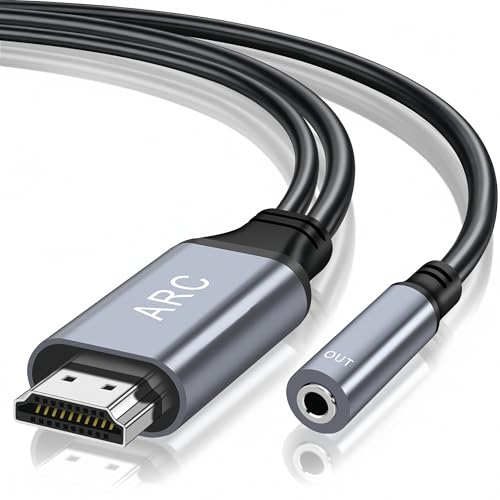
Televisions that strictly disable internal speakers whenever an external cable is attached may require dedicated converter hardware. An HDMI ARC to analog audio converter, such as the MEEKI audio extractor, connects directly to an HDTV ARC port to output sound through auxiliary jacks. These compact converters support sampling rates up to 192KHz and 24-bit streams, delivering clean stereo audio to secondary speakers, desktop monitors, or auxiliary inputs. They offer a practical bridge for older soundbars lacking modern digital inputs.
Powering an external audio converter requires connecting a steady five-volt USB power cable during operation. Like basic optical connections, these converter adapters do not decode multi-channel Dolby or DTS audio formats. You must set your display sound output to PCM or stereo mode so the converter’s noise reduction circuitry can process the signal cleanly. Once configured, you can run a 3.5mm stereo cable to an auxiliary input on an external soundbar while keeping television audio active.
Using external hardware extractors or direct optical feeds introduces a specific limitation regarding volume control. Because optical cables and analog adapters do not carry HDMI CEC signals, your standard television remote cannot adjust soundbar volume. You must use the dedicated soundbar remote control or physical cabinet buttons to change loudness. While this setup requires managing two remotes, it provides independent volume control, allowing you to fine-tune the balance between television and soundbar sound.
Eliminating Audio Delay and Echo Effects
Running two separate speaker systems side by side frequently reveals noticeable timing differences. External soundbars rely on internal digital processors to enhance dialogue clarity, widen stereo separation, and manage frequency equalization. This processing introduces a delay of ten to sixty milliseconds, depending on the complexity of the active sound profile. If television speakers emit sound instantly while the soundbar lags behind, spoken dialogue sounds hollow and reverberant, resembling an echo in a tiled hallway.
Resolving this timing discrepancy requires adjusting the audio delay or lip-sync setting in your television expert sound options. Most modern televisions include a millisecond slider that delays internal speaker playback to match lagging external processors. If your display lacks an adjustable delay setting, check your soundbar remote for dedicated audio delay controls. Adjusting the delay in small ten-millisecond increments aligns both sound waves into phase, eliminating the echo and creating a cohesive audio presentation.
Calibrating your audio is easiest when playing a reliable reference scene featuring centered dialogue or steady percussive beats. Listening to dedicated audio tracks for testing speaker balance helps you identify subtle timing mismatches across different frequency bands. Pay close attention to high-frequency consonant sounds like S and T in spoken dialogue. When both speaker systems fire in perfect synchronization, speech sounds crisp, focused, and centered directly on your screen.
Soundbar DSP Profiles and Room Calibration
Soundbars equipped with switchable digital signal processing profiles provide a clear advantage when blending audio with television speakers. Models like the Assistrust soundbar offer tailored presets for movies, music, and news, enabling listeners to shape frequencies to their room. Selecting a news or voice mode boosts midrange frequencies, keeping speech intelligible even when background effects are active. Combining that focused midrange with the ambient spread of television speakers fills small to medium rooms with balanced sound.
Advanced soundbars, such as the TCL S45H, incorporate room calibration features alongside Dolby Atmos and DTS Virtual:X processing. Built-in acoustic calibration measures room dimensions and wall reflections to balance sound output up to one hundred watts. When running a capable bar like this alongside internal television speakers, the soundbar should deliver the primary audio volume. The television drivers should serve only as subtle reinforcement, preventing modest factory speakers from distorting at higher output levels.
Compact multi-driver units like the Saiyin seventeen-inch soundbar feature multiple internal speakers that easily surpass standard television drivers. A soundbar with dedicated enclosures delivers fuller bass and clearer projection than shallow, recessed television cabinets can provide. If your television cannot achieve echo-free dual playback, routing all sound through a dedicated soundbar remains the cleanest solution. Exploring balanced sound profiles in compact wireless speakers illustrates how purpose-built drivers consistently outperform built-in display components.
Remote Integration and Cable Management
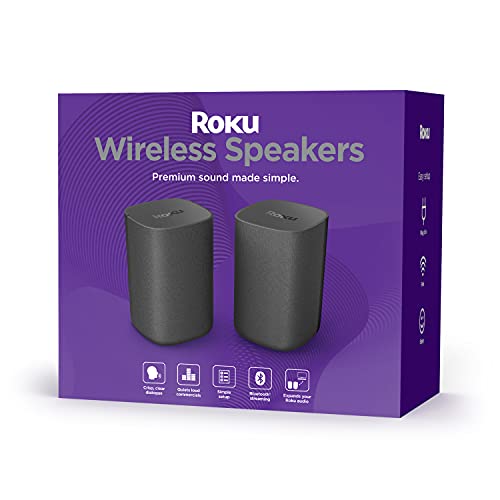
Managing multiple remote controls is a common frustration when operating dual-audio configurations. The Amazon Fire TV Soundbar simplifies daily operation by integrating directly with Fire TV media players, allowing one remote to control power, streaming, and volume. Compact soundbars from RIOWOIS and Saiyin also support Fire TV remote codes and provide compatibility for Roku streaming remotes. Choosing equipment with flexible remote compatibility ensures that everyday adjustments remain simple for everyone in your household.
Proper cable organization is equally important to avoid electromagnetic interference and keep your media console tidy. Keep optical and HDMI cables separated from high-draw electrical cords powering your television, gaming consoles, or subwoofers. When mounting a soundbar on the wall, confirm that its height does not block your television infrared sensor or bottom bezel. Compact designs under three inches in height fit easily beneath television stands while maintaining an unobstructed remote line of sight.
Step-by-Step Configuration Checklist for Dual Audio
Implementing dual-audio playback requires following a systematic setup sequence to avoid signal conflicts. Start by turning off power to your television and soundbar before connecting any audio cables. Insert your optical cable firmly into the optical output port of your television and the optical input jack on your soundbar, removing any protective plastic caps first. If you use an HDMI ARC adapter, connect the cable specifically to the port labeled ARC or eARC rather than a standard HDMI input.
Power on both devices and navigate into your television sound settings menu using your primary remote control. Locate the digital audio output setting and switch it from Auto or Bitstream to PCM mode. Next, select speaker output and choose TV Speaker plus Optical, or leave TV Speaker active if your television outputs optical signals automatically. Open your preferred streaming application and verify that in-app audio settings are set to standard stereo rather than multi-channel surround streams.
Sit in your primary viewing seat and play a dialogue-rich video scene to evaluate overall volume balance and synchronization. Increase soundbar volume until speech sounds clear and robust, then raise television volume gradually to provide gentle fill without overwhelming the soundbar. If you hear an echo or hollow vocal effect, open your television audio delay menu and adjust the slider until speech sounds unified. Testing several video sources confirms that your audio balance remains consistent across different channels and streaming apps.
Practical Takeaway for Dual Speaker Systems
Playing soundbar and television speakers together is achievable when you pair compatible connection methods with proper audio formatting. While proprietary features like Samsung Q-Symphony deliver automated balance, standard setups rely on optical cables, PCM audio output, and careful lip-sync adjustments. Evaluating whether dual playback improves your listening experience or introduces unwanted echo helps you choose the best configuration for your space. Taking time to adjust settings methodically ensures clear, synchronized, and enjoyable audio for every movie and show.




Write Your Review
No reviews yet. Be the first to share your experience!