


Connecting multiple audio systems throughout your living space allows you to enjoy uninterrupted playback as you move from room to room. Learning how to group airplay 2 speakers gives you total command over synchronized whole-home audio directly from an iPhone, iPad, Mac, or Apple TV. While Bluetooth typically limits transmission to a single receiving endpoint, modern Wi-Fi streaming protocols handle high-resolution streams across multiple rooms with minimal latency. Setting up connected zones lets you fill your entire house with identical background sound or manage independent volume sliders in separate rooms.
Integrating different hardware brands into a single playback network can sometimes feel daunting if you are unfamiliar with audio casting settings. Pairing dedicated smart hardware alongside high fidelity home music speakers creates an expansive listening environment without requiring complicated custom wiring. Modern streaming units automatically advertise their network presence, which makes selecting multiple output destinations straightforward once your network settings are properly aligned. Understanding the fundamental controls and network prerequisites ensures that your multi-speaker grouping remains rock solid during daily listening sessions.

Pros
- Delivers full-bandwidth Wi-Fi streaming with zero audio compression or range dropouts
- Enables whole-home synchronized multi-room playback on a budget
- Broad support for Apple AirPlay, DLNA, and UPnP streaming protocols
- Ultra-compact puck profile easily conceals behind existing audio equipment
Cons
- Requires constant USB power as it lacks an internal rechargeable battery
- Wall power adapter block is not included in the box
- Limited to 2.4 GHz Wi-Fi networks and cannot connect to 5 GHz bands
The ACEMAX M5 AudioCast is a purpose-built Wi-Fi receiver engineered to convert any traditional wired speaker, receiver, or soundbar into an intelligent wireless audio hub. Instead of replacing high-grade vintage audio gear with expensive modern wireless speakers, this compact device connects directly through a standard 3.5mm AUX jack, delivering contemporary network streaming capabilities to your favorite stereo hardware.
Setup is straightforward using the free AudioCast companion app on iOS or Android. Within minutes, the adapter connects to your local 2.4 GHz Wi-Fi network, unlocking access to popular music platforms such as Spotify and internet radio stations. Its native support for AirPlay and DLNA protocols makes streaming effortless whether you are queuing tracks from an iPhone, an Android tablet, or a home media server.
For homeowners looking to create an interconnected whole-house audio setup without spending thousands on proprietary systems, the multi-room grouping feature stands out. You can deploy multiple units across your living room, kitchen, and patio, synchronizing them for party mode or assigning unique audio streams to individual rooms right from your smartphone.
Ultimately, the ACEMAX M5 AudioCast offers exceptional utility for music enthusiasts who value high-fidelity sound and smart convenience. It bridges the gap between classic analog audio setups and modern wireless ecosystems, making it a smart and cost-effective addition to any home entertainment system.
Unlike conventional Bluetooth adapters that compress audio signals and compromise dynamic range, the ACEMAX M5 streams music over Wi-Fi for noticeably cleaner reproduction. Bass frequencies come through deep and tight, vocals retain their natural warmth, and the upper treble remains crisp without the harsh digital artifacts often found in wireless audio bridges.
Network stability is rock-solid across standard 2.4 GHz home networks, providing dependable coverage that far exceeds the typical 30-foot limit of Bluetooth. You can move freely around your house, take incoming phone calls, and watch videos on your phone without cutting off the music playback flowing to your speakers.
Latency remains minimal during normal music playback, and multi-room synchronization performs admirably, keeping audio in step between adjacent rooms. It ensures your favorite high-fidelity playlists maintain their punch and clarity from the first beat to the final fade-out.
Measuring just under two inches across and weighing under three ounces, the ACEMAX M5 AudioCast features a minimalist circular puck design. Its lightweight, matte exterior is understated enough to sit unnoticed on a desk or tuck discreetly behind a heavy home theater receiver, bookshelf speaker cabinet, or desktop monitor.
Regarding power and battery requirements, the unit operates entirely on continuous external power via its micro-USB port rather than an internal rechargeable battery. While this means you must keep it plugged in during playback, it allows the device to stay perpetually active and ready on your home network without battery degradation over time.
You can power the adapter using any standard USB port on the back of your television, an audio receiver, a spare wall charger, or even a portable power bank for outdoor patio gatherings. Its lightweight build makes it easy to reposition anywhere your home Wi-Fi network reaches.
Pros
- Magnetic auto-sync makes splitting and recombining effortless with zero app setup
- Genuine physical stereo soundstaging across up to five separate satellite placements
- Sleek and lightweight cylindrical body travels easily between rooms or outdoor patios
- IPX4 splash-resistant build safely handles bathroom humidity and outdoor mist
Cons
- Frequency response bottoms out around 88Hz, lacking deep sub-bass impact
- IPX4 rating protects against water splashes but cannot withstand full submersion
- Individual satellite outputs are modest when dispersed across large, open outdoor spaces
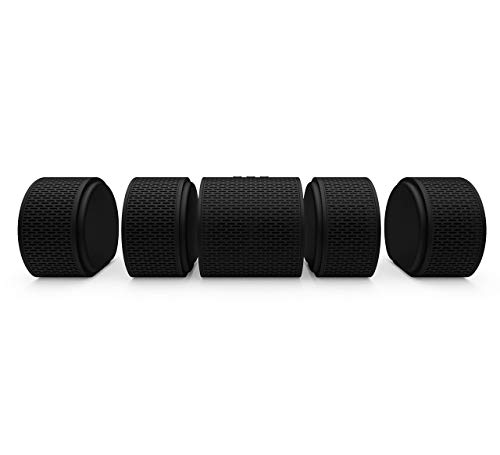
The Hover-1 Air Audio redefines versatile home audio with an inventive pull-apart architecture that transforms from a single sound cylinder into five distinct satellite speakers. Engineered for apartment dwellers, patio entertainers, and everyday listeners, it removes the clutter of typical multi-room audio installations. Instead of configuring complicated Wi-Fi mesh networks or syncing third-party mobile applications, this speaker relies on integrated magnetic contacts that link the satellites together instantly.
In real-world use, this modular construction changes how you experience casual background audio and dinner music. You can keep the unit assembled as a centralized 24-watt soundbar for a focused soundstage, or detach the magnetic units and scatter them around your kitchen, living room, and deck to keep the tunes playing seamlessly as you move around. The lack of software friction is refreshing, allowing any standard Bluetooth playback source to broadcast simultaneously across all separated modules without lag or dropped connections.
While individual satellite modules are tuned for ambient coverage rather than high-decibel outdoor parties, their ability to create true spatial separation is remarkably effective indoors. If you love clever engineering, minimal setup times, and adaptable soundscapes for social gatherings, the Air Audio delivers unmatched versatility that standard single-enclosure speakers simply cannot replicate.
When unified into a single chassis, the speaker combines its drivers to generate 24 watts of power, producing a well-balanced acoustic signature focused on clear mids and clean highs. The AirBase driver operates across an 88Hz to 17kHz frequency range, providing crisp vocal articulation for podcasts and acoustic tracks. While you will not feel bone-rattling sub-bass on heavy electronic or hip-hop tracks, the low-end remains tight and punchy without distorting upper-register details at medium-to-high volumes.
The true performance standout is the channel separation. By physically pulling the magnetized satellites apart, you achieve authentic physical stereo staging that artificial digital signal processing cannot mimic. Bluetooth wireless transmission remains stable throughout typical indoor footprints, maintaining synchronization across the dispersed satellites without audio drift or annoying echo effects.
Sporting a minimalist cylindrical silhouette finished in sleek black, the speaker measures 12.5 inches in length and weighs a manageable 2.6 pounds. Built with IPX4 water resistance, the chassis safely shrugs off errant water drops, bathroom humidity during hot showers, and surprise rain drizzles on the patio. Its magnetic docking mechanisms are surprisingly robust, snapping together with a tactile, satisfying click that feels engineered to survive repeated daily use.
Charging and power distribution are simplified via internal contacts when the device is assembled as one column. USB charging ensures you can easily juice up the entire array from standard power banks or wall adapters. For weekend hangouts or moving from room to room through a normal workday, the battery supply provides reliable cord-free playback, though keeping the satellites docked together maximizes overall stamina for all five internal cells.

Pros
- Exceptional clarity and low-end warmth considering the small, compact footprint.
- Versatile streaming support including AirPlay 2, HEOS, Bluetooth, and USB playback.
- Sleek capacitive touch controls with proximity-sensing illumination.
- Flawless multi-room synchronization and high-res playback support over Wi-Fi.
Cons
- Requires an external Amazon Echo device for direct hands-free Alexa voice commands.
- Outputs mono sound on its own unless paired wirelessly with a second unit.
- Initial configuration relies on downloading and navigating the proprietary HEOS app.
The Denon Home 150 Wireless Speaker is engineered to deliver high-fidelity acoustic performance in a compact footprint designed to fit into any modern living space. Whether perched on a kitchen counter, placed on a bedside table, or integrated into an executive desk setup, the speaker blends understated design with serious acoustic authority. Denon brings decades of traditional Hi-Fi heritage into the smart wireless era, giving listeners an exceptional alternative to closed ecosystems.
Setup is handled effortlessly through the HEOS application on iOS or Android, connecting directly to your home Wi-Fi network. Once configured, streaming options are virtually limitless. You can cast directly via Apple AirPlay 2, stream using Bluetooth, or run native streams from Amazon Music HD, TIDAL, Pandora, and Spotify. The proximity-sensing capacitive touch panel on top lights up as your hand approaches, allowing quick playback controls and immediate access to three preset internet radio stations without needing your phone.
In daily use, the Home 150 excels as both a standalone personal listening hub and a cornerstone of a whole-home audio setup. You can group multiple HEOS-enabled speakers and soundbars to play the same track in absolute harmony across different rooms, or distribute separate playlists to individual zones. For users wanting a cleaner look, the sealed cabinet and acoustic wrap keep maintenance simple while projecting sound far larger than the physical dimensions suggest.
Ultimately, the Denon Home 150 hits the sweet spot between audio refinement and digital versatility. It avoids the harsh compression common in lesser compact wireless units, making it an ideal choice for discerning listeners who prioritize musicality, expansive format compatibility, and seamless multi-room expansion.
Acoustic performance is where the Denon Home 150 distinguishes itself from standard smart speakers. At its core lies a dedicated two-way acoustic platform, pairing a precise 1-inch dynamic tweeter with a robust 3.5-inch mid-bass driver. Both transducers are driven by independent, custom-tuned Class-D power amplifiers, ensuring clean signal delivery with ultra-low harmonic distortion across a wide frequency range.
The sound signature is warm, natural, and remarkably detailed. Vocal tracks come through the midrange with crisp diction and realistic presence, completely free of the hollow boxiness that plagues plastic-chassis portables. High frequencies are smooth and airy, revealing the delicate decay of cymbals and acoustic strings without causing listener fatigue during extended background sessions. Meanwhile, the mid-bass response offers satisfying depth and punch, giving kick drums and basslines physical authority.
Because the speaker handles uncompressed high-resolution digital audio files, subtle micro-details in high-bitrate FLAC and DSD tracks remain intact. While a single Home 150 creates an intimate, directional soundstage ideal for small to medium rooms, pairing two units in a stereo configuration opens up an expansive, true left-right listening field with striking instrument separation.
The exterior of the Denon Home 150 is wrapped in a durable, acoustically transparent woven cloth that resists dirt and dust. Its compact form factor measures approximately 7.1 inches wide, 11.8 inches tall, and 7.1 inches deep, making it easy to position on tight bookshelves or corner tables. The minimalist top glass panel features an intelligent proximity sensor, illuminating touch controls for volume, play/pause, and three preset station buttons whenever your hand approaches.
In terms of physical connectivity, the rear panel provides versatile wired inputs alongside its wireless transceivers. You will find an RJ-45 Ethernet port for rock-solid wired network connectivity, a 3.5mm analog auxiliary input for legacy devices or portable players, and a USB port that enables local high-resolution playback directly from thumb drives.
The unit features an integrated internal power supply powered via a standard AC cord, eliminating the need for an unsightly external power brick. Operating on dual-band Wi-Fi (2.4 GHz and 5 GHz) as well as Bluetooth, the hardware guarantees consistent wireless stability whether you are streaming high-bandwidth uncompressed audio over your local network or making a quick direct connection from a guest's smartphone.
Pros
- High-fidelity WiFi streaming with Alexa, AirPlay 2, and music service integration
- Large drivers deliver vibrant bass and clear highs for home audio
- Stereo and multi-room capabilities expand sound across your house
- Bluetooth 5.0 provides stable wireless connectivity
- DSP technology maintains audio quality at max volume
Cons
- No built-in microphone requires separate Alexa device for voice control
- Lacks portability as it needs a power outlet for continuous use
- Large 6x6x8-inch size may not suit very small spaces
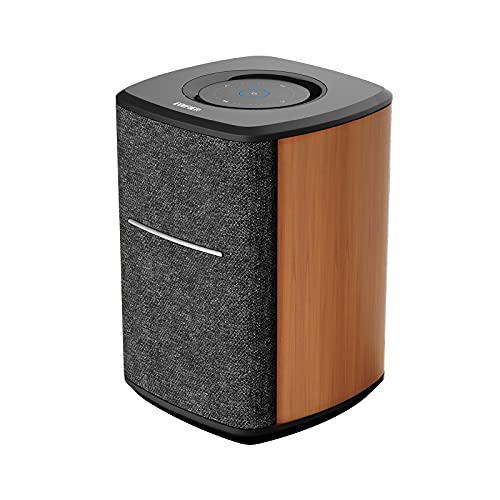
The Edifier MS50A is a powerful WiFi smart speaker designed for privacy-focused users, featuring 40W RMS output without a built-in microphone. It connects effortlessly to Alexa, AirPlay 2, Spotify Connect, and Tidal Link for high-definition streaming over your home network, plus Bluetooth 5.0 for quick phone pairing.
Ideal for American households seeking whole-home audio, it shines in multi-room setups where you group multiple units for synchronized playback or pair two for stereo soundstages that fill living rooms with vibrant energy. Setup is straightforward via WiFi, making it perfect for tech-savvy families who value clear, distortion-free music during gatherings or daily routines.
In real-world use, the 4-inch woofer and 1-inch tweeter produce room-filling sound with punchy bass and crisp details, enhanced by updated DSP tech. While not portable, its stationary power delivers consistent performance for home offices, kitchens, or entertainment spaces.
Verdict: A top pick for privacy-conscious streamers wanting robust WiFi audio without voice spying risks. Grab it if multi-room immersion is your goal.
The MS50A punches above its size with a 4-inch woofer delivering deep, vibrant bass that anchors tracks, paired with a 1-inch tweeter for sparkling vocal clarity and highs. DSP processing ensures zero distortion even at party-level volumes, creating an expansive soundstage ideal for filling medium to large rooms.
WiFi connectivity via AirPlay 2 and music services streams lossless HD audio flawlessly, while Bluetooth 5.0 offers stable range up to 30 feet for phone control. Stereo pairing doubles the immersion, making it outperform single-unit speakers for home theater vibes or background music.
Overall, expect balanced sound with emphasis on full-bodied lows and clear mids, perfect for genres from rock to podcasts without muddiness.
At 6x6x8 inches, the MS50A boasts a substantial build as one of the largest WiFi speakers, housing premium drivers in a sleek, compact enclosure that fits shelves or stands without dominating spaces. Its one-piece design prioritizes stability for permanent home placement.
No battery means endless playback when plugged in, eliminating recharge worries for all-day or multi-room use; just connect to AC power for non-stop streaming sessions. Weight feels solid yet manageable for repositioning around the house.
Lacking IP ratings, it's best for indoor lifestyles like cozy evenings or kitchen cookouts, focusing on durability through quality construction rather than rugged outdoor adventures.
Complete Guide to Grouping AirPlay 2 Speakers for Multiroom Audio
Managing a synchronized home sound system requires understanding how Apple’s streaming protocol handles discovery, buffering, and playback control across local networks. Figuring out how to group airplay 2 speakers allows you to link diverse audio equipment across living spaces into one cohesive soundscape. Rather than relying on separate proprietary applications for each brand, the protocol centralizes grouping options right within your operating system. A few quick taps let you send audio to multiple destinations simultaneously.
AirPlay 2 Architecture and Multi-Speaker Streaming Principles
Apple introduced its second-generation streaming architecture to overcome the single-point limits of legacy streaming. The original protocol sent real-time audio with small buffers, which caused dropouts whenever Wi-Fi signal strength fluctuated. In contrast, modern AirPlay 2 streams utilize multi-second caching alongside precise time-synchronization clocks. This caching enables sending devices to transmit audio data ahead of time, ensuring that every speaker in a designated group plays each note at the exact same millisecond.
Hardware compatibility plays a major role when you design a whole-home audio layout. Dedicated smart speakers like the Edifier MS50A and the Denon Home 150 come engineered with native AirPlay 2 receiver chips and processing boards. These integrated boards actively negotiate network timing packets directly with your host device. While standalone Bluetooth speakers restrict playback to a single room, AirPlay 2 endpoints communicate continuously over your local Wi-Fi.
Cross-brand flexibility remains one of the protocol’s most notable practical strengths. You do not need speakers from the same manufacturer to establish a functional multiroom group. An Apple HomePod, an Edifier Wi-Fi speaker, and a Denon Home component can all join the same playback pool. The host device coordinates playback, transmitting audio packets across your local network while each endpoint renders the stream synchronously.
Grouping Speakers in iOS and iPadOS Control Center
Activating a multiroom speaker group from an iPhone or iPad takes place inside the iOS Control Center. Swiping down from the top-right corner of modern iPhone displays reveals the control deck. Within that deck, the Now Playing audio card displays current track progress. Tapping the small AirPlay icon in the upper-right corner of the playback card opens the full audio routing sheet.
The audio routing sheet lists every detected streaming destination on your local network. Your host device sits at the top of the menu, followed by available smart TVs, receivers, and wireless speakers organized by room name. Each AirPlay 2 compatible endpoint features a circular selection bubble. Tapping your primary speaker initiates playback, while tapping additional circular bubbles adds secondary speakers to the active group.
Visual checkmarks indicate which speakers currently belong to the active broadcast group. As soon as you select multiple destinations, the sending device establishes separate network sockets to each endpoint. The music application will continue playing seamlessly without pausing as new speakers join the stream. Tapping a checked bubble instantly removes that specific speaker from the active group without interrupting audio playback in other rooms.
Managing Master and Independent Room Volume Levels
Controlling output levels across multiple physical spaces requires nuanced volume handling. A sound level that feels comfortable in a small home office might sound inadequate in a large open kitchen. The iOS audio routing sheet provides a dual-layer volume interface specifically designed for grouped playback. At the bottom of the card, a master volume slider scales output across all grouped speakers proportionally with one swipe.
Expanding the group list reveals individual level sliders underneath each active speaker name. These individual faders give you precise control over acoustic balance between distinct environments. You can dial down the volume on a bedside speaker while boosting output on a living room soundbar. Hardware volume buttons on your mobile device adjust the master slider while maintaining the relative volume offsets you established manually.
Temporary room muting is equally simple to handle during daily listening routines. Dragging an individual room slider down to zero silences that specific zone without removing it from the active session. This feature is helpful when taking a quick phone call in one room. Once your conversation concludes, sliding the level back up restores synchronized sound immediately.
Grouping AirPlay 2 Audio from macOS and Apple TV
Streaming from a desktop or laptop computer provides a slightly different workflow than mobile devices. In macOS, you can route entire system audio or group outputs directly inside the Apple Music application. Opening the Sound menu from the menu bar lets you choose individual playback hardware, but selecting the multi-speaker button within Apple Music unlocks simultaneous multiroom grouping. Checking multiple boxes within the popover transmits the active playlist to every selected endpoint.
Apple TV media consoles function as exceptional AirPlay 2 hubs for home entertainment spaces. Holding down the TV button on the Siri Remote brings up the tvOS Control Center sidebar. Navigating to the audio controls tab displays all available AirPlay destinations alongside your main television speakers. Selecting additional speakers lets you route television audio, live sports commentary, or Apple Music directly to kitchen or patio speakers.
Audio synchronization between television picture and remote speakers remains tight under normal network conditions. The tvOS operating system delays visual playback slightly on screen to match the network transmission buffer of external speakers. This coordination prevents distracting lip-sync errors when you walk between rooms. If subtle timing drift develops, tvOS provides an automated calibration tool that utilizes your iPhone microphone to balance acoustic arrival times.
Configuring Audio Zones in the Apple Home App
Structuring your equipment inside the Apple Home app simplifies multiroom grouping significantly. When you first onboard an AirPlay 2 speaker like the Denon Home 150 or Edifier MS50A, the Home app prompts you to assign it to a room. Grouping rooms into zones, such as Upstairs or Downstairs, creates convenient voice targeting categories. This organizational layer eliminates the need to remember individual hardware names when initiating playback.
Voice commands through Siri offer the fastest way to engage multiple speakers without unlocking your phone. Saying phrases like “Hey Siri, play classical music downstairs” instructs the system to group every endpoint assigned to the downstairs zone automatically. You can also issue commands such as “Hey Siri, add the kitchen speaker” while music is playing. The host software immediately expands the active session to incorporate the newly requested destination.
HomeKit automations can link speaker grouping with your everyday household routines. You can configure scenes that automatically group patio and living room speakers whenever you activate an evening entertaining preset. Similarly, an arrival automation can trigger ambient music playback across main living areas as soon as your phone reconnects to your local Wi-Fi. Integrating streaming audio into smart home scenes creates a hands-off listening environment.
Stereo Pairing Versus Multiroom Grouping Differences
Listeners frequently confuse stereo pairing with general multiroom grouping, yet both configurations serve distinct acoustic purposes. Multiroom grouping takes a single audio signal and broadcasts it across several speakers, with each individual speaker reproducing both channels or a summed monophonic mix. This distribution pattern works for background music spread across multiple rooms, where listeners move freely. It ensures balanced sound coverage regardless of where you stand within the house.
Stereo pairing, on the other hand, requires two identical speakers placed in the same room to build a genuine two-channel soundstage. Linking two Edifier MS50A units or two matching Denon Home speakers in stereo mode splits the audio into dedicated left and right signals. One speaker handles left-channel instrumentation while the other reproduces right-channel frequencies. This channel separation creates realistic spatial imaging that a single point source cannot duplicate.
Testing your system after establishing stereo or multi-speaker pairs helps verify that phase alignment and frequency balance are operating properly. Queuing up curated tracks to demo speakers reveals whether the central phantom center channel sounds focused or diffuse. Once a stereo pair is created inside Apple Home, the operating system treats both physical enclosures as a single unified AirPlay target that can join wider multiroom groups.
Router Settings, mDNS Discovery, and Bandwidth Stability
Reliable multi-endpoint streaming hinges directly on the health and configuration of your local wireless network. AirPlay 2 relies heavily on multicast DNS, commonly referred to as Bonjour, to advertise speaker presence to host devices. If your home Wi-Fi router blocks multicast traffic or isolates client devices, speakers will intermittently vanish from the Control Center menu. Ensuring that features like IGMP snooping and multicast packet forwarding are enabled inside router settings keeps discovery consistent.
Selecting the appropriate wireless frequency band prevents congestion and unexpected stream dropouts. The 2.4 GHz band provides extended physical range through drywall and masonry, making it useful for distant speakers, but it remains susceptible to interference from household appliances. The 5 GHz band delivers higher data throughput and encounters far less radio congestion, which proves beneficial when broadcasting multiple audio streams. Dual-band routers that merge both bands allow speakers to negotiate stable connections.
Mesh networking environments occasionally introduce latency hurdles if satellite nodes hand off audio streams inefficiently. When a host iPhone roams between access points, momentary packet loss can cause grouped speakers to desynchronize or drop entirely. Assigning fixed IP reservations through your router’s DHCP reservation table prevents network address reassignment during playback. Giving static network addresses to all streaming components solidifies communication across complex home mesh installations.
Integrating Legacy Systems with Wi-Fi Streaming Adapters
Upgrading to whole-home wireless audio does not require discarding cherished vintage receivers or passive bookshelf pairs. Dedicated Wi-Fi streaming adapters, such as the ACEMAX M5 AudioCast, can breathe modern wireless functionality into traditional analog systems. Connecting a streaming adapter to the auxiliary or RCA line input of an existing stereo receiver allows that vintage amplifier to receive wireless audio casts over your 2.4 GHz network. This setup preserves analog amplification while gaining digital streaming convenience.
Understanding protocol generations remains critical when combining older network adapters with modern native AirPlay 2 hardware. First-generation AirPlay devices and legacy UPnP or DLNA adapters typically support single-point reception from iOS devices. While a Mac running Apple Music can send multiple streams to mixed AirPlay 1 and AirPlay 2 targets, an iPhone will generally limit simultaneous grouping exclusively to certified AirPlay 2 hardware. If an older adapter only handles legacy protocols, it may need its proprietary companion app to join multiroom clusters.
Modular pull-apart portable speakers, such as the Air Audio unit by Hover-1, present another unique alternative for multi-point coverage. Rather than relying on home network infrastructure, these magnetic pull-apart designs broadcast sound across separated physical modules using localized wireless sync. While such systems operate independently of Apple HomeKit software, placing them in distinct corners of a room offers temporary multi-point distribution without complex router configuration. Identifying how each component connects prevents unexpected grouping limitations.
Diagnosing Audio Echoes, Missing Endpoints, and Stream Drops
Experiencing an annoying echo between adjacent rooms indicates that one speaker has fallen out of timing synchronization with the host clock. This symptom usually occurs when internal digital signal processing inside a soundbar or receiver introduces latency that exceeds the network buffer. To resolve timing drift, pause playback for five seconds and restart the stream to force the host device to renegotiate timestamp synchronization packets. Power-cycling the offending speaker clears its temporary internal buffer memory.
Missing endpoints in the Control Center list typically stem from local discovery failures rather than hardware defects. Toggling Wi-Fi off and back on across your iPhone or iPad forces the operating system to send a fresh mDNS discovery query across the local subnet. If a specific speaker consistently fails to show up, verify that the unit has not inadvertently connected to an isolated guest network or a secondary Wi-Fi band with active client isolation. Streaming hardware and controllers must share the same subnet.
Frequent audio sputtering or brief dropouts point toward wireless bandwidth bottlenecks or intense radio frequency interference. Microwaves, baby monitors, and crowded 2.4 GHz wireless channels can disrupt audio packet delivery to perimeter speakers. Relocating your wireless router or adding a wired Ethernet backhaul to your mesh nodes provides immediate stability. Establishing a clean signal environment guarantees that your multi-speaker audio stream remains smooth and uninterrupted throughout every room.


Write Your Review
No reviews yet. Be the first to share your experience!