


Desktop audio systems often encounter issues over years of daily operation, ranging from crackling volume knobs to loose auxiliary inputs. Learning how to disassemble bose companion 2 speakers allows you to inspect internal components, clean accumulated dust, and address minor hardware glitches without replacing the entire pair. Many users pairing these compact units with modern computer speaker setups appreciate their balanced desktop performance, but plastic enclosures can be tricky to service without causing cosmetic damage. Taking a cautious approach helps preserve the structural integrity of the cabinet while exposing the internal circuitry.
The process requires understanding the difference between the active right cabinet, which houses the amplifier and control pot, and the simpler passive left enclosure. Unlike heavy-duty powered speaker systems built with accessible rear service panels, Bose engineered these desktop units with tight tolerances and hidden fasteners beneath the front grille. Understanding proper tool selection and release points prevents snapped plastic tabs or punctured driver cones during servicing. With steady hands and careful prying techniques, opening the housing becomes a manageable task for routine maintenance and port repairs.
Pros
- Effortless plug-and-play setup with no drivers or software required
- Exceptional vocal clarity and midrange separation for everyday multimedia
- Space-saving compact footprint ideal for crowded desks and office setups
- Low-distortion output that maintains composure at moderate to high volumes
Cons
- Lacks native Bluetooth connectivity for wireless streaming
- Sub-bass drops off on heavy low-end tracks due to the absence of a dedicated sub
- No physical bass or treble tone control dials for manual equalization
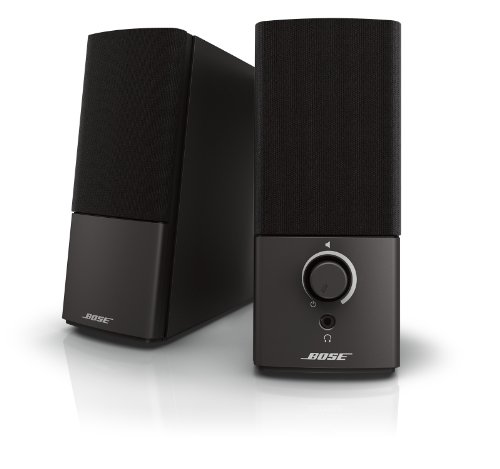
The Bose Companion 2 Series III multimedia speaker system stands as one of the most dependable audio upgrades available for desktop setups. Designed specifically to replace anemic built-in monitor and laptop speakers, this compact stereo pair brings the polished sound signature Bose is famous for into personal workspaces. It caters directly to professionals, college students, and casual media enthusiasts who prioritize clear dialogue, refined musicality, and straightforward utility without turning their desk into a tangled web of wires.
In day-to-day use, these speakers excel across diverse desktop tasks. Whether you are navigating back-to-back Zoom calls, catching up on YouTube video essays, or streaming music while working, the sound is articulate and fatigue-free. The angled cabinet orientation fires audio straight toward ear level, providing an immediate acoustic lift that makes instruments and human voices feel present and centered.
What sets the Companion 2 Series III apart from generic budget speakers is its thoughtful connectivity. The inclusion of two distinct 3.5mm analog inputs means you can leave your desktop PC or Mac permanently wired in while keeping an open line for an iPad, smartphone, or gaming console. Both sources play concurrently, eliminating the need to toggle input switches or swap cables.
While bass enthusiasts craving floor-shaking sub-bass will notice the physical limits of a compact two-channel cabinet, the overall tuning remains remarkably cohesive. As an everyday desktop speaker system that prioritizes clarity, intuitive controls, and bulletproof reliability, the Companion 2 Series III continues to justify its status as a workspace staple.
Acoustically, the Bose Companion 2 Series III focuses on balance, vocal resolution, and non-fatiguing treble. High frequencies are smooth and airy without exhibiting the harsh sibilance common in inexpensive plastic speakers. The midrange is warm and articulate, giving podcast voices, acoustic guitars, and vocal tracks a lifelike presence that cuts cleanly through background ambient noise.
Low frequencies are supported by rear-ported acoustic enclosures that maximize bass output from compact full-range transducers. While these speakers do not replicate the sub-35Hz rumble of a dedicated powered subwoofer, they yield punchy, tight mid-bass that gives kick drums and basslines tangible body. Proprietary Bose TrueSpace digital processing circuitry electronically widens the soundstage, creating the illusion of speakers positioned several feet further apart than their physical desktop placement suggests.
Constructed from durable, matte-black composite materials, the Companion 2 Series III features a clean, minimalist aesthetic that blends effortlessly into any modern home office or gaming desk. Measuring just 7.5 inches tall, 3.1 inches wide, and 5.9 inches deep, the pair takes up negligible surface area while remaining stable thanks to non-slip rubber feet. The right speaker acts as the control hub, housing a smooth rotary volume dial that also powers the unit on and off.
Hardware interfaces are kept simple and functional. The right satellite rear panel hosts the DC power connection, the left speaker umbilical port, and dual 3.5mm stereo auxiliary inputs. Up front, a 3.5mm headphone jack offers quick access for private listening sessions, automatically muting speaker output when headphones are connected. Power is supplied by a lightweight external AC adapter, keeping internal cabinet temperatures low and ensuring consistent, low-noise amplification.

Pros
- Outstanding vocal and midrange clarity ideal for virtual meetings, podcasts, and acoustic music
- Simultaneous dual audio inputs make multi-device desktop multitasking simple
- Front-mounted volume dial and headphone port offer effortless accessibility
- Compact vertical profile occupies minimal desk real estate
Cons
- Lacks modern Bluetooth wireless connectivity for cable-free streaming
- No dedicated bass or treble tone dials to adjust the factory sound profile
- Ultra-low sub-bass frequencies taper off on heavy electronic or hip-hop tracks
The Bose Companion 2 Series II Multimedia Speaker System remains a quintessential 2.0 powered speaker upgrade for users who want clean, natural sound without filling their desk with extra hardware. Designed to significantly outperform tinny built-in monitor and laptop speakers, this pair brings the renowned Bose acoustic philosophy into a streamlined personal workspace configuration.
Targeted squarely at home office professionals, college students, and casual desktop listeners, these speakers excel across everyday media tasks. Whether you spend hours on Zoom conference calls, stream background playlists while working, or watch video essays on YouTube, the system renders dialogue and instrumental nuances with clarity and warmth.
Day-to-day usability is where the Companion 2 Series II shines brightest. The dual-input layout lets you leave your primary computer plugged into the back while connecting a secondary device, such as a portable music player or smartphone, simultaneously. Combined with a responsive front-panel volume knob and a dedicated headphone bypass port, the system integrates seamlessly into active workstations.
Ultimately, the Bose Companion 2 Series II is an easy recommendation for listeners who appreciate fuss-free analog connectivity and dependable sound quality. While it skips wireless convenience features, it compensates with durable engineering, articulate nearfield performance, and a sleek form factor that looks right at home beside modern displays.
Acoustically, the Bose Companion 2 Series II focuses on rich midrange performance and fatigue-free highs. Spoken word tracks, podcasts, and acoustic strings are rendered with genuine warmth and lifelike articulation. Treble response remains smooth and rounded, ensuring that long workdays listening to music or attending virtual meetings will not lead to listener ear fatigue.
Low-end reproduction is handled through a tuned acoustic porting system built directly into each enclosure. While these compact 2.0 speakers naturally cannot reproduce visceral sub-bass frequencies below 60 Hz, they deliver an articulate upper-bass presence that gives kick drums, male vocals, and movie sound effects satisfying body without introducing tubby distortion.
The standout audio feature is the proprietary stereo digital signal processing, which artfully widens the listening sweet spot. Despite sitting mere feet away from the monitors on a standard office desk, listeners experience a cohesive stereo image that feels wider than the physical distance between the two speaker cabinets.
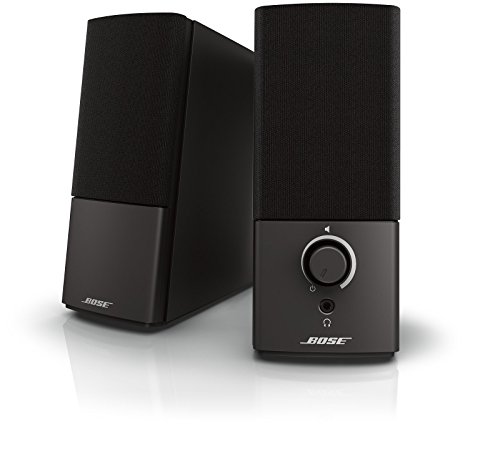
Constructed with durable matte composite cabinets and finished in an understated grey tone, the Companion 2 Series II is engineered to blend seamlessly into professional and personal desktop setups. Standing approximately 7.5 inches tall with a slim 3.4-inch width, the enclosures have a slightly backward-angled front baffle that directs the acoustic output toward ear level rather than your chest.
Hardware connectivity is straightforward and reliable. The right satellite functions as the primary control center, hosting the front-facing volume potentiometer, a 3.5mm headphone out jack, and rear analog ports. Dual 3.5mm stereo inputs on the rear panel allow dual-source mixing without the need for manual switcher boxes.
The system operates as an active powered setup via an included external AC power adapter, eliminating the need for an external amplifier or receiver. A single multi-pin umbilical cable connects the right master unit to the left passive speaker, ensuring a clean, low-profile cable run along the back of your workstation.
Pros
- Crisp vocal reproduction and natural dialogue clarity for podcasts, calls, and videos.
- Warm, balanced bass performance from a remarkably compact desktop footprint.
- Hassle-free plug-and-play analog setup requires no software drivers or pairing.
- Smooth volume potentiometer and front-mounted headphone jack for quick access.
Cons
- Lacks Bluetooth connectivity for wireless streaming from mobile devices.
- No dedicated bass or treble EQ dials for manual tone shaping.
- Does not include digital audio connections such as USB or optical.
The Bose Companion 2 Series III multimedia speaker system is built to transform flat, uninspiring computer sound into an engaging audio experience. Designed specifically for close-range desktop listening, these compact stereo speakers replace the thin, boxy output of standard monitor speakers with depth and authority. Whether you are dialing into remote conference calls, streaming your favorite video playlists, or enjoying personal music sessions, this 2.0 setup brings signature Bose warmth directly to your workstation.
Setting up the system takes only minutes, requiring nothing more than connecting the AC power adapter, running the included 3.5mm audio cable to your computer, and linking the left satellite to the master right speaker. A secondary 3.5mm auxiliary input on the back allows you to keep your computer connected while simultaneously hooking up a secondary audio source like an iPad or phone. Having both the master volume control knob and a 3.5mm headphone output on the front of the right speaker ensures intuitive daily operation.
In real-world desktop environments, the Companion 2 Series III consistently impresses with balanced frequency reproduction and low distortion across various volume levels. Bose integrates proprietary digital signal processing that actively manages sound dynamics, keeping acoustic instruments, spoken voices, and movie soundtracks natural and lifelike. Because it uses a reliable wired connection, you enjoy zero audio latency, which is essential for lip-sync accuracy during video conferences and gaming.
Ultimately, the Bose Companion 2 Series III represents a dependable, premium desktop upgrade for office workers, students, and home listeners. If you value clean workspace aesthetics, trusted build engineering, and crisp, balanced sound without complex configuration, this system delivers steady, high-quality audio day in and day out.
Acoustically, the Companion 2 Series III utilizes Bose TrueSpace stereo digital processing circuitry to project sound well beyond the physical distance between the two cabinets. This engineering creates a spacious, believable soundstage where stereo pans and background details are positioned accurately in front of the listener. Midrange performance is the standout attribute, delivering rich, resonant vocal timbre and intelligible dialogue without harshness or listener fatigue.
Lower frequencies are reinforced through tuned bass ports located on the back of each enclosure. While these compact 2.0 speakers do not reach the subterranean rumble of a discrete subwoofer, they produce tight, satisfying mid-bass that gives body to rock rhythms, pop tracks, and action movies. The treble response is smoothly rolled off at the top end, ensuring bright audio tracks remain pleasant during hours of continuous background listening.
Dynamic headroom is tailored perfectly for small to medium-sized workspaces. Active electronic equalization dynamically balances bass, mid, and high frequencies so your music preserves full tonal weight whether playing at low background levels or elevated volumes. The internal amplification drives the transducers cleanly, preventing audible breakup and cabinet vibration during intense media playback.
The Companion 2 Series III features a clean, professional aesthetic with durable black enclosures and fabric grilles that blend seamlessly into any modern workspace. The cabinets are built with a subtle backward tilt, angling the drivers directly toward your ears when seated at a desk. Their slender profile fits effortlessly alongside widescreen computer monitors or laptop stands without crowding your keyboard and mouse.
Hardware interfaces are focused and functional. The primary right speaker houses two rear 3.5mm analog inputs, a DC power port, and the terminal for the left speaker interconnect cable. On the front, you find a smooth-gliding volume dial that doubles as an on and off switch, right alongside a dedicated 3.5mm headphone jack that automatically mutes the speakers when plugged in.
Power is delivered via an external 12V DC power brick, keeping internal heat away from the acoustic chambers for stable operation. Running on dedicated wall power rather than a low-voltage USB connection allows the internal amplifier to deliver steady current and consistent acoustic dynamics throughout heavy daily use.
Safe Disassembly and Internal Servicing of Bose Companion 2 Speakers
Opening a pair of Bose Companion 2 multimedia speakers requires patience, suitable prying tools, and an understanding of how the internal parts fit together. These desktop speakers do not feature exposed rear screw holes, leading many owners to assume the cabinets are permanently sealed. Instead, the assembly is held together by hidden structural fasteners secured beneath the front metal mesh grille. Approaching the teardown methodically ensures that you can service internal electronics, clear debris, or fix loose audio connections without marring the enclosure.
Essential Tools and Workspace Preparation
Preparing the correct workspace prevents cosmetic scuffs and keeps tiny fasteners from rolling away during disassembly. You should clear a flat desk and lay down a soft microfiber towel or silicone mat to cushion the plastic housing. A plastic pry tool or nylon spudger is essential because metal screwdrivers easily dent the speaker frame or scratch the painted grille. You will also need a precision magnetic Phillips #1 screwdriver, angled tweezers, and a small container to store fasteners.
Before touching any internal component, disconnect the power adapter from the wall outlet and unplug all audio cables. Residual electrical charges can linger in electrolytic capacitors on the amplifier board, making a few minutes of waiting a wise precaution. Having isopropyl alcohol and cotton swabs on hand assists if you plan to clean a noisy volume potentiometer or remove dust. Good overhead lighting also makes it much easier to inspect delicate solder pads and recessed screw heads inside the baffle.
Structural Differences Between the Right and Left Enclosures
The Bose Companion 2 system, across both Series II and Series III iterations, splits system functionality between the two desktop cabinets. The right speaker acts as the master active unit, housing the internal power circuits, stereo amplifier board, volume potentiometer, dual input jacks, and front headphone output. In contrast, the left enclosure is a passive satellite containing only the acoustic driver, internal wiring, and an umbilical connection cable. Because the left speaker contains almost no active circuitry, disassembling it is significantly faster and involves fewer delicate parts.
Working on the right enclosure demands more care due to the tight packing of circuit boards and delicate leads. The front volume knob connects directly through the baffle to a rotary potentiometer mounted on an auxiliary control board. When exploring affordable desktop sound options, listeners often note that integrated volume dials provide convenient desk control, but physical potentiometers are vulnerable to dirt ingress over years of use. Forcing the front baffle away before disconnecting internal leads can tear circuit traces or snap the volume control shaft.
Removing the Front Metal Grille Safely
Extracting the front protective metal grille is the most delicate step of the entire disassembly procedure. The perforated metal screen is seated tightly within a perimeter channel on the front baffle, held by friction fit and perimeter adhesive or rubber grommets. Inserting a metal blade or flathead screwdriver along the edge will permanently kink the thin metal and leave dents in the plastic bezel. Instead, insert a thin, flexible plastic opening tool into the lower corner seam where the grille meets the outer shell.
Gently lever the tool upward to break the adhesive bond, working your way slowly around the perimeter of the cabinet. Once one edge lifts slightly, slide a plastic guitar pick or spudger along the seam to release remaining retention points. If the factory adhesive feels particularly stubborn, applying mild warmth with a household hairdryer can soften the glue without warping the plastic. After freeing the edges, lift the grille straight off the front face of the enclosure and set it aside on a clean surface.
Extracting the Baffle Screws and Disconnecting the Driver
With the grille removed, you will see several Phillips head screws situated around the outer perimeter of the front plastic baffle. Use a properly sized Phillips #1 screwdriver to prevent stripping the soft screw heads, which are recessed into small counterbores. Back each screw out carefully and place them in your magnetic tray, noting whether corner screws differ in length from center fasteners. Removing these exterior perimeter screws separates the structural front baffle from the main rear plastic acoustic chamber.
Do not pull the baffle away rapidly once the perimeter screws are loose, as internal wire harnesses remain connected to the driver terminals. The single full-range transducer is secured to the baffle with its own set of mounting screws around its metal basket. If your goal is simply to inspect the cabinet interior or access the amplifier board, leave the driver attached to the baffle and disconnect the push-on spade connectors instead. Make note of the positive and negative wire polarities, which are usually marked with colored tracer stripes or varying terminal widths.
Accessing and Removing the Active Circuit Board
Once the front baffle of the right speaker is unseated, you can look inside the rear enclosure cavity to see the main printed circuit board. In the Bose Companion 2 Series II and Series III multimedia speakers, this board houses the audio amplification circuitry, input switching components, and voltage regulation stages. The board is anchored against the rear interior wall with small retaining screws and alignment grooves molded into the cabinet plastic. You will also notice the DC power barrel connector and the dual audio input jacks soldered directly to this circuit assembly.
To detach the circuit board, remove the small Phillips screws securing the PCB to the interior rear mounting posts. If your model features retaining nuts around the exterior input jacks or volume knob collar, loosen them gently using miniature pliers or a nut driver. Next, slide the circuit board forward along its interior alignment guides while ensuring no hanging wiring gets pinched against the plastic framework. Taking clear reference photos before removing connectors makes reconnecting the components during reassembly straightforward and foolproof.
Managing Internal Heat Sinks and Thermal Compound
Thermal management is critical inside this compact active enclosure, which lacks active cooling fans. Bose utilizes a formed aluminum heat sink attached to the power amplifier integrated circuit to radiate heat into the internal air volume of the ported cabinet. Avoid bending these heat sink fins or stressing their thermal mounting pins when lifting the circuit assembly out of the shell. If the thermal paste between the amplifier chip and heat sink appears dry and flaky, cleaning and reapplying fresh compound can help maintain proper heat dissipation during extended listening sessions.
Inspect the surrounding components on the circuit board for any visual signs of thermal distress or electrical degradation. Look closely at the tops of the electrolytic filter capacitors to ensure they remain flat rather than bulging or leaking electrolyte. Examine the board surface around the power input diodes and voltage regulator for discoloration caused by excess heat. Addressing component wear while the board is exposed helps prevent sudden amplifier failure down the road.
Resolving Scratchy Volume Pots and Loose Audio Jacks
The most frequent reason listeners disassemble these multimedia speakers is to resolve static, popping, or channel dropouts caused by a dirty volume potentiometer. Dust and ambient moisture penetrate the small aperture on the potentiometer casing over years of desktop usage, causing uneven electrical contact along the resistive carbon track. Spraying a dedicated electronic contact cleaner and lubricant directly into the small opening on the potentiometer housing works wonders. After spraying, rotate the volume control shaft back and forth through its full travel thirty to forty times to sweep away oxidized contaminants.
Another common hardware complaint involves intermittent sound caused by fractured solder joints around the 3.5mm auxiliary input ports or headphone jack. The repeated stress of inserting and removing audio cables can weaken the physical bond between the through-hole connector pins and the circuit board solder pads. Inspect the underside of the PCB under bright magnification, searching for hairline ring cracks around each connector pin. Reflowing these joints with a fine-tipped soldering iron and adding a small dab of fresh rosin-core solder easily restores reliable physical contact and clean stereo sound.
Inspecting Internal Acoustic Damping and Reflex Ports
Examining the acoustic construction inside the enclosure reveals why these compact cabinets produce respectable audio output despite their modest footprint. Bose incorporates a tuned bass reflex port channel molded into the rear section of each cabinet, directing internal airflow to augment low-frequency resonance. While checking the interior, verify that no loose wiring bundles or dislodged foam dampening blocks are obstructing the internal mouth of this port tube. Any foreign debris or shifted wiring caught in the air channel can generate distracting chuffing noises or port turbulence at higher volume settings.
Synthetic acoustic damping material is strategically placed inside each chamber to minimize internal standing waves and prevent unwanted cabinet resonance. When working with portable wireless speakers or traditional desktop setups, proper internal acoustic damping keeps vocal reproduction clear and natural. Ensure that this dampening fiber remains seated against the internal walls rather than bunched directly against the rear of the speaker cone. If the fiber touches the moving driver cone, it will introduce mechanical buzzing during bass-heavy musical passages.
Reassembly Protocols and Phase-Correct Wiring
Reassembling the speakers requires following the disassembly sequence in reverse order with careful attention to component seating and alignment. Slide the main amplifier circuit board back into its rear chassis tracks, securing it with the original retaining screws without over-tightening the plastic threads. Reattach the push-on spade connectors to the acoustic driver terminals, double-checking that you match positive and negative connections accurately. Swapping the terminal polarity will place the left and right speakers out of acoustic phase, causing a hollow soundstage and dramatically reduced bass response.
Position the front baffle back onto the main enclosure shell, ensuring that no internal wires are trapped between the mating plastic rims. Thread the perimeter screws back into their holes by hand before using the screwdriver, turning counterclockwise slightly until you feel the threads engage properly. Tighten the screws in an alternating diagonal pattern to apply uniform clamping pressure across the entire perimeter gasket. This even pressure restores the airtight seal of the acoustic enclosure, preventing cabinet rattles when playing dynamic audio tracks.
Bench Testing Audio Output and Headphone Switching
Before snapping the metal mesh grilles back into position, perform a quick bench test to verify that all electronic functions operate as expected. Connect the DC power supply, plug a known audio source into the rear auxiliary input, and connect a test computer or smartphone. Rotate the front volume knob slowly to ensure smooth resistance and clean, static-free audio output from both channels. Plug a pair of headphones into the front jack to confirm that the internal mute switch activates properly, cutting sound from the main drivers while routing clean audio to the headphones.
Check for air leaks around the perimeter of the front baffle by playing a track with steady low-frequency content at moderate volume. Place your hand close to the seam between the front baffle and the rear cabinet to feel for any escaping air puffs. If you detect air escaping anywhere other than the designated rear reflex port, snug down the adjacent baffle screws slightly to compress the seal. Taking the time to verify airtight assembly before replacing the cosmetic grilles saves you from having to pry the grilles off a second time.
Preventive Maintenance and Deciding When to Upgrade
Once your speakers are fully tested and the front grilles are gently pressed back into their perimeter grooves, practicing preventive maintenance extends their operating lifespan. Keep desktop speakers away from direct sunlight and heat sources, which can degrade the plastic baffle material and dry out flexible driver surrounds. Periodically vacuuming the front mesh grille with a soft brush attachment removes household dust before it can migrate through the perforations into the voice coil gap. Using a surge protector on the main AC power strip also safeguards the sensitive onboard amplifier IC from sudden electrical spikes.
While simple issues like scratchy volume dials and cracked solder joints are easily remedied through teardown and cleaning, severe electronic faults may require professional service or component replacement. If a speaker exhibits severe voice coil rubbing, a burned crossover trace, or a blown amplifier chip that produces hum even with inputs disconnected, repair costs may outweigh the value of the unit. In such circumstances, upgrading to modern desktop audio equipment or acquiring replacement OEM modules represents a practical solution. Understanding these physical limits helps you decide when a weekend repair makes sense and when investing in new hardware provides a better listening experience.







Write Your Review
No reviews yet. Be the first to share your experience!