


Streaming audio directly from a phone or laptop often feels limited by tiny internal device speakers. Learning how to connect echo dot as a bluetooth speaker lets you transform your compact smart puck into a convenient wireless audio hub without buying separate desktop gear. Amazon built two-way Bluetooth connectivity into these devices, which means you can beam playlists from Spotify, Apple Music, podcasts, or YouTube straight through the speaker hardware. Listeners who often explore Bluetooth speakers with strong bass performance know that while compact units have physical boundaries, getting clear vocal playback on a bedside table or home office desk remains genuinely useful.
The setup process requires only a few moments whether you prefer hands-free voice requests or standard mobile system menus. Many listeners assume their smart device functions strictly through cloud commands over home Wi-Fi networks. In reality, enabling the wireless receiver allows offline or personal library playback from handheld tablets, gaming systems, and personal computers. Understanding how to manage your connections ensures smooth audio switching without unexpected dropouts during daily listening routines.
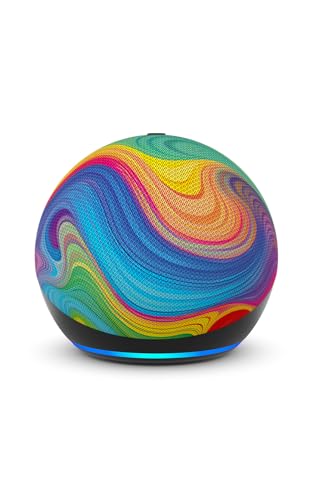
Pros
- Articulate midrange tuning delivers exceptional clarity for audiobooks and spoken content
- Robust parental controls with automatic explicit lyric filtering
- Vibrant Rainbow Swirl fabric aesthetic brightens up kids' bedrooms
- Dedicated physical microphone mute button ensures hardware-level privacy
- Includes a generous two-year replacement guarantee against accidental breakage
Cons
- Compact driver lacks deep sub-bass response for bass-heavy music genres
- Requires continuous AC wall power with no built-in rechargeable battery
- Full audiobook and educational library requires an active Amazon Kids+ subscription
The Amazon Echo Dot Kids reimagines the compact smart speaker experience by balancing child-safe smart functionality with an audio profile tailored for bedrooms and study desks. Sporting a vibrant Rainbow Swirl fabric finish, this spherical speaker is specifically designed to fit naturally into a child's personal space while giving parents total peace of mind. It removes the visual distractions of screen-based tablets, focusing entirely on auditory engagement, independent learning, and structured daily routines.
Under the hood, the speaker leverages upgraded voice intelligence through Alexa+, empowering younger listeners to engage in interactive learning, play educational games, and co-create imaginative stories. For parents, bedtime routines become significantly less stressful thanks to the dedicated Sleep Studio, which draws on calming audio tracks from respected wellness partners including Calm and Headspace. Explicit content filters actively scrub lyrics across major streaming services, ensuring children only hear age-appropriate media.
Everyday usability is bolstered by Amazon's intuitive Parent Dashboard, which lets guardians set bedtime curfews, review audio history, and manage content access directly from their smartphones. When combined with the two-year replacement guarantee that covers accidental mishaps, this Echo Dot Kids delivers a dependable, educational, and screen-free audio hub that children genuinely enjoy using every day.
Acoustically, the Echo Dot Kids is tuned with a distinct emphasis on midrange intelligibility. The front-firing driver produces clean, distinct vocals, which is essential for spoken-word content like audiobooks, podcasts, and daily alarm interactions. Dialogue remains clear even at whisper-level volumes during quiet bedtime stories, preventing listeners from straining to follow narrative arcs.
While low-frequency bass extension is naturally limited by its ultra-compact enclosure, the speaker produces adequate lower-midrange punch to keep pop music and children's sing-alongs lively and enjoyable without distorting at moderate listening levels. Treble frequencies are smoothed out to eliminate harsh sibilance, resulting in a gentle, warm acoustic tone that is easy on young ears over extended listening sessions.
The speaker features an ergonomic spherical form factor measuring 3.94 by 3.94 by 3.53 inches and weighing a modest 0.75 pounds, allowing it to occupy minimal space on a nightstand or bookshelf. The exterior is wrapped in a durable, multi-colored woven fabric that effectively hides minor dust and smudges. Physical buttons across the top provide intuitive, tactile control for volume, action triggers, and a dedicated hardware microphone mute switch with an illuminating LED privacy indicator.
Connectivity relies on dual-band Wi-Fi for seamless cloud streaming and multi-room grouping across compatible Amazon Echo hardware, alongside standard Bluetooth support for direct playback from mobile devices. The unit is powered via an included external AC power adapter, ensuring steady and reliable performance throughout the night without the worry of battery depletion.

Pros
- Enhanced bass from passive radiator fills rooms with rich low-end
- Stable Bluetooth connectivity for wireless streaming from multiple devices
- Up to 8 hours of playback on a single charge supports full-day use
- Color-changing lights add fun ambiance that syncs with music
- Dedicated Echo Dot dock simplifies portable Alexa setup
Cons
- Requires Wi-Fi for full Alexa functionality, limiting offline use
- Echo Dot sold separately, adding to overall setup cost
- No waterproof rating, so best kept indoors or in dry outdoor spots
The iHome iAV5 is a specialized portable speaker designed as a dock for the Amazon Echo Dot (2nd Gen), letting you take Alexa-powered audio and smart home control from room to room or even out to the deck. It combines Bluetooth streaming with Echo Dot integration, making it a seamless extension for Alexa enthusiasts who want more freedom than a stationary smart speaker allows.
Ideal for busy households or anyone integrating smart home devices, this speaker shines in everyday scenarios like bedside routines, kitchen multitasking, or casual outdoor lounging. The stereo sound and color-changing lights elevate music listening, while compatibility with iHome smartplugs expands control over lights and appliances.
In real-world use, it delivers consistent performance with no dropouts in Bluetooth range around the home, and the 8-hour battery holds up for extended sessions. Though not rugged for extreme conditions, its lightweight design makes it effortless to move. Overall verdict: a smart pick for Echo Dot owners craving portability, earning solid marks for convenience and fun features.
Stereo drivers paired with a passive radiator produce room-filling audio with noticeable bass depth, handling everything from podcasts to upbeat tracks without muddiness. Vocal clarity stands out during Alexa responses or Bluetooth streams, ensuring commands and lyrics cut through clearly even at higher volumes.
Volume levels reach party-ready loudness indoors, with minimal distortion, and the Bluetooth connection remains stable up to 30 feet through walls. Five color modes, including pulse-to-music, sync lights with the beat for an engaging visual experience that enhances performance during casual gatherings or solo chill sessions.
The compact, lightweight build with a dedicated MicroUSB dock for the Echo Dot makes it highly portable for home use, slipping easily into a bag for deck or patio moves. Color-changing LEDs offer five modes like slow blend or fast pulse, adding stylish flair without bulk.
Not rated for waterproof or dustproof use, it suits dry environments best to avoid damage. The internal rechargeable battery delivers up to 8 hours of playback at moderate volumes, with a full charge taking about 3-4 hours via USB, supporting worry-free all-day mobility around the house.

Pros
- Exceptional vocal intelligibility tailored for spoken-word content and podcasts
- Robust parental controls via the mobile dashboard with a dedicated mic-off privacy switch
- Automatic explicit lyric filtering across popular music streaming services
- Compact spherical footprint fits comfortably on small bedside tables
Cons
- Compact driver limits deep sub-bass response for bass-heavy music genres
- Requires an active Amazon Kids+ subscription to access the complete library of premium audiobooks
- Must stay connected to a wall outlet due to the lack of an internal battery
The newest Amazon Echo Dot Kids brings thoughtful audio curation directly into children's bedrooms and play areas. Built around a compact spherical chassis featuring the whimsical Stardust finish, this speaker bridges the gap between functional smart home hardware and child-centric entertainment. Instead of relying on screens, it encourages healthy listening habits by delivering interactive stories, guided educational challenges, and reliable morning wake-up alarms.
In everyday use, the speaker shines brightest during structured daily routines. The integrated Sleep Studio delivers soothing soundscapes, calming tracks, and bedtime narratives sourced from respected wellness services like Headspace and Calm. Parents can establish automated wind-down schedules via the Amazon Kids Parent Dashboard, effectively cutting down on bedtime negotiations while encouraging natural sleep hygiene.
Content safety remains front and center. Streaming playback through platforms like Spotify, Apple Music, and Amazon Music is automatically sanitized through active lyric filters. Children can safely discover new artists or explore ad-free podcasts from Wondery Kids without accidental exposure to inappropriate language.
Ultimately, the Echo Dot Kids is an exceptional entry point into personal audio for younger demographics. While audiophiles looking for room-rattling low end will need to look toward larger full-range drivers, this model delivers exactly what it promises: dependable vocal clarity, robust parental governance, and durable hardware backed by a two-year replacement guarantee.
Acoustically, the Echo Dot Kids is engineered with a specialized emphasis on speech intelligibility and near-field listening. Its single compact driver is tuned to boost the midrange frequencies where human speech and narrative voices reside. As a result, audiobooks from Disney or classic authors come across cleanly, without the muffled dialogue or boominess that often plagues inexpensive personal speakers.
Because the speaker measures under four inches across, physical acoustic constraints naturally limit low-end extension. Sub-bass thump is modest, prioritizing controlled, distortion-free mid-bass rather than deep subterranean punch. High frequencies remain smooth and rounded to prevent auditory fatigue during long story sessions or overnight ambient white noise playback.
Volume output is more than adequate to fill a standard child bedroom or study space without harsh breakup at moderate levels. When pushed toward its upper ceiling, onboard dynamic processing steps in to reign in peak distortion, ensuring that interactive conversations, trivia challenges, and pop songs stay pleasant and decipherable.
The Echo Dot Kids features a compact spherical silhouette measuring 3.94 inches wide by 3.53 inches tall and weighing just 0.75 pounds. Wrapped in an eye-catching Stardust motif fabric, the outer cabinet blends playfulness with modern nursery and bedroom aesthetics. A non-slip base keeps the unit stable on bedside tables, dressers, or study desks.
Physical controls on top of the dome include volume keys, an action button, and a dedicated microphone-mute switch that electronically disconnects the internal listening array for total privacy. Wireless connectivity relies on dual-band Wi-Fi for low-latency voice processing and multi-room audio streaming, alongside Bluetooth support for pairing external playback devices.
The unit operates via an included proprietary AC power adapter plugged directly into a standard 120V wall outlet, ensuring uninterrupted operation for overnight sound machines and scheduled morning alarms. Amazon also bundles a 2-year worry-free guarantee, ensuring peace of mind against typical drops and bedroom accidents.
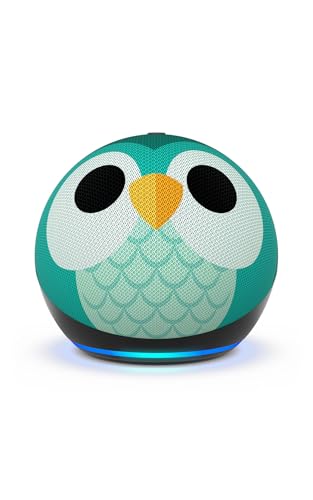
Pros
- Exceptional vocal clarity that brings audiobooks and bedtime stories to life
- Robust parental dashboard with built-in explicit content filters and routine controls
- Compact spherical footprint fits easily on crowded nightstands and study desks
- Dedicated hardware mic-disconnect button ensures complete privacy whenever needed
Cons
- Lacks sub-bass response for bass-heavy contemporary music tracks
- Requires continuous wall power due to the absence of a built-in battery
- Full library access for premium kids content requires an ongoing subscription
The Amazon Echo Dot Kids with the Owl design transforms modern smart audio into a kid-tailored acoustic hub. Retaining the recognizable spherical silhouette of the standard Dot platform, this edition pairs a kid-friendly visual aesthetic with proprietary software tuned specifically for young ears and curious minds. It bridges the gap between functional smart home utility and engaging, screen-free educational entertainment.
Built primarily for bedrooms, playrooms, and study areas, this speaker excels at spoken-word delivery and gentle ambient soundscapes. The curated integration with wellness platforms like Calm, Headspace, and Moshi turns chaotic bedtimes into predictable, soothing wind-down sessions. Parents gain peace of mind through an intuitive dashboard that automatically filters explicit lyrics across major streaming services while offering granular control over listening hours and active time limits.
During day-to-day playback, the speaker handles children's questions, interactive storytelling, and casual music listening with responsiveness and poise. Voice recognition proves sharp even across moderate room distances, allowing younger voices to trigger alarms, music, or educational trivia effortlessly without requiring shouted commands.
Ultimately, the Echo Dot Kids succeeds as a dedicated audio companion rather than a high-powered audiophile monitor. For families seeking an easy-to-manage, safe smart speaker that promotes daily routines and literary engagement, it stands out as one of the most cohesive solutions on the market.
From an acoustic standpoint, the Echo Dot Kids is engineered around a single front-firing dynamic driver calibrated to emphasize the vocal midrange. Dialogue in audiobooks, podcasts, and Alexa responses rings through with crisp clarity, free from boxy resonance or muffled sibilance. High frequencies remain smooth and rolled off slightly at the top end, ensuring long listening sessions remain fatigue-free during bedtime stories or afternoon study blocks.
Lower frequencies are present enough to provide warmth to acoustic instruments and pop melodies, though physical enclosure constraints prevent deep sub-bass extension. In a typical bedroom measuring 100 to 150 square feet, the speaker easily produces room-filling volume without noticeable harmonic distortion until pushed past eighty percent volume. For evening ambient noise and morning alarm duties, output levels are both pleasant and easy to dial in.
The physical construction features a sturdy spherical enclosure measuring 3.94 inches in diameter and weighing just 0.75 pounds. Wrapped in an acoustically transparent fabric bearing a detailed Owl motif, the speaker blends playful charm with resilient everyday durability. Rubberized feet on the base absorb minor driver vibrations while keeping the unit firmly anchored on smooth nightstands or bookshelves.
Physical controls sit along the top crest, including volume adjustment, action keys, and a dedicated microphone disconnect button that physically cuts power to the mic array for guaranteed privacy. Connectivity is driven by dual-band Wi-Fi and Bluetooth, supported by an external AC wall adapter for dependable, uninterrupted power delivery around the clock.
Step-by-Step Guide on How To Connect Echo Dot As A Bluetooth Speaker
Understanding the Two Directional Modes for Bluetooth Audio
To connect an Echo Dot as a Bluetooth speaker, put your source device in pairing search mode and say the voice phrase “Alexa, pair” within hearing distance of the smart unit. The light ring pulses blue to signal that the device is actively broadcasting its Bluetooth identity to nearby source hardware. Open the Bluetooth settings menu on your smartphone, tablet, or laptop, locate your Echo Dot in the discovered equipment list, and tap its name to establish the link. Alexa confirms the connection with a brief chime and an audible voice prompt stating the name of your linked playback hardware.
Amazon engineers built these compact units with bi-directional Bluetooth support that operates in two distinct operational orientations. The primary mode discussed here allows the unit to behave as a receiver, pulling digital music from a mobile handset and pumping it through the internal speaker driver. The alternative orientation lets the device act as an audio transmitter, broadcasting its smart assistant voice and cloud streams out to external speakers. Recognizing which mode you need prevents confusion when navigating connection menus or issuing voice pairing commands across different rooms.
Pairing Your Smartphone or Tablet Using Hands-Free Voice Commands
Voice pairing offers the quickest path to link your mobile handset without navigating nested settings screens inside auxiliary apps. Begin by unlocking your smartphone and navigating to the primary Bluetooth management menu so the handset scans for discoverable peripherals. Speak clearly toward the puck and state “Alexa, pair” or “Alexa, connect Bluetooth” to initiate wireless discovery mode. Your phone should show the specific Echo Dot label within five to ten seconds under available local connections.
Select the device name on your screen to complete the digital handshake between both pieces of hardware. Once the initial pairing finishes successfully, the speaker stores your phone profile inside its local memory cache. Reconnecting in the future requires only a simple voice request such as “Alexa, connect to my phone” whenever you re-enter the room. If multiple paired handsets exist in the same household, naming the specific phone prevents the speaker from grabbing the wrong audio stream.
Configuring the Connection Manually via the Alexa App
Manual configuration through the mobile application serves as an effective alternative when voice recognition fails or environmental noise interferes. Open the Alexa application on your mobile device, tap the Devices icon on the bottom navigation bar, and select the Echo and Alexa category. Choose the specific Echo Dot you want to configure from the equipment overview list displayed on the screen. Select the gear icon in the top right corner to access device settings, then tap the Bluetooth Connections menu option.
Tap the option labeled Pair a New Device to prompt your Echo Dot into broad discovery mode. Make sure your secondary playback source, such as a tablet or media player, has its own Bluetooth radio active and set to visible. Select the target peripheral as soon as its identifier appears on the screen to finalize the wireless audio link. This manual software route provides a clear list of all previously remembered source hardware, making it simple to disconnect or forget stale devices.
Routing Audio from Windows Laptops and Mac Computers
Connecting a personal computer transforms your compact desktop assistant into an effective external PC speaker for calls, webinars, and casual video viewing. On Windows systems, access the main Settings menu, choose Bluetooth and Devices, and toggle the radio switch to the active position. Put your smart assistant into discovery mode by saying “Alexa, pair” before clicking the Add Device button on your desktop interface. Select Bluetooth from the prompt window and click the detected smart speaker to finish system routing.
Mac users can achieve identical audio routing by opening System Settings and navigating straight to the Bluetooth control panel. Ensure your smart unit is actively pulsing blue, then locate it under the nearby devices list on macOS and click Connect. Once paired, you may need to open sound output settings to ensure the operating system designates the external device as the default sound output. While listeners seeking maximum volume often turn to dedicated forty-watt Bluetooth speakers for spacious media setups, an Echo Dot provides plenty of voice clarity for standard office desks.
Distinguishing Between Phone Streaming and Auxiliary Speaker Transmission
A common point of confusion for many owners involves distinguishing between receiving audio from a phone and sending audio out to external sound gear. In receiver mode, your smartphone serves as the media player while the smart speaker functions strictly as an acoustic output device. This setup lets you play stored music files, podcast apps not natively supported by voice skills, and video soundtracks directly through the speaker. All audio decoding happens on the fly while volume can be adjusted from either the phone rocker or the physical buttons on top of the puck.
Transmitter mode reverses this signal pathway entirely by sending the smart assistant audio out to another amplified speaker or soundbar. This configuration proves ideal when you love using voice assistants for news updates and alarms but want richer acoustic output across large gathering spaces. Homeowners who install Bluetooth speakers configured for large rooms frequently tether their compact smart units to heavy external drivers using this exact transmitter orientation. Keeping these two operational directions straight ensures you issue the correct command depending on whether your phone or your smart speaker acts as the audio host.
Hardware Docking and Amplification Solutions
Dedicated accessory docks provide a clever way to expand the acoustic capability and physical versatility of smaller smart speakers. For instance, the iHome iAV5 Color Changing Bluetooth Rechargeable speaker dock is specially designed to dock a second-generation Echo Dot while adding portable functionality. This docking unit integrates a dedicated MicroUSB cable connection to supply operating power directly to the docked puck without tangled wall cords. It also incorporates a passive radiator for enhanced bass response, giving the combined hardware noticeably fuller low-frequency reproduction.
The iHome unit also introduces five color-changing lighting modes, including slow blend, fast blend, favorite color, pulse to music, and preset pulse options. Because it features an internal rechargeable power cell, you can move your docked smart speaker from the bedside table out to the patio while maintaining contact with voice services over local Wi-Fi. It allows users to wirelessly stream audio from any Bluetooth-enabled device while delivering room-filling stereo sound. Adding an amplified docking accessory bridges the gap between stationary smart controls and flexible, mobile room audio.
Physical docks also enhance bedside utility by serving as centralized control hubs for connected accessories. The manufacturer specifies that the iAV5 dock works with iHome smart plugs and various smart home solutions right from your nightstand. Having integrated physical controls and expanded acoustic drivers prevents you from straining to hear morning alarms or weather briefings. It represents a practical hardware upgrade for older compact pucks that lack the built-in acoustic presence of larger modern enclosures.
Acoustic Capabilities Across Different Echo Dot Generations
Acoustic performance varies noticeably depending on which revision and enclosure design of the smart speaker sits on your counter. Modern standalone hardware, such as the Amazon Echo Dot Kids newest model line, features spherical housings that offer enhanced vocal articulation and cleaner high frequencies compared to flat legacy designs. These models come in playful outer shells like Rainbow Swirl, Stardust, and Owl patterns while incorporating advanced Alexa+ interactive features. They also support specialized bedtime audio routines with partner content from Calm, Headspace, and Moshi through the parent dashboard.
Despite their kid-friendly exterior aesthetics and parental monitoring controls, these spherical units function identically to standard models when operating in wireless Bluetooth receiver mode. You can link any standard smartphone to stream unfiltered personal playlists or educational podcasts whenever the smart assistant profile allows. Built-in physical privacy controls include a dedicated microphone off button that disconnects microphone power completely without disrupting an active Bluetooth music stream. Knowing the hardware specifications of your specific model helps set realistic expectations for room volume and frequency coverage.
Amazon packages these youth-focused units with a two-year worry-free guarantee that includes free device replacement if accidental damage occurs. Parents can manage listening habits remotely using the Amazon Kids Parent Dashboard app to establish explicit lyric filters across supported music platforms. This dashboard works alongside streaming services like Apple Music, Spotify, Pandora, and Amazon Music to maintain age-appropriate playback. Understanding these software guardrails ensures seamless music streaming without disabling parental controls during everyday use.
Audio Latency, Codecs, and Video Playback Considerations
Bluetooth wireless transmission introduces processing latency that can impact media consumption depending on the type of content you stream. Standard smart pucks typically rely on the basic SBC audio codec alongside AAC support for handling compressed wireless digital streams. Music playback and spoken podcast tracks mask this latency entirely because your ear does not require visual synchronization to enjoy pure audio. As a result, streaming tracks from Spotify or Apple Music feels completely responsive and steady during typical listening sessions.
Watching videos or playing competitive mobile games through an Echo Dot can occasionally reveal slight lip-sync discrepancies between onscreen actors and audible speech. Desktop video platforms like YouTube often implement internal software delay compensation to keep speech aligned, but fast-paced gaming audio may lag by a fraction of a second. If perfect sync is critical for desktop video editing or gaming, a wired auxiliary connection or dedicated low-latency desktop monitors offer superior timing. For general background music and bedside entertainment, however, the standard Bluetooth connection remains completely satisfactory.
High-resolution audio handling also differs significantly between direct Wi-Fi streaming and local Bluetooth transmission. When an Echo Dot streams music over home Wi-Fi, it pulls digital data directly from cloud servers at maximum supported bitrates. Switching to Bluetooth compresses that same audio stream into standard codecs to transmit across the local radio band. While casual listeners rarely notice the compression in smaller drivers, recognizing this technical distinction explains minor tonal shifts between connection modes.
Diagnosing Disconnections and Wireless Pairing Errors
Bluetooth links can occasionally drop or refuse to initiate due to local radio congestion and outdated device memory profiles. The simplest initial fix involves power cycling the smart speaker by unplugging the power adapter from the wall outlet for ten full seconds. While the speaker boots back up, open your smartphone settings, select your listed smart puck, and tap Forget This Device. Once both units finish their power cycles, say “Alexa, pair” again to establish a clean wireless handshake without corrupted cache files.
Physical distance and structural obstacles also play significant roles in maintaining a stable wireless audio pipeline across your living quarters. Standard Bluetooth operates within an effective range of roughly thirty feet under clear line-of-sight conditions. Thick plaster walls, metal household appliances, and active microwave ovens can create localized radio frequency interference that causes audio stuttering. Keeping your streaming phone within twenty feet of the speaker ensures uninterrupted transmission without packet drops or signal degradation.
Wi-Fi network instability can also create unexpected Bluetooth dropouts because both radios share crowded internal housing space and overlapping frequencies. Many modern household routers operate dual-band channels across 2.4 GHz and 5 GHz wireless spectrums. Shifting your smart assistant over to the 5 GHz Wi-Fi band frees up the 2.4 GHz spectrum exclusively for Bluetooth communication. This simple network adjustment frequently resolves persistent audio popping and unexpected connection drops during extended listening sessions.
Managing Stored Connections and Device Memory Limits
Smart speakers store multiple hardware profiles over time, which can lead to accidental connections with unattended tablets or family devices in neighboring bedrooms. If you notice your speaker suddenly playing audio from someone else’s phone, you can issue the clear command “Alexa, disconnect.” To remove all historical connections entirely, open the Alexa application, navigate to Bluetooth settings for that specific unit, and manually unpair unused devices. Clearing stale hardware profiles eliminates background connection attempts that interrupt your primary listening sessions.
Assigning unique names to your smart speakers across different household rooms also prevents voice routing mistakes when initiating connections. You can rename your device in the software application to something distinct like Office Puck or Bedside Echo rather than keeping the generic factory label. This makes verbal commands like “Alexa, connect to my laptop” much more reliable across multi-device home ecosystems. Taking a few minutes to clean up stored device listings guarantees that only your current playback hardware claims the wireless audio stream.
Smart speaker firmware updates occur automatically over Wi-Fi during overnight idle hours, which can occasionally reset temporary Bluetooth states. If a previously paired smartphone stops reconnecting after an update, toggling your phone’s Bluetooth off and on usually clears the connection error. Re-issuing the standard pairing command prompts the speaker to refresh its wireless security keys without requiring a factory reset. Maintaining clean device lists and updated mobile operating systems keeps your wireless streaming setup running smoothly week after week.
Practical Takeaways for Daily Bluetooth Listening
Turning your smart voice puck into a versatile wireless receiver gives new life to an everyday piece of household technology. Whether you operate a spherical newest-generation Kids model or an older flat design mounted inside an amplified iHome dock, wireless pairing unlocks unlimited audio options from your personal phone library. The straightforward voice pairing commands eliminate the need for complicated software configurations while preserving the full hands-free utility of the smart assistant. Testing your connection range and clearing unused device profiles guarantees dependable, clear background playback whenever you sit down to relax or work.



Write Your Review
No reviews yet. Be the first to share your experience!