


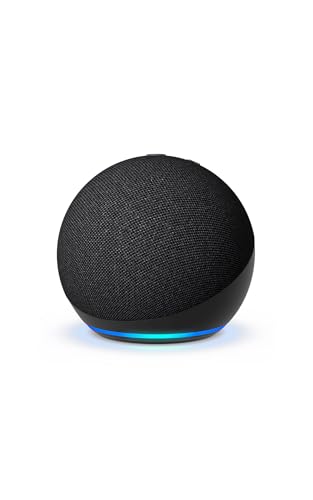
Smart audio hardware frequently serves double duty in modern homes, transitioning from automated digital assistants to everyday music players. Many listeners often wonder whether can you use echo as a bluetooth speaker when streaming from a personal phone, tablet, or laptop. The answer is yes, as Amazon designs these devices with integrated Bluetooth radios capable of pairing directly with external source hardware. Configuring your Echo as a wireless receiver allows you to enjoy podcasts, offline tracks, and audiobooks without relying entirely on voice-activated cloud streaming services.
Standard Bluetooth streaming bypasses the necessity of connecting specialized smart music skills, giving you direct playback control through your preferred media apps. While standalone units like dedicated 40-watt Bluetooth speakers prioritize battery portability and raw acoustic power, an Echo device provides convenient desk or tabletop playback whenever it is connected to power. Learning the exact connection sequence, operational quirks, and performance boundaries will help you get reliable sound without recurring technical interruptions.


Pros
- Massive volume output easily covers large backyards, gymnasiums, and outdoor tailgates.
- Comprehensive connectivity with Bluetooth, USB, SD card, AUX, guitar, and dual mic inputs.
- Expandable power options via included 12V external battery cables prevent mid-party shutoffs.
- Smooth maneuverability thanks to built-in wheels and retractable luggage handle despite its size.
Cons
- Substantial 34.5-pound cabinet requires effort when lifting into vehicle trunks.
- Sound profile leans heavily toward boomy bass, lacking the nuanced midrange fidelity of studio monitors.
- Included starter microphone is basic plastic quality, so serious vocalists will want to upgrade.
The Dolphin SP-1600RBT is a powerhouse all-in-one party PA speaker engineered to command large gatherings, outdoor events, and backyard festivities. Designed for DJs, event hosts, buskers, and tailgaters, this unit delivers high decibels and club-ready energy without requiring a continuous wall outlet. Its hardened ABS plastic cabinet ensures that accidental knocks and outdoor dust will not disrupt the party.
In real-world performance, the SP-1600RBT shines as a versatile entertainment station. The built-in mixer panel makes setup effortless, letting you plug in the included microphone for karaoke, hook up an acoustic-electric guitar, and stream backing tracks over Bluetooth simultaneously. Independent controls for echo, delay, bass, and treble allow quick vocal sweetening on the fly, making it remarkably capable for live backyard sets.
For anyone searching for maximum outdoor projection, versatile instrument integration, and vibrant lighting on a budget, this speaker stands out. While critical audiophiles seeking flat studio response should look elsewhere, partygoers and live entertainers looking for room-shaking fun will find exceptional value in this mobile PA system.
Built around an expansive 15-inch subwoofer and horn-loaded tweeter driven by an AlNiCo magnet system, the Dolphin SP-1600RBT focuses squarely on room-filling projection and aggressive low-frequency punch. Bass-heavy tracks hit with physical authority, delivering the kind of chest-thumping presence essential for dance music, block parties, and outdoor sports gatherings.
The horn tweeter projects upper frequencies across wide outdoor spaces without thinning out, ensuring vocal announcements and lead lines stay intelligible over ambient crowd noise. While the midrange takes a modest back seat to the booming low end, onboard EQ knobs provide enough flexibility to dial back bass and enhance vocal clarity when hosting speeches or karaoke.
If you need an even wider stereo image, the integrated WaveSync protocol allows seamless wireless linking with a secondary SP-1600RBT unit. Pairing two of these 15-inch giants turns standalone mono sound into a true dual-channel PA setup capable of covering commercial dance floors or large outdoor pavilions.
Measuring 14 by 18 by 28 inches and weighing in at 34.5 pounds, the SP-1600RBT features a heavy-duty ABS plastic enclosure designed to endure frequent travel. Built-in rolling wheels and a retractable trolley handle make transport manageable across flat terrain, while a standard 1.5-inch pole cup underneath accommodates universal speaker tripods for elevated sound dispersion above crowd level.
Connectivity options are plentiful, encompassing Bluetooth streaming, USB flash drive playback, an SD card reader, a 3.5mm AUX input, two 1/4-inch mic jacks, and a dedicated 1/4-inch instrument input. Beat-activated front LED lights provide visual flair, with a convenient physical switch on the rear panel to shut them off when professional discretion is required.
Power flexibility is one of this model's greatest assets. The internal 84Wh battery provides up to 7 hours of cord-free runtime, complemented by an included external 12V battery clamp cable. This unique feature lets you tap directly into a car battery or marine power source, guaranteeing uninterrupted music throughout marathon tailgating weekends.

Pros
- Enhanced bass from passive radiator fills rooms with rich low-end
- Stable Bluetooth connectivity for wireless streaming from multiple devices
- Up to 8 hours of playback on a single charge supports full-day use
- Color-changing lights add fun ambiance that syncs with music
- Dedicated Echo Dot dock simplifies portable Alexa setup
Cons
- Requires Wi-Fi for full Alexa functionality, limiting offline use
- Echo Dot sold separately, adding to overall setup cost
- No waterproof rating, so best kept indoors or in dry outdoor spots
The iHome iAV5 is a specialized portable speaker designed as a dock for the Amazon Echo Dot (2nd Gen), letting you take Alexa-powered audio and smart home control from room to room or even out to the deck. It combines Bluetooth streaming with Echo Dot integration, making it a seamless extension for Alexa enthusiasts who want more freedom than a stationary smart speaker allows.
Ideal for busy households or anyone integrating smart home devices, this speaker shines in everyday scenarios like bedside routines, kitchen multitasking, or casual outdoor lounging. The stereo sound and color-changing lights elevate music listening, while compatibility with iHome smartplugs expands control over lights and appliances.
In real-world use, it delivers consistent performance with no dropouts in Bluetooth range around the home, and the 8-hour battery holds up for extended sessions. Though not rugged for extreme conditions, its lightweight design makes it effortless to move. Overall verdict: a smart pick for Echo Dot owners craving portability, earning solid marks for convenience and fun features.
Stereo drivers paired with a passive radiator produce room-filling audio with noticeable bass depth, handling everything from podcasts to upbeat tracks without muddiness. Vocal clarity stands out during Alexa responses or Bluetooth streams, ensuring commands and lyrics cut through clearly even at higher volumes.
Volume levels reach party-ready loudness indoors, with minimal distortion, and the Bluetooth connection remains stable up to 30 feet through walls. Five color modes, including pulse-to-music, sync lights with the beat for an engaging visual experience that enhances performance during casual gatherings or solo chill sessions.
The compact, lightweight build with a dedicated MicroUSB dock for the Echo Dot makes it highly portable for home use, slipping easily into a bag for deck or patio moves. Color-changing LEDs offer five modes like slow blend or fast pulse, adding stylish flair without bulk.
Not rated for waterproof or dustproof use, it suits dry environments best to avoid damage. The internal rechargeable battery delivers up to 8 hours of playback at moderate volumes, with a full charge taking about 3-4 hours via USB, supporting worry-free all-day mobility around the house.
How to Use an Amazon Echo as a Bluetooth Speaker
Yes, you can use an Amazon Echo as a standard Bluetooth speaker for any compatible smartphone, tablet, computer, or digital audio player. The hardware features an internal Bluetooth module that functions as an audio sink, allowing external devices to transmit sound straight through its internal amplifier and speaker drivers. Setting up this connection requires only a straightforward voice command or a few taps inside the mobile application. Understanding how the hardware manages wireless connections ensures you get clear, uninterrupted playback across all your favorite streaming applications.
How Bluetooth Mode Operates on Amazon Echo Hardware
Every Amazon Echo model contains a dual-role wireless radio capable of operating in two distinct modes. In receiver mode, commonly referred to as audio sink mode, the Echo accepts an incoming Bluetooth audio stream from your phone, laptop, or portable player. In transmitter mode, the Echo acts as a source, directing its own voice responses and native streaming audio out to an external Bluetooth sound system. Switching between these modes depends on whether you pair the Echo as a peripheral from your phone or pair an external speaker from inside the companion app.
When operating strictly as a Bluetooth speaker, the Echo processes digital audio packets sent over standard Bluetooth profiles. The device decodes the audio signal locally and routes the resulting waveforms directly to its built-in acoustic drivers. This local processing means your phone handles playlist management, volume normalization, and media pausing directly through its native operating system controls. The Echo remains passive in this state, acting essentially like any traditional wireless speaker sitting on your tabletop or nightstand.
Step-by-Step Bluetooth Pairing Using Voice Commands and the Alexa App
Pairing your host device through voice commands is the quickest method available for most households. Start by activating Bluetooth on your mobile phone, tablet, or laptop, ensuring the device remains in discovery mode. Stand near your smart speaker and state clearly, “Alexa, pair,” which prompts the hardware to broadcast its local Bluetooth beacon. Open the Bluetooth settings menu on your phone, locate the Echo in the list of available devices, and tap its name to establish a stable wireless connection.
Using the companion mobile application provides an alternative pairing path if voice commands fail or if the ambient room noise is too loud. Open the application, navigate to the Devices tab, select your specific Echo unit, and tap the Bluetooth Connections setting. Choose the option to pair a new device, which places the speaker into active pairing status without requiring a spoken trigger phrase. Select your phone or computer once it appears on the screen to finalize the wireless pairing link between both units.
Managing future reconnections is equally straightforward once initial pairing information is stored in the memory of the device. Saying “Alexa, connect to my phone” instructs the smart speaker to search for your previously paired mobile device and resume the link automatically. Conversely, stating “Alexa, disconnect” breaks the active wireless bridge without wiping the stored pairing profile from memory. You can also terminate the connection at any time by toggling Bluetooth off inside your source device settings menu.
Wi-Fi Requirements and Offline Playback Limitations
A common misconception is that an Echo can function entirely as an offline Bluetooth speaker straight out of the packaging. Amazon requires an active Wi-Fi connection and an authenticated account to complete initial device provisioning and setup. If you take an unconfigured Echo to an outdoor setting without wireless internet, the hardware will not permit Bluetooth pairing adjustments. The internal operating system expects cloud communication to initialize its core operational state before opening peripheral connectivity.
Once pairing has been successfully completed on a functional home network, behavior during an internet outage can vary across hardware generations. Some Echo devices maintain an established Bluetooth connection to your phone even if your broadband service temporarily disconnects. However, voice commands like “Alexa, pair” will fail completely without an active internet link because the acoustic speech processing occurs in cloud data centers. In such scenarios, manually selecting the Echo from your phone menu is the only possible method to sustain local media playback.
Audio Performance, Latency, and Codec Constraints
Standard Echo units rely primarily on baseline Bluetooth audio codecs like SBC and occasionally AAC for wireless audio transmission. These codecs deliver dependable clarity for casual listening, spoken podcasts, and background music streaming throughout a residential room. However, listeners seeking high-fidelity dynamics, lossless bitrates, or deep bass response may notice that dedicated audio hardware performs differently. Audiophiles comparing output profiles often examine Bluetooth speakers engineered for bass performance to understand how dedicated passive radiators and larger cabinet enclosures affect sound reproduction.
Wireless latency represents another technical boundary when routing audio through an Echo over Bluetooth. Transmitting audio packets introduces a minor transmission delay that is barely noticeable during pure music playback. However, this delay becomes prominent when watching movies, streaming video clips, or playing mobile games on your connected screen. The slight mismatch between lip movements on video and the sound coming from the speaker happens because standard Echo devices lack low-latency codecs like aptX Low Latency.
Expanding Sound Quality with Docks and Dedicated External Speakers
Compact Echo units like the Echo Dot feature modest internal drivers that can sometimes sound thin across expansive rooms. Accessory manufacturers have addressed this acoustic limitation by designing specialized docking enclosures like the iHome iAV5 color changing rechargeable speaker dock. This docking solution supplies dedicated microUSB power, dynamic color lighting modes, and an integrated passive radiator to boost lower frequency response. Using an accessory dock allows listeners to transform a stationary puck speaker into a richer, battery-assisted audio station for bedside or patio use.
You can also turn the setup around by instructing your Echo to output its audio to larger external sound systems. When filling substantial gathering areas or hosting outdoor events, small tabletop speakers naturally reach acoustic distortion thresholds. In those demanding acoustic environments, connecting to speakers suited for large rooms provides substantially greater sound pressure and broader dispersion. Pairing your smart hub to an external high-power speaker ensures you retain convenient voice assistant controls while enjoying expansive sound reproduction.
Echo Speakerphones Versus Dedicated Conference Audio
Using an Echo as a desk speakerphone for laptop conference calls presents distinct operational challenges. While the smart speaker houses multiple far-field microphones for voice assistant triggers, it does not always bridge those microphones back to your computer over Bluetooth. In many operating systems, the Echo registers solely as a stereo output device, leaving your laptop microphone responsible for capturing your spoken voice. This configuration can lead to acoustic room echo and inconsistent vocal pickup during important business calls.
Professional work environments usually require dedicated conference speakerphones rather than repurposed residential smart hardware. Specialized options like the EMEET M220 Bluetooth speaker feature full-duplex communication, four high-sensitivity MEMS digital microphones, and VoiceIA noise suppression algorithms. The M220 also supports daisy chaining two units together to expand pickup coverage across up to sixteen attendees in larger meeting spaces. For corporate teleconferencing across platforms like Zoom and Skype, purpose-built speakerphones deliver audio clarity that standard smart speakers cannot match.
Managing Device Interference and Signal Stability
Wireless interference can degrade Bluetooth playback between your mobile host and the Echo speaker. Because Bluetooth shares the crowded 2.4 GHz radio frequency band with domestic Wi-Fi networks, microwave ovens, and wireless baby monitors, packet collisions can occur. These signal conflicts manifest as brief audio dropouts, robotic distortion, or unexpected stream stuttering during playback. Placing your Echo at least three feet away from your home router can dramatically improve transmission stability.
Physical obstructions between the transmitter and receiver also attenuate high-frequency radio waves rapidly. Solid materials such as brick walls, metal desks, and dense plaster reduce reliable wireless range from thirty feet down to just a few paces. Maintaining an unobstructed line of sight between your transmitting phone and the Echo ensures continuous data packet delivery. If audio buffering or choppy sound persists, keeping the phone resting within ten feet of the speaker generally resolves the issue.
Troubleshooting Common Echo Bluetooth Connection Issues
Unresponsive pairing often stems from stale connection profiles cached inside the firmware of the Echo. When multiple family members connect their personal smartphones to the same unit, stored Bluetooth registers can become congested. If your phone refuses to establish a handshake, open the Alexa application and remove all previously paired devices from the memory list. Resetting the connection register forces both devices to negotiate a clean security exchange during subsequent discovery attempts.
Another frequent complication occurs when an Echo automatically connects to an unintended household device located in another room. Because the speaker attempts to reconnect with the most recently active device in its memory, it may latch onto an idle tablet across the house. You can verify which host is currently paired by asking, “Alexa, which device is connected?” Stating “Alexa, disconnect” will drop the background link, permitting you to pair your intended phone without physically searching for the secondary hardware.
Power cycling the Echo remains one of the most reliable troubleshooting steps for persistent software anomalies. Disconnecting the AC power adapter for approximately twenty seconds clears transient memory buffers within the onboard microcontroller. After plugging the cable back into the wall outlet, allow the device to reboot completely and illuminate its blue status ring. Once the speaker chimes and reconnects to your local Wi-Fi network, issue the pairing voice command to test the wireless link again.
Echo Versus Portable Party and Outdoor Speakers
Stationary tabletop speakers are optimized for indoor living rooms, requiring continuous connection to a standard electrical wall outlet. They lack protective weather sealing against rain or dust, making them unsuitable for backyard gatherings or camping excursions. The absence of an internal lithium-ion battery means an Echo ceases operation the moment you unplug its barrel connector. Understanding these physical constraints helps users determine when a true portable outdoor speaker is required for mobile listening tasks.
Large gatherings and outdoor social events demand substantially higher acoustic output, durable cabinets, and independent battery power. Heavy-duty options like the Dolphin SP-1600RBT party speaker feature a 15-inch woofer, an internal 84Wh battery lasting over seven hours, and built-in wheels with a trolley handle. The Dolphin unit also integrates physical inputs for guitars and microphones, accompanied by hardware echo and delay adjustments. While an Echo excels at casual home listening, demanding party environments require dedicated sound reinforcement equipment.
Smart Features Versus Pure Bluetooth Usability
Operating an Echo as a Bluetooth speaker introduces an interesting balance between cloud intelligence and local playback. When connected via Bluetooth, the microphone array remains active, listening quietly for its wake word. You can issue voice commands to pause media, resume playback, or adjust the master volume without touching your paired phone screen. If you ask a general query like the local weather forecast, the speaker briefly lowers the music volume, answers your question, and resumes music playback smoothly.
However, relying on voice commands while streaming over Bluetooth can occasionally create unexpected interruptions during group listening sessions. If ambient speech in the room resembles the wake trigger, the speaker may unexpectedly mute your song to process background conversation. You can prevent these interruptions during social gatherings by tapping the physical microphone mute button on top of the Echo chassis. The red indicator ring confirms the microphones are inactive, turning the unit into a strictly dedicated Bluetooth speaker.
Practical Summary for Daily Bluetooth Playback
Repurposing an Amazon Echo as an everyday Bluetooth receiver is an efficient way to expand the utility of existing household smart hardware. The pairing process requires minimal effort, functioning smoothly across Apple, Android, Windows, and ChromeOS operating systems. While it cannot replace high-output party sound systems or dedicated corporate conference gear, it handles daily podcasts, personal music libraries, and bedtime audiobooks effortlessly. Keeping the firmware updated and managing paired devices ensures consistent, hands-free wireless sound throughout your home.



Write Your Review
No reviews yet. Be the first to share your experience!