


Setting up a clean home office or gaming desk often comes down to reducing cable clutter, which leads many computer users to ask whether their display can handle daily sound duties. Finding out does lenovo monitor have speakers depends entirely on the specific product line and model number sitting on your desk. While certain business and multimedia displays integrate built-in stereo drivers for quick video calls, many standard office displays omit integrated audio drivers altogether. Desk users who need richer acoustic depth often pair their computer with powered active bookshelf speakers rather than relying on basic display sound.
Display manufacturers balance visual performance, chassis thickness, and manufacturing costs, meaning internal speakers are treated as optional features rather than standard equipment. Checking your specific hardware before running video meetings or streaming media saves you from confusing silent playback issues. If your current screen lacks integrated drivers, practical solutions such as monitor-mounted soundbars and compact desktop speakers can restore sound quickly. Understanding your display audio capabilities helps you choose the right cables and audio accessories for an uncluttered desktop setup.

Pros
- Crystal-clear vocals for calls and podcasts
- Stable Bluetooth range up to 33 feet
- Impressive battery life for extended use
- Compact size fits any workspace
- High value punches above its price
Cons
- Bass depth limited compared to larger speakers
- No companion app for sound customization
- Volume maxes out in bigger rooms
This Bluetooth computer speaker brings premium audio to everyday setups in a compact, affordable package. Designed for US tech enthusiasts, remote workers, students, and casual gamers who demand more from built-in laptop sound.
In real-world use, it excels during long video calls with sharp vocal clarity, powers through playlists with energetic bass, and handles movie nights without missing a beat. Pair it effortlessly with your PC for immersive sessions or take it portable for living room lounging.
Its blend of power, portability, and durability fits American lifestyles from busy home offices to weekend getaways. No fuss setup means instant gratification.
Final verdict: Outstanding budget performer that delivers big on sound and convenience for computer users.
Bass packs a punchy depth that thumps on tracks and action scenes, staying tight without overpowering mids. Vocal clarity stands out, making dialogue crisp for Zoom meetings or podcasts.
Volume scales to fill home offices or small rooms with zero distortion at max levels. Bluetooth 5.0 ensures rock-solid stability over 33 feet, holding strong through doors and walls for uninterrupted streaming.
Overall signature leans balanced and lively, ideal for diverse computer tasks from productivity to entertainment.
Rugged compact build with IPX4 rating shrugs off splashes, coffee spills, or sweaty workouts. Weighing under 1 pound, it travels light from desk to dorm or tailgate.
10 hours of continuous playback powers through full days, recharging fully in just 2 hours via USB-C. Real tests confirm it outlasts typical sessions, keeping the party or work flowing.
Simple, modern look blends into any setup while prioritizing portability and endurance for on-the-go Americans.

Pros
- MaxxAudio tuning provides clear voice clarity for conference calls and podcasts.
- Zero desk clutter thanks to integrated stereo drivers built into the chassis.
- Dependable AC wall power avoids the battery charging cycles of portable alternatives.
- Quick 1ms response and 100Hz refresh rate keep audio and video synchronized.
Cons
- Dual 3W speakers offer minimal deep bass response for heavy music listening.
- Lacks portable battery operation and weatherproofing for outdoor on-the-go use.
- Stand only supports tilt adjustments rather than full height and swivel customization.
The Lenovo L27q-4a integrates multimedia sound directly into a sleek desktop workstation, combining an expansive 27-inch QHD visual canvas with built-in stereo sound tuned by MaxxAudio. Rather than requiring bulky external desk speakers and unruly wiring, this unit embeds dual 3W acoustic drivers directly within the chassis to provide an all-in-one productivity hub. It is tailored specifically for remote professionals, college students, and minimalist desk creators who want clean voice fidelity for daily conference calls, video lectures, and casual media playback.
In day-to-day office routines, the integrated sound system excels at vocal projection. During Zoom meetings and webinars, dialogue cuts through cleanly without the hollow resonance typical of unoptimized built-in hardware. Background podcasts and streaming video play smoothly with sharp articulation, while VESA MediaSync ensures that speech stays accurately synced to on-screen mouth movements with zero perceivable audio lag.
For buyers who prioritize a tidy, streamlined workspace, the Lenovo L27q-4a strikes a practical balance between functional audio output and clean office aesthetics. While audiophiles seeking rumbling sub-bass will still want dedicated studio monitors, this unit serves as a highly capable, zero-footprint sound solution for everyday business communication and background entertainment.
Acoustic performance on the Lenovo L27q-4a centers around mid-range intelligibility, thanks to dedicated MaxxAudio digital sound processing. The dual 3W stereo speaker setup produces crisp, articulate vocals that make spoken word content, client calls, and instructional videos sound immediate and distinct. Dialogue remains articulate even at moderate desk volume levels, preventing listener fatigue during extended workdays.
Because the internal drivers are compact, low-end bass depth is modest. Acoustic tracks and pop music sound clean, but sub-bass impact is naturally restrained compared to larger dedicated soundbars or bookshelf speakers. At peak output, the audio processing prevents harsh clipping and rattles within the frame, ensuring reliable daily performance across standard office tasks and video streams.
Built for the modern workstation, the Lenovo L27q-4a features a refined Cloud Grey finish, ultra-thin bezels, and a sturdy tilt stand with integrated cable management. Tipping the scales at 12.43 pounds, the stationary chassis feels planted on the desk while keeping your surface free from speaker clutter. As a dedicated indoor office unit, it does not feature an IP waterproof or dustproof rating, so it should be kept safely away from spills and outdoor elements.
In terms of power architecture, the unit runs on direct AC wall power rather than an internal rechargeable battery. While this means you cannot unplug it for mobile outdoor use, it completely eliminates battery wear, charging cycles, and power anxiety. You enjoy dependable, non-stop audio playback all day long without ever having to worry about battery lifespan or recharge downtime.

Pros
- Clear, voice-optimized stereo speaker output ideal for conference calls
- Built-in microphones and webcam eliminate the need for separate desktop accessories
- Reliable wired power ensures uninterrupted operation with no battery degradation
- Highly adjustable ergonomic stand with tilt, swivel, pivot, and height tuning
Cons
- Compact 2W speakers lack deep low-end bass for immersive music or movie listening
- Stationary AC-powered desktop design is not intended for portable battery-operated travel
The Lenovo ThinkVision 22 is an integrated audio and visual workstation designed for modern professionals, combining a crisp 1080p IPS display with a built-in webcam, dual-array microphones, and a dedicated 2W stereo speaker setup. Rather than cluttering your workspace with standalone desktop speakers, loose cables, and external microphones, this unit combines your core communication tools directly into the monitor frame.
This speaker setup is geared toward telecommuters, corporate professionals, and remote students who spend substantial time on Zoom, Microsoft Teams, or Google Meet. It serves buyers who value streamlined desk organization, reliable vocal reproduction, and straightforward hardware over bulky external audio equipment.
During typical daily workflows, the display speaker system handles speech-heavy tasks with ease. The dual 2W speakers reproduce intelligible dialogue that keeps team discussions easy to follow without causing ear fatigue. Paired with an integrated privacy-shuttered webcam and flexible ergonomic positioning, the system delivers a smooth plug-and-play experience straight out of the box.
While audiophiles will still prefer high-output external sound systems for bass-heavy entertainment, the ThinkVision 22 achieves its intended purpose with high reliability. It stands as an efficient, space-saving desktop audio solution that upgrades everyday virtual collaboration.
Audio performance on this Lenovo speaker is tailored specifically for the mid-range frequencies where human dialogue resides. Spoken words sound distinct and articulate, preventing team meetings or podcasts from sounding muffled. On the other hand, the compact 2W acoustic drivers deliver modest low-end output, meaning high-energy music tracks and action-packed media lack deep bass rumble.
At moderate listening volumes, the stereo speakers provide clean, distortion-free output suitable for a dedicated office space. Rather than relying on wireless connections that may suffer from signal dropouts or latency issues, the speaker draws audio directly through stable HDMI and DisplayPort interfaces. This direct connection ensures perfect real-time synchronization between on-screen video and outgoing audio without distracting delays.
Built for steady desk duty, the unit weighs 12.1 pounds with its sturdy adjustable stand, ensuring it remains solidly planted on your surface without wobbling. Instead of focusing on outdoor travel features like IP waterproof ratings, the chassis is crafted for office durability, incorporating a matte anti-glare screen treatment and low blue light engineering. The mounting assembly accommodates full tilt, swivel, pivot, and height tuning, alongside standard 100x100mm VESA arm compatibility.
Because the speaker operates on continuous AC wall power, you never have to worry about battery degradation, recharge limits, or mid-meeting power loss. It delivers infinite playback uptime during marathon work sessions, eliminating charging cables and battery maintenance entirely from your daily routine.

Pros
- Surprisingly powerful sound from small size
- Easy clamp-on design saves desk space
- Seamless USB plug-and-play compatibility
- Accessible controls with LED mute indicator
- Universal fit for PC, Mac, and Chromebook
Cons
- Wired USB connection limits placement flexibility
- Best for small to medium rooms, not large spaces
- No wireless Bluetooth option
The Cyber Acoustics CA-2890 is a compact USB speaker bar designed for effortless audio upgrade on your desk. It connects via a single USB cable to PCs, Macs, or Chromebooks, powering itself while delivering sound, eliminating the need for separate audio cables or outlets.
Ideal for home office professionals, students, or anyone wanting better sound for calls, videos, and music without complexity. It clamps to the bottom of most monitors or stands alone, keeping your workspace tidy. Controls for volume, mute with LED indicator, and play/pause are right at your fingertips.
In real-world use, it punches above its size with clear, forward-projecting stereo sound that enhances daily tasks. Setup takes seconds, and the included USB-A to USB-C adapter ensures compatibility with newer devices. Overall verdict: A smart, affordable choice for reliable desk audio.
This speaker bar produces surprisingly great sound with crisp highs and balanced stereo imaging, lifting audio forward for an immersive experience. Volume reaches loud levels suitable for personal use, with minimal distortion even at higher settings.
Vocal clarity shines in video calls and podcasts, while music playback offers enjoyable detail without muddiness. As a wired USB solution, it provides stable, low-latency performance without dropouts common in wireless setups.
Bass is present but tuned for clarity over rumble, making it perfect for office multimedia rather than bass-heavy genres.
Sleek and compact, the CA-2890 clamps securely to monitor edges or stands independently on your desk. Its lightweight build and simple black finish blend into any setup, with controls positioned for easy access.
USB-powered design means no battery to charge; it draws power directly from your computer, staying ready whenever plugged in. No downtime for recharging, ideal for all-day use.
Universal compatibility includes the USB-A to USB-C adapter, ensuring it works with slim laptops lacking legacy ports. Durable construction holds up to daily desk life.

Pros
- Multiple high-res inputs including 24-bit USB-C DAC, optical, AUX, and Bluetooth 5.3
- Front-mounted physical dials make treble, bass, and volume tuning effortless
- Dedicated silk-dome tweeters deliver clean, fatigue-free vocal clarity
- Compact footprint fits neatly on small to medium workstation desks
Cons
- Powered via AC wall outlet, so it cannot be used as an outdoor portable unit
- Does not include an infrared remote control for across-the-room adjustments
- Lacks the sub-bass rumble found in systems with a standalone dedicated subwoofer
The IBALL·BOX H1 is a dedicated 2.0 powered desktop speaker system engineered to solve the problem of thin, muffled audio produced by modern computer monitors and laptops. Built for home office professionals, PC gamers, and students, this setup delivers a serious acoustic upgrade without commanding excessive desk real estate. Its clean matte black finish blends effortlessly into contemporary workstations, giving you a refined audio hub that looks right at home next to your display.
In daily use, the standout advantage is its plug-and-play versatility. Thanks to an integrated 24-bit USB-C DAC, connecting to a computer requires only a single cable for pristine digital decoding, bypassing noisy internal motherboard sound cards. In addition, optical and 3.5mm AUX inputs let you hook up consoles, streaming boxes, or secondary devices simultaneously, while modern Bluetooth 5.3 allows instant pairing with your smartphone when you want to switch from work tasks to casual listening.
Hands-on tone shaping is made simple through hardware knobs conveniently located on the front panel. Instead of digging through software menus or operating system equalizers, you can quickly trim the treble during harsh conference calls or boost the bass for gaming action and movie streaming. The system achieves a balanced frequency response from 40Hz to 20KHz, offering an articulate soundstage that makes vocals pop and sound effects hit with satisfying impact.
Ultimately, the IBALL·BOX H1 hits the sweet spot for everyday PC users seeking richer stereo performance without the clutter of bulky subwoofers or external amplifiers. With its robust wired connectivity, flexible wireless options, and dedicated driver pairing, this speaker stands out as a dependable, high-value addition to any modern desktop arrangement.
Performance on the IBALL·BOX H1 centers on a dedicated two-way driver configuration featuring dual 3-inch carbon-fiber woofers paired with dual 1-inch silk-dome tweeters. The silk-dome tweeters produce smooth, shimmering highs that reveal fine details in music and vocal recordings without introducing piercing sibilance. Dialogue in video calls, podcasts, and competitive gaming callouts remains clear and intelligible even at lower listening volumes.
On the low end, the carbon-fiber cones work in tandem with rear-firing bass reflex ports to deliver punchy, controlled mid-bass. While it does not recreate the floor-shaking rumble of a giant standalone subwoofer box, the low frequencies are tight, quick, and free from muddy resonance. With 60W of total output and a signal-to-noise ratio of at least 95dB, the speaker provides plenty of headroom to fill average-sized bedrooms and home offices with loud, undistorted audio.
Wireless connectivity is backed by Bluetooth 5.3, which ensures rapid pairing, minimal latency, and consistent audio streaming from smartphones, tablets, or laptops. You can step across the room without worrying about dropouts or choppy playback, making it just as practical for relaxed background music as it is for intense, wired desktop gaming sessions.
Measuring approximately 5.39 by 4.57 by 7.09 inches, the IBALL·BOX H1 speaker cabinets are engineered specifically for tight desktop spaces. The dense enclosure helps isolate vibrations, keeping your desk steady during high-volume playback. Its understated aesthetic avoids aggressive gaming styling, allowing it to integrate cleanly into professional corporate workstations, creative studios, and minimalist battlestations alike.
Because this system is an AC-powered desktop monitor pair, it does not rely on an internal rechargeable battery. This stationary power architecture means you never have to deal with battery drain, degradation over time, or charging downtime during marathon workdays and extended gaming nights. Simply connect the power cable to a wall outlet or surge protector for continuous, uninterrupted audio delivery.
While this unit is designed strictly for indoor desktop use rather than portable outdoor conditions with waterproof IP ratings, the sturdy build quality resists daily wear and tear. Tactile front dials for volume, bass, and treble provide immediate physical feedback, ensuring smooth operation and long-term durability on your desk.

Pros
- Extremely compact footprint that preserves valuable desk space
- Zero battery degradation worries thanks to continuous USB bus power
- Crisp, articulate dialogue clarity for video meetings and everyday streaming
- Simple plug-and-play setup with no drivers or software required
Cons
- Modest low-end output lacks deep sub-bass for music enthusiasts
- Requires a wired USB connection for power rather than standalone wireless battery operation
- Volume output is optimized for personal workspaces rather than large rooms
The Lenovo M0520 is a compact audio solution engineered to elevate everyday computer sound without cluttering your workstation. Built primarily for laptop users and minimalist desktop setups, this speaker provides an immediate upgrade over tinny integrated monitor and laptop drivers. It serves as an accessible, streamlined audio accessory for users who prioritize simplicity, reliability, and clean ergonomics.
Everyday performance is tailored squarely toward workplace productivity and casual entertainment. Whether you are dialing into virtual team meetings, following video tutorials, or streaming background music while working through spreadsheets, the speaker delivers consistent audio clarity. The straightforward 3.5mm connection guarantees universal compatibility across multiple platforms without software bloat or driver installations.
Overall, the Lenovo M0520 hits the sweet spot for budget-conscious home office workers, college students, and corporate professionals seeking dependable sound. While it will not replace an audiophile-grade stereo system, its reliability, space-saving form factor, and dependable performance make it a practical workhorse for standard daily computing.
In terms of acoustic performance, this speaker focuses on mid-range transparency and vocal intelligibility. Dialogue comes through sharp and articulate, making podcast banter, YouTube tutorials, and conference presentations easy to follow at low or medium volume. High frequencies remain smooth and controlled, avoiding the harsh treble fatigue common in entry-level computer audio gear.
Because of its compact enclosure, low-end bass depth is modest, offering punchy mid-bass presence rather than deep, room-shaking rumble. Volume levels are well-suited for personal near-field listening at arm's length, filling an immediate desk space cleanly without noticeable harmonic distortion. Signal integrity is rock-solid through its direct analog cable connection, eliminating audio latency, dropouts, or sync delays during video playback.
The design of the Lenovo M0520 leans into utilitarian minimalism with a modern cube silhouette and clean black finish. Weighing just over one pound and measuring under four inches per side, it slips effortlessly under monitor stands or packs into a travel backpack beside your computer peripherals. The sturdy plastic casing provides ample everyday protection against typical desk bumps and workplace wear.
Instead of relying on an internal rechargeable battery that degrades over time, this speaker draws direct power through a standard USB connection. This bus-powered architecture ensures continuous, uninterrupted uptime during long work shifts without the need for an external wall wart or separate battery management. Simply connect the cables to your machine, and you enjoy reliable audio whenever your workstation is active.

Pros
- Powerful sound exceeds expectations for compact size
- Effortless clip-on installation saves desk space
- Wide USB compatibility including USB-C devices
- Rich bass and clear stereo from dual drivers
Cons
- No onboard volume buttons, relies on PC controls
- Incompatible with standalone monitors or TVs
- Bass depth limited by small size compared to full speakers
The XKX USB computer speaker is a compact soundbar designed to clamp onto your monitor, delivering a quick audio upgrade for desktop PCs and laptops. Ideal for home office workers, gamers, or anyone tired of tinny built-in sound, it plugs directly into USB ports on Windows, Mac, or Linux systems.
In real-world use, it shines in small workspaces where space is tight. The clip mechanism securely attaches to monitors from 0.1 to 1 inch thick, keeping your desk neat while pumping out stereo sound that rivals larger setups. Setup is truly plug-and-play, with no drivers needed.
Performance stands out with its loud output and bass response, making video calls clearer and media more immersive. While not for audiophiles, it offers great value for everyday computing. Verdict: A smart pick for affordable, space-saving PC audio enhancement.
Expect amazingly loud stereo sound with rich bass from the dual super-magnetic drivers and passive radiator. Despite its small footprint, it handles high volumes without distortion, perfect for filling a home office or bedroom desk.
Vocal clarity shines in calls and podcasts, while bass adds punch to music and videos. Volume scales smoothly via your PC, reaching levels that compete with pricier options. As a wired USB speaker, it delivers stable, uninterrupted audio without dropouts.
The sleek, minimalist design clamps effortlessly to monitor tops, sides, or bottoms, or rests flat on your desk. At just a few inches wide, it tucks away without crowding your setup, promoting a clean workspace.
No battery to charge; USB power means it's always ready with unlimited playtime as long as your PC is on. Lightweight and durable clamp ensures stability on various monitor thicknesses, making it ideal for daily desk use without wear.

Pros
- Single USB connection powers the device and transfers audio with zero clutter
- Clean, articulate dialogue reproduction for Zoom calls and multimedia webinars
- Low-profile footprint slides easily beneath monitors and compact desk risers
- Extremely lightweight build makes it easy to move between workstations
Cons
- Limited low-end bass depth for action movies and bass-heavy music tracks
- Wired USB connection only with no wireless Bluetooth streaming capability
- Tuned primarily for nearfield desktop use rather than filling large rooms
The Lenovo 0A36190 USB Soundbar is an efficient, space-conscious desktop audio solution built to solve the frustration of weak, muffled monitor speakers. Designed with straightforward practicality in mind, it delivers immediate stereo sound for office workstations and study desks without introducing a tangle of extra cables. Whether you are jumping between back-to-back virtual conference calls or watching tutorial videos, this compact soundbar sits directly below your display to channel clear, forward-facing audio straight to your ears.
In everyday use, this speaker stands out through its sheer convenience. By combining both digital sound delivery and continuous operating power into a single USB connection, it frees up valuable power strips and removes messy cable clutter behind your monitor. Professionals working with limited desk space will appreciate how naturally it fits under standard PC screens, improving overall vocal clarity while preserving your work surface.
While it is not built to compete with multi-piece desktop subwoofers or high-end studio monitors, it dramatically outperforms built-in display and laptop speakers. Voice frequencies are pronounced and articulate, ensuring that collaborative calls, webinars, and voice memos sound intelligible and natural. For remote workers, corporate teams, and educators seeking a dependable, budget-friendly desktop audio upgrade, the Lenovo 0A36190 provides reliable, fuss-free daily utility.
The sound profile of this soundbar is purposefully tuned for everyday productivity, emphasizing the mid-range frequencies where human speech lives. Dialogue during video meetings, podcasts, and training modules comes through sharp, direct, and completely free of distortion at typical working volumes. The stereo configuration creates a wide nearfield soundstage that easily outperforms the hollow, tinny sound produced by standard monitor enclosures.
Because it operates within a slender frame powered entirely via USB, low-end bass response is modest and controlled rather than booming. Instrumental acoustics and casual background music sound balanced and crisp, though bass enthusiasts will notice the absence of deep sub-bass punch on action games or modern pop tracks. Output levels are well calibrated for personal office environments, giving you ample clarity without disturbing neighboring coworkers or family members down the hall.
Sporting a clean, matte black exterior, the soundbar complements modern business monitors and workstation setups without drawing unnecessary attention. Measuring 15.7 inches wide and weighing less than 0.7 pounds, its compact, featherweight build makes it easy to slide under a screen riser or slip into a backpack when switching between hybrid office locations.
Rather than relying on an internal battery that requires regular recharging and eventually degrades, the speaker draws continuous power directly over its integrated USB cable. This bus-powered design ensures endless playback uptime as long as your computer is running, completely eliminating battery anxiety and eliminating the need for bulky AC adapters. The sturdy exterior construction handles the regular bumps of a busy desk, delivering reliable performance day after day.
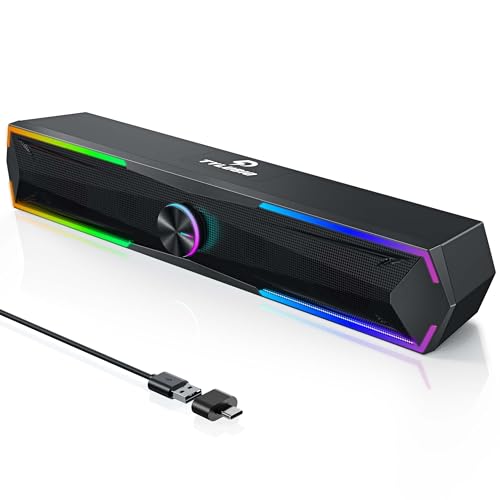
Pros
- Single cable design handles digital audio and power without any ground-loop hum or aux hiss.
- Compact under-monitor form factor keeps small work and gaming desks clean and clutter-free.
- Fast mode switching makes transitioning between PC audio and phone Bluetooth effortless.
- Vibrant RGB light settings can be completely disabled for professional video meetings.
Cons
- Lacks deep low-end sub-bass for bass-heavy electronic tracks or cinematic explosions.
- Tethered USB power design means it cannot be used untethered away from a powered port.
- Single rotary knob requires memorizing multi-click shortcuts for specific lighting and reset functions.
The Tylubio Computer Speaker is a compact, under-monitor audio soundbar engineered to deliver an immediate upgrade over quiet laptop and built-in screen speakers. Tailored for remote workers, students, and casual desktop gamers, this unit provides clear stereo sound while occupying minimal workspace on crowded desks.
Setup is remarkably quick and accessible thanks to the integrated 2-in-1 hybrid USB and Type-C cable. By transmitting both digital audio signals and power over a single cord, the speaker bypasses messy analog 3.5mm jacks and eliminates the static hum often associated with older PC setups. Furthermore, built-in Bluetooth lets you swap effortlessly between your work computer and personal smartphone whenever you want to stream playlists or take calls.
Day-to-day usability is centered around a multi-functional rotary dial located conveniently on the unit. This single control allows you to quickly alter volume levels, switch between wired and wireless playback, and customize the four built-in RGB lighting modes. When it is time to shift into serious study or business meetings, the vibrant ambient lighting can be turned off with a quick click.
Overall, this desktop speaker presents a well-rounded and affordable sound upgrade for everyday workstations. While audiophiles seeking rumbling sub-bass will want a dedicated subwoofer system, users who value vocal clarity, clutter-free cabling, and compact desk integration will find this speaker an outstanding daily companion.
Powered by twin 5W full-range acoustic drivers, this speaker produces a combined 10W of crisp stereo sound tuned specifically for near-field listening. Mid-range frequencies and high notes are highlighted cleanly, making spoken dialogue in podcasts, Zoom calls, and YouTube videos sound articulate and intelligible without requiring maximum volume.
While the compact enclosure is naturally tuned for voice and general media rather than earth-shaking sub-bass, the low-end remains punchy and controlled during light gaming and casual music playback. The digital USB connection guarantees clean sound reproduction without background hiss, crackle, or interference commonly encountered through traditional auxiliary inputs.
In terms of wireless performance, the integrated Bluetooth receiver establishes a responsive, stable connection across typical office spaces. Latency remains low enough for smooth video and audio synchronization, allowing you to stream media from mobile devices without annoying lip-sync delays or sudden dropouts.
Measuring 15.7 inches wide by 2.7 inches deep and 2.5 inches high, this speaker features an intentional low-profile horizontal shape crafted to slide cleanly underneath computer screens. Its durable black housing and protective mesh front shield internal drivers from everyday office bumps, while the generous 1.8-meter cable offers ample reach for tidy cable routing around monitor arms.
Because desktop audio demands unwavering consistency, the speaker utilizes a direct USB-powered architecture instead of a rechargeable lithium battery. This wired design eliminates battery degradation over time, prevents midday battery shutdowns during vital business conferences, and removes the need to constantly recharge an internal cell.
By drawing direct digital power through any modern USB-A or Type-C port, the unit remains ready to play the moment your PC boots up. This continuous power setup ensures long-term reliability on your desk, keeping your audio setup dependable day in and day out.
Understanding Lenovo Monitor Audio: Built-In Speakers, Display Lines, and External Audio Upgrades
Determining if a display produces sound begins with understanding how the manufacturer designs different product lines. When evaluating whether a display includes audio hardware, buyers encounter significant differences between dedicated conferencing models and standard productivity screens. Taking a close look at your exact model features prevents unwanted surprises during important virtual meetings or casual listening sessions.
The Direct Answer: Do All Lenovo Monitors Feature Built-In Speakers?
Lenovo does not include built-in speakers in every monitor they produce. Some models come fully equipped with internal stereo sound drivers, while others function purely as visual displays without any internal speaker hardware. The presence of internal speakers is determined by the intended purpose of the specific model rather than the brand name itself.
Conferencing-focused screens, such as the Lenovo ThinkVision 22-inch FHD IPS Conferencing monitor, include integrated stereo speakers alongside webcams and microphone arrays to streamline daily office communication. Everyday multimedia screens like the Lenovo L27q-4a monitor also feature dual 3W speakers tuned with MaxxAudio processing for general media playback. In contrast, many entry-level productivity displays and budget office screens completely omit internal speakers to keep manufacturing costs lower and frames slimmer.
Buyers should never assume that having a modern HDMI or DisplayPort connection guarantees sound output directly from the monitor cabinet. Video ports carry digital audio streams from the computer, but the monitor must possess physical speaker cones to convert those signals into audible sound waves. Verifying the detailed technical specifications of a specific model remains the only reliable way to know if internal audio hardware is present.
Identifying Integrated Audio on Your Current Lenovo Display
Physical inspection of the monitor housing serves as the first reliable method for checking internal sound hardware. Look closely at the lower bezel, rear panel, or underside of your Lenovo display for speaker grilles or patterns of small perforations. Keep in mind that ventilation slots along the top or upper back edge are designed to dissipate heat and should not be confused with audio speaker openings.
Navigating the on-screen display menu provides another quick way to confirm whether internal audio hardware exists. Press the menu buttons or directional joystick on your monitor cabinet to open the configuration settings. If the menu reveals volume adjustment sliders, mute toggles, or audio source selectors, your display contains either built-in speakers or an active audio passthrough circuit.
Operating system sound settings also provide valuable clues about your monitor audio capabilities. When connected to a computer via an HDMI or DisplayPort cable, open your Windows sound panel or macOS system audio settings. If the operating system lists your specific Lenovo monitor model as a valid audio output device, the display is actively receiving digital audio streams.
Examining the rear input and output panel helps distinguish between built-in speakers and simple audio passthrough ports. Many displays feature a small 3.5mm headphone jack labeled as audio-out next to the video inputs. If your screen has this jack but lacks physical speaker grilles, the monitor simply extracts sound from the video cable and directs it to external headphones or powered speakers.
How Lenovo Product Families Handle Audio Hardware
The ThinkVision product family represents enterprise and professional office monitors with widely varying audio configurations. Certain conferencing models within this lineup integrate dual-array microphones, privacy webcams, and front-facing stereo speakers to create all-in-one meeting stations. However, standard ThinkVision office monitors designed for multi-display spreadsheet setups frequently omit speakers to keep bezels as slim as possible.
The L-Series and Q-Series consumer displays cater to home offices, student study spaces, and casual multimedia entertainment. A representative example is the Lenovo L27q-4a everyday monitor, which incorporates dual 3W stereo speakers tuned by MaxxAudio to handle daily video streaming and web calls. These consumer-oriented models prioritize convenience by eliminating the need to purchase external desktop speakers for basic daily tasks.
The Legion and LOQ product families focus specifically on gaming performance where refresh rates and input latency take priority. Most gaming monitors either omit internal speakers entirely or include low-power basic drivers, as most gamers prefer dedicated stereo headsets or external multichannel sound systems. Omitting heavy speaker magnets allows gaming monitors to maintain aggressive styling and robust internal cooling.
Budget-oriented D-Series and C-Series models emphasize visual utility and affordability for everyday computing. These displays rarely feature internal speaker hardware because omitting audio components reduces retail pricing and overall product weight. Users choosing these entry-level displays generally rely on laptop speakers, desktop soundbars, or headphones for their daily listening needs.
Why Your Monitor Has Volume Settings but Plays No Sound
Many users experience confusion when their computer displays an active volume slider for a monitor that remains completely silent. This situation usually occurs because modern HDMI and DisplayPort connections carry digital audio packets alongside video signals as standard protocol. Your operating system detects this digital audio connection and creates an audio endpoint regardless of whether physical speaker cones exist inside the plastic housing.
In models lacking internal speakers, the display circuit routes this incoming digital sound directly to a rear 3.5mm analog audio-out jack. If no external speakers or headphones are plugged into that specific jack, the audio signal dead-ends inside the monitor without producing sound. Connecting a pair of headphones or an auxiliary cable from the monitor jack to an external speaker immediately resolves this issue.
Software mute settings and incorrect default output selections also cause silent playback on screens that actually possess internal speakers. If your computer directs sound to a different sound card or Bluetooth device, the monitor speakers will not receive the audio stream. Checking both your operating system volume mixer and the physical monitor on-screen volume control ensures that both pathways remain unmuted.
Acoustical Limitations of Built-In Monitor Speakers
Understanding the physical constraints of monitor enclosures helps set realistic expectations for built-in sound quality. Flat-panel computer monitors feature slim enclosures that leave minimal internal air volume for acoustic resonance. Most built-in systems, such as the 2W stereo drivers found on conferencing displays or 3W drivers on multimedia models, must fit into narrow bezels or downward-firing cavities.
Small driver cones lacking resonant chamber depth naturally struggle to reproduce low-frequency bass notes. While vocal frequencies between 300Hz and 3kHz sound clear enough for spoken dialogue and virtual meetings, music tracks often sound thin and tinny. Bass drums, low synthesized notes, and cinematic explosions lack physical impact because tiny monitor drivers cannot displace sufficient air volume.
Built-in speakers remain an excellent tool for saving desk real estate and following simple verbal presentations or spoken podcasts. However, relying on internal monitor speakers for critical music listening or gaming immersion often leads to listening fatigue. Recognizing these physical hardware limitations helps users decide when a dedicated external audio solution becomes necessary.
External Clip-On Soundbars for Space-Saving Monitor Audio
Adding an external clip-on soundbar offers an effective way to gain audible sound without sacrificing valuable desktop space. Devices such as the Lenovo 0A36190 USB soundbar are engineered to attach directly to compatible monitor bezels, delivering stereo sound without requiring separate wall power adapters. Running both power and digital audio over a single USB cable keeps workstation wiring tidy and straightforward.
Third-party mounting solutions provide broad compatibility across various display models and brands. The Cyber Acoustics USB Speaker Bar CA-2890 conveniently clamps to the bottom of most computer monitors, using a single USB connection for power and digital sound. It features accessible front controls for volume and quick microphone muting, which simplifies daily call management during remote work sessions.
Another practical compact option is the XKX computer soundbar, designed to gently clip onto monitor edges ranging between 0.1 inch and 1 inch in thickness. This soundbar incorporates dual drivers alongside a passive radiator, which assists in producing richer bass than typical downward-firing monitor speakers can generate. These clip-on options deliver immediate sound upgrades while keeping desk surfaces completely clear of speaker cabinets.
Powered Desktop Speakers for Fuller Workspace Audio
When sound quality, musical fidelity, and authentic stereo imaging matter, standalone powered desktop speakers represent the superior choice. An active 2.0 system contains dedicated power amplifiers matched to separate woofers and tweeters inside rigid acoustical cabinets. This independent enclosure design eliminates the severe volume and vibration constraints imposed by thin monitor bezels.
The IBALL-BOX H1 computer speakers illustrate how much performance increases when moving to an external powered setup. Featuring 60W of total stereo output, dual 3-inch carbon-fiber woofers, 1-inch silk-dome tweeters, and rear bass reflex ports, this system covers a wide 40Hz to 20kHz frequency response. Front-mounted bass and treble knobs allow direct tonal adjustments, while optical, 3.5mm auxiliary, USB-C, and Bluetooth inputs provide versatile system connectivity.
Upgrading to dedicated powered desktop speakers transforms any basic computer desk into a capable acoustic workstation with balanced midrange response. For users who prefer a flexible multi-room listening solution instead of fixed desktop hardware, keeping a compact portable Bluetooth speaker nearby provides reliable wireless audio whenever they step away from the monitor. These versatile alternatives ensure you never have to tolerate thin, fatiguing sound from minimal display hardware.
Setting Up Audio Connections Over HDMI, DisplayPort, and USB
Establishing reliable sound from your computer to your monitor requires understanding how digital audio signals travel across display cables. Both HDMI and DisplayPort connections carry digital audio packets embedded directly within the video stream. Ensuring your graphics card drivers are up to date allows your computer operating system to recognize the display audio receiver correctly.
Selecting the correct audio endpoint in your operating system represents the next essential configuration step. In Windows, click the speaker icon in your system tray and choose your Lenovo monitor from the list of available playback devices. On macOS, navigate to System Settings, open the Sound menu, and highlight your connected display under the Output tab to direct digital sound through the cable.
Modern USB-C connections and dedicated USB soundbars introduce even greater flexibility to desktop audio routing. When using an under-monitor soundbar like the Tylubio desktop soundbar, a hybrid USB and USB-C connector delivers both digital audio and operating power through one line. This direct digital USB transmission bypasses analog motherboard noise, ensuring clean and static-free playback across Windows, macOS, and Chrome OS computers.
Practical Takeaways for Choosing Your Desktop Audio Strategy
Deciding whether to rely on internal monitor speakers or invest in external audio depends primarily on your daily workflow. If your primary computing activities involve spreadsheet editing, reading documents, and attending quick virtual meetings, a display with integrated speakers keeps your desk clean. Models like the Lenovo ThinkVision conferencing screen provide all the vocal clarity needed for casual remote conversations.
If your current Lenovo monitor lacks internal drivers, you do not need to replace the entire screen just to get sound. Adding a compact USB soundbar that clamps to the monitor bezel restores audio capability instantly at minimal expense without cluttering your desk. For gaming, streaming movies, and listening to albums, moving to external powered speakers delivers the stereo separation and dynamic range that no built-in monitor speaker can match.
Always review the manufacturer specification sheet carefully before purchasing any monitor if integrated sound is an important requirement for your setup. Look specifically for listed speaker driver wattage, such as dual 2W or 3W configurations, rather than relying solely on mentions of audio jacks or HDMI capabilities. Taking time to verify these hardware details ensures your new workspace setup meets all your visual and audio expectations.


Write Your Review
No reviews yet. Be the first to share your experience!