


Finding the right audio setup for mobile entertainment often comes down to how well a tablet handles spatial audio and speaker separation. Many listeners wonder about does ipad air 3 have stereo speakers when preparing to stream movies, play mobile games, or listen to music across a room. While mobile devices continue to pack impressive acoustic hardware into slim chassis designs, physical port and speaker grille locations dictate how sound waves actually reach your ears. Connecting external audio hardware like portable Bluetooth speakers or wired speaker systems often becomes necessary when built-in tablet drivers fail to provide the wide acoustic soundstage you expect.
The third-generation tablet from Apple presents a unique hardware configuration that surprises many long-time media consumers. It does deliver multichannel output, but its physical driver placement heavily impacts how you perceive stereo imaging during everyday tasks. Understanding the hardware limitations of the tablet helps you decide whether its integrated output suffices or if auxiliary cables and external monitors are needed for your listening space. Let’s take a closer look at the actual speaker layout and examine practical accessories designed to connect your device to better sound systems.

Pros
- Official MFi certification prevents firmware incompatibility and iOS warning alerts
- Lossless stereo transmission delivers uncompressed sound without Bluetooth latency
- Tangle-free flexible jacket tested for more than 15,000 bends
- Compact 3.5mm plug fits effortlessly into deep phone cases and car auxiliary ports
Cons
- Incompatible with newer USB-C iPhone 15 and 16 models
- Compact 3.3-foot length limits mobile reach and may not suit backseat passengers
- Lacks integrated inline microphone or volume control buttons
The Seulliya Lightning to 3.5mm Aux Cable serves as an essential direct bridge between Apple devices and external audio systems. Crafted for commuters, home audiophiles, and casual listeners alike, this adapter links Lightning-equipped iPhones straight into portable speakers, vehicle stereos, and desktop sound systems. By prioritizing a physical connection over wireless pairing, it provides an immediate, foolproof way to stream your favorite playlists without dealing with pairing menus or signal dropouts.
In everyday use, the cable stands out for its reliability and hassle-free operation. Thanks to the integrated Apple MFi certified chip, you can upgrade iOS versions without fear of triggering incompatible accessory warnings. The connector casing is intentionally streamlined, allowing it to snap securely into standard auxiliary ports even if your iPhone is fitted with a thick protective case. It eliminates the annoying static and hum often found in low-grade generic adapters.
Durability is another major asset, especially for users who frequently travel or toss cables into backpacks. The soft yet resilient outer coating resists knotting and survives tight bends without snapping internal copper leads. Whether you are running audio to a tailgate speaker or plugging into a vintage soundbar, this cable holds up under continuous daily handling.
Ultimately, this audio adapter represents a dependable, budget-friendly audio upgrade. It eliminates wireless setup headaches and delivers instant, reliable music to any external speaker system with classic plug-and-play simplicity.
When connected to an external speaker, this cable delivers full-bodied, uncompressed stereo sound. The 24K gold-plated contacts preserve full dynamic range, allowing low-end frequencies to hit with satisfying bass depth while keeping midrange vocals and high-end details remarkably clear. Music retains its energetic punch at high volume levels without the clipping, buzzing, or hiss that frequently plagues subpar auxiliary adapters.
A primary performance advantage of this wired connection is the total elimination of wireless interference. While Bluetooth range and stability can be degraded by physical obstacles, Wi-Fi congestion, or distance, this direct line maintains a rock-solid feed. Audio sync remains instantaneous, making it as well-suited for watching movies and gaming as it is for high-bitrate music playback.
Engineered for rugged, on-the-go audio sessions, this cable is reinforced to withstand more than 15,000 bends over its lifespan. The protective outer jacket resists the snagging, cracking, and fraying commonly caused by outdoor exposure, moisture, and dust during tailgates or road trips. Weighing practically nothing and coiling neatly without persistent creases, it slips easily into pockets, glove compartments, or gear pouches.
From a power perspective, this adapter provides an unmatched advantage by requiring zero charging time. Because it is a passive wired solution, there is no built-in battery to maintain, drain, or replace. You get unlimited playback time as long as your connected device has power, ensuring your speaker setup never goes silent while waiting for a wireless adapter to recharge.
Audio Architecture and Stereo Capabilities of the iPad Air 3
Evaluating tablet sound requires understanding how internal components translate digital audio files into acoustic energy. While headphone listening bypasses a device’s physical chassis, open-air listening depends entirely on driver quality, amplifier headroom, and physical driver distance. Answering whether does ipad air 3 have stereo speakers requires examining the internal engineering choices Apple made when releasing this hardware. The direct answer is yes, but the way those speakers are arranged inside the enclosure creates major practical compromises for horizontal viewing.
Physical Speaker Layout and Stereo Configuration
The iPad Air 3 features a built-in two-speaker sound system designed to reproduce independent left and right audio channels. These two micro-transducers sit along the bottom edge of the aluminum chassis, positioned on opposite sides of the central Lightning data port. Because the system routes dedicated left and right signals to separate internal transducers, the hardware technically qualifies as a true stereo system rather than a summed mono configuration. This arrangement provides clean channel isolation whenever you hold the tablet vertically in portrait mode.
Internal audio processing inside iPadOS manages digital-to-analog conversion before sending power to these bottom-firing drivers. Each miniature driver is housed in a compact chamber designed to maximize acoustic output while preventing chassis rattle against the battery and logic board. Because these chambers are physically restricted by the tablet’s slim profile, they rely heavily on high-frequency definition rather than deep low-end resonance. The result is articulate dialogue and clear treble, but relatively modest mid-bass performance during complex musical passages.
Acoustic dispersion from these miniature grilles radiates outward from the bottom edge of the frame. When the device rests flat on a desk or sits in a typical folio case, sound waves reflect against nearby surfaces and clothing. This reflection can slightly alter the apparent frequency balance, occasionally boosting lower midrange frequencies while softening upper treble detail. Understanding this physical driver path explains why your listening angle dramatically alters overall volume and tone.
Portrait Versus Landscape Listening: The Soundstage Compromise
The primary drawback of the tablet’s acoustic layout becomes obvious the moment you rotate the screen into landscape mode for video playback. Because both physical speaker grilles occupy the bottom edge in portrait orientation, rotating the tablet places both speakers on one side of the screen. Whether you tilt the screen left or right, all sound originates from either the left bezel or the right bezel. This single-sided acoustic profile completely eliminates horizontal stereo separation across the visual image.
When you watch a widescreen movie, an on-screen actor speaking on the far left side of the display still emits sound from the right speaker if the tablet is rotated that way. This spatial disconnect creates a distracting sensory mismatch during cinematic viewing and immersive gaming. Instead of experiencing a wide soundstage with distinct left and right cues, your ears localize all acoustic information to one physical point in the room. The brain struggles to align the horizontal visual cues with the one-sided auditory feedback.
In contrast, holding the tablet upright in portrait orientation maintains correct stereo imaging. Reading digital magazines, scrolling social feeds, or making portrait video calls allows the two bottom speakers to flank your hands and fire downward evenly. However, very few users consume high-fidelity movies or music videos in portrait orientation. Consequently, the practical reality for media consumers is that built-in stereo playback is rarely experienced under the exact conditions where stereo separation matters most.
Comparing iPad Air 3 Audio to Pro and Later Air Models
Examining Apple’s broader lineup highlights why the Air 3 occupies an unusual middle ground in tablet acoustic history. Higher-end iPad Pro models feature a quad-speaker array with four separate acoustic chambers placed at all four corners of the tablet. These Pro systems automatically detect screen orientation using internal gyroscopes and dynamically reassign high and low frequencies to ensure balanced landscape stereo. The iPad Air 3 does not possess this four-corner hardware architecture.
Later iterations, starting with the fourth-generation iPad Air, adopted a redesigned industrial chassis featuring true landscape stereo speakers. Those newer models place one speaker assembly on the top edge and another on the bottom edge when viewed in portrait. When rotated horizontally, those separate assemblies sit on opposite sides of the screen, creating genuine widescreen audio separation without needing four separate drivers. The Air 3 represents the final generation of the classic home-button design, locking its audio hardware into the older bottom-heavy format.
This generational distinction is vital for buyers who prioritize built-in audio fidelity when shopping for pre-owned or refurbished tablets. If your primary goal is watching movies on a nightstand without headphones or external speakers, a model with landscape stereo grilles provides a significantly superior native soundstage. If you already own an Air 3, recognizing this acoustic limitation encourages you to explore external output options to unlock true channel separation.
Overcoming Orientation Limits: Connecting External Powered Speakers
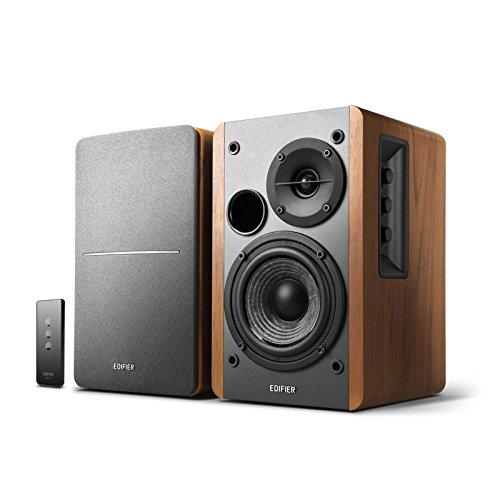
The most effective solution for overcoming narrow or one-sided built-in sound is routing audio to external active speakers. External loudspeakers provide dedicated enclosures, robust power supplies, and larger woofers that reproduce frequencies well below the mechanical limits of tablet transducers. Positioning two discrete powered monitors on a desk or entertainment console creates an expansive soundstage that matches the visual scale of your streaming video.
When setting up a desktop listening station, connecting the tablet to powered desktop monitors allows you to adjust toe-in angles and listener distance for pinpoint stereo imaging. Active speakers feature integrated amplification matched directly to their internal crossover networks, eliminating the need for bulky separate receivers. This streamlined configuration works exceptionally well in bedrooms, home offices, and apartment living spaces where physical footprint matters.
External speakers also solve the problem of audio dynamics and vocal clarity during quiet scenes. Tablet speakers often compress high-dynamic-range soundtracks, forcing you to constantly ride the volume controls between quiet dialogue and loud explosions. High-quality bookshelf speakers or powered monitors handle sudden transient peaks effortlessly, ensuring clear dialogue without harsh distortion or mechanical cabinet vibration.
Wired Audio Connections: Lightning Port Versus the 3.5 mm Jack
One distinct advantage of the iPad Air 3 over modern flagship tablets is the inclusion of a dedicated 3.5 mm analog headphone jack alongside its central Lightning port. This gives users dual pathways for outputting line-level or headphone-level audio to external sound systems. The analog headphone jack relies on Apple’s internal digital-to-analog converter (DAC) to output an electrical signal directly to headphones, auxiliary car inputs, or powered speakers. It offers pure plug-and-play simplicity without requiring external dongles.
However, relying solely on an aging analog headphone jack can present physical challenges over years of daily ownership. Headphone ports collect pocket lint, suffer from internal contact wear, and can develop loose connections that cause channel dropouts when the cable wiggles. In addition, the Lightning port serves as a fully digital output interface capable of transmitting uncompressed digital audio streams directly to external accessory chips. Utilizing an MFi-certified Lightning audio cable bypasses potential wear inside the analog jack and provides a secure, modern connection.
An accessory like the Seulliya Apple MFi Certified Lightning to 1/8-inch audio cable bridges this gap by plugging directly into the tablet’s primary data port. The integrated digital chip converts pristine audio data into clean analog signals for car stereos, home theater inputs, and desktop audio systems. Having the ability to route audio through either interface gives owners outstanding flexibility when connecting to older receivers or modern portable stereos.
Cable Quality, Durability, and Signal Transmission
Maintaining audio fidelity between your mobile device and an external sound system depends heavily on cable build quality. Inferior auxiliary cords frequently suffer from poor shielding, thin copper conductors, and fragile solder joints that fail after repeated flexing. When routing line-level signals to dedicated surround speaker systems or desktop amplifiers, high-quality interconnects prevent electromagnetic interference from nearby power bricks and Wi-Fi antennas.
The Seulliya Lightning to 3.5 mm cable addresses durability concerns with an advertised rating of over 15,000 bends, using a flexible outer jacket that resists tangling and creasing. Its slim plug housing fits comfortably into device ports without forcing you to remove protective tablet cases or bulky folio covers. This practical clearance prevents accidental disconnections and mechanical stress on the tablet’s female Lightning receptacle during active use.
At the connection points, 24K gold-plated contacts provide oxidation resistance and ensure consistent electrical conductivity across both left and right audio channels. Corrosion-free contacts prevent the crackling noises and signal degradation that often plague cheap bare-nickel connectors. Seamless stereo transmission preserves channel separation, allowing your external amplifiers and speakers to present music and movie soundtracks exactly as the mixing engineer intended.
Wireless Audio Options: Bluetooth and AirPlay Considerations
Wired auxiliary cables remain the benchmark for zero-latency audio, but wireless protocols offer undeniable convenience in modern living spaces. The iPad Air 3 includes Bluetooth 5.0 wireless connectivity, enabling quick pairing with battery-powered speakers, soundbars, and wireless headphones. Bluetooth eliminates physical tethering, allowing you to walk around the room with the tablet while streaming background music to an audio system across the house.
Despite this convenience, Bluetooth audio introduces data compression and measurable latency that can hinder specific media experiences. Standard Bluetooth codecs like AAC and SBC compress dynamic audio files to fit wireless bandwidth limitations, which can subtly soften high-frequency detail and bass punch. Furthermore, audio latency can cause noticeable lip-sync errors during fast-paced movie action or rhythm gaming, where sound effects lag behind visual triggers on screen.
Apple AirPlay provides higher fidelity by streaming uncompressed audio over your local Wi-Fi network to compatible smart speakers and network receivers. AirPlay buffers playback to maintain synchronization, making it fantastic for music playback, but it still suffers from slight transport delays when scrubbing through video files. For tasks demanding immediate response times and uninterrupted signal clarity, a direct physical cable connection remains the most reliable option.
Practical Audio Calibration and Tablet Settings
Optimizing sound from your tablet involves adjusting several key software toggles inside iPadOS. Navigating to the Accessibility settings menu reveals an option labeled Mono Audio. If you frequently watch movies using the built-in speakers in landscape mode, turning on Mono Audio combines the left and right channels into a unified stream sent equally to both bottom drivers. This ensures you never miss subtle dialogue or ambient cues assigned strictly to the opposite, non-existent stereo channel.
When you plug in an external auxiliary cable or connect to high-end desktop speakers, remember to switch Mono Audio back off. Leaving mono enabled on external stereo monitors collapses your soundstage, causing expansive multi-instrument arrangements to sound crowded and flat. You can also explore the Music app settings to adjust system EQ curves, selecting profiles like Vocal Booster or Acoustic depending on your room environment.
Proper gain staging between the tablet and your external amplifier is equally critical for achieving clean sound. Setting your tablet volume to roughly eighty percent output delivers a strong line-level signal to external speakers without driving the tablet’s internal amplifier into clipping distortion. From there, use the physical volume knob on your powered speakers or receiver to control final listening volume. This balanced approach minimizes background hiss and ensures maximum dynamic clarity for all your entertainment needs.






Write Your Review
No reviews yet. Be the first to share your experience!