
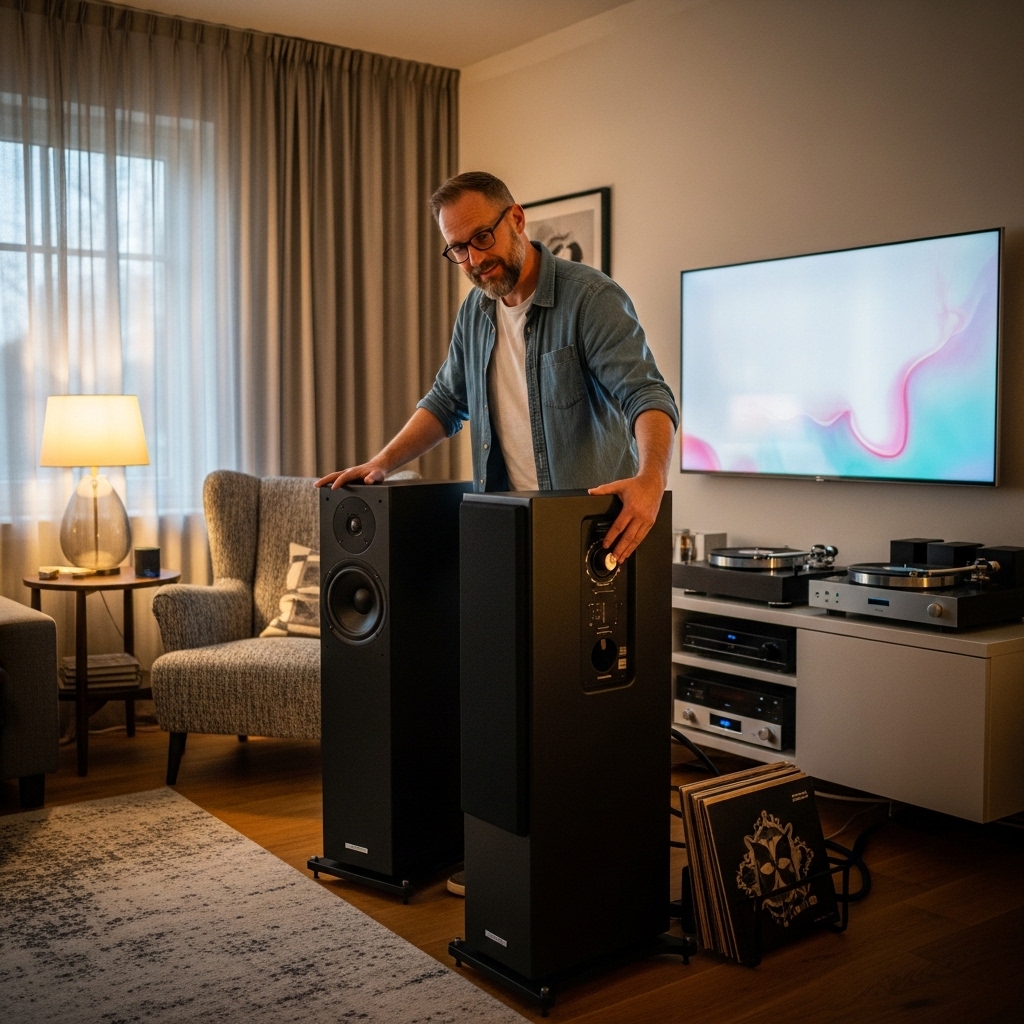

Setting up audio equipment for DJ mixing often leads to immediate questions about necessary hardware. If you are wondering do you need speakers for a dj controller, the quick answer is that solo practice is possible with just a pair of DJ headphones, but external sound becomes vital once you step beyond basic bedroom rehearsals. Connecting your system to dedicated hardware allows you to hear the full stereo field, experience realistic bass impact, and monitor how your transitions truly project in a real room. You might consider pairing your setup with Pioneer DJ DM-50D-BT 5-inch Active Monitor units or exploring dedicated home music speakers if fidelity across multiple audio sources is your main objective. Understanding audio routing prevents costly purchasing mistakes before you invest in extra gear.
Modern digital DJ controllers act as both physical MIDI control decks and dedicated sound cards. Because the unit separates the cue channel for headphone pre-listening from the master output that feeds the audience, a dedicated speaker system lets you master the art of beatmatching with accuracy. Beginners frequently attempt to use everyday computer speakers or television soundbars, only to encounter frustrating processing delays that ruin transition timing. Choosing the correct monitor or PA system tailored to your space solves these timing hurdles while delivering clear, distortion-free sound.

Pros
- Punchy and well-defined low-end ideal for dance, hip-hop, and electronic music
- DSP switch offers genuine versatility between flat production mixing and hyped DJ playback
- Wireless Bluetooth capability adds convenient everyday casual listening
- Front-panel volume control and headphone jack save desktop reach-arounds
Cons
- Master/slave design requires speaker wire linking the left and right cabinets
- Bulkier cabinet footprint compared to standard 3-inch or 4-inch desktop monitors
- Lacks dedicated digital inputs like USB audio or optical connections
The Pioneer DJ DM-50D-BT desktop monitor pair bridges the gap between critical studio monitoring and energetic DJ performance playback. Designed specifically for home studio creators, aspiring beatmakers, and bedroom DJs, these monitors solve the classic dilemma of needing flat frequency response for mixing alongside the bass impact required to feel a club groove. Pioneer DJ accomplishes this balance by integrating intelligent DSP processing that lets you toggle between specialized sound profiles at the flip of a switch.
In practical day-to-day use, the DM-50D-BT excels as an all-in-one desktop audio hub. When tracking vocals or balancing instruments in a digital audio workstation, the Production setting tames exaggerated low frequencies to reveal honest mix flaws. When switching over to rehearse a live mix or entertain friends, switching to DJ mode introduces extra energy and dynamic punch in the bassline. Adding Bluetooth to this hardware configuration means you can instantly audition tracks straight from a phone without firing up your entire interface and computer setup.
For music producers who want high-output desktop monitoring without buying separate speakers for casual streaming and dedicated tracking, the DM-50D-BT hits the sweet spot. It provides ample volume, strong build construction, and reliable Pioneer DJ pedigree, making it a dependable cornerstone for any modern project studio.
Acoustic performance on the DM-50D-BT centers around its 5-inch fiberglass cone woofer and custom 3/4-inch soft dome tweeter. The low end reaches down with satisfying authority, driven by front-ported grooved bass ducts that minimize air turbulence. This design delivers punchy kick drums and defined 808s that remain clean even when pushing volume levels into party territory. Midrange frequencies remain intelligible, ensuring synths, snares, and vocal lines sit clearly across the center stage.
High frequencies benefit from convex diffusers engineered to disperse high tones broadly across the room. This acoustic design creates an expansive listening sweet spot, allowing you to move around your mixing desk or DJ console without losing tonal clarity. While high-end reference purists might find the DJ mode slightly flattering in the lower registers, the neutral Production mode provides the accurate balance needed to make reliable mixing decisions.
Built from rigid MDF wood cabinets, the DM-50D-BT monitors effectively suppress unwanted cabinet resonance and mechanical vibrations. The pair utilizes an active-passive master configuration where the left speaker houses the Class D amplifier, power delivery, DSP engine, and physical connection hub, sending amplified signal to the right speaker via traditional speaker wire. Front-panel ergonomics are smartly executed, offering direct access to the master volume knob and a 1/8-inch headphone output that automatically mutes speaker playback when plugged in.
Connectivity is generous for analog studio gear, boasting stereo RCA inputs, a 1/8-inch stereo auxiliary input, and balanced 1/4-inch TRS inputs suitable for professional audio interfaces and DJ mixers. On the wireless side, built-in Bluetooth enables quick pairing with smartphones, laptops, and tablets. The speakers operate on standard US 120V mains power, drawing clean and efficient amplification to drive both units effortlessly across extended creative sessions.

Pros
- Versatile 2-way sound modes optimize for DJing or production
- High-quality DSP and diffusers produce detailed, spacious audio
- Easy wired connectivity for reliable performance
- Distortion-free even at high volumes
- Aligned drivers for precise frequency response
Cons
- Wired connections only, no Bluetooth or wireless options
- Compact size limits ultra-deep sub-bass for larger spaces
- Desktop-focused, not suited for portable or on-the-go use
The Pioneer DJ DM-40D is a 4-inch desktop monitor system built for serious home audio enthusiasts, particularly aspiring DJs and music producers. Its compact black design slips easily onto any desk, delivering studio-grade sound without dominating space. Switch between DJ and production modes to engage DSP settings that fine-tune your listening experience for mixing or creating tracks.
In real-world use, these monitors shine during late-night sessions, connecting effortlessly to DJ controllers or mixers via RCA and mini-jack inputs. The front headphone socket lets you monitor privately without disturbing others. Users appreciate the balanced output that helps spot mix flaws quickly, making it a go-to for bedroom producers honing their craft.
Performance stands out with clean bass and precise highs, thanks to time-aligned drivers and advanced DSP. While not overpowering in massive rooms, it excels in close-field monitoring where accuracy matters most. Overall verdict: a smart pick for budget-conscious creators seeking pro-level clarity in a desktop package.
The DM-40D boasts clean, balanced bass from its 4-inch woofer, paired with crystal-clear high-frequencies via DECO convex diffusers. This setup creates a wide 3D stereo soundstage, ideal for immersing in mixes during home DJ sets or production work. The Class D amplifier and 96kHz DSP ensure pure audio reproduction free of digital artifacts.
Volume levels push hard without distortion, even when cranking tracks for testing. Time alignment between woofer and tweeter delivers tight, accurate frequencies across the spectrum. Vocal clarity shines through, helping producers carve out space in busy mixes, while the DSP modes adapt the signature perfectly for DJ energy or studio precision.
Sporting a sleek black finish, the DM-40D's desktop form factor measures compactly with 4-inch woofers, making it rugged enough for daily studio desk duty. Its sturdy build handles regular use in home setups, with front controls for easy access during sessions. No IP ratings, but the sealed design resists dust in typical indoor environments.
Powered by standard AC via efficient Class D amplification, it runs continuously without battery concerns, perfect for all-day production marathons. Weighing in lightly for its class, it stays stable on desks without vibration issues. Focus on wired reliability means no charging downtime, just plug in and create.
Pros
- Massive 1800W output with zero distortion at party volumes
- Multiple connectivity options including stable Bluetooth pairing
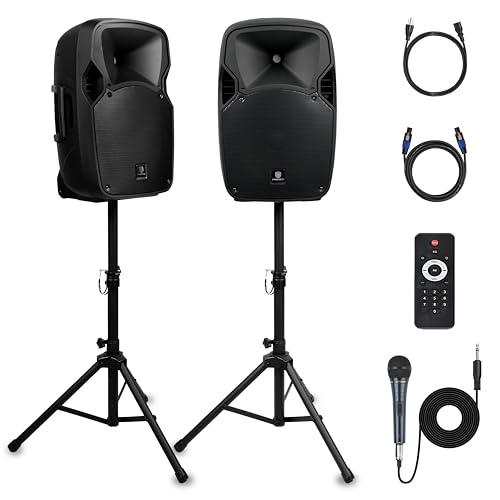
- Complete kit with stands, mic, and remote ready out of the box
- Professional EQ and LCD display for precise sound tuning
- Easy portability with built-in wheels for quick moves
Cons
- Requires AC power outlet with no built-in battery for untethered use
- Larger size may feel bulky for solo handheld carrying
- Lacks companion app for wireless control adjustments
The PRORECK Party 12 is a complete 2-way powered PA speaker system designed for anyone hosting DJ parties, karaoke nights, personal gatherings, or outdoor events. It pairs an active speaker with a passive one, delivering 1800W peak power through a 12-inch woofer and 1-inch tweeter for pro-grade audio that fills large spaces.
Ideal for American partygoers from backyard barbecues to wedding receptions, it shines in real-world scenarios like tailgating or community events where you need reliable, high-volume sound. Setup is straightforward with included stands, a wired microphone, and transport wheels, getting you rocking in minutes without extra gear.
Performance stands out with versatile connectivity and onboard controls, making it a step above basic party speakers. While it demands a power source, the immersive sound and ease of use make it a top pick for value-driven buyers chasing club-like vibes at home.
Verdict: A powerhouse for party pros on a budget, earning its spot as a go-to for dynamic audio that elevates any gathering.
Expect deep bass penetration from the 12-inch subwoofer that thumps hard enough for outdoor DJ sets, paired with crisp highs from the titanium tweeter for clear vocals and instruments. The 1800W peak handles max volumes without breakup, perfect for noisy environments like block parties.
Vocal clarity shines during karaoke with dedicated mic inputs and adjustable levels, ensuring singers cut through the mix. Bluetooth range stays solid up to 30 feet with minimal dropouts, while USB/SD playback delivers glitch-free tracks from your drives.
Overall, it balances punchy lows, balanced mids, and sparkling highs for an immersive profile that rivals pricier systems at gatherings.
Built sturdy for party rigors with dual transport wheels and a standard 35mm stand mount, this speaker rolls easily to venues and stands tall for optimal sound dispersion. The included stands and power cord make it fully portable within reach of an outlet, weighing in as a manageable load for two people.
No IP rating means it's best kept dry for indoor or covered outdoor use, but the rugged cabinet holds up to typical bumps during transport. Lacking a battery, it offers unlimited playback time when plugged in, sidestepping recharge worries for all-day events.
Design prioritizes pro functionality with an LCD screen, rear control knobs, and remote, blending portability with stage-ready toughness for US hosts on the move.
Audio Routing, Headphone Cueing, and External Speaker Selection
Directly answering the central question clarifies what gear is truly required versus what is optional. Strictly speaking, you do not need external speakers to operate a DJ controller if your unit includes an integrated audio interface and headphone jack. Solo practice can take place entirely inside your headphones by using the cue and master blend controls. However, relying exclusively on headphones limits your ability to gauge stereo separation, room resonance, and physical bass response in any social setting.
How Audio Interfaces Work Inside a DJ Controller
Most modern DJ controllers come equipped with a built-in sound card, technically known as an audio interface. This internal hardware divides digital audio streams from your computer into two separate physical stereo feeds. One stereo path routes private audio directly into your DJ headphones, allowing you to preview and beatmatch incoming songs before the crowd hears them. The other stereo stream routes the live master mix out through physical output jacks on the back panel of the controller.
If your controller lacks a built-in sound card, it operates merely as a MIDI control surface. In that rare configuration, your computer sound card or an external multi-channel audio box must handle the signal conversion. Most controllers designed for popular software platforms handle this conversion internally through USB power. Without physical speakers connected to the master outputs, that second audio stream remains completely silent unless you route the master signal into your headphone mix.
Practicing with Headphones Only: The Master Cue Technique
DJs who practice late at night or live in shared apartments often rely entirely on headphone monitoring. DJ software platforms allow users to activate the master cue button alongside channel cue buttons. When both cues are active, you can hear both the incoming track and the live playing track blended together in your ear cups. Some hardware controllers also include a dedicated cue balance knob that sweeps between cue audio and master audio smoothly.
While this technique saves desk space and keeps noise levels down, prolonged headphone listening causes rapid ear fatigue. In-ear or on-ear drivers sit directly against your ear canal, making subtle frequency clashing between muddy basslines harder to distinguish over time. Furthermore, headphones cannot reproduce the tactile low-frequency rumble that moves through a room during a live performance. Practicing without speakers is a viable temporary solution, but it cannot fully simulate the sensory dynamics of performing in front of people.
Why Smart Speakers, TV Soundbars, and Bluetooth Cause Latency
Many aspiring DJs attempt to save money by routing controller audio into existing home soundbars, television systems, or wireless Bluetooth speakers. While these devices work fine for casual music listening, they introduce severe digital audio latency. Consumer smart speakers process incoming signals through internal digital signal processing chips before driving their internal amplifiers. This processing delay might only measure a fraction of a second, but that small delay throws off manual beatmatching completely.
Wireless connections introduce an even greater timing mismatch between your hand movements and what your ears perceive. For instance, pairing a portable Bluetooth speaker with deep bass can provide enjoyable playback for casual listening, but the wireless encoding buffer makes manual scratch routines and tight tempo adjustments virtually impossible. When you drop a cue point on a jog wheel, you need the sound to strike instantaneously. Direct analog cable connections remain the gold standard for DJ monitoring because they eliminate digital processing delay.
Active Studio Monitors for Bedroom and Desktop Mixing
Active desktop studio monitors represent the most popular speaker choice for home DJs. Unlike passive speakers that require a separate power amplifier, active monitors house dedicated amplifiers directly inside their enclosures. This self-contained design simplifies cable management and saves valuable space on small work desks. Compact monitors provide nearfield audio reproduction, which focuses balanced sound directly toward the listener seated at the mixing console.
Units such as the Pioneer DJ DM-40D 4-Inch Desktop Monitor System highlight the advantages of purpose-built DJ desktop speakers. The DM-40D features front-mounted volume control and dual sound modes that toggle digital signal processing between DJ mixing and music production. Its four-inch woofer and convex high-frequency diffusers create a wide stereo sweet spot that lets you hear nuances in track transitions clearly. Connecting this type of monitor to your controller requires only basic analog RCA cables, keeping your setup clean and responsive.
Stepping up in driver size brings additional low-end authority that benefits bass-heavy dance music genres. The Pioneer DJ DM-50D-BT 5-inch Active Monitor incorporates a larger five-inch woofer to deliver deeper bass response in desktop spaces. It also includes wireless connectivity for casual streaming when you are off the clock, while maintaining zero-latency analog inputs for active mixing sessions. Choosing the right monitor size depends on your desk dimensions and room volume, with four-inch and five-inch drivers serving small bedrooms exceptionally well.
Powered PA Speakers for House Parties and Mobile Events
Desktop monitors excel in small rooms, but they lack the projection and acoustic power required to fill a crowded venue or outdoor patio. If your DJ controller is intended for house parties, weddings, or backyard gatherings, a powered public address system becomes necessary. PA speakers are engineered with high sound pressure levels and heavy-duty enclosures designed to push sound across wide distances. Attempting to push small studio monitors to party volumes will cause harsh distortion and can permanently damage the drivers.
A comprehensive setup like the PRORECK Party 12 12-Inch 1800W 2-Way Powered PA demonstrates the scale needed for larger gatherings. This system combines an active master cabinet housing internal amplification with a companion passive cabinet linked via a standard Speakon cable. Its twelve-inch low-frequency driver and compression tweeter produce the room-filling volume and deep bass punch needed to energize a dance floor. Integrated speaker stands elevate the high-frequency horns above head height, preventing the crowd from absorbing clear audio.
Live sound gear also includes rugged rear-panel connections such as balanced XLR and quarter-inch microphone inputs alongside line-level RCA terminals. This connectivity allows mobile DJs to route master output from a controller while simultaneously running auxiliary backup music or wired microphones. Built-in transport wheels and heavy side handles make physical setup and tear-down manageable for solo operators. If your performance goals extend beyond personal bedroom practice, investing in a portable PA package ensures your sound carries without clipping.
Understanding Output Terminals and Cable Connections
Connecting your DJ controller to external speakers requires understanding the audio output jacks on your hardware. Entry-level controllers almost universally feature unbalanced stereo RCA outputs, color-coded in red for the right channel and white for the left channel. Unbalanced cables work perfectly for short cable runs across a desktop or within a few feet of your monitor speakers. However, running unbalanced lines over long distances makes the signal vulnerable to radio frequency interference and electrical hum.
Mid-tier and professional DJ controllers often incorporate balanced quarter-inch TRS or three-pin XLR master outputs. Balanced connections use three conductors to cancel out induced noise and ground hum, allowing you to run long cables to distant PA cabinets without degrading audio quality. If your controller only offers RCA outputs while your speakers feature XLR inputs, you can safely use dual RCA-to-XLR male cables for short runs. Always confirm the input sensitivity and connector types on your chosen speakers before ordering connection cables.
Audio enthusiasts frequently test different tracks to verify that their connections are free of unwanted noise or channel imbalance. Playing known songs for testing speaker clarity through your controller can help you evaluate dynamic range, vocal presence, and bass tightness. If you notice a low-frequency hum or high-frequency hiss, inspect your cable routing to make sure audio lines do not run parallel to high-voltage power cords. Proper cable management protects your audio signal and prevents embarrassing audio dropouts during performances.
Audio Driver Configuration and Software Buffer Latency
Connecting physical speakers to your controller hardware is only half the battle; your DJ software must also be configured to recognize the audio interface. Popular applications such as Rekordbox, Serato DJ, Traktor, and Virtual DJ require you to select the controller as the primary audio output device in the preferences menu. If the software defaults to your computer internal speakers, turning the master volume knob on the controller will produce no sound from your external monitors. Checking the audio routing tab confirms that channels one and two feed the master output cleanly.
Software buffer size settings also exert a massive influence on real-time performance and system stability. A lower buffer size reduces audio latency, making cue-point triggering feel crisp and instantaneous. Setting the buffer too low on an underpowered computer, however, can result in digital audio crackles, popping sounds, and system dropouts. Setting the buffer size to 256 or 512 samples generally provides a stable balance between responsive mixing feel and reliable computer processing power.
Step-by-Step Troubleshooting for Silent Master Output
Experiencing complete silence after connecting speakers to a DJ controller is one of the most common issues beginners encounter. The first step involves checking the physical signal chain, starting with the master level knob on the controller deck. Ensure that the channel trim or gain knobs are turned up enough to illuminate the channel level meters when a song plays. If the meters remain dark, the audio signal is not reaching the mixing board from the software deck.
Next, inspect the physical power and input selector switches on your active speakers. Many modern studio monitors include multiple inputs, such as digital Bluetooth, mini-jack auxiliary, and analog RCA. If the monitor is toggled to Bluetooth mode, it will ignore the analog audio incoming from your controller cables. Verify that the speaker volume knob is set to a moderate level and that the AC power cable is firmly seated into a live wall socket.
If physical connections appear intact, examine your computer operating system sound settings. On both Windows and macOS platforms, operating system updates can occasionally alter default audio routing or mute external USB sound cards. Verify that your DJ software retains exclusive access to the controller audio driver rather than letting background operating system notifications hijack the stream. Testing with an alternate set of RCA cables can quickly rule out a broken internal wire or loose connector pin.
Matching Speaker Choice to Your Mixing Environment
Determining whether to buy desktop monitors, a mobile PA rig, or stick with headphones depends entirely on your space and goals. Bedroom DJs focused on mastering transitions, recording demo mixes, and streaming online will find four-inch or five-inch active monitors provide the perfect balance of detail and compact footprint. These monitors offer flat frequency responses that let you hear exactly how track elements blend without overwhelming small living areas. They fit easily onto home desks and plug directly into standard controller outputs without complex configuration.
If your ambitions include hosting house parties, small venue gigs, or outdoor community events, a dedicated PA speaker setup represents the only practical choice. High-output cabinets with twelve-inch or fifteen-inch woofers push sound waves through crowded rooms where bodies naturally absorb high frequencies. Evaluating your immediate performance goals, room acoustics, and budget allows you to make an informed hardware decision. Starting with headphones is a sensible way to learn the basics, but investing in the right speakers unlocks the full sensory enjoyment of DJing.




Write Your Review
No reviews yet. Be the first to share your experience!