


Many musicians and home audio enthusiasts often wonder whether an electronic piano or synthesizer can double as a sound system for other multimedia sources. Space constraints in a home studio, living room, or bedroom frequently make the idea of consolidating audio gear appealing. Instead of crowding a desk with extra desktop hardware, you might hope that the integrated amplification and drivers inside your musical instrument can reproduce your favorite music playlists or practice backing tracks. Before plugging in your phone, tablet, or laptop, you must evaluate whether can yamaha keyboards be used as speakers effectively and safely without damaging internal electronics. Checking your exact instrument hardware determines whether your setup will deliver seamless music playback or require separate audio equipment.
The short answer is that many instruments support external playback, but compatibility depends on the specific connection ports and digital architecture engineered into each model. Some instruments offer physical auxiliary inputs or modern wireless streaming, while others are strictly designed to output sound rather than receive it. Understanding the difference between digital data transfer and analog sound input will prevent frustrating connection errors during setup. While an instrument setup can be convenient for practice sessions, listeners seeking pristine stereo separation or cinematic low-end reproduction often achieve better results with dedicated PC speakers for music. Exploring your instrument specifications helps you choose the right cables and adjust settings for balanced, distortion-free playback.


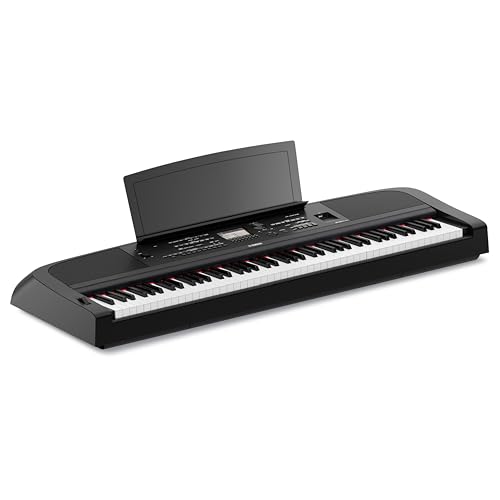


How Yamaha Keyboards Function as External Audio Speakers
Many electronic instruments produced by Yamaha can indeed function as external audio speakers, allowing users to route music from mobile phones, media players, and personal computers directly through the keyboard cabinet. This capability enables performers to play along with commercial recordings, stream educational lessons, or simply use the instrument as an active sound system for casual listening. However, not every instrument in the brand lineup features the necessary input hardware to receive an incoming audio stream. Knowing whether your specific digital piano or arranger keyboard supports external sound reproduction requires looking closely at the input jacks, wireless receivers, and internal soundcards installed on the unit.
Audio signals require an active amplification pathway inside the instrument chassis before reaching the internal driver cones. When you connect an external playback source, the keyboard internal preamp must receive that line-level signal, blend it with or bypass the onboard tone generator, and direct it to the power amplifier. If an instrument lacks an incoming signal pathway, the built-in amplification remains dedicated exclusively to the internal synthesizer or piano engine. Confirming the presence of dedicated input circuitry is the essential first step before purchasing cables or attempting an audio connection.
The Three Primary Connection Methods for Audio Playback
The most common way to stream audio through an instrument is via an analog auxiliary input jack, typically labeled as Aux In on the rear or top connection panel. This connection usually takes the form of a 3.5-millimeter stereo mini jack or, on larger commercial instruments, dual quarter-inch mono jacks. Connecting an external device requires a standard analog patch cable running from the headphone jack or audio output of your phone, tablet, or media player directly into the keyboard input. Once connected, the incoming stereo line signal passes straight into the instrument internal amplifier, playing your music in real time alongside your keyboard playing.
Modern digital pianos and performance keyboards frequently integrate Bluetooth audio receivers, eliminating the need for physical patch cords. This wireless protocol allows users to pair smartphones, laptops, and tablets directly to the keyboard sound system through a software pairing menu. It is crucial to distinguish Bluetooth audio streaming from Bluetooth MIDI, as the latter only transmits digital performance data rather than audible sound waves. While wireless playback is exceptionally convenient for rehearsing alongside recorded tracks, users should keep in mind that high-performance Bluetooth PC speakers often provide lower wireless latency and wider driver dispersion for general media consumption.
A third pathway found on newer instruments is bidirectional USB audio, handled through the square USB-to-Host connector. Unlike legacy USB ports that only handle digital performance commands, an onboard USB audio interface converts digital audio streams from a computer or mobile operating system into analog sound. This single-cable setup allows digital audio workstations, media streaming apps, and web browsers to send high-fidelity audio straight into the keyboard speaker array. Users must verify whether their host device requires proprietary driver software or supports plug-and-play class-compliant operation before relying on this digital link.
Distinguishing Between USB Audio and USB MIDI
Confusion often arises among equipment owners regarding the exact function of the USB-to-Host port located on the back of many keyboards. On numerous budget models, this port acts strictly as a MIDI interface designed to transmit note values, velocity, and controller data to recording software. If a keyboard only supports USB MIDI, plugging it into a laptop or smartphone will never produce sound from YouTube, Spotify, or media player applications. The computer recognizes the keyboard as an input controller rather than an output speaker destination.
When an instrument features true USB audio streaming, the host computer recognizes the keyboard as an active sound card or audio playback device within the operating system. Selecting the instrument as your default output route directs all system sounds, streaming audio, and software instrument playback straight to the keyboard internal amplifier. This distinction is critical because many entry-level digital pianos feature a USB port that appears identical on the outside while lacking internal digital-to-analog converters. Reading the technical specifications in the instrument manual helps you confirm whether the USB terminal handles audio streaming or MIDI data exclusively.
Attempting to force audio through a MIDI-only connection by using software workarounds will result in silence and frustration. If your instrument features a USB-to-Host port that only handles MIDI, you will need to utilize an analog audio input jack instead for external music playback. For users whose keyboards lack both USB audio and analog auxiliary inputs, external audio playback through the built-in speaker system is impossible. In those situations, keeping separate powered monitors or desktop audio components remains the only viable listening solution.
Step-by-Step Configuration for External Devices
Setting up an analog auxiliary connection requires matching the output signal level of your source device to the input sensitivity of the keyboard. Begin by powering down both the instrument and the external playback source to prevent abrupt electrical pops that could damage the speaker cones. Connect a high-quality 3.5-millimeter stereo auxiliary cable between the headphone jack of your phone or media player and the Aux In terminal on the keyboard. Turn the volume on your playback device to approximately fifty percent, power on the keyboard, and gradually raise the instrument master volume to reach a comfortable listening level.
Configuring a wireless Bluetooth audio connection involves navigating the internal function menu on keyboards equipped with wireless hardware. Place the instrument in pairing mode by pressing and holding the dedicated Bluetooth button or selecting the pairing option in the system menu until the indicator flashes. Open the Bluetooth settings on your mobile device, locate the keyboard model designation in the list of available devices, and initiate the connection. After pairing completes successfully, test playback using a low-volume audio track to verify that the wireless signal arrives cleanly without clipping or dropouts.
Establishing a digital USB connection requires connecting a standard USB-A to USB-B cable, or a compatible USB-C adapter, between your computer and the keyboard USB-to-Host jack. Windows and macOS systems typically detect class-compliant Yamaha instruments automatically, though professional workstation models may require installing official Steinberg USB drivers. Once the operating system recognizes the hardware, open your computer audio control panel and select the Yamaha instrument as your primary playback device. Adjust the computer software volume slider to eighty percent and use the keyboard physical master volume dial to control overall room loudness.
Acoustic Voicing and Sound Profile Differences
Built-in keyboard speakers are engineered with specific frequency profiles tailored to reproduce acoustic pianos, electric keyboards, and synthesizer patches. Manufacturers tune internal amplifier crossovers and driver enclosures to emphasize rich mid-range fundamentals, clean transient attack, and resonant bass notes typical of keyboard performance. When playing commercial pop, hip-hop, or rock tracks through these speakers, listeners may notice that the mix balance sounds noticeably different compared to conventional hi-fi equipment. Vocals and keyboard tracks often sound forward and clear, while ultra-low sub-bass and airy high-frequency percussion can feel somewhat subdued.
The physical placement of keyboard speakers also affects how sound disperses throughout the room. Many portable keyboards feature upward-firing or rear-ported speaker grilles that direct sound toward the performer rather than into the wider living space. This layout is ideal for personal practice sessions, but it can create an uneven acoustic field if you attempt to use the instrument as a whole-room party speaker. Listeners who prioritize broad spatial imaging and punchy low frequencies often find that a dedicated Bluetooth speaker delivers a more balanced sonic experience for casual social listening.
Amplifier headroom and speaker power ratings represent another practical limitation when using an instrument as an external sound system. Most beginner and portable keyboards utilize small internal power amplifiers rated between two and six watts per channel. Driving these compact amplifiers at maximum volume with heavily compressed, bass-heavy modern music can quickly push the internal amplifier into clipping, causing audible distortion. Keeping playback levels moderate preserves audio clarity and prevents premature wear on the delicate voice coils inside the speaker drivers.
Model Capabilities Across the Yamaha Instrument Lineup
Yamaha designs instruments across several distinct product categories, each featuring different levels of audio connectivity. Entry-level portable arranger keyboards, such as the PSR-E series, frequently include an analog 3.5-millimeter Aux In jack specifically intended for educational play-along sessions. Some of these beginner models even incorporate unique features like Melody Suppressor, which attempts to reduce the vocal or lead instrument volume from incoming audio tracks. These budget instruments provide an affordable, accessible way to stream external music through internal speakers without needing extra adapters.
Dedicated stage keyboards, including performance models in the CK series, feature robust input options designed for gigging musicians and rehearsal spaces. These instruments often provide both Bluetooth audio streaming and dedicated analog inputs equipped with adjustable input gain controls. Stage musicians can route external backing tracks or mobile backing apps directly through the internal stereo speaker system during rehearsals without bringing separate PA equipment. The speaker systems in these performance keyboards are designed to offer clear monitoring for stage players in quiet acoustic rehearsal environments.
Advanced digital arranger workstations, such as the PSR-SX series, incorporate high-end bi-amplified speaker systems with expansive digital connectivity. These instruments feature comprehensive analog inputs, full USB audio streaming, and high-quality Bluetooth audio reception paired with sophisticated internal equalizer controls. Users can sculpt the incoming audio signal using the keyboard onboard master EQ and compressor modules, achieving remarkably clear playback across diverse music genres. The substantial cabinet enclosures and higher wattage amplification on these professional models provide superior sound projection compared to basic portable keyboards.
Digital pianos intended for home practice, including the popular P-series and Arius console models, present a wider variance in connectivity features. Compact portable pianos such as the P71 or P45 focus strictly on piano authenticity and lightweight design, frequently omitting auxiliary inputs and wireless Bluetooth audio entirely. In contrast, larger ensemble pianos like the DGX series feature robust multi-speaker arrays, analog auxiliary inputs, Bluetooth connectivity, and bidirectional USB audio interfaces. Owners of furniture-style upright digital pianos must carefully examine their specific instrument rear panel to confirm which input jacks are present.
Troubleshooting Common Playback and Noise Issues
The most frequent issue encountered when connecting an external audio device is unexpectedly low volume or total silence from the keyboard speakers. If no sound emerges, first confirm that the cable is firmly seated into an input terminal rather than an output or headphone jack. On many keyboards, plugging a cable into a headphone jack automatically mutes the internal speakers through an internal switching contact. Ensure that you have not plugged your audio source into an auxiliary output or phones jack, and verify that the source device volume is set above fifty percent.
Audible buzzing, humming, or ground loop noise can occur when connecting a smartphone, tablet, or laptop that is simultaneously plugged into an AC wall charger. Electrical potential differences between the keyboard power supply and the mobile device charger often generate a continuous low-frequency hum through the speakers. To isolate and eliminate this noise, try disconnecting the mobile device charger and running the playback source solely on internal battery power. If the hum vanishes immediately, installing an inexpensive 3.5-millimeter ground loop isolator between the source and keyboard input will resolve the issue permanently.
Audio distortion and harsh clipping happen when the line-level output of the source device exceeds the maximum input threshold of the keyboard preamp. When an external phone or computer sends a signal that is too hot, the keyboard input circuitry saturates, creating raspy distortion even at low master volume settings. To correct this problem, lower the output volume slider on your phone or computer until the music sounds completely clean. You can then use the physical master volume dial on the keyboard to achieve the desired room loudness without overdriving the internal audio input stage.
Wireless latency is an important factor to consider if you plan to use Bluetooth audio for watching videos, playing rhythm games, or monitoring live performances. Standard Bluetooth audio transmission introduces a slight delay between the source device and the receiving speakers, typically ranging from fifty to two hundred milliseconds. While this delay is unnoticeable when streaming music albums or podcasts, it can cause visible lip-sync mismatch during video playback. For tasks that require instant audio synchronization, switching to a wired analog auxiliary cable or direct USB audio connection completely eliminates playback lag.
Practical Takeaways for Setting Up Your Equipment
Using your keyboard as an external speaker system is a convenient, space-saving solution that works wonderfully for casual listening, practicing along with favorite songs, and following online lessons. However, treating a musical instrument as a permanent replacement for dedicated stereo speakers or home theater sound systems involves real acoustic trade-offs. The specialized tuning, directional speaker placement, and moderate amplifier power of most keyboards mean they excel at live instrument articulation rather than room-filling bass reproduction.
Before purchasing cables or expecting your instrument to stream external audio, always inspect the rear and side connection panels to verify exact port labels. Look specifically for Aux In, Audio In, or a Bluetooth pairing button, and consult the official user manual to clarify the capabilities of any USB-to-Host port. Keeping your source volume balanced and preventing audio clipping will ensure that your keyboard internal speakers deliver reliable, enjoyable sound for years to come.




Write Your Review
No reviews yet. Be the first to share your experience!