


Building a unified home theater setup often involves mixing different speaker designs to balance room aesthetics and acoustic immersion. When you place a low-profile soundbase beneath a television, adding dedicated rear channels can transform a flat front soundstage into a dynamic listening space. Many homeowners exploring a Can Sonos Playbase Play One Speakers Guide want to know whether an existing base speaker connects smoothly with standalone smart speakers. In fact, proper system pairing eliminates the need to run bulky speaker cables across your living area. Modern multi-room ecosystems provide substantial flexibility for both casual movie nights and dedicated music listening through synchronized wireless technology.
Pairing these components can solve common listening frustrations such as muddled dialogue, weak rear effects, and cluttered wiring layouts. While audiophiles often evaluate high-performance home audio speakers for dedicated listening rooms, wireless smart systems focus on modular convenience and synchronized performance. Understanding signal routing, network requirements, and placement accessories ensures your soundbase and satellite speakers work together without intermittent drops or channel imbalances. Taking a few moments to understand setup requirements helps you achieve a balanced acoustic field tailored to your space.



Integrating Sonos Playbase with Sonos One Speakers
A Sonos Playbase can connect and play seamlessly alongside Sonos One speakers. The Sonos software ecosystem allows you to link these units either as dedicated rear surround satellites for a home theater setup or as independent zones within a synchronized multi-room audio layout. Because both models communicate over a local home network, integration does not require physical audio cables between the base and the satellite units. Determining the right configuration depends primarily on whether your goal is immersive surround sound for television or whole-home music coverage.
Surround Sound Bonding Versus Multi-Room Grouping
Configuring your speakers as a bonded surround sound system fundamentally alters how audio channels are processed. In surround mode, the Playbase handles the front left, center, and right channels while directing discrete rear ambient effects to the two Sonos One speakers. The hardware achieves this by establishing a low-latency direct wireless connection that bypasses standard home network congestion. This setup delivers cinematic separation during movie playback, turning a standard living room into an engaging theater environment.
Grouping speakers for multi-room audio follows a completely different streaming path. When grouped, the Playbase and each Sonos One remain independent audio rooms that can play the exact same music in perfect synchronization or stream distinct tracks in different areas. This mode operates over your standard household Wi-Fi network rather than a dedicated low-latency surround link. Homeowners frequently use grouping during social gatherings to distribute background music evenly across adjacent living and dining spaces.
Sonos App Ecosystem and Software Compatibility
System compatibility between these devices requires careful attention to the Sonos software platform you choose. The Sonos Playbase supports both the legacy S1 controller platform and the modern S2 operating system. Sonos One units, including the microphone-free Sonos One SL, are also fully compatible with both environments depending on their production generation. To operate together in any capacity, all speakers in your home must run on the exact same software generation.
Running an S2 ecosystem is generally recommended if all hardware in your home supports it. The newer platform offers enhanced processing capabilities, expanded software support, and higher audio bandwidth for connected zones. If you own older legacy Sonos products that mandate an S1 household, the Playbase and Sonos One can still co-exist on S1 without losing core surround functionality. Verifying that your mobile device runs the matching controller app is the first step before configuring bonded playback.
Step-by-Step App Pairing and Surround Configuration
Bonding your Sonos One speakers as rear channels requires completing a straightforward setup routine within the Sonos application. You begin by opening the app, navigating to the system settings menu, and selecting the room assigned to your Playbase. From that menu, choose the option to set up surround speakers and follow the animated prompts on your screen. The application will detect compatible available speakers and guide you through designating which unit sits on the left and which on the right.
Hardware pairing rules require using two sonically matched speakers for the left and right surround positions. You can pair two Sonos One speakers, two Sonos One SL units, or even combine one Sonos One with one Sonos One SL. However, you cannot officially pair a Sonos One with an older generation Play:1 as a matched surround pair in the native app. Once designated, each speaker emits an acoustic chime so you can verify that the physical placement matches the assigned channel.
TV Audio Formats and Optical Connection Considerations
Physical connectivity on the Sonos Playbase relies entirely on a single digital optical audio input. Unlike newer soundbars that utilize HDMI eARC or ARC connections, the Playbase connects directly to the optical audio output on your television. This architecture means audio processing capabilities are governed by the television’s ability to passthrough discrete multi-channel signals via optical cables. Inspecting your television audio settings is vital to achieving genuine surround reproduction rather than downmixed stereo.
The Playbase decodes discrete Dolby Digital 5.1 signals and standard two-channel stereo PCM audio. It does not support newer object-based audio formats like Dolby Atmos, nor does it natively decode standard DTS bitstreams. If your television outputs audio in an unsupported format, the Playbase may downgrade the stream to standard stereo, causing your rear Sonos One speakers to remain silent or produce artificial ambient fill. Setting your television sound output format to Dolby Digital or Bitstream ensures full multi-channel data reaches the optical input.
Audio Calibration: Trueplay and Playback Customization
Acoustic characteristics vary dramatically based on room geometry, furniture placement, and flooring materials. Sonos addresses these variations through Trueplay tuning, a software calibration tool available on supported iOS devices. Trueplay uses the microphone on your mobile device to measure test tones bounced off walls, ceilings, and furniture. The system then automatically applies equalization filters to balance frequency response across the Playbase and rear surrounds.
Beyond automated tuning, the Sonos app provides granular manual controls for surround behavior. Within the surround audio settings menu, you can independently adjust the volume level of the rear speakers for TV viewing and music playback. If dialogue feels slightly distant, increasing the surround TV level slightly can draw ambient sound forward without overpowering spoken lines. These manual sliders allow you to tailor sound pressure levels directly to your specific seating distance.
The music playback toggle represents another critical setting for bonded surround speakers. Selecting the ambient setting directs subtle background accompaniment to the rear speakers while keeping vocals anchored to the Playbase. Selecting the full setting instructs the rear Sonos One speakers to output full-range stereo sound alongside the base unit. Many listeners prefer the full setting for music because it creates an enveloping wall of sound during casual listening sessions.
Physical Placement, Stands, and Wall Mount Positioning
Proper spatial positioning of your rear speakers ensures an authentic directional soundfield. Surround channels are intended to reproduce off-screen movement, ambient weather, and room reflections rather than direct frontal sound. Placing the two Sonos One speakers just behind or directly to the sides of the primary listening position creates the most natural acoustic imaging. Angling the speakers inward toward the center of the couch helps direct high frequencies toward the listener’s ears.
Elevation plays an equally critical role in sound dispersion across the seating area. Rear surround drivers should ideally sit at or slightly above seated ear height to avoid localized beaming. Dedicated floor stands, such as models engineered by Sanus or ynVISION, raise the speakers to ideal listening levels while providing concealed channels for power cords. Integrating dedicated stands also prevents vibrations from transferring into end tables or adjoining furniture.
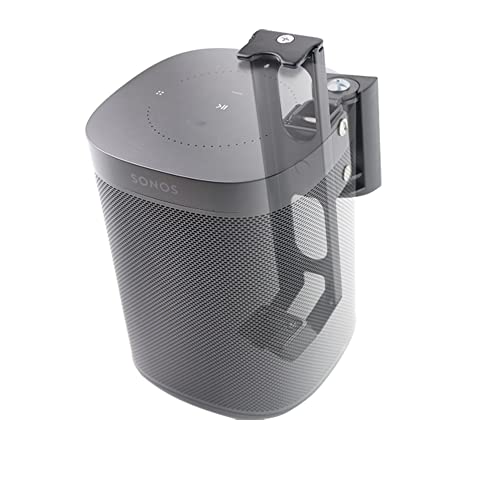
Wall mounting offers an attractive alternative when floor space is limited or room traffic makes free-standing poles impractical. Brackets from manufacturers like EMAQUIN and notiela provide tilt and swivel mechanisms that let you angle the speakers downward from higher wall positions. While evaluating whole-home listening setups, comparing integrated surround hardware against standalone wireless audio options demonstrates how fixed physical placement optimizes multichannel immersion. Secure mounting hardware ensures stability while keeping power cables neatly routed along wall baseboards.
Network Stability, Interference, and Sync Troubleshooting
Reliable wireless communication is essential for maintaining seamless audio synchronization between the Playbase and rear surrounds. When configured as surrounds, the Playbase creates a dedicated 5 GHz direct wireless bridge to communicate with each Sonos One. This point-to-point link bypasses your primary household Wi-Fi router to ensure latency remains imperceptible. If physical obstacles or dense masonry walls obstruct this signal, momentary audio dropouts or surround channel popping can occur.
Minimizing wireless interference helps preserve signal integrity across the dedicated surround link. Placing your home Wi-Fi router, cordless phone bases, or wireless video transmitters at least three feet away from your Sonos hardware reduces radio frequency overlap. If your home network experiences heavy wireless traffic, connecting the Playbase to your router using a physical Ethernet cable activates SonosNet. This proprietary mesh network isolates Sonos audio traffic from regular family internet activities, creating a more robust streaming backbone.
Audio delay and lip-sync issues occasionally arise due to video processing lag inside the television. When actors’ lips move slightly ahead of or behind the spoken audio, you can correct the timing using the TV Dialog Sync tool inside the Sonos app. This slider adjusts millisecond delays to bring dialogue into alignment with on-screen action. Verifying that your television’s digital audio output delay is set to zero before adjusting the Sonos app helps establish an accurate baseline.
Practical Hardware Decisions and System Integration
Choosing the right companion hardware depends on your preferences for voice control and room aesthetics. The standard Sonos One features built-in far-field microphone arrays for voice assistant integration. When bonded to a Playbase, these microphones remain active, allowing you to pause audio, skip tracks, or query smart home devices. If you prefer hardware without microphones due to privacy preferences or simply want to streamline equipment, the Sonos One SL provides identical acoustic output without voice hardware.
Expanding your home theater configuration beyond a 5.0 channel setup is also possible within this ecosystem. Adding a wireless Sonos Sub offloads deep low-frequency effects from the Playbase and Sonos One units, creating a complete 5.1 surround sound environment. When a Sub is bonded, the Playbase automatically redistributes mid-range and high frequencies to its dedicated drivers while directing deep bass below eighty hertz to the subwoofer. This transition increases dynamic headroom across the entire soundstage, resulting in clearer dialogue and punchier movie soundtracks.
Careful planning of power outlets and cable management completes a successful installation. Because every Sonos speaker contains its own internal amplifier, both the Playbase and the rear Sonos One speakers require continuous connection to standard electrical outlets. Utilizing slim power cords and integrated stand channels keeps the installation visually clean and unobtrusive. Once configured and calibrated, a Playbase paired with Sonos One speakers provides an effortless, high-performance home theater experience that requires zero daily manual switching.








Write Your Review
No reviews yet. Be the first to share your experience!