


Setting up a desktop workspace often brings up tricky questions about audio flexibility, especially when juggling different monitors, analog cords, and wireless gear. Many listeners discover that their default computer sound card seems limited to one jack, leading them to ask: can my pc connect to wired speakers and bluetooth without running into driver conflicts or lag? Modern computers with Windows, macOS, or Linux possess the internal hardware to handle multiple audio pathways, allowing you to link traditional analog cables alongside wireless audio adapters. Whether you plan to switch between devices for distinct tasks or output sound simultaneously across your room, managing these connections requires an understanding of how operating systems handle digital-to-analog conversion and signal endpoints.
Selecting the right desktop audio gear makes this integration straightforward, particularly when pairing dedicated best pc speakers for music with auxiliary wireless units. Compact computer soundbars and 2.0 bookshelf arrangements from brands like Logitech, SOULION, and Nylavee frequently feature dual connectivity, offering both 3.5mm auxiliary jacks and integrated Bluetooth receivers on a single chassis. By looking at physical cable inputs, Bluetooth protocols, and system playback settings, you can tailor your setup to transition between private listening, video conferences, and room-filling music.

Pros
- Super simple plug-and-play with no drivers needed
- Versatile Bluetooth mode pairs easily as R200
- Customizable LED lights add fun to your setup
- Direct volume control beats software menus
- Compact size fits any laptop or desktop perfectly
Cons
- Bluetooth mode still requires USB power source
- Not battery-powered for true portability
- USB-C fast chargers not compatible for power
The SOULION R200 is a compact soundbar speaker designed for computers, laptops, and desktops, delivering easy audio enhancement for everyday use. It stands out with its USB plug-and-play simplicity, colorful LED lights, and optional Bluetooth, making it a go-to for anyone tired of tinny built-in laptop speakers.
Targeted at home office professionals, students, and casual users, this speaker shines in real-world scenarios like video calls, streaming music during work, or movie nights on a budget setup. Its slim profile tucks neatly under monitors, and the rotary knob lets you tweak volume on the fly without interrupting your flow.
Performance feels reliable with stereo sound that fills a desk space adequately, paired with fun lighting modes to match your mood. While not a high-end audiophile choice, it punches above its weight for quick setups and vibrant visuals.
Verdict: A smart pick for affordable, hassle-free audio that jazzes up your digital workspace without complexity.
The R200 speaker provides balanced stereo sound with decent clarity for vocals and dialogue, making it great for Zoom meetings, podcasts, and light music in office environments. Bass is present but not booming, suiting desk-sized rooms rather than parties.
Volume reaches solid levels for personal use without distortion, and the direct knob control ensures precise adjustments. Bluetooth mode offers stable pairing up to typical desk range, though it needs USB power for operation.
Overall, it excels in clear mids for work tasks, with enough punch for casual listening to keep your productivity humming.
Slim and sleek at 12.7 inches long, this speaker measures just 2.92 by 3.37 inches high, weighing only 1.34 pounds for easy placement under monitors or beside laptops. Its compact build keeps desks tidy while adding stylish LED accents in four modes.
No built-in battery means it's powered continuously via USB or USB-C, eliminating charging downtime for always-ready use during long workdays. This wired approach ensures consistent performance without battery drain worries.
While not rugged or waterproof, its lightweight plastic construction handles daily desk life well, prioritizing space-saving portability around your home office.

Pros
- Vibrant syncing lights elevate gaming sessions
- Intuitive control pod for quick adjustments
- Strong Bluetooth and AUX versatility
- Clear, balanced audio from left-right channels
- Compact fit beside monitors
Cons
- USB powered only, needs constant outlet
- Desktop-focused, not suited for large rooms
- No deep bass like larger systems
The SOULION C30 is a 2.0-channel speaker set designed for computer desktops, laptops, and gaming rigs. It stands out with pulsing and flame LED lights that sync to audio rhythms, turning ordinary desk sessions into immersive experiences for music, movies, or games.
Ideal for gamers, remote workers, and media enthusiasts who want enhanced visuals without complexity. USB power and simple Bluetooth or AUX connections make setup effortless on Windows PCs, Macs, or tablets.
In real-world use, it provides even stereo sound distribution better than soundbars, filling desk spaces comfortably. The control pod handles everything with one knob, from volume to light intensity.
Verdict: A fun, affordable upgrade for any monitor setup, especially if you love atmospheric lighting with your audio.
Expect balanced, clear stereo sound from dual channels, with pristine highs and mids for dialogue, effects, and tunes. Placed on monitor sides, it avoids the muddiness of single soundbars for a more natural listening field.
Volume reaches desk-filling levels without distortion, perfect for gaming footsteps or movie explosions. Bluetooth mode offers stable pairing up to standard room range, with AUX for zero-latency wired fidelity.
No booming sub-bass, but even output suits everyday PC tasks like calls, videos, and casual playlists.
Sleek black design with a central control pod blends into any desk setup. Compact size sits neatly beside monitors, while LED lights add flair without overwhelming your workspace.
USB powered means no battery to charge or replace, offering continuous playback as long as plugged in. Lightweight build makes repositioning easy for optimal stereo placement.
Lacks rugged IP ratings, so best for indoor desks rather than rough handling. Durable pod controls withstand daily twists and presses.

Pros
- Punchy bass and detailed sound from compact drivers punches above its size
- Effortless monitor mounting saves desk space and stays secure
- Stable Bluetooth 5.3 connection eliminates lag during gaming
- Vibrant RGB lighting adds fun personalization to any setup
- Universal USB compatibility for easy plug-and-play setup
Cons
- Bass depth limited by compact size, not ideal for large rooms
- USB-powered only, requires constant connection to a device
- No dedicated app for advanced sound customization
The BESTISAN Computer Speaker is a versatile gaming soundbar designed for PC enthusiasts who want enhanced audio without cluttering their desk. It clamps securely to most monitors or stands alone, making it perfect for gamers, remote workers, and casual desktop users seeking an upgrade from tinny laptop speakers.
In real-world use, it shines during gaming sessions and video calls, delivering loud, balanced sound that fills small to medium spaces. The dual 1.5-inch full-range drivers paired with bass diaphragms produce surprisingly robust audio, handling action-packed games and music with clarity and impact. Bluetooth 5.3 ensures seamless wireless playback, while wired USB options offer reliable plug-and-play simplicity.
Controls are intuitive with dedicated buttons for everything from volume to RGB modes, reducing distractions. Though compact, it punches above its weight in volume and immersion, making it a smart pick for budget-conscious setups. Overall verdict: Excellent value for desktop audio enhancement, earning high marks for convenience and fun features.
Engineered with dual 1.5-inch full-range drivers and dedicated bass diaphragms, this soundbar offers a balanced frequency response with enhanced low-end punch, clear midrange for vocals and effects, and crisp highs that reveal subtle details in games and tracks. Bass extends respectably for its size, providing rumble in explosions without muddiness.
The wide soundstage creates an immersive bubble around your monitor, ideal for gaming or movies. Volume levels reach loud peaks without distortion, filling desks effortlessly. Bluetooth 5.3 delivers low-latency audio sync, pulling you into the action without delays.
Acoustic tuning prioritizes impact over audiophile precision, making it rewarding for everyday desktop listening where excitement trumps neutrality.
Built for desk integration, the speaker features a spring-loaded clip that expands up to 0.78 inches, clamping securely to monitor tops, sides, or bottoms on most displays. Its compact form stands stable on desks, with a lightweight yet sturdy plastic chassis that resists vibrations during loud playback.
Connectivity includes Bluetooth 5.3 for wireless pairing and USB-A/C ports for wired plug-and-play with PCs, laptops, and mobiles across Windows, macOS, Chrome OS, and Linux. No HDMI or optical inputs, keeping it focused on computer use. Power comes via USB, eliminating batteries or adapters.
Tactile buttons serve as a centralized hub for playback, volume, input switching, and 6 RGB modes, offering hands-on control without software. Dimensions prioritize space-saving without sacrificing driver performance.

Pros
- Exceptional stereo separation and bass response for a compact soundbar
- Versatile connectivity with Bluetooth and AUX for multiple devices
- Simple plug-and-play USB power with automatic on/off
- Non-toxic materials and premium driver components for durability
- Integrated mic enhances utility for Zoom calls and gaming chat
Cons
- No built-in battery limits true portability without a power source
- Bass depth may not match larger home theater systems for big rooms
- Lacks advanced EQ controls beyond the single knob
The Nylavee computer soundbar is a compact Hi-Fi stereo upgrade designed for desktops, laptops, and monitors, transforming tinny built-in speakers into a full-bodied audio experience. With four speaker units and two independent bass diaphragms, it punches above its weight in delivering balanced sound for everyday use like video calls, music streaming, and light gaming.
Ideal for home office professionals, students, or casual gamers who want better sound without complexity, this USB-powered bar connects via Bluetooth 5.0 or 3.5mm AUX to PCs, Xbox, PS5, phones, and tablets. Its one-knob operation simplifies control, while the built-in mic and headphone jack add practical versatility for hybrid work setups.
In real-world testing based on its specs, the soundbar fills small to medium desks with clear vocals, detailed highs, and satisfying bass thumps on tracks like pop hits or game soundtracks. It excels in clarity over volume, making it a smart pick for focused listening rather than party blasting.
Overall verdict: A high-value choice for anyone tired of weak laptop audio, offering premium features at an accessible level. It shines in office and bedroom environments but may need pairing with a subwoofer for bass enthusiasts.
The Nylavee soundbar's unique cavity design and four speaker units with dual bass diaphragms produce a wide soundstage, emphasizing powerful low-end punch and rich high-pitch extension. Expect deep bass that rumbles on electronic beats without muddiness, paired with crisp treble that reveals nuances in vocals and cymbals.
Midrange clarity stands out for dialogue-heavy content like podcasts or movies, thanks to double-layer neodymium magnets and mica fiber diaphragms that minimize distortion even at high volumes. Bluetooth 5.0 ensures low-latency streaming, while max volume levels suit desk use without overwhelming neighbors.
Acoustic engineering focuses on efficiency, maximizing output from USB power alone for consistent performance across genres from Spotify playlists to YouTube tutorials.
Built with non-toxic, durable materials, the Nylavee soundbar features a sleek, low-profile cabinet that slides easily under monitors or on desks. Its compact dimensions make it unobtrusive yet effective, with a premium feel from high-quality components like neodymium drivers.
Connectivity includes Bluetooth 5.0 for wireless pairing, 3.5mm AUX for wired stability, a built-in mic for calls, and a headphone jack for privacy. No HDMI or optical inputs, keeping it simple for computer-focused setups.
Power comes solely via USB or USB-C from any laptop, PC, or adapter - no battery or AC adapter needed, enabling automatic power-on. The side-mounted knob handles all functions intuitively, prioritizing ease in daily use.

Pros
- Versatile connections work with computers, smartphones, TVs, and more
- Easy-Switch technology for smooth multi-device audio toggling
- Convenient on-speaker controls and headphone jack
- Full-range drivers with bass extension for balanced desktop sound
- Bluetooth 4.2 provides reliable wireless performance
Cons
- Requires power source, limiting portability for on-the-go use
- Bass extension solid but lacks deep subwoofer punch for movies
- Compact size means not ideal for large rooms or parties
The Logitech Z207 are compact 2.0 stereo speakers designed for computer desktops, offering Bluetooth wireless connectivity alongside a 3.5mm wired option for reliable audio from PCs, laptops, smartphones, tablets, or TVs. Ideal for home office workers, students, or casual gamers who want upgraded sound without complexity, these speakers prioritize ease and versatility in everyday setups.
In real-world use, setup is straightforward: pair via Bluetooth 4.2 or plug in the cable, and Logitech's Easy-Switch lets you toggle between devices seamlessly. The active drivers handle full-range audio while passive radiators add bass depth, making podcasts, music, and video calls come alive on your desk. Controls are right on the speaker for volume tweaks and pairing, with a headphone jack for late-night sessions.
Performance shines in small to medium spaces, delivering clear vocals and decent volume without distortion. While not party-level loud, they excel for focused work or light entertainment. Overall verdict: a smart upgrade for anyone tired of tinny laptop speakers, offering great value for multi-device households.
These speakers feature one active driver per unit for full-range audio reproduction, paired with a passive radiator that extends bass response for punchier lows than typical desktop speakers. Vocals remain clear and detailed during calls or music, with balanced mids that avoid muddiness.
Volume levels fill a home office comfortably, handling peaks without clipping, though max output suits personal use over group listening. Bluetooth 4.2 provides stable connectivity up to 33 feet, with minimal dropouts during movement around the room. Wired 3.5mm input ensures zero-latency for gaming or videos.
Overall, the sound signature is neutral with added bass warmth, perfect for all-day productivity or streaming without fatigue.
The Z207 boast a sleek, compact design with a small footprint that tucks neatly onto any desk or shelf. Built with durable materials, they withstand daily handling, while integrated controls keep your workspace clutter-free. No rugged IP rating, but the sturdy enclosure handles typical indoor use.
Power comes via USB, eliminating battery concerns for continuous operation during long workdays or binge sessions; just plug into your computer or charger. No recharging downtime means it's always ready. Weight is lightweight at under 2 pounds total, easy to reposition.
This plugged-in approach prioritizes reliability over portability, suiting stationary setups where consistent power enhances lifestyle integration.
Pros
- Crisp dialogue and vocal clarity that easily outclasses built-in monitor speakers
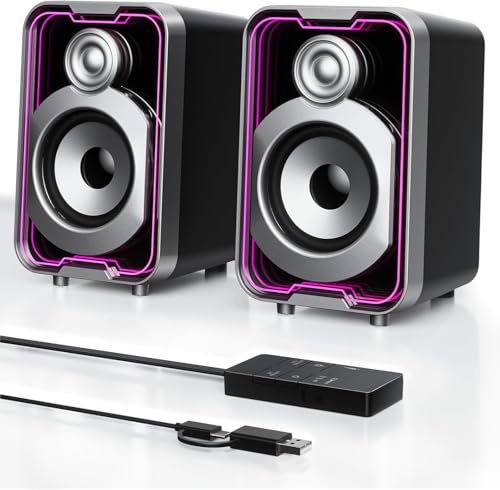
- Striking infinity mirror RGB lighting with five selectable visual effects
- Simple dual-mode operation toggling between wired USB and wireless Bluetooth
- Convenient inline control pod keeps audio adjustments within arm's reach
Cons
- Lacks sub-bass rumble due to the compact driver size and absence of an external subwoofer
- Lightweight plastic cabinet can shift if cables are pulled tightly
- Pushes into audible harmonic distortion at peak maximum volume levels
The SOULION 10W USB Powered Computer Speakers are designed to solve one of the most persistent nuisances in everyday desktop computing: thin, lifeless monitor audio. Built for students, remote professionals, and casual gamers, this 2.0 channel desktop set prioritizes simplicity, aesthetics, and targeted acoustic performance. Rather than demanding complex drivers or sprawling power strips, the system runs straight off a standard USB port, making integration into your daily workspace virtually seamless.
In real-world use, versatility stands out as one of the system's biggest assets. Thanks to the integrated Bluetooth wireless receiver, you can switch seamlessly from typing on a desktop to streaming a podcast or playlist from your phone. The dedicated desktop control pod streamlines the process, placing essential commands like track muting, volume control, and lighting adjustments at your fingertips rather than burying them inside operating system menus.
Visual presentation is another strong point. The front baffle features an infinity mirror design that yields a multi-dimensional light tunnel effect across five distinct lighting modes. It injects personality into dim gaming environments without being overly distracting during daytime productivity tasks. While plastic-bodied and lightweight, the housings sit firmly beside dual-monitor arrays or compact laptop stands.
Overall, the SOULION 10W system serves as a dependable upgrade for anyone seeking functional desktop sound, stylish ambient lighting, and clutter-free wired or wireless audio playback without spending a small fortune.
Acoustically, the SOULION system relies on dual 5-watt active drivers supported by independent passive diaphragms. The tuning leans toward upper-midrange clarity and crisp treble, which benefits spoken-word podcasts, conference calls, and competitive gaming chatter. Dialogue emerges distinctly from background instrumentation, ensuring you never miss footsteps or movie conversations.
While the compact cabinets naturally restrict deep sub-bass reproduction, the passive diaphragms add a touch of mid-bass presence that prevents kick drums and sound effects from feeling entirely hollow. The stereo separation provides an accurate nearfield soundstage, giving listeners a clear sense of left-right directionality when seated within typical desk distances of two to three feet.
Volume output is more than adequate for private home offices and small bedrooms. Pushing the output toward its absolute upper ceiling can result in mild compression and high-end harshness, but at standard moderate listening levels, the delivery remains pleasant, articulate, and far superior to integrated laptop speakers.
Constructed from lightweight black ABS composite, each speaker measures approximately 4 by 3.5 by 5.5 inches. This mini footprint makes them well suited for compact student desks, cubicles, or secondary monitor setups where surface space is at a premium. The angled front face directs acoustic output toward ear level, optimizing nearfield audio clarity.
Connectivity centers around a hardwired USB cable that handles both digital audio transfer and power delivery from computers, eliminating ground-loop hum and external AC brick clutter. For mobile audio playback, an internal Bluetooth module pairs quickly with smartphones, tablets, and gaming handhelds, allowing flexible switching on the fly.
The external control pod acts as the central command hub, featuring tactile switches to toggle illumination modes, power states, audio sources, and rotary volume. The cable lengths provide adequate slack for standard desktop monitor configurations, keeping your workspace neat and organized.

Pros
- Low-profile under-monitor design saves valuable desk space and reduces cord clutter
- Built-in rechargeable battery allows flexible placement and easy portability around the home
- Broad input options including Bluetooth 5.3, 3.5mm AUX, TF card, and flash drive playback
- Clear vocal clarity makes virtual meetings, podcasts, and YouTube playback easily intelligible
Cons
- USB port functions exclusively for flash drive playback and cannot be used as a direct USB audio DAC
- Compact driver dimensions lack the deep, room-shaking sub-bass found in larger desktop subwoofer systems
- Does not include dedicated EQ presets or mobile app customization
The Bluedee Rechargeable Computer Soundbar is an ultra-convenient audio upgrade engineered for modern desks, dorm workstations, and home offices. If you are tired of tinny laptop speakers or bulky desktop speakers that clutter your work surface with tangled cables, this low-profile soundbar provides a tidy, functional solution. Its horizontal form factor nests neatly beneath computer displays, making it an ideal audio companion for anyone aiming to maintain a minimalist setup.
In everyday use, this speaker proves remarkably versatile. Dual full-range acoustic drivers work alongside dedicated tweeters to deliver balanced output across everyday tasks. Dialogue during video conferences comes through clean and intelligible, while YouTube videos and background music sound lively and open. The addition of an internal rechargeable battery brings genuine flexibility, allowing you to unplug the unit and carry it to the kitchen counter, patio table, or bedroom without interrupting your playlist.
Connectivity is simple and adaptable across several platforms. Whether you prefer pairing via wireless Bluetooth 5.3 or running the included 3.5mm AUX line to your desktop computer or gaming monitor, setup takes mere seconds. It also offers standalone playback from flash drives and micro TF cards, giving you complete independence from an active computer connection.
Overall, the Bluedee desktop soundbar strikes a smart balance between convenience, desk aesthetics, and everyday performance. While it will not replace an audiophile-grade hi-fi setup, it represents exceptional utility and clean design for students, home workers, and casual streamers seeking better everyday sound.
Performance on this desktop speaker is tuned specifically for day-to-day desktop activities such as video meetings, multimedia consumption, and light gaming. The driver arrangement balances crisp high frequencies with a forward midrange, ensuring that spoken voices, dialogue, and vocal tracks stay articulate even at lower listening levels. Bass response is punchy and pleasant for its size, providing adequate warmth without causing desk vibrations or muddiness.
Volume capabilities are more than sufficient to fill a standard home office or bedroom without noticeable distortion at moderate listening levels. Backed by Bluetooth 5.3 technology, the speaker maintains a rock-solid wireless connection across typical indoor ranges, minimizing latency issues when synchronizing audio with streaming video or casual PC gaming.
Featuring an understated matte black chassis measuring 16.5 inches wide, the soundbar slips smoothly under most monitor risers and stands. The clean, elongated shape enhances desk aesthetics without drawing unnecessary attention. Tactical side-mounted controls allow you to switch sources and fine-tune your volume with an easy-to-reach knob, eliminating the need to search for software sliders in the middle of a video conference.
A standout feature is the integrated rechargeable battery, which delivers up to 13 hours of cordless audio playback at moderate volume levels. Recharging takes place through a standard USB-C port, meaning you can keep it continuously powered directly from your PC or unplug it for an afternoon of cable-free listening around the house.
Connecting Wired and Bluetooth Speakers to a PC: Capabilities, Setup, and Routing
Your personal computer can connect to both wired speakers and Bluetooth speakers without any hardware conflicts. Modern motherboards, desktop sound cards, and laptop processors integrate independent analog audio codecs alongside separate wireless controllers. Because of this multi-chip architecture, your operating system recognizes wired jacks and Bluetooth transceivers as distinct audio endpoints. Learning how to configure, switch, or mirror these endpoints enables you to build a versatile desktop audio setup tailored to your daily needs.
How Computer Operating Systems Manage Multiple Audio Endpoints
Operating systems treat connected audio hardware as individual playback targets rather than a single shared pipeline. Windows, macOS, and Linux assign dedicated software drivers to your motherboard audio codec, USB digital interfaces, and Bluetooth radio controllers. Connecting a standard 3.5mm analog cord does not shut down your computer Bluetooth radio, nor does pairing a wireless speaker disable physical audio ports. Both communication channels remain powered, active, and prepared to process audio streams simultaneously.
The primary constraint in standard operation stems from operating system routing logic rather than physical hardware limitations. Desktop platforms typically designate one primary playback device as the default audio sink for all active applications. When you plug in a wired soundbar or connect a Bluetooth speaker, your system assigns system sounds and media streams to whichever device is currently active. Swapping between these audio streams takes only a couple of clicks, while streaming to both endpoints at once requires a software bridge.
Hardware Requirements for Wired and Wireless Desktop Audio
Connecting wired speakers requires identifying the physical audio output jacks present on your computer chassis. Standard desktop towers feature 3.5mm stereo line-out jacks, which are commonly color-coded in light green on rear motherboard panels. Modern compact computer speakers frequently utilize digital USB connections, which deliver power and digital audio signals through a single cable. Speakers such as the BESTISAN Computer Speaker or SOULION soundbars use this single-cable design, eliminating messy analog cables behind your desk.
Wireless playback relies on an internal or external Bluetooth transceiver capable of transmitting stereo audio profiles. Most laptops and pre-assembled desktops include built-in wireless cards that manage Wi-Fi and Bluetooth communication simultaneously. If your desktop motherboard lacks built-in wireless capabilities, an inexpensive USB Bluetooth dongle provides the necessary wireless radio link. After installing the appropriate adapter drivers, your computer can discover and pair with wireless Bluetooth speakers across your workspace.
Connecting Wired and Bluetooth Speakers Step by Step
Begin the setup procedure by establishing your wired speaker connection. Plug the 3.5mm audio jack into your computer line-out port, or insert the USB connector into an available USB port on your PC. If your speakers use a dual cable design, like the SOULION 2.0 Bluetooth Computer Speakers, connect the USB plug to a power port and the 3.5mm plug to the headphone jack. Turn on the physical power switch or rotary knob and confirm that the power indicator light activates.
Next, pair your wireless speaker with your operating system. Open the Windows Settings menu, navigate to the Bluetooth and Devices section, and verify that Bluetooth is switched on. Put your wireless speaker into pairing mode by pressing its mode button until the status light flashes rapidly or sounds an alert chime. Select Add Device in Windows, choose the Bluetooth option, click on your speaker when its name appears, and wait for the system confirmation message.
Apple Mac users complete this wireless configuration through the System Settings menu. Open System Settings from the Apple menu, select the Bluetooth tab from the left sidebar, and ensure the wireless radio is active. Put your speaker into pairing discovery mode and watch for its name in the nearby devices list. Click Connect next to your speaker model to finalize the wireless handshake and store the pairing profile for future sessions.
Switching Between Wired and Bluetooth Audio Outputs
Toggling between your wired speakers and your Bluetooth speaker is straightforward once both devices are recognized. In Windows 11, click the speaker icon located on the system taskbar tray to launch the Quick Settings interface. Click the small arrow icon adjacent to the volume slider to view every active playback endpoint. Selecting your wired speakers or your Bluetooth device immediately routes audio to that unit without requiring you to restart running media players.
Mac users can switch output paths easily from the Menu Bar or the Control Center. Clicking the Sound icon in the menu bar displays an output list containing internal speakers, line-out ports, USB audio interfaces, and paired Bluetooth receivers. Selecting your preferred speaker immediately transfers system sound to that hardware. This switching capability lets you alternate smoothly between private listening on compact notebook speakers and room-filling playback through an external speaker.
Simultaneous Audio Output Using Windows and macOS Tools
Neither Windows nor macOS transmits duplicate audio streams to two different output devices by default. However, both platforms provide integrated utility features that allow you to broadcast audio across multiple devices simultaneously. In Windows, the classic Sound Control Panel includes a virtual recording feature called Stereo Mix that mirrors audio from your default output. Access this tool by opening Sound Settings, selecting More Sound Settings, and viewing the Recording tab to locate the Stereo Mix interface.
Right-click the Stereo Mix icon, select Properties, and navigate to the Listen tab. Check the box labeled Listen to this device, then choose your connected Bluetooth speaker from the playback device drop-down list. Return to the Playback tab and confirm that your wired speakers remain set as the default device. Once you apply these adjustments, your computer outputs audio to your wired speakers while Stereo Mix duplicates the exact same audio stream to your Bluetooth speaker.
On macOS, simultaneous playback is managed through the built-in Audio MIDI Setup utility. Open Finder, go to Applications, enter the Utilities folder, and launch Audio MIDI Setup. Click the plus button at the bottom-left corner of the window and select Create Multi-Output Device. Check the selection boxes beside your wired output and your paired Bluetooth speaker, then choose this multi-output configuration as your active sound device in macOS System Settings.
Managing Latency and Audio Delay Discrepancies
Sending audio to wired and Bluetooth speakers at the same time introduces transmission latency differences between the two channels. Analog 3.5mm copper connections deliver audio signals virtually instantaneously, generally registering under five milliseconds of delay. In contrast, Bluetooth audio transmission requires digital audio compression, wireless radio packet transmission, and digital-to-analog conversion at the speaker. This processing overhead typically produces a delay between forty and two hundred milliseconds, depending on the codec used.
When both speaker systems operate inside the same room, this latency gap creates an audible echo effect. The wired speakers produce the audio immediately, while the Bluetooth speakers reproduce the sound a split second later. If your speakers are positioned in separate rooms, this timing discrepancy is virtually unnoticeable and provides convenient multi-room audio. For single-room setups, third-party mixing tools like VoiceMeeter allow you to apply an intentional millisecond delay to the wired output to synchronize the audio.
The specific Bluetooth generation supported by your hardware also impacts overall wireless latency. Modern speakers and adapters equipped with Bluetooth 5.3 provide faster data transmission and lower latency than older Bluetooth 4.2 models. Products like the BESTISAN Computer Speaker and Bluedee soundbars incorporate Bluetooth 5.3 for more reliable wireless streaming. While modern protocols reduce transmission delay significantly, wireless audio inherently carries slightly more processing overhead than a direct physical cable connection.
Hybrid Speaker Designs with Dual Wired and Wireless Modes
Many computer users wanting wired and wireless audio prefer a hybrid speaker system rather than managing two physical speaker sets. Modern desktop soundbars and bookshelf speakers frequently integrate both 3.5mm auxiliary inputs and Bluetooth receivers into one compact housing. The Logitech Z207 demonstrates this versatile design, allowing users to connect a permanent wired cable to their PC while maintaining an active Bluetooth link to a smartphone or tablet.
The Logitech Easy-Switch feature allows listeners to toggle between audio sources simply by pausing audio on one device and hitting play on the other. Similarly, soundbars from Nylavee and SOULION feature physical mode buttons or rotary control pods to swap between wired AUX inputs and wireless Bluetooth connections. This hybrid configuration keeps your workspace organized by utilizing one set of stereo drivers to handle gaming audio, computer alerts, and wireless mobile music streaming.
Troubleshooting Desktop Audio Routing and Hardware Issues
A common problem when running wired and wireless speakers simultaneously is ground loop buzzing or electrical line noise. When a powered speaker draws power via USB from the same motherboard generating analog audio, electrical activity from your system can leak into the 3.5mm line. Powering your speaker using an external USB wall charger instead of a computer USB port separates the electrical grounds and eliminates this unwanted humming noise.
Intermittent Bluetooth dropouts often occur when other wireless devices congest the 2.4 GHz radio frequency spectrum. Wi-Fi routers, wireless computer mice, and mobile phones situated close to your PC tower can interfere with Bluetooth audio packets. Moving your Bluetooth speaker closer to your computer, switching your home router to 5 GHz Wi-Fi, or using a USB extension cable to elevate your Bluetooth adapter resolves most signal drops.
Audio playback failures can also arise from mismatched sample rates between your wired and wireless audio devices. Windows sometimes struggles to synchronize devices operating at different sample frequencies, such as 44.1 kHz on one channel and 48 kHz on another. Opening the Advanced tab inside the device properties menu and setting both playback devices to 16-bit 48 kHz format ensures clean audio streaming across both endpoints.
Buyer Considerations for Dual-Capable PC Speakers
Selecting speakers that accommodate both wired setups and wireless streaming requires balancing physical footprint, driver layout, and desktop ergonomics. Compact single-piece soundbars, such as the SOULION Computer Speakers or the clamp-mounted BESTISAN Computer Speaker, slide directly beneath monitors to conserve desk space. If stereo imaging and soundstage width are your primary audio priorities, traditional two-piece 2.0 bookshelf speakers placed on either side of your screen deliver superior left and right separation.
Power delivery systems represent another important factor when comparing hybrid desktop models. Many budget-friendly computer speakers rely on continuous USB bus power and do not contain an internal battery. In contrast, portable desktop soundbars like the Bluedee Computer Speakers feature rechargeable batteries that provide hours of cordless operation. A rechargeable battery lets you unplug the speaker and carry it into another room without losing your Bluetooth audio connection.
Finally, examine control layout and accessibility when choosing your desktop audio equipment. Having a physical rotary volume knob and a dedicated input selector switch within arm reach makes toggling between PC gaming and phone streaming effortless. Speakers equipped with an on-chassis headphone port, such as the Nylavee Computer Speakers, offer extra utility by allowing you to plug in private headphones without searching behind your computer case.
Desktop Audio Configuration Takeaway
Connecting both wired speakers and Bluetooth speakers to a personal computer gives you total control over how you consume media. Whether you choose to toggle between devices for specific tasks or mirror audio across multiple rooms, your operating system provides the necessary routing capabilities. Verifying your port connections, keeping wireless drivers updated, and selecting speakers with flexible inputs will give you a dependable, high-quality desktop audio experience.




Write Your Review
No reviews yet. Be the first to share your experience!