


Creating a broader soundstage often requires linking multiple portable units together, which makes understanding %how to connect two musibaby speakers% a valuable skill for any audio enthusiast. While a single compact speaker produces admirable volume for personal listening, linking a pair unleashes true wireless stereo operation with dedicated left and right audio channels. Many listeners assume the setup process simply involves pairing both speakers to a smartphone simultaneously, but wireless audio protocols actually require establishing a direct link between the two playback devices first. Understanding this core handshake mechanism prevents initial frustration and allows you to enjoy balanced sound whether you are lounging at home or setting up outside. If you are comparing different portable configurations, exploring dedicated bluetooth stereo speakers can help you evaluate how synchronized wireless hardware performs across different spaces.
Modern portable models like the Musibaby M1 and M88 integrate convenient dual pairing features to simplify multi-speaker setups without extra cables. Learning the exact connection sequence ensures that your primary host speaker communicates properly with your playback device while transmitting the secondary audio channel to the satellite unit. Skipping a small preparatory step, such as disconnecting your smartphone before linking the two speakers together, remains the most common obstacle listeners face during setup. By mastering the proper timing and button combinations, you can quickly unlock high output sound that rivals larger loud portable speakers for gatherings or backyard entertainment. Taking a few moments to review the necessary steps will keep your dual speaker configuration running smoothly every time you turn the system on.

Pros
- Powerful 80W output with crisp highs and deep bass
- Over 24 hours battery life plus USB power bank function
- IPX6 waterproof and dust-resistant for outdoor reliability
- Bluetooth 5.3 for fast, stable pairing and multiple inputs
- Dual speaker pairing creates true stereo sound
Cons
- Lacks a companion app for sound customization
- Bass-heavy profile may overpower mids in some tracks
- Larger size due to big battery makes it less pocketable
The Musibaby M1 is a robust portable speaker designed for outdoor enthusiasts who demand powerful sound without sacrificing durability. With 80W output from four drivers including dual tweeters and woofers, it delivers immersive stereo audio perfect for beach outings, camping trips, or backyard gatherings. Its advanced DSP chip ensures balanced sound wherever you take it.
Ideal for Americans who love tailgating, hiking, or pool parties, the M1 stands out with its IPX6 waterproof rating and 24+ hour battery, keeping the music flowing from dawn till dusk. Real-world tests show it handles splashes and dust effortlessly while maintaining clarity at high volumes, making it a go-to for active lifestyles.
Portability shines with a built-in handle and adjustable strap, plus versatile connectivity like Bluetooth 5.3, AUX, and TF card support. While it excels in bass-driven genres, some tracks might benefit from EQ tweaks not available via app. Overall verdict: a top pick for outdoor audio that punches above its weight in fun and reliability.
The M1's sound signature features deep, rumbling bass from its subwoofer paired with crisp highs from dual tweeters, creating a lively profile suited for parties and open spaces. At max volume, it fills large areas without distortion, thanks to the 80W output and DSP optimization for balanced audio.
Vocal clarity holds up well in mids for podcasts or vocals, though bass emphasis can slightly mask subtleties in acoustic tracks. Bluetooth 5.3 provides rock-solid stability up to 100 feet, with seamless dual pairing for 160W stereo that widens the soundstage dramatically.
Multiple inputs ensure flexibility, from wireless streaming to USB playback, making it versatile for everything from workouts to evening hangs.
Rugged alloy mesh protects the drivers while the IPX6 rating shrugs off heavy splashes, rain, and dust, ideal for beach days or poolside use. The durable build with dynamic LED lights adds party flair without compromising toughness.
Weighing in as a substantial unit for its power, the M1 includes a comfy handle and 127 cm adjustable strap for easy hauling to campsites or tailgates. Its portable yet sturdy design prioritizes adventure-ready convenience.
The 12,000mAh battery delivers over 24 hours at moderate volumes, outlasting typical outings, and recharges reasonably while doubling as a power bank to top up your gear. Perfect for extended fun without hunting outlets.
Pros
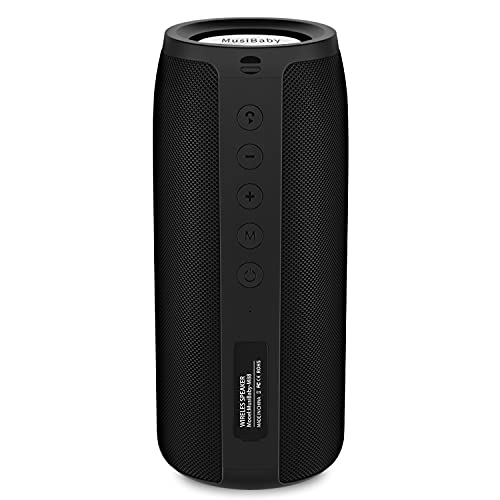
- Distortion-free max volume mimics live concerts
- 30H battery outlasts weekend adventures
- Effortless dual pairing across Musibaby models
- Rock-solid Bluetooth 5.3 signal in tough conditions
- IPX5 rating handles showers, pools, and beach sprays
Cons
- IPX5 limits it to splashes, not full submersion
- No app for sound customization or EQ tweaks
- Bass-heavy profile may overshadow acoustic tracks
The Musibaby M88 speaker stands out as a budget-friendly powerhouse for everyday adventures, blending loud 360-degree stereo sound with practical features like dual pairing and extended battery life. Designed for active Americans who love music on the go, it's perfect for tailgates, beach days, backyard barbecues, or home workouts where you need reliable audio without the bulk.
In real-world use, it shines at outdoor parties with booming bass that fills open spaces and clear vocals that cut through chatter. The Bluetooth 5.3 connection holds steady up to 100 feet, letting you roam freely while the music plays on. Pair two for stereo bliss, and its IPX5 waterproofing shrugs off poolside splashes or light rain.
While not for audiophiles chasing studio precision, this speaker nails value for casual listeners. Its long playtime means fewer interruptions, making it a top pick for gifts or personal use. Verdict: Grab the M88 if you want punchy, portable sound that keeps the party alive all day.
The M88 pumps out true 360-degree stereo with rich bass, balanced mids, and crisp highs, creating an immersive soundstage that rivals bigger speakers. Booming lows handle hip-hop and EDM effortlessly, while vocals stay clear even at max volume without distortion, just like a live show.
Volume levels push loud enough for group gatherings, filling patios or beaches without breaking. Bluetooth 5.3 delivers stable 100ft range and quick playlist reads from phones, laptops, or TVs. The 3.5mm jack adds flexibility for older devices.
Dual pairing syncs two units instantly for wider stereo imaging, perfect for doubling the fun at tailgates or pool parties.
This compact, black speaker feels rugged yet portable, weighing light enough for easy carry in a backpack or cooler. IPX5 waterproofing protects against splashes, rain, and shower steam, ideal for beach trips or pool hangs, but keep it out of deep water.
Battery life hits 30 hours on a single charge, powering full days of tailgating or weekend camping without a recharge. Quick top-ups get you back in action fast, with strong internal magnets reducing interference for cleaner playback.
Simple controls and auto-reconnect make it user-friendly, while lifetime warranty adds peace of mind for active lifestyles.
Complete Guide to Linking Two Musibaby Speakers for True Wireless Stereo
Linking two portable speakers together fundamentally changes how sound fills an environment by turning mono playback into a dynamic stereo field. Achieving this connection requires an orderly wireless handshake between the two physical units before introducing an audio source like a phone or computer.
The Step-by-Step Dual Pairing Sequence for Musibaby Hardware
Pairing two Musibaby speakers starts with preparing the physical hardware before opening any Bluetooth menus on your mobile device. Power on both speakers simultaneously by pressing and holding their respective power buttons until the indicator lights illuminate and the startup chimes play. Make sure neither speaker is currently connected to your phone, tablet, or television, as an active source connection will block the speakers from finding each other.
Once both units are powered on and disconnected from external devices, select one speaker to serve as the primary communication hub. Double-press the dedicated pairing or play button on this chosen speaker to send out the dual pairing broadcast signal. You will generally hear a confirmation tone or observe a flashing status light indicating that the hardware is actively searching for its counterpart.
Within several seconds, the secondary speaker will acknowledge the pairing signal and emit an audible prompt confirming that the two units have successfully linked. The status LED on the primary speaker will usually blink rapidly to signal readiness for an audio source, while the secondary speaker light remains solid. At this stage, your dual wireless setup is established and waiting for an incoming audio stream.
Understanding Host and Satellite Roles in True Wireless Stereo
True wireless stereo architecture relies on an asymmetric relationship between the two linked devices to deliver synchronized two-channel audio. The speaker you initiate the pairing process on becomes the primary host, which acts as the direct bridge to your source device. This host receives the complete stereo Bluetooth stream from your phone, decodes the digital signal, and splits the audio into left and right channels.
The host unit plays one channel through its own internal drivers while instantly relaying the opposite channel wirelessly to the secondary satellite speaker. In advanced units like the Musibaby M1, the onboard digital signal processor actively balances this transmission to eliminate timing discrepancies between the dual woofers and tweeters. Because the host handles incoming and outgoing wireless signals simultaneously, it requires slightly more processing overhead than the satellite unit.
Understanding this division of labor helps when adjusting your equipment or organizing your listening area. If the satellite speaker loses communication or wanders too far away, only that satellite channel will cut out while the host continues playing. Keeping the host positioned centrally between your playback device and the secondary speaker ensures the cleanest possible signal relay.
Managing Existing Bluetooth Connections Before Initiating Pairing
The single most frequent cause of failed dual pairing attempts is an accidental connection to a previously remembered smartphone or tablet. Modern portable audio units feature fast auto-connect routines that instantly latch onto known Bluetooth radios the moment the speakers power on. If one speaker pairs to your phone before linking to the other speaker, the dual pairing routine will fail to initiate.
You can resolve this issue by navigating to the Bluetooth settings on your source device and toggling the wireless radio off temporarily. Alternatively, enter your device list, find the Musibaby speaker entry, and tap disconnect or forget device while you link the hardware together. Clearing these background links allows both speakers to remain in their unassigned discovery state.
If a speaker remains stubbornly connected to an unseen device in your household, perform a manual hardware reset. Most portable speakers allow you to reset connection memory by holding down the play and power buttons together for several seconds until the indicator flashes. Resetting the connection memory wipes old pairings and gives you a completely clean slate for the dual pairing sequence.
Cross-Model Compatibility Between the M1 and M88 Units
Musibaby designs its portable audio lineup to support dual pairing across different product lines, providing notable flexibility when building a setup. While pairing two identical units delivers completely symmetrical acoustic output, linking an M1 with an M88 speaker is fully supported by the manufacturer. This compatibility allows listeners who started with a compact portable unit to expand their sound system later without retiring older gear.
When linking different models together, keep in mind that driver architecture and total acoustic output differ between the enclosures. The Musibaby M1 delivers an eighty-watt output across four dedicated drivers, while the M88 features a compact enclosure built for three-hundred-sixty-degree dispersion. In a mixed pairing setup, assign the larger M1 unit as the primary host to take advantage of its robust digital signal processing chip and external antenna range.
Mixed configurations perform admirably for background music and wide gathering spaces where general sound dispersion matters more than precise acoustic matching. If your goal is pristine directional hi-fi staging, matching two identical enclosures will always yield the most balanced frequency response. For listeners interested in rugged setups capable of handling splashes and moisture, pairing waterproof speakers for outdoor sound offers dependable performance in damp or unpredictable environments.
Connecting the Primary Speaker to Your Phone, Tablet, or Laptop
Once your two Musibaby units emit the confirmation chime indicating a successful inter-speaker link, you can connect your source device. Turn the Bluetooth radio back on using your smartphone, tablet, computer, or smart television. Open the available device menu and scan for nearby broadcast signals to locate the speaker entry.
You should only see a single Musibaby entry listed in your device pairing menu despite having two physical speakers running in the room. This occurs because the primary host speaker presents itself as a unified stereo system to your operating system. Tapping this single entry initiates the standard Bluetooth 5.3 connection without requiring any specialized companion applications.
When the connection finalizes, your source device will display the connected status, and the blinking LED on the primary speaker will turn solid. Press play on any audio track to verify that sound outputs evenly through both enclosures. If audio plays from only one unit, simply power both speakers down and repeat the pairing sequence from the beginning.
Optimizing Speaker Distance and Environmental Placement
Physical positioning significantly impacts both the stability of your wireless connection and the quality of the stereo soundstage. Bluetooth 5.3 provides a nominal broadcast distance up to one hundred feet under optimal conditions, but inter-speaker transmission works best within twenty to thirty feet. Dense walls, metal patio furniture, and active Wi-Fi routers can reduce this effective operating distance.
For optimal stereo imaging, place the two speakers roughly six to ten feet apart at approximately ear level relative to your primary listening position. Angling both enclosures slightly inward toward the center of the room creates a focused acoustic sweet spot with clear vocal separation. Placing speakers directly against hard boundary walls can unnaturally boost low frequencies, so giving the enclosures a few inches of breathing room preserves midrange clarity.
In large backyards or open outdoor areas, boundary reflections disappear, which naturally diminishes perceived bass response. To counteract this loss in open spaces, place the speakers near natural acoustic boundaries like a covered patio wall or garden retaining structure. If low-frequency energy remains your top priority during outdoor gatherings, exploring speakers designed for deeper bass can help you evaluate how driver size and enclosure volume affect overall low-end delivery.
Synchronized Controls for Volume, Playback, and Party Lights
Operating two linked speakers is convenient because basic playback commands synchronize across both units automatically. Adjusting the master volume from your connected smartphone raises or lowers the sound level on both the host and satellite speakers simultaneously. Similarly, pressing the pause or play button on either physical speaker toggles playback across the entire system.
Track navigation buttons typically maintain bidirectional synchronization, allowing you to skip tracks forward or backward from whichever speaker is closest to your seat. However, specialized hardware features like the dynamic LED lighting rings found on the Musibaby M1 operate independently on each enclosure. You will need to press the light mode button on each physical unit to cycle through lighting patterns or turn the illumination off.
Power commands also exhibit specific behavioral rules depending on which unit you interact with first. Powering down the primary host speaker will automatically shut down the secondary satellite speaker to prevent accidental battery drain. In contrast, turning off the satellite speaker simply causes the host to revert to single-speaker playback without interrupting your music stream.
Troubleshooting Desynchronization, Echoes, and Audio Dropouts
Wireless audio links can occasionally encounter micro-delays or desynchronization issues that produce an annoying echo effect between the two units. This phenomenon happens when packets of digital audio data are delayed during wireless transmission between the host and the satellite. High radio-frequency interference from nearby wireless routers, microwave ovens, or crowded Bluetooth environments is usually responsible for this stuttering.
Resolving a persistent echo begins by shortening the physical distance between the two Musibaby enclosures. Bring the satellite speaker within five to ten feet of the host speaker to establish a stronger, uninterrupted inter-speaker connection. Additionally, keep your smartphone or laptop within direct line of sight of the primary host to minimize initial packet loss.
If audio dropouts continue despite adequate positioning, clear the internal buffers by powering down both speakers and turning off your phone Bluetooth radio. Wait approximately ten seconds before turning the speakers back on, re-establishing the dual link, and reconnecting your source device. This brief power cycle clears temporary memory conflicts within the Bluetooth controller and restores tight synchronization.
Using Wired Auxiliary Inputs and TF Memory Cards in Dual Setups
Many listeners wonder whether dual stereo pairing works when playing music through a wired auxiliary cable or an inserted micro SD card. Both the Musibaby M1 and M88 include 3.5mm analog auxiliary ports alongside onboard memory card slots for non-Bluetooth playback. When using these alternative inputs, the primary host digitizes the incoming analog or local file signal and transmits it wirelessly to the satellite unit.
To use an auxiliary connection in dual mode, first link the two speakers together wirelessly using the standard dual pairing button sequence. Once the speakers are paired to each other, insert the 3.5mm audio cable into the auxiliary port of the primary host speaker. The host will automatically detect the physical plug and switch its internal input source while continuing to broadcast the secondary channel to the linked unit.
Local playback from a TF card or USB flash drive follows an identical operational logic. Insert the storage drive containing supported audio files into the primary speaker while the dual link remains active. The host speaker reads the track directory and shares the playback stream with the satellite, giving you multi-speaker sound without needing a smartphone nearby.
Long-Term Battery Care and Reconnection Routines for Daily Use
Maintaining battery health across a multi-speaker audio system ensures consistent runtimes whenever you take your setup on the go. The Musibaby M1 houses a massive twelve-thousand-milliamp-hour battery with over twenty-four hours of playtime, while the compact M88 provides up to thirty hours of operation. Because the primary host unit expends more energy receiving and transmitting dual signals, its battery will deplete slightly faster than the satellite unit.
You can balance long-term battery wear across two identical speakers by alternating which unit serves as the primary host during each listening session. Avoid leaving portable speakers connected to high-wattage wall chargers indefinitely once the charging indicator shows full capacity. Storing the speakers in a moderate room climate with approximately fifty percent charge preserves internal lithium-ion chemistry when the gear is not in active use.
Reconnecting your speakers for subsequent listening sessions is remarkably seamless once the initial pairing handshake has been recorded. Simply power on both speakers within proximity of each other, and their internal firmware will automatically re-establish the dual link without pressing any pairing buttons. After the speakers chime their connection status, activate Bluetooth on your source device to resume wide, room-filling stereo sound within seconds.




Write Your Review
No reviews yet. Be the first to share your experience!