


Setting up multiple audio outputs from a single phone, laptop, or media player often leads listeners to wonder about basic cable solutions. When people ask, can you connect 2 speakers with an aux cord, the answer depends largely on whether the speakers have built-in amplification and how the audio signal is divided. While modern listeners often rely on wireless protocols like Bluetooth speakers, standard 3.5mm analog connections remain one of the most reliable and latency-free ways to distribute sound. Connecting two separate audio units using a standard 3.5mm auxiliary cable requires understanding the difference between passive and powered equipment, as well as the distinction between a simple pass-through cord and a dedicated audio splitter.
Directly plugging one standard aux cord between two standalone speakers usually does nothing unless one unit features an active auxiliary output designed for daisy chaining. In most consumer setups, splitting the line-level output from your source device using a Y-cable or headphone splitter is the proper physical solution. Understanding signal degradation, impedance loading, and channel splitting will help you achieve clean stereo or dual-mono sound without damaging your hardware. Exploring the right combination of cables and powered monitors ensures that both speakers produce clear, balanced audio for desktop work, small gatherings, or multi-room listening.




Understanding How to Connect Two Speakers With an Aux Cord
Connecting multiple speakers to a single media player using standard 3.5mm auxiliary cords is a common goal for home listeners, desktop computer users, and event hosts. The direct answer is that you can connect two speakers to one playback source, but doing so requires specific cable adapters or active output ports rather than a single uninterrupted cord between two ordinary speaker cabinets. Standard auxiliary cords are passive conductors that transport low-voltage, line-level analog audio signals from a single output to a single input. Successfully routing that signal to two independent speaker cabinets requires understanding how hardware handles amplification, channel routing, and physical connections.
The Fundamental Rule: Line-Level Signals and Speaker Power
Audio signals leaving a standard 3.5mm headphone jack or aux output carry very small amounts of electrical current known as line-level audio. This microscopic signal contains the audio waveform information, but it lacks the electrical power required to physically move speaker cones and produce audible sound. Because an auxiliary cord only carries this tiny line-level signal, it can never directly drive two traditional passive speakers on its own. Passive speaker cabinets require heavy copper speaker wire connected to an external power amplifier or home stereo receiver.
When you connect two speakers via an auxiliary cord, both target speakers must be powered, active models with their own built-in internal amplifiers and power cords. Active speakers take the low-voltage auxiliary signal from your phone, computer, or media player and internally amplify that signal to drive the physical woofers and tweeters. If you attempt to plug an aux cord into passive speakers that lack an integrated power supply, you will get complete silence or faint, distorted whispers. Verifying whether your speakers require a wall plug, internal rechargeable battery, or USB power connection is the essential first step before purchasing any cabling.
Desktop computer speaker sets, such as the generic stereo 2.0 split desktop speakers or GOgroove gaming computer speakers, demonstrate this active design in a pre-paired package. These dual-cabinet desktop units use one primary powered enclosure that houses the amplifier circuit, volume potentiometer, and input connections. The master cabinet receives the 3.5mm aux input from your computer and routes the amplified secondary channel across a dedicated umbilical cable to the second cabinet. In this pre-engineered scenario, two speakers play together seamlessly because the internal electronics manage channel distribution and power balance for you.
Daisy Chaining Versus Audio Splitting
Listeners who want to connect two separate, standalone speaker enclosures generally have two physical connection paths available. The first method is known as daisy chaining, where an audio signal enters the first speaker and subsequently passes through to the second speaker. True daisy chaining requires the first speaker to feature an active, buffered line-out or aux-out port in addition to its normal aux-in jack. When you connect your phone to the aux input of speaker one, the internal circuit replicates that line-level signal and sends it out through the auxiliary output jack to the input of speaker two.
Unfortunately, most budget and mid-tier standalone speakers do not include a dedicated line-out or aux-out port. If you examine the back of a standard powered speaker, you will typically find only an auxiliary input jack, meaning the audio path terminates inside that cabinet. Plugging an aux cord directly between the aux-in jack of speaker one and the aux-in jack of speaker two will never work because both ports are designed strictly to receive electrical signals rather than transmit them. Connecting two receiving ports together produces no sound, as neither unit can push an audio waveform to the other.
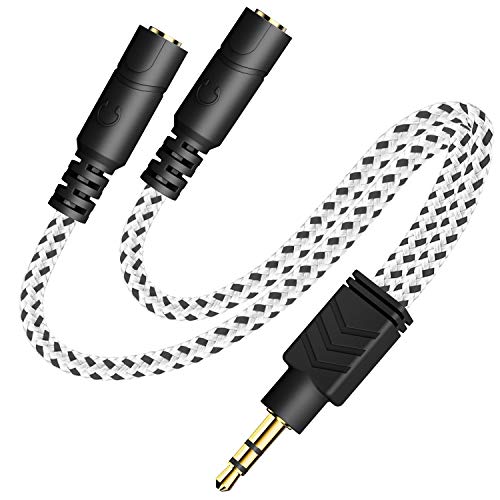
The second and far more common method is using a Y-splitter cable to duplicate the audio signal before it ever reaches the speakers. An audio splitter, such as the DUKABEL 3.5mm stereo 2-way audio cable, plugs directly into your media player and provides two independent female auxiliary jacks. From those two output ports, you run separate male-to-male auxiliary cables directly to each individual powered speaker. This setup splits the line-level signal at the source, allowing both powered cabinets to receive identical audio data simultaneously without needing special output jacks on the speakers themselves.
Cable Formats and Adapter Hardware
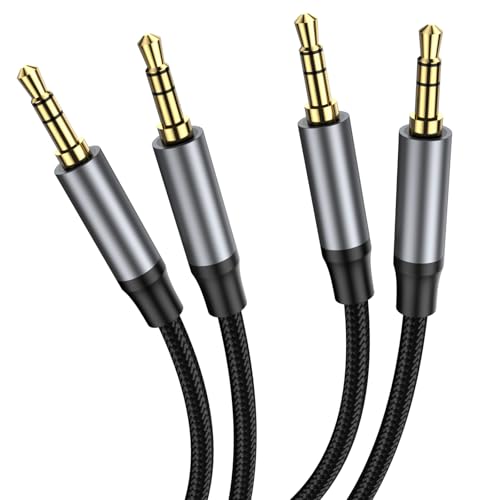
Selecting the correct physical cables ensures a secure connection, low mechanical noise, and reliable channel delivery across your playback system. A standard 3.5mm TRS stereo auxiliary cable features two insulating rings on the tip, separating the left audio channel, right audio channel, and ground shield. When connecting from a headphone splitter to standalone powered monitors, standard male-to-male stereo cords like the QianLink 2 Pack AUX Cable or KAYQINHO 3.5mm audio aux cable provide durable connections with sufficient length to position the cabinets apart. High-density braided sheathing on these cables helps prevent physical tangling and protects the delicate copper strands from bending stress.
Many contemporary smartphones, tablets, and lightweight laptops have completely eliminated the traditional 3.5mm headphone jack in favor of digital connectors. If your source device uses a modern digital output, you will need a digital-to-analog interface cord before connecting to an auxiliary splitter. A dedicated USB C to 3.5mm adapter cable, such as the KAYQINHO USB C to 3.5mm audio aux jack cable, converts digital data from modern phones into an analog line-level signal compatible with auxiliary splitters. Using a compliant adapter maintains proper signal transmission and avoids digital decoding errors before the sound reaches your auxiliary cables.
Certain audio components and powered monitor speakers feature RCA input jacks rather than miniature 3.5mm ports. In those situations, an adapter cable like the AIMHDUTY AUX to RCA Y-splitter cable allows you to bridge the connection between a standard 3.5mm aux source and the dual red-and-white analog jacks on your speaker. RCA connectors provide a wider physical contact area that often resists accidental disconnection better than small miniature plugs. Checking the exact physical socket on each speaker cabinet prevents you from purchasing incompatible cable combinations.
Stereo Separation Versus Dual Mono Distribution
When dividing an auxiliary signal to power two separate speaker units, you must consider whether the system outputs true stereo or dual-mono audio. True stereo sound requires discrete left-channel information sent to the left speaker and discrete right-channel information sent to the right speaker. Dedicated stereo reproduction creates a wide, immersive soundstage where musical instruments and sound effects appear at specific physical locations in front of the listener. In speakers configured for party environments or open gathering spaces, listener placement varies widely, making broad sound coverage more important than precise stereo imaging.
A standard Y-splitter cable duplicates both the left and right audio channels simultaneously to both output jacks. This means that both connected speakers receive the complete stereo mix, effectively playing identical audio tracks in dual-mono format unless the splitter is specifically engineered as a channel-breakout adapter. Dual-mono playback is beneficial for wide-area background music because listeners standing near either speaker will hear all musical elements equally without missing left-only or right-only instruments. However, if your goal is an accurate desktop monitoring setup, dual-mono reproduction flattens the stereo soundstage into a single centered audio plane.
To achieve true discrete stereo using two independent powered speakers and an aux source, you need a stereo-breakout Y-cable rather than a standard duplicating splitter. A stereo-breakout cable routes the left audio signal solely to one 3.5mm plug and the right audio signal solely to the other 3.5mm plug. Connecting the left breakout plug to speaker one and the right breakout plug to speaker two restores proper stereo separation. Listeners should inspect the packaging and wiring diagram of any splitter to confirm whether it duplicates full stereo or isolates separate directional channels.
Step-by-Step Procedure for Connecting Two Powered Speakers
Connecting two powered speakers to a single source device using auxiliary cords is straightforward when you follow a logical, orderly sequence. Begin by powering down both speaker units and turning your source device volume down to approximately twenty-five percent. Powering off the amplifiers prevents sudden pops or electrical surges that could potentially stress delicate speaker tweeters during cable insertion. Place both speaker cabinets in their desired listening positions and ensure each unit has access to its required electrical outlet or battery power source.
Next, plug your primary 3.5mm stereo splitter cable firmly into the headphone or line-out jack of your playback device. Ensure the connector slides completely into the socket until you feel a firm mechanical click, as a loose plug can cause channel dropouts or hum. Connect your first male-to-male auxiliary cord from output jack A on the splitter directly into the aux-in port of speaker one. Then connect your second male-to-male auxiliary cord from output jack B on the splitter into the aux-in port of speaker two.
Once all physical audio connections are fully seated, power on both speaker units and set their individual hardware volume controls to a moderate midway position. Start playing a familiar audio track on your source device and gradually raise the source volume to a comfortable listening level. Walk between both cabinets to verify that both speakers are producing clean, undistorted sound at matched volume levels. If one speaker sounds significantly louder than the other, adjust the physical gain knobs on the speaker enclosures until the acoustic output feels perfectly balanced.
Diagnosing Hum, Ground Loops, and Signal Attenuation
Splitting an analog audio signal between two separate powered devices can occasionally introduce electrical noise or unexpected volume drops. When a single audio source feeds two parallel amplifier inputs, the source device sees a reduced electrical input impedance. While modern line-level outputs from computers and smartphones easily drive two high-impedance powered speakers without audible loss, splitting the signal across three or four units can cause noticeable signal attenuation. If your audio sounds quiet, thin, or lacking in bass punch, the line-level output may be struggling to drive the combined input loads.
Another common challenge in dual-speaker aux setups is the appearance of a low-frequency hum or buzz, frequently referred to as a ground loop. Ground loops occur when two powered speakers are plugged into different electrical wall outlets while sharing a common audio ground wire through the auxiliary splitter. This configuration creates an electrical voltage differential that travels along the cable shield, resulting in an irritating sixty-hertz hum through both drivers. Connecting both speaker power cords into the exact same surge protector or power strip often eliminates ground loop hum immediately.
If ground loop noise persists despite using a shared power strip, inserting an inexpensive inline ground loop isolator between the splitter and speaker inputs can solve the problem. A ground loop isolator uses small internal audio transformers to break the physical electrical ground connection while allowing the audio signal to pass cleanly through magnetic coupling. Also, routing auxiliary cables away from heavy electrical power cords, computer power bricks, and fluorescent light ballasts prevents electromagnetic interference from bleeding into your sound. Inspecting cable connections for loose plugs or bent pins helps prevent static bursts during physical movement.
Comparing Aux Splitters With Wireless Multiroom and Active Mixers
While passive auxiliary splitters provide a simple and budget-conscious way to link two speakers, advanced multi-speaker setups often benefit from active hardware. Passive splitters lack the ability to boost audio voltage, meaning any cable length longer than fifteen or twenty feet may suffer from high-frequency roll-off and external noise pickup. An active audio distribution amplifier or small desktop mixer takes your line-level source and provides dedicated, buffered output stages with individual volume potentiometers for each speaker channel. Using an active distribution unit ensures that both speaker lines receive clean, strong signals regardless of cable length or speaker impedance variations.
For listeners who want to eliminate long, cluttering physical cords running across a room, modern wireless streaming systems provide a clean alternative. Many contemporary compact portable speaker options feature built-in digital linking protocols, allowing two matching wireless speakers to pair wirelessly for synchronized stereo or multi-room playback. Wireless pairing avoids the physical tripping hazards of long aux cords and eliminates ground loop hum entirely because there is no shared electrical wiring between the units. However, wireless setups can introduce minor transmission latency, making wired aux cables preferable for desktop video editing, rhythm gaming, and time-sensitive media playback.
Evaluating your primary listening requirements helps determine whether a basic aux splitter or a more robust audio interface fits your environment. If you simply need to route music to two bookshelf speakers placed a few feet apart on a workstation desk, a high-quality Y-cable and standard auxiliary cords deliver excellent audio fidelity with zero delay. If you are wiring speakers across separate rooms or managing complex audio sources, investing in a powered distribution box provides far superior signal control and reliability.
Final Practical Recommendations for Dual-Speaker Wired Audio
Connecting two speakers with an auxiliary setup is completely achievable as long as you respect the electrical realities of line-level audio signals and active speaker amplification. Always ensure that both speaker enclosures contain internal amplifiers, as an auxiliary cord cannot push raw electrical power to unpowered passive drivers. Using a durable stereo Y-splitter and quality braided auxiliary cables allows you to divide playback from phones, laptops, and tablets smoothly and reliably.
Before completing your permanent cable routing, test your setup with various music tracks to ensure both channels reproduce full-range audio without distortion or electrical ground hum. Adjust individual cabinet gain controls to achieve an even acoustic balance, and secure your cords with cable ties to prevent strain on fragile 3.5mm female jacks. By selecting the correct splitter format and matching your equipment types properly, you can enjoy dependable dual-speaker sound tailored to your listening space.



Write Your Review
No reviews yet. Be the first to share your experience!