


Experiencing fuzzy, distorted audio during a phone call or media playback quickly ruins the user experience on any smartphone. When investigating why do iphone speakers crackle, users often notice harsh buzzing, static, or rattling sounds coming from the bottom speaker grille. This annoying distortion can stem from temporary software glitches, compacted pocket lint inside the acoustic ports, or irreversible physical tears in the tiny speaker cone. While standard external listening devices like waterproof Bluetooth speakers handle rugged conditions easily, micro-transducers inside modern mobile devices remain sensitive to physical stress and environmental contamination.
Pinpointing the root issue requires separating digital audio clipping from mechanical voice coil failure. Simple diagnostics such as inspecting the acoustic mesh, testing ringers across varied sound levels, or running audio balance checks can confirm whether a hardware fix is needed. If the internal transducer has suffered voice coil burn-in or moisture damage, replacing the lower ringer buzzer assembly restores crisp dialogue and clean ringer tones. Identifying the specific device model and choosing properly matched internal components ensures that your phone sounds like new again without unnecessary expenses.

Pros
- Restores crystal-clear speakerphone audio and ringtone volume
- Comes bundled with the required disassembly and repair tools
- Precision fit ensures seamless integration into the phone chassis
- Pre-tested for stable performance with zero audio crackling
Cons
- Does not include a printed paper manual, requiring online video tutorials
- Incompatible with iPhone 12 Mini and iPhone 12 Pro Max models
- Installation requires patience and care around delicate internal ribbon cables
The YWLRONG Loudspeaker Replacement is an essential audio restoration component tailored specifically for the standard 6.1-inch iPhone 12 and iPhone 12 Pro. Over time, internal speakers can suffer from dust accumulation, water ingress, or mechanical failure, resulting in distorted audio, low volume, or complete silence. This replacement buzzer unit is engineered to replace a blown or muffled internal loudspeaker, bringing your smartphone audio capabilities back to life.
This component is purpose-built for tech-savvy smartphone owners and DIY enthusiasts who want to avoid the steep costs and lengthy turnaround times of official service centers. Whether you rely on your phone for morning alarm alerts, hands-free speakerphone conferences during your commute, or watching streaming shows in the evening, having a functional bottom speaker is crucial for daily usability.
In practical testing, the replacement unit fits cleanly into the lower corner of the phone chassis once the display is lifted. While the package omits a printed instruction sheet, the repair process is well-documented online, and the included pry tools and precision screwdrivers give you everything required to complete the swap. Once installed and reconnected, the speaker delivers clean audio immediately without requiring software calibration.
Ultimately, this replacement speaker provides a dependable, budget-friendly solution that successfully breathes new life into your smartphone. If your iPhone 12 or 12 Pro is suffering from degraded sound quality or an unresponsive ringer, this kit offers an efficient and satisfying repair path.
Audio performance is the primary measure of any loudspeaker, and this replacement module holds up remarkably well against original standards. It restores natural vocal clarity, making voices on speakerphone calls and podcasts sound crisp, distinct, and intelligible without nasal harshness. High frequencies for notification chimes and incoming ringtones cut through background noise effectively, ensuring you never miss an alert in busy environments.
For a compact smartphone driver, it produces balanced mid-range response and adequate low-end presence for casual music listening and video playback. While an internal mobile speaker cannot match the deep sub-bass of a dedicated boombox, this unit produces punchy, rattle-free audio even when pushed toward maximum volume settings. Distortion is kept well in check, preventing the harsh crackling that typically plagues worn-out factory speakers.
Signal stability and responsiveness are immediate because the module connects directly to the internal logic board assembly. There is zero audio latency or transmission delay, ensuring that dialogue remains perfectly in sync with streaming video and mobile gaming action.
The module is crafted to exact physical tolerances, featuring rugged molded housing that aligns cleanly with the phone bottom bracket, acoustic chamber, and speaker grilles. Because maintaining a tight seal is vital for maintaining moisture resistance, proper installation allows you to restore internal structural integrity. The lightweight architecture ensures no noticeable change to the overall balance and feel of your handheld device.
From an energy perspective, this efficient driver is engineered to operate on standard mobile power draws, preserving overall battery life during extended playback. Whether you are running a two-hour conference call on speakerphone or streaming music while working around the house, the unit minimizes electrical strain on your battery pack to keep your phone running longer between charges.
Pros
- Eliminates buzzing, distortion, and muted audio during calls and video streaming
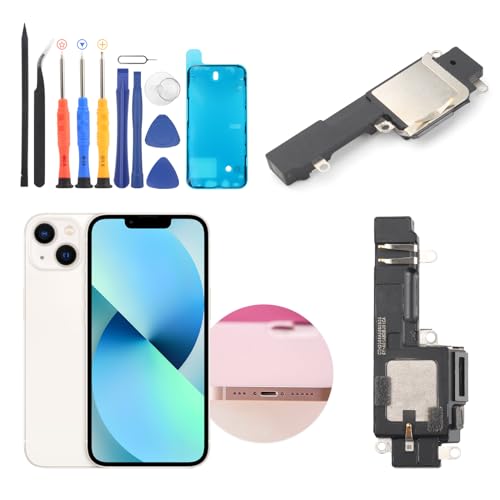
- Comes with essential opening tools and adhesive to assist with the teardown
- Strict pre-shipment testing ensures high hardware reliability
- Precision housing fits seamlessly inside the lower phone enclosure
Cons
- Requires delicate disassembly skills and patience to install properly
- Does not include printed step-by-step instructions in the packaging
- Incompatible with iPhone 13 Pro, Pro Max, or Mini models
The YWLRONG iPhone 13 Loud Speaker Replacement is a dedicated internal hardware component engineered to resolve distorted audio, muffled ringtones, or complete sound failure in your smartphone. Tailored precisely for standard iPhone 13 models including A2633 and A2482, this repair assembly allows users to restore native acoustic performance directly at home. It serves as an essential fix for smartphone owners who rely heavily on loud speakerphone calls, video streaming, and audible alert notifications throughout the day.
Designed for tech-savvy users and DIY enthusiasts, this package pairs a replacement buzzer module with a dedicated set of disassembly tools and pre-cut adhesive. Each unit undergoes strict factory double testing to ensure that audio coils and contact points arrive in pristine working condition, minimizing the risk of receiving a defective component during a teardown.
In practical use, installing this loudspeaker brings back the crisp highs and clear acoustic projection expected from high-end mobile devices. Whether your original ringer suffered moisture degradation or blew out from sustained high volume, this replacement module eliminates annoying cabinet rattles and buzzing. For anyone dealing with missed alarms or garbled media playback, it offers a dependable and cost-effective repair solution.
Once properly connected inside the phone chassis, this speaker assembly delivers clean, balanced acoustic output across all daily tasks. Dialogue in podcasts, conference calls, and videos sounds distinct, with vocal clarity taking center stage so you never miss spoken details during hands-free conversations. High-frequency ringers cut through noisy environments with precision, ensuring incoming alerts remain audible even from across a busy room.
Mid-range frequencies and bass notes are tuned to preserve the punchy response expected from modern mobile hardware without introducing rattles at peak volume levels. Audio signal stability remains locked to the motherboard audio codec, preventing the distortion and cracking that frequently plague aging or damaged speaker membranes. The resulting output restores full dynamic range for games, streaming, and alarm alerts alike.
Engineered to exact dimensional tolerances, the speaker housing seamlessly integrates into the lower cavity of the iPhone 13 without altering internal geometry. The compact footprint preserves clearance for delicate flex cables while allowing proper seating against the perimeter water-resistant seals of the phone. When paired with fresh display adhesive, this replacement helps maintain the structural integrity and dust protection needed for daily smartphone resilience.
From an energy perspective, the speaker module operates within original factory voltage parameters to ensure standard playback efficiency without excessive battery drain. Because it draws minimal current directly from the logic board, long phone conversations and extended video marathons will not prematurely deplete your daily charge. The lightweight build ensures your device retains its original balance, making it a reliable hardware restoration from the inside out.

Pros
- Restores original ringtone volume and speakerphone speech clarity
- Includes dedicated disassembly tools for convenient self-installation
- Direct OEM-style fit engineered specifically for base iPhone 14 models
- Undergoes double quality testing to eliminate audio buzzing or static
Cons
- Does not come with printed step-by-step instructions, requiring online video tutorials
- Incompatible with iPhone 14 Pro, Plus, or Pro Max models
- Requires careful disassembly which may compromise factory water resistance if not resealed
The YWLRONG Loud Speaker Replacement for iPhone 14 is a targeted repair assembly engineered to replace blown, muffled, or completely silent bottom speakers. Over time, smartphone speakers can suffer from water ingress, pocket lint accumulation, or physical drops that cause driver crackling and lost volume. This replacement module provides an affordable, direct solution to bring your device back to peak acoustic output without the steep price tag of a third-party repair shop.
This assembly is specifically designed for iPhone 14 owners and tech-savvy DIYers who want to fix their audio hardware at home. Packaged alongside essential repair tools, it allows users to perform the replacement using freely available online video tutorials. The module fits precisely into the lower speaker cavity of standard iPhone 14 models, ensuring proper acoustic channeling and an airtight seal against the phone frame.
In real-world use, replacing a worn module with this fresh unit immediately revives speakerphone conversations, ringer notifications, and media streaming. Dialogue sounds sharp, notification chimes cut through ambient room noise, and music tracks regain their intended dynamics. For anyone struggling with distorted smartphone audio, this speaker assembly delivers dependable performance and exceptional value.
When it comes to sound quality, this replacement speaker is tuned to match the balanced acoustic profile of the original device. Vocal clarity is the standout feature, ensuring that FaceTime calls, speakerphone conferences, and podcasts come through with articulate detail and zero tinny rasp. Mid-range frequencies remain clean and prominent, which helps you hear callers clearly even in moderately noisy environments.
Low-end bass depth is tuned for a compact chassis, offering punchy response for YouTube videos and background music streaming without rattling internal phone components. Peak volume levels are robust and distortion-free, allowing alarms and ringtones to project cleanly across a room. Whether streaming high-resolution audio over Wi-Fi or receiving calls, the speaker delivers consistent audio stability with no crackle or signal drop.
The speaker module features a lightweight yet rugged composite housing designed to withstand daily thermal cycles and internal mechanical pressure. It integrates fine protective mesh over the sound port to keep dust, sand, and pocket debris out of the driver assembly. When undertaking this repair, users should note that opening the device disrupts the factory IP68 waterproof barrier, making the application of fresh frame adhesive essential to maintain water and moisture resistance.
From an energy perspective, the speaker adheres strictly to original factory electrical resistance specifications, meaning it will not cause abnormal battery drain on your iPhone. Users can enjoy full-day playback time and standard charging intervals without worrying about overheating or power loss. By restoring efficient internal power transfer, this speaker ensures your smartphone delivers hours of continuous audio playback on a single charge.
Comprehensive Guide to iPhone Speaker Crackling, Diagnostics, and Replacement
A sudden rasping sound from your phone disrupts hands-free calls, navigation prompts, and casual video playback. When users ask why do iphone speakers crackle, the explanation usually comes down to signal distortion, foreign debris clogging the acoustic openings, or mechanical breakdown within the loudspeaker housing itself. Microscopic drivers in modern smartphones operate under tight thermal and physical tolerances, meaning even slight imperfections in the acoustic chamber produce noticeable buzzing. Understanding how these miniature acoustic components function allows device owners to diagnose the problem systematically and apply the right fix.
Acoustic Mechanics Behind Mobile Loudspeaker Distortion
Smartphones rely on ultra-compact dynamic drivers designed to reproduce vocals and high alerts within a confined enclosure. The bottom loudspeaker module, commonly called the ringer buzzer assembly, contains a neodymium magnet, a copper voice coil, and a flexible polymer diaphragm. When an alternating electrical signal passes through the voice coil, the resulting magnetic field moves the diaphragm rapidly to produce sound waves. Because the chassis lacks the internal volume of dedicated speakers, digital signal processing pushes the micro-driver toward its maximum physical excursion.
Unlike larger audio systems, a smartphone ringer module cannot dissipate heat rapidly through large metal heat sinks. High reliance on internal digital amplification allows these miniature transducers to generate loud ringtones despite their tiny size. Driving a miniature polymer membrane at elevated volume levels introduces mechanical fatigue over time. When physical clearances between the delicate voice coil and the surrounding magnet gap narrow due to thermal stress, unwanted scraping generates harsh static.
Primary Physical Causes: Debris, Lint, and Metal Filings
Everyday carrying habits place mobile devices in pockets and bags where microscopic debris constantly accumulates. Clothing fibers and dust gradually migrate toward the bottom speaker grilles, settling into the fine acoustic mesh. As sound pulses through the ports, loose debris vibrates against the exterior grille or the internal speaker membrane, mimicking a blown speaker. Many users assume their internal hardware has failed when the real culprit is simply a layer of compressed lint rattling against the acoustic port.
An even more troublesome contaminant is fine metallic dust, which frequently exists in workshops, construction sites, and garages. Because the internal loudspeaker incorporates a potent permanent magnet to drive the voice coil, it actively attracts ferrous particles through the port holes. Once microscopic metal shavings bypass the protective mesh, magnetic force pulls them directly into the tiny gap surrounding the voice coil. As the speaker attempts to oscillate, trapped metal particles physically grind against the coil windings, producing persistent crackling artifacts.
Liquid Ingress, Trapped Moisture, and Contact Corrosion
While modern smartphones feature water-resistant exterior seals, liquid exposure remains a frequent catalyst for acoustic degradation and speaker crackling. Protective gaskets safeguard internal logic board circuits, but the speaker chamber is inherently semi-exposed so sound waves can travel outward. When water enters the speaker port, surface tension causes droplets to cling to the micro-mesh and collect in front of the speaker diaphragm. The added mass of trapped water restricts free diaphragm movement, resulting in muffled, gargling, and crackling audio during playback.
If moisture lingers inside the speaker chamber, it can degrade structural adhesives and corrode internal electrical contact pads. Mineral deposits left behind after water evaporates form rigid crusts along the flexible suspension ring of the driver. These mineral formations restrict natural diaphragm travel and cause brittle, rasping distortion whenever audio signals push lower frequencies. While rugged entertainment gear like portable wireless audio devices features heavy-duty sealed enclosures, micro-speakers inside smartphones degrade quickly when moisture compromises their internal contacts.
Voice Coil Overheating and Mechanical Cone Damage
Operating smartphone speakers at maximum volume for extended periods generates substantial thermal stress within the microscopic voice coil. Because the loudspeaker enclosure has minimal air volume to dissipate heat, thermal energy concentrates in the fine copper wire windings. Excessive heat softens the structural adhesives that secure the coil loops to the bobbin assembly, causing individual wire strands to unseat. Once a wire loop delaminates, it scrapes against the fixed magnet core during playback, resulting in persistent buzzing and scratching sounds.
Mechanical over-excursion presents another common failure mode when playing bass-boosted audio or loud speakerphone calls. When an audio signal exceeds designed physical limits, the diaphragm flexes beyond its elastic threshold. This excessive movement can crease the polymer dome, tear the flexible surround suspension, or deform the voice coil former. A torn suspension loses its restoring force, allowing the diaphragm to flap erratically and produce loud fluttering noises even at moderate volume settings.
Distinguishing Software Artifacts from Hardware Failure
Not every instance of speaker crackling stems from physical hardware failure; operating system glitches and corrupt audio caches can also mimic damaged components. Mobile operating systems employ complex audio processing algorithms, including dynamic equalizers and volume limiters. If a background process hangs or an audio buffer underflows, digital-to-analog conversion stutters, generating brief pops, clicks, or static. These audio artifacts frequently occur when switching rapidly between streaming apps or receiving high-priority notifications during active playback.
Testing multiple audio sources helps isolate whether the crackling is specific to an individual application or system-wide. A poorly encoded streaming video, compressed voice memo, or noisy cellular connection can introduce static that vanishes when playing native ringtones. Performing a standard device restart clears temporary memory caches and resets audio routing daemons. If the crackling sound persists across all applications, alarm sounds, and phone calls at every volume level, the issue resides in the physical loudspeaker hardware.
Non-Invasive Grille Cleaning and Moisture Ejection
Before opening a device or ordering replacement parts, performing safe exterior cleaning often resolves minor debris-related buzzing. Inspect the bottom speaker grilles under bright light with a magnifying lens to spot trapped fibers or caked dust. Use a dry, soft-bristled brush or an anti-static detailing brush to gently sweep across the grille openings at an angle. Never press bristles straight into the holes, as excessive force can puncture the delicate internal water-resistant mesh and push dirt deeper inside.
Avoid using high-pressure compressed air cans directly against the microphone or speaker grilles on your mobile device. The intense blast from canned air can easily exceed the mechanical burst pressure of the acoustic mesh and rupture the micro-speaker diaphragm. If liquid exposure recently occurred, using a low-frequency sound tone can help expel trapped water droplets from the acoustic channel. Specialized sine waves played around one hundred sixty hertz create rapid air displacement that pushes surface moisture outward through the grille holes.
Identifying the Correct Replacement Assembly by Model
When physical hardware failure confirms that replacement is necessary, identifying your phone’s exact model number is the critical first step. Loudspeaker assemblies look similar across generations, but chassis contours, mounting screw locations, and electrical contact pads vary between models. For instance, the YWLRONG for iPhone 12 Loud Speaker Replacement is designed specifically for iPhone 12 and iPhone 12 Pro models, corresponding to model numbers A2403, A2402, A2407, A2406, A2408, and A2404. It will not fit the 12 Mini or 12 Pro Max due to physical enclosure differences.
Subsequent iPhone generations introduce subtle internal chassis revisions that make parts non-interchangeable between device lines. The YWLRONG for iPhone 13 Loud Speaker Replacement serves iPhone 13 models carrying identifiers A2633, A2482, A2631, A2634, and A2635, accommodating updated internal bracket spacing and revised logic board layouts. Attempting to force an incorrect speaker into the chassis risks cracking the plastic mounting tabs or bending delicate contact pins. Buyers should verify their device model under Settings by navigating to General and selecting About to check the exact model string before purchasing replacement parts.
Likewise, the YWLRONG for iPhone 14 Loud Speaker Replacement matches standard iPhone 14 models with identifiers A2649, A2881, A2884, A2883, and A2882, but does not fit the 14 Pro or 14 Plus. The internal architecture of modern phones requires exact alignment with grounding brackets and vibration damping pads. Selecting the correct model-specific buzzer assembly ensures proper electrical contact with the logic board flex cables and maintains intended acoustic seal performance within the chassis.
Workspace Preparation, Safety, and Essential Tools
Replacing an internal iPhone loudspeaker requires methodical workspace preparation and appropriate miniature hand tools. Quality replacement modules like the YWLRONG assemblies often come bundled with essential disassembling tools, including pentalobe screwdrivers, tri-point drivers, plastic spudgers, and suction cups. Having a dedicated magnetic screw mat is strongly advised, as internal screws feature distinct lengths and thread pitches that must return to their original locations. Installing an incorrect screw into a shallow chassis standoff can puncture the display panel or cause permanent logic board damage.
Prior to beginning any disassembly, discharge the smartphone battery below twenty-five percent to minimize the risk of thermal runaway if the battery is accidentally punctured. Power down the device completely and disconnect any external charging cables or accessories. Applying gentle, controlled heat using a thermal pack around the perimeter of the display softens the perimeter adhesive seal. Prying a screen without adequate heat increases the likelihood of cracking the front glass or damaging fragile display flex ribbons located along the side.
Step-by-Step Overview of the Hardware Replacement Workflow
The replacement procedure begins by removing the two pentalobe screws flanking the charging port at the bottom of the device. Using a suction cup and a thin plastic pry pick, gently separate the screen assembly from the rear enclosure, taking care not to insert the pick too deeply. Modern displays open toward the side like a book, requiring gentle handling to prevent straining the delicate display and digitizer cables. Once opened, immediately remove the battery connector shield plate and disconnect the battery to eliminate live electrical current from the system.
With the battery safely disconnected, locate the lower section of the phone where the loudspeaker module and Taptic Engine are housed. In most models, the vibration motor sits adjacent to the loudspeaker buzzer assembly, secured by several tri-point or Phillips screws. Removing the retaining screws and gently setting aside the vibration motor grants full access to the lower loudspeaker bracket. Keep track of small grounding clips and antenna contact tabs that rest between the speaker housing and the phone frame, as these elements maintain cellular reception and grounding.
Unscrew the retaining fasteners holding the loudspeaker assembly in place and gently pry the module upward using a flat plastic spudger. Disconnect any integrated antenna flex cables or contact springs that mate with the charging port assembly. Transfer any reusable rubber gaskets or mesh covers from the original speaker to the new replacement unit if they are not pre-installed. Seat the new loudspeaker assembly into the chassis cavity, ensuring contact pins rest squarely against the corresponding logic board pads without binding or misalignment.
Testing, Verification, and Troubleshooting Reassembly
Reinstall the retaining screws in their exact original positions, tightening them until snug without applying excessive torque that could strip the delicate threads. Reconnect the Taptic Engine, reinstall its protective shield bracket, and reconnect the battery flex cable to the logic board. Before applying new perimeter waterproof adhesive and sealing the screen, power on the phone to perform an interim audio test. Playing a high-volume ringer and placing a test speakerphone call confirms proper sound reproduction before final reassembly.
Open the device settings, navigate to Sounds and Haptics, and cycle through various ringtones at both low and maximum volume levels. Listen closely for any remaining buzzing, vibration rattling, or hollow resonance that could indicate a loose chassis screw or improperly seated grounding bracket. The audio should sound crisp, balanced, and free from harmonic distortion across the entire volume spectrum. For everyday media listening where expansive dynamics and room-filling bass are desired, routing audio to powered audio setups provides higher fidelity without overworking tiny phone speakers.
Practical Prevention Tips to Protect Replacement Speakers
Protecting your newly installed loudspeaker assembly requires mindful everyday habits and basic environmental precautions. Keep the device away from metal shavings, iron filings, and magnetic dust commonly encountered in machine shops or hobbyist workbenches. Using a protective case with integrated port dust flaps provides an effective physical barrier against pocket lint and airborne particles. Routinely brushing the lower grilles with a clean, dry detailing brush prevents lint buildup before fibers can become compacted inside the ports.
Managing playback volume also extends the mechanical life of micro-transducers and prevents premature voice coil burnout. Avoid running audio at continuous maximum volume for prolonged periods, especially when using third-party equalizer apps that artificially boost sub-bass frequencies. Addressing audio issues promptly ensures you enjoy clear calls, crisp media playback, and dependable alert tones throughout the life of your device. By understanding the mechanical causes of speaker crackling and using verified replacement parts matched to your exact iPhone model, you can resolve audio distortion efficiently and restore pristine sound quality.





Write Your Review
No reviews yet. Be the first to share your experience!