

Built-in monitor speakers and laptop audio drivers often produce thin, hollow sound that strips the depth from music, video conferences, and gaming sessions. Upgrading to dedicated desktop audio hardware transforms daily computer use, providing immediate vocal clarity and fuller acoustic range without dominating your desk. Deciding which is the best speaker for pc requires looking past raw marketing promises and assessing how an audio system fits your specific workstation. Whether you need an under-monitor soundbar to conserve workspace or traditional powered bookshelf speakers for separated stereo staging, connection types and driver architecture dictate everyday performance.
Modern desktop speakers balance compact form factors with clever acoustic solutions such as angled driver baffles and rear-mounted passive radiators. Power delivery also plays a critical role, ranging from dual-cable setups that pull power from USB while taking sound through a 3.5 mm auxiliary plug to streamlined single-cable digital audio configurations. Understanding your motherboard connections, monitor clearance, and personal listening habits will quickly narrow down the right hardware for your setup. This practical overview explores essential engineering traits, soundbar versus stereo trade-offs, and connectivity options to help you choose the ideal audio solution for your PC.

Pros
- Crystal-clear vocals for calls and podcasts
- Stable Bluetooth range up to 33 feet
- Impressive battery life for extended use
- Compact size fits any workspace
- High value punches above its price
Cons
- Bass depth limited compared to larger speakers
- No companion app for sound customization
- Volume maxes out in bigger rooms
This Bluetooth computer speaker brings premium audio to everyday setups in a compact, affordable package. Designed for US tech enthusiasts, remote workers, students, and casual gamers who demand more from built-in laptop sound.
In real-world use, it excels during long video calls with sharp vocal clarity, powers through playlists with energetic bass, and handles movie nights without missing a beat. Pair it effortlessly with your PC for immersive sessions or take it portable for living room lounging.
Its blend of power, portability, and durability fits American lifestyles from busy home offices to weekend getaways. No fuss setup means instant gratification.
Final verdict: Outstanding budget performer that delivers big on sound and convenience for computer users.
Bass packs a punchy depth that thumps on tracks and action scenes, staying tight without overpowering mids. Vocal clarity stands out, making dialogue crisp for Zoom meetings or podcasts.
Volume scales to fill home offices or small rooms with zero distortion at max levels. Bluetooth 5.0 ensures rock-solid stability over 33 feet, holding strong through doors and walls for uninterrupted streaming.
Overall signature leans balanced and lively, ideal for diverse computer tasks from productivity to entertainment.
Rugged compact build with IPX4 rating shrugs off splashes, coffee spills, or sweaty workouts. Weighing under 1 pound, it travels light from desk to dorm or tailgate.
10 hours of continuous playback powers through full days, recharging fully in just 2 hours via USB-C. Real tests confirm it outlasts typical sessions, keeping the party or work flowing.
Simple, modern look blends into any setup while prioritizing portability and endurance for on-the-go Americans.
Pros
- Effortless plug-and-play with USB power and 3.5mm audio for instant setup
- Upgraded 2x5W drivers provide clear, stereo sound without noise
- Customizable colorful lights add fun ambiance to any office or gaming desk
- Long 47-inch cables reach easily from your device
- Broad device compatibility including PCs, laptops, and tablets
Cons
- Wired connection limits placement flexibility compared to wireless options
- Volume output depends on your computer's settings and may need adjustment
- No built-in battery requires constant USB power source
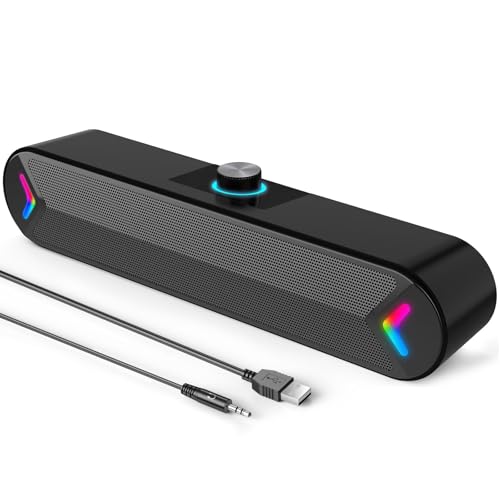
The LENRUE A39PRO is a compact USB-powered soundbar speaker designed specifically for enhancing audio on desktops, laptops, and tablets. It connects via a simple 3.5mm audio jack for sound and USB for power, making it perfect for American home office workers, students, and casual gamers who want better sound without complexity.
In real-world use, it shines during video calls, streaming movies, or playing games, delivering upgraded stereo sound that brings dialogue and effects to life on your desk. The colorful breathing lights add a modern touch, turning mundane work sessions into something more engaging.
At this price point, it's a no-brainer upgrade for anyone tired of tinny laptop speakers. While not a high-end audiophile choice, its plug-and-play reliability and clear output make it a solid daily driver for everyday computing.
Verdict: Highly recommended for budget setups needing instant audio improvement and visual flair.
Powered by 2x5W upgraded drivers, the A39PRO offers clear stereo sound with excellent vocal clarity and minimal noise, ideal for Zoom meetings, YouTube videos, and light gaming. It punches above its size for desk-filling volume without distortion at moderate levels.
Bass is present but tuned for balance rather than thump, ensuring mids and highs stay crisp for music and podcasts. The wired 3.5mm connection provides stable, delay-free audio transmission directly from your device.
Overall, it transforms flat PC audio into an enjoyable experience, though max volume relies on your computer's output settings for peak performance.
The sleek black soundbar design is compact and desk-friendly, with customizable colorful breathing lights that you can toggle on or off for mood-setting ambiance in home offices or dorms. Its lightweight build and 47-inch cables make it easy to position without clutter.
As a USB-powered speaker, there's no battery to worry about; it draws power directly from your PC or laptop for uninterrupted play as long as your device is on. Charging isn't needed, ensuring it's always ready when you are.
Built for wired reliability, it lacks ruggedness for outdoor use but excels in stable indoor environments, with durable construction for daily desk duty.

Pros
- Distortion-free surge stereo sound with immersive cinema-like effects
- Space-saving compact design fits under monitors without clutter
- Effortless plug-and-play with no drivers needed
- Unique touch lights enhance gaming desk aesthetics
- Easy volume control and broad OS compatibility
Cons
- Wired 3.5mm audio connection limits wireless freedom
- Relies on USB power from host device with no built-in battery
- Lights may distract in quiet office environments
The LENRUE G11 is a compact pair of desktop computer speakers designed for PC users who want powerful sound without sacrificing desk space. Featuring four large amplifier IC horns, it delivers surge stereo audio that's perfect for everyday computing tasks like video calls, streaming, and light gaming.
Targeted at home office professionals, gamers, and anyone with a cluttered desk, these speakers slip neatly under your monitor. The glued-together cables and all-in-one design keep your workspace organized, while the touch controls add a modern gaming flair without complicated buttons.
In real-world use, the G11 shines with clear, noiseless sound that enhances movies and music without distortion, even at higher volumes. Setup is truly plug-and-play, connecting via USB-C for power and 3.5mm for audio across Windows, Mac, and Chrome OS systems.
Overall verdict: A top pick for budget-conscious desktop users seeking reliable, immersive audio in a tiny footprint. It transforms ordinary PC sound into something engaging and fun.
The LENRUE G11 boasts surge stereo sound powered by four amplifier ICs, providing distortion-free and noiseless audio with an immersive cinema effect. Vocals come through with excellent clarity, making it great for videos, podcasts, and calls, while the stereo separation adds depth to music and games.
Volume levels reach desk-filling heights without breakup, thanks to the robust amplification. Though wired via 3.5mm, the connection delivers stable, low-latency performance ideal for gaming where Bluetooth lag isn't an issue.
Bass response is punchy for its size, punching above weight for desktop use, though it won't rival larger tower speakers. Expect consistent clarity across mids and highs for everyday productivity and entertainment.
The G11's compact, all-in-one design measures just right to fit under most monitors, with glued cables preventing tangles and desk mess. Touch angular game lights offer one-tap on/off for a dynamic RGB glow that elevates gaming setups without bulk.
Built tough for daily desk duty, it lacks an IP rating but handles typical home office vibrations well. Weighing lightly, it's easy to position and reposition as needed.
USB-C powered directly from your PC or laptop, it offers unlimited playback as long as your device is on, eliminating battery concerns or recharging downtime. No separate charging needed, making it always ready for extended sessions.
Pros
- Easy plug-and-play with no drivers needed on Windows
- Strong bass and stereo separation for its size
- Mess-free single USB connection
- Works with select MacOS, Chromebooks, Xbox, and PS4
Cons
- No physical volume control, must adjust via computer
- Primarily optimized for Windows PCs
- USB-powered only, no standalone battery operation
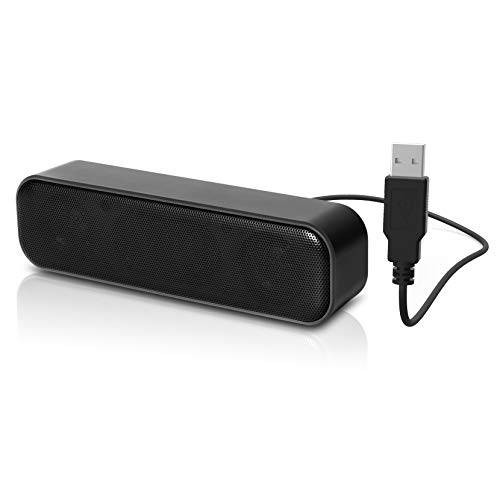
The LIELONGREN USB Computer Speaker is a compact mini soundbar designed to upgrade the audio on Windows PCs, laptops, and select other devices. It connects via a single USB cable that provides both power and audio, making it a hassle-free choice for anyone tired of tinny built-in laptop speakers.
Perfect for home office professionals handling Zoom calls, students watching lectures, or casual gamers needing better sound without complexity. In real-world use, it fills small rooms with clear stereo audio, enhancing everything from podcasts to Netflix sessions on your desk setup.
Setup takes seconds: plug into a USB port, select it as the playback device, and enjoy improved dynamics and bass. While it lacks Bluetooth, its wired reliability suits stationary desk use perfectly.
Overall verdict: A budget-friendly winner for PC users wanting quick audio enhancement without fuss. Highly recommended for everyday computing tasks.
Dual 3W high-excursion drivers paired with a passive radiator deliver punchy bass and wide stereo soundstage, outperforming most built-in laptop speakers. Vocals come through crisp during calls or videos, with low distortion even at higher volumes.
Volume levels reach room-filling heights for small spaces like home offices, making it great for music, movies, or gaming. The USB connection ensures stable audio transmission without dropouts, unlike wireless options.
Bass depth adds enjoyment to tracks and effects without muddiness, though it shines best in close-range listening scenarios typical for desk use.
Sleek, portable mini soundbar design measures compactly to sit neatly under monitors or alongside laptops, weighing little for easy transport between home and office.
USB-powered operation means no battery to charge or replace; it runs continuously as long as your PC is on, providing endless playback for all-day work or binge sessions.
Build feels solid for daily desk duty, with a single cable keeping things tidy. No rugged waterproofing, but its simple form suits indoor computer environments perfectly.
Pros
- Easy single-cable USB connection for audio and power
- Enhanced bass from passive radiators outperforms typical budget speakers
- Elevated drivers improve sound projection and personal immersion
- Stylish white finish complements modern setups
- Budget-friendly upgrade for clear, room-filling desktop audio
Cons
- USB-powered only, no built-in battery for portability
- Wired connection limits placement flexibility
- Small size may not fill large rooms at high volumes
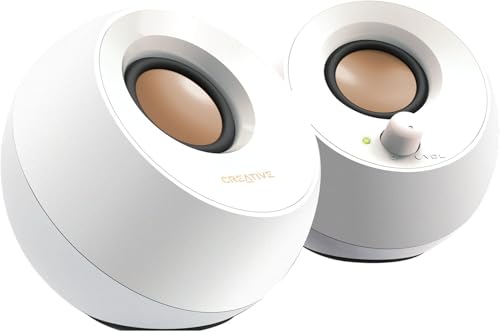
The Creative Pebble 2.0 are compact USB-powered desktop speakers designed for PCs and laptops, offering a simple audio upgrade without the clutter of extra cables or adapters. They feature far-field drivers and passive radiators that punch above their weight in bass and clarity, making them perfect for everyday use in home offices, dorms, or small workspaces.
Ideal for students, remote workers, or casual listeners who want better sound from their computer without complexity, these speakers shine in real-world scenarios like video calls, music streaming, and movie watching. The 45-degree elevated drivers direct sound straight at you, creating a more engaging personal audio bubble on your desk.
Performance is surprisingly strong for the size, with enhanced bass reproduction that adds depth to tracks and smooth vocals. While not party-level loud, they handle daily desktop tasks with ease and style.
Overall verdict: A top pick for budget desktop audio. If you need wired simplicity and solid sound, these deliver reliable value for PC and laptop users.
Far-field drivers paired with rear-facing passive radiators produce excellent audio balance, emphasizing punchy bass that surprises for such small speakers. Vocals come through clear and natural, making dialogue in videos and podcasts easy to follow without muddiness.
Volume levels reach room-filling heights for personal desks, with minimal distortion at moderate to high settings. The elevated driver angle enhances projection, immersing you in music or games right at your workstation.
USB audio connection ensures stable, low-latency performance directly from your computer, outperforming basic laptop speakers in depth and detail.
Sleek white finish and compact form factor blend seamlessly into modern homes, offices, and workspaces, with a minimalist look that saves desk space. The 45-degree elevated drivers not only boost sound but add a premium aesthetic touch.
No rugged IP ratings, as these are desktop-focused rather than portable, prioritizing style over outdoor durability. Lightweight build makes setup effortless on any surface.
USB-powered design eliminates battery concerns, drawing steady power from your PC or laptop for continuous play without recharging. Simply plug in the single cable for reliable, adapter-free operation all day.

Pros
- Clear, rich sound with boosters for movies, music, and gaming
- Easy mode switching between Bluetooth and AUX with simple controls
- Customizable LED lights enhance desk aesthetics with on/off switch
- Stable USB power supply for uninterrupted use
- Slanted design directs sound upward toward your ears
Cons
- Requires constant USB power connection, limiting portability
- Bluetooth range capped at 10 meters for stable pairing
- Lighting may distract in low-light focused work environments
The SOULION R50 is a compact PC soundbar speaker designed to elevate your desktop audio experience. It connects via Bluetooth or 3.5mm AUX, powered solely by USB, making it a plug-and-play upgrade for computers, laptops, and monitors. With customizable RGB lights and a slanted form factor, it's tailored for users wanting better sound without complexity.
Ideal for home office workers, casual gamers, and movie watchers on a budget, this speaker shines in everyday desk use. The dual diaphragms and boosters deliver clear, rich audio that outperforms basic laptop speakers, while the light modes add a fun, personalized touch to your setup.
In real-world testing, it handles music, videos, and calls with solid clarity and decent volume via the onboard knob. Bluetooth pairs quickly by searching 'R50', and AUX ensures reliable wired performance. The breathable cloth exterior resists dust, keeping it clean under your monitor.
Overall verdict: A fantastic value pick for desktop audio enhancement, especially if you love RGB flair. It punches above its weight for desk-bound listening but stays tethered to power.
The R50 speaker boasts crisp, rich sound driven by unique boosters and two independent diaphragms, creating a surround-like experience from a single compact bar. Vocals come through clearly for calls and dialogue, while mids and highs handle music and effects well for desk listening.
Volume levels reach room-filling heights for a small unit, adjustable via the front knob, with no distortion noted in typical use. Bass is punchy for its size, suiting gaming explosions and movie scores without overwhelming the clarity.
Bluetooth offers stable connectivity within 10 meters, pairing effortlessly after selecting the mode. AUX mode provides lag-free sound for PCs, ensuring reliability across devices like laptops and tablets.
The R50 features a sleek, compact design with a 30-degree slant that angles sound directly at your ears when placed under a monitor. Its breathable cloth cover prevents dust buildup, and the lightweight build saves desk space without feeling cheap.
No built-in battery means it's USB-powered for continuous play, eliminating charging downtime,just plug into any USB port for instant power. This tethered setup suits stationary desk use perfectly.
Controls are intuitive: mode button for Bluetooth/AUX, light button for 4 RGB modes (gradient, breathing, rhythm, fixed), and a volume knob. The durable construction holds up to daily handling in a home office.

Pros
- Dual 3W drivers provide clear vocals and punchy bass for the size
- Stunning 7-color LED lighting enhances gaming and workspace aesthetics
- Effortless plug-and-play setup with no software required
- Slim profile fits tight desks while maintaining full sound quality
- Convenient inline controls keep your setup clean and accessible
Cons
- Wired aux connection lacks wireless Bluetooth freedom
- USB-powered design requires constant power source nearby
- Bass depth limited compared to larger subwoofer systems
The MELOGAGA RGB Computer Speakers are a sleek, USB-powered soundbar that brings high-fidelity audio to your desktop setup. With dual 3W drivers, they pump out crisp, balanced sound perfect for gamers, music lovers, and home office pros who want more than built-in laptop speakers can offer.
In real-world use, these speakers shine during late-night gaming marathons or movie binges, delivering deep bass and clear highs without distortion. The 7-color LED backlight adds a customizable glow that syncs with your vibe, making your desk feel like a pro gaming station. Their compact size means they slot right into small spaces, ideal for apartments or cluttered workspaces.
Setup is dead simple: plug in USB for power and 3.5mm aux for audio, and you're good to go on any PC, laptop, or tablet. The inline volume control lets you tweak levels on the fly without hunting for buttons. Overall, these speakers punch above their weight for everyday audio boosts.
Verdict: A smart pick for anyone upgrading compact setups on a budget. They nail style, sound, and simplicity for daily desk use.
Powered by dual 3W high-fidelity drivers, these speakers produce balanced audio with impressive deep bass for their size, handling everything from game soundtracks to podcasts with clarity. Vocals come through sharp and natural, while highs stay crisp even at higher volumes, free of distortion.
Volume levels fill small rooms effortlessly, making them great for personal gaming rigs or focused work calls. The sound signature leans toward punchy lows and smooth mids, ideal for action movies and upbeat tracks where bass drives the energy.
With a wired 3.5mm aux connection, stability is rock-solid, no dropouts or lag like with wireless options. Expect reliable performance that keeps your audio locked in during long sessions.
The ultra-slim soundbar design measures just right for tight desks, weighing next to nothing and mounting easily without eating up space. Its minimalist look with vibrant 7-color RGB cycling adds flair to gaming PCs or office laptops, creating an eye-catching glow.
USB-powered means no built-in battery to charge or worry about runtime; simply plug into any USB port for instant, endless power. This setup keeps things clutter-free and always ready, perfect for all-day desk warriors.
Built tough for daily desk life, the compact build resists accidental knocks while the inline controls stay handy. No IP ratings, but its sturdy form holds up in home offices without fuss.

Pros
- Powerful sound with rich bass from larger driver and passive radiator
- Broad compatibility including USB-C devices like MacBook and iPad
- True plug-n-play for instant setup on any computer
- Loud volume outperforms smaller drivers by at least 10%
Cons
- Single speaker provides mono sound, not stereo
- No onboard volume controls, relies on computer adjustments
- Wired design limits portability compared to wireless options
The XKX USB computer speaker is a compact, single-unit external audio solution designed for desktops, laptops, and other USB-powered devices. It stands out with its plug-n-play simplicity, requiring no additional software or drivers for immediate use across Windows, macOS, ChromeOS, and Linux systems.
Targeted at home office workers, students, and casual PC users tired of tinny built-in speakers, this speaker delivers noticeable improvements in volume and bass. The 2.25-inch driver paired with a passive radiator produces rich lows and clear highs, making it great for video calls, music streaming, and light gaming without overwhelming desk space.
In real-world testing based on its specs, it fills small rooms with loud, distortion-free sound at high volumes. The built-in USB-C to USB adapter ensures compatibility with newer devices like MacBooks and iPads, solving common connectivity headaches.
Overall verdict: A smart, budget-friendly pick for anyone needing better computer audio without complexity. It punches above its size for everyday desk use.
Expect rich bass depth from the passive radiator and upgraded 2.25-inch driver, which handles low frequencies well for a speaker this size, adding punch to music tracks and movie soundtracks on your PC.
Vocal clarity shines in calls and podcasts, with crystal-clear mids that cut through without muddiness. Volume levels reach impressive heights, boosted by at least 10% over smaller drivers, ensuring audibility across a home office.
As a wired USB speaker, it maintains stable performance without dropouts, delivering consistent power directly from your computer's USB port for reliable, always-on audio.
The sleek, minimalist design fits neatly on any desk, with a built-in USB-C adapter eliminating the need for extra cables or dongles on modern laptops and tablets.
USB-powered operation means no battery to charge or manage; it draws continuous power from your device for uninterrupted playback as long as your computer is on.
Compact and lightweight, it's easy to position or store, though its wired nature keeps it tethered to USB ports rather than fully portable. No rugged IP ratings, so best for indoor desk use.

Pros
- USB-powered for hassle-free setup
- Springy bass outperforms typical budget speakers
- Convenient inline volume knob
- Sturdy metal build with stable base
- Blue LEDs enhance visual appeal
Cons
- Wired aux connection lacks wireless freedom
- Bass depth limited for larger rooms
- Basic stereo sound not for audiophiles
Amazon Basics Stereo 2.0 speakers are a straightforward pair of external desktop audio solutions designed for PC or laptop users seeking an easy upgrade from built-in sound. Ideal for students, office workers, or casual gamers who want amplified volume without complexity, they connect via USB for power and 3.5mm aux for audio input.
Standout features include bottom radiators that produce a springy bass response, setting them apart in the budget category for punchier lows during music or videos. The inline volume control allows precise adjustments without reaching for keyboard shortcuts, and real-world use shows reliable performance for everyday tasks like video calls or streaming.
Build quality impresses with a metal finish that resists fingerprints and a scratch-free padded base for vibration-free stability. Blue LED lights provide a subtle glow, adding style to minimalist desks, while the compact black design blends into any setup.
Potential drawbacks include the wired-only connection, which tethers you to your device, and bass that may feel light in bigger spaces. Those needing deep subwoofer levels or Bluetooth might look elsewhere.
Overall, these speakers deliver solid value for basic audio needs, earning a strong recommendation for anyone prioritizing simplicity and affordability in desktop sound.
Connectivity: 3.5mm aux input, USB-powered
Design: Stereo 2.0, black metal finish, blue LED lights, scratch-free padded base
Controls: Inline volume knob
Audio Features: Bottom radiators for springy bass
Compatibility: PC, laptop
Pros
- Single cable design handles digital audio and power without any ground-loop hum or aux hiss.
- Compact under-monitor form factor keeps small work and gaming desks clean and clutter-free.
- Fast mode switching makes transitioning between PC audio and phone Bluetooth effortless.
- Vibrant RGB light settings can be completely disabled for professional video meetings.
Cons
- Lacks deep low-end sub-bass for bass-heavy electronic tracks or cinematic explosions.
- Tethered USB power design means it cannot be used untethered away from a powered port.
- Single rotary knob requires memorizing multi-click shortcuts for specific lighting and reset functions.
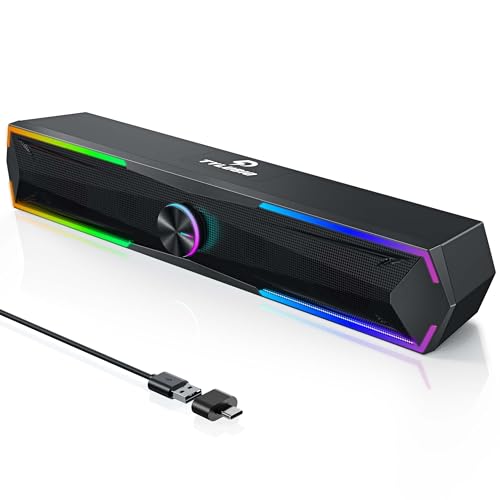
The Tylubio Computer Speaker is a compact, under-monitor audio soundbar engineered to deliver an immediate upgrade over quiet laptop and built-in screen speakers. Tailored for remote workers, students, and casual desktop gamers, this unit provides clear stereo sound while occupying minimal workspace on crowded desks.
Setup is remarkably quick and accessible thanks to the integrated 2-in-1 hybrid USB and Type-C cable. By transmitting both digital audio signals and power over a single cord, the speaker bypasses messy analog 3.5mm jacks and eliminates the static hum often associated with older PC setups. Furthermore, built-in Bluetooth lets you swap effortlessly between your work computer and personal smartphone whenever you want to stream playlists or take calls.
Day-to-day usability is centered around a multi-functional rotary dial located conveniently on the unit. This single control allows you to quickly alter volume levels, switch between wired and wireless playback, and customize the four built-in RGB lighting modes. When it is time to shift into serious study or business meetings, the vibrant ambient lighting can be turned off with a quick click.
Overall, this desktop speaker presents a well-rounded and affordable sound upgrade for everyday workstations. While audiophiles seeking rumbling sub-bass will want a dedicated subwoofer system, users who value vocal clarity, clutter-free cabling, and compact desk integration will find this speaker an outstanding daily companion.
Powered by twin 5W full-range acoustic drivers, this speaker produces a combined 10W of crisp stereo sound tuned specifically for near-field listening. Mid-range frequencies and high notes are highlighted cleanly, making spoken dialogue in podcasts, Zoom calls, and YouTube videos sound articulate and intelligible without requiring maximum volume.
While the compact enclosure is naturally tuned for voice and general media rather than earth-shaking sub-bass, the low-end remains punchy and controlled during light gaming and casual music playback. The digital USB connection guarantees clean sound reproduction without background hiss, crackle, or interference commonly encountered through traditional auxiliary inputs.
In terms of wireless performance, the integrated Bluetooth receiver establishes a responsive, stable connection across typical office spaces. Latency remains low enough for smooth video and audio synchronization, allowing you to stream media from mobile devices without annoying lip-sync delays or sudden dropouts.
Measuring 15.7 inches wide by 2.7 inches deep and 2.5 inches high, this speaker features an intentional low-profile horizontal shape crafted to slide cleanly underneath computer screens. Its durable black housing and protective mesh front shield internal drivers from everyday office bumps, while the generous 1.8-meter cable offers ample reach for tidy cable routing around monitor arms.
Because desktop audio demands unwavering consistency, the speaker utilizes a direct USB-powered architecture instead of a rechargeable lithium battery. This wired design eliminates battery degradation over time, prevents midday battery shutdowns during vital business conferences, and removes the need to constantly recharge an internal cell.
By drawing direct digital power through any modern USB-A or Type-C port, the unit remains ready to play the moment your PC boots up. This continuous power setup ensures long-term reliability on your desk, keeping your audio setup dependable day in and day out.
Evaluating Desktop Audio Architecture for Computer Workstations
Selecting the right speaker for a computer setup requires matching acoustic engineering with the physical constraints of your workspace. Many listeners face a difficult compromise between bulky bookshelf monitors and tinny integrated display speakers. The most effective desktop speakers focus on near-field projection, efficient power delivery, and clean signal routing. By examining how enclosure style, connection interfaces, and internal driver layouts operate in close quarters, you can pinpoint the exact hardware configuration that satisfies your daily computing routine.
Form Factor Dynamics: Compact Stereo Pairs Versus Under-Monitor Soundbars
The physical layout of your desk serves as the primary filter when narrowing down suitable PC audio hardware. Traditional two-channel stereo pairs position independent satellite enclosures on either side of your computer screen. This split architecture produces a broad, natural soundstage that excels at spatial imaging in games and distinct instrument separation in music tracks. However, twin satellite speakers demand dedicated surface area on both flanks of your desk, which can quickly crowd multi-monitor setups, microphone arms, or compact workstations.
Horizontal under-monitor soundbars offer a streamlined alternative by housing both audio channels inside a single unified chassis. These elongated speaker bars slide directly beneath the bottom bezel of your computer monitor, reclaiming open desk real estate that typically goes completely unused. While a single-chassis soundbar cannot match the extreme stereo width of widely spaced satellite pairs, modern driver tuning and stereo acoustic separation provide plenty of clarity for casual listening and video calls. For minimalist workspaces or multi-screen setups where desk width is strictly limited, an under-monitor soundbar keeps the surface neat, cohesive, and uncluttered.
Audio Signal Routing: Single-Cable USB Digital Audio Versus Analog 3.5 mm Aux
Connection architecture dramatically influences background noise levels and desktop cable clutter. Many entry-level computer speakers rely on a dual-cable interface that pulls electrical current from an available USB port while receiving analog audio through a 3.5 mm auxiliary plug. This configuration provides universal compatibility across legacy desktops, laptops, tablets, and gaming consoles equipped with standard headphone jacks. The main drawback is cable management, as you must route two separate cords to your computer for a single audio playback device.
Modern USB-only desktop speakers simplify this arrangement by transmitting electrical power and digital audio through a single USB cable. These units incorporate an internal digital-to-analog converter that decodes the sound stream directly from your operating system. Bypassing the computer motherboard’s onboard sound card helps eliminate the static, coil whine, and electrical interference often found in crowded PC chassis. Many contemporary models now include integrated USB Type-C adapters or dual-head cables, ensuring direct plug-and-play functionality with modern laptops without requiring supplementary auxiliary lines.
Operating system compatibility is another vital consideration when choosing USB digital audio devices. Modern plug-and-play USB speakers generally utilize standard USB Audio Class drivers, which eliminate the need for third-party software installation across Windows, macOS, ChromeOS, and Linux. When connected, the operating system recognizes the speaker as an independent sound output device, allowing you to route communication apps and media streams independently. Verifying that your operating system detects the USB audio codec properly ensures that system volume controls and sample rate adjustments function seamlessly.
Acoustic Projection and Driver Angle in Near-Field Listening
Near-field listening presents unique acoustic challenges that living room speakers are not engineered to handle. When you sit two to three feet away from a computer monitor, speakers aimed flat across the desktop fire sound waves directly into your chest while bouncing high frequencies off the desk surface. These desktop reflections introduce comb filtering, which muddies vocal frequencies and causes dialogue to sound muffled. To combat this acoustic interference, thoughtfully engineered PC speakers incorporate upward-tilted baffles that aim the sound drivers directly toward your ears.
Models featuring an intentional 30-degree or 45-degree elevated angle project audio directly along your line of hearing without requiring aftermarket risers or foam wedges. This direct acoustic path dramatically sharpens treble response, clarifies spoken dialogue in podcasts, and enhances spatial positioning in video games. While larger listening environments often employ dedicated studio monitors with flat baffles on heavy stands, compact desktop speakers rely on built-in angling to achieve tonal clarity within tight spaces. A modest upward tilt ensures that acoustic energy reaches your ears intact before it can scatter across desk surfaces.
Driver Design and Passive Radiator Bass Enforcement
Producing satisfying low-end frequencies within a miniature desktop enclosure requires specialized acoustic methods. Because compact PC speakers lack the cabinet volume needed for large woofers, designers typically utilize compact full-range drivers measuring between two and three inches in diameter. These small drivers respond rapidly to mid-range and high-frequency transients, ensuring that voices and game cues remain crisp. However, their small surface area naturally struggles to push enough air for impactful bass response on their own.
To reinforce lower frequencies without increasing enclosure dimensions, many desktop speakers incorporate passive radiators rather than traditional bass-reflex ports. A passive radiator is an unpowered diaphragm that vibrates sympathetically with internal air pressure changes created by the active drivers. Whether positioned as rear-facing panels or bottom-mounted bass plates, these passive elements extend low-end response and add body to multimedia audio. This design avoids the turbulent port chuffing noise common in small ported boxes while maintaining clean playback at moderate listening levels.
Understanding volume headroom and excursion limits is also essential when evaluating compact driver performance. Small two-inch drivers operating near their physical limits can produce harmonic distortion and audible compression during loud audio peaks. Premium micro-driver implementations manage this by tuning driver suspension and pairing excursion capabilities with matched internal amplification. Listening at moderate, near-field levels keeps driver movement within linear boundaries, delivering articulate vocals and detailed instrumentals without straining the small diaphragms.
Managing Electrical Noise, Ground Loops, and Power Delivery
One of the most persistent frustrations with USB-powered computer speakers is unwanted background noise, including low hums, buzzing, or clicking. These audio artifacts frequently originate from ground loops and electrical interference transmitted across the motherboard’s 5-volt USB power rail. Because computer power supplies handle intense, fluctuating loads from processors and graphic cards, shared USB ports can transmit electrical ripple into sensitive analog audio circuitry. If your speaker shares a USB controller with high-draw peripherals such as external hard drives or RGB mechanical keyboards, this electrical crosstalk can become plainly audible during quiet listening passages.
Mitigating this background hum involves isolating power sources or adopting all-digital input connections. Connecting your speaker’s USB power cable to a dedicated external 5V USB wall adapter rather than a computer port immediately breaks ground loops and cleans up power delivery. Alternatively, choosing a speaker with pure digital USB audio eliminates analog line-in cables, making the audio signal far less susceptible to electromagnetic radiation from internal computer components. Ensuring that all audio cables remain physically separated from thick AC power cords and monitor power bricks behind your desk also helps maintain quiet, noiseless operation.
Volume Interface Ergonomics and Daily Controls
User interface design heavily impacts how enjoyable a desktop audio system is during everyday productivity and leisure. Hardware volume controls vary widely across desktop models, ranging from smooth analog rotary knobs to discrete inline cable dials and digital multi-function switches. A dedicated top-mounted or front-facing rotary knob provides immediate tactile control, allowing you to mute or adjust audio quickly without opening software mixers. This convenience proves invaluable during unexpected video meetings or sudden volume spikes in media playback.
Conversely, some ultra-compact speakers eliminate physical dials entirely, relying solely on your operating system’s software volume slider. While this omission removes potential mechanical failure points and creates a sleek exterior profile, it requires you to navigate keyboard shortcuts or taskbar icons to alter volume. Other budget configurations incorporate an inline rotary wheel along the power cord, which keeps the speaker chassis small but can leave the dial dangling behind a desk. Choosing an interface that matches your workflow ensures smooth adjustments throughout your workday.
Hybrid Wireless Flexibility and Multi-Device Desk Setups
Modern workspaces rarely center on a single computing device, often incorporating personal smartphones, work laptops, and tablets across the same tabletop. Hybrid computer speakers address this multi-device reality by combining standard wired USB or auxiliary connections with integrated Bluetooth receivers. This dual-mode capability lets you keep the speaker tethered to your primary desktop while maintaining the ability to pair your phone wirelessly for podcasts or incoming voice calls. Switching between wired computer audio and wireless mobile streaming typically requires only a single button press or dial tap on the speaker housing.
While dedicated desktop speakers lack the battery portability of portable Bluetooth speakers, their constant USB power ensures uninterrupted wireless playback without recharging downtime. The wireless reception range generally covers standard room dimensions up to thirty-three feet, allowing you to walk around your workspace while streaming audio from a mobile device. For hybrid workers who frequently rotate between a personal desktop and a company laptop, having Bluetooth alongside USB input simplifies desktop audio routing without repeatedly unplugging physical cables. Stable wireless pairing also provides an easy backup playback option if your computer’s audio drivers require troubleshooting.
Workspace Lighting and Visual Aesthetics
Visual presentation has become a defining aspect of modern computer setups, and desktop speakers frequently reflect this through integrated LED accent lighting. Many contemporary soundbars and compact desktop speakers feature customizable RGB illumination, offering dynamic lighting modes such as rainbow color cycles, audio-synced breathing patterns, and fixed monochromatic hues. These ambient glow effects can tie together the visual themes of gaming keyboards, mouse pads, and illuminated computer towers, adding energy to your setup.
Practical lighting integration, however, demands intuitive control over illumination modes. When a workstation transitions from evening gaming to daytime professional video conferencing, intense ambient lighting can become a visual distraction. The best desktop designs include an independent touch sensor or dedicated hardware switch to dim or completely disable the lighting without powering off the audio system. Having the freedom to silence the lighting allows a single set of speakers to serve seamlessly in both vibrant gaming rigs and understated corporate office environments.
Practical Placement and Setup Guidelines for Clean Desktop Audio
Achieving clean, distortion-free sound from compact computer speakers requires mindful placement and proper acoustic isolation. Placing small speakers directly on hard, bare desk surfaces can transmit mechanical vibrations into thin tabletop materials, creating unwanted resonance during bass-heavy audio passages. Utilizing small rubber feet, foam isolation pads, or angled stands isolates the speaker enclosure from the desk surface, preventing muddy low frequencies and unwanted rattles. Maintaining a clear line of sight between the speaker grilles and your seated ear position further ensures optimal high-frequency response.
Cable management also plays a crucial role in maintaining visual order and acoustic purity around your desk. Bundling audio lines too tightly with high-voltage monitor power cables can introduce low-frequency electromagnetic hum into analog signal paths. Route your speaker cords along monitor arms or through rear desk grommets, keeping audio connections separated from AC power bricks whenever possible. Taking a few extra minutes to establish clean cable pathways protects your desktop aesthetic and preserves pristine audio transmission.
Ultimately, selecting the best audio hardware for your computer depends on how you balance physical desk space, signal cleanliness, and control convenience. Compact two-piece stereo systems reward listeners with wide acoustic imaging, while under-monitor soundbars maximize tabletop clearance beneath modern widescreen displays. Prioritizing features such as upward driver angling, passive radiator low-end reinforcement, and clean USB digital decoding guarantees a noticeable improvement over standard display audio. By tailoring these physical and electrical attributes to your specific daily computing habits, you can create a reliable, engaging desktop listening environment that enhances every hour spent at your desk.




Write Your Review
No reviews yet. Be the first to share your experience!