

Virtual meetings often suffer from sudden audio dropouts, muted microphones, or muffled speaker output that disrupts team collaboration before a presentation even begins. Connecting an external desktop speakerphone or headset to your computer requires proper system configuration so that meeting software directs voice signals to the right physical hardware. Learning how to test microphone and speakers in teams before your call starts prevents unexpected technical hiccups and ensures smooth two-way communication across every remote session. Reliable hardware pairings, such as pairing modern computers with versatile Bluetooth speakers or dedicated conference speakerphones, can elevate acoustic clarity significantly. Taking a few proactive seconds to run integrated diagnostic tests confirms that your microphone picks up clear speech while your speakers deliver crisp, intelligible sound.
Modern desktop audio components incorporate sophisticated digital signal processing, full-duplex transmission, and acoustic echo cancellation to separate speech from unwanted ambient background noise. When these components conflict with default operating system settings, Microsoft Teams may fail to recognize your intended output device or input array. Checking your peripheral connections, audio drivers, and application-level device preferences establishes a reliable communication pipeline for high-stakes business discussions. This comprehensive walkthrough guides you through built-in diagnostic tools, manual hardware verification, and equipment optimization to keep your remote audio running seamlessly.
Pros
- Full-duplex microphone prevents audio clipping during simultaneous two-way discussions
- Impressive 20-hour battery life easily lasts through extended multi-day travel
- AI-driven noise reduction effectively suppresses background office distractions
- Dual USB-C and USB-A compatibility ensures seamless connectivity with modern and legacy laptops
Cons
- This specific package configuration does not include a dedicated wireless USB dongle
- Acoustic tuning emphasizes vocal intelligibility rather than deep sub-bass for music enthusiasts
- Lacks a dedicated mobile companion app for manual EQ adjustments
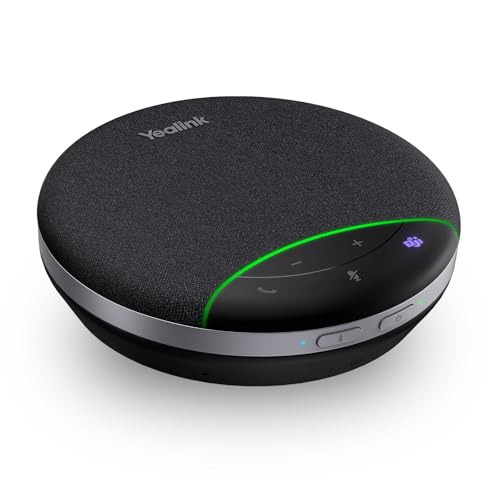
The Yealink SP92 is an executive-grade portable speakerphone engineered to solve the persistent headaches of hybrid collaboration. Built for home offices, remote road warriors, and compact meeting spaces, this device acts as an immediate upgrade over tinny laptop speakers and fatiguing over-ear headsets. With seamless out-of-the-box integration for platforms like Microsoft Teams and Zoom, setup requires zero technical hurdles.
In real-world calling scenarios, the SP92 stands out thanks to its reliable full-duplex audio architecture. Unlike entry-level speakerphones that cut off audio when two participants speak at the same time, this unit maintains fluid, natural dialogue. The built-in AI noise reduction algorithms work continuously in the background, reliably stripping away keyboard clatter, paper rustling, and HVAC hum while keeping speech sharp and natural.
Beyond boardroom utility, the SP92 easily doubles as a capable desktop speaker for personal listening during downtime. Switching between a wired laptop connection and a wireless smartphone link is quick and effortless. For hybrid professionals seeking an all-in-one calling hub that fits neatly into a travel backpack, the Yealink SP92 provides exceptional performance and value.
At the core of the Yealink SP92 is a custom-engineered 50mm dynamic speaker driver paired with proprietary virtual bass technology. Rather than delivering a flat, lifeless sound profile typical of small conference devices, the SP92 injects warmth and body into the lower midrange. This balance ensures that baritone and tenor voices project with authentic weight, preventing the ear strain associated with prolonged remote meetings.
Microphone performance is equally refined. The 360-degree omnidirectional mic setup provides consistent voice capture from any side of the desk within small huddle rooms. Advanced signal processing identifies speech patterns dynamically, suppressing peripheral noises so remote colleagues hear clear, isolated vocal tracks instead of room reverberation.
Volume output is loud enough to fill a standard office or huddle room without introducing harsh harmonic distortion at peak levels. While the speaker is purposefully voiced for dialogue and lacks the sub-bass rumble of dedicated party speakers, it renders acoustic tracks, podcasts, and casual playlists with crisp fidelity and zero cabinet rattle.
Designed with business travel in mind, the Yealink SP92 adopts a compact puck form factor measuring 5 x 5 x 1.3 inches and weighing just 0.61 pounds. Its sleek matte black chassis looks understated on professional desks, while the top grille is built to protect the internal 50mm transducer from everyday office wear. The package also includes a custom zippered case that prevents scuffs inside laptop bags.
Hardware connectivity is flexible and future-proof. The speakerphone connects directly via Bluetooth for wireless flexibility with mobile devices, or through a wired connection utilizing the included USB-C cable and tethered USB-A adapter. Plug-and-play capability powers the device on automatically upon connection, eliminating manual pairing steps when switching workstations.
Power efficiency is a major highlight of the internal hardware. The onboard rechargeable battery provides up to 20 hours of continuous talk or music playback on a single charge. Whether utilized as a stationary desktop hub or a portable road warrior accessory, the SP92 provides dependable endurance through long work weeks without requiring frequent trips to the outlet.

Pros
- Intelligent AI noise filtering keeps distracting background chatter off your calls.
- Full-duplex audio allows natural simultaneous conversations without voice clipping.
- Exceptional 20-hour battery longevity with quick 2.5-hour recharging.
- Hassle-free plug-and-play setup for Windows, macOS, and mobile devices.
Cons
- Dedicated wireless USB PC dongle is sold separately in this base package.
- Lacks an outdoor water-resistance rating since it is engineered strictly for indoor office use.
- Designed specifically for huddle spaces and small conference rooms rather than large boardrooms.
The Yealink SP92 speaker is a compact, high-efficiency audio hub engineered to eliminate communication friction in modern work environments. Designed primarily for remote workers, home office professionals, and small huddle teams of four to eight people, this speaker bridges the gap between bulky conference room installations and underwhelming laptop speakers. It integrates seamlessly into hybrid workflows, giving every team member a clear voice at the table.
In real-world calling scenarios, the standout feature is the active AI noise suppression. By filtering out more than 1,000 ambient distractions, such as mechanical keyboard typing, paper rustling, and background cooling fans, the speaker ensures that your clients and colleagues hear only your voice. The full-duplex technology is equally impressive, allowing multiple participants to speak at the same time without the frustrating audio cutoffs common on entry-level speakerphones.
Software compatibility is virtually effortless thanks to official Microsoft Teams certification. Whether you conduct your daily standups on Teams, jump onto client calls via Zoom, or collaborate across Google Meet and Cisco Webex, the device responds immediately upon connection. On-device touch controls make managing volume, muting microphones, and answering calls intuitive and immediate.
Overall, the Yealink SP92 speaker offers exceptional value for any business professional seeking reliable, studio-grade vocal reproduction without complicated hardware configurations. It transforms any desk or dining table into an executive-level conference room with zero hassle.
Engineered with a high-fidelity 50mm dynamic speaker driver, the unit prioritizes vocal intelligibility above all else. Yealink pairs this hardware with proprietary Virtual Bass processing, providing enough low-end warmth to prevent voices from sounding thin or tinny. While tuned specifically to optimize human speech frequencies, the acoustic balance also handles podcasts and background focus music comfortably during downtimes between meetings.
Microphone pickup is handled by a 360-degree omnidirectional sensor capable of capturing voices up to 13 feet away in every direction. Advanced echo cancellation routines scrub acoustic feedback, ensuring that participants sitting at either end of a small conference table come through with balanced volume and clean articulation.
On the wireless side, Bluetooth 5.3 technology delivers rock-solid audio stability with an extended range of up to nearly 100 feet. You can pace around your home office or grab a notebook from across the room without experiencing signal drops, latency, or stuttering audio streams.
The physical footprint of the speaker is sleek, professional, and built for modern mobile workstations. Measuring roughly five inches across and weighing just 0.62 pounds, the low-profile circular puck fits neatly underneath desktop monitors or inside crowded backpacks. Yealink also includes a tailored zippered travel case to protect the mesh grille and housing while commuting between home and corporate offices.
Power performance is where this portable speaker truly shines. The built-in rechargeable battery delivers up to 20 continuous hours of talk time or audio playback, allowing power users to sail through an entire week of standard calls without hunting for an outlet. Standby time extends up to an impressive 20 days when idle.
When it is time to recharge, the device goes from empty to full capacity in approximately 2.5 hours using a standard 5V/2A power source. For stationary desktop users, the included USB-C cable with its attached USB-A adapter provides continuous power and zero-latency wired audio transmission simultaneously.
Pros
- Exceptional vocal clarity and acoustic echo cancellation for natural conversations
- Includes dedicated USB-C/A wireless dongle for instant, driver-free PC pairing
- Generous 20-hour battery life easily handles multiple full workdays of calls
- Full-duplex audio prevents vocal clipping when multiple people speak at once
Cons
- Compact 50mm driver lacks the deep sub-bass extension required for high-fidelity music listening
- Microphone pickup radius is engineered for small rooms and falls short in large executive boardrooms
- Lightweight plastic build focuses on portability rather than luxury desk aesthetics
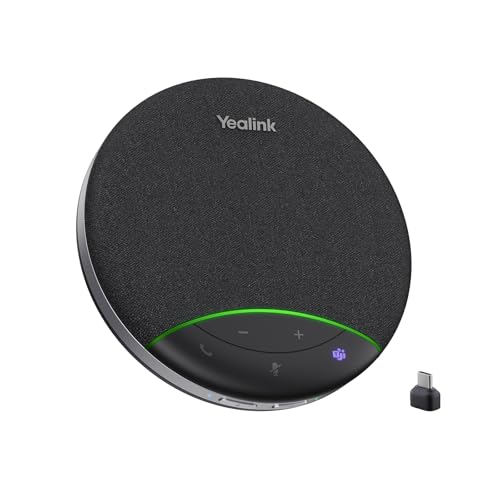
The Yealink SP92 conference speakerphone is engineered to solve one of the most persistent issues in modern hybrid work: poor audio clarity from built-in laptop microphones and speakers. Tailored for home offices, huddle spaces, and traveling professionals, the SP92 unites intelligent signal processing with an articulate dynamic driver. Designed to support small groups of 4 to 8 participants, it bridges the gap between bulky, complex conference room installations and underwhelming personal devices.
In real-world deployment across Microsoft Teams, Zoom, and Google Meet, the SP92 stands out with its real-time AI noise reduction. The hardware actively scrubs ambient office disruptions, including mechanical keyboard clatter, desk fans, and nearby chatter, while preserving natural speech dynamics. Thanks to its true full-duplex architecture, conversations flow organically without the cutoffs or unnatural gate-clipping common in budget speakerphones when participants speak simultaneously.
Flexibility across devices is another key strength. Whether permanently wired to a workstation via USB-C or packed into a commuter bag for off-site client presentations, pairing takes seconds. The included BT51C wireless dongle eliminates the latency and pairing inconsistencies often associated with standard computer Bluetooth adapters, ensuring rock-solid wireless audio performance.
Ultimately, the Yealink SP92 delivers high-tier conferencing performance at an accessible price point. While it is not designed to replace high-fidelity bookshelf monitors for critical music listening, its class-leading voice intelligibility, ultra-reliable wireless connectivity, and all-day battery life make it an essential productivity tool for modern professionals.
Acoustically, the Yealink SP92 centers around a customized 50mm dynamic transducer engineered with a distinct midrange bias. Vocal frequencies sit prominently forward in the mix, ensuring that voices sound crisp, full-bodied, and effortless to decipher during long team calls. Yealink also incorporates proprietary Virtual Bass technology, which injects subtle low-end resonance to keep audio from sounding tinny or hollow, making casual background music and podcasts enjoyable between meetings.
On the input side, the integrated 360-degree omnidirectional microphone provides an expansive 13-foot pickup radius. Integrated acoustic echo cancellation and full-duplex processing ensure that audio loops are eliminated before they reach your call partners, even at high output volumes. The speaker handles volume peaks cleanly without distortion, preserving clear dialogue so nobody has to lean in or repeat themselves.
Built for maximum portability, the Yealink SP92 features a sleek disc form factor measuring just 5.04 inches across and 1.37 inches thick, weighing in at a lightweight 9.7 ounces. The matte-finished chassis houses responsive, capacitive top-panel controls for volume, call answer/end, microphone mute, and dedicated Teams integration. Yealink also bundles a compact zippered travel case that protects the fabric acoustic mesh during daily transit.
Hardware connectivity is versatile, offering three straightforward options: a direct USB-C wired connection (complete with a USB-A adapter), high-efficiency Bluetooth 5.3 with up to 98 feet of wireless range, or the included plug-and-play BT51C wireless dongle. Power is supplied by an internal lithium-ion battery delivering up to 20 hours of continuous call time, with a quick 2.5-hour recharge cycle via standard 5V/2A USB power.

Pros
- Hassle-free driverless USB plug-and-play connectivity
- Effective AI background noise suppression clarifies vocal delivery
- Full-duplex transmission allows natural, simultaneous two-way conversations
- Extremely compact and travel-friendly footprint for mobile work
Cons
- Lacks wireless Bluetooth capability and relies solely on a tethered USB connection
- Compact driver lacks low-end bass depth, making it ill-suited for high-fidelity music listening
- May require manual input and output selection in OS sound settings upon initial setup
The Ynoonvon Conference Speakerphone is a dedicated, ultra-portable desktop solution tailored to address one of the most frustrating aspects of remote work: mediocre laptop audio. Designed specifically for teleconferencing, distance learning, and collaborative meetings, this desktop unit integrates both high-sensitivity microphone elements and an amplified loudspeaker into a singular, pocketable form factor.
In practical day-to-day use, the speakerphone excels at speech intelligibility. Equipped with a 360-degree omnidirectional microphone array and an integrated AI noise suppression algorithm, it consistently isolates the human vocal band while filtering out common home-office distractions such as keyboard clatter, PC cooling fans, and ambient room reverberation. The addition of full-duplex communication ensures that spontaneous banter and natural meeting flow remain intact without the artificial gating or mutual cut-offs common in entry-level hardware.
For remote professionals, educators, and small team leaders tired of wearing bulky headsets all day, the Ynoonvon provides a comfortable and capable hands-free alternative. While it will not replace an audiophile music system, it delivers clear, reliable vocal projection and trouble-free meeting performance right out of the box.
Acoustically tuned specifically for voice frequencies, the Ynoonvon speakerphone emphasizes midrange clarity and upper-register crispness. Spoken dialogue punches cleanly through the speaker cone without the muffled, boxy characteristics typical of tiny laptop drivers. The soundstage is intimate yet well-dispersed, filling a personal workspace or small huddle room with articulate, easily understandable voice output.
On the capture side, the full-duplex acoustic engineering allows simultaneous two-way conversations with zero clipping. The hardware-level echo cancellation and AI noise reduction effectively curb acoustic feedback loops, ensuring participants on the other end of the call hear a dry, focused vocal track without distracting room reflections or low-frequency desk rumble.
Boasting an exceptionally compact profile measuring approximately 2 by 1.6 by 2 inches, this speakerphone leaves virtually zero footprint on cluttered desks. The chassis is finished in an understated matte black with top-mounted controls, blending seamlessly into professional office environments or mobile workstation bags.
Connectivity is strictly wired via USB, ensuring consistent audio data streaming and stable bus power without the latency, dropouts, or battery degradation associated with Bluetooth peripherals. Setup is completely driverless across major desktop operating systems, requiring only a simple selection in your system sound control panel to serve as your primary input and output device.

Pros
- Modular dual-pack functions as two standalone units or a unified wide-area array.
- True full-duplex processing eliminates awkward speech clipping when multiple people speak.
- Dependable 18-hour runtime on a single charge handles back-to-back presentations.
- Wide compatibility with Zoom, Microsoft Teams, WebEx, and major UC platforms out of the box.
Cons
- Acoustics are tuned strictly for voice communication and lack low-end bass response for music.
- Linking the two pods requires a physical 3.5mm daisy chain cable rather than a wireless tether.
- Touch-sensitive controls on the top plate can register inadvertent taps during repositioning.
The TONGVEO Daisy Chain Wireless Conference Speakerphone set addresses one of the most frustrating aspects of modern hybrid meetings: uneven room audio. Designed for corporate boardrooms, classrooms, and collaborative meeting rooms, this two-pack system bridges the gap between single desktop speakerphones and costly, complex in-ceiling commercial AV setups. By supplying two synchronized pods, it allows everyone at the table to speak naturally without having to lean into a single central microphone.
In real-world conference setups, the system proves straightforward and reliable. The master and slave arrangement connects with an included 9.8-foot 3.5mm cable, allowing placement at opposite ends of long conference tables. When joined, the system comfortably accommodates up to 30 participants, maintaining even voice pickup and room-filling volume. Just as convenient is its ability to break apart: when large meetings are done, each speakerphone can operate independently in separate huddle rooms or home offices.
Software compatibility is virtually seamless. Tested across Zoom, Microsoft Teams, and WebEx, the plug-and-play USB dongle and standard Bluetooth profiles connect without requiring proprietary software or administrative driver installations. Physical touch controls for call answering, mute, and volume give instant feedback, complemented by an OLED status display that eliminates the guesswork around remaining battery reserves.
Ultimately, TONGVEO has engineered an exceptionally practical communication tool for small to mid-sized enterprises. It delivers balanced acoustic projection, dependable microphone range, and remarkable deployment flexibility, making it a sound investment for organizations seeking to professionalize their conference audio without spending thousands on permanent installations.
Unlike general-purpose Bluetooth speakers that focus heavily on sub-bass impact, the TONGVEO speakerphones are voiced specifically for the human vocal range. The 5W speaker driver is tuned to emphasize midrange frequencies between 300 Hz and 3.4 kHz, ensuring consonants and spoken nuances cut through clearly. Even at maximum volume, spoken voices remain crisp and distinct without buzzing, muffled resonances, or high-frequency sibilance.
Acoustic pickup is managed by a quad-element omnidirectional microphone array on each pod. Capable of capturing sound in a 360-degree field up to 20 feet individually (and 40 feet when daisy-chained), the system maintains consistent levels whether a speaker is seated nearby or standing at a whiteboard across the room. The integrated full-duplex processing is a highlight, allowing natural interruptions and back-and-forth dialogue without the sudden volume dips or speech clipping typical of half-duplex hardware.
The built-in AI noise reduction algorithms perform admirably in untreated office environments. Steady background noise like air conditioning blowers, laptop cooling fans, and exterior street traffic are systematically filtered out before transmitting audio to remote listeners. While the vocal tuning means you will not want to use these units for bass-heavy music listening, their speech intelligibility is first-class.
The TONGVEO speakerphones feature a low-profile, disc-shaped chassis finished in matte black, engineered to rest cleanly on conference tables without obstructing sightlines or webcams. The top control deck integrates touch-sensitive sensors for volume, call management, and microphone muting. An integrated OLED display clearly communicates connection status, volume levels, and battery percentage at a glance.
Hardware connectivity is versatile and tailored for diverse office setups. Users can connect directly to a computer using the included USB cable, link cord-free using the 2.4 GHz wireless USB dongle for low latency, or pair over standard Bluetooth with smartphones and tablets. When room scaling is needed, the 3.5mm auxiliary port serves as the daisy-chain link to bind the master and secondary pods together seamlessly.
Portability is backed by an impressive 8000mAh internal rechargeable battery that provides up to 18 hours of continuous talk time. This substantial capacity ensures multi-day offsite workshops can run uninterrupted without hunting for wall outlets. Weighing just over two pounds for the kit, the system packs neatly into a laptop bag or briefcase for business travel.
Complete Step-by-Step Guide to Testing Microphones and Speakers in Microsoft Teams
Testing your microphone and speakers in Microsoft Teams guarantees that participants can hear your voice clearly while you receive incoming audio without distortion or delay. The most direct method involves running an automated diagnostic call through the software, followed by confirming that your physical audio peripherals are recognized by your operating system. Establishing a solid testing routine isolates common hardware and configuration conflicts before they interfere with critical collaborative work. Taking these preparatory steps ensures that virtual presentations and team discussions proceed without frustrating audio dropouts.
Running the Built-in Teams Test Call Feature
Microsoft Teams provides a built-in automated diagnostic mechanism known as the Make a Test Call function. To access this tool, click the three horizontal dots next to your profile avatar in the upper right corner of the desktop application and select Settings from the dropdown menu. Navigate to the Devices tab on the left sidebar, where you will see the active selections for your audio devices. Clicking the Make a Test Call button initiates a short simulated call with an automated recording bot designed to evaluate input clarity.
The automated assistant prompts you to speak a short sentence after a distinct tone sounds. Once you finish speaking, the system immediately plays back your recorded voice through the designated speaker or connected conference unit. If you hear your voice clearly without crackling or robotic clipping, your microphone input and speaker output are functioning properly. A detailed diagnostic report appears on the screen afterward, verifying your microphone, speaker, camera, and network connection status with green checkmarks or error alerts.
Verifying Audio Device Selection in Desktop Settings
Audio routing errors frequently occur when the software selects an unintended device profile, such as an integrated laptop microphone instead of a dedicated desktop speakerphone. Inside the Devices section of Teams, check the dropdown menus labeled Speaker and Microphone to verify that your preferred hardware is actively highlighted. Using options like the Yealink SP92 USB Speakerphone Bluetooth Conference requires selecting that specific peripheral rather than the generic system default option. Explicitly selecting your hardware prevents the platform from defaulting back to lower quality built-in computer components whenever a secondary device disconnects.
Conference speakerphones often appear under unique hardware identifiers depending on whether they connect via USB cable or wireless dongle. For instance, models such as the Ynoonvon Conference Speakerphone with 360° Voice may register in your audio list as 3-M6 USB AUDIO. If an external speakerphone does not appear in the menu, disconnect the USB plug, wait five seconds, and reconnect it to an alternative USB port on your machine. Restarting Teams after switching audio hardware also refreshes peripheral detection tables and eliminates routing conflicts that cause silent calls.
Adjusting Windows and macOS System Audio Permissions
Application-level testing can fail if the underlying operating system restricts Microsoft Teams from accessing your audio hardware. In Windows, open the Settings panel, choose System, select Sound, and confirm that your target speakerphone is designated as the primary input and output device. Scroll down to the Advanced Sound Options menu to verify that the volume slider assigned specifically to Teams is set to an audible level. Windows also contains a dedicated privacy section where you must verify that desktop apps have explicit permission to access the microphone.
Mac users must navigate to System Settings and open the Privacy and Security tab to review microphone permissions. Ensure the toggle switch next to Microsoft Teams is enabled, as macOS security protocols automatically block unapproved applications from recording sound. Additionally, inspect the Sound preference pane to confirm the input volume slider registers adequate signal deflection when you speak aloud. Proper system-level permission management prevents frustrating scenarios where Teams shows an active microphone icon that captures zero audible sound.
Troubleshooting Microphone Inaudibility and Echo Issues
When participants cannot hear you during a meeting, inspect the physical mute indicators on both your software interface and external hardware. Many modern conference units include capacitive touch mute buttons with illuminated status indicators that can override application commands. Hardware echo frequently emerges when your microphone picks up sound vibrating from uncalibrated speakers, creating an acoustic feedback loop. Unlike listening through dedicated music speakers that prioritize wide dynamic range, conference speakerphones utilize specialized full-duplex acoustic echo cancellation to prevent transmitted audio from cycling back into the microphone.
If your voice sounds faint or distant, reposition your desktop speakerphone closer to your primary seating position. Full-duplex audio processing allows participants on both ends of a call to speak simultaneously without cutting out voice signals, but excessive room reverberation can degrade this balance. Placing your audio equipment on a flat, solid desk surface away from reflective glass partitions or computer cooling fans significantly reduces background interference. Ensuring that your room has sound-absorbing materials like rugs or curtains also stabilizes microphone reception during extended conversations.
Resolving Low Speaker Volume and Audio Distortion
Unexpectedly low playback volume can stem from mismatched gain staging across operating system controls, conference software volume, and hardware-level volume knobs. Increase the volume on your physical speakerphone first, then adjust the master volume slider in your computer taskbar. Units featuring custom dynamic drivers, like the 50mm speaker found on the Yealink Sp92 Conference Speaker and Microphone, incorporate virtual bass algorithms to balance spoken dialogue without distorting voice clarity. If you observe crackling or harsh clipping during speech, reduce the system master volume slightly to keep the digital amplifier within its clean operating range.
Distortion can also occur when high-bandwidth audio streams are routed through low-bandwidth wireless voice profiles. While portable wireless speaker options handle general entertainment playback effortlessly, interactive teleconferencing software compresses audio to maintain low latency. Selecting the correct audio output mode prevents Teams from forcing your speakerphone into a degraded communication protocol with poor fidelity. Regularly verifying that your device firmware is up to date through the hardware manufacturer utility resolves underlying digital signal decoding glitches.
Optimizing USB and Wireless Bluetooth Connections
Connection stability directly impacts how reliably Microsoft Teams communicates with your audio hardware during routine testing. Direct wired connections via USB-C or USB-A provide instantaneous plug-and-play operation with minimal signal latency and zero wireless interference. For wireless office setups, standard Bluetooth pairing offers great convenience but can occasionally drop packets in environments with dense Wi-Fi activity. Utilizing a pre-paired wireless adapter, such as the BT51C dongle included with the Yealink Sp92 Conference Speaker and Microphone, establishes a dedicated audio channel that maintains superior audio stability compared to native computer Bluetooth.
Wireless dongles bypass standard operating system Bluetooth handshake protocols, presenting the connected speakerphone directly as a recognized USB audio endpoint. This configuration simplifies device management because Teams treats the dongle as an always-ready wired audio interface. If you rely on internal Bluetooth pairing, keep your speakerphone within direct line of sight of your laptop to preserve clean transmission. Avoid routing USB cables through unpowered desktop hubs, as insufficient bus voltage can lead to intermittent disconnections or audio stuttering during calls.
Configuring Omnidirectional Speakerphones for Group Meetings
Testing audio in a shared huddle room or multi-person conference area requires evaluating coverage radius and microphone pickup patterns. Standard personal headsets or laptop mics fail to capture voices evenly around a conference table, creating volume discrepancies among participants. Compact conference units like the SP92 series offer 360-degree omnidirectional microphone coverage designed to capture speech within an approximate 13-foot radius, making them suitable for small teams. Testing these units in a group environment involves having participants speak from various positions around the table to confirm consistent signal capture.
Larger conference spaces demand expanded microphone arrays and higher acoustic wattage to reach all attendees evenly. A cascading solution, such as the TONGVEO 2-in-1 Conference Speaker and Microphone, utilizes a daisy-chain link cable to connect master and slave speakerphones across tables up to 40 feet long. This setup expands voice pickup across multiple high-sensitivity omnidirectional microphone arrays while doubling output volume through synchronized 5W speakers. When testing daisy-chained speakerphones, ensure the linking cable is securely seated in both units before launching Teams, and confirm that both units synchronize their mute and volume status seamlessly.
Managing AI Noise Reduction and Acoustic Echo Cancellation
Background distractions like mechanical keyboard clatter, air conditioning hum, and paper shuffling can obscure speech during online meetings. Microsoft Teams contains built-in software noise suppression, but combining it with hardware-based AI algorithms delivers optimal voice clarity. Dedicated conference speakerphones employ deep learning models to identify and suppress over one thousand types of stationary and non-stationary ambient noises in real time. During your initial test call, try tapping on your desk or typing while speaking to observe how cleanly the device isolates your voice.
Hardware-level noise suppression algorithms prioritize human vocal frequencies, allowing natural voice transmission while attenuating constant background frequencies. If your voice sounds robotic, pinched, or overly processed during test playback, you may have aggressive noise filtering enabled in both Teams and your peripheral hardware simultaneously. Lowering the Teams noise suppression setting from High to Auto or Low lets the speakerphone onboard processor handle noise cancellation cleanly. Balancing these two processing layers guarantees that your speech sounds natural rather than muffled or digitally clipped.
Practical Hardware Maintenance and Connection Verification
Consistent audio reliability depends on proper physical maintenance and regular verification of your peripheral components. Dust and debris can accumulate inside microphone grille apertures over time, degrading pickup sensitivity and causing muffled voice transmission. Clean your speakerphone exterior gently using a dry microfiber cloth, avoiding liquid cleaners that could penetrate internal acoustic cavities or driver membranes. Inspecting connecting cables for fraying, bent connectors, or loose housing ensures continuous electrical conductivity and prevents sudden dropouts mid-call.
For portable wireless conference speakerphones, maintaining proper battery health prevents unexpected shutoffs during critical presentations. Rechargeable batteries with extended runtimes of up to 18 or 20 hours should be recharged using compliant power sources to preserve cell longevity over months of regular use. Establishing a quick pre-meeting checklist that includes checking battery status, verifying USB connections, and running a ten-second test call safeguards your professional presence. Taking these systematic steps eliminates communication barriers and ensures your voice comes through with total clarity in every Microsoft Teams collaboration.




Write Your Review
No reviews yet. Be the first to share your experience!