


Combining ambient illumination with room-filling sound often sounds like a complicated smart home project requiring miles of wiring and separate control apps. Many homeowners want the convenience of streaming audio without cluttering counter space or running speaker cables across floors. Learning how to integrate smart speakers with lighting can simplify your entertainment setup while keeping your living spaces clean and organized. Pairing lighting fixtures with audio playback allows you to create customized moods, background soundscapes, and synchronized daily schedules with minimal physical clutter.
While some setups require network hubs, voice assistants, and dedicated multiroom controllers, others take a direct hardware approach by embedding wireless drivers directly into recessed fixtures. When comparing these integrated solutions to dedicated home music speakers, you will notice distinct differences in installation complexity, sound dispersion, and system control. Exploring practical methods for blending sound and light makes it much easier to select the right configuration for your specific room layout, existing ceiling fixtures, and daily listening habits.
Pros
- Dual-purpose design combines reliable lighting and Bluetooth audio
- Quick Bluetooth connection enhances everyday home listening
- Exceptional longevity reduces replacement hassle and costs
- Included remote simplifies operation from anywhere in the room
- No Wi-Fi or app needed for straightforward setup
Cons
- Sound output suited for ambient use, not high-volume parties
- Indoor-only design limits outdoor versatility
- Lacks advanced EQ controls without companion app
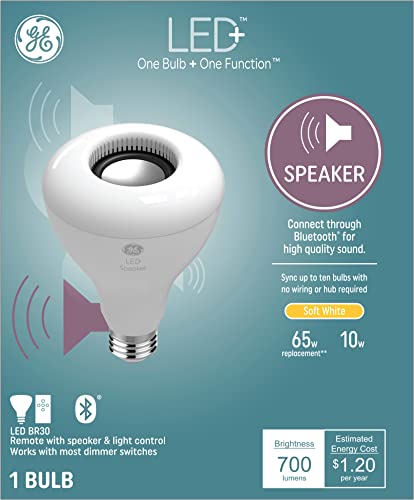
The GE LED+ Speaker is a clever BR30 floodlight bulb that doubles as a Bluetooth speaker, perfect for Americans upgrading their homes without complex smart systems. It delivers soft white light and integrated audio, ideal for living rooms, kitchens, or bathrooms where you crave mood-setting music alongside illumination.
Connect via Bluetooth from your phone or tablet effortlessly, no apps or Wi-Fi involved, and use the included remote for control. Real-world use shines in casual settings like dinner parties or remote work sessions, filling spaces with balanced sound and warm light that mimics traditional bulbs but saves energy.
Performance holds up for daily immersion, with the bulb's longevity ensuring years of reliable service. It's a smart pick for practical buyers seeking value-packed home tech.
Verdict: Highly recommended for multifunctional simplicity in US households tired of separate lights and speakers.
Expect warm, room-ambient audio from this speaker bulb, with clear vocals and mids that suit podcasts, light music, or background tunes during family gatherings. Bass is present but tuned for subtlety, avoiding boominess in enclosed spaces.
Volume reaches conversational levels across medium rooms without distortion, making it great for mood enhancement rather than concerts. Bluetooth range stays stable up to 30 feet, perfect for controlling from adjacent areas like home offices.
Overall, it excels in seamless streaming stability, prioritizing easy home audio over audiophile precision.
Sleek BR30 bulb design fits standard indoor recessed or track fixtures, blending invisibly while packing speaker tech inside a durable, heat-efficient shell. At under a pound, it's lightweight for easy swaps in any ceiling or lamp.
No rechargeable battery here; it's AC-powered for continuous use, boasting 13.7 years of life based on 3 hours daily, outlasting traditional bulbs and slashing energy bills for worry-free operation.
Rugged for indoor environments, it handles normal humidity but skips outdoor or wet-area ratings, focusing on reliable home durability over portability.
A Practical Guide to Integrating Audio and Lighting Systems
Integrating sound and illumination transforms standard living areas into responsive environments that cater to daily routines, work sessions, and social gatherings. Achieving this balance does not require professional electrical rewiring or complicated home automation servers. Depending on your room layout and audio expectations, you can combine these two utilities through all-in-one speaker bulbs or by coordinating separate smart components through platform automations. Evaluating how these technologies function allows you to choose an arrangement that delivers clean lighting and dependable background sound.
Understanding the Two Primary Integration Pathways
Homeowners generally choose between two distinct methods when coordinating sound with lighting fixtures. The first method uses integrated hardware where an audio driver is built directly into an LED light bulb chassis. This design consolidates power and playback into a single socket, eliminating the need to position separate tabletop audio devices. It offers an immediate plug-and-play solution that operates right after screwing the bulb into an existing electrical fixture.
The second pathway relies on software ecosystems managed by wireless home platforms and voice-controlled smart speakers. In this scenario, your smart lights and separate wireless speakers communicate over a shared Wi-Fi network or Zigbee protocol. Commands spoken to a central hub can dim the overhead lights while initiating an audio playlist on a nearby sound system. While this multi-device method allows extensive custom scripting, it requires compatible network hardware and ongoing application management.
Choosing between these two approaches depends primarily on whether you prioritize simplicity or expanded smart-home automation. Hardware bulbs excel in utility spaces like kitchens, garages, and guest bedrooms where quick streaming is desired without network configuration. In contrast, software-linked systems work best for open-concept spaces where high-fidelity stereo sound and dynamic color adjustments are regular requirements. Understanding your primary listening expectations ensures that you invest in the framework best suited for your household.
Hardware-Based Integration: The Speaker Light Bulb Approach
Integrated speaker bulbs represent an elegant convergence of daily illumination and wireless acoustics. Products such as the GE Lighting LED+ Speaker Indoor Floodlight Bulb replace conventional incandescent or basic LED floodlights inside recessed ceiling cans. Because the audio speaker draws electrical current directly from the standard light socket, you completely avoid dangling power adapters and wall cords. The resulting setup keeps floor space and kitchen counters completely clear of electronic clutter.
A key advantage of this self-contained design is freedom from network outages and third-party smartphone apps. Many speaker bulbs connect straight to your mobile device via standard Bluetooth protocols without requiring home Wi-Fi or account logins. Adjustments to illumination levels and volume are frequently handled by a dedicated handheld remote control included in the packaging. This direct control architecture makes operation straightforward for family members or guests who do not have smart home apps on their phones.
The primary electrical requirement for this style of hardware integration involves maintaining continuous line power to the light fixture. If a user switches off the physical wall toggle, both the light source and the internal audio receiver lose power immediately. Homeowners typically leave the wall switch in the on position and use the accompanying remote or linked Bluetooth device to control light and sound. Keeping power active ensures that your playback source can reconnect automatically whenever you enter the room.
Ecosystem and Software Automations: Linking Separate Devices
Connecting standalone smart speakers with independent smart bulbs represents the standard software-driven integration route. In this setup, voice assistants like Amazon Alexa, Google Assistant, or Apple HomeKit serve as the command bridge between your lighting fixtures and audio players. Users configure specific routines inside a mobile application to trigger multiple actions through a single voice phrase. For instance, uttering a morning greeting can prompt overhead lights to brighten slowly while a morning news podcast begins streaming.
This networked framework provides exceptional freedom regarding device placement and sound performance. Because the speakers and light bulbs remain separate physical products, you can position high-performance bookshelf speakers at ear level while using smart bulbs across multiple lamps. Advanced multiroom audio protocols also enable synchronized sound playback across several rooms while controlling distinct lighting zones independently. This level of granular customization is ideal for expansive home layouts and entertainment areas.
The main trade-off of ecosystem automation is its reliance on robust wireless networking and cloud server stability. If your local Wi-Fi router experiences interference or loses internet connectivity, voice routines and automated lighting schedules may fail to execute. Firmware updates between different equipment manufacturers can also occasionally disrupt device synchronization. Users who choose this route should expect periodic mobile app maintenance to keep all wireless components communicating reliably.
Acoustic Realities: Overhead Sound versus Traditional Placement
Positioning a speaker driver inside an overhead lighting fixture naturally alters how sound waves interact with your room. Down-firing audio drivers mounted in ceiling cans disperse sound downward in a conical pattern, creating broad coverage across the floor below. This overhead distribution is highly effective for casual background music, conversational podcasts, and ambient soundscapes. Listeners can move freely throughout the room without experiencing dramatic shifts in listening volume.
However, compact drivers mounted inside bulb enclosures operate with physical acoustic compromises. Due to limited chassis volume and thermal heat from the LED diodes, these speakers generally produce modest low-frequency bass extension. When compared directly against standalone Bluetooth audio options, light bulb drivers prioritize midrange vocal clarity over deep bass impact. Listeners seeking room-shaking low frequencies for movies or bass-heavy music may find the output better suited for supplementary listening rather than primary audio.
Room acoustics also play a significant role in how overhead speaker bulbs perform in daily practice. Hard surfaces like tile kitchen floors, stone countertops, and bare drywall can reflect high-frequency sound, making speech sound slightly brighter. Adding rugs, fabric furnishings, or curtains helps absorb harsh acoustic reflections and balances the overall tonal character. Setting appropriate expectations for ceiling-mounted audio ensures satisfaction with the resulting sonic environment.
Fixture Compatibility, Sockets, and Enclosure Considerations
Before installing any speaker-equipped light bulb, you must verify that your lighting fixtures offer adequate physical clearance. The BR30 bulb profile is specifically engineered to match standard residential recessed cans, typically measuring five to six inches in diameter. Because an integrated driver requires extra internal housing space, these bulbs can sometimes sit slightly lower in the can than minimalist standard bulbs. Confirming that the bulb sits securely within the fixture trim prevents awkward visual protrusion.
Electrical dimmer switches are another critical compatibility factor that requires careful inspection. Traditional wall-mounted rotary or slide dimmers modulate incoming voltage, which can cause internal Bluetooth amplifiers to buzz, stutter, or reset unexpectedly. Most speaker bulbs specify that they must be powered by a standard on-off toggle switch, with all dimming handled internally via remote control. If your room features existing wall dimmers, setting them to full output or replacing them with standard switches prevents electrical interference.
When ceiling sockets are not available or suitable, you can explore alternative fixture locations like floor lamps, track heads, or architecturally mounted audio. In rooms where ceiling cans are absent, combining smart tabletop lamps with dedicated wall hanging speakers provides an excellent balance of decor and audio fidelity. This hybrid approach keeps wiring reasonably tidy while providing a wider stereo image than a single overhead bulb socket can supply. Choosing the right fixture type ultimately dictates how seamlessly your sound blends into the living area.
Setup, Pairing, and Daily Operational Workflow
Installing an integrated speaker bulb follows a process nearly identical to replacing a standard household light bulb. Always shut off electrical power at the wall switch before unscrewing the existing bulb to avoid electrical contact risks. Once the socket is clean and cool, gently thread the speaker bulb into the E26 medium screw base until it seats firmly without over-tightening. Restoring power at the wall switch will illuminate the LED and activate the internal wireless receiver.
Connecting your playback source to a Bluetooth speaker bulb takes only a few moments on a smartphone, tablet, or computer. Navigate to the Bluetooth settings menu on your transmitting device and search for the designated bulb name to establish the initial handshake. Once paired, audio streams directly from your preferred music or podcast application without intermediate software bridges. Most systems remember the paired device and reconnect automatically when the phone returns within wireless range.
Daily operation is typically managed using the included wireless remote control or your paired phone. The remote generally provides dedicated buttons for cycling through light brightness levels, adjusting speaker volume, and muting either light or sound independently. This dual-control layout means you can listen to music while the light is dimmed, or illuminate the room without playing audio. Keeping the remote in a convenient wall cradle ensures easy access for everyone in the household.
Troubleshooting Common Lighting and Audio Conflicts
The most frequent challenge encountered with speaker light bulbs involves accidental power interruption from family members. When someone habitually flips the wall switch down to turn off the room lighting, the Bluetooth connection terminates abruptly. Using clear switch guards or educating household members to use the remote control resolves this common frustration. Keeping continuous power flowing ensures uninterrupted wireless readiness whenever you want background sound.
Wireless range limitations and radio frequency interference can also lead to intermittent audio dropouts. Bluetooth signals generally operate reliably within thirty feet, but thick walls, metal ceiling cans, and microwave ovens can degrade signal integrity. If you notice stuttering playback, try moving your streaming device closer to the fixture or eliminating obstacles along the line of sight. Ensuring that your transmitting device is not attempting to stream to multiple conflicting accessories simultaneously also restores smooth streaming.
Latency is another technical consideration if you intend to stream audio from video sources like tablets or television screens. Bluetooth audio transmission involves slight digital processing delays that may cause spoken dialogue to fall out of sync with actor lip movements on screen. While perfectly suitable for music, podcasts, and radio broadcasts, speaker bulbs are not primarily optimized for low-latency home theater duties. Understanding these functional boundaries prevents unrealistic audio expectations in multimedia setups.
Longevity, Energy Efficiency, and Maintenance Considerations
Solid-state LED lighting provides substantial operational efficiency and extended lifespan compared to older lighting technologies. Products like the GE LED+ speaker bulb feature manufacturer ratings reaching up to 13.7 years of service based on an average of three hours of daily use. Operating at a modest energy draw equivalent to a standard 65W incandescent floodlight, these fixtures deliver soft white illumination without generating excessive utility bills. Combining energy savings with sound functionality makes integrated fixtures a sensible long-term home upgrade.
Maintaining an overhead speaker bulb requires minimal effort beyond occasional dust removal to ensure proper heat dissipation. Over time, household dust can collect around the speaker grille and cooling fins, especially in high-traffic kitchens or laundry areas. Always switch off fixture power and allow the bulb to cool completely before wiping the exterior surfaces with a dry microfiber cloth. Avoid applying liquid cleaners or damp rags near the speaker grille or electrical contacts to prevent short circuits.
Deciding how to integrate your audio and lighting ultimately comes down to balancing acoustic performance with practical daily convenience. If your primary goal is clean ceiling integration without running cords or managing complicated hub settings, all-in-one Bluetooth speaker bulbs provide an ideal solution. Conversely, if high-fidelity stereo sound and elaborate smart automation routines are your priorities, a coordinated multi-device wireless setup offers greater flexibility. Matching your equipment selection to your listening habits ensures a functional, clutter-free audio environment for years to come.


Write Your Review
No reviews yet. Be the first to share your experience!