


Setting up mobile audio should take only seconds, yet pairing issues or confusing control buttons frequently disrupt playback. Modern Android devices offer streamlined wireless menus, but connecting depends on whether your speaker relies on standard Bluetooth 5.3 pairing, induction audio sensors, or hardwired auxiliary ports. Understanding how to connect wireless speaker to android phone systems ensures reliable sound delivery whether you stream podcasts at your desk or blast playlists outdoors. Many listeners who evaluate portable Bluetooth audio options look for straightforward connectivity that avoids constant dropped signals.
Android uses automated Bluetooth discovery menus to detect nearby devices within seconds of activating discovery mode. Placing your speaker into active pairing mode allows your phone to complete the wireless handshake without authorization delays. Some desk stands and hybrid units even bypass digital pairing entirely through physical audio induction sensors that amplify sound the moment your device rests on the cradle. Mastering both connection methods prevents playback interruptions and keeps your audio streaming smoothly across any environment.

Pros
- Instant place-and-play operation with no apps or pairing required
- Clear, intelligible midrange tuning tailored for podcasts, voice calls, and videos
- Versatile 360-degree rotating hinge supports both vertical and horizontal docking
- Dual connectivity options with both near-field induction and Bluetooth 5.3
- Emergency USB output provides useful top-up charging for mobile devices
Cons
- Compact enclosure produces limited sub-bass response for heavy music genres
- Induction mode requires precise alignment with your phone's built-in speaker grille
- Plastic construction is lightweight rather than audiophile-grade metal or wood
The Oresoc 5-in-1 Induction Speaker is an innovative hybrid audio solution engineered specifically to solve the friction of wireless pairing. By integrating near-field magnetic induction technology alongside a modern Bluetooth 5.3 chipset, it serves as an immediate audio amplifier, a flexible smartphone viewing cradle, an emergency power bank, and a colorful accent light all in one remarkably small footprint.
In day-to-day testing, the standout feature is the zero-setup operation. Instead of navigating smartphone settings menus or waiting for pairing chimes, you simply set your iPhone or Android device on the silicone-lined cradle. The internal sensors pick up your phone's speaker output and magnify it cleanly across your desk, making it exceptionally useful for hands-free kitchen recipes, spontaneous video watching, or casual daytime listening.
Ergonomics play a massive role in why this gadget excels in modern workspaces. The 360-degree articulating arm allows smooth transitions between portrait mode for scrolling and landscape mode for streaming shows. Padded contact points safeguard your phone against scuffs while maintaining a rigid viewing angle, even when interacting with the touchscreen.
Ultimately, while the Oresoc is not built to replace high-output bookshelf speakers, it outperforms expectations within its utility-driven category. For students, office professionals, and casual listeners seeking a hassle-free desk accessory that elevates daily media consumption, it delivers superb practicality and convenience.
Acoustically, this compact speaker focuses on voice-forward tuning, making it an exceptional performer for spoken-word content. The midrange frequencies are elevated and remarkably articulate, ensuring that YouTube commentators, podcast hosts, and callers on speakerphone sound distinct without the tinny, harsh resonance typical of bare smartphone speakers.
Bass reproduction is naturally constrained by the ultra-compact enclosure, meaning low sub-bass frequencies roll off fairly early. However, the upper-bass registers carry enough punch to give acoustic instruments, pop vocals, and video game sound effects a satisfying body without rattling desktop surfaces or inducing muddy distortion.
When you want to stream from across the room, the built-in Bluetooth 5.3 protocol ensures clean wireless transmission with minimal latency, preventing annoying audio-video sync lag during movie playback. The induction playback mode offers surprisingly punchy volume gains with zero latency, providing an effortless acoustic boost right at your fingertips.
The Oresoc speaker is built around an ultra-portable form factor, measuring a tidy 2 x 2 x 2 inches that fits seamlessly on crowded nightstands, cluttered workstations, or tight kitchen countertops. The housing is constructed from impact-resistant polymer finished with non-slip silicone pads that keep your phone planted firmly in place during daily operation.
Powering the unit is an internal rechargeable battery that delivers up to 8 hours of uninterrupted playback on a single two-hour recharge via standard USB. In a pinch, the unit can reverse-charge your smartphone through its wired USB output port, giving you vital emergency power during long video conference calls or power outages.
The mechanical hinge provides steady resistance that holds modern smartphones upright without drooping over time. Rounded out by dynamic RGB accent lighting, the hardware adds a modern technological flourish to any desktop aesthetic while maintaining high everyday utility.


Pros
- Frictionless magnetic induction allows instant amplification without Bluetooth setup
- Crisp, dialogue-focused midrange makes podcasts and video calls effortless to understand
- Sturdy, weighted non-slip stand accommodates bulky protective phone cases
- Compact folding footprint makes it an easy travel accessory
Cons
- Compact 8W driver produces minimal sub-bass response for bass-heavy music genres
- Induction mode requires proper alignment with your smartphone speaker to function properly
- Lacks water resistance ratings for shower or heavy poolside use
The DONOW Wireless Induction Bluetooth Speaker combines a versatile desktop mount with convenient sound reinforcement. Designed for desks, kitchen countertops, and bedside tables, it bridges the gap between basic passive phone stands and complicated wireless speakers. By offering near-field electromagnetic induction alongside traditional Bluetooth, it eliminates setup hurdles entirely.
This device is particularly well-suited for multitaskers who consume video content while cooking, professionals taking video calls, and users who struggle with wireless settings. Seniors or anyone frustrated by wireless pairing protocols will appreciate the sheer simplicity: placing a phone on the cradle instantly captures and amplifies the speaker output without touching a single software menu.
In day-to-day use, the speaker delivers consistent acoustic elevation over tinny integrated mobile drivers. Switching over to standard Bluetooth provides expanded range when streaming music or audiobooks from a tablet or secondary device. The folding arm feels reassuringly tight, holding heavier devices upright without slipping backward during touch inputs.
Overall, the DONOW speaker stand proves that useful desktop audio does not require complex configurations or bulky housings. While it will not replace a dedicated high-fidelity stereo system, its utilitarian blend of hands-free positioning, zero-friction induction, and vocal clarity makes it an outstanding everyday desk companion.
Tuned primarily for vocal reproduction, the speaker emphasizes the upper bass and midrange frequencies. Spoken-word media, including audiobooks, news briefings, and podcasts, cuts through ambient room noise cleanly. Dialogue sounds natural and articulate, overcoming the muffled acoustics typical of down-firing phone speakers.
Driven by an 8-watt audio amplifier, the unit easily generates enough acoustic pressure to fill a personal workspace or small kitchen nook. While deep sub-bass rumble is physically limited by the petite cabinet volume, the lower-mid punch remains tight and distortion-free at sensible listening levels. The front-firing acoustic orientation delivers a focused, intimate soundstage perfect for solo entertainment and desktop conferencing.
Built with durable matte black composite materials, the chassis measures a portable 5.39 by 3.11 by 1.61 inches and weighs roughly 12 ounces. A weighted non-slip silicone base anchors the unit firmly to smooth wood, granite, or laminate surfaces. The support hooks accommodate devices up to 0.75 inches thick, easily seating phones encased in rugged protective shells.
The hinge mechanism adjusts smoothly across a wide angle range, collapsing flush against the base plate for seamless travel storage. Internally, magnetic induction sensors line the backrest to detect audio signals directly from your mobile speaker, while an onboard Bluetooth receiver handles standard wireless pairing for devices placed up to thirty feet away.


Pros
- Clear vocal projection makes video conferences and audiobooks easy to understand
- Solid 360-degree swivel mechanism holds phones and tablets firmly in place
- Stable Bluetooth 5.3 connection with minimal audio-to-video latency
- Compact footprint eliminates desk clutter by combining a stand and a speaker
Cons
- Bass output lacks sub-bass depth due to the ultra-compact driver enclosure
- Does not double as a power bank to charge docked smartphones or tablets
- Volume ceiling is tailored for personal desktop listening rather than large gatherings
The voijump Cell Phone Stand with Wireless Bluetooth Speaker is an inventive desktop accessory designed to merge mobile device utility with personal audio convenience. Rather than balancing a smartphone against a coffee mug or cluttering a small workstation with multiple separate gadgets, this hybrid unit elevates your screen while pushing clear sound directly toward you. It is crafted for remote professionals, college students, and home cooks who routinely stream video content, attend Zoom calls, or reference online recipes.
In practical daily testing, the stand shines in nearfield environments. The adjustable bracket handles mobile devices ranging from compact four-inch smartphones up to larger thirteen-inch tablets, supporting both vertical and horizontal orientations. Hands-free speakerphone capability facilitates effortless voice and video calls, while Bluetooth 5.3 ensures smooth synchronization between spoken words on-screen and the resulting audio output.
From an audio perspective, the unit makes practical trade-offs that favor vocal clarity over bass-heavy resonance. Speeches, podcasts, and streaming television shows sound significantly fuller and more intelligible than when routed through standard smartphone speakers. For shoppers seeking an economical, multi-functional desktop companion that declutters their space while upgrading personal media sound, this all-in-one stand delivers reliable day-to-day value.
Acoustically tuned for close-range desktop listening, the voijump speaker concentrates energy across the critical midrange and vocal frequencies. Dialogue, YouTube narrations, and acoustic tracks are reproduced with commendable clarity, avoiding the muffled, boxy tone often found in standard phone speakers. High frequencies remain smooth and controlled, preventing ear fatigue during back-to-back virtual conference calls.
Given the handheld proportions of the chassis, sub-bass reproduction is naturally limited. Deep low-end thumps and synth basslines take a backseat to midrange articulation, which is an expected acoustic compromise for a compact multi-purpose bracket. Nevertheless, the internal driver maintains good composure at typical desk volumes, resisting buzzing, rattles, and distortion even when pushed near its peak output.
The voijump unit is constructed around a durable composite chassis measuring 4.69 by 2.80 by 2.20 inches and weighing less than a pound. Non-slip silicone padding blankets both the cradle backplate and bottom base, preventing devices up to 15 mm thick from slipping or suffering scuffs. The dual-axis hinge facilitates 360-degree rotation alongside versatile tilt adjustments, holding tablets firmly at natural ergonomic viewing angles.
On the hardware side, connectivity is anchored by Bluetooth 5.3 for power-efficient wireless streaming, supplemented by a standard USB-A slot for direct flash drive music playback. Subtle LED accents lend a contemporary aesthetic to any modern desk setup. It is important to note that while the internal rechargeable battery provides cord-free operation for the speaker, the unit does not function as a power bank to recharge your mobile devices.
Pros
- Seamless dual-mode playback with stable Bluetooth 5.3 connectivity
- Versatile 5-in-1 design combines speaker, stand, charger, and lights
- Secure non-slip grips hold phones steady at any angle
- Long battery life supports extended use without frequent recharges
Cons
- No waterproof rating, so avoid use near water or outdoors in rain
- Induction mode may vary by phone model compatibility
- Best for small spaces, not ideal for large parties needing max volume
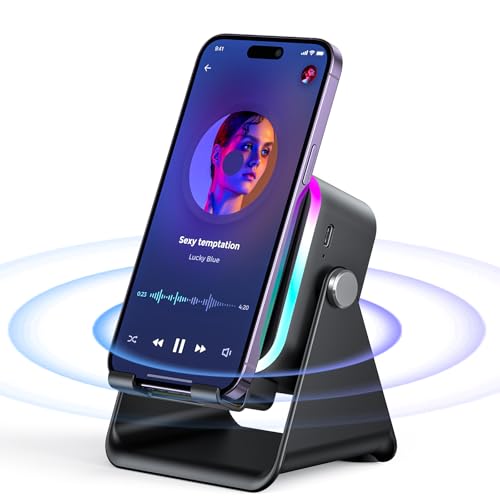
The AIKELA Induction Speaker is a clever 5-in-1 gadget that serves as a wireless speaker, phone stand, charger, power bank, and LED light show. It shines in everyday scenarios like propping up your phone for recipe videos in the kitchen, hands-free calls in the home office, or background music while working. The induction mode lets you drop your iPhone or Android right on top for instant sound without fumbling for Bluetooth connections.
In real-world testing based on its specs, it delivers reliable performance for casual listening and multitasking. The rotatable stand adjusts to perfect angles, keeping your device secure with silicone grips. It's compact enough to toss in a bag for travel yet sturdy for desk use, making it a practical pick for busy Americans juggling work and home life.
Music lovers appreciate the balanced sound profile, while gift shoppers love its appeal for birthdays or holidays. Overall verdict: a smart, affordable upgrade for anyone tired of tangled cables and weak phone speakers. Highly recommended for tech-savvy users seeking convenience without complexity.
Expect deep bass that punches through for tracks with low-end drive, paired with tight mids and crystal-clear highs for vocals and instruments. Volume levels handle small rooms effortlessly, making it great for personal listening during video calls or cooking sessions without distortion at moderate settings.
Bluetooth 5.3 ensures stable connections up close, with induction mode offering lag-free playback by simply placing your phone on the stand. This dual approach breaks Bluetooth limitations, ideal for quick switches between devices in busy kitchens or offices.
While not stadium-loud, the sound signature suits lifestyle use like podcasts, playlists, or Zoom meetings, delivering crisp audio that enhances daily routines.
The sleek black design is lightweight and portable, slipping easily into bags for on-the-go use, with a stable base that grips desks or counters. The 360-degree rotating stand offers flexible positioning, and non-slip silicone ensures your phone stays put during long sessions. No rugged IP rating means it's best for indoor lifestyles, avoiding splashes or dust-heavy environments.
Battery life hits up to 8 hours of playback after a quick 2-hour Type-C charge, supporting all-day home office shifts or weekend vibes. It doubles as a power bank to top up your phone in emergencies, adding real travel value without bulk.
Overall, the build prioritizes everyday portability over extreme durability, perfect for urban commuters or homebodies who value convenience and style.
Connecting Your Wireless Speaker to an Android Phone
Connecting an external wireless speaker to an Android smartphone requires establishing a clean communication bridge between your device hardware and the audio receiver. Whether you use a conventional Bluetooth 5.3 speaker, a jobsite boombox, or a hybrid induction stand, the connection process depends on proper pairing mode activation and accurate system settings. Modern Android releases streamline this procedure through dedicated device discovery menus, but hardware quirks can still complicate playback. Following a methodical setup sequence eliminates signal dropouts and delivers crisp audio output for media streaming, video calls, and hands-free listening.
Preparing Your Android Phone and Audio System for Discovery
Successful wireless pairing begins with preparing your Android operating system to scan for active broadcasting frequencies. Swipe down from the top of your screen to open the Quick Settings panel, then tap and hold the Bluetooth icon to open the full connection menu directly. Ensure Bluetooth is toggled on so your phone actively transmits discovery beacons across nearby frequencies. If your phone was recently connected to automotive systems or wireless earbuds, toggling Bluetooth off and on resets the local wireless controller. This quick reset purges temporary connection caches and ensures your phone scans the immediate environment without lag.
Before triggering the pairing scan, inspect your speaker to verify it holds sufficient battery power to maintain active radio transmission. Low battery levels often cause Bluetooth chipsets to disable discovery mode or shut down during the cryptographic handshake. Disconnect any physical 3.5mm auxiliary cables from the speaker chassis because hardwired connections frequently override wireless input boards. If the speaker was previously paired to an adjacent tablet or family smartphone, move that secondary source out of range or disable its Bluetooth. Preventing competing devices from seizing the wireless signal ensures your Android phone establishes a priority connection without handshake contention.
Standard Bluetooth Pairing Sequence on Modern Android Devices
Initiating discovery mode on your speaker requires activating its internal Bluetooth beacon so nearby hosts can locate its identifier. Most standalone speakers, including models from brands like Sonrinss, feature a multi-function power or Bluetooth button that must be held down until a status LED flashes rapidly. A fast-blinking blue or alternating blue and red light generally indicates that the speaker is ready for pairing. Consult your device documentation if the indicator behaves differently, as steady lights usually signify an active link with an existing device rather than discovery mode. Never rush past this step, because your Android phone cannot list devices that remain in passive standby mode.
Once the speaker LED flashes in discovery mode, return to your Android screen and tap Pair new device within the Bluetooth menu. Your phone will populate a list of available hardware, showing brand names or model identifiers like Oresoc, AIKELA, or generic speaker labels. Tap the corresponding name on your screen to start the digital handshake between both chipsets. A pop-up dialog may request permission to access your contacts or grant media streaming privileges depending on whether the speaker includes a built-in microphone. Confirm the pairing prompt, and listen for an audible chime or watch for a solid blue LED indicator confirming the link.
After completing the handshake, your Android device lists the speaker under Connected devices alongside its reported battery percentage. Tap the gear icon next to the speaker name to verify that the Media audio toggle is fully activated. If you intend to take speakerphone calls through an integrated microphone, verify that the Phone calls slider is enabled as well. Leaving media toggles disabled allows the phone to connect physically while routing audio through internal phone speakers instead. Verifying these toggles immediately after pairing guarantees that all streaming applications route sound directly through your wireless speaker.
Connecting Hybrid Induction Speakers Without Digital Pairing
Induction speakers represent an alternative wireless category that amplifies phone audio without relying on traditional Bluetooth radio frequencies. Units such as the DONOW or Oresoc 5-in-1 induction speaker stands use magnetic induction sensors to capture electromagnetic vibrations emitted by your phone internal speakers. To activate induction mode, power on the stand and look for an indicator light signifying sensor readiness rather than Bluetooth discovery. You do not need to open Android menus, enter passcodes, or scan for device names when using this physical mode. The stand captures the audio signal organically, providing instant volume amplification without battery-intensive radio transmission.
Proper physical alignment is crucial when using an induction speaker stand because the internal sensors must align with your phone speaker grille. Position your Android phone on the cradle with the bottom edge resting securely against the silicone support ledge. If audio does not amplify immediately, slide the phone slightly left or right until the internal transducer picks up the acoustic vibration. Thick protective phone cases with metallic kickstands or heavy armor plating can dampen electromagnetic transmission between both devices. Removing bulky cases or repositioning the phone horizontally on a 360-degree rotating mount often resolves muffled induction playback.
Hybrid induction models also include integrated Bluetooth 5.3 chips for listeners who prefer freedom of movement without keeping the phone docked. Pressing the mode button toggles the internal circuitry from induction capture to wireless Bluetooth reception. Once switched, the speaker emits standard discovery signals, allowing you to pair your Android phone through standard system settings. This dual-mode capability lets you use induction playback for quick desk tasks and Bluetooth streaming when walking across the room. Understanding how to toggle between both modes prevents confusion when the speaker fails to amplify sound away from the physical cradle.
Configuring Bluetooth Audio Profiles and Codec Settings in Android
Android handles wireless audio transmission through specialized Bluetooth profiles designed for fidelity and playback control. The Advanced Audio Distribution Profile, commonly known as A2DP, governs stereo music streaming, while the Audio/Video Remote Control Profile manages play, pause, and volume commands. When you connect a wireless speaker, Android automatically negotiates the highest supported codec between your phone and the speaker chipset. Standard SBC codecs provide broad compatibility across budget and utility speakers, while advanced AAC codecs deliver cleaner high frequencies on supported hardware. Most desk speakers and phone stands utilize standard SBC transmission to conserve power and reduce latency.
Listeners experiencing low volume levels or unbalanced output should inspect the Bluetooth absolute volume settings inside Android. Absolute volume synchronizes your phone volume slider with the speaker internal hardware amplifier. Occasionally, firmware discrepancies cause the phone slider to max out while the physical speaker amplifier remains at a fraction of its capacity. If sound output remains weak despite high phone volume, press the physical volume buttons on the speaker chassis to raise internal amplification. You can also disable absolute volume within Android Developer Options to control phone volume and speaker hardware gain independently.
Resolving Common Android Bluetooth Connection Failures
One of the most frequent frustrations occurs when an Android phone fails to discover a broadcasting speaker in the available devices menu. If the speaker name does not appear after several seconds of scanning, power down both the speaker and your phone. Rebooting your Android device clears stuck Bluetooth daemons and reinitializes system radio hardware. At the same time, perform a hard reset on your speaker by holding the power button for ten seconds or pressing an integrated reset switch if provided. Restarting both devices purges lingering handshake conflicts and allows the Bluetooth controller to establish a fresh pairing table.
Persistent pairing failures often stem from accumulated cache data inside Android system applications. Navigate to Settings, select Apps, enable system apps display, and locate Bluetooth or Bluetooth Legacy. Tap Storage and Cache, then select Clear Cache followed by Clear Storage to wipe corrupted connection logs. This action resets your Bluetooth stack without erasing personal photos, contacts, or stored documents. After clearing system cache, restart your phone and initiate the pairing sequence from scratch. This troubleshooting step resolves stubborn discovery loops that prevent your phone from recognizing nearby hardware.
Radio frequency interference from household appliances can also degrade wireless discovery and induce audio stuttering. Wi-Fi routers, microwave ovens, and crowded USB 3.0 hubs operate on the 2.4 GHz band, which directly overlaps with Bluetooth signals. Position your Android phone within three feet of the speaker during the initial pairing handshake to overcome environmental interference. Once the secure digital handshake concludes, normal operating ranges allow you to move several yards away without losing the audio stream. Maintaining clear line of sight during initial pairing prevents synchronization errors and ensures permanent device registration.
Managing Multi-Device Connections and Signal Contention
Modern households often contain dozens of active Bluetooth devices, creating connection contention when a speaker powers on. Bluetooth chipsets are programmed to automatically reconnect to the last known host device stored in their memory registers. If a family member previously streamed music from a laptop or secondary phone, the speaker may silently connect to that device instead of your Android phone. When this occurs, your Android phone will search endlessly without finding an available broadcast signal. Power down Bluetooth on adjacent devices or clear the speaker memory bank by holding the pairing button until the memory reset chime sounds.
Some compact wireless speakers support multipoint connectivity, allowing two host devices to maintain simultaneous standby links. While multipoint offers convenience, it can create audio priority conflicts if notification chimes from one phone interrupt music streaming from another. If you frequently encounter audio cutouts, disconnect secondary devices through their individual Bluetooth menus to grant your Android phone exclusive streaming rights. When exploring complex audio environments or pairing multiple audio units together, managing host priority becomes essential for consistent stereo distribution. Dedicated single-host connections provide the lowest latency and eliminate unexpected audio interruptions during extended playback sessions.
Power Management, Sleep Timers, and Wireless Signal Stability
Battery conservation algorithms on modern wireless speakers and phone stands often trigger automatic sleep states after periods of inactivity. If audio pauses for ten to fifteen minutes, the speaker internal microcontroller may shut down Bluetooth radios to preserve battery reserves. Waking the speaker requires tapping the power button or adjusting the phone position on induction cradles. Check that your Android phone battery saver mode is not restricting background Bluetooth audio transmission while streaming with the screen locked. Adding your preferred music application to the unrestricted battery list prevents the operating system from killing background audio processes prematurely.
Rechargeable desktop speakers and phone stands from makers like voijump and AIKELA rely on lithium-ion batteries that require regular maintenance. Operating a wireless speaker at maximum volume while simultaneously using emergency USB charging functions drains power rapidly and generates internal heat. High operating temperatures can trigger thermal throttling circuits, causing intermittent audio cutouts or unexpected system shutdowns. Use a certified 5V USB power adapter to recharge the internal battery before demanding extended playback sessions. Keeping the battery charged ensures the internal wireless receiver maintains sufficient voltage for clean, undistorted sound reproduction.
Verifying Audio Output and Maintaining Stable Daily Playback
Completing a quick sound check immediately after establishing your connection confirms that audio routes through the external speaker rather than phone earpieces. Open a streaming app or video clip and monitor the audio output selector located in the Android media notification widget. Tapping the media output icon allows you to switch playback between the phone speaker, wireless speaker, or connected accessories instantly. If sound appears faint or tinny, check that the phone volume slider and the external speaker volume controls are both elevated to reasonable listening levels. This simple check ensures both amplifiers operate harmoniously without digital clipping or distortion.
Maintaining consistent wireless performance over weeks of daily use requires simple operational discipline. Always turn off the speaker when leaving your workspace to prevent the internal battery from discharging completely during idle standby. Clean dust and debris from silicone phone cradles and speaker grilles to keep acoustic ports clear of physical obstruction. If you regularly switch between induction amplification and standard Bluetooth streaming, remember to toggle mode switches deliberately to match your immediate playback setup. Following these practical maintenance steps guarantees that your wireless speaker connects swiftly and delivers clear sound whenever you tap play on your Android device.


Write Your Review
No reviews yet. Be the first to share your experience!