


Setting up external audio can completely reshape movie nights, but learning how to connect roku speakers requires understanding Roku’s closed audio ecosystem. Unlike conventional audio equipment that connects through standard speaker wire, analog cables, or optical connections, these wireless satellites communicate over a proprietary wireless link. That architecture eliminates audio cables running across living room floors, yet it introduces strict host device requirements. Before planning physical speaker placement or mounting brackets, confirming your host television or streaming soundbar compatibility is the essential starting point.
Traditional home entertainment spaces often rely on dedicated stereo loudspeakers powered by heavy AV receivers. Roku bypasses that complex wiring by integrating internal amplifiers directly into each wireless satellite enclosure. This setup guide outlines the complete pairing sequence, essential compatibility boundaries, physical positioning tactics, and menu adjustments. Knowing how these components talk to each other ensures you achieve clear dialogue and immersive sound without unexpected connection errors. Taking time to understand the setup process saves time and prevents pairing headaches during initial installation.
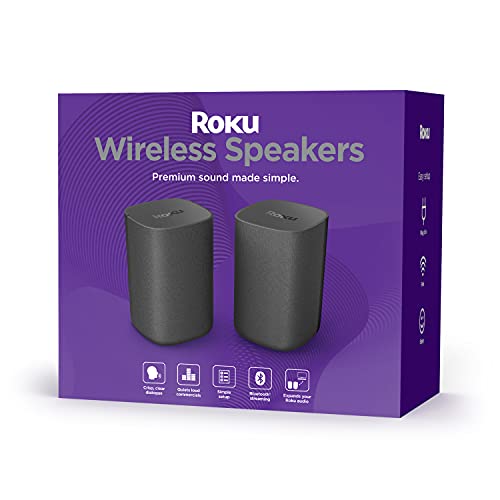
Pros
- Near-instant, guided on-screen setup with automated firmware upgrades
- Speech Clarity mode noticeably rescues muffled movie and television dialogue
- Stable low-latency wireless connection eliminates messy audio cables across the room
- Direct Bluetooth pairing works independently of the television display
Cons
- Strict ecosystem lock-in; entirely incompatible with standard non-Roku TVs or generic streaming players
- Each speaker requires access to its own AC wall outlet for power
- Limited deep low-end rumble on bass-heavy soundtracks unless paired with an external subwoofer
The Roku Wireless Speakers offer an accessible, clutter-free path to upgraded television sound. Engineered exclusively for Roku TV displays, the Roku Streambar, and the Roku Smart Soundbar, this renewed pair eliminates the complexity typically associated with multi-channel audio. Instead of wrestling with a traditional AV receiver and running spools of speaker wire across the living room, users can establish a capable stereo or surround sound stage in minutes.
Setup is managed directly through the familiar Roku operating system. Once plugged into wall power, the television automatically detects the speakers and guides you through an intuitive pairing process. From there, you can choose whether to assign the speakers as front stereo drivers to replace weak built-in television speakers, or stage them behind your seating area as dedicated rear surround satellites. Regular over-the-air firmware updates ensure seamless wireless stability without requiring manual maintenance.
In everyday use, the system shines during dialogue-driven programming, streaming series, and evening movie sessions. Roku includes dedicated sound profiles, most notably Speech Clarity and Volume Leveling, which actively prevent the common frustration of riding the volume control between quiet conversations and loud sound effects. Night Mode further softens sharp audio peaks, making the setup well-suited for apartments or late-night entertainment.
While audiophiles seeking an elaborate component system with analog inputs will look elsewhere, Roku users receive exceptional convenience and performance here. The renewed certification brings this hardware in at a practical price point while preserving full audio functionality. If your home entertainment centers on the Roku platform, this pair delivers an immediate, wire-free audio enhancement.
Acoustically, the Roku Wireless Speakers prioritize vocal intelligibility and cohesive mid-frequency reproduction. Built-in drivers produce clean, articulated highs that remain pleasant without becoming harsh or fatiguing at higher listening volumes. By lifting the dialogue out of the cabinet and into dedicated stereo enclosures, voices gain natural separation from musical scores and ambient background effects.
The stereo imaging creates a wider and more dynamic soundfield than any standard flat-screen TV can achieve on its own. Sound pans accurately across the room, providing a palpable sense of direction during movies and gaming. When used as rear satellites alongside a Streambar, ambient environmental noises such as rainfall and distant engines surround the listener effectively.
Lower frequencies are punchy and responsive through the mid-bass range, providing satisfying weight to male vocals and standard action sequences. However, because these are compact bookshelf units, the sub-bass shelf naturally tapers off before reaching subterranean theater depths. Listeners who demand visceral room-shaking impact during blockbusters can round out the system by pairing it with the dedicated Roku Wireless Subwoofer.
Each speaker stands 7.7 inches tall with a footprint of 4.9 by 4.9 inches, finished in a clean, non-reflective matte black. Weighing 4 pounds each, the enclosures are solid and well-damped, which effectively minimizes unwanted internal resonance during louder scenes. Their compact, vertical tower profile blends easily onto end tables, bookshelves, or dedicated speaker stands without dominating the room decor.
Hardware interfaces on the rear are intentionally streamlined. There are no physical HDMI, optical, or auxiliary ports; all TV audio signal transmission is handled over a dedicated, low-latency Wi-Fi protocol managed by the host Roku device. This proprietary link keeps audio and video strictly synchronized, preventing distracting lip-sync delays.
Each unit is powered by its own detachable AC power cord, meaning you will need two open electrical outlets near your chosen speaker locations. For versatility beyond television content, internal Bluetooth hardware allows you to connect your phone or laptop directly, streaming music and audiobooks with the TV screen turned off.
Pros
- Seamless audio-video sync with Roku TV and Streambar
- Automatic software updates for optimal performance
- Bluetooth connectivity for versatile music playback
- Night Mode for quiet viewing without disturbing others
- Simple plug-and-play wireless pairing
Cons
- Requires compatible Roku TV or Streambar (SE not supported)
- Needs nearby power outlets as they are not battery-powered
- Best performance limited to Roku ecosystem devices
The Roku Wireless Speakers come as a set of two, designed exclusively to elevate audio for Roku TV, Streambar, or Streambar Pro owners. They transform standard TV sound into a cinematic experience, filling rooms with immersive audio that syncs perfectly with on-screen action. Ideal for cord-cutters and movie lovers who want surround sound without the hassle of complex wiring.
In real-world use, these speakers excel at delivering clear dialogue during fast-paced scenes and rich soundscapes for music or streaming content. Pair them via Bluetooth for personal tunes or use built-in tuning like Speech Clarity to make voices stand out. Setup is straightforward: plug into power and connect wirelessly to your Roku device.
While they shine in home entertainment setups, they require a compatible Roku base system. Overall, they offer premium sound upgrades at an accessible level, making them a smart add-on for anyone deep in the Roku ecosystem. Verdict: Highly recommended for immersive TV audio without breaking the bank.
Roku Wireless Speakers provide powerful audio with high frequencies for detailed highs and dynamic bass that adds depth to explosions and music. Vocal clarity is a standout, enhanced by Speech Clarity which boosts dialogue over background noise, ensuring you never miss a line in movies or shows.
Volume handles room-filling levels without distortion, and Volume Leveling keeps commercials from blasting. Bluetooth streaming offers stable connectivity for music from phones, with range suitable for typical living rooms. Night Mode tames peaks for late-night viewing.
Performance peaks in surround configurations, moving sound with the action for true immersion. Expect consistent, high-quality output synced flawlessly to your Roku display.
These speakers feature a sleek, unobtrusive design that blends into home setups, with wireless connectivity eliminating audio cables across floors. They require standard power outlets for operation, ensuring reliable performance without battery concerns.
Build quality supports easy placement behind or beside your seating area, and the compact form allows stacking sets for full surround. No rugged or waterproof ratings, so they suit indoor living rooms best.
Automatic software updates keep firmware current via your Roku device, maintaining peak sound without manual intervention. Focus on simplicity makes them lightweight on maintenance for everyday TV use.

Pros
- Precise tilt and swivel mechanism dials in the ideal surround sound sweet spot.
- Sturdy, all-metal construction prevents speaker droop and unwanted resonance.
- Integrated bubble level makes wall alignment fast and straightforward.
- Direct fit for Roku Wireless Speakers utilizing the 1/4-inch-20 thread standard.
Cons
- Not intended for hollow drywall installation without anchoring into wood studs or masonry.
- Limited strictly to single 1/4-inch-20 threaded speakers, lacking universal multi-bracket adapters.
- Manual articulation requires loosening and tightening bracket screws to adjust angles.
The tiebutie Heavy-Duty Speaker Wall Mounts provide Roku home theater enthusiasts with an easy way to elevate their surround sound environment. While Roku Wireless Speakers deliver impressive multi-channel audio for their size, placing them flat on end tables or low media consoles compromises their directional drivers. These dedicated wall brackets solve placement limitations by lifting rear channels off furniture and mounting them at optimal listening height.
Designed to mount on wood studs, brick, or concrete surfaces, each mount features a rugged triangular support plate engineered to hold speakers firmly in place. The integrated bubble level is a thoughtful touch that simplifies installation, ensuring brackets are plumb before securing hardware. Once installed, the hardware blends cleanly behind the speaker body for a streamlined visual profile.
In everyday use, the ability to direct high-frequency audio toward your couch transforms movies and TV shows. Sound effects track more accurately across the room, and dialogue clarity improves as reflections off nearby furniture surfaces are reduced. For Roku home cinema setups, this mount kit is an indispensable accessory that unlocks balanced, immersive surround performance.
Speaker elevation and angling are critical factors in achieving an immersive home theater soundstage. By utilizing the 30-degree tilt and 90-degree swivel capabilities, listeners can point Roku Wireless Speaker tweeters directly toward the main seating area. This precise toe-in and downward tilt ensure high frequencies arrive on-axis, significantly enhancing directional imaging and ambient sound detail during film playback.
Mounting speakers on the wall also aids acoustic isolation. When compact speakers rest directly on hollow console surfaces or resonant side tables, low frequencies can create rattling artifacts and muddy upper-bass response. Elevating the enclosures on rigid metal brackets decouples the cabinet, leading to punchier mid-bass, cleaner vocal articulation, and a more coherent surround sound field.
Constructed from high-grade solid metal, the tiebutie brackets emphasize structural integrity and durability. The triangular bracing mechanism prevents sagging over time, keeping your Roku speakers securely fastened at your preferred angle. The mount utilizes a standard 1/4-inch-20 screw post, matching the factory rear threaded insert found on Roku Wireless Speakers for a stable, vibration-resistant connection.
Installation is designed for structural wood studs, solid brick, or concrete walls, providing a much firmer anchor than fragile drywall anchors. The mount bracket incorporates an embedded bubble level directly into the plate, eliminating the need to balance a separate tool during marking and drilling. Once secured, tension adjustment screws keep your chosen tilt and pan angles firmly locked under normal room vibrations.
Complete Guide to Connecting and Configuring Roku Speakers
Connecting Roku speakers involves pairing dedicated wireless satellites to a compatible Roku host device rather than linking them to an audio receiver. The wireless handshake takes place directly through the Roku operating system, where the software identifies each satellite, assigns stereo channels, and synchronizes audio with on-screen video. Once linked, the host device offloads audio playback while maintaining master volume control through the standard Roku remote.
Host Hardware Compatibility and System Requirements
Device compatibility forms the foundation of any successful Roku audio installation. The Roku Wireless Speakers and Roku Wireless Speakers – Set of 2 (Pack of 1) do not accept line-in analog or optical signals from standard televisions. Instead, they require an active Roku host device, such as a Roku TV, a Roku Streambar, a Roku Streambar Pro, or a Roku Smart Soundbar. Standard Roku streaming players like the Roku Ultra cannot pair directly with these satellites on their own.
Model variations within the host device lineup also require attention. Manufacturer specifications clarify that the Roku Streambar SE is not compatible with these wireless satellites. Running a software update check on your host device is a necessary preparatory step. Navigating to the settings menu ensures that your host platform possesses the latest wireless audio drivers before you start pairing.
Network environments influence hardware discovery during the initial connection process. The host device and the wireless satellites communicate across a dedicated direct link managed by Roku OS. Ensuring that your home Wi-Fi network operates without excessive channel interference helps the host discover both speakers promptly. An outdated firmware build can cause the pairing routine to stall during the initial scan.
Physical Placement and Electrical Power Considerations
Physical preparation begins with understanding that these speakers are wireless for audio signals only. Each satellite cabinet houses an internal amplifier that requires power from a standard electrical outlet. Planning your room layout requires placing each satellite within reach of an AC wall plug or an approved surge protector. Running cords across open walkways creates hazards, so positioning satellites near perimeter baseboards is preferable.
Acoustic balance depends on where you position the left and right cabinets relative to your seating area. For front stereo listening beside a Roku TV, separating the speakers by roughly four to eight feet creates an engaging soundstage. Placing them near ear level when seated prevents high frequencies from reflecting awkwardly off floors. If the satellites serve as rear surrounds with a Streambar, position them slightly behind your primary couch.
Surrounding furniture can alter sound clarity and wireless signal integrity. Placing satellites inside enclosed wooden cabinets or behind heavy metal stands can weaken the wireless transmission from the host. Leaving open breathing room around each enclosure prevents unwanted bass resonance from clouding spoken dialogue. Keeping the satellites away from high-powered desktop routers also helps minimize wireless interference.
Step-by-Step Wireless Pairing via the Roku Interface
Initiating the wireless link requires both satellite speakers to be powered on and in discovery mode. Plug each speaker into a wall outlet and observe the status LED on the cabinet. A pulsing light confirms that the unit is ready to link with the host system. If the light remains solid, hold the pinhole reset button for ten seconds to clear previous pairing data.
Navigating the on-screen menu begins the automated pairing routine. Power on your Roku TV or Streambar host device, press the Home button on your remote, and scroll down to Settings. Choose Remotes & devices, select Set up a new device, and highlight Wireless speakers. Holding the Home button on the remote for five seconds also launches this pairing shortcut on updated platforms.
Following the automated on-screen prompts guides you through channel assignments. The Roku system discovers the first speaker and sounds an audible chime, prompting you to confirm whether it plays on your left or right. After assigning the first channel, the host repeats the process for the second satellite. Once confirmed, the host installs any required firmware updates onto the speakers automatically.
Wall Mounting and Acoustic Alignment with Mounting Brackets
Elevating speakers off crowded tables improves room appearance and keeps sound drivers unobstructed. Mounting brackets like the tiebutie Heavy-Duty Speaker Wall Mounts for Roku interface directly with the 1/4″-20 threaded hole on the back of Roku wireless satellites. Using hardware matched to that exact thread specification prevents cabinet damage and ensures a secure mechanical fit. This approach clears surface space while anchoring speakers in permanent listening positions.
Directional alignment plays a significant role in dialogue clarity. Articulating brackets offering tilt adjustments up to thirty degrees and swivel adjustments up to ninety degrees allow you to aim sound toward your ears. Directing tweeters toward the central seating spot prevents dialogue from sounding distant or muffled. Mounting brackets with integrated bubble levels simplify horizontal alignment during installation, keeping the visual presentation neat.
Secure installation requires fastening mounting hardware into solid structural materials. Anchoring brackets into solid wood wall studs, poured concrete, or brick masonry provides sufficient load capacity for the metal hardware and speaker weight. Mounting brackets solely into hollow drywall using standard anchors is not recommended, as regular adjustments can pull anchors loose. Always confirm bracket stability before clipping the power cord into its final position.
Fine-Tuning Sound Modes for Dialogue and Nighttime Listening
Once the wireless link is active, Roku OS unlocks integrated audio processing tools. Pressing the Star (*) button on your Roku remote while streaming video opens the sound settings menu. This overlay allows you to adjust audio parameters in real time without pausing playback. These preferences remain saved across your entertainment inputs, maintaining consistent sound profile settings automatically.
Activating the Speech Clarity feature boosts frequencies where human vocal dialogue resides. Many movie mixes bury spoken dialogue beneath loud sound effects, forcing listeners to raise master volume constantly. Speech Clarity separates dialogue tracks dynamically, making actor voices intelligible even at lower volume levels. You can choose between low, medium, and high clarity levels depending on room acoustics.
Managing dynamic volume spikes is simple using Volume Leveling and Night Mode. Volume Leveling smooths out drastic volume jumps, preventing commercial breaks from blaring unexpectedly. Night Mode compresses overall dynamic range, softening explosions and reducing heavy bass frequencies so you do not disturb sleeping family members. These digital tools provide versatile sound management without complex external equalizers.
Bluetooth Audio Streaming and Secondary Source Pairing
Beyond handling television audio, Roku wireless satellites function as music streaming endpoints for mobile devices. Unlike conventional setups that require manual input switching, the Roku host system acts as a centralized Bluetooth receiver. Linking a smartphone or tablet to your Roku TV or Streambar transmits audio smoothly across both paired satellites. This capability lets you stream playlists, podcasts, and audiobooks with clean stereo separation.
Comparing this integration with standalone wireless Bluetooth speakers reveals distinct operational advantages. Portable single-cabinet speakers squeeze stereo channels into a compact enclosure, narrowing the perceived soundstage. Roku wireless speakers maintain physical separation between left and right channels, delivering authentic stereo imaging and acoustic depth. The host television can also turn off its screen panel while music plays, saving electrical power.
Pairing a mobile device to the system takes only a few straightforward steps. From the Roku home menu, navigate to Settings, choose Remotes & devices, and select Pair Bluetooth device. Enable Bluetooth on your smartphone, select your Roku TV or Streambar from the device list, and accept the pairing prompt. Once paired, your phone remembers the connection, allowing you to stream music whenever the host is active.
Expanding from Front Stereo to Multi-Channel Surround Configurations
Understanding audio configurations allows you to tailor your Roku system to your listening goals. When connected directly to a Roku TV without a soundbar, two wireless satellites operate as front left and front right channels. This setup replaces down-firing television speakers with robust forward-facing acoustic drivers. Dialogue clarity improves immediately, and stereo separation becomes noticeably more pronounced across the front soundstage.
Adding a Roku Streambar or Roku Smart Soundbar shifts the wireless satellites into rear surround channels. In this arrangement, the soundbar handles center dialogue and front sound effects, while the satellites produce rear atmospheric audio. The Roku operating system automatically applies a surround decoding profile, routing movie effects behind the couch. You can adjust surround volume independently in the audio settings to balance sound levels.
Unlike portable wireless audio gear designed for grab-and-go listening, Roku wireless satellites are stationary components in a home entertainment setup. They rely on fixed wall power and proximity to the host device to maintain synchronization. Treating them as permanent fixtures ensures that channel assignments, acoustic angles, and wireless connection paths remain stable over months of daily use. This dedicated arrangement delivers consistent acoustic performance without regular recalibration.
Troubleshooting Connection Drops and Audio Latency
Wireless audio connections can occasionally suffer from signal drops, crackling, or synchronization drift. If one speaker cuts out intermittently during playback, safe troubleshooting begins with a power cycle. Unplug both satellite speakers and the host Roku device from their wall outlets for sixty seconds. Restoring power forces the host and satellites to negotiate a fresh wireless handshake, clearing temporary memory cache errors.
Persistent connection drops often point to local Wi-Fi congestion or channel overlap. Because Roku devices communicate using direct wireless protocols, placing a Wi-Fi router directly beside either satellite can cause signal collisions. Moving the router a few feet away or selecting clear 5 GHz wireless channels can stabilize audio streams. Verifying that the satellites have an unobstructed line of sight to the host also helps maintain signal strength.
When a speaker fails to connect after a system update, executing a clean re-pairing process usually resolves the issue. Open the Roku Settings menu, enter Remotes & devices, navigate to the offline speaker listing, and choose the option to forget the device. Once removed, press the reset button on the rear of the speaker until the pairing LED flashes, then run the setup wizard again. This procedure re-establishes fresh network keys without altering other television preferences.
Practical Ownership and Verification Takeaways
Verifying your final installation ensures that dialogue, music, and surround effects perform as intended across streaming apps. After completing the pairing sequence and sound mode adjustments, launch a streaming video containing a multi-channel audio test. Listen carefully to confirm that left and right channels output sound strictly from their designated positions without audio delay. If audio appears slightly out of sync with actor lips, adjust the audio delay slider in the advanced display settings.
Ongoing maintenance for your wireless audio setup requires minimal effort but preserves hardware reliability over time. Keep the rear ports and driver grilles free of dust by wiping them with a dry microfiber cloth, avoiding liquid cleaners. Periodically inspect wall mounting screws to ensure bracket hinges remain tight and properly angled toward your listening area. Allowing your Roku TV or Streambar to install automatic software updates overnight ensures that your audio system continues operating with optimal stability.


Write Your Review
No reviews yet. Be the first to share your experience!