

Expanding sound coverage across an outdoor patio or open backyard often exposes the physical limits of a single wireless cabinet. Learning how to connect one bluetooth speaker to another allows listeners to distribute audio evenly across a wider listening zone without pushing one enclosure into audible distortion. Whether someone wants synchronized party audio or true wireless stereo separation with dedicated left and right channels, linking multiple units creates a much more immersive environment. Modern portable units, such as high-output speakers designed for big spaces, frequently feature dedicated pairing protocols designed to sync playback seamlessly.
Connecting multiple audio devices requires understanding the specific wireless standards and hardware options supported by your particular hardware. Some setups use proprietary manufacturer linking protocols, while others rely on universal source-side broadcasting or physical auxiliary connections. Many mid-sized portable Bluetooth speakers support native wireless linking, but compatibility issues can quickly arise when mixing hardware from different brands. This comprehensive guide details the practical mechanics of pairing wireless speakers, exploring wireless pairing standards, source-device dual audio, physical cabling, and troubleshooting tips to ensure clean, continuous playback.
Practical Methods and Technical Steps for Linking Bluetooth Speakers
Connecting two Bluetooth speakers together requires matching the transmission capabilities of your audio source with the internal wireless hardware of each speaker. Most modern multi-speaker setups rely on either native True Wireless Stereo (TWS), proprietary brand-specific broadcast networks, software-based source streaming, or analog wired line connections. Choosing the correct approach depends primarily on whether your speakers share the same manufacturer ecosystem or come from entirely different brands. Once you identify the hardware architecture of your audio gear, establishing a synchronized connection becomes a straightforward process that drastically elevates your listening space.
The Core Linking Methods: How Wireless Speaker Pairing Actually Operates
True Wireless Stereo represents the most common method for linking two identical or compatible wireless enclosures. In a standard TWS configuration, your source device transmits a single stereo Bluetooth stream to a designated primary speaker. The primary speaker then acts as a wireless relay, decoding the signal, keeping one channel for itself, and forwarding the remaining channel to the secondary satellite speaker. This architecture creates authentic acoustic separation between left and right channels, transforming two standalone monophonic cabinets into an expansive, cohesive soundstage.
Proprietary broadcast networks function differently by focusing on synchronized multi-speaker playback rather than strict stereo imaging. Manufacturers engineer these proprietary transmission modes to connect dozens or even hundreds of compatible units across a single localized radio network. Instead of splitting audio into dedicated left and right stereo channels, party-mode systems generally broadcast a summed dual-mono signal to every connected cabinet. This distribution pattern ensures that listeners walking around a crowded room or patio experience full-range frequency balance regardless of where they stand relative to individual speakers.
Source-level dual audio provides a third alternative that operates directly from your smartphone, tablet, or computer rather than relying on speaker-to-speaker communication. In this operating mode, the host device uses an updated Bluetooth controller to maintain two completely independent wireless audio streams simultaneously. This approach allows users to stream audio to two speakers manufactured by entirely different companies without requiring cross-brand software compatibility. However, because each speaker receives an independent data stream, minor transmission timing discrepancies can occasionally introduce subtle acoustic echo between mismatched units.
Wired line-level daisy-chaining remains the most reliable zero-latency option when wireless linking protocols are unavailable or unstable. Many performance-oriented portable cabinets include analog 3.5 mm auxiliary inputs and outputs specifically intended for physical interconnection. Running an analog audio cable from the line-out jack of a primary receiver into the line-in port of a secondary cabinet completely bypasses digital transmission lag. This physical link eliminates wireless packet loss, making it especially valuable in environments congested with heavy radio interference or during live performance playback.
Step-by-Step Procedure for True Wireless Stereo (TWS) Pairing
Before initiating any wireless pairing sequence between two speakers, you should ensure that neither speaker is actively streaming audio from a previously paired phone or computer. Power on both audio units and check their status indicator lights to confirm they are sitting in unlinked discovery mode. If a speaker automatically reconnects to a nearby tablet or phone, access that device settings menu and temporarily disconnect or forget the speaker. Clearing these residual background pairings prevents the hardware from prioritizing older wireless handshakes over the new inter-speaker link.
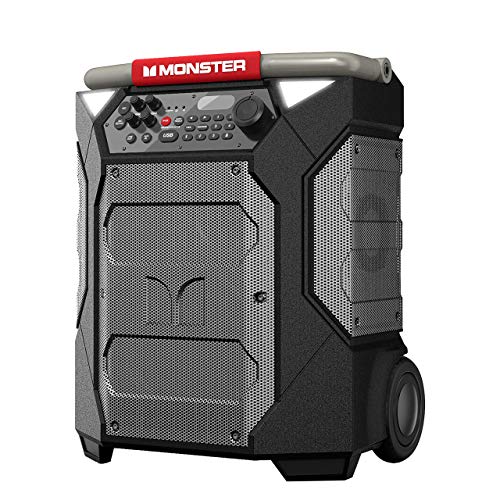
Designate one unit as your primary master speaker and establish a standard Bluetooth connection between it and your main source device. Once your phone or laptop confirms an active audio link with this master unit, you can initiate the dedicated inter-speaker pairing handshake. On many modern performance units, such as the Monster Rockin’ Roller 270 Portable Indoor/Outdoor, activating the linking protocol involves pressing a dedicated TWS pairing button on the control interface or selecting the multi-speaker command inside the manufacturer mobile application. The master cabinet will enter a secondary transmission mode, actively searching for the unlinked companion speaker.
Press the corresponding pairing button on the secondary speaker to allow it to receive the incoming wireless sync beacon from the master unit. Within a few seconds, both speakers should emit an audible chime or display solid status lights indicating a successful hardware link. The primary speaker will continue communicating directly with your phone, while silently routing the complementary audio channel across the localized link to the secondary enclosure. If supported by the manufacturer software, you can open the companion mobile app to toggle between discrete left-right stereo imaging and balanced dual-mono party playback.
Verifying your channel separation ensures that your new dual-speaker system delivers the intended acoustic presentation. Play a familiar stereo test track or an orchestral recording that features distinct directional panning between instruments. If sound emerges exclusively from one side or plays out of phase, power down both units and restart the pairing sequence starting with the primary cabinet. Confirming proper stereo orientation allows you to arrange the enclosures intentionally across your room, maximizing both soundstage width and spatial immersion.
Connecting Disparate Brands: Source-Level Dual Audio and Multi-Output Setup
Direct speaker-to-speaker wireless linking almost universally fails when attempting to bridge products built by competing manufacturers. Because brands develop unique proprietary wireless protocols and internal firmware, an enclosure from one company cannot decode the linking beacons transmitted by another brand. When you need to run two mismatched speakers simultaneously, your primary smartphone or computer operating system must manage the multi-device connection directly. Modern mobile platforms increasingly incorporate multi-output audio utilities that make this cross-brand synchronization possible without third-party hardware.
Samsung mobile devices running recent versions of Android feature a built-in Dual Audio utility that simplifies this exact multi-brand challenge. To use this feature, pair both independent Bluetooth speakers to your Samsung phone through standard Bluetooth settings. Once both speakers display an active connection status, swipe down the notification panel and open the Media Output interface. From this screen, select both active audio devices simultaneously, allowing the phone to route media playback across two independent Bluetooth links with separate volume sliders for each unit.
Apple mobile platforms offer Audio Sharing features, although native wireless duplication over standard Bluetooth remains restricted primarily to proprietary headphone hardware and AirPlay-compatible Wi-Fi systems. Mac desktop computers, however, provide native support for multi-brand output through the built-in Audio MIDI Setup utility. By opening Audio MIDI Setup, users can create an Aggregate Device or Multi-Output Device that combines two separate Bluetooth connections into a unified virtual sound card. This configuration routes system audio to both speakers simultaneously, though manual adjustments to drift correction settings may be necessary to prevent temporal delay.
Windows computers can achieve dual Bluetooth playback through sound control panel properties or third-party virtual audio cable software. Within the native Windows sound settings, users can occasionally route playback through a primary speaker while enabling the Stereo Mix recording device to listen and mirror the signal to a secondary audio path. Third-party software mixers offer even finer control, providing dedicated latency compensation sliders to align the acoustic output of two differing speaker models. While software routing requires more initial setup than native speaker buttons, it provides a viable pathway for utilizing existing hardware without buying identical replacements.
Physical Auxiliary Daisy-Chaining: The Universal Low-Latency Alternative
Physical auxiliary cables provide a foolproof fallback whenever wireless protocols refuse to sync or when audio latency disrupts video playback. Connecting speakers physically requires a standard 3.5 mm stereo audio cable or an appropriate adapter matching the specific input and output jacks on your hardware. In a typical wired daisy-chain, your source device connects to the primary speaker via Bluetooth or a 3.5 mm auxiliary line. The primary speaker then feeds its analog line-out port directly into the line-in port of the secondary speaker, passing the audio signal down the chain instantaneously.
When using a basic analog Y-splitter cable directly from a smartphone or audio interface, the source signal divides equally between both speakers. This passive split delivers identical audio to both units, making it an excellent method for deploying outdoor speakers with dedicated subwoofers alongside standard full-range portable enclosures. Because the splitting occurs entirely in the analog domain, there is zero digital processing lag or packet buffering between the two cabinets. Both enclosures fire in perfect physical synchronicity, eliminating the faint acoustic echo that occasionally plagues budget wireless links.
Wired installations can occasionally introduce electrical ground loop hum, particularly when both speakers remain plugged into wall chargers sharing the same alternating-current circuit. This low-frequency buzzing sound occurs because minute differences in ground potential create stray electrical currents along the shielding of your audio patch cable. Installing an inexpensive passive ground loop noise isolator along the 3.5 mm audio line breaks this electrical continuity while allowing the analog audio signal to pass cleanly through internal isolation transformers. This simple accessory preserves pure background silence, ensuring your wired link sounds just as clean as a pristine wireless connection.
Cable management and physical placement require practical forethought when linking outdoor audio gear with long analog interconnects. Use heavy-duty, shielded audio cables with molded strain-relief boots to prevent internal copper breakage from foot traffic or accidental tugging. Secure long cable runs along baseboards, patio pavers, or beneath outdoor rugs so guests do not trip over the wiring during events. Taking basic protective measures keeps your physical audio links intact and protects the delicate input jacks on your speaker cabinets from structural strain.
Acoustic Considerations and Optimal Speaker Placement
Linking two speakers together doubles your system acoustic output potential, but improper placement can easily undermine your sound quality through phase cancellation. When two speakers reproduce the identical frequency band in close proximity, sound waves radiating from their respective drivers can collide out of phase, creating acoustic nulls where bass frequencies abruptly disappear. To avoid comb filtering, space your paired speakers at least six to ten feet apart in typical indoor rooms, or even further in open outdoor settings. This physical separation prevents localized frequency cancellation while generating an expansive, balanced listening field.
Positioning your primary and secondary units according to classical stereo triangle principles creates a dramatically superior spatial image. In an ideal stereo setup, the distance between the two paired cabinets should roughly equal the distance from each speaker to the primary listening position. Angling the speaker grilles slightly inward toward the center of the listening zone sharpens vocal clarity and focuses center-channel audio details. This disciplined alignment ensures that dynamic stereo pans move fluidly across the room rather than sounding like two disconnected audio sources competing for attention.
Room boundaries exert a tremendous influence over perceived bass extension and overall tonal balance. Placing linked cabinets near solid masonry walls or inside room corners naturally reinforces low frequencies through acoustic boundary loading. This boundary loading principle allows listeners to maximize acoustic presence when pairing smaller cabinets alongside portable speakers engineered for deep bass. However, placing a bass-heavy enclosure too tight into an enclosed corner can occasionally produce muddy, boomy resonance, so experiment with pulling the cabinets several inches away from reflective walls to achieve clean, punchy low-end impact.
Outdoor listening environments lack the reflective ceilings and walls that naturally amplify sound indoors, making speaker placement even more critical. In open backyards or poolside spaces, position your paired speakers elevated slightly off the ground on patio tables, benches, or dedicated mounting stands. Elevating the drivers places high-frequency dispersion patterns at ear level, preventing lawn grass and patio furniture from absorbing crisp acoustic detail. Distributing two linked units on opposite sides of a seating area blankets the entire yard in balanced sound without requiring uncomfortable volume levels from a single cabinet.
Diagnostic Troubleshooting for Audio Dropouts, Desynchronization, and Pairing Failures
Intermittent audio dropouts between linked speakers usually stem from 2.4 GHz radio frequency interference or physical boundary obstruction. The primary speaker communicates with the secondary satellite across the same crowded 2.4 GHz wireless spectrum utilized by home Wi-Fi routers, cordless devices, and microwave ovens. Maintaining an unobstructed line of sight between the two speaker cabinets drastically reduces packet loss and sudden channel dropouts. If dropouts persist, relocating your home Wi-Fi router to another channel or moving the speakers away from dense brick walls will often restore link stability.
Temporal desynchronization, where one speaker lags slightly behind the other to create an unpleasant hollow echo effect, indicates a buffer timing mismatch. When this occurs, access your source device settings and pause media playback for ten seconds to allow internal transmission buffers to flush out. If pausing does not resolve the acoustic delay, toggle Bluetooth off on your phone, power cycle both speakers, and re-establish the connection sequence from scratch. Clearing transient buffer errors allows the master clock in the primary cabinet to resynchronize its internal timing with the companion enclosure.
Persistent pairing refusal often happens when a speaker retains conflicting pairing information from previous connections in its non-volatile memory. Most portable speakers provide a hardware factory reset procedure, typically accomplished by holding down the power and volume buttons simultaneously for five to ten seconds. Performing a factory reset erases corrupt pairing records, clears stale device lists, and restores factory default Bluetooth operating parameters. After resetting both cabinets, initiate the pairing sequence again as if setting up brand new equipment out of the box.
Firmware incompatibilities represent another common cause of pairing failure, particularly on speakers that receive periodic software updates via mobile companion applications. If one speaker cabinet operates on older factory firmware while its identical companion has been updated to the latest software release, their internal linking handshakes may fail to handshake correctly. Connect each speaker individually to your smartphone, open the manufacturer companion application, and verify that both units run the identical current firmware version. Maintaining matching firmware ensures flawless communication protocols and reliable feature operation across both enclosures.
Battery Life, Power Demands, and Sustained Playback Performance
Operating two speakers in a linked wireless configuration introduces distinct power consumption profiles between the primary and secondary units. The primary master speaker continuously performs double duty by receiving incoming Bluetooth streams from your phone while simultaneously broadcasting that decoded data over a secondary wireless link to the satellite. Because of this dual-transceiver workload, the master cabinet will routinely deplete its internal battery roughly twenty to thirty percent faster than the secondary speaker. Understanding this power disparity helps you plan recharging intervals and prevents the primary speaker from cutting out unexpectedly during long listening sessions.
High-capacity battery systems make a significant practical difference when hosting long gatherings away from alternating-current wall outlets. Heavy-duty portable units, exemplified by the Monster Rockin’ Roller 270 Portable Indoor/Outdoor, pack massive internal power reserves rated for up to 100 hours of continuous playtime. That model pairs its substantial endurance with 200 Watts of listed acoustic power, delivering substantial volume for large indoor or outdoor spaces without taxing internal amplifiers into thermal distortion. Having robust battery capacity ensures your multi-speaker array maintains clean, undistorted playback from the beginning of an event until the end.
Modern performance speakers often integrate auxiliary charging capabilities that expand their utility during outdoor gatherings. The Monster Rockin’ Roller 270 incorporates a built-in Qi wireless charging pad directly on its top panel, allowing users to keep their smartphone powered without running messy charging cables across the lawn. Keeping your source phone charged is essential because running high-bitrate Bluetooth streaming while managing dual-output audio can quickly drain a mobile battery. Utilizing integrated power banks built into your audio gear prevents your source device from shutting down mid-playlist.
Environmental resistance ratings represent another vital operational consideration when pairing speakers outdoors near water or unpredictable weather. The Monster Rockin’ Roller 270 features an IPX4 water resistance rating, which safeguards internal electronics against splashing water from any angle. While an IPX4 rating protects equipment from unexpected poolside splashes or light rain showers, it does not certify protection against high-pressure water jets or complete liquid submersion. Always ensure that protective rubber port gaskets remain firmly seated over charging ports and auxiliary inputs whenever operating speakers in damp outdoor settings.
Long-Term Verification and Connection Maintenance
Establishing a dependable shutdown and startup routine prevents annoying connection errors the next time you want to link your speakers. When concluding your listening session, power down the secondary satellite speaker first before turning off the primary master cabinet. Following this reverse shutdown sequence prevents the primary speaker from frantically searching for a dropped satellite link, which can sometimes scramble its stored connection profile. Shutting down in the correct order ensures that both units wake up in a clean state ready for immediate re-linking.
When you power the audio system back on for your next listening session, turn on the master speaker first and confirm that it locks onto your source device before powering up the satellite. Most speakers engineered with modern TWS memory will detect the secondary enclosure automatically once both units are active, re-establishing the dual-speaker link within seconds without manual button presses. If the automatic reconnection does not engage within fifteen seconds, a single brief press of the dedicated linking button will usually jog the stored wireless handshake.
Periodic cleaning of external connectors and control surfaces keeps your audio hardware operating reliably through years of active use. Use a soft, lint-free microfiber cloth lightly dampened with clean water to wipe dust, dirt, and dried beverage residue from speaker grilles, carry handles, and button arrays. Avoid spraying harsh chemical cleaners or aerosol solvents directly onto speaker housings, as these fluids can degrade protective rubberized coatings and compromise water-resistant port seals. Inspecting auxiliary jacks and charging ports for lint or debris ensures firm mechanical contact and uninterrupted signal transfer.
Mastering the technical steps required to connect multiple speakers transforms your everyday portable gear into a versatile, high-fidelity sound system capable of handling any venue. Whether you rely on true wireless stereo pairing for clinical left-right channel accuracy, source-level broadcasting for cross-brand flexibility, or heavy-duty analog cables for zero-latency reliability, matching the right connection method to your hardware guarantees flawless sound. Taking full advantage of modern pairing features lets you unlock the true acoustic potential of your audio investment across every room and outdoor gathering.


Write Your Review
No reviews yet. Be the first to share your experience!