

Getting crisp, reliable desktop sound should not require wrestling with endless cables or complicated software menus. Many office workers, students, and home professionals discover that learning how to connect dell speakers is surprisingly straightforward once you identify whether your hardware uses a direct USB connection, an analog 3.5mm audio jack, or a dedicated monitor power pass-through. Whether you are mounting a compact soundbar directly beneath an UltraSharp display or plugging an audio bar into an office workstation, matching the connector type to your computer output saves time and prevents playback errors. While some users rely on portable notebook speakers for on-the-go listening, integrated monitor soundbars provide a cleaner, permanent desktop footprint.
Dell audio accessories range from passive monitor-powered bars to intelligent conferencing bars equipped with dedicated microphone controls and noise suppression. Understanding the specific physical mounting system, whether using classic T-hooks, stand brackets, or modern magnetic strips, ensures your speaker stays secure without scratching monitor bezels. Connecting the signal cable properly also allows your operating system to route voice calls and media playback to the correct output channels automatically. By verifying both the physical attachment and digital audio settings, you can establish a dependable audio configuration that delivers clear dialogue and rich multimedia every day.
Pros
- Eliminates desktop cable clutter via direct monitor mounting and USB bus power
- Crisp, clear midrange performance optimized for conference calls and casual video streaming
- Instant plug-and-play installation requiring no drivers or external power outlets
- Built-in volume knob and headphone passthrough port provide convenient controls
Cons
- Limited low-frequency bass output makes it unsuitable for bass-heavy music genres
- Physical mounting brackets only fit select Dell monitor models with matching T-hook slots
- Total 2.5-watt stereo output is intended for personal desktop listening rather than filling large rooms
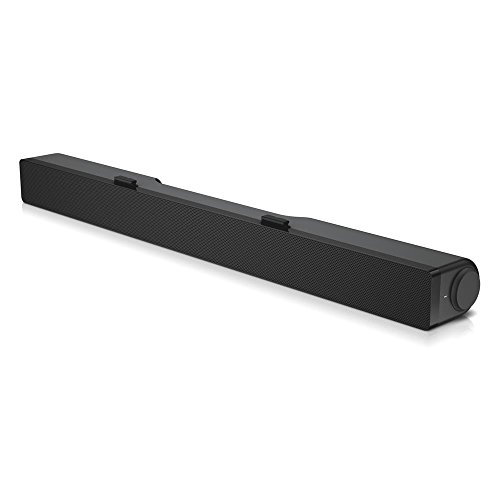
The Dell AC511 USB Wired Soundbar is engineered specifically for workstation users seeking to eliminate desktop clutter without sacrificing vocal clarity. Designed to snap directly onto the underside of compatible Dell E-Series, P-Series, and UltraSharp monitors, this compact audio bar delivers an integrated appearance that mimics built-in display speakers. By drawing both power and digital audio signals through a single USB connection, it effectively banishes bulky AC wall adapters and messy signal cables from your desk.
While this soundbar is not built to shake walls, it excels in real-world productivity scenarios. Dialogue during conference calls comes through with crisp articulation, ensuring you never miss a word during Zoom or Microsoft Teams meetings. Casual background music, training videos, and podcast listening are handled smoothly, providing an immediate upgrade over tinny integrated laptop speakers.
Usability is central to the AC511 design. A smooth volume wheel on the side allows for immediate level changes without diving into Windows audio settings, while the inclusion of dedicated headphone and aux-in ports lets you quickly switch to private listening. For office workers, students, and home professionals seeking an understated audio upgrade for their compatible Dell monitor, the AC511 remains a practical, cost-effective solution.
Acoustic performance on the Dell AC511 is tuned purposefully for the midrange frequencies where human speech lives. Featuring two discrete stereo drivers delivering 1.25 watts RMS per channel, it produces a clear, centered soundstage that keeps voices upfront and easily intelligible. Treble frequencies are reasonably crisp without turning harsh or sibilant at standard listening distances.
Given its slim profile and modest power draw, low-end bass response is naturally constrained. Sub-bass frequencies and deep cinematic rumbles roll off early, meaning electronic tracks and action movies will lack heavy impact. However, the acoustic tuning avoids low-end distortion and unwanted resonance, ensuring that speech and light acoustic playback remain clean and articulate throughout typical working volumes.
Measuring approximately 16.5 inches wide and under two inches deep, the AC511 boasts a minimalist matte-black plastic chassis that integrates seamlessly with Dell professional displays. The top of the unit features integrated T-hook mounts that slide and lock into the mounting slots found on compatible Dell enterprise monitors. Even if your display lacks the mounting slots, the soundbar can rest flat beneath your screen on rubberized feet.
Hardware connectivity keeps things simple with a hardwired USB Type-A cable that transfers both power and digital audio directly from your PC or monitor USB hub. On the side, a tactile rotary knob controls volume, accompanied by a 3.5mm headphone output and a 3.5mm auxiliary input for connecting external audio devices. Because it operates entirely on standard 5V USB bus power, no external power supplies or batteries are required.

Pros
- Mounts directly beneath compatible displays to free up precious desk space
- Clear vocal reproduction that enhances conference calls and instructional videos
- Dual 3.5mm headphone jacks allow two people to listen at the same time
- Smooth analog volume wheel allows immediate adjustment without system menus
Cons
- Requires a compatible Dell monitor power jack or an optional power brick
- Lacks deep sub-bass frequencies for heavy cinematic and bass-driven tracks
- No wireless Bluetooth connectivity for mobile devices
The Dell AX510 Soundbar Speaker is an ultra-compact audio solution engineered specifically for desktop workstations. Instead of taking up valuable space with conventional computer desktop speakers and extra cables, this unit snaps cleanly into the mounting slots found beneath compatible Dell UltraSharp and Professional monitors. It is tailored for office professionals, students, and casual computer users who want dependable day-to-day sound without the clutter of separate speakers.
During daily productivity tasks, the speaker excels by delivering clean, natural voice playback for Zoom conferences, virtual classrooms, and streaming media. The physical volume wheel located on the side panel makes audio adjustments seamless, while the dual 3.5mm headphone outputs provide an effortless transition to private listening when working in shared environments.
While it is not designed to replace high-end studio monitors, the Dell AX510 delivers dependable performance for everyday computer tasks. For users with compatible Dell hardware seeking a tidy, budget-conscious sound upgrade with great voice clarity, this soundbar is a smart workstation addition.
With a total output of 10 watts RMS across its two stereo channels, the Dell AX510 places a strong focus on midrange clarity and vocal articulation. Spoken dialogue in videos, conference calls, and podcasts comes through with distinct separation and natural warmth, avoiding the tinny, muffled audio often produced by integrated monitor speakers. Bass output is punchy and adequate for everyday acoustic music and videos, though it naturally tapers off when handling deep sub-bass frequencies.
The stereo system produces ample volume to comfortably fill a standard home office or bedroom workstation without rattling or distorting at higher output levels. Because the soundbar relies on an uninterrupted direct 3.5mm analog connection, you bypass the latency, pairing headaches, and audio drift common to budget wireless connections, ensuring lip-sync accuracy across all your video playback.
Weighing under a single pound, the Dell AX510 features a slender, impact-resistant plastic enclosure built to blend seamlessly with standard black office displays. Because it is intended strictly for indoor desk deployment, it does not carry an outdoor IP waterproof rating, but its sturdy front grille effectively protects internal speaker components from workplace dust and accidental knocks.
Unlike portable battery-operated speakers that constantly require recharging cycles, the AX510 runs on continuous tethered power. It is designed to draw power straight from the 12-volt DC output jack on compatible Dell displays, giving you unlimited runtime without having to monitor battery levels or sacrifice an additional wall outlet behind your desk.

Pros
- Sleek magnetic snap-on design completely eliminates desktop clutter on compatible Dell monitors.
- Class-leading background noise suppression ensures professional-grade speech clarity during calls.
- Dedicated tactile controls for Teams integration, volume adjustments, and microphone muting.
- Full duplex support enables fluid, natural multi-party conversations without echo.
Cons
- Magnetic mounting system is limited exclusively to select Dell monitor models.
- Acoustic tuning favors vocal clarity over bass response, making it less ideal for immersive music listening.
- Wired USB connection limits placement flexibility away from the monitor hub.
The Dell Slim Conferencing Soundbar SB522A delivers an elegant solution to a common workspace nuisance: bulky desktop speakers and muddy laptop microphones. Designed specifically to pair with Dell commercial displays, this low-profile soundbar targets business professionals, remote workers, and educators who need clear, dependable audio for video conferencing without sacrificing valuable desk space.
In daily office use, the SB522A shines through its tight software integration and dedicated hardware controls. Certified for Microsoft Teams and Zoom, the soundbar sports an easily accessible Teams button, a smooth volume control dial, and a distinct mute switch that prevents accidental hot-mic moments. Whether jumping between client pitches or day-long strategy sessions, the physical tactile feedback eliminates the clumsy scramble to find on-screen software buttons.
Vocal capture is bolstered by Dell AI noise cancellation, which actively suppresses background clatter such as mechanical keystrokes, HVAC hums, and ambient office chatter. Combined with full-duplex communication, conversations flow seamlessly without the clipped syllables or robotic audio artifacts often found in basic integrated monitor speakers.
Ultimately, the SB522A is an indispensable productivity accessory for anyone anchored to virtual meetings. While casual music listeners may miss low-end impact, remote workers looking for a clean, cable-disciplined workstation will find this sleek soundbar to be a reliable and remarkably polished daily driver.
Acoustically, the Dell SB522A is voiced specifically for human speech intelligibility. The mid-range frequencies are forward and remarkably defined, rendering male and female vocal timbres with crisp separation and lifelike presence. Even in large video conference calls with dozens of attendees, voices remain distinct and effortless to follow without listener fatigue.
Thanks to integrated echo cancellation and full duplex audio processing, both sides of a conversation can speak at the exact same time without the sound cutting out or feeding back into the microphone. Highs are kept smooth and sibilance-free, preventing the sharp, tinny edge that plagues typical built-in monitor speakers.
Because the enclosure measures less than an inch thick, physical driver displacement is constrained, meaning deep sub-bass frequencies are practically non-existent. For background classical music or podcasts, the audio output is pleasantly balanced, but users seeking deep cinematic rumble or heavy basslines will want to keep a dedicated pair of headphones nearby.
Weighing a feathery 0.31 pounds and measuring 11.65 inches across by just 0.71 inches deep, the SB522A boasts a remarkably minimalist footprint. Its matte black exterior matches the clean industrial aesthetics of Dell enterprise monitors, snapping securely to the underside of compatible displays via concealed, high-strength magnets.
Connectivity is handled via a low-profile USB cable designed to route directly into the downstream USB port of your monitor hub. This thoughtful layout means no dangling wires across your desk mat and eliminates the need for a separate AC wall adapter, as the soundbar draws all necessary operating power directly over the USB connection.
On the soundbar chassis, you will find clean hardware integration including a multi-function Teams button, an intuitive rotary volume knob, and a mic mute button that illuminates to give immediate visual confirmation of your privacy status. Users can also access the Dell Peripheral Manager (DPM) application on Windows to apply custom EQ profiles, test voice levels, and keep the soundbar firmware updated.

Pros
- Simple one-cable USB setup eliminates bulky AC power adapters.
- Direct monitor mounting frees up valuable desk space.
- Clear, intelligible voice reproduction for conference calls and webinars.
- Integrated volume knob and headphone pass-through for quick control.
Cons
- Lacks deep bass response required for heavy music or cinematic movies.
- No wireless Bluetooth support; strictly a wired USB connection.
- Mounting bracket is primarily engineered for compatible Dell monitor stands.
The Dell AC511M Stereo USB Soundbar offers an efficient, low-profile audio upgrade for desktop computer setups. Engineered to clip onto compatible monitor stands or sit neatly beneath your display, this speaker solves the common problem of bulky desktop audio gear consuming valuable workspace. Powered directly through your computer's USB port, it eliminates power brick clutter and simplifies your desktop aesthetic.
This speaker is tailored for remote professionals, office workers, and students who spend hours on video conferences, webinars, and virtual classes. In real-world desktop testing, spoken dialogue comes through cleanly with distinct separation from background audio. The physical volume dial on the side allows quick adjustments during unexpected volume shifts, while an integrated 3.5mm headphone port offers seamless switching to private audio.
While music enthusiasts will notice a lack of sub-bass punch, everyday media tasks such as YouTube videos, casual music listening, and calls sound well-balanced. For anyone seeking a tidy, plug-and-play solution that elevates desktop audio without complex software or tangled cables, this unit delivers solid daily utility and clean functionality.
Equipped with precision-tuned stereo drivers, the Dell AC511M prioritizes midrange clarity and upper-frequency detail. Voices sound articulate and lifelike, preventing the muffled tone common in entry-level computer speakers. While low-end frequencies are modest due to the compact enclosure, acoustic instruments and dialogue remain distinct without audible distortion at standard office listening levels.
Digital audio flows directly over the wired USB connection, avoiding latency, compression artifacts, and wireless interference. This stable connection guarantees that spoken dialogue remains in sync with on-screen video during meetings and streaming media. The speaker achieves sufficient volume to comfortably fill a small home office or personal cubicle without pushing the hardware into harsh clipping.
Measuring just under 16 inches wide and weighing under one pound, this sleek black soundbar is built for minimalist efficiency. The chassis features clean lines and a durable matte plastic finish that resists fingerprints. It includes an integrated bracket designed to snap onto compatible Dell monitor stands, keeping your desk surface completely free of clutter.
Unlike portable units, this speaker operates on standard USB bus power and does not contain an internal battery. Drawing power directly through the connected computer ensures you never have to worry about recharging or battery degradation over time. The single USB cable delivers uninterrupted continuous playback for all-day reliability throughout work shifts.

Pros
- Effortless USB setup with no drivers or power adapters
- Space-saving monitor mount keeps desk clutter-free
- Clear stereo sound boosts office productivity and entertainment
- Durable build for daily desk use
Cons
- Requires constant USB connection, no standalone battery
- Lacks wireless Bluetooth for cable-free freedom
- Basic features without app controls or EQ customization
The Dell AC511M is a compact USB-powered stereo soundbar designed for computer monitors and laptops, perfect for American home office workers tired of tinny built-in speakers. It attaches easily to your monitor, freeing up desk space while pumping out clear stereo audio for Zoom calls, streaming, or casual gaming.
In real-world use, it shines in quiet office environments, providing enough volume for personal listening without disturbing others. Setup takes seconds: just plug into a USB port, and you're ready. No batteries or extra power means it's always on when your PC is.
Targeted at budget-conscious professionals, this soundbar offers surprising value for its simplicity. While not a powerhouse for parties, it transforms lackluster laptop sound into something enjoyable for daily tasks. Verdict: a smart pick for streamlined home office audio upgrades.
The AC511M delivers balanced stereo sound with decent vocal clarity, making it great for crystal-clear conference calls and dialogue-heavy videos. Mids are forward for natural speech, though bass is light, suiting close-range desk listening over room-filling blasts.
Volume reaches adequate levels for personal use, staying distortion-free at max without overwhelming a home office. USB connection ensures stable, low-latency audio with no dropouts, outperforming flaky Bluetooth in wired reliability.
Ideal for focused work sessions, it handles podcasts, music, and movies well, prioritizing clarity over thumping lows.
Sleek and unobtrusive, the AC511M soundbar measures slim for easy monitor attachment via included mount, blending into any modern desk setup. Its lightweight plastic build withstands daily handling but lacks rugged IP ratings for outdoor or spill-prone areas.
No built-in battery means continuous USB power draw, perfect for plugged-in laptops or always-on monitors with zero recharge worries. It sips power efficiently, running indefinitely as long as your device supplies it.
Portability shines for office hops: detach, plug into another USB, and go, keeping your workflow cable-minimal and desk tidy.

Pros
- Advanced AI noise suppression significantly enhances call clarity in busy environments
- Plug-and-play operation with direct certification for major UC platforms
- Compact, lightweight form factor eliminates desk clutter completely
- Eliminates the physical fatigue of wearing over-ear headsets all day
Cons
- Lacks sub-bass extension, making it suboptimal for movie watching or bass-heavy music
- Designed strictly for desktop PC and monitor use rather than living room audio
- No independent Bluetooth connectivity for mobile device audio streaming
The Dell Pro Premium Conferencing Soundbar SB725 is a purpose-built acoustic solution engineered to tackle the specific frustrations of modern hybrid work. Unlike generic computer speakers that muddle spoken frequencies or introduce microphone echo, this dedicated soundbar streamlines virtual meetings with crisp intelligibility. Designed for professionals who spend hours on video calls, it offers an effective way to leave headsets behind without sacrificing audio quality or vocal presence.
In everyday use, the dual-directional AI noise cancellation is the standout element. By actively analyzing incoming and outgoing audio streams, the onboard processing separates human speech from unwanted environmental noise. Whether your dog is barking in the background, a lawnmower is buzzing outside, or a colleague is typing furiously, the SB725 suppresses the disruption on both sides of the call, allowing natural communication to flow freely.
Integration with your existing workflow is smooth and intuitive. Dell secured official certifications for both Microsoft Teams and Zoom, meaning call controls and mute states communicate reliably with your software. The built-in LED indicator serves as an essential visual safeguard, clearly signaling when your microphone is hot so you can avoid awkward meeting interruptions.
Ultimately, the Dell SB725 is an exceptional desktop tool for home offices, executive desks, and enterprise huddle areas. While it will not replace an audiophile music system, its speech accuracy, noise rejection, and space-saving aesthetic make it an indispensable upgrade for high-productivity workspaces.
Acoustically, the Dell SB725 is voiced specifically to excel across human speech frequencies. By prioritizing a clean, detailed midrange from roughly 300 Hz through 4 kHz, the high-performance drivers reveal subtle vocal inflections and keep voices distinct, even during chaotic multi-speaker conferences. High frequencies are gently smoothed to eliminate sharp sibilance, preventing the ear fatigue often caused by cheap desktop speakers over long work sessions.
Because conference audio requires bidirectional communication, the soundbar features sophisticated echo cancellation. Acoustic feedback loops are actively detected and neutralized before they reach your microphone array, facilitating full-duplex conversations where both parties can talk simultaneously without words clipping or dropping out. The speaker projects sound forward in an intimate, direct field that provides ample volume for individual desk spaces without spilling excessively into neighboring rooms.
Constructed with a sleek, minimalist matte-black enclosure, the Dell SB725 measures a compact 1.36 inches tall by 11.7 inches wide and weighs just over half a pound. Its ultra-slim profile is crafted to fit unobtrusively underneath compatible Dell monitors, floating above the desk surface to preserve valuable workspace and maintain a clean, organized aesthetic.
Hardware functionality is centered around practicality and fast operation. The soundbar connects via a reliable wired USB interface that delivers continuous power and uncompressed digital audio in a single run, eliminating latency and complex cable routing. High-visibility LED status indicators provide immediate, glanceable alerts for microphone status, giving users confidence throughout crucial business presentations.
Comprehensive Guide to Connecting and Configuring Dell Speakers
Connecting Dell speakers requires identifying the exact interface your particular model uses for power and audio transmission. While modern units typically rely on a single USB cable for both power delivery and digital sound, older or specialized systems often separate the power source from the 3.5mm analog input. Making the proper physical and digital connections ensures your system detects the hardware instantly without introducing electrical hum or signal distortion. Taking a methodical approach to mounting, cabling, and operating system settings helps you achieve optimal acoustic performance from your workspace audio gear.
Identifying Your Dell Speaker Model and Connection Type
Dell manufactures several distinct speaker formats designed primarily to complement desktop monitors and enterprise workstations. Models like the Dell AC511 and AC511M function as streamlined USB soundbars, drawing both electricity and digital audio information directly from an available USB port. In contrast, older units such as the Dell AX510 rely on a 3.5mm analog audio plug paired with a specialized barrel-style DC power connector designed to plug into compatible monitor power pass-through jacks. Modern conferencing hardware, including the Dell Slim Conferencing Soundbar SB522A and the Pro Premium SB725, introduces integrated microphone arrays and USB interfaces tailored for unified communications platforms.
Inspecting the cable assembly attached to your speaker is the easiest way to determine the correct setup workflow. If your speaker terminates in a single USB Type-A or Type-C connector, the hardware utilizes internal digital-to-analog conversion and requires no auxiliary power bricks. If the device features a split cable with both a standard 3.5mm audio pin and a small round power jack, it requires an external direct-current power source before it can reproduce sound. Recognizing these physical distinctions upfront prevents connection errors and ensures you have the necessary ports accessible on your computer or monitor hub.
Physical Mounting Options for Dell Monitors and Stands
Dell soundbars are widely recognized for their ability to mount directly to display hardware, preserving valuable desktop real estate. Traditional models employ mechanical T-hook tabs that slide into pre-molded slots along the bottom bezel of compatible UltraSharp, Professional, and Entry series monitors. Aligning the soundbar tabs with these monitor cutouts and sliding the unit firmly to the side locks the speaker securely into place. Users should always support the monitor bezel with one hand while engaging the mounting mechanism to prevent tipping or putting undue pressure on the display panel.
For displays lacking bottom bezel cutouts, Dell provides specialized mounting brackets that attach directly to the monitor stand riser. The Dell AC511M soundbar, for example, includes a versatile bracket designed to clamp around the vertical monitor stem without impeding height or tilt adjustments. Modern displays in the UltraSharp series frequently feature magnetic docking areas along the bottom edge, allowing soundbars like the SB522A to snap seamlessly onto the chassis without tools or visible brackets. When using magnetic mounts, ensure the contact surface is free of dust or debris so the magnetic grip remains strong and stable during daily desk movement.
Connecting USB Powered Dell Soundbars
Establishing a connection with a USB-powered soundbar such as the Dell AC511 or AC511M begins with choosing an appropriate USB host port. You can insert the speaker USB cable directly into an open USB 2.0 or USB 3.0 port on your desktop tower or laptop chassis. Alternatively, if your monitor connects to your computer via a USB upstream cable, you can plug the soundbar directly into the monitor downstream USB hub for exceptionally neat cable management. Using the monitor hub keeps wiring hidden behind the screen, eliminating clutter and reducing the likelihood of accidental cable snags.
Once the USB cable is inserted, the operating system should immediately detect the audio hardware and load standard class-compliant USB audio drivers. You will usually hear a subtle confirmation chime from your operating system indicating that a new audio playback device is ready for use. Unlike specialized sound cards, standard USB soundbars do not require third-party driver installations for baseline stereo functionality. If the device features an integrated hardware volume dial, ensure the dial is rotated clockwise away from the minimum setting so test sounds are clearly audible.
Connecting Analog 3.5mm Dell Soundbars and Speaker Systems
Setting up an analog soundbar like the Dell AX510 involves two separate connections that must both be completed for the device to operate. First, locate the proprietary 12-volt DC power pass-through socket on the rear or underside of your compatible Dell monitor. Plug the short barrel-connector lead from the soundbar firmly into this monitor power output, which supplies operating current to the internal amplifier whenever the display is powered on. If your specific monitor model does not feature this dedicated DC output, an optional external power adapter must be used to energize the speaker circuitry.
After securing power delivery, insert the 3.5mm stereo mini-plug into the corresponding audio output jack on your sound source. When connecting directly to a desktop computer, plug the connector into the light green analog line-out port on the rear motherboard panel or the front-panel headphone jack. If you prefer to route sound through an HDMI or DisplayPort connection, you can plug the soundbar 3.5mm cable directly into the monitor audio-out jack. Keep in mind that monitor audio-out jacks only pass sound when your video cable carries an active digital audio signal from your computer graphics hardware.
Windows and macOS Audio Configuration Steps
Connecting the cables physically is only the first part of the process, as your operating system must be directed to use the speaker as its primary output device. On Windows systems, click the speaker icon in the taskbar notification area and open the sound output menu to view all active playback devices. Locate the entry corresponding to your Dell soundbar, which may be identified by its model name or as a generic USB audio device, and select it as default. You can open Windows Sound Settings to test stereo channel separation and adjust system-wide master gain levels to prevent digital clipping.
Apple macOS users can configure output routing by opening System Settings and navigating to the Sound panel. Under the Output tab, select the Dell speaker from the list of detected hardware and verify that the output volume slider is positioned appropriately. Unlike complex multi-channel surround arrays, stereo soundbars communicate simple two-channel audio streams that require no channel re-mapping or special spatial audio encoding. Once selected in system preferences, the Dell soundbar will automatically handle streaming media, browser video playback, and operating system notification alerts.
Setting Up Dell Conferencing Soundbars and Peripheral Software
Dedicated conferencing soundbars such as the Dell Slim Conferencing Soundbar SB522A or the Pro Premium SB725 feature advanced capabilities that benefit from specialized management tools. These units incorporate noise-canceling microphone elements and dedicated call-control buttons certified for applications like Microsoft Teams and Zoom. To unlock fine-grained control over frequency response and voice clarity, users should install the Dell Peripheral Manager software suite on compatible Windows machines. This utility allows you to customize equalizer profiles, toggle intelligent acoustic echo cancellation, and adjust microphone gain levels to match your speaking environment.
Physical controls on conferencing soundbars provide rapid access to essential meeting functions directly from the speaker housing. Pressing the dedicated Teams button can bring the meeting window to the foreground, while the hardware mute button synchronizes with your conferencing software to provide an instant visual LED status indicator. Ensuring your meeting software settings specify the Dell soundbar for both speaker output and microphone input prevents disruptive audio feedback loops. Regularly checking the Dell Peripheral Manager application for firmware updates guarantees continued platform compatibility and stable noise-cancellation performance during collaborative sessions.
Desktop Integration Versus Alternative Audio Solutions
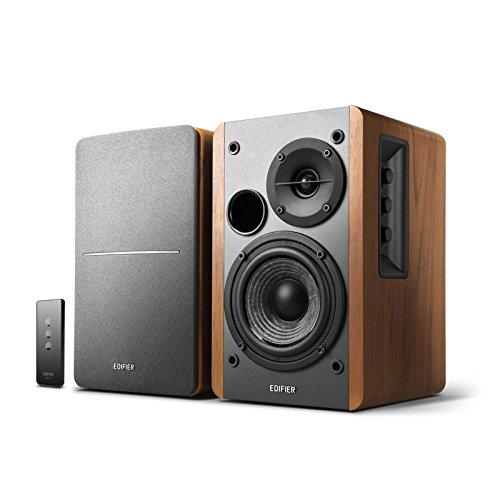
Choosing a monitor-mounted Dell soundbar offers major ergonomic benefits, but understanding how it compares to standalone audio equipment helps clarify expectations. While traditional standalone multimedia speaker systems provide dedicated subwoofers and wider stereo separation across a desk, they also consume desktop space and require separate mains outlets. Dell soundbars emphasize zero-footprint utility, making them ideal for corporate workstations, compact dorm rooms, and tidy home offices where clutter must be minimized. They deliver voice clarity and direct near-field audio that far surpasses the weak acoustic output of built-in laptop speakers.
For listeners seeking expansive dynamic range or high-volume playback, compact soundbars naturally face acoustic limitations due to their slender enclosure volumes. Unlike full-size high-fidelity stereo loudspeakers engineered for expansive listening rooms, monitor soundbars utilize compact stereo drivers tailored for intimate desk listening. The acoustic design prioritizes vocal intelligibility and focused midrange response over sub-bass extension, which is particularly beneficial during remote meetings and everyday video playback. Recognizing these sound profile trade-offs ensures you select the right audio setup for your daily workflow and listening preferences.
Troubleshooting Common Dell Speaker Connection and Audio Problems
If you experience complete silence after connecting your Dell speaker, begin troubleshooting by verifying the basic physical connections. Check that the USB cable is fully seated in a powered port and confirm that any inline or rotary volume knobs are turned up. If using an analog model connected to a monitor audio-out port, verify that your computer is actually sending audio over the display cable by testing computer line-out ports directly. Often, computers inadvertently default to disabled HDMI audio streams or route signals to disconnected headphone sockets, cutting off the speaker feed entirely.
Distorted sound, background buzzing, or intermittent dropouts often stem from power delivery issues or electrical ground loops. When a USB soundbar is connected to an unpowered passive USB hub, insufficient electrical current can cause the amplifier stage to distort during louder audio peaks. Connecting the USB lead directly to a motherboard port on the rear of your PC provides stable voltage and resolves current starvation. If analog speakers exhibit a low-frequency hum, ensure the audio patch cable is routed away from high-voltage monitor power cables and heavy computer power supplies to prevent electromagnetic interference.
When Windows or macOS fails to recognize a USB soundbar in the audio hardware list, inspecting device manager settings provides valuable diagnostic insight. Disconnect the USB cable, wait several seconds, and reconnect it to a different USB port to force the operating system to re-enumerate the hardware bus. In Windows Device Manager, expand the Sound, Video, and Game Controllers tree to verify that the Dell audio device appears without yellow warning symbols. If driver conflicts occur, right-clicking the device and choosing to uninstall the driver before reconnecting the hardware will prompt the operating system to reinstall a clean class-compliant audio profile.
Practical Verification and Maintenance for Long-Term Audio Reliability
Conducting a systematic audio verification after setup ensures your Dell speaker performs dependably across all desktop applications. Play a familiar stereo audio track or run a channel identification utility to verify that left and right channels are oriented correctly according to your listening position. Test the hardware volume dial and any integrated headphone pass-through jacks to confirm clean signal transfer without crackling. For conferencing models, initiate a brief test call to ensure the integrated microphone captures clear speech while the echo cancellation circuitry successfully prevents acoustic feedback.
Maintaining your speaker hardware requires minimal effort but preserves both physical appearance and acoustic clarity over time. Use a soft, dry microfiber cloth or a low-pressure can of compressed air to remove dust particles from the speaker grille cloth and volume potentiometer. Avoid applying liquid cleaners or solvents directly to the speaker enclosure, as moisture can penetrate driver surrounds or internal circuit boards. Keeping the wiring neatly organized with cable ties prevents strain on USB connectors and ensures your desktop audio configuration remains dependable throughout daily use.






Write Your Review
No reviews yet. Be the first to share your experience!