


Television displays deliver sharp picture clarity, yet thin cabinet designs often produce muffled dialogue and weak bass from built-in speakers. Many listeners turn to existing multimedia desktop units to upgrade their living room audio without purchasing a bulky sound system. Learning how to connect bose companion 2 speakers to tv provides an effective way to redirect television sound through active stereo drivers that clarify speech and enhance background effects. While desktop gear like compact notebook speakers is engineered primarily for computer desks, connecting these active units to a modern screen requires understanding specific audio ports and signal pathways.
Most flat-screen televisions feature digital audio outputs, whereas desktop audio setups rely on analog stereo connections. Matching these audio connections ensures reliable sound reproduction and prevents distortion or delayed playback. Proper setup involves identifying whether a display offers a 3.5 millimeter headphone output, analog RCA jacks, or an optical digital connection that needs conversion. Taking a few minutes to inspect available ports and adjust television sound settings will establish a stable, clear audio connection.

Pros
- Outstanding vocal and midrange clarity ideal for virtual meetings, podcasts, and acoustic music
- Simultaneous dual audio inputs make multi-device desktop multitasking simple
- Front-mounted volume dial and headphone port offer effortless accessibility
- Compact vertical profile occupies minimal desk real estate
Cons
- Lacks modern Bluetooth wireless connectivity for cable-free streaming
- No dedicated bass or treble tone dials to adjust the factory sound profile
- Ultra-low sub-bass frequencies taper off on heavy electronic or hip-hop tracks
The Bose Companion 2 Series II Multimedia Speaker System remains a quintessential 2.0 powered speaker upgrade for users who want clean, natural sound without filling their desk with extra hardware. Designed to significantly outperform tinny built-in monitor and laptop speakers, this pair brings the renowned Bose acoustic philosophy into a streamlined personal workspace configuration.
Targeted squarely at home office professionals, college students, and casual desktop listeners, these speakers excel across everyday media tasks. Whether you spend hours on Zoom conference calls, stream background playlists while working, or watch video essays on YouTube, the system renders dialogue and instrumental nuances with clarity and warmth.
Day-to-day usability is where the Companion 2 Series II shines brightest. The dual-input layout lets you leave your primary computer plugged into the back while connecting a secondary device, such as a portable music player or smartphone, simultaneously. Combined with a responsive front-panel volume knob and a dedicated headphone bypass port, the system integrates seamlessly into active workstations.
Ultimately, the Bose Companion 2 Series II is an easy recommendation for listeners who appreciate fuss-free analog connectivity and dependable sound quality. While it skips wireless convenience features, it compensates with durable engineering, articulate nearfield performance, and a sleek form factor that looks right at home beside modern displays.
Acoustically, the Bose Companion 2 Series II focuses on rich midrange performance and fatigue-free highs. Spoken word tracks, podcasts, and acoustic strings are rendered with genuine warmth and lifelike articulation. Treble response remains smooth and rounded, ensuring that long workdays listening to music or attending virtual meetings will not lead to listener ear fatigue.
Low-end reproduction is handled through a tuned acoustic porting system built directly into each enclosure. While these compact 2.0 speakers naturally cannot reproduce visceral sub-bass frequencies below 60 Hz, they deliver an articulate upper-bass presence that gives kick drums, male vocals, and movie sound effects satisfying body without introducing tubby distortion.
The standout audio feature is the proprietary stereo digital signal processing, which artfully widens the listening sweet spot. Despite sitting mere feet away from the monitors on a standard office desk, listeners experience a cohesive stereo image that feels wider than the physical distance between the two speaker cabinets.
Constructed with durable matte composite cabinets and finished in an understated grey tone, the Companion 2 Series II is engineered to blend seamlessly into professional and personal desktop setups. Standing approximately 7.5 inches tall with a slim 3.4-inch width, the enclosures have a slightly backward-angled front baffle that directs the acoustic output toward ear level rather than your chest.
Hardware connectivity is straightforward and reliable. The right satellite functions as the primary control center, hosting the front-facing volume potentiometer, a 3.5mm headphone out jack, and rear analog ports. Dual 3.5mm stereo inputs on the rear panel allow dual-source mixing without the need for manual switcher boxes.
The system operates as an active powered setup via an included external AC power adapter, eliminating the need for an external amplifier or receiver. A single multi-pin umbilical cable connects the right master unit to the left passive speaker, ensuring a clean, low-profile cable run along the back of your workstation.

Pros
- Exceptional vocal clarity focused on speech enhancement
- Quick and simple setup with included optical cable
- Bluetooth connectivity supports up to three devices
- Included remote for easy control of key sound modes
- Compact dimensions ideal for small spaces
Cons
- Deep bass requires separate Bose module purchase
- HDMI cable and wall brackets sold separately
- Limited to first powered-on device for auto Bluetooth connect
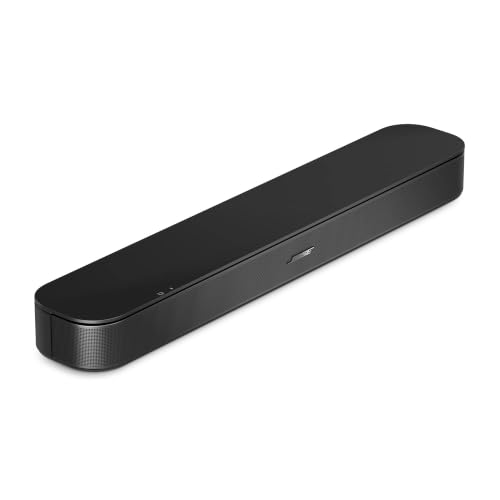
The Bose TV Speaker is a compact all-in-one soundbar designed to solve the common issue of muffled TV audio. With its focus on simplicity, it delivers clearer speech and more natural sound from a small footprint, making it perfect for anyone tired of straining to hear dialogue over background noise during evening binge sessions or family movie nights.
Targeted at everyday TV enthusiasts, this speaker shines in living rooms where space is at a premium. Its two angled full-range drivers create a wider soundstage, pulling you into the action without needing a full home theater system. Real-world use reveals reliable performance for daily viewing, with Bluetooth adding versatility for casual music streaming.
Setup is a breeze with the included optical cable or optional HDMI-ARC, and the remote lets you tweak settings on the fly. While it excels at clarity, pairing it with a Bose bass module unlocks even more potential. Overall, it's a smart, no-fuss upgrade for better TV sound that punches above its size.
Verdict: Highly recommended for straightforward TV audio improvement, especially if dialogue clarity is your top priority.
Bose prioritizes vocal clarity with dedicated dialogue enhancement, ensuring crisp pronunciation even in noisy scenes. The two angled full-range drivers produce wide, natural sound that feels spatial and realistic, elevating standard TV broadcasts to a more engaging level without distortion at normal volumes.
Bass is present but leans light for a compact unit; adding a Bose Bass Module 500 or 700 via a simple cable delivers the depth needed for action movies. Volume levels fill small to medium rooms effectively, and Bluetooth connectivity is stable for streaming music or podcasts from up to three devices, auto-connecting to the first one powered on.
HDMI-ARC and optical inputs ensure low-latency TV sync, making lip-sync issues a thing of the past for seamless viewing.
At just over 2 inches tall, 23 inches wide, and 4 inches deep, this sleek black soundbar slips easily in front of most TVs or mounts to walls with optional brackets. Its minimalist build complements modern setups, staying out of sight while delivering big audio improvements.
No battery here; it plugs into a standard outlet with a 5-foot power cord for continuous operation, perfect for stationary home use without recharging worries. The included compact remote measures 4.1 by 1.6 inches, fitting comfortably in hand for quick adjustments.
Durability suits everyday living room placement, with expandability via bass modules using a standard 3.5mm cable. Weight is light at under a pound, making repositioning effortless.
Practical Setup Guide: Connecting Bose Companion 2 Speakers to a Television
Connecting powered desktop speakers to a television bridges the gap between computer audio gear and contemporary display standards. The Bose Companion 2 series relies on analog inputs, specifically stereo 3.5 millimeter auxiliary jacks and dual RCA ports. Establishing a working configuration requires identifying television audio ports, choosing appropriate cables or adapters, and adjusting sound menus for clean stereo playback.
Active speakers feature internal amplification, requiring only a line-level or headphone signal from the source screen. Unlike passive units that depend on an external audio receiver, these multimedia speakers handle power and volume independently. By applying the correct setup method, listeners can direct television audio through stereo drivers positioned beside the screen for immediate sound improvement.
Understanding Bose Companion 2 Audio Ports and Television Output Types
The rear panel of the right Bose Companion 2 satellite houses dual analog stereo inputs labeled for computer and auxiliary sources. Both inputs accept standard line-level signals, allowing two audio sources to remain connected simultaneously without manual switching. Because these speakers lack digital optical inputs or HDMI connections, they cannot interpret raw digital bitstream data directly from a display.
Contemporary televisions offer varying audio outputs depending on chassis thickness and release period. Older screens frequently feature dedicated red and white RCA audio outputs or a 3.5 millimeter headphone jack. Modern ultra-thin displays usually omit analog ports, relying instead on digital optical Toslink and HDMI connections that require different cabling approaches.
Confusing audio inputs with audio outputs remains a frequent setup mistake when inspecting a television panel. Many displays feature analog RCA ports intended for older media players, which are strictly input jacks that cannot send sound outward. Audio ports intended for external speakers are clearly labeled as Audio Out, Optical Digital Out, or display a headphone symbol next to the terminal.
Method 1: Direct Connection via a 3.5mm Headphone Jack
The simplest way to link these multimedia speakers to a display is through a standard 3.5 millimeter headphone jack. If your television includes an analog headphone output, a basic male-to-male 3.5 millimeter stereo audio cable creates an immediate physical link. Plug one end into the television headphone port and connect the opposite end into the auxiliary or computer input on the right speaker.
Connecting through a headphone jack alters how volume controls function between the television and external speakers. In most display models, inserting a cable into the headphone port automatically mutes internal television speakers. Setting the Bose volume knob to roughly the twelve o’clock position allows the television remote control to regulate daily listening levels without introducing unwanted background hiss.
Headphone jacks provide variable output, which can introduce background hiss if source levels are set too low while speaker amplification is high. To prevent noise floor distortion, adjust the television headphone volume to roughly seventy or eighty percent of maximum. Then, raise the physical knob on the right speaker until sound reaches a comfortable volume, ensuring clean audio during quiet dialogue.
Method 2: Connecting Through Analog RCA Audio Outputs
Televisions equipped with dedicated analog stereo RCA output jacks allow connection via a dual-RCA audio cable or an RCA-to-3.5mm stereo cable. Locate the ports labeled Audio Out on the television panel, consisting of red and white jacks. Insert color-matched RCA plugs into these output terminals and connect the opposite ends to the Bose speaker inputs for a clean, direct analog link.
RCA audio outputs on televisions generally deliver a fixed line-level signal rather than variable volume. A fixed output transmits audio at full line strength, meaning the television remote control will not alter speaker volume. Instead, adjustments must be made using the control knob situated on the front panel of the right speaker, or through connected external source devices like streaming boxes.
Method 3: Using a Digital-to-Analog Converter for Optical Outputs
Most contemporary smart televisions omit analog outputs altogether, leaving a digital optical Toslink port as the primary audio output. Because Bose Companion 2 speakers accept only analog signals, routing sound from an optical-only display requires a compact digital-to-analog converter, known as a DAC. A basic DAC accepts the digital light pulse from the screen and translates it into a standard analog stereo signal.
Setting up an optical converter requires a digital optical cable, a converter unit, and analog stereo interconnects. First, connect the optical cable from the Optical Digital Audio Out port on the television into the converter optical input. Next, run an analog cable from the converter audio output into the Bose speaker inputs. Finally, connect the included USB cable to power the converter box.
While larger traditional stereo loudspeakers often connect through dedicated AV receivers containing built-in decoders, compact converters fulfill the exact same role for desktop pairs. Basic DAC units are generally powered by a five-volt USB connection, which can plug directly into a television service port. Powering the converter from the screen ensures the adapter turns on and off with the television display. If the television USB port introduces ground loop hum, switching to an independent wall outlet power adapter resolves the interference immediately.
Adjusting Television Audio Settings for Digital and Converted Signals
Physical cable connections represent only half of the installation process when routing sound through a digital converter. Smart televisions output audio in various formats, including multichannel surround streams such as Dolby Digital, DTS, or uncompressed stereo PCM. Compact converters cannot decode multichannel surround bitstreams, making it essential to open the television sound menu and set the digital audio output format to PCM.
Disabling internal television speakers is another critical configuration step in the sound settings menu. Modern televisions often continue playing sound through internal drivers even when an external cable is connected. Having both the television speakers and the Bose speakers active simultaneously creates an echo caused by slight processing delays, so setting the sound destination specifically to Optical or External Speakers ensures clean output.
Many televisions also feature advanced audio processing features such as auto-volume leveling, dynamic compression, or surround virtualization. While intended to assist small built-in drivers, these settings can cause unnatural pumping or muffled dialogue when processed by active external speakers. Disabling artificial sound modes and selecting a standard or neutral sound profile allows the Bose drivers to reproduce audio with natural dynamics and clear speech.
Troubleshooting Low Volume, Static, and Audio Synchronization Issues
Ground loop hum is a common annoyance when integrating active computer speakers into a living room television setup. This issue manifests as a continuous low-frequency buzz that frequently occurs when the digital converter is powered by a television USB port on the same electrical circuit. Disconnecting the USB cable from the television and powering the DAC using an independent wall charger usually eliminates the hum completely.
Unusually low output volume often points to an improperly configured headphone output setting or an unadjusted source device. If connecting via the 3.5 millimeter headphone jack, verify that the television headphone output level is raised within the sound menu. Additionally, ensure connected peripheral sources like streaming devices have their internal volume outputs set to maximum, providing a robust signal for the speakers to amplify cleanly.
Audio delay or lip-sync mismatch can occasionally occur when digital signals undergo conversion through external hardware. If speech appears out of sync with on-screen action, inspect the television sound menu for an audio delay or AV sync setting. Most modern televisions provide a millisecond adjustment slider, allowing you to advance or delay the audio stream until speech aligns naturally with the video.
Comparing Desktop Companion Speakers to Dedicated Television Soundbars
While using desktop speakers upgrades thin flat-panel audio, dedicated television soundbars offer distinct architectural advantages for living rooms. Active computer speakers like the Bose Companion 2 Series II Multimedia Speaker are engineered primarily for near-field listening at a desk. In contrast, purpose-built television soundbars are acoustically tuned for far-field dispersion, projecting sound across an entire living room for listeners seated further away.
Dedicated TV audio solutions, such as the Bose TV Speaker (2nd Gen) or the Bose TV Speaker – Soundbar for TV with Bluetooth, integrate seamless modern connectivity that desktop speakers lack. These soundbars feature HDMI-ARC connections, enabling automatic power synchronization and volume control directly through the standard television remote. They also house onboard optical decoders and wireless Bluetooth streaming, eliminating the need for standalone converters and extra cabling.
Soundbars also provide targeted acoustic features like dialogue enhancement modes that elevate spoken frequencies above background noise. While the Bose Companion 2 series provides balanced stereo separation, it lacks specialized equalization modes for speech clarity. Furthermore, users seeking wireless flexibility might compare compact television solutions against portable Bose audio options that can move between rooms easily. Dedicated television audio systems offer integrated features and remote controls tailored specifically for living room entertainment.
Satellite Speaker Placement and Cable Management in Living Spaces
Optimal placement of your speaker satellites significantly influences audio clarity and stereo soundstage reproduction. Position the left and right speakers symmetrically on either side of the television screen, angled slightly inward toward your primary seating position. Keeping the speakers at ear level ensures high-frequency dialogue travels directly to listeners, while leaving breathing room around rear bass ports avoids muddy low frequencies.
Desktop speaker systems feature fixed-length interconnect cables that tether the passive left satellite to the amplified right control speaker. In larger living rooms, this tether cable may not span the full width of an expansive media console or wall-mounted display. If additional width is required, standard 3.5 millimeter stereo extension cables can safely lengthen the interconnect without degrading audio signal quality.
Connecting Bose Companion 2 speakers to a television provides a dependable way to revitalize thin display sound using equipment you may already have on hand. Whether your television supports a direct 3.5 millimeter connection or requires an inexpensive optical converter, following the proper signal chain ensures trouble-free performance. Adjusting television audio settings to output stereo PCM format and silencing internal speakers unlocks crisp dialogue and balanced stereo sound for daily viewing.


Write Your Review
No reviews yet. Be the first to share your experience!