


Integrating modern wireless audio into a traditional stereo system often presents an unexpected cabling puzzle. When exploring how to connect bluetooth speaker to amplifier hardware, many listeners discover that power ratings, signal levels, and wireless protocols do not always align right away. Traditional amplifiers are built to drive passive speaker cabinets through high-level speaker wire, whereas standalone Bluetooth speakers rely on their own internal battery, amplifier, and digital processing circuitry. Bridging these two audio worlds requires selecting the proper output ports or pairing the right external adapters to avoid damaging sensitive audio components.
Whether your goal involves routing music from a vintage receiver out to a portable speaker on the patio or modernizing an older sound system with wireless streaming, the right approach protects your equipment. If you enjoy analog records, configuring a Bluetooth speaker for vinyl setups requires an identical understanding of audio output levels. Similarly, pairing an amplifier with a dedicated high-output Bluetooth speaker depends on clean pre-amplified signals rather than raw speaker-level power. By understanding your amplifier connections and pairing hardware correctly, you can achieve reliable, clear playback across your entire living space.

Connecting a Bluetooth Speaker to an Amplifier: Methods, Signal Paths, and Safety
Connecting a Bluetooth speaker to an amplifier requires routing audio through an unamplified line-level port or an external adapter. Standard speaker binding posts output excessive voltage that will damage a portable speaker’s internal circuitry. Most users complete this setup by connecting a Bluetooth transmitter to the amplifier’s line output or headphone jack to broadcast sound wirelessly. Alternatively, if your goal is streaming from a phone into an amplifier, adding a Bluetooth receiver or choosing an integrated Bluetooth stereo amplifier bridges the connection cleanly.
The Critical Distinction Between Speaker-Level and Line-Level Audio
Understanding the difference between raw speaker-level voltage and delicate line-level audio is essential before connecting any cables. Traditional stereo amplifiers send high-voltage electrical signals through speaker terminals to move passive speaker voice coils. In contrast, portable Bluetooth speakers are active units containing built-in amplifiers designed strictly for low-voltage signals. Feeding an amplified speaker-wire signal into a portable speaker’s auxiliary jack will quickly burn out its internal preamplifier circuits.
Line-level audio outputs provide a steady, low-voltage signal intended for passing sound between components without powering speakers directly. Common amplifier outputs supplying safe line-level audio include ports labeled Tape Out, Rec Out, Line Out, or Preamp Out. These ports bypass the internal power amplification stage, providing a clean audio stream that external transmitters or active speakers can process safely. Checking your amplifier’s rear panel for these specific jacks ensures a secure starting point.
Headphone jacks on the front panel of an amplifier also deliver low-voltage signals suitable for external active hardware. While headphone sockets pass through a small internal headphone amplifier, the output voltage remains safe for auxiliary inputs on Bluetooth speakers. A standard adapter cable from the headphone socket allows immediate audio transmission without accessing rear wiring. Note that plugging into this jack often mutes the main room speakers, which changes how sound distributes.
Method 1: Connecting via an External Bluetooth Transmitter
Using an external Bluetooth transmitter is the most effective way to send sound from an analog amplifier to a wireless speaker. A transmitter accepts an analog signal through RCA or 3.5mm cables and converts that audio into a digital wireless stream. This enables traditional audio components like vinyl turntables or CD players to broadcast directly to portable Bluetooth speakers. The transmitter acts as the wireless bridge, eliminating long cables running across your living space.
To install the transmitter, connect a stereo RCA cable from the amplifier’s Line Out or Tape Out jacks into the transmitter’s audio input. If your amplifier only offers a headphone jack, use a 3.5mm auxiliary cable instead. Once audio connections are secure, connect the transmitter to a reliable USB power source using its included cable. Placing the transmitter a short distance away from the amplifier chassis helps minimize electromagnetic interference from large power transformers.
Establishing the link requires placing both the transmitter and your Bluetooth speaker into pairing mode at the same time. Because neither device features a visual screen, pairing relies on automatic discovery across the wireless band. Keep the speaker close to the transmitter during this initial handshake to ensure they connect quickly. Once the status indicator turns solid, audio playing through the amplifier streams directly to your wireless speaker.
Method 2: Direct Wired Connection Using Pre-Out or Headphone Ports
A direct cable connection remains a dependable alternative when wireless streaming is not strictly required. Many portable Bluetooth speakers include a 3.5mm auxiliary input port alongside their wireless antennas. Running a shielded audio cable between the amplifier and the speaker eliminates wireless latency, signal compression, and connection drops. This approach works especially well if the Bluetooth speaker sits permanently on a shelf or desk near the stereo cabinet.
Completing this wired path requires matching the connector types between your amplifier and the speaker’s auxiliary jack. If your amplifier provides RCA pre-out jacks, select a stereo cable featuring dual RCA plugs on one end and a 3.5mm plug on the other. If you connect through a front-panel headphone port, you may need a quarter-inch to 3.5mm adapter plug. Ensure every connector seats firmly into its jack to avoid channel loss or thin audio.
Managing volume levels correctly prevents signal distortion and protects the internal amplifier of your Bluetooth speaker. Start by setting the volume on the Bluetooth speaker to roughly 70 percent of its maximum range. Next, slowly adjust the volume dial on the amplifier or headphone output until you reach a comfortable listening level. Keeping both devices below their maximum volume limits prevents clipping, preserves battery health, and minimizes background hiss.
Method 3: Integrating Bluetooth Audio Receivers into Stereo Systems
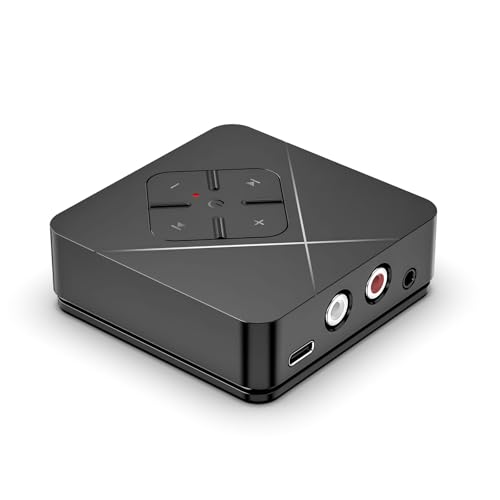
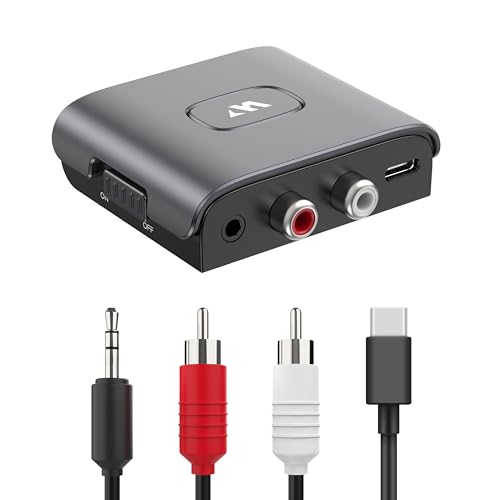
Many listeners investigating amplifier setups actually want to stream wireless music from their mobile devices into existing home stereos. In this scenario, you need a dedicated Bluetooth receiver rather than a transmitter. A Bluetooth receiver captures wireless signals from your smartphone or tablet and translates them into analog line-level sound. That audio then travels via RCA or auxiliary cables into the amplifier’s input ports, modernizing older equipment with wireless streaming.
Hardware such as the WARRKY Bluetooth Audio Receiver for Home Stereo illustrates how dedicated receivers simplify this process. The manufacturer lists dual 3.5mm and RCA output ports, allowing direct connection to an amplifier’s AUX, CD, or Tape inputs. It features an optimized high-gain external antenna designed for coverage up to 164 feet in open spaces and 65 feet indoors. Furthermore, its published specifications highlight a 20Hz to 20kHz frequency response, a signal-to-noise ratio over 90dB, total harmonic distortion under 0.15%, and support for SBC and AAC codecs.
Another practical option for wireless reception is the Ultrbeka 2026 Bluetooth 6.0 Receiver for Home. According to product details, it adopts an upgraded Bluetooth 6.0 chip with transmission range reaching up to 20 meters. It includes multi-display LEDs, functional buttons for volume adjustment or track switching, and low-latency audio support. The unit also features an automatic memory function that stores up to five paired devices, allowing quick reconnection without manual pairing every session.
Method 4: Deploying an Integrated Bluetooth Stereo Amplifier
Replacing separate adapter boxes with an all-in-one receiver offers the cleanest signal path for multi-speaker home setups. An integrated Bluetooth stereo amplifier combines wireless reception, preamplification, and power amplification inside a single compact chassis. This design eliminates external adapter cables, multiple power plugs, and potential signal loss between loose interconnects. It allows you to broadcast phone audio wirelessly while driving traditional passive speaker cabinets directly from the amplifier terminals.
The ELZONYX Bluetooth 5.0 Stereo Amplifier serves as a clear example of this integrated architecture. The manufacturer lists 400W plus 400W peak power with a rated output of 50W by two plus 70W in a 2.1 channel audio configuration. This design allows users to power two passive speakers and one passive subwoofer simultaneously. It incorporates Bluetooth 5.0 wireless streaming alongside physical inputs for USB drives, SD cards, FM radio, and standard RCA audio sources.
Control flexibility is an important advantage of dedicated Bluetooth amplifiers in home entertainment spaces. The ELZONYX unit features independent rotary knobs for subwoofer volume, bass, treble, echo, microphone levels, and master volume. Dual microphone inputs allow karaoke or announcement capabilities, while an included wireless remote handles input switching from across the room. Choosing an integrated unit streamlines your setup if you prefer powering traditional bookshelf speakers without extra adapter boxes.
Managing Audio Codecs, Latency, and Wireless Synchronization
Audio latency is an important factor whenever wireless Bluetooth links handle sound from television or video sources. Bluetooth audio requires time to encode digital packets at the transmitter, broadcast them through the air, and decode them at the speaker. Standard SBC codecs can introduce noticeable audio delay, causing dialogue on screen to drift out of sync with actor speech. When transmitting video audio, choosing hardware that supports low-latency processing helps maintain alignment between picture and sound.
Codec compatibility between your source and your Bluetooth receiver or speaker plays a major role in acoustic clarity. Codecs such as AAC preserve subtle high-frequency details more effectively than basic SBC when streaming from compatible devices. Receivers like the WARRKY unit explicitly support both SBC and AAC, ensuring broad compatibility with modern mobile hardware. For casual music playback, slight transmission latency remains unnoticeable because real-time lip sync is not required.
Antenna placement and room boundaries also affect wireless stability and audio throughput. Thick masonry walls, metal equipment racks, and crowded Wi-Fi routers operating on 2.4GHz frequencies can degrade Bluetooth signal strength. If you plan on streaming sound out to an outdoor speaker with dedicated bass, orienting external antennas toward windows or open doors minimizes dropouts. Maintaining an unobstructed line of sight ensures the cleanest possible data stream over longer distances.
Troubleshooting Ground Loops, Signal Noise, and Low Output
A persistent low-frequency hum through your speakers often indicates a ground loop issue within your adapter setup. Ground loops frequently occur when a Bluetooth adapter draws USB power from the same stereo receiver or television it feeds with audio cables. Because both devices share a common ground path through audio and power connections, electrical noise travels into the audio signal. Powering your Bluetooth receiver or transmitter with an independent wall adapter, such as the dedicated power supply bundled with the WARRKY receiver, usually silences ground hum immediately.
Low audio volume is another common frustration encountered during initial system setup. If music sounds faint despite turning the amplifier dial up, check the independent volume controls on your source device and adapter. Most Bluetooth receivers and portable speakers maintain their own internal digital volume registers that operate independently of the stereo amplifier. Raising the output volume on your smartphone, tablet, or adapter buttons ensures a healthy line-level signal reaches the amplifier inputs.
Frequent signal dropouts or connection failures usually point to saved device conflicts in the receiver memory. Devices with automatic memory functions, such as the Ultrbeka receiver, reconnect automatically to the nearest known device when powered on. If multiple family tablets or phones have paired in the past, the adapter may latch onto an unintended device in another room. Clearing the pairing cache or toggling Bluetooth off on secondary devices restores quick, predictable pairing with your preferred audio source.
Practical Audio Verification and Safe Operating Practices
Conducting a quick physical inspection before powering on your audio equipment protects sensitive components from unexpected electrical surges. Verify that audio plugs are firmly seated into RCA or 3.5mm jacks and that power cables are safely routed away from foot traffic. If you are operating an amplifier with high rated power, ensure all speaker terminals connect exclusively to passive speakers rather than active portable equipment. Taking a few seconds to double-check wiring prevents accidental damage to delicate internal circuitry.
When positioning your sound hardware, proper placement improves both acoustic dispersion and wireless reliability. Placing a Bluetooth speaker for large spaces on an elevated shelf rather than on the floor allows sound waves to travel cleanly across the room. Elevating the speaker also reduces physical barriers between its internal Bluetooth antenna and your transmitting hardware. Balanced acoustic placement paired with solid wireless reception delivers consistent, distortion-free sound throughout your listening environment.
Connecting a Bluetooth speaker to an amplifier is straightforward once you respect the distinction between line-level and speaker-level signals. By choosing an external Bluetooth transmitter for wireless broadcasting, a direct auxiliary cable for desktop listening, or a dedicated receiver to upgrade your stereo, you can tailor your setup to your exact audio needs. Review your amplifier ports, maintain safe gain levels, and enjoy seamless wireless sound across all your favorite media.




Write Your Review
No reviews yet. Be the first to share your experience!