


Streaming music seamlessly across an entire home often leaves listeners wondering what to do with their favorite traditional audio systems. Learning %how to add speakers to airplay% allows audio lovers to bridge classic analog equipment with modern wireless convenience. By introducing dedicated network adapters or specialized streaming hardware, powered monitors and vintage stereo receivers can join an Apple ecosystem in minutes. When evaluating different audio setups, reviewing Bluetooth speaker configurations provides helpful contrast against network-based streaming protocols.
Integrating existing hardware into AirPlay eliminates the expense of replacing quality speaker cabinets that already deliver balanced sound. Whether someone wants synchronized whole-home playback or simple desktop streaming from an iPhone, the setup process depends on network stability and line-level inputs. Dedicated Wi-Fi streaming adapters like the ACEMAX M5 AudioCast receive audio over local networks, while auxiliary Bluetooth receivers offer quick alternative wireless paths. Understanding the exact connections, power needs, and streaming standards ensures seamless audio distribution without annoying lag or signal drops.

Pros
- Delivers full-bandwidth Wi-Fi streaming with zero audio compression or range dropouts
- Enables whole-home synchronized multi-room playback on a budget
- Broad support for Apple AirPlay, DLNA, and UPnP streaming protocols
- Ultra-compact puck profile easily conceals behind existing audio equipment
Cons
- Requires constant USB power as it lacks an internal rechargeable battery
- Wall power adapter block is not included in the box
- Limited to 2.4 GHz Wi-Fi networks and cannot connect to 5 GHz bands
The ACEMAX M5 AudioCast is a purpose-built Wi-Fi receiver engineered to convert any traditional wired speaker, receiver, or soundbar into an intelligent wireless audio hub. Instead of replacing high-grade vintage audio gear with expensive modern wireless speakers, this compact device connects directly through a standard 3.5mm AUX jack, delivering contemporary network streaming capabilities to your favorite stereo hardware.
Setup is straightforward using the free AudioCast companion app on iOS or Android. Within minutes, the adapter connects to your local 2.4 GHz Wi-Fi network, unlocking access to popular music platforms such as Spotify and internet radio stations. Its native support for AirPlay and DLNA protocols makes streaming effortless whether you are queuing tracks from an iPhone, an Android tablet, or a home media server.
For homeowners looking to create an interconnected whole-house audio setup without spending thousands on proprietary systems, the multi-room grouping feature stands out. You can deploy multiple units across your living room, kitchen, and patio, synchronizing them for party mode or assigning unique audio streams to individual rooms right from your smartphone.
Ultimately, the ACEMAX M5 AudioCast offers exceptional utility for music enthusiasts who value high-fidelity sound and smart convenience. It bridges the gap between classic analog audio setups and modern wireless ecosystems, making it a smart and cost-effective addition to any home entertainment system.
Unlike conventional Bluetooth adapters that compress audio signals and compromise dynamic range, the ACEMAX M5 streams music over Wi-Fi for noticeably cleaner reproduction. Bass frequencies come through deep and tight, vocals retain their natural warmth, and the upper treble remains crisp without the harsh digital artifacts often found in wireless audio bridges.
Network stability is rock-solid across standard 2.4 GHz home networks, providing dependable coverage that far exceeds the typical 30-foot limit of Bluetooth. You can move freely around your house, take incoming phone calls, and watch videos on your phone without cutting off the music playback flowing to your speakers.
Latency remains minimal during normal music playback, and multi-room synchronization performs admirably, keeping audio in step between adjacent rooms. It ensures your favorite high-fidelity playlists maintain their punch and clarity from the first beat to the final fade-out.
Measuring just under two inches across and weighing under three ounces, the ACEMAX M5 AudioCast features a minimalist circular puck design. Its lightweight, matte exterior is understated enough to sit unnoticed on a desk or tuck discreetly behind a heavy home theater receiver, bookshelf speaker cabinet, or desktop monitor.
Regarding power and battery requirements, the unit operates entirely on continuous external power via its micro-USB port rather than an internal rechargeable battery. While this means you must keep it plugged in during playback, it allows the device to stay perpetually active and ready on your home network without battery degradation over time.
You can power the adapter using any standard USB port on the back of your television, an audio receiver, a spare wall charger, or even a portable power bank for outdoor patio gatherings. Its lightweight build makes it easy to reposition anywhere your home Wi-Fi network reaches.

Pros
- High-bitrate LDAC decoding preserves pristine audio clarity and dynamic range
- Next-generation Bluetooth 6.0 ensures instant connectivity with no audio dropouts
- Multi-point pairing allows seamless switching between two connected phones or tablets
- Compact, clean footprint tucks away neatly behind audio racks and television stands
Cons
- Operates exclusively as a receiver and cannot transmit audio from TVs to Bluetooth headphones
- Requires a continuous USB power connection because it lacks an internal rechargeable battery
- LDAC streaming requires a compatible Android device, defaulting to standard codecs on iOS
The UGREEN Bluetooth 6.0 LDAC Audio Adapter is engineered to breathe wireless functionality into traditional home stereo equipment, active bookshelf speakers, and vintage AV receivers. Many music enthusiasts hesitate to retire classic amplifiers that deliver rich analog warmth simply because they lack modern streaming features. This compact adapter bridges the gap by providing high-resolution wireless streaming straight to standard 3.5mm AUX and dual RCA stereo inputs.
Setup is genuinely plug and play in real-world use. Once connected to a USB power source and hooked up to your amplifier, the unit enters pairing mode immediately. Thanks to the updated Bluetooth 6.0 chipset, device recognition is fast, and the receiver holds a rock-solid connection with smartphones, laptops, and tablets up to 33 feet away. Dual-device pairing also makes sharing music effortless during gatherings, allowing two users to alternate playlists without tedious pairing cycles.
Ultimately, this adapter is a high-value upgrade for listeners who want to bring modern streaming convenience to their favorite analog setups. While it functions strictly as a receiver rather than a transmitter, its audio purity, low latency, and dependable connectivity make it a top-tier choice for any home audio renovation.
Acoustic fidelity is where this adapter stands out, driven primarily by its native support for Sony Hi-Res certified LDAC decoding. By processing wireless audio streams up to 24-bit/96kHz, the receiver preserves high-frequency micro-details that standard SBC or AAC compression tends to truncate. Cymbals and brass retain an airy, natural decay, while acoustic guitars display crisp string resonance without harsh sibilance.
Across the low-end and midrange frequencies, the adapter maintains a balanced, uncolored sound profile. Bass notes hit with tight definition and punch without bleeding into the lower mids, ensuring that male and female vocals remain centered, articulate, and clear. Furthermore, the enhanced bandwidth of Bluetooth 6.0 minimizes audio-video sync issues, making it well-suited for streaming concert performances or television sound to existing stereo monitors.
The exterior of the UGREEN receiver is constructed from specialized flame-retardant PC material, providing superior heat tolerance and structural safety in tight entertainment centers. Its compact, low-profile footprint allows it to sit unobtrusively alongside preamps, turntables, or compact desktop amplifiers without adding visual clutter to your living space.
For hardware connections, the rear panel includes both a 3.5mm auxiliary port and dedicated left/right RCA jacks to ensure broad compatibility with modern and vintage gear alike. The receiver is powered via a standard USB port, guaranteeing continuous, stable operation without the eventual battery wear or recharge cycles typical of portable wireless dongles.
Complete Guide on How to Add Speakers to AirPlay
Bringing existing audio hardware into an Apple streaming environment requires connecting a dedicated Wi-Fi audio adapter or receiver directly to the auxiliary or line inputs of your sound system. Traditional speakers cannot interpret wireless digital packets on their own, meaning an intermediary device must translate the incoming AirPlay stream into an analog or optical audio signal. Once this adapter joins your local home network, your Apple devices recognize the connected setup as an active output destination within Control Center. This straightforward conversion lets you modernize reliable high-fidelity stereo systems without discarding capable cabinets, amplifiers, or precision drivers.
Distinguishing Powered Speakers from Passive Audio Cabinets
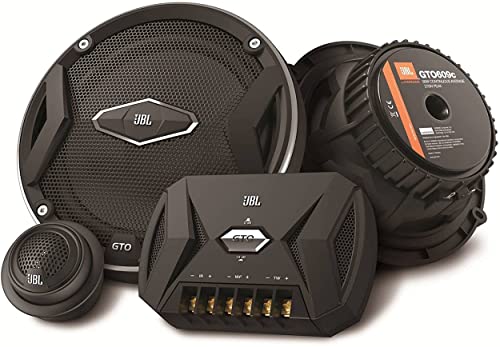
Before purchasing or wiring any streaming adapter, verifying whether your speakers are powered or passive is the critical first step. Powered or active speakers contain internal amplifiers and plug directly into standard wall power outlets, typically featuring 3.5 millimeter auxiliary ports, RCA jacks, or optical inputs on the rear panel. Passive speakers, on the other hand, lack internal power amplification and rely entirely on raw speaker wire connected to an external stereo amplifier or home theater receiver. If you attempt to connect a streaming adapter directly to passive terminals without an amplifier, no audible sound will occur because the signal remains at an unamplified line level.
When integrating passive setups, the streaming receiver connects directly into an available analog input on your amplifier, such as the CD, AUX, or Tape jacks. The amplifier handles the voltage boost and current delivery required to move the physical speaker cones, while the streaming adapter handles network reception and digital conversion. Active speakers simplify this chain considerably because the line output from an adapter plugs straight into the master speaker cabinet. Matching your equipment configuration early prevents purchasing incorrect cabling or overcomplicating an otherwise straightforward audio installation.
In custom architectural or on-wall speaker installations, locating the amplifier and streaming adapter in an accessible cabinet makes maintenance and cable routing simpler. Many wall-mounted systems use centralized multi-zone amplifiers where each zone can receive its own dedicated streaming adapter for independent room control. Keeping line-level connections clean and minimizing long runs of unshielded analog cable helps protect audio quality from electromagnetic interference generated by nearby household electronics. Proper hardware classification guarantees your conversion project proceeds smoothly without signal mismatches or frustrating wiring mistakes.
Hardware Options for Converting Traditional Speakers
Dedicated Wi-Fi streaming adapters stand out as the primary method to bring older audio gear into modern streaming environments. Devices such as the ACEMAX M5 AudioCast Wi-Fi Wireless Audio adapter function as external network sound cards that connect to traditional speakers via a 3.5 millimeter auxiliary cable. These network adapters tap directly into your 2.4 GHz home Wi-Fi network and maintain compatibility with streaming protocols including AirPlay 1, DLNA, and UPnP. Because audio travels across local Wi-Fi rather than short-range wireless channels, the connection maintains full line-level audio fidelity without unwanted compression artifacts.
When choosing an adapter, examine the supported audio interfaces and protocol capabilities listed in the manufacturer specifications. Some basic streaming units offer standard 3.5 millimeter analog stereo jacks, while more advanced adapters might include optical digital outputs for external digital-to-analog converters. If an adapter relies on a companion mobile application for initial network setup, verify that the software runs reliably on your mobile operating system. Ensuring the adapter supports continuous power via standard micro-USB or USB-C ports also allows convenient placement behind stereo components.
Buyers who do not require multiroom grouping or direct Apple HomeKit synchronization sometimes consider high-resolution Bluetooth adapters instead. For instance, the UGREEN Bluetooth 6.0 LDAC Audio Adapter provides high-resolution wireless streaming over standard RCA or AUX inputs. While Bluetooth does not use the AirPlay protocol, it still allows iPhones, iPads, and Mac computers to beam music wirelessly across a room with minimal configuration. Understanding whether you need multiroom network casting or simple point-to-point wireless transmission will clarify which adapter type fits your daily habits.
Step-by-Step Wi-Fi Streaming Adapter Setup
Setting up a Wi-Fi audio streamer begins with establishing physical connections before handling any software configuration. First, connect the included 3.5 millimeter audio cable or RCA interconnect from the adapter audio-out port to your powered speaker or stereo amplifier input. Next, plug the adapter power cable into a dependable USB wall block or a powered USB service port on your audio receiver. Turn on your speaker system or select the corresponding input channel on your amplifier, adjusting the volume to a moderate level so you can hear status chimes clearly.
Once the hardware powers up, open your smartphone Wi-Fi settings and locate the temporary network broadcast by the streaming adapter. Connect your phone directly to this temporary network to initiate the initial handshake process. Open the companion setup application, such as the AudioCast utility for ACEMAX hardware, and follow the on-screen prompts to select your home 2.4 GHz Wi-Fi network. Enter your network security password carefully, allowing the adapter several moments to join the local router and confirm its operational IP address.
After the adapter successfully joins your home network, reconnect your smartphone back to your main Wi-Fi band. Open the companion application once more to rename the device according to its physical location, such as Living Room Stereo or Office Bookshelf. Naming each adapter distinctly prevents confusion later when multiple playback destinations appear in the iOS Control Center menu. At this stage, test a short audio track from the companion app or native streaming service to confirm clear, uninterrupted playback.
Routing Audio Through iOS Control Center and macOS
Once the adapter is connected and recognized on the home network, sending music from an Apple device requires only a couple of taps. On an iPhone or iPad, swipe downward from the top-right corner of the screen to open the Control Center interface. Tap the audio playback card located in the upper-right quadrant, then touch the small AirPlay triangle and concentric circles icon. A list of available network destinations will populate automatically, showing your newly configured speaker alongside any native Apple devices on the network.
Tap the designated speaker name in the list, and your iOS device will redirect audio output across the local Wi-Fi link. The volume slider within Control Center now adjusts the output level sent to the adapter, though your physical amplifier volume knob remains the master gain control. For macOS users, clicking the Sound icon in the menu bar displays an identical list of network output devices for system-wide audio routing. Music, podcasts, system alerts, and web browser audio will stream directly to your stereo speakers with minimal operational effort.
When streaming from specific applications such as Spotify, Apple Music, or third-party radio apps, you can also select the AirPlay output directly inside the playback screen. This internal routing feature lets you control playback queues and volume without leaving the active music player. If someone else in your household shares the same Wi-Fi network, their Apple devices will discover the same speaker adapter automatically. This shared access makes hosting social gatherings simple, as guests can easily contribute songs to the playback queue without pairing cables.
AirPlay Protocol Differences and Playback Latency
Understanding the differences between the original AirPlay protocol and AirPlay 2 helps set realistic expectations for converted speaker systems. Many standalone aftermarket streaming adapters, including the ACEMAX M5 AudioCast, operate on the legacy AirPlay 1 framework. AirPlay 1 functions as a point-to-point wireless transmission pipeline that streams real-time audio directly from a single master device to a single destination. While the audio fidelity remains CD-quality and uncompressed, the protocol introduces a brief buffer delay of approximately two seconds.
This inherent transmission delay in legacy AirPlay makes it less suitable for watching video content because dialogue may not sync accurately with on-screen lip movement. However, for casual music listening, podcast playback, and background radio streaming, this buffer delay presents zero practical drawbacks. Modern AirPlay 2, by comparison, incorporates advanced multi-device buffer synchronization and HomeKit integration, permitting simultaneous playback across multiple speaker brands. Converted legacy systems on original protocols achieve multiroom playback through proprietary app grouping rather than native Apple HomeKit grouping.
If your primary goal involves whole-home synchronization across multiple rooms from the native Apple Control Center, genuine AirPlay 2 hardware remains necessary. Nevertheless, users looking for an economical way to stream music to a single dedicated stereo setup will find original AirPlay adapters perfectly capable. Evaluating whether you require multiroom party modes or simple single-zone wireless streaming prevents overspending on complex networking equipment. Both protocol generations provide robust wireless convenience compared to tethering your phone with a short physical cable.
Wi-Fi Audio Streaming Versus Bluetooth Adapter Alternatives
Choosing between Wi-Fi audio adapters and high-resolution Bluetooth receivers depends heavily on your listening habits and environment. Wi-Fi adapters communicate across your local network router, which means your phone does not need to remain within close physical proximity to the speakers. You can carry your iPhone into the kitchen or backyard without causing audio stutter, provided your Wi-Fi signal reaches both areas. Furthermore, incoming phone calls and text notification sounds do not disrupt your music playback when streaming over dedicated network protocols.
Bluetooth receivers, such as the UGREEN Bluetooth 6.0 LDAC Audio Adapter, operate through direct device-to-device radio links without touching your home router. This architecture provides effortless plug-and-play operation, making it ideal for temporary listening spaces or rooms with weak wireless network reception. The inclusion of high-resolution codecs like LDAC supports 24-bit audio reproduction, delivering refined sound fidelity on compatible sources. Additionally, Bluetooth adapters typically support dual device pairing, allowing two household members to alternate tracks without tedious network handshakes.
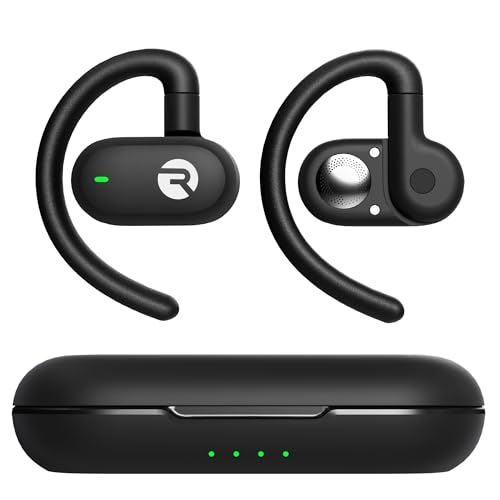
For listeners comparing different room setups, exploring standalone wireless audio gear helps clarify whether a fixed home adapter or an all-in-one wireless unit better fits your lifestyle. Bluetooth units excel in straightforward, low-latency playback where network routers are unavailable or restricted by guest security policies. Conversely, Wi-Fi streaming adapters provide superior whole-home integration and freedom from range constraints within large domestic spaces. Weighing these practical differences ensures your converted speaker system matches how you actually consume media.
Router Optimization, Troubleshooting, and Gain Staging
Smooth wireless audio streaming relies on network stability, making router configuration an essential part of the conversion process. Most compact Wi-Fi audio adapters operate exclusively on the 2.4 GHz frequency band due to its superior range through walls and floors. If your dual-band router uses automated band steering, temporarily separating your router bands into distinct network names can resolve setup communication conflicts. Additionally, verifying that your router allows Multicast DNS traffic without client isolation ensures your Apple devices discover active receiver nodes promptly.
When an AirPlay speaker suddenly drops offline or fails to appear in Control Center, a quick diagnostic sequence restores operation. Toggling your phone Wi-Fi off and back on flushes the local discovery cache, while power cycling the adapter clears temporary memory faults. If playback drops out intermittently during songs, inspect physical cables for loose fits and confirm your network is not congested by heavy downloads. Assigning a reserved DHCP IP address to your streaming adapter within your router settings permanently stabilizes network discovery across all connected devices.
Optimizing your gain staging ensures high-fidelity playback without introducing unwanted amplifier noise or digital clipping. Set your physical amplifier or powered speaker volume knob to approximately seventy percent, managing daily listening levels from your Apple device. Positioning bookshelf speakers at ear level and slightly away from rear room boundaries further refines acoustic clarity and bass balance. With these simple setup steps and network precautions, you can enjoy seamless, high-resolution wireless streaming through your favorite traditional speakers for years to come.




Write Your Review
No reviews yet. Be the first to share your experience!