


Desk clutter remains one of the most common frustrations for anyone trying to build a clean computer workstation or gaming setup. Traditional computer audio systems frequently require two separate speaker cabinets flanking your monitor, which eats away valuable mouse room and leaves a tangle of interconnect cables behind your display. Many computer users naturally wonder whether can you use a soundbar as pc speakers to reclaim desk real estate without sacrificing daily listening clarity. While large living room soundbars are built to fill wide open spaces from across the room, modern compact soundbars are tailored specifically for close-range desktop audio.
Opting for a compact soundbar allows you to slide a single horizontal bar directly beneath your monitor riser, keeping your work surface open and organized. Whether you decide on a dedicated desktop bar or adapt an existing television unit, understanding connectivity and speaker tuning ensures you achieve balanced sound for gaming, video calls, and media playback. Many listeners who evaluate powered active bookshelf speakers discover that a streamlined horizontal bar offers an easier setup with fewer cables. Choosing the right device comes down to your computer ports, audio expectations, and workspace dimensions.

Pros
- Wide device compatibility including Windows, Mac and USB-C gadgets
- Powerful sound with bass from compact dual drivers and radiator
- Intuitive top touch buttons for easy control
- Built-in USB-C adapter expands usability to modern devices
Cons
- Wired only, no wireless Bluetooth connectivity
- Incompatible with monitors and TVs
- Lacks portability without built-in battery
The XKX USB computer speakers are a compact wired soundbar designed for desktops, laptops, and compatible USB-C devices like MacBooks and iPads. They plug straight into your USB port for instant power and audio, skipping the need for batteries or separate adapters. Ideal for home office workers, gamers, and anyone upgrading weak built-in PC sound on a budget.
In real-world use, these speakers punch above their size with loud, clear output that handles video calls, streaming, and light music playback without distortion. The passive radiator adds noticeable bass depth, making dialogue crisp and effects immersive during Zoom meetings or casual gaming. Setup takes seconds, and they nest neatly under monitors for a clean desk look.
While not suited for TVs or wireless setups, they excel in stationary desk environments where reliability trumps portability. Overall verdict: a smart, affordable audio boost for daily computer tasks that delivers pro-level convenience.
Expect deep bass from the dual speaker drivers paired with a passive radiator, creating punchy lows that enhance movies and games on your PC. Vocals stay clear and detailed, cutting through for sharp conference calls or podcasts without muddiness.
Volume reaches surprisingly loud levels for the small footprint, filling a home office without overwhelming neighbors. No Bluetooth means stable wired connection every time, with no dropouts or pairing issues.
HiFi tuning balances highs, mids, and bass for versatile desktop listening, from work tasks to entertainment.
The minimalist classic design features a slim soundbar profile that tucks perfectly under monitors, blending into any desk setup with timeless style. At just a few inches tall, it saves space while looking premium.
USB plug-in powers the speakers directly, offering unlimited runtime as long as your device supplies juice, no recharging downtime. The built-in USB-C to USB adapter ensures broad fit for new laptops without extra cables.
Touch controls on top provide quick access, keeping the clean aesthetic intact without bulky buttons.

Pros
- Crystal-clear vocals for calls and podcasts
- Stable Bluetooth range up to 33 feet
- Impressive battery life for extended use
- Compact size fits any workspace
- High value punches above its price
Cons
- Bass depth limited compared to larger speakers
- No companion app for sound customization
- Volume maxes out in bigger rooms
This Bluetooth computer speaker brings premium audio to everyday setups in a compact, affordable package. Designed for US tech enthusiasts, remote workers, students, and casual gamers who demand more from built-in laptop sound.
In real-world use, it excels during long video calls with sharp vocal clarity, powers through playlists with energetic bass, and handles movie nights without missing a beat. Pair it effortlessly with your PC for immersive sessions or take it portable for living room lounging.
Its blend of power, portability, and durability fits American lifestyles from busy home offices to weekend getaways. No fuss setup means instant gratification.
Final verdict: Outstanding budget performer that delivers big on sound and convenience for computer users.
Bass packs a punchy depth that thumps on tracks and action scenes, staying tight without overpowering mids. Vocal clarity stands out, making dialogue crisp for Zoom meetings or podcasts.
Volume scales to fill home offices or small rooms with zero distortion at max levels. Bluetooth 5.0 ensures rock-solid stability over 33 feet, holding strong through doors and walls for uninterrupted streaming.
Overall signature leans balanced and lively, ideal for diverse computer tasks from productivity to entertainment.
Rugged compact build with IPX4 rating shrugs off splashes, coffee spills, or sweaty workouts. Weighing under 1 pound, it travels light from desk to dorm or tailgate.
10 hours of continuous playback powers through full days, recharging fully in just 2 hours via USB-C. Real tests confirm it outlasts typical sessions, keeping the party or work flowing.
Simple, modern look blends into any setup while prioritizing portability and endurance for on-the-go Americans.

Pros
- Upgraded drivers provide rich bass and clear highs
- RGB lightshow projection enhances gaming and music vibes
- Easy plug-and-play connectivity across multiple devices
- Precise volume knob simplifies control
- Compact size ideal for desktop setups
Cons
- Requires USB power source, no built-in battery
- Wired 3.5mm audio only, lacks Bluetooth
- Bass may feel limited in larger rooms
The Redragon GS560 is a compact 2.0 channel desktop soundbar that transforms ordinary PC audio into an engaging experience with its rich sound and synchronized RGB lighting. Designed for gamers, remote workers, and anyone upgrading their setup, it sits neatly under monitors or TVs, delivering crystal-clear audio without cluttering your desk.
In real-world use, it excels during gaming marathons or video calls, where the dynamic lightshow pulses to the beat, creating an immersive atmosphere. The upgraded drivers handle everything from explosive game effects to clear dialogue, making it a standout for budget setups.
Setup is effortless with USB power and a 3.5mm cable, compatible with PCs, laptops, TVs, and phones. While it shines in small spaces, it prioritizes style and clarity over room-filling volume. Overall verdict: a fun, affordable audio boost for desk warriors.
The GS560 boasts upgraded drivers for crystal-clear sound quality paired with rich bass, perfect for punchy game soundtracks and crisp vocals in movies or calls. It maintains clarity at moderate volumes, avoiding distortion during extended sessions.
With four backlit modes including dynamic RGB sync, the audio-light display elevates performance, bouncing waves or disco effects to your music. Volume levels suit desktop use, filling personal workspaces effectively without overwhelming neighbors.
Connected via 3.5mm, it offers stable wired performance across devices, though it lacks wireless options for ultimate flexibility.
Sleek and compact at 16 inches, the black soundbar features a modern touch-control backlit display and a delicate volume knob with on/off switch, blending functionality with style on any desk.
Its lightweight build and low-profile design make it easy to position under devices, with glowing LED illumination in static or dynamic modes adding visual appeal without bulk.
USB-powered for continuous operation, it requires a nearby port rather than a battery, ensuring reliable performance during long workdays or gaming without recharge worries.

Pros
- Effortless plug-and-play USB connection
- Crisp stereo audio and balanced bass
- Touch-sensitive colorful lights for style
- Compact soundbar fits tight desk spaces
- Works with most PCs and laptops seamlessly
Cons
- Requires constant USB power source, no built-in battery
- Not compatible with Xbox or projectors
- Bass may not satisfy audiophiles seeking deep rumble
The LENRUE Computer Speakers are a compact USB-powered soundbar designed to elevate your desktop or laptop audio experience. With a slim profile that slips under monitors, they deliver stereo sound through a single USB connection, making them a hassle-free upgrade for everyday computing.
Targeted at gamers, home office workers, and casual media consumers, these speakers shine in setups where space is premium and simplicity rules. Connect to your PC or laptop, and enjoy crisp audio for gaming sessions, movie nights, or music playback without fumbling with extra cables or software.
In real-world use, the balanced bass and clear highs provide engaging sound for budget setups, while touch-sensitive lights add a gaming vibe to your desk. Performance holds up for light to moderate volume needs, turning bland monitor speakers into a vibrant audio hub.
Overall verdict: A solid pick for affordable desk audio enhancement, especially if you value ease and style over portable power.
Expect crystal-clear stereo sound with balanced bass that punches above its price for gaming and media. Vocals come through crisp and detailed, making dialogue in movies or calls stand out without muddiness.
Volume levels fill small rooms adequately for desk use, with no distortion at comfortable listening levels. The USB connection ensures stable, low-latency audio delivery straight from your PC or laptop.
Ideal for focused sessions like work calls or single-player games, where clarity trumps earth-shaking bass. Touch controls keep adjustments quick during intense play.
The space-saving soundbar design is slim and monitor-friendly, weighing next to nothing for easy desk placement. Touch-sensitive lighting offers soft, breathing colors that enhance your setup's aesthetics without overwhelming.
No built-in battery means unlimited playback as long as your USB-powered device is on, perfect for all-day desk use. Charges via any USB port, with a included USB-C adapter for modern laptops.
Build feels sturdy for stationary use, though not rugged for travel. Focuses on compact efficiency over portability, suiting home office or gaming rigs.
Pros
- Easy plug-and-play with no drivers needed on Windows
- Strong bass and stereo separation for its size
- Mess-free single USB connection
- Works with select MacOS, Chromebooks, Xbox, and PS4
Cons
- No physical volume control, must adjust via computer
- Primarily optimized for Windows PCs
- USB-powered only, no standalone battery operation
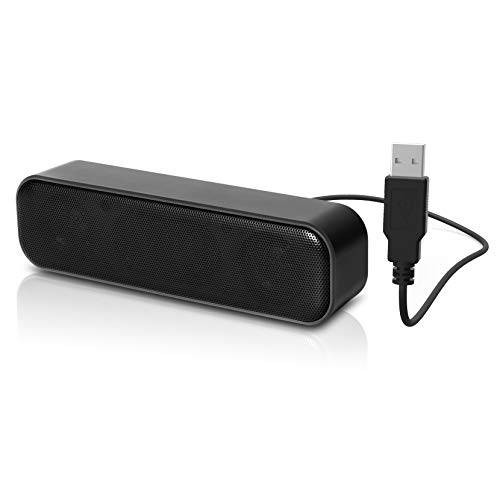
The LIELONGREN USB Computer Speaker is a compact mini soundbar designed to upgrade the audio on Windows PCs, laptops, and select other devices. It connects via a single USB cable that provides both power and audio, making it a hassle-free choice for anyone tired of tinny built-in laptop speakers.
Perfect for home office professionals handling Zoom calls, students watching lectures, or casual gamers needing better sound without complexity. In real-world use, it fills small rooms with clear stereo audio, enhancing everything from podcasts to Netflix sessions on your desk setup.
Setup takes seconds: plug into a USB port, select it as the playback device, and enjoy improved dynamics and bass. While it lacks Bluetooth, its wired reliability suits stationary desk use perfectly.
Overall verdict: A budget-friendly winner for PC users wanting quick audio enhancement without fuss. Highly recommended for everyday computing tasks.
Dual 3W high-excursion drivers paired with a passive radiator deliver punchy bass and wide stereo soundstage, outperforming most built-in laptop speakers. Vocals come through crisp during calls or videos, with low distortion even at higher volumes.
Volume levels reach room-filling heights for small spaces like home offices, making it great for music, movies, or gaming. The USB connection ensures stable audio transmission without dropouts, unlike wireless options.
Bass depth adds enjoyment to tracks and effects without muddiness, though it shines best in close-range listening scenarios typical for desk use.
Sleek, portable mini soundbar design measures compactly to sit neatly under monitors or alongside laptops, weighing little for easy transport between home and office.
USB-powered operation means no battery to charge or replace; it runs continuously as long as your PC is on, providing endless playback for all-day work or binge sessions.
Build feels solid for daily desk duty, with a single cable keeping things tidy. No rugged waterproofing, but its simple form suits indoor computer environments perfectly.

Pros
- Effortless plug-in setup with no drivers needed
- Premium rotary encoder knob for intuitive volume adjustments
- Strong bass and clear highs for its size
- Wide device compatibility including Mac, Windows, and more
- RGB lighting adds fun without overpowering the sound
Cons
- Wired USB connection limits placement flexibility
- No wireless Bluetooth option for cable-free use
- RGB lights may distract in dark rooms if not turned off
The XKX USB soundbar is a compact 15-inch external speaker designed for desktops, laptops, and monitors, transforming weak built-in audio into a hi-fi experience. It plugs directly into USB ports on PCs, Macs, and more, making it perfect for gamers, remote workers, and anyone tired of tinny laptop sound.
In real-world use, it shines during gaming sessions with punchy bass from dual boosting ports that add depth to explosions and music, while the dual 2-inch drivers handle vocals and effects clearly at high volumes. The rotary knob syncs perfectly with your system volume for quick adjustments, and RGB lights sync to the beat for added immersion.
Setup takes seconds with the included USB-A adapter, and it works across Windows, Mac, Chrome OS, and Linux without fuss. For desk-bound users seeking affordable, reliable sound enhancement, this soundbar delivers value without complexity.
Verdict: A solid choice for budget-conscious setups needing loud, bass-forward audio and gaming flair. It punches above its price for everyday desk use.
Powered by dual 2-inch super-magnetic drivers, this soundbar produces HD stereo sound with impressive volume and fidelity, bringing music genres to life with natural clarity. Punchy bass from dual ports creates spacious immersion, making action movies feel dynamic and games more engaging.
Vocal clarity stays strong even at max volume, avoiding muddiness, while the overall soundstage suits close-range desk listening. No distortion noted in typical use, though it excels most in mid-to-high volumes for bass impact.
As a wired USB speaker, performance ties directly to your device's output, delivering consistent, stable audio without dropouts common in wireless options.
The sleek 15-inch bar fits neatly under monitors or on desks, with a durable build featuring a premium rotary encoder knob for smooth, precise control. RGB lights in the front logo pulse with music, cycle through 256 colors, or turn off easily to suit your setup.
USB-powered design means no separate battery or charging; it draws power directly from your computer for unlimited playback as long as your device is on. The native USB-C plug plus included adapter ensures a stable, tight connection on various ports.
Lightweight and compact, it adds minimal clutter while enhancing your workspace aesthetics, ideal for gamers wanting style without bulk.
Pros
- Rich stereo sound from dual drivers for clear vocals and bass
- Versatile connectivity with Bluetooth 5.0 and Aux input
- Plug-and-play USB power works with any laptop or PC port
- Slim profile saves desk space under monitors
- Anti-magnetic tech reduces static for cleaner audio
Cons
- Requires constant USB power source, no built-in battery for portability
- Bass depth solid for desks but not room-filling for large spaces
- Ambient lights may distract in bright work environments
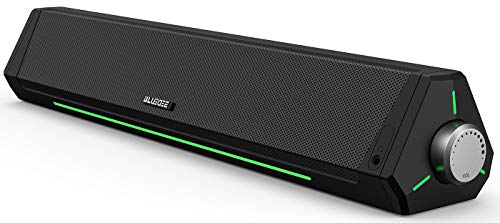
The Bluedee computer speakers are a sleek soundbar designed for desktop PCs and laptops, transforming ordinary setups into immersive audio zones. With dual drivers and diaphragms, they blend high-pitched clarity with deep bass, making them ideal for gamers, remote workers, and media enthusiasts who want better sound without bulky speakers.
In real-world use, these speakers shine in home offices where space is premium. Plug them into a USB port, connect via Bluetooth or Aux, and enjoy static-free audio for calls, videos, or playlists. The compact 16.4-inch width slips neatly under monitors, while the nylon Y-cable keeps cables managed for a professional look.
Ambient lights add a modern touch, enhancing evening sessions without overpowering. Eco-friendly materials and lifetime support make them a smart, guilt-free buy. Overall, Bluedee delivers reliable performance for everyday desk use, earning a strong recommendation for budget-conscious upgraders.
Bluedee speakers produce HiFi stereo sound with dual drivers handling crisp highs and deep bass, perfect for clear dialogue in videos or punchy effects in games. Anti-magnetic technology cuts static, ensuring immersive listening without distortion at moderate volumes.
Bluetooth 5.0 offers stable wireless range up to 30 feet, while the 3.5mm Aux provides wired reliability for low-latency gaming. Volume levels fill small to medium desks effectively, with balanced mids for vocals and calls.
Expect solid performance for daily tasks like Zoom meetings or Spotify streaming, though it prioritizes clarity over earth-shaking lows.
The futuristic slim design measures just 2.6 inches high and deep, fitting snugly below monitors for a minimalist desk aesthetic. Made from 85% eco-friendly ABS, it's durable for daily use with a premium feel.
USB or USB-C powering means no battery to charge; it runs continuously as long as plugged in, drawing minimal power from laptops or adapters. The nylon-braided Y-cable combines power and audio for a tangle-free setup.
No IP rating, so best for indoor desks rather than dusty or wet areas. Lightweight and stable, it enhances workspace style without bulk.

Pros
- Exceptional stereo separation and bass response for a compact soundbar
- Versatile connectivity with Bluetooth and AUX for multiple devices
- Simple plug-and-play USB power with automatic on/off
- Non-toxic materials and premium driver components for durability
- Integrated mic enhances utility for Zoom calls and gaming chat
Cons
- No built-in battery limits true portability without a power source
- Bass depth may not match larger home theater systems for big rooms
- Lacks advanced EQ controls beyond the single knob
The Nylavee computer soundbar is a compact Hi-Fi stereo upgrade designed for desktops, laptops, and monitors, transforming tinny built-in speakers into a full-bodied audio experience. With four speaker units and two independent bass diaphragms, it punches above its weight in delivering balanced sound for everyday use like video calls, music streaming, and light gaming.
Ideal for home office professionals, students, or casual gamers who want better sound without complexity, this USB-powered bar connects via Bluetooth 5.0 or 3.5mm AUX to PCs, Xbox, PS5, phones, and tablets. Its one-knob operation simplifies control, while the built-in mic and headphone jack add practical versatility for hybrid work setups.
In real-world testing based on its specs, the soundbar fills small to medium desks with clear vocals, detailed highs, and satisfying bass thumps on tracks like pop hits or game soundtracks. It excels in clarity over volume, making it a smart pick for focused listening rather than party blasting.
Overall verdict: A high-value choice for anyone tired of weak laptop audio, offering premium features at an accessible level. It shines in office and bedroom environments but may need pairing with a subwoofer for bass enthusiasts.
The Nylavee soundbar's unique cavity design and four speaker units with dual bass diaphragms produce a wide soundstage, emphasizing powerful low-end punch and rich high-pitch extension. Expect deep bass that rumbles on electronic beats without muddiness, paired with crisp treble that reveals nuances in vocals and cymbals.
Midrange clarity stands out for dialogue-heavy content like podcasts or movies, thanks to double-layer neodymium magnets and mica fiber diaphragms that minimize distortion even at high volumes. Bluetooth 5.0 ensures low-latency streaming, while max volume levels suit desk use without overwhelming neighbors.
Acoustic engineering focuses on efficiency, maximizing output from USB power alone for consistent performance across genres from Spotify playlists to YouTube tutorials.
Built with non-toxic, durable materials, the Nylavee soundbar features a sleek, low-profile cabinet that slides easily under monitors or on desks. Its compact dimensions make it unobtrusive yet effective, with a premium feel from high-quality components like neodymium drivers.
Connectivity includes Bluetooth 5.0 for wireless pairing, 3.5mm AUX for wired stability, a built-in mic for calls, and a headphone jack for privacy. No HDMI or optical inputs, keeping it simple for computer-focused setups.
Power comes solely via USB or USB-C from any laptop, PC, or adapter - no battery or AC adapter needed, enabling automatic power-on. The side-mounted knob handles all functions intuitively, prioritizing ease in daily use.

Pros
- Low-profile under-monitor design saves valuable desk space and reduces cord clutter
- Built-in rechargeable battery allows flexible placement and easy portability around the home
- Broad input options including Bluetooth 5.3, 3.5mm AUX, TF card, and flash drive playback
- Clear vocal clarity makes virtual meetings, podcasts, and YouTube playback easily intelligible
Cons
- USB port functions exclusively for flash drive playback and cannot be used as a direct USB audio DAC
- Compact driver dimensions lack the deep, room-shaking sub-bass found in larger desktop subwoofer systems
- Does not include dedicated EQ presets or mobile app customization
The Bluedee Rechargeable Computer Soundbar is an ultra-convenient audio upgrade engineered for modern desks, dorm workstations, and home offices. If you are tired of tinny laptop speakers or bulky desktop speakers that clutter your work surface with tangled cables, this low-profile soundbar provides a tidy, functional solution. Its horizontal form factor nests neatly beneath computer displays, making it an ideal audio companion for anyone aiming to maintain a minimalist setup.
In everyday use, this speaker proves remarkably versatile. Dual full-range acoustic drivers work alongside dedicated tweeters to deliver balanced output across everyday tasks. Dialogue during video conferences comes through clean and intelligible, while YouTube videos and background music sound lively and open. The addition of an internal rechargeable battery brings genuine flexibility, allowing you to unplug the unit and carry it to the kitchen counter, patio table, or bedroom without interrupting your playlist.
Connectivity is simple and adaptable across several platforms. Whether you prefer pairing via wireless Bluetooth 5.3 or running the included 3.5mm AUX line to your desktop computer or gaming monitor, setup takes mere seconds. It also offers standalone playback from flash drives and micro TF cards, giving you complete independence from an active computer connection.
Overall, the Bluedee desktop soundbar strikes a smart balance between convenience, desk aesthetics, and everyday performance. While it will not replace an audiophile-grade hi-fi setup, it represents exceptional utility and clean design for students, home workers, and casual streamers seeking better everyday sound.
Performance on this desktop speaker is tuned specifically for day-to-day desktop activities such as video meetings, multimedia consumption, and light gaming. The driver arrangement balances crisp high frequencies with a forward midrange, ensuring that spoken voices, dialogue, and vocal tracks stay articulate even at lower listening levels. Bass response is punchy and pleasant for its size, providing adequate warmth without causing desk vibrations or muddiness.
Volume capabilities are more than sufficient to fill a standard home office or bedroom without noticeable distortion at moderate listening levels. Backed by Bluetooth 5.3 technology, the speaker maintains a rock-solid wireless connection across typical indoor ranges, minimizing latency issues when synchronizing audio with streaming video or casual PC gaming.
Featuring an understated matte black chassis measuring 16.5 inches wide, the soundbar slips smoothly under most monitor risers and stands. The clean, elongated shape enhances desk aesthetics without drawing unnecessary attention. Tactical side-mounted controls allow you to switch sources and fine-tune your volume with an easy-to-reach knob, eliminating the need to search for software sliders in the middle of a video conference.
A standout feature is the integrated rechargeable battery, which delivers up to 13 hours of cordless audio playback at moderate volume levels. Recharging takes place through a standard USB-C port, meaning you can keep it continuously powered directly from your PC or unplug it for an afternoon of cable-free listening around the house.

Pros
- Streamlined single-cable USB setup eliminates messy desk cords
- Reliable dual-connectivity with USB digital audio and Bluetooth 5.3
- Angled driver layout directs dialogue clearly toward the listener
- Subtle RGB lighting modes can be turned off with one touch
Cons
- Lacks an internal rechargeable battery, requiring continuous USB power
- Compact drivers lack deep sub-bass impact for bass-heavy tracks
- Does not include a dedicated 3.5mm analog auxiliary input
The ICOREBEI Computer Soundbar is a space-conscious desktop audio solution tailored for home offices, dorm workstations, and everyday entertainment hubs. Designed to sit discreetly beneath a computer monitor or laptop stand, this speaker replaces weak, tinny built-in display speakers with a far richer, forward-facing stereo field. It caters directly to remote professionals, students, and casual creators who want dependable daily audio without cluttering their desks with bulky speaker pairs or tangled wiring.
Setting up the speaker is remarkably seamless thanks to its true plug-and-play architecture. Using the supplied USB-C to USB-A cable, the unit receives both digital sound and power directly from your computer, requiring zero software downloads, manual drivers, or wall adapters. When you want to transition from a productive workday to streaming music or videos from your phone or tablet, pressing the mode toggle engages modern Bluetooth 5.3 for fast and stable pairing.
In daily office and multimedia use, the soundbar shines by offering exceptional vocal articulation. Video conference calls on Zoom or Microsoft Teams come through with crisp separation, while podcasts and instructional videos sound natural and fatigue-free. While the compact form factor is not built to rattle room walls, it delivers clean, articulate sound that remains consistent across moderate and high volume levels.
Ultimately, the ICOREBEI Desktop Soundbar hits the sweet spot of convenience, utility, and contemporary aesthetics. It solves the everyday annoyance of poor monitor audio while preserving valuable desk real estate, making it an excellent investment for anyone looking to modernize their workspace sound setup.
Audio performance on this desktop soundbar is anchored by dual full-range acoustic drivers complemented by a passive bass radiator. This acoustic configuration is tuned specifically for near-field listening, ensuring that spoken dialogue, vocal tracks, and game sound effects remain front and center. The passive radiator helps round out mid-bass frequencies, giving kick drums and lower male voices a pleasing warmth that standard computer monitors simply cannot replicate.
At normal working distances, the speaker produces ample volume to fill a home office, bedroom, or cubicle without cracking or noticeable distortion. The drivers project forward with clean channel separation, lending games and streaming movies an immersive spatial feel. While it does not deliver the thumping low-end rumble of a dedicated external subwoofer, its treble clarity and midrange presence make dialogue easy to understand at any volume.
Wireless connectivity is backed by Bluetooth 5.3, offering strong signal stability up to 30 feet in open desktop environments. Switching between USB digital audio on a primary PC and wireless streaming from an iPhone or Android device is swift, with minimal audio latency during video playback and web streaming.
Measuring approximately 16 inches wide, 2.6 inches deep, and 2.5 inches high, this speaker features an elongated low-profile silhouette built specifically to tuck underneath wide monitors and monitor arms. Its chassis features an intentional upward acoustic tilt, firing sound waves directly toward ear level rather than into your chest or desk surface. The matte black finish and three customizable RGB lighting modes add an appealing visual accent to modern gaming or productivity setups, with the option to turn the lights off completely during focused work sessions.
Regarding power architecture, this speaker is built without an internal lithium-ion battery and is engineered strictly as a USB-powered unit. Because it draws power continuously via USB, you never have to worry about battery degradation, cycle limits, or charging down-time during important work presentations. It operates seamlessly off any standard 5V USB computer port, powered monitor hub, or wall charging brick.
For users who want portable flexibility around the house or between standing desks, the speaker can also be powered directly from a standard portable USB power bank. Its lightweight frame makes it easy to reposition anywhere across your workstation, offering a clean, cable-efficient design that keeps your workspace organized.
Everything You Need to Know About Using a Soundbar for PC Audio
Using a soundbar as your primary computer speaker setup is entirely possible and has quickly grown into one of the most sensible space-saving trends for modern desks. Dedicated computer soundbars, as well as select compact home theater units, integrate smoothly into desktop operating systems. The key to a successful setup lies in understanding how the speaker receives power, how it decodes audio signals, and how its physical form factor interacts with your sitting position.
Core Audio Connections: Digital USB, 3.5mm Analog, and Bluetooth
Connecting a soundbar to a personal computer generally involves one of three primary interfaces: digital USB, standard 3.5mm analog audio, or wireless Bluetooth. A single-cable USB connection represents the most streamlined approach available for desktop computing. Soundbars engineered with internal digital-to-analog converters bypass noisy motherboard audio chips entirely, pulling clean digital audio and electrical power through one cord. Brands such as XKX, LENRUE, and LIELONGREN emphasize this design, providing seamless driverless operation across Windows, macOS, and ChromeOS devices.
Analog 3.5mm auxiliary connections offer broad compatibility across older desktops, laptops, portable monitors, and gaming consoles. When you connect via an auxiliary cable, the soundbar receives an already converted analog signal from your computer sound card or headphone jack. Many models paired with auxiliary cables require a separate USB port solely for power delivery. Some audio configurations use braided Y-cables that bundle both audio and power lines together, minimizing desk clutter while maintaining reliable signal transfer.
Bluetooth wireless connections provide additional flexibility for multi-device workspaces, allowing easy pairing with phones, tablets, or laptops. Soundbars from Bluedee and Nylavee incorporate Bluetooth 5.0 or Bluetooth 5.3 standards to maintain stable short-range audio links. While Bluetooth eliminates physical audio cords completely, desktop users must still provide power to the unit unless it contains an internal rechargeable battery. Choosing between wired and wireless operation often depends on whether you prioritize absolute zero audio delay or cable-free convenience.
Television Soundbars vs. Purpose-Built Desktop Soundbars
A frequent point of confusion among buyers is whether a standard television soundbar can serve as a desktop monitor speaker. Living room soundbars typically span thirty to forty inches in length, which easily overwhelms standard computer desks and monitor risers. In contrast, purpose-built computer soundbars generally measure between fifteen and seventeen inches wide. This compact profile allows the speaker to sit squarely between monitor stand legs without encroaching on keyboard trays or mousepads.
Input selection also differs dramatically between living room soundbars and PC-specific units. Television soundbars rely heavily on HDMI ARC, HDMI eARC, and digital optical connections designed to interface directly with smart TVs. Most desktop computers and graphics cards do not support audio return channel protocols over their standard HDMI display outputs without specialized splitters. Purpose-built desktop bars prioritize USB inputs, headphone passthroughs, and auxiliary jacks that plug straight into computer motherboards without extra hardware.
Acoustic tuning represents another major distinction between these two speaker categories. Home theater soundbars are voiced to throw broad dialogue and dynamic effects across ten to twenty feet of open living space. Computer soundbars are tuned specifically for near-field listening, where your ears sit only two to three feet away from the driver enclosure. This near-field focus ensures balanced dialogue, clear vocal frequencies for conference calls, and comfortable volume scaling without harsh high-frequency glare.
Near-Field Acoustics and Stereo Separation at Your Desk
One inherent acoustic compromise of any single-piece soundbar is stereo imaging width. Traditional dual-speaker setups allow you to position the left and right channels several feet apart, creating a wide acoustic triangle centered on your chair. Soundbars place both channels inside a single cabinet, which naturally narrows the perceived soundstage. While dialogue and centered media elements sound exceptionally focused, wide stereo panning in games or orchestral music will feel more compact than on separated monitors.
Manufacturers address this physical limitation by angling drivers slightly upward and outward within the chassis. Compact soundbars such as those from ICOREBEI and Bluedee use tilted front baffles that point sound waves directly toward your ears rather than into your chest. This upward angle significantly improves vocal clarity and high-frequency definition while seated at a desk. Directing audio energy upward also minimizes early reflections bouncing off the desk surface, which can otherwise cause muddy mid-range response.
Desktop acoustic boundaries can still affect overall performance when placing any speaker directly on bare wood, glass, or laminate surfaces. Hard desk materials tend to resonate in response to cabinet vibrations, occasionally coloring mid-bass frequencies. Listeners who study dedicated powered desktop monitors often use isolation pads to decouple speakers from desk surfaces. While compact computer soundbars feature rubberized base pads to resist vibration, keeping the surrounding area clear of rattling accessories helps preserve cleaner audio reproduction.
Power Delivery Systems: USB Bus Power, AC Adapters, and Batteries
Power architecture plays a significant role in determining how easily a soundbar integrates into your computer workspace. Single-cable USB-powered units draw all necessary operating current directly from your computer motherboard or laptop port. This design eliminates bulky wall adapters and heavy power bricks behind your desk. However, total amplifier output remains constrained by standard USB power delivery limits, making these units ideal for moderate listening levels rather than room-shaking volume.
Dual-connection models separate power and audio tasks by using a USB plug strictly for electrical current alongside a 3.5mm cable for sound. These soundbars can plug into an open computer USB port, a powered monitor hub, or an external USB wall charger. Using a dedicated wall charger can sometimes eliminate ground loop buzzing caused by shared electrical grounds on busy computer motherboards. Ensuring clean power delivery prevents unwanted humming through sensitive full-range drivers.
Rechargeable desktop soundbars provide the ultimate flexibility for portable or minimalist desk arrangements. Units like the rechargeable Bluedee model provide internal lithium battery packs capable of sustaining playback for up to thirteen hours between charges. Much like versatile compact portable speaker options, a battery-powered soundbar can easily move from a work desk to a patio or dorm room without disconnecting multiple wires. Users can leave the unit plugged in via USB-C for desktop duty or disconnect it whenever a cord-free surface is needed.
Audio Latency and Gaming Performance for Computer Setups
Audio latency is a crucial performance metric for computer users, especially those engaged in competitive gaming or video editing. A direct wired USB or 3.5mm analog connection delivers audio signals practically instantaneously. In fast-paced games where gunshot cues or footsteps dictate your reaction time, zero perceptible delay is mandatory. Hardwired connections ensure that muzzle flashes, dialogue lip movements, and audio cues remain locked in perfect synchronization with your monitor refresh rate.
Bluetooth connections introduce variable latency depending on the wireless version, operating system handling, and active audio buffer. Standard Bluetooth audio transmission can introduce delays ranging from forty to over one hundred milliseconds. While this slight delay is barely noticeable during casual music playback, it can cause distracting lip-sync errors during movie dialogue or missed cues during competitive gaming. For dedicated gaming battlestations, utilizing the hardwired USB or auxiliary cable remains the recommended operating mode.
Aesthetic gaming features have also migrated into compact desktop soundbars to match modern battlestation lighting. The Redragon GS560 and related models from XKX include integrated RGB illumination with multiple lighting patterns, including music-syncing dynamic pulses and smooth color cycles. These lighting modes can be toggled on or off via dedicated touch controls to suit your mood. Having easy access to lighting and volume controls keeps your gaming environment visually coherent without requiring complex background software suites.
Driver Architecture: Full-Range Drivers, Tweeters, and Bass Radiators
Understanding the internal driver layout of a soundbar helps set realistic expectations for frequency extension and acoustic output. Most compact computer soundbars employ dual full-range drivers measuring between 1.5 and 2.0 inches in diameter. These small magnetic transducers handle everything from upper bass to mid-range vocals and treble sparkle. Because full-range drivers carry the entire audible spectrum, manufacturers focus on rigid cone materials, such as mica fiber, to control distortion at higher listening levels.
Multi-unit configurations, such as the four-driver setup found in the Nylavee soundbar, separate acoustic workloads across multiple transducers. Employing dual neodymium magnets and reinforced diaphragms helps these systems reproduce dialogue with higher clarity and wider dynamic headroom. While compact soundbars cannot match the absolute output of large standalone woofers, multi-driver arrays provide surprisingly robust vocal presence for virtual meetings, podcasts, and digital media streaming.
Low-frequency extension in compact enclosures is almost always augmented by passive radiators rather than open bass-reflex ports. A passive radiator consists of a suspended diaphragm that reacts to internal air pressure generated by the active drivers. This sympathetic vibration reinforces mid-bass impact without requiring extra amplifier power or large internal cabinet volume. While passive radiators cannot reproduce deep sub-bass frequencies below sixty hertz, they deliver a satisfying punch for explosions, game audio, and modern music tracks.
Practical Placement Strategies Beneath Desktop Monitors
The primary spatial benefit of a computer soundbar is its ability to tuck cleanly beneath your primary display. Most desktop bars stand under three inches tall, allowing them to nestle beneath adjustable monitor stands, shelf risers, or wall-mounted screens. Centering the soundbar directly under the screen ensures that dialogue and game audio emanate from the same focal point as your video content. This alignment creates a natural audiovisual coherence that feels balanced and intuitive.
Cable management requires thoughtful routing to maintain the clean visual appeal that makes soundbars so attractive. When using a soundbar equipped with a rear-facing USB-C connection, route the cord alongside your monitor power and display cables into a desktop grommet. Utilizing included right-angle adapters or compact USB-C to USB-A dongles ensures the cable does not press awkwardly against monitor stand legs. Keeping power and signal lines neatly organized behind the speaker maintains an open, uncluttered workspace.
Electromagnetic interference from nearby computer electronics is another factor worth managing during installation. Bluedee and other desktop audio brands incorporate anti-magnetic shielding into their driver assemblies to prevent electrical static from bleeding into the audio signal. However, resting the soundbar directly on top of unshielded external hard drives, power strips, or high-draw charging hubs can occasionally introduce faint buzzes. Placing the soundbar on clean desk space directly beneath the monitor ensures the quietest background performance.
Operating System Configuration and Troubleshooting
Configuring a USB computer soundbar within your operating system is typically straightforward thanks to class-compliant audio drivers. When you plug a digital USB soundbar into a Windows 10 or 11 system, the platform automatically detects the hardware as a default audio playback endpoint. You simply click the speaker icon in your system tray and select the USB soundbar to direct system sounds through the external unit. Similar plug-and-play simplicity applies to macOS and ChromeOS platforms without needing specialized third-party software.
Volume control mechanics can vary depending on whether the soundbar uses an analog potentiometer, touch buttons, or a rotary encoder. Soundbars equipped with digital rotary encoder knobs, such as specific models from XKX, communicate directly with your computer operating system to adjust system volume levels. Analog volume wheels, on the other hand, attenuate the electrical signal independently from the computer master volume. For optimal signal clarity with analog volume knobs, set your computer software volume to roughly eighty percent and use the physical knob to make fine adjustments.
If you encounter an unwanted hum or low buzzing sound when using an auxiliary-connected soundbar, you are likely experiencing a ground loop issue. This frequently occurs when the soundbar draws electrical power from a computer USB port while taking analog audio from the motherboard audio jack. The shared grounding path allows subtle electrical interference from graphics cards or power supplies to enter the audio path. Connecting the soundbar USB power cable to a separate wall charger or switching to a pure digital USB audio model resolves this noise immediately.
Making the Right Soundbar Choice for Your Computer Desk
Deciding whether a soundbar fits your computer audio needs ultimately hinges on how you balance physical space against absolute acoustic imaging. For users with compact desks, multiple monitors, or minimal surface depth, a horizontal soundbar is virtually unbeatable. It eliminates messy interconnect cords, fits neatly inside unused space under your screen, and delivers far superior vocal clarity and volume compared to tinny integrated monitor speakers. The streamlined horizontal form factor preserves your workspace without requiring dedicated speaker stands.
If your daily computer workflow centers on office productivity, casual YouTube viewing, video conferencing, and relaxed gaming, a desktop soundbar offers exceptional practicality and value. Choosing a model with flexible inputs, such as USB digital audio, auxiliary backup, and Bluetooth connectivity, ensures you can interface with any work or personal device effortlessly. By matching the soundbar dimensions and power requirements to your workstation layout, you can enjoy clear, engaging desktop audio while keeping your desk organized and clutter-free.


Write Your Review
No reviews yet. Be the first to share your experience!