


Desktop audio setups often blur the boundary between compact headphone listening stations and full-range room sound systems. Many listeners researching audio routing wonder, can grace m9xx power speakers directly from its rear outputs. The Grace Design m9XX operates primarily as a high-resolution digital-to-analog converter and dedicated headphone amplifier, which means its analog RCA outputs deliver line-level signals rather than high-current speaker drive power. Connecting passive speakers straight to these line jacks will produce virtually no audible sound because passive drivers require a dedicated power stage. Anyone planning an audio configuration around this compact desktop DAC needs to understand the fundamental distinction between line-level audio distribution and active amplification.
Active studio monitors and powered desktop units handle their own amplification internally, making them well matched to the line outputs of a desktop converter. Conversely, passive multi-driver setups such as stereo loudspeaker systems or raw component drivers always demand an external power amplifier or receiver to push sufficient current across the voice coils. When enthusiasts evaluate standalone pro audio drivers like the high-sensitivity units from Power Acoustik, recognizing power requirements prevents costly setup mistakes and unexpected silence. Reviewing your signal chain from source conversion to physical transducer ensures every audio component operates within its intended voltage and impedance limits.

Understanding Speaker Power Requirements and the Grace Design m9XX
To answer the primary question directly, the Grace Design m9XX cannot power passive speakers on its own because it lacks a built-in power amplifier. The unit functions as a reference-grade USB digital-to-analog converter and high-output headphone amplifier. Its rear-panel RCA outputs are line-level pre-outs designed to send clean audio signals to powered monitors or an external power amplifier. Connecting passive speaker terminals directly to these RCA line jacks will result in near-silent playback or completely inaudible volume. Understanding where digital conversion ends and electrical amplification begins is essential for assembling a functioning sound system.
Line-Level Output Versus Amplified Speaker Power
Audio signals move through sound systems at fundamentally different voltage and current thresholds depending on the stage of reproduction. Line-level audio typically operates between one and two volts root-mean-square, transmitting delicate musical information between electronic components without driving a physical load. Passive speaker drivers, by contrast, require substantial electrical wattage to push physical voice coils, cones, and suspensions against air resistance. Dedicated power amplifiers accept incoming low-voltage line signals and step them up into high-current electrical waves. Without this heavy amplification stage, raw speaker cones lack the mechanical drive force necessary to produce audible acoustic energy.
The Grace Design m9XX features precision converter architecture paired with analog line outputs on its rear chassis. These RCA connections are engineered to maintain low output impedance and minimal distortion when feeding downstream gear. However, the internal line buffer circuits cannot output the amperes of current demanded by standard four-ohm or eight-ohm speaker voice coils. Forcing a line output stage to drive a low-impedance passive speaker creates severe signal attenuation and extreme circuit mismatch. While line outputs safely connect to preamplifiers, integrated amplifiers, and active speakers, they are incapable of driving bare speaker binding posts.
Attempting to connect passive speaker wires directly to the line outputs of the converter produces negligible volume and heavy distortion. The few milliwatts available from line-level buffers simply cannot overcome the mechanical inertia of speaker cones and spiders. Increasing the digital volume dial on the converter will not fix this physical power deficit and merely introduces digital clipping into the signal path. Also, presenting an ultra-low impedance load to line-level op-amps can cause unnecessary thermal stress on the output stage. Proper system setup always requires routing line-level outputs into dedicated, high-impedance amplifier inputs.
Active Speakers Versus Passive Speakers in Desktop Audio
Connecting active powered monitors represents the most direct way to use the m9XX for room listening. Active speakers contain their own power amplifiers, electronic crossovers, and dedicated internal power supplies built directly into each cabinet. Because these monitors feature integrated power stages, their line-level inputs are designed specifically to accept the analog voltages from the m9XX RCA outputs. Running standard shielded RCA cables from the converter to the inputs of active monitors allows full-range playback with complete dynamic range. This combination delivers the detail of reference digital conversion while allowing the monitor amplifiers to produce room-filling sound.
Passive speakers differ entirely because they contain only physical driver elements and passive crossover components without internal electronics. Traditional stereo loudspeakers, vehicle speakers, and raw audio transducers belong to this passive design category. Even when looking at compact notebook speakers or portable listening gear, confirming whether a speaker has internal power is essential before running cables. If an audio speaker lacks an AC power plug, battery compartment, or power switch, it is passive and requires an outboard amplifier. Recognizing this hardware division prevents audio enthusiasts from mistakenly buying passive drivers for direct connection to line-level DACs.
Volume management functions as another practical consideration when connecting desktop converters to powered listening gear. The m9XX features an integrated rotary encoder that attenuates volume digitally across both headphone and rear RCA outputs. When paired with active studio monitors, this feature lets the desktop converter act as a convenient analog preamplifier. Listeners can calibrate their active monitors to a fixed reference gain and control overall room volume straight from the desktop dial. This workflow delivers smooth volume tracking without adding extra analog volume boxes or secondary preamps to the desk.
Integrating Dedicated Amplification for Passive Drivers
Listeners who want to power passive speaker cabinets from an m9XX must insert a standalone power amplifier into the signal chain. In this configuration, the digital converter sends its clean analog line-level signal over RCA cables to the amplifier input jacks. The external power amplifier then boosts that signal with sufficient voltage and current to drive passive speakers via speaker wire. This modular arrangement lets users select an amplifier tailored specifically to the wattage handling and impedance rating of their speaker set. It also keeps high heat and heavy electrical currents safely isolated from sensitive digital conversion circuits.
Impedance bridging between the converter and the power amplifier is crucial for preserving audio fidelity and dynamic response. The line outputs of the m9XX provide a low source impedance that effortlessly drives the typical ten-kilo-ohm or higher input impedance found on modern amplifiers. This large impedance difference prevents high-frequency loss and ensures a flat frequency response from deep bass through extended treble. Using quality shielded RCA cables over short to moderate cable runs prevents electromagnetic interference from reaching the amplifier inputs. Clean cabling ensures that no unwanted buzzing or computer noise corrupts the amplified listening signal.
Integrated stereo amplifiers and home theater receivers offer another flexible solution for powering passive speakers. An integrated amplifier houses both preamplifier input switching and high-current power stages within a single durable enclosure. Connecting the m9XX analog RCA outputs into an auxiliary line input on an integrated receiver bypasses the need for multiple separate components. The receiver then manages volume, speaker protection, and high-power delivery to the passive speaker binding posts. This approach is especially convenient for audio enthusiasts who share their listening space between computer sources and traditional home audio components.
Understanding Raw Driver Specifications: Power, Impedance, and Sensitivity
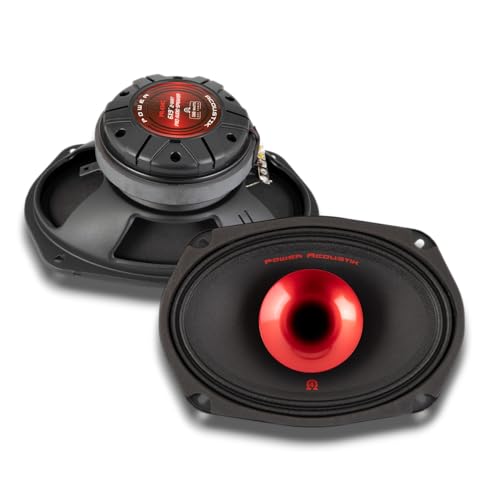
Examining raw pro-audio drivers highlights why external amplification is necessary for custom sound builds. The Power Acoustik PR-694C – 6×9 Inch 2-Way Midrange and the Power Acoustik PR-694T – 6×9 Inch 2-Way Midrange are engineered as passive high-output drivers. The manufacturer rates both models for up to 350 watts maximum power handling with a nominal impedance of 4 ohms. These substantial power ratings indicate that the voice coils require dedicated multi-watt amplification to perform as intended. Trying to run such robust drivers from line-level sources leaves them completely underpowered and silent.
Nominal impedance represents the electrical resistance a speaker voice coil presents to an incoming amplified signal. A 4-ohm driver demands approximately twice the electrical current from an amplifier compared to a standard 8-ohm home speaker at equivalent voltage. Because of this higher current draw, any amplifier paired with 4-ohm speakers must be explicitly rated for continuous 4-ohm operation. Pairing low-impedance speakers with an amplifier not rated for 4-ohm loads can cause thermal shutdown or permanent circuit damage. Checking amplifier specifications prior to connection ensures long-term stability and consistent audio output.
Sensitivity measurements describe how effectively a speaker turns electrical watts into audible sound pressure level. The PR-694C lists a sensitivity of 94dB, while the PR-694T features a 95dB rating, both tested under standard input parameters. High sensitivity numbers mean these speakers generate impressive acoustic volume even with modest amplifier wattage. When comparing raw pro drivers with dedicated component speakers, higher sensitivity ratings provide valuable dynamic headroom for open spaces and vehicle cabins. This efficiency helps avoid amplifier strain and prevents harsh clipping distortion during musical peaks.
Compression Tweeters Versus Bullet Tweeters in Pro Audio Drivers
High-frequency transducer architecture plays a major role in shaping sound dispersion and acoustic energy projection. The Power Acoustik PR-694C uses a compression tweeter mounted over its black paper cone midrange. Compression drivers route acoustic waves through a specialized throat and phase plug to increase efficiency across upper frequencies. This physical design creates clear, immediate treble response capable of cutting through background noise in open environments. Listeners choosing speakers for outdoor, vehicle, or pro audio applications frequently favor compression tweeters for their crisp transient attack.
The Power Acoustik PR-694T uses an integrated bullet tweeter centered within the 6×9 driver frame. Bullet tweeters employ an acoustic phase bullet inside a small horn assembly to guide high-frequency energy forward in a focused beam. This directional horn loading produces sharp, bright treble clarity that maintains definition at high volume levels. Because bullet tweeters have narrower horizontal and vertical dispersion, listener positioning relative to the speaker axis becomes very important. Deciding between a compression driver and a bullet tweeter depends on whether wide room coverage or focused forward projection is preferred.
Both driver designs employ rigid black paper cones and stamped steel baskets to handle demanding acoustic playback. Paper cone materials offer an advantageous balance between low moving mass and natural internal damping to suppress harmonic resonance. The steel basket provides mechanical rigidity, maintaining alignment between the voice coil and magnetic gap during high excursion. In addition to sturdy cone construction, these two-way drivers rely on internal crossover capacitors to filter out damaging low frequencies from the tweeters. Ensuring proper high-pass filtering protects the delicate tweeter voice coils from low-frequency overload during high-volume listening.
Troubleshooting Low Volume, Distortion, and Signal Mismatches
Diagnosing unexpected silence or low volume starts with verifying the purpose of each connected component. If someone has wired passive speakers straight to line outputs, recognizing that missing amplifier stage instantly solves the mystery. Inspecting audio interconnects to confirm RCA plugs are firmly seated into amplifier input jacks eliminates common ground hums and weak signal dropouts. For systems using standalone power amps, matching amplifier gain controls to the incoming line level prevents premature distortion. Following a methodical signal check from the computer source down to the speaker terminals resolves most sound discrepancies.
Distortion often occurs when listeners attempt to push underpowered hardware beyond its operational capabilities. Raising software volume sliders past 100 percent in an effort to overcome missing amplification causes digital clipping that sounds harsh and broken. Similarly, pushing an undersized amplifier into heavy output clipping to drive 4-ohm speakers sends clipped square waves into the voice coils. Clipped signals generate excessive heat in the voice coil winding and can quickly damage delicate high-frequency tweeters. Maintaining conservative gain structures across all devices ensures clear, distortion-free sound reproduction throughout the dynamic range.
Ground loops present another frequent audio hurdle in desktop sound systems that connect to multiple mains-powered units. When a computer, USB converter, and powered amplifier connect to different wall outlets, slight voltage differentials can introduce an audible 60Hz hum. Plugging all audio components into a single common power strip or conditioned surge protector frequently resolves ground differential issues. Keeping analog RCA interconnects separated from mains power cords also prevents electromagnetic noise from radiating into low-level audio lines. Clean cable routing preserves the transparent background noise floor of the digital converter.
Building a Safe and Reliable Audio Signal Chain
Creating an enjoyable audio system relies on assigning each piece of equipment to its intended engineering function. The Grace Design m9XX serves as a reference DAC and personal headphone amplifier, supplying clean analog pre-outs for downstream gear. Pairing this converter with active desktop speakers yields a streamlined setup that avoids the need for external power amps. When working with passive pro audio drivers like the high-sensitivity Power Acoustik 6×9 models, integrating a dedicated 4-ohm rated power amplifier completes the reproduction chain. Respecting the functional boundary between signal decoding and power delivery guarantees reliable performance and great sound.
Proper enclosure design and secure mounting also determine how well raw 6×9 drivers perform in physical listening spaces. Installing these drivers into solid, sealed, or ported speaker boxes prevents out-of-phase rear sound waves from cancelling front bass energy. Bolting the steel basket tightly against a flat baffle eliminates rattles, panel resonances, and air leaks during deep cone strokes. Using adequate gauge oxygen-free copper speaker wire minimizes electrical resistance between amplifier output terminals and the 4-ohm voice coils. Careful mechanical installation ensures that every watt delivered by the amplifier translates into accurate, distortion-free acoustic output.
Performing a routine power sequencing check protects both your audio equipment and your hearing during daily operation. Always power on digital sources and the m9XX first, letting line-level voltages stabilize before switching on downstream power amplifiers or active speakers. When turning the system off, power down the amplifiers first to prevent voltage spikes from causing audible thumps through the speakers. Begin listening tests with the volume dial set low, raising levels gradually to verify clean channel balance and undistorted frequency response. Following these practical operational steps keeps your sound equipment running smoothly and safely for years of listening pleasure.


Write Your Review
No reviews yet. Be the first to share your experience!