


Trying to project your voice across a backyard gathering, classroom, or family party often leads to a common wireless audio dilemma. Most people want a cable-free microphone setup, but discovering how to connect a bluetooth mic to a bluetooth speaker requires understanding how wireless audio profiles communicate. Standard Bluetooth speakers function as audio receivers, while standalone Bluetooth microphones are designed as audio inputs that normally pair with a host computer or phone rather than another peripheral. Because both devices are classified as Bluetooth clients, they cannot negotiate an audio stream directly without an intermediate bridge.
When you need clear vocal amplification through Bluetooth speakers for large coverage areas, you have several reliable pathways to establish this connection. Whether you route the audio signal through a smartphone host application, use an analog AUX adapter bridge, or operate an integrated wireless karaoke speaker system, each approach balances signal latency and vocal clarity. Reviewing your hardware capabilities and connection modes makes it easy to set up a functional, wire-free speaking configuration. With the right configuration, you can achieve loud, intelligible speech without dealing with tangled cables or complex soundboards.

Pros
- Seamless TWS pairing for enhanced stereo experience
- Integrated mic and selfie shutter add practical everyday utility
- Lightweight lanyard design perfect for active outdoor lifestyles
- Quick Bluetooth connectivity supports most phones
- Adorable size ideal for gifting without overwhelming bulk
Cons
- Limited bass depth due to ultra-compact size
- Maximum volume may not fill large spaces
- Battery life not specified, potentially short for extended use
The MOMOHO Mini Bluetooth Speaker is a remarkably compact audio device, roughly the size of a coin, designed for users who prioritize portability over power. Ideal for outdoor adventurers, casual listeners, and anyone seeking a thoughtful gift, it combines Bluetooth audio with smart extras like a selfie remote and call mic.
In real-world use, it shines during hikes or runs, where the included lanyard lets you hang it effortlessly for motivation-boosting tunes. Pair two units via TWS for a fuller stereo sound that punches above its weight, making group outings more enjoyable. The built-in mic handles calls clearly, even in breezy conditions.
While it won't replace a full-sized speaker, its multifunctional appeal and cute design make it a standout for everyday convenience. Verdict: A fun, practical pick for on-the-go audio needs, especially at this price point.
Expect a balanced sound signature from this mini speaker, with clear mids and highs that excel for vocals, podcasts, and calls. The tiny driver prioritizes clarity over rumble, delivering crisp treble that reveals details in upbeat tracks without harshness.
TWS pairing creates a wider soundstage and boosted volume, turning mono playback into immersive stereo for small gatherings. Bass is present but rolled-off, suitable for casual outdoor listening rather than bass-heavy genres. Volume levels handle personal use well, with minimal distortion at max output.
Bluetooth stability ensures reliable performance up to 50 feet, making it great for dynamic activities where consistent audio matters.
Crafted in a sleek black finish, the MOMOHO Mini's coin-like dimensions and lightweight build make it incredibly pocketable. The custom lanyard is a thoughtful touch, securing it during sports or travel without adding bulk.
Connectivity relies on Bluetooth for wireless streaming, with no wired inputs, keeping it simple and cable-free. The integrated microphone and remote shutter functions expand its utility beyond audio.
Power comes from an internal rechargeable battery suited for portable use, though exact life depends on volume. Overall, the hardware emphasizes multifunctionality in a durable, gift-ready package.

Pros
- Powerful 24W output with DSP for distortion-free sound at high volumes
- Exceptional 30-hour battery life on a single charge
- Seamless Bluetooth 5.3 pairing and stable long-range connectivity
- IPX7 waterproofing handles rain, splashes, and submersion
- Dual pairing for true stereo surround sound
Cons
- RGB lights may feel gimmicky for serious listening sessions
- No companion app for EQ customization or firmware updates
- Compact size limits maximum bass depth compared to larger models
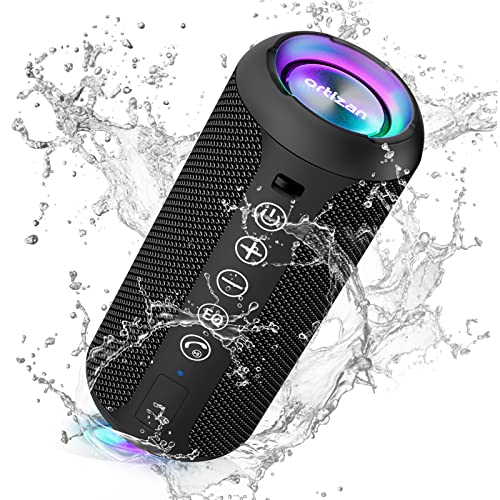
The Ortizan Portable Bluetooth Speaker (1st Gen) is a rugged, feature-packed option for on-the-go audio enthusiasts. With 24W of power from dual 12W drivers, advanced DSP, and passive radiators, it punches above its weight in delivering balanced sound suitable for casual listening anywhere.
Targeted at party-goers, beach lovers, and gift buyers, it's ideal for men and women seeking an affordable, durable speaker for home, outdoors, or travel. Real-world tests show it excels in open spaces, maintaining clarity during hikes or poolside hangs, with TWS pairing enhancing the experience for stereo setups.
Performance shines in bass-heavy tracks and podcasts alike, though it lacks app control. Battery life impressively hits 30 hours at moderate volumes, outlasting most competitors. Overall verdict: a top value pick for versatile, waterproof portability - highly recommended for summer adventures.
Expect deep, boosted bass from the dual passive radiators, paired with crisp treble and detailed mids thanks to the 24W stereo drivers and digital signal processor. This tuning favors energetic playback, revealing punchy lows in EDM or hip-hop while keeping vocals clear in rock or pop.
Soundstage widens impressively with TWS pairing, mimicking surround sound for movies or groups. It handles high volumes without muddiness, maintaining composure up to 65dB, though extreme highs can sharpen slightly at max output.
Bluetooth 5.3 ensures low-latency streaming, with stable connections over 66 feet, making it reliable for playlists from phones, TVs, or laptops.
Built tough with IPX7 waterproofing, this cylindrical speaker (3 x 3 x 6.69 inches, 1.28 lbs) withstands submersion up to 3 feet for 30 minutes, plus dust and splashes - perfect for showers, camping, or boats. The rugged exterior includes RGB LED lights that pulse to the beat, doubling as a night light.
Connectivity covers Bluetooth 5.3, AUX jack, TF card slot, and built-in HD mic for hands-free calls. No HDMI or optical, but wireless focus keeps it simple. Power via Type-C, with 30-hour playtime at moderate levels.
Compact and lightweight, it fits in a backpack easily, with intuitive buttons for play/pause and pairing. Package includes cable and guide for quick setup.
Connecting a Bluetooth Microphone to a Bluetooth Speaker
A direct wireless connection between an independent Bluetooth microphone and a standard Bluetooth speaker cannot be formed without an intermediary host or hardware bridge. Both units operate as Bluetooth client peripherals expecting to communicate with a central host device like a smartphone, tablet, or receiver. To send vocal audio to your speaker without cables, you must route the microphone signal through a host mobile application, connect via a wireless microphone receiver plugged into an auxiliary input, or use an integrated karaoke sound system. Understanding these three practical methods ensures you achieve clear vocal amplification without frustrating audio delays.
The Bluetooth Pairing Barrier: Why Direct Connections Fail
Consumer Bluetooth hardware relies on standardized profiles that determine which device controls the connection and which accepts data. Audio speakers operate primarily under the Advanced Audio Distribution Profile (A2DP) as audio sinks, meaning their firmware is programmed strictly to receive decoded sound from a transmitter. Standalone Bluetooth microphones typically function as audio input sources, yet their internal chipsets lack the master discovery software necessary to initiate a connection with another peripheral. Because neither device features a screen or operating system interface to authenticate the other, two standard Bluetooth audio gadgets cannot pair directly.
Operating systems on smartphones and computers solve this communication barrier by serving as universal Bluetooth hosts. A host device contains the master radio controller capable of managing concurrent connections across diverse Bluetooth protocols. When you attempt to pair a wireless microphone straight to a portable speaker, the missing host handshake prevents the two radios from exchanging encryption keys. Recognizing this fundamental architectural limit saves valuable setup time, allowing you to bypass impossible direct pairing attempts and focus on functional routing techniques instead.
Method 1: Routing Audio Through a Smartphone or Tablet Host
Connecting both your Bluetooth microphone and your Bluetooth speaker to a central smartphone provides an accessible software-based solution. Begin by powering on your Bluetooth speaker, placing it into discovery mode, and pairing it through your smartphone settings menu. Once the speaker outputs media sound correctly, put your wireless Bluetooth microphone into pairing mode and connect it as an additional audio device on the same phone. Modern mobile operating systems can manage simultaneous Bluetooth connections, registering the microphone as an audio input and the speaker as an output destination.
After both devices are paired to your phone, install a live microphone passthrough application from your mobile app store. Mobile operating systems do not automatically route live microphone input directly to connected speakers to prevent immediate feedback loops. Applications such as live microphone utilities capture the incoming audio stream from the Bluetooth mic and instantly redirect it to the speaker output. While this method requires no extra hardware purchases, digitizing and re-broadcasting the signal through two Bluetooth links introduces a slight 100 to 200 millisecond vocal delay.
Method 2: Using Wireless Microphones with an AUX Receiver Bridge
Connecting a dedicated wireless microphone kit to your speaker auxiliary port offers the most stable and responsive setup available. These microphone systems feature a handheld or lavalier mic paired directly to a compact 3.5 mm receiver dongle operating over ultra-high frequency (UHF) or 2.4 GHz digital radio bands. Instead of transmitting over standard Bluetooth profiles, the wireless microphone sends its signal directly to the physical receiver hardware. You simply insert the receiver jack directly into the 3.5 mm AUX input port located on your Bluetooth speaker.
Hardware auxiliary connections bypass the processing lag associated with multi-stage digital Bluetooth encoding. Portable units such as the Ortizan Portable Bluetooth Speaker (1nd Gen) include a standard 3.5 mm AUX input alongside Bluetooth 5.3 playback capabilities, making them fully compatible with analog receiver dongles. Once the receiver is plugged in and powered on, your spoken voice is amplified instantly through the speaker drivers with virtually zero perceptible delay. This immediate vocal feedback creates a much more natural speaking and singing experience for live presentations.
Method 3: Utilizing Integrated All-in-One Karaoke Speaker Systems
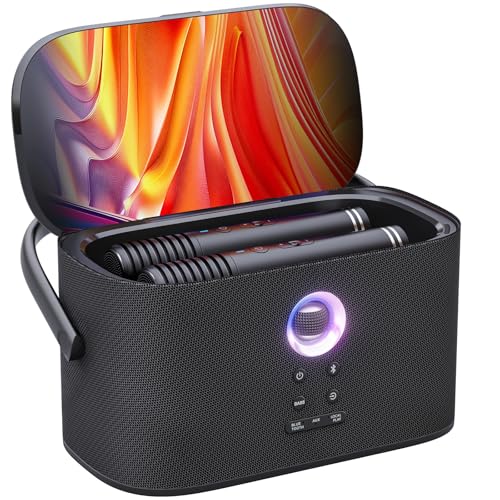
Integrated karaoke machines solve peripheral connection problems by building the wireless microphone receiver directly into the speaker mainboard. Advanced systems like the Ikarao Portable Karaoke Machine for Adults come equipped with two self-charging wireless microphones that pair automatically upon removal from their storage slots. Because the internal receiver is hardwired directly to the digital sound processor and 140W peak power amplifier architecture, you never have to navigate complicated Bluetooth pairing menus or third-party phone applications. The speaker acts as an all-in-one vocal hub, accepting background music via Bluetooth or Wi-Fi while mixing live vocals seamlessly.
Compact entertainment systems also provide effortless pre-paired wireless convenience for casual users and family gatherings. The Mini Karaoke Machine,Portable Speaker with 2 wireless microphones from MEGUO demonstrates how miniaturized DSP chips enable instant vocal synchronization. Users can power on both the compact speaker and the included wireless microphones to achieve instant vocal amplification without technical configuration. In addition, purpose-built karaoke and PA speakers feature dynamic range compression and anti-clipping circuitry that protect drivers from loud vocal transients.
Managing Audio Latency and Bluetooth Signal Delay
Digital latency represents the primary technical obstacle when attempting to amplify live speech or singing over wireless connections. When you speak into a microphone, your vocal cords generate sound waves that your brain registers instantaneously through bone conduction. If the speaker projects that same sound with even a 50-millisecond delay, your brain perceives an echo effect that makes fluent speaking remarkably difficult. Standard Bluetooth audio profiles prioritize bandwidth stability and acoustic fidelity over instantaneous real-time transmission, introducing buffer times that compound latency.
If you must rely on a smartphone software bridge, you can minimize vocal delay by closing background applications and lowering the software buffer size in your app settings. When high acoustic output is needed across a venue, pairing your setup with higher-output 40-watt speakers can help maintain vocal clarity without pushing small amplifier circuits into thermal compression. However, switching from software bridges to hardware radio frequency receivers remains the ultimate remedy for vocal delay. Dedicated UHF or 2.4 GHz systems transmit voice packets with less than five milliseconds of latency, guaranteeing synchronous audio performance.
Preventing Acoustic Feedback and Audio Distortion
Acoustic feedback is the piercing squeal or harsh rumble produced when an amplified microphone picks up its own output from a nearby speaker. This audio loop occurs rapidly because the sound from the speaker re-enters the microphone capsule, gets amplified again, and overloads the audio circuitry within milliseconds. To prevent feedback during live vocal use, always position your Bluetooth speaker slightly in front of the person speaking rather than behind them. Keeping the microphone capsule aimed away from the speaker front grilles ensures sound waves do not circulate directly back into the pickup element.
Adjusting your system gain stages properly protects both your listener ears and your speaker drivers from sudden acoustic distortion. If your microphone features an independent gain control, set the microphone sensitivity to a moderate midpoint before raising the main speaker volume. Cranking the microphone input gain too high forces internal preamps to clip, producing harsh, crackling sound even if the speaker master volume is set low. Conversely, keeping microphone gain balanced while utilizing outdoor speakers with dedicated subwoofers ensures full-range frequency reproduction without overdriving high-frequency tweeters.
Hardware Features That Impact Wireless Microphone Compatibility
Evaluating a Bluetooth speaker input layout reveals whether it can easily integrate with external wireless microphones. A physical 3.5 mm auxiliary port remains the single most valuable hardware feature for vocal amplification because it accepts wireless receiver dongles, wired microphones, and external preamps. In contrast, ultra-compact models like the MOMOHO Mini Bluetooth Speaker focus entirely on pocket portability and hands-free phone calls through a tiny built-in microphone. While miniature coin-sized speakers excel at personal audio and remote shutter triggers, their lack of an auxiliary port restricts them from receiving external microphone signals.
Battery capacity and sustained power delivery also dictate how reliably a Bluetooth speaker supports live microphone amplification during extended events. When amplifying spoken vocals, dynamic peaks require sudden bursts of amplifier power that drain batteries faster than steady-state background music playback. The Ortizan 1st Gen speaker addresses power demands with an integrated lithium battery providing up to 30 hours of continuous runtime, alongside an IPX7 waterproof housing that protects internal electronics from outdoor moisture. Robust battery reserves ensure the digital signal processor maintains stable line voltage without introducing audio cutouts during loud speech.
Choosing the Right Audio Setup for Your Intended Application
Selecting the ideal wireless microphone and speaker combination depends heavily on the size of your audience and the acoustics of your venue. For intimate indoor gatherings, classroom lectures, or small team meetings, routing a wireless microphone through a smartphone to a mid-sized portable speaker provides sufficient vocal projection without complex gear. The modest sound pressure level required in small spaces allows you to keep amplifier volume at moderate levels, minimizing the risk of feedback loops. However, verify that your smartphone battery has adequate charge, as running simultaneous Bluetooth connections and live routing apps accelerates power consumption.
For outdoor celebrations, backyard parties, or street performances, an all-in-one wireless karaoke PA system provides substantial advantages in acoustic coverage and reliability. High-output units like the Ikarao Shell S2 deliver 140W peak power through dual full-range drivers, projecting intelligible speech across open outdoor environments where sound quickly dissipates. If you already own a dependable portable Bluetooth speaker equipped with an auxiliary jack, purchasing an aftermarket UHF wireless microphone kit offers an economical upgrade path. Checking battery levels, verifying auxiliary connections, and setting appropriate gain levels beforehand guarantees a smooth, professional, and wire-free vocal experience.



Write Your Review
No reviews yet. Be the first to share your experience!