


You might join a video meeting on an iPad or Android slate and wonder how the device both projects sound and picks up your voice. The question of whether are tablet speakers used for microphones frequently arises when users try to understand mobile hardware or troubleshoot muffled call audio. Tablets rely on compact internal engineering that balances portability with audio clarity, yet their output and input channels remain completely separate components. Many users often explore notebook speaker setups when looking for compact desktop sound improvements, but portable slates manage sound reproduction under much tighter space constraints.
Built-in tablet drivers are designed exclusively to push air outward, while microscopic microphone elements handle voice reception from separate pinhole locations. Understanding why Are Tablet Speakers Used For Microphones is not how portable devices function can help you diagnose audio issues, adjust system permissions, and optimize call quality. When internal components cannot deliver enough volume or speech clarity for group calls, external companion speakerphones offer an integrated combination of speakers and multi-directional microphone arrays. Examining how these hardware parts interact ensures you choose the right audio configuration for your daily workflow.
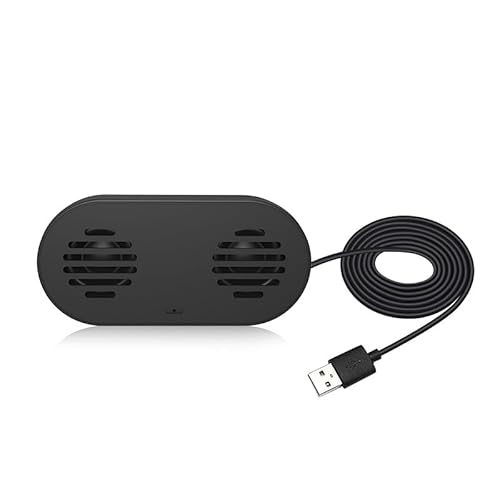
Pros
- Single USB cable handles both audio signal and electrical power
- Integrated microphone eliminates the clutter of a separate headset
- Extremely compact profile fits neatly beneath any monitor
- Clear vocal clarity for virtual meetings and lectures
Cons
- Lacks physical hardware volume knobs or mute buttons on the unit
- Compact dual-driver setup produces modest bass depth
- Requires a continuous USB connection since it has no internal battery
The HONKYOB USB Computer Speaker is a space-conscious desktop audio solution created for users tired of the tinny, muffled sound coming from built-in laptop drivers. Whether you work in a corporate home office, study in a college dorm, or simply want cleaner audio for day-to-day computing, this mini soundbar streamlines your setup by combining stereo playback and an integrated microphone into one tidy chassis.
In real-world everyday use, the speaker shines brightest during work calls, video conferences, and streaming media. It operates via a single USB cable that carries both power and digital audio, meaning you can finally ditch tangled 3.5mm cords and dedicated power adapters. Windows systems automatically recognize the device within moments of plugging it in, with zero drivers or configuration steps required.
Ultimately, this mini soundbar delivers an effective quality-of-life boost for anyone seeking an affordable, straightforward audio station. While it will not replace an elaborate home theater system, it provides crisp voice intelligibility, dependable reliability, and a clean desktop look for daily productivity.
Powered by dual 3W acoustic drivers paired with an internal sound card, this desktop speaker outputs clear, balanced audio that easily outperforms standard laptop speakers. The acoustic tuning emphasizes the upper-bass and midrange spectrum, which helps spoken dialogue cut through clearly during video calls, conference meetings, and YouTube tutorials without sounding muffled.
Because the unit measures just over five inches wide, it focuses on vocal fidelity and nearfield stereo separation rather than room-shaking low-end bass. Volume levels can reach comfortably loud thresholds for private offices or bedrooms without introducing harsh buzzing, provided volume adjustments are managed through your operating system settings. The direct digital USB connection also eliminates the electrical buzz and static commonly heard with unshielded analog headphone ports.
Built with a minimalist aesthetic in mind, the speaker measures just 5.1 by 1.8 by 2.4 inches. This slim profile allows it to slide cleanly underneath computer screens or nestle beside a laptop riser without crowding your keyboard and mouse. An integrated silicone anti-slip pad lines the bottom surface, isolating the speaker from the desk to prevent movement and annoying vibration noise.
Unlike portable wireless units that need constant recharging, this soundbar relies entirely on tethered USB power from your computer or hub. This continuous wired power source means you never have to worry about battery degradation, low-battery warning beeps during meetings, or keeping track of charging cables. It remains ready to broadcast audio the second your workstation powers up, while remaining light enough to pack into a briefcase for mobile hot-desk days.

Pros
- Exceptional 4-mic array for omnidirectional, noise-free pickup
- Rich 3W audio fills rooms evenly with full duplex clarity
- Effortless daisy chaining expands coverage for larger groups
- Long 10-hour battery supports extended meetings on the go
- Universal compatibility with major conferencing apps
Cons
- 3W output prioritizes voice clarity over high-volume music playback
- No built-in display for call status or controls
- Daisy chain limited to compatible EMEET models
The EMEET M0 Plus is a portable conference speakerphone designed for modern hybrid work environments, featuring four AI-powered microphones in a 360-degree array for comprehensive voice capture. It shines in home offices, small meeting rooms, or business travel, supporting up to eight participants per unit and expandable via daisy chain for larger groups.
In real-world use, the upgraded VoiceIA algorithm excels at filtering background noise and echo, delivering conversations that feel in-person. Setup is instant with USB-C plug-and-play or Bluetooth 5.0, working flawlessly with Zoom, Microsoft Teams, and other platforms without drivers.
Its 3W speaker provides even sound distribution, and the 10-hour battery ensures reliability during long sessions. While optimized for voice calls rather than music, it offers professional-grade performance for professionals seeking a compact, versatile audio solution.
Verdict: A top pick for remote teams wanting clear, hassle-free conferencing without breaking the bank.
The M0 Plus emphasizes midrange clarity for natural voice reproduction, with AI-enhanced noise reduction ensuring crisp intelligibility even in noisy environments. Bass is controlled for speech without muddiness, while treble remains detailed without harshness, creating a balanced profile ideal for meetings.
Full duplex technology supports simultaneous talk and listen, fostering a wide soundstage that picks up voices from all directions up to eight feet away. At max volume, the 3W driver maintains clarity without distortion, filling small to medium rooms effectively.
Acoustic engineering via the four-mic array and 2023 VoiceIA upgrade minimizes echo and reverb, delivering professional-grade performance comparable to larger systems when daisy-chained.
Compact and portable, the M0 Plus sports a sleek, durable plastic build suited for desk or travel use, with a lightweight design that includes a large-capacity battery for over 10 hours of talk time. Dimensions allow easy placement in any setup without dominating space.
Connectivity is straightforward: USB-C for wired plug-and-play and Bluetooth 5.0 for wireless pairing with PCs, phones, or tablets, supporting standard protocols across brands. No additional power adapters needed beyond USB charging.
Daisy chain functionality via USB links multiple units for expanded mic and speaker coverage, compatible with EMEET models like M3 or Meeting Capsule, making it scalable for conference rooms.

Pros
- Intelligent AI noise filtering keeps distracting background chatter off your calls.
- Full-duplex audio allows natural simultaneous conversations without voice clipping.
- Exceptional 20-hour battery longevity with quick 2.5-hour recharging.
- Hassle-free plug-and-play setup for Windows, macOS, and mobile devices.
Cons
- Dedicated wireless USB PC dongle is sold separately in this base package.
- Lacks an outdoor water-resistance rating since it is engineered strictly for indoor office use.
- Designed specifically for huddle spaces and small conference rooms rather than large boardrooms.
The Yealink SP92 speaker is a compact, high-efficiency audio hub engineered to eliminate communication friction in modern work environments. Designed primarily for remote workers, home office professionals, and small huddle teams of four to eight people, this speaker bridges the gap between bulky conference room installations and underwhelming laptop speakers. It integrates seamlessly into hybrid workflows, giving every team member a clear voice at the table.
In real-world calling scenarios, the standout feature is the active AI noise suppression. By filtering out more than 1,000 ambient distractions, such as mechanical keyboard typing, paper rustling, and background cooling fans, the speaker ensures that your clients and colleagues hear only your voice. The full-duplex technology is equally impressive, allowing multiple participants to speak at the same time without the frustrating audio cutoffs common on entry-level speakerphones.
Software compatibility is virtually effortless thanks to official Microsoft Teams certification. Whether you conduct your daily standups on Teams, jump onto client calls via Zoom, or collaborate across Google Meet and Cisco Webex, the device responds immediately upon connection. On-device touch controls make managing volume, muting microphones, and answering calls intuitive and immediate.
Overall, the Yealink SP92 speaker offers exceptional value for any business professional seeking reliable, studio-grade vocal reproduction without complicated hardware configurations. It transforms any desk or dining table into an executive-level conference room with zero hassle.
Engineered with a high-fidelity 50mm dynamic speaker driver, the unit prioritizes vocal intelligibility above all else. Yealink pairs this hardware with proprietary Virtual Bass processing, providing enough low-end warmth to prevent voices from sounding thin or tinny. While tuned specifically to optimize human speech frequencies, the acoustic balance also handles podcasts and background focus music comfortably during downtimes between meetings.
Microphone pickup is handled by a 360-degree omnidirectional sensor capable of capturing voices up to 13 feet away in every direction. Advanced echo cancellation routines scrub acoustic feedback, ensuring that participants sitting at either end of a small conference table come through with balanced volume and clean articulation.
On the wireless side, Bluetooth 5.3 technology delivers rock-solid audio stability with an extended range of up to nearly 100 feet. You can pace around your home office or grab a notebook from across the room without experiencing signal drops, latency, or stuttering audio streams.
The physical footprint of the speaker is sleek, professional, and built for modern mobile workstations. Measuring roughly five inches across and weighing just 0.62 pounds, the low-profile circular puck fits neatly underneath desktop monitors or inside crowded backpacks. Yealink also includes a tailored zippered travel case to protect the mesh grille and housing while commuting between home and corporate offices.
Power performance is where this portable speaker truly shines. The built-in rechargeable battery delivers up to 20 continuous hours of talk time or audio playback, allowing power users to sail through an entire week of standard calls without hunting for an outlet. Standby time extends up to an impressive 20 days when idle.
When it is time to recharge, the device goes from empty to full capacity in approximately 2.5 hours using a standard 5V/2A power source. For stationary desktop users, the included USB-C cable with its attached USB-A adapter provides continuous power and zero-latency wired audio transmission simultaneously.

Pros
- Superior 360° microphone array for immersive pickup
- Effective noise cancellation enhances remote call clarity
- Broad software compatibility including Zoom and Skype
- Stable daisy chain expands coverage reliably
- High 85dB volume suits medium-sized rooms
Cons
- Daisy chain cable sold separately
- Auto shuts off after one hour inactivity
- Best for up to 8 without additional unit
The EMEET Luna is a versatile conference speaker designed for remote workers and small teams needing professional audio without headsets. It combines a multi-microphone array with advanced VoiceIA noise reduction to deliver clear, natural sound in home offices or small meeting spaces.
Ideal for users tired of echoey calls or background noise disruptions, the Luna excels in daily Zoom, Skype, or WebEx sessions. Its 360° pickup ensures everyone is heard equally, while daisy chaining supports larger groups up to 16 attendees for more collaborative setups.
In real-world use, it provides smooth full-duplex conversations and auto-adjusts volume based on speaker distance, making long meetings comfortable. Praised by CNET as a top pick for work-from-home speakerphones, it transforms casual spaces into effective conference areas.
Overall verdict: A smart choice for reliable, hands-free audio that boosts productivity in hybrid work environments.
The Luna shines with ultra-clear vocal reproduction and speech enhancement, automatically balancing volume for consistent clarity regardless of speaker position. Its 360° multi-microphone array captures voices naturally, supported by full-duplex technology for uninterrupted back-and-forth dialogue.
VoiceIA noise reduction effectively eliminates common distractions like keyboard typing or air conditioning, ensuring professional-grade audio. At up to 85dB max volume, it fills medium rooms without distortion, though it's optimized for speech rather than music with focused mids and highs.
Bluetooth connectivity offers stable performance, with dongle or USB options providing even more reliability for critical calls. Expect solid range in typical office settings without dropouts.
Featuring a sleek full-metal matte casing with sandblasted finish, the Luna has a premium, youthful look that's both professional and portable. Its compact design includes a dongle slot for easy travel, weighing light enough for on-the-go meetings.
While not ruggedized for outdoors, the durable build handles daily desk use well. Connectivity options like USB, Bluetooth, AUX, and dongle make it versatile without needing drivers.
Battery life is managed smartly with auto shutoff after one hour of inactivity to conserve power, though exact playtime depends on usage. Recharging is straightforward via USB, keeping it ready for back-to-back sessions.

Pros
- Crisp, intelligible speech reproduction with dependable background noise rejection
- Stable, low-latency wired operation with both USB-C and USB-A compatibility out of the box
- Compact 4.4-inch disc design slips effortlessly into computer bags and backpacks
- Universal compatibility with Zoom, Microsoft Teams, Skype, Google Meet, and Webex
Cons
- Acoustically tuned strictly for vocal frequencies, offering virtually no sub-bass for music listening
- Lacks Bluetooth support and an internal battery, requiring a direct USB tether to function
- Microphone coverage is optimized for small huddle spaces and will lose sensitivity in large boardrooms
The EMEET OfficeCore M1A is a dedicated desktop conference speakerphone engineered to solve the persistent headaches of muffled laptop microphones and hollow internal speakers. Built primarily for professionals navigating hybrid work environments, small office meeting spaces, and home workstations, this compact audio peripheral bridges the gap between cumbersome multi-piece audio setups and inadequate built-in computer hardware.
In real-world conference calling, the M1A distinguishes itself through its targeted speech processing. Powered by EMEET's proprietary VoiceIA algorithm, the dual-microphone array constantly works to suppress persistent distractions like air conditioner hum, mechanical keyboard chatter, and paper shuffling. The inclusion of full-duplex technology ensures that conversations flow naturally, allowing remote collaborators to speak simultaneously without the awkward audio dropouts common in entry-level speakerphones.
Ease of use is another major highlight. Because it relies entirely on a hardwired USB interface, there is no Bluetooth pairing friction, wireless dropouts, or battery degradation to manage over time. Whether launching a planned presentation on Zoom or jumping onto an impromptu Microsoft Teams huddle, the device registers immediately across Windows and macOS systems without third-party drivers.
Ultimately, the EMEET M1A represents a practical, high-value investment for business users who prioritize speech intelligibility and dead-simple reliability above all else. While it makes zero pretense of being a high-fidelity music speaker, it excels at its core duty of keeping every participant in the meeting room clearly heard and understood.
Acoustically, the EMEET M1A is voiced with a sharp focus on human vocal bandwidth. The internal driver focuses its energy entirely within the critical 300 Hz to 4 kHz range, highlighting vocal presence and consonants so you never have to strain to comprehend soft-spoken colleagues. Low-end frequencies are intentionally rolled off to prevent desk-induced rumble and muffled resonance, resulting in clean, fatigue-free audio playback across extended video conferences.
The speaker provides nine distinct output volume levels, giving users precise control over ambient room dynamics. Volume changes are tracked visually around the perimeter of the unit with bright blue LED indicators, providing instant verification of sound levels. Even when pushed to its higher output thresholds, the speaker maintains vocal composure without introducing raspy harmonic distortion.
On the capture side, the two 360-degree omnidirectional microphones reliably gather voice signals across a small conference perimeter. The acoustic echo cancellation reliably cuts room reverb, while the integrated voice amplification balances near and far speakers so everyone on the receiving end hears a consistent, balanced sound level.
Sporting a low-profile hockey-puck form factor, the EMEET M1A measures roughly 4.4 inches in diameter and under 1.4 inches tall. Its discreet matte-black chassis blends neatly into corporate boardrooms and minimalist home desks alike. The underside features a dense non-slip rubber pad that isolates the microphones from micro-vibrations produced by desk taps and typing.
The top interface is outfitted with responsive capacitive touch controls for essential call operations, including volume adjustments and a prominent central mute button. When engaged, clear visual LED cues illuminate to ensure participants know immediately whether their room audio is live or silenced, eliminating awkward hot-mic incidents.
For hardware connections, the M1A utilizes a tethered USB-C cable designed for modern ultrabooks and tablets, accompanied by a secure tethered USB-A adapter for legacy desktop towers. Because the unit is entirely bus-powered over USB, it draws minimal current directly from the host machine, eliminating the need for bulky AC power bricks or recurring battery recharge cycles.

Tablet Audio Engineering and Voice Capture Explained
Tablet speakers are never used as microphones in standard consumer hardware. Speakers and microphones perform opposite acoustic tasks, and mobile operating systems route input and output through distinct physical pathways. While both components rely on electromagnetic principles, tablet engineering separates audio generation from audio capture to prevent hardware damage, eliminate severe distortion, and maintain stable voice communication.
Acoustic Transducers and Physical Hardware Differences
A speaker driver functions as an output transducer that converts electrical audio signals into mechanical sound waves. In a tablet, tiny voice coils push against miniature diaphragms to create air pressure variations that your ears register as speech, music, or game audio. These dynamic drivers receive amplified analog power from the digital-to-analog converter inside the tablet chassis. The physical suspension and coil structure are optimized to project sound into the surrounding environment rather than detect minute air vibrations.
Microphones operate in the reverse direction by translating mechanical sound waves into minute electrical currents. In modern tablets, these are almost universally Micro-Electro-Mechanical Systems, commonly known as MEMS microphones. MEMS capsules contain a microscopic pressure-sensitive diaphragm etched directly onto a silicon chip. They require minuscule amounts of current to register speech frequencies, whereas dynamic speaker drivers require substantial amplifier wattage to produce audible volume.
Some hobbyists note that dynamic speaker drivers can technically act as crude microphones when wired in reverse into a high-gain preamplifier. However, tablet motherboards do not support bidirectional analog signal paths across speaker terminals. The output amplifier is hardwired directly to the speaker drivers, and the audio processor never treats those terminals as an analog recording input. Attempting to force an output driver to capture sound would result in muffled, muddy frequencies and virtually non-existent voice clarity.
How Mobile Tablets Capture and Process Your Voice
Tablets capture spoken audio through dedicated microphone ports that appear as tiny pinholes along the device perimeter. Manufacturers strategically position these openings near the top edge, beside the camera module, or along the lower bezel. Placing the microphones away from the speaker grilles reduces mechanical vibration transfer through the chassis. When you speak during a call, sound waves enter these pinholes and reach the enclosed MEMS sensors.
Modern mobile devices rarely rely on a single microphone element to capture audio. Instead, they incorporate multi-microphone arrays that work together to isolate speech and suppress ambient room noise. Digital signal processors analyze the minute timing differences between when your voice strikes the front microphone versus a rear or side sensor. This process, known as beamforming, creates a directional listening zone focused on the user while rejecting background chatter.
Operating systems like iPadOS and Android assign specific audio roles to each microphone based on the active application. A video recording app may prioritize the microphone closest to the rear camera lens, while a conference call app prioritizes the front-facing array. At no point in this software routing pipeline does the system query the speaker drivers for audio input data. The operating system maintains strict separation between the audio capture daemon and the audio playback pipeline.
Acoustic Echo Cancellation and Full-Duplex Communication
A frequent reason users wonder about speaker and microphone interaction is the mystery of why feedback loops do not ruin every call. When you speak on a conference call, the remote caller voice plays out of your tablet speakers just inches away from the internal microphones. In an unmanaged analog system, that loud output would re-enter the microphone, loop through the network, and create deafening howling feedback. Modern tablets prevent this through sophisticated Acoustic Echo Cancellation algorithms.
Acoustic Echo Cancellation software maintains a reference copy of the digital audio stream currently being sent to the internal speakers. As the microphone captures sound in the room, the processor compares the incoming signal against the speaker reference track. The algorithm mathematically subtracts the speaker sound from the microphone input in real time before transmitting your voice to the call. This processing ensures the other callers hear only your voice rather than their own echo.
This balance allows devices to maintain full-duplex communication, which means both sides of a conversation can talk and listen simultaneously. Without full-duplex processing, video conferencing platforms would be forced into half-duplex operation like a walkie-talkie. Reliable signal management prevents tablet audio from collapsing during heated discussions or fast-paced meetings. However, processing heavy audio tasks inside a cramped mobile chassis introduces distinct performance bottlenecks.
Acoustic Limitations of Integrated Tablet Hardware
Tablet enclosures measure only a few millimeters in thickness, leaving virtually no physical space for acoustic chambers. Internal speakers feature minute magnets and shallow excursion depths, which severely limits low-frequency reproduction and overall headroom. When users increase the volume to hear remote participants in a noisy room, tiny drivers often produce harsh treble and harmonic distortion. Users who compare these constraints to wireless desktop speakers quickly realize how much cabinet volume influences clarity and depth.
Microphone performance suffers from similar physical constraints inside thin tablet frames. The tiny pinhole openings can easily become clogged with lint, dust, or skin oils during daily handling. Furthermore, holding a tablet during a meeting can accidentally cover the primary microphone opening with your hand or a protective case. Even when unobstructed, built-in MEMS sensors struggle to capture balanced voice audio when the speaker sits more than two or three feet away from the device.
Background noise rejection algorithms can also introduce noticeable voice degradation when pushed to extremes. If an air conditioner or laptop fan hums nearby, aggressive noise filters may clip the edges of your words or create a strange underwater acoustic effect. The tablet processor must constantly balance noise suppression against voice naturalness. In professional environments or shared workspaces, these compromises often make built-in tablet audio inadequate for productive collaboration.
Combined Speakerphone Solutions for Mobile Workstations
The confusion regarding whether speakers double as microphones often stems from the popularity of dedicated speakerphones. Peripheral units designed for desks combine high-output speakers with multi-microphone arrays inside a single unified chassis. Rather than forcing a single driver to handle both tasks, these accessories house specialized drivers for playback alongside omnidirectional mic capsules for voice pickup. Devices such as the EMEET Conference Speakerphone M0 Plus and the Yealink Sp92 Conference Speaker and Microphone provide all-in-one desktop audio solutions.
Dedicated conference speakerphones use substantial driver enclosures that project loud, clear speech across a room without cabinet buzzing. For instance, models like the EMEET Luna feature acoustic designs capable of reaching balanced volume levels suitable for medium meeting spaces. Placing dedicated microphones several inches away from larger internal speaker drivers gives acoustic isolation algorithms much more physical separation to work with. This physical spacing improves echo cancellation accuracy and keeps voices sounding natural.
Compact desktop soundbars like the HONKYOB USB Computer Speaker with Built-in Microphone and the ROFALL USB Computer Speakers with Microphone take a similar approach for personal workstations. These units place dual dynamic drivers alongside an integrated microphone capsule, giving desktop users a simple plug-and-play solution. While they house both components behind a single grille, the internal wiring keeps the microphone circuit and speaker voice coils strictly isolated. This unified form factor simplifies cabling without compromising electrical safety or audio quality.
Connectivity Protocols and Tablet System Compatibility
Connecting external audio gear to a modern tablet requires understanding standard digital interfaces. Most contemporary tablets utilize USB-C ports that support universal USB Audio Class specifications. Devices like the EMEET M1A USB Conference Speaker and Microphone connect directly through integrated USB-C cables without requiring specialized hardware drivers. When you plug a class-compliant speakerphone into a tablet, the operating system instantly recognizes both an audio input endpoint and an audio output endpoint.
Wireless setups rely on modern Bluetooth standards to deliver convenient cable-free communication. The Yealink Sp92 utilizes Bluetooth 5.3 to maintain stable communication across distances up to thirty meters, which allows you to place the speakerphone centrally on a conference table while managing the call on a tablet several feet away. Bluetooth profiles such as Hands-Free Profile handle bidirectional voice and playback, though they compress audio bandwidth during active calls. When high fidelity is required, users often explore dedicated computer speakers for clear audio for pure playback tasks while keeping communication channels separate.
Some users encounter compatibility hurdles when connecting legacy USB-A peripherals to tablets equipped only with USB-C ports. Using simple passive adapters or powered USB-C hubs resolves this barrier without introducing signal latency. It is essential to ensure that your hub or adapter supports data transfer rather than power delivery alone. Once connected, opening your tablet sound settings confirms whether the external peripheral has been successfully selected as both the active input and output device.
Power Delivery, Battery Run Times, and Meeting Mobility
Power distribution represents another critical operational factor when pairing external audio devices with portable tablets. Bus-powered speakerphones draw electrical current directly from the tablet battery through the USB-C cable. While this eliminates the need for wall outlets, running high-volume speakers can drain a tablet battery substantially faster during extended work sessions. For mobile professionals, choosing a speakerphone with an internal rechargeable battery prevents unexpected battery exhaustion.
Battery-equipped conference units offer remarkable operating longevity for all-day remote sessions. The Yealink Sp92 includes a built-in battery supporting up to twenty hours of continuous call time, while the EMEET M0 Plus provides over ten hours on a single charge. Units with internal power reservoirs handle audio amplification independently, sparing the host tablet from heavy current demands. When the meeting concludes, these portable peripherals can be recharged via standard USB adapters or power banks.
Desktop speakers without internal batteries, such as the HONKYOB mini soundbar, remain tethered to host power. These compact units suit fixed home office desks where the tablet sits docked on a powered charging stand. Conversely, battery-powered conference discs easily slip into a travel briefcase alongside your tablet, allowing you to establish a functional meeting space in hotel rooms, huddle lounges, or client offices. Matching the power configuration to your typical travel habits ensures uninterrupted communication.
Selecting the Right Audio Hardware for Clear Meetings
Evaluating your room size and meeting attendance dictates the appropriate hardware choice. Personal calls involving one listener sitting directly in front of a tablet rarely demand multi-microphone conference arrays. A basic USB speaker bar or compact speakerphone provides sufficient clarity for individual video chats, online classes, and standard voice communication. These entry-level options offer immediate improvements over built-in tablet drivers by projecting sound directly toward your ears.
Group meetings with several participants gathered around a table require omnidirectional voice capture and expandable coverage. Advanced speakerphones like the EMEET Luna and M0 Plus support daisy-chain functionality, allowing you to link two units together using an extension cable. Linking two devices doubles microphone coverage to support up to sixteen attendees across longer conference tables. Built-in algorithms dynamically balance voice levels, ensuring soft-spoken participants sound equally clear to remote listeners.
Background noise suppression technology represents another vital evaluation factor for busy office environments. Algorithms like EMEET VoiceIA filter out ambient distractions including keyboard clatter, air conditioning rumble, and paper shuffling. Yealink AI noise cancellation similarly screens out common background noises in real time without cutting off active speech. Investing in capable hardware with proven noise suppression preserves meeting professionalism and eliminates the constant need to toggle the mute button.
Safe Device Setup and Common Tablet Audio Troubleshooting
When experiencing audio failure during a video call, always perform basic verification checks before assuming hardware failure. Start by checking physical obstructions around the tablet perimeter, ensuring your protective case does not block the tiny microphone pinholes. Dust accumulation can be cleared gently using a dry, soft-bristled brush without inserting sharp metal objects into the ports. Forcing needles or paperclips into microphone openings can rupture the delicate internal MEMS membrane and permanently destroy voice capture capability.
Software permission settings cause the vast majority of silent microphone complaints on modern mobile platforms. Operating systems enforce strict privacy controls that require users to grant individual apps explicit permission to access the microphone. If participants cannot hear you in Zoom or Teams, verify that microphone access is toggled on under your tablet privacy settings. Additionally, ensure that your device has not silently paired with an unattended Bluetooth headset or vehicle speaker in an adjacent room.
Tablets manage audio through carefully isolated hardware channels, meaning your tablet speakers are never tasked with capturing voice input. Relying on dedicated internal MEMS microphones for personal calls, or connecting a capable external speakerphone for collaborative group sessions, ensures crisp, reliable communication. By matching your audio hardware to your physical environment and keeping system permissions properly configured, you can enjoy dependable sound clarity across every virtual meeting.



Write Your Review
No reviews yet. Be the first to share your experience!