


Smartphone media consumption requires clear dialogue, balanced tones, and sufficient loudness for hands-free listening. When built-in playback sounds muffled or lopsided, learning how to adjust speakers on iphone can immediately restore balance across calls, video streaming, and podcast playback. Many listeners struggle with confusing iOS settings where ringer volume and media volume remain linked or separated unpredictably. Connecting portable wireless audio gear can offer extra output, but internal operating system adjustments usually solve underlying clarity issues first.
Apple mobile devices route sound through a combination of the bottom-firing loudspeaker and the top earpiece receiver to create a spatial stereo field. Learning the proper steps for How To Adjust Speakers On Iphone allows users to correct channel balance, adjust music equalization profiles, and safely raise audio limits. Pairing the phone with compact external speakers can also assist when hardware volume limits fall short of room listening needs. Taking a structured approach ensures you address software controls, acoustic cleanliness, and auxiliary hardware in the right order.

Pros
- Instant plug-and-play simplicity with zero Bluetooth pairing or software setup required
- Noticeably louder output and crisper dialogue compared to standard internal phone speakers
- Independent internal battery prevents accelerated battery drain on your mobile device
- Featherlight, pocketable design ideal for everyday carry and business travel
Cons
- Micro-sized driver lacks deep sub-bass reproduction for bass-heavy modern music
- Direct plug-in fit may feel tight or restricted when using thick, heavy-duty phone cases
- 4-hour playback endurance necessitates frequent recharging during extended listening sessions
The Portable Cell Phone Speaker Amplifier is an ultra-compact audio accessory engineered to resolve one of modern mobile technology's most common annoyances: quiet, muffled smartphone audio. Rather than navigating finicky Bluetooth settings, dead battery alerts on bulky wireless speakers, or complex software menus, this pocket amplifier plugs straight into your hardware for an immediate acoustic lift.
This device is custom-tailored for busy professionals who need louder, clearer conference calling on speakerphone, seniors looking for an audible volume boost for daily conversations, and travelers watching movies in quiet hotel rooms. It effectively bridges the gap between weak internal phone transducers and heavy external Bluetooth gear, offering an effortless docking design you can take anywhere.
In practical listening tests, the instant five-fold amplification makes an obvious difference. Dialogue in podcasts, YouTube videos, and driving navigation directions easily cuts through ambient room noise with commendable clarity. While it will not replace a dedicated high-fidelity desktop sound system, it punches far above its weight class for spoken word clarity and everyday media enhancement without pushing into harsh distortion at peak volume.
Ultimately, this mini amplifier represents a practical, budget-conscious solution for anyone tired of cupping their hand around their phone speaker. Its dual-interface accessibility and plug-and-play execution make it a dependable companion for on-the-go audio enhancement.
Acoustically tuned for maximum vocal intelligibility, this mini sound amplifier channels its power into the vital 500Hz to 4kHz frequency range where human speech resides. By concentrating its amplification where clarity counts, dialog, vocals, and caller audio project forward with clean authority, producing up to five times the acoustic volume of a bare smartphone speaker.
Due to the micro-chamber footprint, the speaker naturally rolls off the lower sub-bass frequencies, a deliberate acoustic choice that prevents the muddy, rattling distortion typical of budget micro-drivers. Treble response remains clear and articulated, keeping speech sibilance in check so conference calls, audiobooks, and turn-by-turn driving instructions remain crisp and legible even in noisy commuter environments.
Weighing only a few ounces and measuring just 3.5 by 1 by 1.2 inches, the amplifier features an ultra-compact, durable plastic chassis tailored for everyday carry. The dual-pronged integration of a modern Type-C connector alongside a traditional 3.5mm auxiliary pin ensures compatibility across current Android phones, modern iPads, and legacy mobile players without requiring separate adapters.
Power is driven by a self-contained 250mAh lithium-ion rechargeable battery, freeing your mobile phone from powering the amplifier directly. This onboard cell provides up to 4 hours of continuous playback per charge cycle and recharges quickly through a standard USB interface, making it ready for reliable daily duty.
Pros
- Versatile bone conduction creates fun, instrument-like sounds on everyday objects
- True wireless stereo elevates solo play to full surround experience
- Compact portability fits any bag for on-the-go creativity
- Strong Bluetooth compatibility with major phones and tablets
- Powers up to 115dB for room-filling volume on ideal surfaces
Cons
- Sound quality shines brightest on hollow surfaces, less impressive standalone
- Volume and tone vary by object thickness and material
- Requires two units for full stereo, single unit is mono only
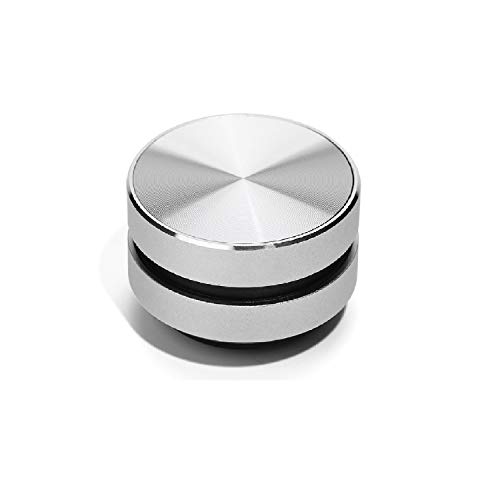
The Bigvapor Bone Conduction Speaker redefines portable audio by using vibration technology to turn any hollow object into a speaker. Stick it on a plastic box, guitar body, or even a dashboard, and enjoy a spectrum of sound effects that mimic different instruments. It's a game-changer for inventive users who want customizable audio without bulky gear.
Ideal for party hosts, travelers, or home tinkerers, this mini speaker pairs via Bluetooth with iPhones, Samsung devices, and tablets for music, calls, games, or podcasts. Two units connect automatically for true wireless stereo, delivering a surround experience perfect for tailgates or casual hangouts.
In real-world tests, it punches up to 115dB on thin hollow surfaces, creating lively vibes for small groups. While surface-dependent, its creativity factor makes it stand out from standard speakers. Verdict: A must-buy for fun-loving audio explorers seeking portable innovation.
Bone conduction tech vibrates surfaces for a dynamic sound signature that shifts from bassy thumps on buckets to crisp highs on glasses. Vocals stay clear for podcasts and calls, while volume hits 115dB on optimal thin objects, filling rooms without distortion.
Bluetooth range holds steady for stable streaming indoors or out, with TWS pairing two speakers for balanced 2.0 stereo. No companion app needed, but expect playful experimentation to dial in the best tone for movies or games.
FM radio adds versatility for live tunes, making it reliable for workouts where traditional speakers falter.
This ultra-mini design weighs next to nothing, making it the ultimate pocketable companion for hikes, beach days, or desk setups. Its rugged build handles daily tosses, though no official IP rating means keeping it dry during pool parties.
Portability reigns supreme, with a form factor that clings to surfaces via vibration alone, no clips required. Pair it with hollow finds like storage bins for extended play without bulk.
Battery life supports hours of vibes on a single charge, quick top-ups keep the party going. Focus on its lightweight freedom for all-day creativity without drain worries.
Optimizing and Fine-Tuning Your iPhone Audio Output
Adjusting audio output on an iOS device requires understanding both software sliders and the physical acoustic pathways built into the phone. The quickest way to alter sound output involves the physical volume buttons on the left edge of the chassis, but these buttons only control the active audio stream. If media is playing, the buttons adjust media volume; if the phone is idle, they may alter your ringer level instead. Mastering the underlying audio settings gives you complete control over tonal balance, voice clarity, and overall acoustic output.
Apple mobile devices utilize a dual-transducer stereo speaker configuration to deliver personal audio. The primary loudspeaker sits at the bottom edge behind precision-machined acoustic cutouts, handling lower and midrange frequencies with greater acoustic resonance. A secondary micro-speaker resides within the front-facing earpiece receiver, providing higher frequency detail and directional stereo separation. When either channel sounds faint or distorted, balancing these two distinct acoustic paths restores natural stereo imaging.
Managing Master Volume and Ringer Distinctions
Separating media loudness from notification alerts prevents loud ringtones from startling you while keeping video playback audible. The Sound and Haptics menu in your device settings contains a dedicated slider for ringers and alerts. Disabling the toggle labeled Change with Buttons locks your ringtone volume at a fixed level permanently. This setting ensures that pressing the physical volume switches exclusively manages music, podcasts, navigation prompts, and phone call loudness.
The iOS Control Center provides an instantaneous visual gauge for checking output levels. Swiping downward from the top right corner of the screen reveals a large vertical audio bar with a speaker glyph. Dragging this slider upward increases output smoothly while showing real-time volume percentage steps. Tapping and holding the audio slider opens an expanded view that indicates the exact destination of the audio stream, whether built-in speakers or connected wireless hardware.
Adjusting Stereo Balance and Mono Audio in Accessibility
Hearing preferences or uneven acoustic grilles often require shifting sound output toward one side of the phone. Navigating to Accessibility within settings reveals an Audio and Visual submenu designed for fine auditory calibration. A horizontal balance slider labeled Left and Right sits near the bottom of this menu. Centering this slider maintains an even stereo field, while moving it slightly toward either side compensates for hearing differences or minor grille blockages.
The Mono Audio toggle located in the same Accessibility menu solves problems caused by asymmetrical stereo mixing. Many older music recordings or dialogue-heavy podcasts pan instruments or distinct voices entirely to one channel. When listening through built-in phone speakers, one channel may sound significantly quieter due to the acoustic size disparity between the earpiece and bottom driver. Enabling Mono Audio combines both stereo tracks into a unified signal sent equally to both physical speaker locations.
Background noise reduction controls can also influence call clarity when using the speakerphone function. In older iOS versions, an option called Phone Noise Cancellation helped suppress environmental rumble during hands-free conversations. While modern devices automate much of this processing through multi-microphone beamforming arrays, keeping microphone ports clear remains essential. Checking these system toggles ensures your voice transmits clearly without cutting out during speakerphone discussions.
Utilizing Built-in Music Equalizer Presets
The native Apple Music settings menu includes an Equalizer feature that alters frequency response curves across playback. Navigating through Settings to Music reveals the EQ submenu, which contains more than twenty distinct acoustic profiles. Profiles such as Acoustic, Bass Booster, Treble Booster, and Vocal Booster alter specific frequency bands to emphasize instruments or spoken dialogue. Selecting the Vocal Booster preset elevates mid-range frequencies, making podcast hosts and audiobooks much easier to understand at moderate volume levels.
The Late Night equalizer preset offers unique benefits for users struggling with quiet dialogue in loud rooms. Unlike traditional presets that simply boost treble or bass, Late Night applies dynamic range compression to the audio stream. This process raises the volume of quiet passages while capping the peaks of sudden explosions or sound effects. Built-in phone speakers benefit significantly from this compression because it prevents driver distortion while making quiet whispers distinctly audible.
Third-party audio applications often maintain independent equalizer settings that override operating system defaults. Streaming platforms like Spotify or specialized video players feature built-in graphic equalizers within their respective in-app preference menus. If music sounds harsh or boomy despite adjusting system settings, inspecting these application-specific equalizers is vital. Aligning third-party equalizer curves with system audio output creates a consistent listening experience across all media formats.
Managing Headphone Safety and Speaker Volume Limits
iOS incorporates built-in hearing protection features that can inadvertently restrict media volume across connected sound gear. The Headphone Safety menu under Sound and Haptics includes a toggle called Reduce Loud Audio. When activated, this feature measures sound output in decibels and prevents audio signals from exceeding a selected threshold between 75 and 100 decibels. While primarily targeted at in-ear monitors, misconfigured audio routing can sometimes cause this limit to throttle external speaker adapters.
Bluetooth audio devices connected to an iPhone can be classified manually to ensure appropriate volume curves. Tapping the information icon next to a paired Bluetooth device allows you to label it as a speaker, headphone, car stereo, or hearing aid. Labeling an external device as a speaker ensures the operating system disables aggressive decibel capping intended exclusively for earbuds. This distinction allows portable amplifiers and wireless audio boxes to achieve their full acoustic potential without artificial suppression.
Addressing Physical Speaker Grille Blockages and Debris
Microscopic lint, pocket dust, and skin oils frequently accumulate across the fine metal acoustic grilles of mobile devices. Because the bottom speaker port relies on tiny laser-cut apertures to move air, even partial debris accumulation drastically reduces acoustic volume. The earpiece receiver speaker along the top display edge is especially vulnerable to makeup and facial oil during standard phone calls. A muffled speaker often stems from physical obstruction rather than an internal software misconfiguration.
Cleaning acoustic grilles requires gentle techniques that protect delicate internal water-resistant membranes. A clean, soft-bristled toothbrush or an anti-static electronics detailing brush gently dislodges impacted lint without pushing it deeper into the housing. Never use compressed air cans or sharp metal needles on speaker openings, as high air pressure can rupture internal acoustic seals. Brushing lightly across the openings at an angle allows dislodged debris to fall outward naturally.
Liquid ingress represents another common reason for sudden drops in speaker performance. Although modern smartphones feature water resistance gaskets, surface tension can trap water droplets directly across the fine speaker mesh. Trapped liquid dampens cone vibration, resulting in a thin, crackling, or barely audible sound signature. Utilizing specialized audio tone apps that emit rapid low-frequency vibrations helps expel trapped moisture droplets from the acoustic cavities safely.
Hardware Amplification with Plug-in Speaker Accessories
Built-in smartphone micro-transducers face physical limits when projecting sound across noisy spaces or large rooms. In environments where software adjustments fail to deliver necessary loudness, external hardware amplifiers provide practical sound reinforcement. Direct wired connections bypass Bluetooth pairing routines and eliminate latency during video calls. Compact plug-in speakers represent an effective way to boost volume without carrying heavy external audio gear.
The Portable Cell Phone Speaker Amplifier illustrates how compact analog and digital hardware expands mobile sound output. The manufacturer states this compact module connects directly into device ports via Type-C or 3.5mm connectors for straightforward plug-and-play operation. Product specifications highlight an instant sound boost that projects audio up to five times louder than standard phone speakers. The integrated 250mAh rechargeable battery delivers up to four hours of continuous playback, making it suitable for travel, hands-free navigation, and group conversations.
Using a self-powered plug-in amplifier protects your smartphone battery from excessive power drain during loud playback sessions. Because the internal 250mAh cell drives the external micro-speaker independently, the phone only supplies an unamplified line-level audio signal. Recharging the module via standard USB ensures the accessory stays ready for daily commutes or office conferencing. For users who need quick sound amplification without complex wireless pairing menus, direct-connect accessories provide an uncomplicated audio solution.
Acoustic Surface Resonance via Bone Conduction Speakers
Acoustic transducers that operate through surface resonance offer a distinctly different way to manipulate mobile sound. Rather than pushing air through a traditional paper cone, vibration transducers transfer acoustic energy into solid objects. Placing a resonant transducer against a hollow container turns that object into a functioning speaker enclosure. This creative mechanism allows listeners to customize tonal warmth and volume by testing various surface materials around the home or office.
The Bigvapor Bone Conduction Speaker utilizes this vibrational technology to deliver customized sound through everyday hollow objects. Manufacturer specifications indicate the compact wireless unit connects via Bluetooth and can produce volume levels reaching up to 115 decibels when coupled with thin hollow objects like plastic storage boxes or Kraft boxes. Placing the device on glass produces clear, crisp highs, while resonant wooden tables or hollow cardboard create deeper low-frequency resonance. The versatile unit also functions as an FM radio and speakerphone for conference calls.
Two compatible resonance units can pair automatically via True Wireless Stereo to create a full two-channel soundstage. Compared to conventional portable speaker models that rely on sealed plastic enclosures, surface resonance devices allow interactive sound experimentation. Customizing audio becomes a tactile process of moving the speaker between cardboard boxes, guitar bodies, or metal tins. This flexible approach provides an inventive alternative when traditional phone speaker volume adjustments reach their physical limits.
Troubleshooting Persistent Volume and Sound Balance Glitches
Unintentional wireless connections frequently hijack audio output and leave users wondering why internal speakers produce no sound. If an iPhone remains paired to a nearby Bluetooth speaker in another room or a vehicle parked outside, sound routes away from the handset silently. Opening the AirPlay menu from Control Center reveals all currently active playback targets. Selecting the iPhone entry immediately returns audio routing to the built-in transducers.
Operating system glitches can occasionally lock media volume at zero or cause audio channels to drop out entirely. Toggling the physical Ring/Silent switch or checking Focus mode rules helps rule out muted notification profiles. Force-closing background media applications that may have crashed while holding an audio session clears software deadlocks. Restarting the phone reloads the core audio daemon, resolving temporary driver communication faults without altering saved user preferences.
When software balance sliders fail to respond, performing a settings reset can restore normal audio routing. Navigating to General, then Transfer or Reset iPhone, and selecting Reset All Settings refreshes all accessibility, audio, and network defaults. This action does not erase personal photos, documents, or apps, but it clears misconfigured sound profiles and rogue accessibility overrides. Following a settings reset, testing built-in speakers against known audio files verifies that standard acoustic balance has returned.
Practical Verification Steps for Balanced Playback
Verifying audio adjustments requires playing familiar, well-mastered audio material across multiple volume levels. Selecting a high-quality vocal track allows you to evaluate dialogue clarity from the earpiece while monitoring lower frequencies from the bottom grille. Listening at twenty-five, fifty, and seventy-five percent volume reveals whether distortion occurs at higher gains. If crackling appears only at peak volume, lowering equalizer boosts or easing dynamic compression usually cleans up the signal.
Comparing phone audio to known external systems, such as dedicated stereo speakers, establishes a reliable baseline for tonal accuracy. Built-in phone speakers naturally lack deep sub-bass reproduction due to enclosure size constraints. Recognizing the physical boundaries of micro-speakers prevents users from over-boosting bass frequencies that cause unwanted acoustic buzzing. When richer acoustics or room-filling volume are needed, transitioning to dedicated hardware remains the most satisfying path.
Regular acoustic maintenance combined with thoughtful iOS sound configuration keeps mobile audio clear and dependable. Inspecting speaker grilles for lint every few weeks prevents gradual volume loss before it becomes noticeable. Balancing the accessibility stereo sliders, choosing suitable equalizer profiles, and adding compact external sound accessories provides a complete sound solution for any environment. Taking time to fine-tune these audio settings ensures that your phone delivers crisp, balanced, and enjoyable sound every day.




Write Your Review
No reviews yet. Be the first to share your experience!