


Connecting a trusted pair of wired desktop drivers to a computer without stringing aux cables across your desk can clean up a workspace instantly. Many listeners own older audio gear that still produces rich audio, yet they run into issues when modern computers or laptops rely on wireless setups. Learning how to make non bluetooth speakers bluetooth with a pc provides an effective way to modernize your audio configuration without discarding perfectly functional hardware. Whether you want to route music across a home office or cut down on cable clutter beside your monitor, transforming legacy monitors into wireless receivers takes only a few straightforward adjustments.
You can bridge this connection gap by pairing an external Bluetooth receiver directly to your speaker inputs, or by adopting modern hybrid solutions that integrate wireless streaming alongside conventional wired connections. If you frequently switch between workstations or use portable hardware, checking our advice on compact notebook speakers highlights how space constraints influence desk audio. Understanding the hardware requirements, signal latency, and computer output settings ensures you get consistent playback without annoying audio dropouts. Let us examine the practical methods and adapter setups that turn standard analog drivers into responsive wireless listening stations.

Pros
- Loud and clear 30W peak stereo output with robust vocal clarity
- Flexible connectivity options including Bluetooth, Aux, and USB audio
- Convenient front-panel dials for immediate volume and lighting adjustments
- Built-in front headphone pass-through port for instant private listening
- Sleek, modern white enclosure that elevates clean desktop aesthetics
Cons
- Lacks sub-bass rumble below 60Hz due to compact driver dimensions
- Requires a dedicated AC wall outlet instead of running purely on USB bus power
- No companion software or app for fine-grained manual EQ calibration
The LITTOAK 30W Bluetooth PC Gaming Speakers deliver a significant sonic and visual upgrade to any modern workstation or battle station. Encased in a clean white chassis, this 2.0-channel stereo pair is designed specifically for gamers and media enthusiasts looking to replace tinny monitor speakers or weak laptop audio without spending a fortune. With its balanced footprint, the set fits neatly alongside dual-monitor arrangements while commanding visual presence through its multi-zone RGB lighting.
In everyday use, the front-mounted control suite makes operation remarkably straightforward. Rather than forcing you to reach behind the cabinet or fumble with software overlays mid-game, volume adjustments, input selections, and lighting toggles are right at your fingertips. The inclusion of an AC power adapter ensures the internal amplification receives consistent voltage, preventing the sudden audio cutouts or volume dips often encountered with low-voltage, USB-powered desk speakers.
For casual gaming, movie streaming, and daily playlist listening, the LITTOAK system easily fulfills expectations. The stereo separation provides accurate imaging for following footsteps in tactical shooters or pinpointing instruments across a soundstage. While it will not replace an audiophile-grade studio monitor or a dedicated subwoofer system, it hits the sweet spot for budget-conscious gamers wanting vibrant presentation and dependable everyday performance.
At the heart of each speaker sits a 2.75-inch full-range driver backed by 15W of dedicated amplification, yielding a combined 30W output. The overall sound signature favors an engaging, forward mid-range and bright upper frequencies. Dialogue in movies and voice communications over Discord come through with commendable clarity, cutting through background game audio effortlessly.
The three built-in hardware EQ presets offer tangible shifts in sound reproduction. Gaming mode widens the soundstage and highlights spatial cues such as footsteps and reloads; Movie mode warms the mids and enhances vocal presence for dialogue-heavy cinema; and Music mode flattens the frequency curve to provide a more natural, balanced tonal balance across genres. While deep sub-bass frequencies are naturally limited by the driver size, the ported enclosure produces punchy mid-bass impact that gives gunshots and percussion satisfying weight without muddying the mix.
Measuring approximately 5.5 x 8 x 7 inches, the cabinets sport a contemporary white finish accented by smooth front baffles. Six distinct RGB lighting modes illuminate the speaker contours, offering dynamic pulses and static hues that synchronize nicely with popular RGB gaming peripherals. The responsive front-panel buttons provide tactile feedback, allowing you to cycle through illumination modes or power on the unit with a simple long press.
Connectivity is among the system's strongest assets. Listeners can stream wirelessly via low-latency Bluetooth from a smartphone or tablet, or utilize the 3.5mm auxiliary input and USB port for zero-latency direct connection to a PC, Mac, or television. A front-mounted 3.5mm headphone jack provides a convenient pass-through for gaming headsets, eliminating the hassle of crawling under your desk to switch cables when transitioning to late-night gaming.

Pros
- Reliable DC power supply eliminates clipping and volume dips seen in USB-only speakers.
- Multiple inputs including USB Type-C, AUX, and Bluetooth 5.3 make source switching simple.
- Convenient top buttons provide easy control over power, lighting, and audio profiles.
- Three distinct hardware EQ modes genuinely enhance game cues and vocal clarity.
Cons
- Requires a dedicated wall outlet, offering no internal battery for on-the-go portability.
- Compact footprint restricts deep sub-bass frequencies on heavy bass tracks.
- RGB lighting operates on hardware presets without custom desktop software sync.
The LITTOAK 30W desktop speaker delivers an immediate audio upgrade for anyone tired of tinny built-in monitor speakers or underpowered laptop audio. Engineered specifically for desktop workstations and gaming setups, this compact unit bridges the gap between everyday office utility and immersive multimedia playback. Its sleek horizontal profile tucks neatly under monitors, preserving valuable workspace while aiming audio directly toward the listener.
Setting up the speaker is straightforward thanks to its versatile input options. Whether you want to stream high-resolution playlists from your phone via Bluetooth 5.3 or hardwire your gaming PC using modern Type-C or 3.5mm AUX connections, switching between sources takes only a tap. The inclusion of a front-accessible headphone jack also ensures seamless transitions to private audio during late-night gaming sessions or office calls.
During real-world testing across gaming, streaming video, and everyday work, the hardware EQ settings prove to be a standout feature. Game mode sharpens positional footstep cues and gunfire, Movie mode widens the vocal presence for crisp dialogue, and Music mode offers an even, mid-forward acoustic balance. Having dedicated physical controls on top eliminates the frustration of digging through software control panels just to adjust lighting or volume.
Ultimately, this speaker provides tremendous utility for students, remote workers, and casual gamers seeking dependable desktop acoustics. While it does not replace a multi-channel home theater system, its combination of stable DC-powered output, eye-catching RGB accents, and plug-and-play flexibility makes it a smart desktop companion.
Audio performance is anchored by a steady 30W peak DC power supply, which delivers much cleaner headroom and volume stability than common USB-powered alternatives. Midrange vocals and acoustic tracks come through with satisfying clarity, avoiding the muddled presentation typical of low-cost computer soundbars. While low-end sub-bass drops off on heavy synth tracks, the punchy mid-bass remains tight and well-controlled across moderate to high volume levels without buzzing.
Wireless stability via Bluetooth 5.3 is fast and reliable, maintaining a solid connection across an office or bedroom without perceptible audio-video lag when watching videos or gaming casually. Switching among the three precision-tuned EQ modes instantly rebalances the soundstage, letting you prioritize clear spoken dialogue during conference calls or emphasize atmospheric soundscapes in open-world PC games.
Designed with a modern desktop footprint, the speaker features a resilient matte finish accented by customizable RGB lighting along the grille. The 10 lighting modes range from subtle static ambient backlighting to lively beat-synced patterns that match your mechanical keyboard and gaming peripherals. Its compact dimensions make it easy to slide directly below a computer monitor without cluttering cables or blocking screen visibility.
Because this unit is optimized for stationary desktop performance, it operates via a dedicated DC wall adapter rather than an internal rechargeable battery. This stationary design eliminates the hassle of battery degradation, recharge downtime, or power throttling during intense sessions. While you will not be packing it for poolside gatherings or beach outings, its constant wall power guarantees consistent 30W peak output whenever your PC is running.

Pros
- Clear, rich sound with boosters for movies, music, and gaming
- Easy mode switching between Bluetooth and AUX with simple controls
- Customizable LED lights enhance desk aesthetics with on/off switch
- Stable USB power supply for uninterrupted use
- Slanted design directs sound upward toward your ears
Cons
- Requires constant USB power connection, limiting portability
- Bluetooth range capped at 10 meters for stable pairing
- Lighting may distract in low-light focused work environments
The SOULION R50 is a compact PC soundbar speaker designed to elevate your desktop audio experience. It connects via Bluetooth or 3.5mm AUX, powered solely by USB, making it a plug-and-play upgrade for computers, laptops, and monitors. With customizable RGB lights and a slanted form factor, it's tailored for users wanting better sound without complexity.
Ideal for home office workers, casual gamers, and movie watchers on a budget, this speaker shines in everyday desk use. The dual diaphragms and boosters deliver clear, rich audio that outperforms basic laptop speakers, while the light modes add a fun, personalized touch to your setup.
In real-world testing, it handles music, videos, and calls with solid clarity and decent volume via the onboard knob. Bluetooth pairs quickly by searching 'R50', and AUX ensures reliable wired performance. The breathable cloth exterior resists dust, keeping it clean under your monitor.
Overall verdict: A fantastic value pick for desktop audio enhancement, especially if you love RGB flair. It punches above its weight for desk-bound listening but stays tethered to power.
The R50 speaker boasts crisp, rich sound driven by unique boosters and two independent diaphragms, creating a surround-like experience from a single compact bar. Vocals come through clearly for calls and dialogue, while mids and highs handle music and effects well for desk listening.
Volume levels reach room-filling heights for a small unit, adjustable via the front knob, with no distortion noted in typical use. Bass is punchy for its size, suiting gaming explosions and movie scores without overwhelming the clarity.
Bluetooth offers stable connectivity within 10 meters, pairing effortlessly after selecting the mode. AUX mode provides lag-free sound for PCs, ensuring reliability across devices like laptops and tablets.
The R50 features a sleek, compact design with a 30-degree slant that angles sound directly at your ears when placed under a monitor. Its breathable cloth cover prevents dust buildup, and the lightweight build saves desk space without feeling cheap.
No built-in battery means it's USB-powered for continuous play, eliminating charging downtime,just plug into any USB port for instant power. This tethered setup suits stationary desk use perfectly.
Controls are intuitive: mode button for Bluetooth/AUX, light button for 4 RGB modes (gradient, breathing, rhythm, fixed), and a volume knob. The durable construction holds up to daily handling in a home office.

Pros
- Effortless plug-and-play with no drivers needed
- Stable Bluetooth 5.3 for low-latency gaming and music
- Vibrant RGB lights enhance desktop gaming setups
- Compact soundbar design saves desk space
- All-in-one USB cable reduces clutter
Cons
- Requires USB power even in Bluetooth mode
- No built-in battery for true portability
- Limited bass depth typical of compact desktop speakers
The Bluedee computer speakers are a compact USB soundbar designed for desktops, laptops, and tablets, blending wired plug-and-play reliability with Bluetooth 5.3 wireless freedom. Ideal for gamers, movie buffs, and remote workers who want enhanced audio without cable chaos or setup hassles.
In real-world use, they shine during late-night gaming sessions or focused work calls, delivering HiFi stereo sound that fills small rooms with clarity. The anti-noise tech cuts distractions, making vocals pop in videos and effects punch in games, all powered by a single USB cable for a clean workspace.
While compact, the RGB lights add flair to your setup, syncing with your vibe. Overall, these speakers offer great value for everyday desktop audio upgrades, earning a strong recommendation for budget-conscious users seeking immersive sound and style.
Bluedee speakers boast HiFi stereo drivers with anti-noise technology, producing crystal-clear vocals and rich instrumentals that excel in movies and games. Volume reaches room-filling levels without distortion in typical desktop environments, perfect for immersive sessions.
Bluetooth 5.3 provides stable connections up to 30 feet with low latency, ideal for wireless gaming from your phone or controller. Switch modes effortlessly via the M button, maintaining consistent performance across wired USB or Bluetooth use.
Bass is punchy for the size, emphasizing mids and highs for dialogue-heavy content, though it shines most in balanced stereo playback over thumping lows.
This sleek soundbar features a minimalist black design with 6 dynamic RGB effects in 7 colors, creating a customizable glow that matches your gaming rig or office aesthetic. At under a pound, its lightweight build sits neatly under monitors without crowding desks.
Powered solely via USB-A or Type-C, it draws continuous power for non-stop use, eliminating battery concerns or recharges. No rugged IP rating, so best for indoor desk setups rather than outdoors.
The all-in-one cable design keeps things tidy, with durable construction promising longevity backed by lifetime support.

Pros
- Versatile connections work with computers, smartphones, TVs, and more
- Easy-Switch technology for smooth multi-device audio toggling
- Convenient on-speaker controls and headphone jack
- Full-range drivers with bass extension for balanced desktop sound
- Bluetooth 4.2 provides reliable wireless performance
Cons
- Requires power source, limiting portability for on-the-go use
- Bass extension solid but lacks deep subwoofer punch for movies
- Compact size means not ideal for large rooms or parties
The Logitech Z207 are compact 2.0 stereo speakers designed for computer desktops, offering Bluetooth wireless connectivity alongside a 3.5mm wired option for reliable audio from PCs, laptops, smartphones, tablets, or TVs. Ideal for home office workers, students, or casual gamers who want upgraded sound without complexity, these speakers prioritize ease and versatility in everyday setups.
In real-world use, setup is straightforward: pair via Bluetooth 4.2 or plug in the cable, and Logitech's Easy-Switch lets you toggle between devices seamlessly. The active drivers handle full-range audio while passive radiators add bass depth, making podcasts, music, and video calls come alive on your desk. Controls are right on the speaker for volume tweaks and pairing, with a headphone jack for late-night sessions.
Performance shines in small to medium spaces, delivering clear vocals and decent volume without distortion. While not party-level loud, they excel for focused work or light entertainment. Overall verdict: a smart upgrade for anyone tired of tinny laptop speakers, offering great value for multi-device households.
These speakers feature one active driver per unit for full-range audio reproduction, paired with a passive radiator that extends bass response for punchier lows than typical desktop speakers. Vocals remain clear and detailed during calls or music, with balanced mids that avoid muddiness.
Volume levels fill a home office comfortably, handling peaks without clipping, though max output suits personal use over group listening. Bluetooth 4.2 provides stable connectivity up to 33 feet, with minimal dropouts during movement around the room. Wired 3.5mm input ensures zero-latency for gaming or videos.
Overall, the sound signature is neutral with added bass warmth, perfect for all-day productivity or streaming without fatigue.
The Z207 boast a sleek, compact design with a small footprint that tucks neatly onto any desk or shelf. Built with durable materials, they withstand daily handling, while integrated controls keep your workspace clutter-free. No rugged IP rating, but the sturdy enclosure handles typical indoor use.
Power comes via USB, eliminating battery concerns for continuous operation during long workdays or binge sessions; just plug into your computer or charger. No recharging downtime means it's always ready. Weight is lightweight at under 2 pounds total, easy to reposition.
This plugged-in approach prioritizes reliability over portability, suiting stationary setups where consistent power enhances lifestyle integration.
Pros
- Crisp dialogue and vocal clarity that easily outclasses built-in monitor speakers
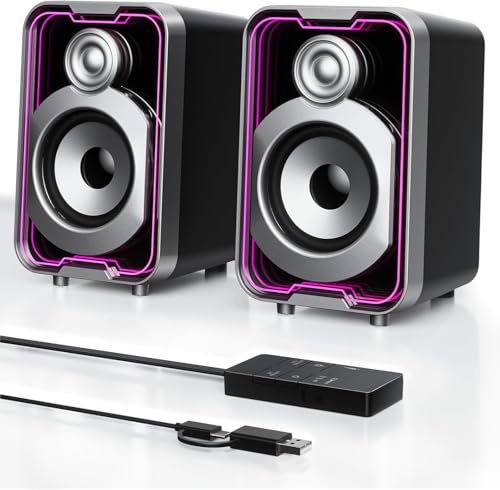
- Striking infinity mirror RGB lighting with five selectable visual effects
- Simple dual-mode operation toggling between wired USB and wireless Bluetooth
- Convenient inline control pod keeps audio adjustments within arm's reach
Cons
- Lacks sub-bass rumble due to the compact driver size and absence of an external subwoofer
- Lightweight plastic cabinet can shift if cables are pulled tightly
- Pushes into audible harmonic distortion at peak maximum volume levels
The SOULION 10W USB Powered Computer Speakers are designed to solve one of the most persistent nuisances in everyday desktop computing: thin, lifeless monitor audio. Built for students, remote professionals, and casual gamers, this 2.0 channel desktop set prioritizes simplicity, aesthetics, and targeted acoustic performance. Rather than demanding complex drivers or sprawling power strips, the system runs straight off a standard USB port, making integration into your daily workspace virtually seamless.
In real-world use, versatility stands out as one of the system's biggest assets. Thanks to the integrated Bluetooth wireless receiver, you can switch seamlessly from typing on a desktop to streaming a podcast or playlist from your phone. The dedicated desktop control pod streamlines the process, placing essential commands like track muting, volume control, and lighting adjustments at your fingertips rather than burying them inside operating system menus.
Visual presentation is another strong point. The front baffle features an infinity mirror design that yields a multi-dimensional light tunnel effect across five distinct lighting modes. It injects personality into dim gaming environments without being overly distracting during daytime productivity tasks. While plastic-bodied and lightweight, the housings sit firmly beside dual-monitor arrays or compact laptop stands.
Overall, the SOULION 10W system serves as a dependable upgrade for anyone seeking functional desktop sound, stylish ambient lighting, and clutter-free wired or wireless audio playback without spending a small fortune.
Acoustically, the SOULION system relies on dual 5-watt active drivers supported by independent passive diaphragms. The tuning leans toward upper-midrange clarity and crisp treble, which benefits spoken-word podcasts, conference calls, and competitive gaming chatter. Dialogue emerges distinctly from background instrumentation, ensuring you never miss footsteps or movie conversations.
While the compact cabinets naturally restrict deep sub-bass reproduction, the passive diaphragms add a touch of mid-bass presence that prevents kick drums and sound effects from feeling entirely hollow. The stereo separation provides an accurate nearfield soundstage, giving listeners a clear sense of left-right directionality when seated within typical desk distances of two to three feet.
Volume output is more than adequate for private home offices and small bedrooms. Pushing the output toward its absolute upper ceiling can result in mild compression and high-end harshness, but at standard moderate listening levels, the delivery remains pleasant, articulate, and far superior to integrated laptop speakers.
Constructed from lightweight black ABS composite, each speaker measures approximately 4 by 3.5 by 5.5 inches. This mini footprint makes them well suited for compact student desks, cubicles, or secondary monitor setups where surface space is at a premium. The angled front face directs acoustic output toward ear level, optimizing nearfield audio clarity.
Connectivity centers around a hardwired USB cable that handles both digital audio transfer and power delivery from computers, eliminating ground-loop hum and external AC brick clutter. For mobile audio playback, an internal Bluetooth module pairs quickly with smartphones, tablets, and gaming handhelds, allowing flexible switching on the fly.
The external control pod acts as the central command hub, featuring tactile switches to toggle illumination modes, power states, audio sources, and rotary volume. The cable lengths provide adequate slack for standard desktop monitor configurations, keeping your workspace neat and organized.

Pros
- Streamlined single-cable USB setup eliminates messy desk cords
- Reliable dual-connectivity with USB digital audio and Bluetooth 5.3
- Angled driver layout directs dialogue clearly toward the listener
- Subtle RGB lighting modes can be turned off with one touch
Cons
- Lacks an internal rechargeable battery, requiring continuous USB power
- Compact drivers lack deep sub-bass impact for bass-heavy tracks
- Does not include a dedicated 3.5mm analog auxiliary input
The ICOREBEI Computer Soundbar is a space-conscious desktop audio solution tailored for home offices, dorm workstations, and everyday entertainment hubs. Designed to sit discreetly beneath a computer monitor or laptop stand, this speaker replaces weak, tinny built-in display speakers with a far richer, forward-facing stereo field. It caters directly to remote professionals, students, and casual creators who want dependable daily audio without cluttering their desks with bulky speaker pairs or tangled wiring.
Setting up the speaker is remarkably seamless thanks to its true plug-and-play architecture. Using the supplied USB-C to USB-A cable, the unit receives both digital sound and power directly from your computer, requiring zero software downloads, manual drivers, or wall adapters. When you want to transition from a productive workday to streaming music or videos from your phone or tablet, pressing the mode toggle engages modern Bluetooth 5.3 for fast and stable pairing.
In daily office and multimedia use, the soundbar shines by offering exceptional vocal articulation. Video conference calls on Zoom or Microsoft Teams come through with crisp separation, while podcasts and instructional videos sound natural and fatigue-free. While the compact form factor is not built to rattle room walls, it delivers clean, articulate sound that remains consistent across moderate and high volume levels.
Ultimately, the ICOREBEI Desktop Soundbar hits the sweet spot of convenience, utility, and contemporary aesthetics. It solves the everyday annoyance of poor monitor audio while preserving valuable desk real estate, making it an excellent investment for anyone looking to modernize their workspace sound setup.
Audio performance on this desktop soundbar is anchored by dual full-range acoustic drivers complemented by a passive bass radiator. This acoustic configuration is tuned specifically for near-field listening, ensuring that spoken dialogue, vocal tracks, and game sound effects remain front and center. The passive radiator helps round out mid-bass frequencies, giving kick drums and lower male voices a pleasing warmth that standard computer monitors simply cannot replicate.
At normal working distances, the speaker produces ample volume to fill a home office, bedroom, or cubicle without cracking or noticeable distortion. The drivers project forward with clean channel separation, lending games and streaming movies an immersive spatial feel. While it does not deliver the thumping low-end rumble of a dedicated external subwoofer, its treble clarity and midrange presence make dialogue easy to understand at any volume.
Wireless connectivity is backed by Bluetooth 5.3, offering strong signal stability up to 30 feet in open desktop environments. Switching between USB digital audio on a primary PC and wireless streaming from an iPhone or Android device is swift, with minimal audio latency during video playback and web streaming.
Measuring approximately 16 inches wide, 2.6 inches deep, and 2.5 inches high, this speaker features an elongated low-profile silhouette built specifically to tuck underneath wide monitors and monitor arms. Its chassis features an intentional upward acoustic tilt, firing sound waves directly toward ear level rather than into your chest or desk surface. The matte black finish and three customizable RGB lighting modes add an appealing visual accent to modern gaming or productivity setups, with the option to turn the lights off completely during focused work sessions.
Regarding power architecture, this speaker is built without an internal lithium-ion battery and is engineered strictly as a USB-powered unit. Because it draws power continuously via USB, you never have to worry about battery degradation, cycle limits, or charging down-time during important work presentations. It operates seamlessly off any standard 5V USB computer port, powered monitor hub, or wall charging brick.
For users who want portable flexibility around the house or between standing desks, the speaker can also be powered directly from a standard portable USB power bank. Its lightweight frame makes it easy to reposition anywhere across your workstation, offering a clean, cable-efficient design that keeps your workspace organized.
Adapting Wired Speakers for Seamless PC Bluetooth Streaming
Turning a standard pair of non-Bluetooth speakers into a functional wireless setup requires bridging the gap between your computer’s audio output and the analog inputs of your sound system. The simplest approach uses an external Bluetooth audio receiver that connects directly to the 3.5mm auxiliary or RCA port of your powered speakers. Your PC then pairs with this receiver just as it would with any standard wireless headset, sending a digital audio stream over the air while the adapter converts it into an analog signal. This setup preserves your existing speakers while eliminating the need for a physical audio tether connecting back to your computer tower.
Understanding the Audio Signal Path: Transmitters vs. Receivers
Before purchasing new accessories or moving cables around your desk, identifying the direction of your audio signal prevents common buying mistakes. A Bluetooth transmitter takes an existing audio signal and broadcasts it wirelessly, whereas a Bluetooth receiver catches an over-the-air signal and feeds it into an amplifier or speaker. In a desktop computer environment, your PC acts as the transmitter by broadcasting media playback, games, and system notifications. That means your non-Bluetooth speakers require a receiver to interpret that wireless stream and deliver it to the speaker cones.
Many computer users mistakenly purchase a USB Bluetooth dongle intended for speaker conversion when they actually need an analog receiver box. If your desktop motherboard already contains built-in Bluetooth hardware, you do not need an additional computer transmitter. You simply need a dedicated receiver box plugged into the input jacks of your speakers. If your computer lacks internal wireless capabilities entirely, you will need a USB Bluetooth transmitter for the PC alongside the audio receiver at the speaker end.
Active Versus Passive Speakers: Checking Your Hardware Requirements
The specific hardware you need depends heavily on whether your non-Bluetooth speakers are powered active units or unpowered passive cabinets. Active computer speakers, such as typical desktop monitors or portable soundbars, contain internal amplifiers that draw power directly from a wall outlet or a USB port. Because active units amplify their own line-level signals, you can plug a compact Bluetooth receiver straight into their 3.5mm or RCA inputs. The receiver provides the analog line-level signal, and the internal amplifier delivers the necessary driving power to the speaker cones.
Passive speakers do not have internal power cords or amplifiers and must receive an amplified signal through speaker wire to function. If you are attempting to adapt traditional stereo loudspeakers to your PC, plugging a basic 3.5mm receiver directly into the binding posts will not work. In that scenario, you need a mini stereo amplifier equipped with built-in Bluetooth or an external receiver connected to an integrated receiver amplifier. Connecting passive audio cabinets without suitable amplification results in no sound or potential equipment damage from mismatched line levels.
Connecting an External Bluetooth Receiver to Your Wired Speakers
Setting up an external Bluetooth receiver on active speakers takes only a couple of minutes once you identify your available ports. Most modern receivers feature a 3.5mm headphone-style output, a pair of stereo RCA jacks, or occasionally an optical digital connection. You simply run the corresponding patch cable from the receiver’s audio output jack into the audio input port of your speaker system. Ensure the cable is fully seated in both ports to avoid channel dropouts or buzzing audio during playback.
Powering the receiver correctly is just as critical as routing the analog signal cables. Many compact audio receivers draw power through a standard micro-USB or USB-C cable connected to a charging brick or an open computer port. If your speakers include a powered USB pass-through port, you can often power the receiver directly from the speaker housing to minimize cable clutter. However, sharing a common power ground between the receiver and an active speaker can occasionally introduce ground loop hum, which requires specific positioning to resolve.
Enabling and Verifying Bluetooth on Your Windows PC or Mac
Once your speaker-side hardware is plugged in and powered, your computer must recognize its own wireless transmission hardware. On Windows systems, you can quickly verify your connection status by opening the Settings menu, navigating to Bluetooth and devices, and ensuring the main Bluetooth toggle is set to the active position. If the toggle is missing entirely, your PC motherboard may not have an internal wireless card installed, or the appropriate driver might be disabled in Device Manager. Mac users can verify this status under System Settings by selecting the Bluetooth panel from the primary sidebar.
If your desktop PC lacks native wireless transmission, adding an inexpensive USB Bluetooth dongle provides an instant hardware fix. These miniature adapters plug directly into an available USB-A or USB-C port on your computer case and typically install generic audio drivers automatically. Once plugged in, the operating system treats the dongle as an integrated wireless controller, letting you discover nearby audio equipment. Be sure to insert the dongle into a front-facing port or an unblocked rear port to avoid physical signal interference caused by metallic computer cases.
Step-by-Step Pairing and Audio Output Configuration
Pairing your computer to the newly adapted speaker system requires placing the receiver into its active discovery mode. Most audio adapters use a multi-function button that you press and hold until an indicator LED flashes rapidly in blue or red. When the light indicates active pairing, open the Bluetooth discovery window on your PC and click on Add device. Select the Bluetooth option from the popup list, wait for your adapter model name to appear, and click it to establish the link.
Establishing the wireless handshake is only half the battle, as your computer operating system must also designate the connection as your active sound route. Click on the speaker icon located in your Windows taskbar notification tray and select the small output selection arrow beside the volume slider. Choose your newly paired Bluetooth receiver from the playback list so all media routes away from internal monitor speakers. You should hear a short confirmation chime through your speakers once the operating system redirects the default audio stream.
Upgrading to Hybrid Desktop Speakers with Multi-Device Switching
While adding an external receiver adapts legacy equipment effectively, some users find that managing multiple power bricks, adapters, and audio patch cables clutters small desks. An alternative path involves upgrading to modern computer speakers that feature integrated Bluetooth alongside standard wired connections. Products like the Logitech Z207 2.0 Stereo Computer Speakers offer built-in wireless connectivity alongside standard 3.5mm inputs, allowing users to switch between PC audio and mobile streaming seamlessly. This design integrates the receiver hardware directly inside the cabinet, eliminating extraneous power cables entirely.
Similarly, compact desktop soundbars such as the Bluedee Computer Speakers for Desktop PC and the SOULION R50 provide hybrid connectivity with dedicated mode-switch buttons. These units allow users to plug a single USB or aux cable directly into a gaming rig for latency-free PC audio while keeping Bluetooth open for phone or tablet playback. When exploring dedicated Bluetooth speaker options, evaluating whether a hybrid desktop speaker fits your space better than an adapter cluster can save substantial setup time. Built-in volume dials and front-facing input toggles also make switching audio sources much more intuitive during busy workdays.
Addressing Audio Latency, Codecs, and Sound Quality Trade-Offs
Streaming audio over a wireless connection introduces latency, which is the slight delay between when a sound is generated on the PC and when it reaches your ears. For casual music playback or listening to podcasts, this small delay is completely unnoticeable because audio synchronization with visual media is not required. However, when watching movies or playing competitive PC games, high latency can cause distracting dialogue desynchronization or delayed gaming sound effects. Understanding how Bluetooth handles compression helps you configure your setup for optimal responsiveness.
The standard Bluetooth audio codec supported across almost all Windows devices is SBC, which balances reasonable sound quality with universal device compatibility. Some advanced receivers support AAC or low-latency transmission profiles that compress and transmit audio packets with significantly shorter processing buffers. If you experience distracting lip-sync errors while streaming video content, check if your media player supports audio delay adjustments to realign speech with video frames. For dedicated gaming, keeping a direct wired bypass cable connected to your hybrid speakers ensures zero lag when precision matters most.
Eliminating Ground Loops, Audio Hum, and Electrical Interference
One of the most frequent complaints when adapting analog speakers with USB-powered receivers is an annoying electrical buzzing or whining sound. This issue typically stems from a ground loop, which occurs when the receiver and the active speaker share a common electrical ground through the same computer power supply. The electrical currents circulating between the power line and the analog audio patch cable create audible static that increases whenever the computer works under heavy processing load. This background noise can severely degrade your listening experience even when playback volume is set relatively low.
You can eliminate ground loop noise easily by powering the Bluetooth receiver from an isolated wall adapter rather than a computer USB port. Providing an independent power source breaks the shared ground loop circuit, silencing the electrical whine immediately. Alternatively, inserting an inexpensive 3.5mm ground loop isolator between the receiver output and the speaker input filters out circulating ground currents while leaving audio frequencies intact. Taking the time to isolate your power sources ensures your adapted sound system remains dead quiet during silent pauses in music or speech.
Troubleshooting Stuttering Audio, Signal Drops, and Reconnection Glitches
If your speakers emit stuttering audio or disconnect unexpectedly, the primary culprit is usually physical signal obstruction or radio frequency congestion. Desktop environments are filled with wireless signals, including Wi-Fi routers, wireless computer mice, and mobile phones operating across the shared 2.4 GHz frequency band. Positioning your receiver in a clear line of sight rather than tucked behind a dense metal computer case helps maintain a steady transmission packet rate. Keeping the distance between your PC and the receiver within standard indoor operating limits prevents unexpected signal degradation.
Software configurations can also cause intermittent audio drops if power management settings allow your operating system to suspend USB or wireless controllers. On Windows, you can access Device Manager, locate your Bluetooth adapter, and uncheck the option that allows the computer to turn off the device to save power. Updating your motherboard chipset and wireless drivers from the manufacturer’s official support portal also resolves known compatibility bugs that cause spontaneous disconnects. Taking these preventive steps ensures that your converted speakers reconnect automatically every time you boot up your computer.
Long-Term Practical Considerations for Converted Desktop Audio
Converting non-Bluetooth speakers into wireless PC monitors provides remarkable convenience, yet keeping your expectations grounded ensures long-term satisfaction. Analog desktop speakers connected via a quality receiver deliver warm, rich sound that easily rivals modern standalone wireless units while preventing functional electronics from landing in scrap heaps. However, you should still keep standard 3.5mm or USB patch cables accessible near your desk for situations that demand uncompressed fidelity or instantaneous response. Having both wireless convenience and direct wired capability gives you complete versatility across all forms of desktop media.




Write Your Review
No reviews yet. Be the first to share your experience!