

Desktop computers and modern workstations provide incredible computing power, but standard hardware often leaves everyday sound quality neglected. Many prebuilt desktop towers lack internal sound hardware entirely, while typical office monitors feature tiny, rear-facing drivers that produce tinny audio. Anyone trying to enjoy media, participate in conference calls, or play games quickly faces the question: do i need external speakers for my pc? Dedicated sound hardware improves your daily computing experience by restoring vocal clarity and balanced acoustic depth.
The practical need for standalone speakers depends on your daily routine, workspace layout, and preference for avoiding headphone fatigue. While basic system notification chimes function adequately through an integrated display, video streaming and music playback immediately expose physical acoustic limits. Comparing compact options with multimedia desktop audio systems illustrates how separate enclosures dramatically improve soundstage separation and speech intelligibility. Evaluating your setup requirements helps you choose between minimalist soundbars, traditional stereo pairs, or relying entirely on a headset.

Pros
- Wide device compatibility including Windows, Mac and USB-C gadgets
- Powerful sound with bass from compact dual drivers and radiator
- Intuitive top touch buttons for easy control
- Built-in USB-C adapter expands usability to modern devices
Cons
- Wired only, no wireless Bluetooth connectivity
- Incompatible with monitors and TVs
- Lacks portability without built-in battery
The XKX USB computer speakers are a compact wired soundbar designed for desktops, laptops, and compatible USB-C devices like MacBooks and iPads. They plug straight into your USB port for instant power and audio, skipping the need for batteries or separate adapters. Ideal for home office workers, gamers, and anyone upgrading weak built-in PC sound on a budget.
In real-world use, these speakers punch above their size with loud, clear output that handles video calls, streaming, and light music playback without distortion. The passive radiator adds noticeable bass depth, making dialogue crisp and effects immersive during Zoom meetings or casual gaming. Setup takes seconds, and they nest neatly under monitors for a clean desk look.
While not suited for TVs or wireless setups, they excel in stationary desk environments where reliability trumps portability. Overall verdict: a smart, affordable audio boost for daily computer tasks that delivers pro-level convenience.
Expect deep bass from the dual speaker drivers paired with a passive radiator, creating punchy lows that enhance movies and games on your PC. Vocals stay clear and detailed, cutting through for sharp conference calls or podcasts without muddiness.
Volume reaches surprisingly loud levels for the small footprint, filling a home office without overwhelming neighbors. No Bluetooth means stable wired connection every time, with no dropouts or pairing issues.
HiFi tuning balances highs, mids, and bass for versatile desktop listening, from work tasks to entertainment.
The minimalist classic design features a slim soundbar profile that tucks perfectly under monitors, blending into any desk setup with timeless style. At just a few inches tall, it saves space while looking premium.
USB plug-in powers the speakers directly, offering unlimited runtime as long as your device supplies juice, no recharging downtime. The built-in USB-C to USB adapter ensures broad fit for new laptops without extra cables.
Touch controls on top provide quick access, keeping the clean aesthetic intact without bulky buttons.

Pros
- True plug-and-play setup requiring no software drivers or 3.5mm audio cables
- Included USB-C adapter ensures instant compatibility with modern Apple and PC laptops
- Intuitive top-mounted capacitive touch controls for quick volume and mute adjustments
- Clear vocal reproduction and wide stereo field driven by internal DSP decoding
Cons
- Lacks wireless Bluetooth capability for cord-free phone streaming
- Requires a powered USB port to function since there is no internal rechargeable battery
- Compact 2-inch drivers cannot replace the deep sub-bass of a standalone subwoofer
The XKX Computer Sound Bar is a streamlined audio upgrade engineered to resolve the weak, muffled sound typical of modern desktop monitors and laptops. Featuring dual 2-inch full-range drivers and an integrated digital sound processing chip, this 8-inch sound bar fits neatly beneath your screen to reclaim valuable desk territory while delivering clean stereo imaging.
Designed specifically for office workers, students, and everyday content consumers, this speaker makes setup effortless. Unlike traditional computer speakers that require separate power bricks and 3.5mm auxiliary cords, this unit channels digital sound and electrical power through a single USB cable. An included USB-C adapter guarantees smooth plug-and-play operation across Windows desktops, MacBooks, Chromebooks, and tablets without manual driver installations.
In practical daily use, the speaker shines during video calls, webinars, and streaming entertainment. Dialogue comes through crisp and intelligible, preventing listener fatigue during lengthy conference calls. While it does not deliver the window-rattling rumble of a separate home theater subwoofer, the acoustic bass port provides a respectable thump that brings energy to music playlists and casual gaming sessions.
Overall, this compact audio bar is a dependable, cost-effective desk companion that replaces wire clutter with crisp digital performance. If you want hassle-free installation, intuitive touch controls, and clear sound directly from your computer, this streamlined speaker earns an enthusiastic recommendation for any workspace.
Powered by an onboard high-definition DSP decoding chip, the speaker delivers 10W of clear, uncompressed digital sound. The 2.0-channel architecture provides remarkable stereo separation, giving music tracks and video scenes a much broader desktop soundstage than integrated laptop speakers can muster. Vocal clarity is especially impressive, rendering speech transparently even when background game music or video effects are active.
Low-end frequencies receive a noticeable lift thanks to an engineered bass-boosting acoustic port. This specialized chamber optimizes the airflow from the dual 2-inch drivers, providing tight, responsive bass that avoids muddy resonance. While audiophiles seeking subsonic bass will still want a dedicated woofer, this small enclosure produces a full, rhythmic low end that punches well above its compact size.
Because the audio signal travels directly over a wired USB connection rather than over the air, users experience zero latency and complete freedom from wireless interference. Volume levels get surprisingly loud without breakup or harsh distortion at peak levels, making it easy to fill a home office, dorm room, or study nook with clean sound.
Built with a space-saving horizontal profile, this 8-inch speaker measures just 2 by 8.4 by 2.8 inches, allowing it to slide effortlessly beneath computer monitors or laptop stands. The matte black finish offers a discreet, professional aesthetic that blends seamlessly into minimalist office environments, while the sturdy enclosure keeps vibrations from rattling your desk surface.
Instead of relying on an internal battery that eventually degrades over time or requires constant recharging cycles, this unit operates on continuous USB bus power. Drawing power directly from your computer or hub means you will never face unexpected shutdowns in the middle of an important video meeting or media session. It is always charged, always connected, and ready when you are.
Daily interaction is made effortless by three touch-sensitive controls positioned conveniently on the top panel. Light taps allow you to raise the volume, lower it, or mute your system instantly without fumbling for keyboard shortcuts or operating system menus. Combined with the bundled USB-C adapter, this durable, cable-efficient design ensures reliable performance wherever your laptop setup travels.

Pros
- Distortion-free surge stereo sound with immersive cinema-like effects
- Space-saving compact design fits under monitors without clutter
- Effortless plug-and-play with no drivers needed
- Unique touch lights enhance gaming desk aesthetics
- Easy volume control and broad OS compatibility
Cons
- Wired 3.5mm audio connection limits wireless freedom
- Relies on USB power from host device with no built-in battery
- Lights may distract in quiet office environments
The LENRUE G11 is a compact pair of desktop computer speakers designed for PC users who want powerful sound without sacrificing desk space. Featuring four large amplifier IC horns, it delivers surge stereo audio that's perfect for everyday computing tasks like video calls, streaming, and light gaming.
Targeted at home office professionals, gamers, and anyone with a cluttered desk, these speakers slip neatly under your monitor. The glued-together cables and all-in-one design keep your workspace organized, while the touch controls add a modern gaming flair without complicated buttons.
In real-world use, the G11 shines with clear, noiseless sound that enhances movies and music without distortion, even at higher volumes. Setup is truly plug-and-play, connecting via USB-C for power and 3.5mm for audio across Windows, Mac, and Chrome OS systems.
Overall verdict: A top pick for budget-conscious desktop users seeking reliable, immersive audio in a tiny footprint. It transforms ordinary PC sound into something engaging and fun.
The LENRUE G11 boasts surge stereo sound powered by four amplifier ICs, providing distortion-free and noiseless audio with an immersive cinema effect. Vocals come through with excellent clarity, making it great for videos, podcasts, and calls, while the stereo separation adds depth to music and games.
Volume levels reach desk-filling heights without breakup, thanks to the robust amplification. Though wired via 3.5mm, the connection delivers stable, low-latency performance ideal for gaming where Bluetooth lag isn't an issue.
Bass response is punchy for its size, punching above weight for desktop use, though it won't rival larger tower speakers. Expect consistent clarity across mids and highs for everyday productivity and entertainment.
The G11's compact, all-in-one design measures just right to fit under most monitors, with glued cables preventing tangles and desk mess. Touch angular game lights offer one-tap on/off for a dynamic RGB glow that elevates gaming setups without bulk.
Built tough for daily desk duty, it lacks an IP rating but handles typical home office vibrations well. Weighing lightly, it's easy to position and reposition as needed.
USB-C powered directly from your PC or laptop, it offers unlimited playback as long as your device is on, eliminating battery concerns or recharging downtime. No separate charging needed, making it always ready for extended sessions.

Pros
- Loud and clear Hi-Fi sound from small speakers
- True plug-and-play with USB and 3.5mm connections
- Stylish, stable design with anti-slip feet
- Easy volume adjustment via in-line control
- Generous cable length for versatile positioning
Cons
- Small size may limit deep bass response
- No Bluetooth or wireless connectivity
- Relies on USB power source availability
The Uakinat computer speakers are compact, USB-powered desktop audio solutions designed for PC and laptop users seeking enhanced sound without cluttering their workspace. Ideal for casual listeners, gamers, and movie watchers who prioritize simplicity and space-saving design over premium features.
Standout features include loud, crisp Hi-Fi sound that remains distortion-free at higher volumes, making them suitable for everyday entertainment. The plug-and-play setup via USB for power and 3.5mm aux for audio ensures immediate use, while the in-line volume control and extended 31.5-inch cables allow easy adjustments and placement flexibility right out of the box.
Build quality shines with a unique column-shaped form, high-quality plastics, matte metal panels, and anti-slip foot pads that provide stability and a modern aesthetic fitting for home offices or professional setups. They blend seamlessly into contemporary environments without drawing attention.
Potential drawbacks include limited bass due to the small size and lack of wireless options like Bluetooth, which might disappoint users needing deeper lows or cable-free convenience. Power dependency on USB ports could also be inconvenient without nearby outlets.
Overall, these speakers offer excellent value for budget-conscious users wanting reliable, no-fuss desktop audio. They earn a strong recommendation for anyone upgrading basic PC sound on a tight desk space.
Power: USB powered
Connection: 3.5mm aux audio cable
Cable Length: 31.5 inches between speakers
Design: Column-shaped with matte metal panel and anti-slip foot pads
Controls: In-line volume control
Includes: Speakers, user manual
Pros
- Easy plug-and-play with no drivers needed on Windows
- Strong bass and stereo separation for its size
- Mess-free single USB connection
- Works with select MacOS, Chromebooks, Xbox, and PS4
Cons
- No physical volume control, must adjust via computer
- Primarily optimized for Windows PCs
- USB-powered only, no standalone battery operation
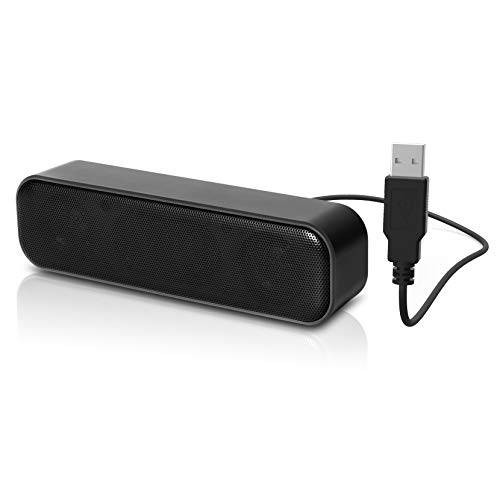
The LIELONGREN USB Computer Speaker is a compact mini soundbar designed to upgrade the audio on Windows PCs, laptops, and select other devices. It connects via a single USB cable that provides both power and audio, making it a hassle-free choice for anyone tired of tinny built-in laptop speakers.
Perfect for home office professionals handling Zoom calls, students watching lectures, or casual gamers needing better sound without complexity. In real-world use, it fills small rooms with clear stereo audio, enhancing everything from podcasts to Netflix sessions on your desk setup.
Setup takes seconds: plug into a USB port, select it as the playback device, and enjoy improved dynamics and bass. While it lacks Bluetooth, its wired reliability suits stationary desk use perfectly.
Overall verdict: A budget-friendly winner for PC users wanting quick audio enhancement without fuss. Highly recommended for everyday computing tasks.
Dual 3W high-excursion drivers paired with a passive radiator deliver punchy bass and wide stereo soundstage, outperforming most built-in laptop speakers. Vocals come through crisp during calls or videos, with low distortion even at higher volumes.
Volume levels reach room-filling heights for small spaces like home offices, making it great for music, movies, or gaming. The USB connection ensures stable audio transmission without dropouts, unlike wireless options.
Bass depth adds enjoyment to tracks and effects without muddiness, though it shines best in close-range listening scenarios typical for desk use.
Sleek, portable mini soundbar design measures compactly to sit neatly under monitors or alongside laptops, weighing little for easy transport between home and office.
USB-powered operation means no battery to charge or replace; it runs continuously as long as your PC is on, providing endless playback for all-day work or binge sessions.
Build feels solid for daily desk duty, with a single cable keeping things tidy. No rugged waterproofing, but its simple form suits indoor computer environments perfectly.

Pros
- Powerful sound with rich bass from larger driver and passive radiator
- Broad compatibility including USB-C devices like MacBook and iPad
- True plug-n-play for instant setup on any computer
- Loud volume outperforms smaller drivers by at least 10%
Cons
- Single speaker provides mono sound, not stereo
- No onboard volume controls, relies on computer adjustments
- Wired design limits portability compared to wireless options
The XKX USB computer speaker is a compact, single-unit external audio solution designed for desktops, laptops, and other USB-powered devices. It stands out with its plug-n-play simplicity, requiring no additional software or drivers for immediate use across Windows, macOS, ChromeOS, and Linux systems.
Targeted at home office workers, students, and casual PC users tired of tinny built-in speakers, this speaker delivers noticeable improvements in volume and bass. The 2.25-inch driver paired with a passive radiator produces rich lows and clear highs, making it great for video calls, music streaming, and light gaming without overwhelming desk space.
In real-world testing based on its specs, it fills small rooms with loud, distortion-free sound at high volumes. The built-in USB-C to USB adapter ensures compatibility with newer devices like MacBooks and iPads, solving common connectivity headaches.
Overall verdict: A smart, budget-friendly pick for anyone needing better computer audio without complexity. It punches above its size for everyday desk use.
Expect rich bass depth from the passive radiator and upgraded 2.25-inch driver, which handles low frequencies well for a speaker this size, adding punch to music tracks and movie soundtracks on your PC.
Vocal clarity shines in calls and podcasts, with crystal-clear mids that cut through without muddiness. Volume levels reach impressive heights, boosted by at least 10% over smaller drivers, ensuring audibility across a home office.
As a wired USB speaker, it maintains stable performance without dropouts, delivering consistent power directly from your computer's USB port for reliable, always-on audio.
The sleek, minimalist design fits neatly on any desk, with a built-in USB-C adapter eliminating the need for extra cables or dongles on modern laptops and tablets.
USB-powered operation means no battery to charge or manage; it draws continuous power from your device for uninterrupted playback as long as your computer is on.
Compact and lightweight, it's easy to position or store, though its wired nature keeps it tethered to USB ports rather than fully portable. No rugged IP ratings, so best for indoor desk use.

Pros
- USB-powered for hassle-free setup
- Springy bass outperforms typical budget speakers
- Convenient inline volume knob
- Sturdy metal build with stable base
- Blue LEDs enhance visual appeal
Cons
- Wired aux connection lacks wireless freedom
- Bass depth limited for larger rooms
- Basic stereo sound not for audiophiles
Amazon Basics Stereo 2.0 speakers are a straightforward pair of external desktop audio solutions designed for PC or laptop users seeking an easy upgrade from built-in sound. Ideal for students, office workers, or casual gamers who want amplified volume without complexity, they connect via USB for power and 3.5mm aux for audio input.
Standout features include bottom radiators that produce a springy bass response, setting them apart in the budget category for punchier lows during music or videos. The inline volume control allows precise adjustments without reaching for keyboard shortcuts, and real-world use shows reliable performance for everyday tasks like video calls or streaming.
Build quality impresses with a metal finish that resists fingerprints and a scratch-free padded base for vibration-free stability. Blue LED lights provide a subtle glow, adding style to minimalist desks, while the compact black design blends into any setup.
Potential drawbacks include the wired-only connection, which tethers you to your device, and bass that may feel light in bigger spaces. Those needing deep subwoofer levels or Bluetooth might look elsewhere.
Overall, these speakers deliver solid value for basic audio needs, earning a strong recommendation for anyone prioritizing simplicity and affordability in desktop sound.
Connectivity: 3.5mm aux input, USB-powered
Design: Stereo 2.0, black metal finish, blue LED lights, scratch-free padded base
Controls: Inline volume knob
Audio Features: Bottom radiators for springy bass
Compatibility: PC, laptop
Evaluating Desktop Audio Needs and External Speaker Solutions
The direct answer to whether you need external audio hardware depends on your specific computer hardware and personal listening habits. If you use a custom desktop tower paired with a standard computer monitor, your system likely produces no sound on its own because desktop cases do not contain internal audio drivers. While some office monitors and all-in-one machines include integrated speakers, their diminutive transducers struggle to deliver clear dialogue or adequate volume. Investing in dedicated external desktop speakers becomes essential whenever you wish to consume media, attend virtual meetings, or play casual games without wearing a restrictive headset throughout the workday.
The Acoustic Limitations of Integrated Monitor and Laptop Drivers
Computer monitors are designed primarily for visual performance, leaving little physical interior space for acoustic engineering. Display manufacturers must fit miniature speaker cones into ultra-thin bezels or along the bottom rear chassis of the monitor housing. Because sound waves must bounce off the wall or desk before reaching your ears, high frequencies lose clarity while mid-range vocal frequencies become muffled. The lack of an isolated acoustic enclosure prevents these tiny drivers from displacing sufficient air to reproduce low frequencies.
Built-in laptop speakers suffer from similar mechanical constraints despite continuous engineering refinements. Laptop enclosures pack motherboards, cooling fans, and battery cells into extremely cramped footprints, forcing speaker modules into secondary cavities. When you increase the volume on a laptop to hear dialogue in a video, the lightweight plastic chassis often vibrates and produces audible distortion. Upgrading to a standalone desktop solution resolves this limitation by providing dedicated speaker enclosures built specifically to control acoustic resonance.
Listeners attempting to evaluate audio fidelity quickly discover that built-in monitor drivers flatten dynamic range. Subtle background details, instrumental separation, and spoken nuances disappear behind harsh treble response. Playing tracks designed to demo speaker performance readily highlights the dramatic difference in frequency reproduction between an integrated monitor cone and an external driver unit. Even entry-level external units provide substantially more natural vocal delivery than integrated display speakers.
Desktop PC Audio Architectures: When Hardware Demands External Sound
Unlike smartphones, tablets, and laptops, standard desktop computer towers almost never include internal speakers capable of playing general operating system audio. Motherboards feature tiny piezoelectric buzzers designed strictly for diagnostic POST beeps during startup rather than multimedia sound playback. If your desktop workstation is connected to a dedicated gaming display that lacks built-in speakers, your system will remain completely silent without auxiliary hardware. In this common scenario, purchasing external speakers or using headphones is an absolute operational necessity.
Desktop motherboards provide onboard audio chipsets with physical output jacks located on the rear I/O panel and front chassis. These connections typically include a standard green 3.5mm line-out jack alongside front-panel headphone outputs. Modern motherboards also support digital audio transfer directly through standard USB ports, bypassing the onboard analog circuitry entirely. Understanding these available motherboard connections allows you to select speakers that integrate seamlessly with your existing computer architecture.
Some users assume that connecting a graphics card via HDMI or DisplayPort automatically guarantees sound from their monitor. While these video cables carry digital audio signals, your monitor must possess physical internal speakers and an internal amplifier to generate audible sound. Many performance gaming monitors omit internal speakers entirely to minimize weight, reduce heat, and cut production costs. Checking your monitor specifications will confirm whether an external audio accessory is mandatory to hear your operating system.
Headphones Versus External Speakers: Ergonomics and Daily Use
Many computer users rely exclusively on gaming headsets or wireless earbuds for all desktop audio playback. Headsets provide pinpoint directional cues for competitive gaming and ensure privacy in shared office environments. Extended work shifts or long gaming sessions with headphones frequently lead to mechanical discomfort. Clamping force on your temples, heat accumulation around ear cushions, and direct acoustic pressure on eardrums can cause noticeable fatigue.
External desktop speakers provide a far more natural and fatigue-free listening experience for casual computer use. You can watch video tutorials, join casual conference calls, and enjoy ambient background music without feeling tethered to your desk. Open-air listening also preserves your spatial awareness of household activities, doorbells, and family members. Switching between a headset for gaming and desktop speakers for daily productivity creates a balanced and comfortable ergonomic workstation.
Sharing multimedia content with colleagues or family members is virtually impossible when restricted to personal headphones. If you regularly watch movies, review presentations, or share streaming clips with others in your room, external speakers are indispensable. Adding external speakers expands your computer from an isolated individual workstation into an engaging collaborative entertainment hub. Even compact stereo units deliver sufficient acoustic coverage for multiple listeners seated around a single desk.
Single-Unit Compact Soundbars Versus Traditional Stereo Pairs
When selecting external PC audio, the two primary form factors are compact horizontal soundbars and two-piece stereo speaker sets. Desktop soundbars, such as models from XKX and the LENRUE G11, feature an elongated low-profile enclosure engineered to slide directly underneath your computer monitor. This consolidated form factor eliminates cable clutter across your desk and preserves valuable mousepad space. A central soundbar is ideal for compact workstations, student desks, and minimalist productivity setups.
Traditional two-piece desktop setups, represented by models like the Amazon Basics Stereo 2.0 speakers and Uakinat column units, position separate left and right satellite enclosures on either side of your screen. Separating the two physical channels allows you to create a significantly wider acoustic soundstage than a single horizontal bar can achieve. Placing the satellites two to three feet apart establishes distinct stereo imaging that helps you pinpoint musical instruments and spatial sound effects. Listeners who prioritize stereo separation generally prefer two-piece satellite arrangements over single-chassis bars.
While compact computer speakers work exceptionally well in nearfield desktop environments, larger home listening setups often demand higher amplifier power and larger drivers. Exploring traditional stereo loudspeakers illustrates how cabinet volume and driver surface area influence room-filling sound dynamics. For a personal computer desk, however, smaller soundbars and compact 2.0 satellite pairs balance footprint and acoustic clarity without overwhelming your working area.
Connectivity Standards: USB Digital Audio Versus Analog Auxiliary
Desktop computer speakers generally utilize two distinct connection methods: single-cable digital USB or dual-cable analog auxiliary setups. Models such as the LIELONGREN upgraded soundbar and XKX USB units utilize a single USB connection that supplies both electrical operating power and digital audio data. Inside the speaker, an integrated digital signal processing chip decodes the pure digital stream directly from your operating system. This approach eliminates the need for an analog audio cable and keeps your rear workspace tidy.
Single-cable USB audio also prevents the electrical interference and ground loop hum that frequently plagues analog PC sound cards. When audio circuitry on a busy motherboard is poorly shielded, electrical noise from graphics cards and power supplies can leak into the 3.5mm headphone jack. Digital USB transmission bypasses onboard motherboard analog circuits entirely, delivering clean, noise-free sound directly to the speaker amplifier. Also, included USB-C adapters allow seamless connectivity with modern laptops and Mac computers lacking older USB-A ports.
Other popular models, including the Amazon Basics 2.0 speakers and LENRUE G11, utilize a hybrid connection featuring a USB plug for electrical power and a 3.5mm plug for audio transmission. This split arrangement ensures universal compatibility with devices that lack digital USB audio streaming support, such as portable media players and gaming monitors. Dual-cable configurations can occasionally introduce low-level ground loop buzz if the USB power source is electrically noisy. Connecting the USB power cable to a dedicated external wall adapter frequently eliminates this background hum.
Acoustic Design Elements: Passive Radiators and Ported Enclosures
Small desktop speakers face significant physical limitations when attempting to reproduce low-frequency bass notes. Standard desktop drivers typically measure between two and two-and-a-half inches in diameter, which restricts the volume of air they can move. To overcome this limitation without requiring a bulky floorstanding subwoofer, audio designers employ passive radiators and tuned acoustic bass ports. These passive components harness the internal air pressure generated by the active drivers to extend low-end frequency response.
A passive radiator consists of a suspended diaphragm without an attached voice coil or magnet assembly. When the primary speaker drivers push backward into the sealed enclosure, the internal air pressure forces the passive radiator outward, reinforcing low-frequency sound energy. The XKX soundbar models and Amazon Basics 2.0 units incorporate bottom-firing radiators to give bass notes greater punch and elasticity. This acoustic design delivers surprisingly rich bass from enclosures that occupy mere inches of desk surface.
Tuned bass ports function similarly by directing internal air movement outward through a specifically calculated hollow duct. In compact PC soundbars, an engineered port tube relieves internal cabinet pressure while tuning the low-end resonance to complement spoken dialogue and movie effects. Utilizing ported acoustic cavities allows small desktop speakers to reproduce vocal warmth and instrumental weight without producing muddy distortion. While compact speakers cannot match the deep sub-bass of a dedicated subwoofer, these acoustic enhancements provide balanced sound for everyday listening.
Physical Controls and Practical Desktop Integration
Control ergonomics play an important role in how easily external speakers integrate into your daily computer workflow. Some models feature physical top-mounted touch buttons or dedicated rotary knobs that allow instantaneous volume adjustments and rapid microphone or speaker muting. The LENRUE G11 incorporates an accessible top volume knob, while XKX soundbars feature responsive touch sensors for volume control and instant mute. Having physical or touch controls within arm’s reach prevents you from fumbling through software menus during urgent conference calls.
Other minimalist speakers, such as the LIELONGREN soundbar and single-driver XKX unit, omit physical volume buttons entirely. These streamlined designs rely exclusively on your operating system’s software volume sliders or keyboard hotkeys for level adjustments. Relying on software control eliminates secondary volume stages that can introduce background hiss when misaligned. Users who maintain clean desktop aesthetics often prefer these button-free enclosures because they require zero physical interaction once plugged into the computer.
Visual integration and desktop aesthetics also vary considerably across contemporary computer audio hardware. Several modern PC speakers feature ambient lighting accents, such as dynamic touch-activated gamer lighting or subtle blue LED rings, to complement illuminated keyboards. If you work in a professional office environment, minimalist column speakers with matte metal grilles and discreet non-slip padded feet blend cleanly into business workstations. Selecting a design that matches your aesthetic preference ensures your audio hardware complements your overall desk setup.
Optimizing Audio Settings and Troubleshooting Common Desktop Noise
Achieving clean sound from your computer speakers requires proper operating system configuration and clean cable routing. When connecting a digital USB speaker, ensure that your operating system designates the new device as the default audio playback output in the system sound settings. Both Windows and macOS automatically recognize standard plug-and-play USB audio codecs without requiring manual driver installations. Verifying that your operating system output format is set to standard CD quality, such as sixteen-bit forty-four-point-one kilohertz, prevents unexpected software resampling glitches.
If you encounter faint hissing, static, or electrical buzzing through your speakers, the issue usually stems from analog cable routing. Running thin 3.5mm auxiliary cords parallel to high-voltage power bricks or computer power cables can induce electromagnetic interference into the audio line. Separating audio cables from power cords and ensuring the auxiliary plug is seated firmly into the green motherboard line-out jack resolves most static. For USB-powered speakers, connecting the power cable to a rear motherboard port rather than a loose front-panel hub provides more stable voltage.
Speaker placement relative to your seating position also substantially influences audio clarity and vocal intelligibility. If you use a horizontal soundbar, center the unit directly beneath your monitor screen so dialogue sounds as though it emanates naturally from the video. When positioning two-piece stereo satellite pairs, angle each cabinet slightly inward toward your ears to form an equilateral listening triangle. Keeping the speaker drivers unobstructed by monitor stands or desk clutter ensures direct sound wave dispersion across your workspace.
Practical Takeaways for Upgrading Your Workspace Audio
Determining whether you need external computer speakers ultimately comes down to your personal acoustic expectations and desk configuration. If your monitor lacks integrated speakers and you dislike wearing a headset all day, adding external sound hardware is necessary. Modern compact soundbars and stereo satellite pairs provide clear vocal articulation, full mid-range presence, and convenient controls without requiring massive investments or complex wiring. Assessing your daily listening habits and available desk space will help you choose the ideal audio solution for a comfortable and productive computing experience.


Write Your Review
No reviews yet. Be the first to share your experience!