


Smartwatch shoppers and fitness enthusiasts often look for on-wrist sound so they can take quick phone calls, hear timer alerts, or interact with voice assistants during workouts. If you are comparing wearable devices, understanding whether does fitbit versa have speakers can dramatically shape your buying decision. Many users assume every modern fitness smartwatch provides acoustic feedback, but wearable hardware varies substantially depending on the release generation. Identifying the exact model ensures you do not mistake a microphone opening for a functional audio output port. Knowing what audio components sit inside the chassis saves you from unexpected disappointments after opening the box.
While some fitness watches prioritize silent haptic alerts to maximize battery life, others integrate micro-transducers and digital microphones for complete two-way voice communication. Choosing the right wearable setup often involves balancing physical notification needs against preferences for external listening gear like portable Bluetooth audio options. That distinction is particularly important when evaluating older smartwatches against newer iterations that support wrist calls. Below, you will find relevant watches and protective accessories, followed by an in-depth breakdown of audio hardware across each generation in the series.


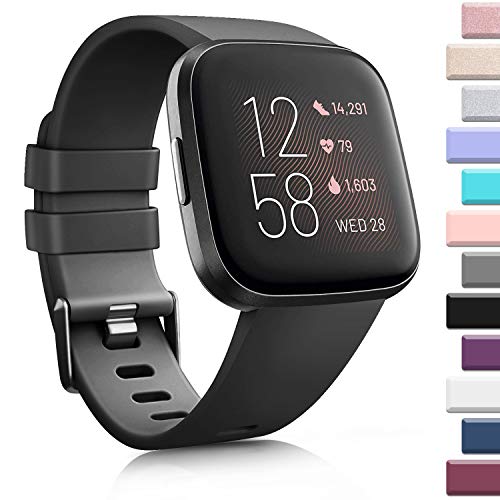


Understanding Audio Capabilities Across the Fitbit Versa Smartwatch Lineup
To answer the question directly, whether a watch in this series includes an integrated sound driver depends entirely on the specific hardware generation. The original Fitbit Versa, Fitbit Versa Lite, and Fitbit Versa 2 do not possess built-in speakers, relying strictly on vibration motors and visual screen prompts for all user alerts. In contrast, the newer Fitbit Versa 3 and Fitbit Versa 4 include both a micro-speaker and an internal microphone to support audible alarms, voice assistant responses, and on-wrist Bluetooth phone calls. Understanding these architectural distinctions prevents unexpected surprises and ensures you select a wearable device that matches your communication habits.
Model-by-Model Hardware Breakdown Across the Versa Series
The earliest entries in the product line established the lightweight square silhouette but omitted physical acoustic transducers entirely. Both the original Fitbit Versa and the budget-oriented Versa Lite relied exclusively on vibration motors for tactile wrist alerts. When an incoming message arrived or an exercise target was met, the watch buzzed against your skin while displaying text on the glass. The perimeter of the aluminum housing was completely sealed, leaving no opening for acoustic sound output.
Fitbit added a small microphone pinhole to the Versa 2 casing to facilitate cloud-based voice commands through Amazon Alexa. Despite introducing voice input hardware, the manufacturer elected not to install an internal speaker cone inside the watch body. As a result, the Versa 2 processes speech input seamlessly, yet all system responses return as written text across the screen. Many consumers understandably mistake the tiny microphone hole on the frame for a speaker, leading to confusion when the watch remains silent.
The release of the Fitbit Versa 3 introduced a major physical update by incorporating a dedicated speaker cavity along the left flank of the chassis. This micro-speaker operates alongside an upgraded microphone array, unlocking genuine two-way audio communication on the wrist. Fitbit retained this acoustic enclosure for the subsequent Versa 4, maintaining consistent hardware capabilities for phone calls and audio chimes. Therefore, any buyer asking does fitbit versa have speakers can confirm that only the Versa 3 and Versa 4 contain functional sound output hardware.
Why the Fitbit Versa 2 Audio Configuration Confuses Buyers
Voice assistant marketing remains the primary factor causing shoppers to misjudge the acoustic capabilities of the Versa 2. Retail descriptions frequently emphasize built-in Alexa support, which naturally leads buyers to expect spoken voice feedback similar to home smart speakers. When you issue a voice query regarding the weather or a calendar event, the watch transcribes the command and displays a card on the screen. The absence of an internal output driver prevents the device from generating spoken replies or chime notifications.
Timer alerts and morning wake-up alarms on the Versa 2 also operate on a strictly tactile basis. If you set an alert for a workout interval, the watch pulses silently against your wrist until dismissed. Many runners and office workers value this silent operation because it avoids drawing unwanted attention in quiet settings. However, heavy sleepers who require an audible alarm tone often discover too late that the Versa 2 cannot produce sound on its own.
Software settings on the Versa 2 can further complicate buyer expectations by including audio and Bluetooth management menus. These menu screens allow users to link wireless earbuds directly to the watch for music playback during exercise. Because the watch contains a Bluetooth transmitter chip, digital audio files can be routed outward to external listening accessories. That wireless transmission capability does not translate to internal sound reproduction, as the watch body lacks physical speaker components.
Practical Everyday Audio Functions on Versa 3 and Versa 4
Integrating an internal sound driver into the Versa 3 and Versa 4 substantially expanded hands-free utility throughout the day. On-wrist Bluetooth phone calling serves as the most prominent feature, allowing you to answer incoming cellular calls directly through the watch. The micro-transducer projects the caller voice with surprising clarity for casual conversations when your phone remains across the room. While it cannot rival a dedicated speakerphone in noisy environments, it handles quick check-ins during cooking or household chores with ease.
Digital assistant interactions also feel much more natural once an integrated acoustic driver is present on the wrist. When using supported voice assistants on these newer models, answers can be read aloud through the speaker grille in addition to visual text cards. This auditory feedback allows you to hear recipe conversions, calculation results, or quick weather summaries without breaking eye contact with your current task. Users can adjust the master voice volume directly within the watch system settings to maintain clarity in varied environments.
System alerts and alarm sequences also benefit from acoustic reinforcement on these later generations. Instead of relying solely on tactile wrist buzzes, the Versa 3 and Versa 4 can sound melodic chime sequences when an alarm triggers. This dual approach of tactile vibrations combined with audible alerts ensures that deep sleepers are far less likely to miss morning wake-up calls. The internal sound driver is tuned specifically for human speech frequencies and higher-pitched alert tones, ensuring crisp projection despite the compact enclosure.
Music Playback Restrictions on Integrated Watch Speakers
A widespread misconception among fitness enthusiasts is that a smartwatch with a speaker can stream music aloud during outdoor training. On both the Versa 3 and Versa 4, the operating system strictly restricts the internal speaker from playing back media tracks. The built-in acoustic driver cannot output music from streaming services, downloaded audio files, or radio applications. Fitbit deliberately restricted media output to preserve battery longevity and protect the compact transducer from thermal stress during prolonged listening.
Physical constraints also explain why smartwatch manufacturers avoid routing continuous music through miniature watch speakers. Producing balanced musical bass and mid-range frequencies requires moving a volume of air that tiny watch cavities simply cannot displace. Forcing compressed music through such a small opening results in tinny, distorted audio that drains the battery rapidly. Listeners seeking room-filling or trail-ready sound during exercise typically pair their phones with dedicated wireless speakers or sport headphones instead.
The on-screen music controls present on the Versa interface function as a remote control rather than a local playback station. Tapping pause, skip, or volume buttons on your watch face merely sends a Bluetooth instruction to your paired phone or connected earbuds. When music is playing, the actual sound waves originate from the connected headphones or external receiver, not the watch casing. Keeping this functional limitation in mind prevents users from assuming their watch audio hardware is malfunctioning when tracks do not play aloud.
Comparing Speaker Hardware on the Fitbit Sense and Sense 2
Consumers evaluating the Versa lineup frequently examine the flagship Fitbit Sense and Sense 2 smartwatches during their research. These premium health-oriented wearables share their chassis tooling, dimensions, and core acoustic layout with the Versa 3 and Versa 4. Both the original Sense and the updated Sense 2 feature an integrated micro-speaker and microphone arrangement on the left frame. Consequently, call performance, voice assistant playback, and audible alerts behave identically across both the advanced Sense models and the modern Versa models.
The key differences between the Sense family and the Versa series reside in advanced biometrics rather than acoustic hardware. The Sense introduces sensors for continuous electrodermal activity tracking, skin temperature monitoring, and electrocardiogram readings that the Versa series omits. From an audio perspective, however, the speaker components, volume limits, and frequency reproduction curves remain completely interchangeable between the two model lines. Choosing between them should be guided by your health-tracking requirements rather than expectations of superior audio output.
Shared casing geometry also means that many third-party protective accessories fit both the Sense and Versa series effortlessly. Flexible screen protectors, bumper guards, and replacement wristbands frequently list dual compatibility across both product lines. When selecting an all-around protective shell, verifying that the accessory includes a precise cutout for the speaker grille is essential. Covering that acoustic slit with a solid bumper will severely muffle ringtones and distort incoming voice calls during daily use.
Pairing External Audio Devices for Better Listening Quality
Smartwatch micro-transducers are built to handle spoken communication, making them unsuitable for immersive audio listening. When you want motivating workout music, rich podcasts, or detailed voice coaching, pairing external audio gear delivers vastly superior results. High-grade wireless earbuds and Bluetooth receivers incorporate dedicated drivers engineered to reproduce a broad frequency range with low distortion. Connecting external listening gear also keeps your audio private while running on public paths or working out in crowded gyms.
Connecting wireless audio accessories to your smartphone or supported wearable requires navigating to the Bluetooth connection menu. Once you place your wireless earbuds or portable speaker into pairing mode, the host device scans for available local hardware. Selecting the accessory name establishes a stable wireless link that handles media streaming with full stereo separation. This wireless connection pathway bypasses the tiny watch speaker entirely, delivering uncompromised dynamic range and robust vocal clarity.
For home gym sessions or outdoor recovery routines, streaming music from your mobile device to high fidelity audio equipment creates an energizing training atmosphere. Smartwatches serve admirably as health monitors and notification hubs, but dedicated audio gear remains unmatched for sound fidelity. Letting your watch track heart rate while your external sound system powers the room provides the ideal balance of fitness utility and acoustic performance. This approach ensures each device performs the specific task it was engineered to handle.
Diagnosing Audio Issues, Low Volume, and Distorted Call Quality
If your Versa 3 or Versa 4 suddenly fails to produce alert sounds, software settings should be your primary checkpoint. Accidental activation of Do Not Disturb or Sleep mode instantly silences all incoming audio alerts and prevents the screen from waking up. Swiping right or pulling down the quick settings panel allows you to check whether these quiet modes are currently active. Disabling both toggles immediately restores normal acoustic ringtones and spoken voice assistant feedback.
Bluetooth handshakes between your mobile phone and the wearable can occasionally drop, leading to failed on-wrist calls. For wrist calls to function properly, the phone must maintain two separate Bluetooth connections: one for data synchronization and another for audio telephony. If the dedicated on-wrist calling profile unpairs, the watch will vibrate during incoming calls but fail to route audio through the speaker. Re-pairing the calling profile inside the mobile application typically resolves communication dropouts without requiring a factory reset.
Physical debris lodging within the speaker slot represents another common reason for muffled sound output or low volume. Over weeks of daily wear, skin oils, dust, and dried perspiration can collect over the protective mesh. Inspecting the speaker opening under direct lighting helps reveal whether lint or residue is obstructing air movement. Brushing the port gently with a dry, soft-bristled toothbrush usually dislodges surface particles and restores standard volume levels.
Water Exposure, Swimming, and Acoustic Port Maintenance
Modern smartwatches in this lineup feature 50-meter water resistance, making them well-suited for lap swimming and showering. However, water entering the speaker port temporarily disrupts sound production because liquid droplets block the acoustic pathway. When water clings inside the grille via surface tension, the internal driver cannot push air effectively, causing severe audio muffling. Users emerging from a pool often believe their watch speaker is broken when it is simply filled with trapped moisture.
Clearing liquid from the acoustic chamber requires gentle handling rather than brute force. You should hold the watch with the speaker opening pointed downward and tap the device gently against your palm to shake droplets free. Never insert paper clips, sewing needles, or toothpicks into the speaker slit, as sharp tools will puncture the internal waterproof membrane. Puncturing that protective barrier permanently compromises the water resistance of the casing, inviting catastrophic liquid damage during future swims.
Activating the on-device Water Lock setting before entering the pool prevents water droplets from registering as accidental screen taps. Once you exit the water, turning off Water Lock triggers a sequence of vigorous haptic pulses designed to expel standing liquid from the housing. Allowing the watch to rest on a dry cloth in a well-ventilated room for an hour or two will evaporate remaining moisture naturally. Once the acoustic mesh dries completely, normal sound projection and caller clarity return automatically.
Understanding the exact hardware boundaries of each model allows you to match your daily communication expectations with the right device generation. If your routine depends on wrist-based phone calls, spoken assistant responses, or audible morning alarms, choosing a speaker-equipped model like the Versa 3, Versa 4, or Sense 2 is essential. If your primary focus centers on silent fitness tracking and vibration prompts, an earlier generation like the Versa 2 continues to offer dependable utility. Taking time to inspect your model specifications and properly maintain its acoustic ports ensures reliable performance across all your daily activities.






Write Your Review
No reviews yet. Be the first to share your experience!