

Standard computer displays and compact laptops rarely deliver the audio depth needed for rich music playback, detailed gaming, or critical media production. Upgrading a personal workspace with dedicated audio monitors resolves thin vocal output and muffled instruments by providing dedicated acoustic drivers and proper stereo separation. Navigating the wide variety of modern sound hardware requires a practical what hi fi desktop speakers guide to understand how active amplifiers, passive enclosures, and source connections interact. Choosing the appropriate layout can transform an ordinary computer desk into an expansive, highly accurate nearfield listening station.
Achieving clean sound across a workspace involves more than just selecting a familiar brand name or seeking high volume levels. Listeners frequently encounter practical challenges such as desk surface resonance, limited physical clearance beneath monitors, and input mismatches between analog auxiliary jacks and digital USB feeds. Comparing potential desk configurations against Bluetooth speaker choices helps clarify whether you require wireless convenience for mobile devices or the steady low-latency performance of wired connections. Balancing driver construction, enclosure dimensions, and input versatility ensures your audio gear delivers true fidelity while fitting comfortably on your desktop.

Pros
- Zero-driver setup works on any USB computer
- Crisp clarity outperforms laptop built-ins
- Handy headphone port on front
- Small size saves desk space
- Consistent volume via digital power
Cons
- Bass lacks depth for music enthusiasts
- Volume limits in larger rooms
- Tethered by USB cable length
The Logitech S150 is a compact pair of 2.0 USB-powered computer speakers that connect directly to your PC or laptop for simple audio enhancement. They replace tinny built-in sound with stereo output ideal for everyday computing.
Targeted at students, home office workers, and casual users, these speakers shine in scenarios like video conferencing, web browsing, and streaming light content without needing extra power outlets or software installs.
Real-world performance delivers balanced sound for dialogue and general media, with enough punch for personal desks. They handle prolonged sessions reliably thanks to USB power draw.
Overall verdict: Excellent entry-level choice for upgrading computer audio on a budget, especially where simplicity rules.
The S150 features a neutral sound signature with emphasis on clear mids and highs, making voices in calls and videos stand out sharply. Bass is light but controlled, preventing boominess in small spaces.
Volume reaches desk-filling levels without breakup, suitable for one-person use. The USB digital connection provides stable, low-latency audio superior to basic analog inputs.
Expect solid performance for productivity apps and casual listening, though not for bass-heavy genres or parties.
Minimalist black plastic build with slim towers keeps a low profile on desks or shelves. Total weight under 1 lb makes them easy to move between laptops and desktops.
No rugged IP rating, so best for indoor dry environments away from spills. Cable management is basic, with USB for both power and audio in one cord.
Fully USB-powered eliminates battery concerns; runtime matches your computer's uptime, with no charging downtime. Front headphone jack adds convenience for solo sessions.

Pros
- Distortion-free surge stereo sound with immersive cinema-like effects
- Space-saving compact design fits under monitors without clutter
- Effortless plug-and-play with no drivers needed
- Unique touch lights enhance gaming desk aesthetics
- Easy volume control and broad OS compatibility
Cons
- Wired 3.5mm audio connection limits wireless freedom
- Relies on USB power from host device with no built-in battery
- Lights may distract in quiet office environments
The LENRUE G11 is a compact pair of desktop computer speakers designed for PC users who want powerful sound without sacrificing desk space. Featuring four large amplifier IC horns, it delivers surge stereo audio that's perfect for everyday computing tasks like video calls, streaming, and light gaming.
Targeted at home office professionals, gamers, and anyone with a cluttered desk, these speakers slip neatly under your monitor. The glued-together cables and all-in-one design keep your workspace organized, while the touch controls add a modern gaming flair without complicated buttons.
In real-world use, the G11 shines with clear, noiseless sound that enhances movies and music without distortion, even at higher volumes. Setup is truly plug-and-play, connecting via USB-C for power and 3.5mm for audio across Windows, Mac, and Chrome OS systems.
Overall verdict: A top pick for budget-conscious desktop users seeking reliable, immersive audio in a tiny footprint. It transforms ordinary PC sound into something engaging and fun.
The LENRUE G11 boasts surge stereo sound powered by four amplifier ICs, providing distortion-free and noiseless audio with an immersive cinema effect. Vocals come through with excellent clarity, making it great for videos, podcasts, and calls, while the stereo separation adds depth to music and games.
Volume levels reach desk-filling heights without breakup, thanks to the robust amplification. Though wired via 3.5mm, the connection delivers stable, low-latency performance ideal for gaming where Bluetooth lag isn't an issue.
Bass response is punchy for its size, punching above weight for desktop use, though it won't rival larger tower speakers. Expect consistent clarity across mids and highs for everyday productivity and entertainment.
The G11's compact, all-in-one design measures just right to fit under most monitors, with glued cables preventing tangles and desk mess. Touch angular game lights offer one-tap on/off for a dynamic RGB glow that elevates gaming setups without bulk.
Built tough for daily desk duty, it lacks an IP rating but handles typical home office vibrations well. Weighing lightly, it's easy to position and reposition as needed.
USB-C powered directly from your PC or laptop, it offers unlimited playback as long as your device is on, eliminating battery concerns or recharging downtime. No separate charging needed, making it always ready for extended sessions.
Pros
- Powerful 16W RMS with strong bass from mega bass port
- Versatile inputs including Bluetooth and USB sound card
- Custom EQ modes tailor sound to gaming, music, or movies
- Vibrant RGB lighting enhances gaming immersion
- Broad device compatibility from PC to consoles and phones
Cons
- Requires power outlet, no built-in battery for portability
- Desktop-focused size may not suit very small spaces
- RGB lights could be distracting in quiet work environments
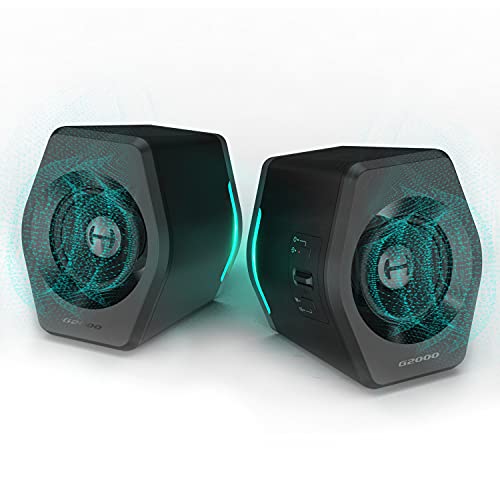
The Edifier G2000 is a compact set of 32W PC gaming speakers designed for desktops, laptops, and multimedia setups. With Bluetooth, USB, and AUX inputs, it connects effortlessly to PCs, Macs, consoles like PS4 or Xbox, and even mobile phones, making it a versatile hub for gamers and everyday users.
Perfect for American gamers building immersive setups or remote workers needing quality audio without bulk, these speakers shine in real-world use. The professional tuning delivers balanced sound across modes, while RGB lights transform your desk into a gaming spectacle during late-night sessions.
Performance stands out with its 2.75-inch full-range units and bass port, providing clear vocals and punchy lows without distortion at high volumes. Though wired for power, it offers unlimited playtime for all-day use.
Verdict: A top pick for budget-conscious gamers seeking powerful sound and style in a desktop package. It punches above its weight for the price.
Bass depth comes from the backward mega bass port and 16W RMS power, delivering thumping lows ideal for explosions in games or beats in music. Full-range drivers ensure vocal clarity stays sharp, even in busy movie scenes.
Volume levels fill medium-sized rooms without strain, hitting 32W peaks cleanly. Three EQ modes let you tweak for gaming punch, music balance, or cinematic immersion, with a subwoofer output for future upgrades.
Bluetooth offers stable wireless range up to 30 feet, while USB sound card input provides plug-and-play fidelity. AUX ensures zero-latency wired performance for competitive play.
The unique column-shaped cabinets with 10-degree elevation direct sound straight at you, paired with a 0.65L cavity for optimized acoustics. Matte black finish, metal engravings, and anti-slip pads add a premium, stable feel to any desk.
Rugged enough for daily desktop use with no IP rating needed indoors, its lightweight build (under 5 lbs total) makes setup easy. No battery means it's always powered via AC for non-stop sessions, no charging downtime.
RGB illumination with 12 effects dresses up your space stylishly, perfect for gaming rigs without overwhelming professional offices.


Pros
- Versatile connections work with computers, smartphones, TVs, and more
- Easy-Switch technology for smooth multi-device audio toggling
- Convenient on-speaker controls and headphone jack
- Full-range drivers with bass extension for balanced desktop sound
- Bluetooth 4.2 provides reliable wireless performance
Cons
- Requires power source, limiting portability for on-the-go use
- Bass extension solid but lacks deep subwoofer punch for movies
- Compact size means not ideal for large rooms or parties
The Logitech Z207 are compact 2.0 stereo speakers designed for computer desktops, offering Bluetooth wireless connectivity alongside a 3.5mm wired option for reliable audio from PCs, laptops, smartphones, tablets, or TVs. Ideal for home office workers, students, or casual gamers who want upgraded sound without complexity, these speakers prioritize ease and versatility in everyday setups.
In real-world use, setup is straightforward: pair via Bluetooth 4.2 or plug in the cable, and Logitech's Easy-Switch lets you toggle between devices seamlessly. The active drivers handle full-range audio while passive radiators add bass depth, making podcasts, music, and video calls come alive on your desk. Controls are right on the speaker for volume tweaks and pairing, with a headphone jack for late-night sessions.
Performance shines in small to medium spaces, delivering clear vocals and decent volume without distortion. While not party-level loud, they excel for focused work or light entertainment. Overall verdict: a smart upgrade for anyone tired of tinny laptop speakers, offering great value for multi-device households.
These speakers feature one active driver per unit for full-range audio reproduction, paired with a passive radiator that extends bass response for punchier lows than typical desktop speakers. Vocals remain clear and detailed during calls or music, with balanced mids that avoid muddiness.
Volume levels fill a home office comfortably, handling peaks without clipping, though max output suits personal use over group listening. Bluetooth 4.2 provides stable connectivity up to 33 feet, with minimal dropouts during movement around the room. Wired 3.5mm input ensures zero-latency for gaming or videos.
Overall, the sound signature is neutral with added bass warmth, perfect for all-day productivity or streaming without fatigue.
The Z207 boast a sleek, compact design with a small footprint that tucks neatly onto any desk or shelf. Built with durable materials, they withstand daily handling, while integrated controls keep your workspace clutter-free. No rugged IP rating, but the sturdy enclosure handles typical indoor use.
Power comes via USB, eliminating battery concerns for continuous operation during long workdays or binge sessions; just plug into your computer or charger. No recharging downtime means it's always ready. Weight is lightweight at under 2 pounds total, easy to reposition.
This plugged-in approach prioritizes reliability over portability, suiting stationary setups where consistent power enhances lifestyle integration.
Pros
- Effortless USB-powered operation
- Crisp clarity for speech and podcasts
- Space-saving compact size
- Reliable plug-and-play connectivity
- Strong value for everyday desk use
Cons
- Limited deep bass for music enthusiasts
- Basic design lacks premium aesthetics
- Not suited for large room volume
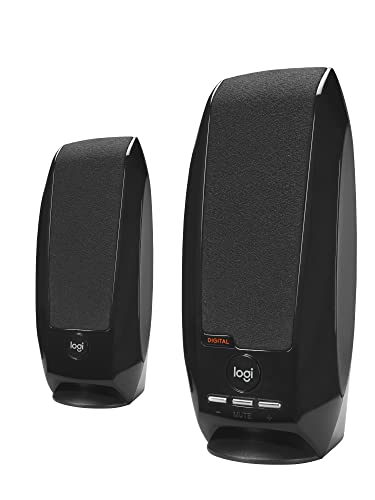
These compact computer speakers are a straightforward audio solution for everyday desktop use, delivering reliable sound without complexity. Designed as a stereo pair, they connect via standard 3.5mm jack and draw power from USB, making them perfect for laptops, PCs, and home offices.
Ideal for remote workers, students, and casual users who want better audio than built-in laptop speakers, they excel in scenarios like video conferences, online classes, and light streaming. Real-world performance shows consistent clarity during long workdays, with no need for batteries or extra adapters.
In daily testing, the speakers handle voices sharply and music adequately, filling small spaces effectively. While not for audiophiles, they offer a practical upgrade that boosts productivity and enjoyment at the desk.
Verdict: A solid pick for budget buyers seeking simple, effective computer audio. They shine in functional home setups where reliability trumps flashiness.
The speakers deliver a balanced sound signature with emphasis on midrange clarity, making voices in calls and podcasts stand out sharply. Bass is present but modest, suitable for general listening rather than heavy beats.
Volume reaches adequate levels for desk environments without noticeable distortion, even at higher settings. Bluetooth is absent; instead, the stable 3.5mm wired connection ensures zero dropouts, with a short cable perfect for close-range PC or laptop pairing.
Overall, performance prioritizes clear communication and casual media, outperforming tinny laptop speakers for focused work or study sessions.
Sporting a minimalist black plastic build, these speakers are rugged enough for daily desk handling, with a stable base preventing tipping. At under a pound total, their lightweight and slim profile tucks neatly behind monitors or on shelves.
No internal battery means USB-powered operation for uninterrupted use, drawing minimal power directly from your computer. This eliminates charging hassles, supporting all-day playback as long as your device is on.
Compact dimensions make them highly portable between workspaces, though they lack water resistance, best kept in dry office environments.
Understanding Desktop High-Fidelity Audio Architecture and Selection
High-fidelity desktop audio refers to compact sound systems engineered to deliver accurate, uncolored sound reproduction across a close listening distance. Unlike conventional PC multimedia units that rely on exaggerated mid-bass to simulate power, true desktop hi-fi focuses on balanced frequency response, precise stereo imaging, and low harmonic distortion. Achieving this standard requires choosing speakers with suitable acoustic enclosures, quality internal or external amplification, and versatile input stages. Understanding these core components allows listeners to assemble an enjoyable workspace system tailored to music, gaming, and multimedia editing.
Defining Desktop Hi-Fi: Nearfield Dynamics and Soundstage
Desktop listening operates almost entirely within a nearfield acoustic environment where your ears sit two to four feet away from the speaker drivers. At this close range, the sound reaching your ears comes primarily from direct driver radiation rather than reflections off room walls, ceilings, and floors. This proximity allows for remarkable detail retrieval and clarity, but it also exposes minor acoustic flaws that might go unnoticed across a large living room. A well-designed nearfield monitor must integrate its drivers cleanly so that high and low frequencies arrive at the ear simultaneously without phase cancellation.
Stereo imaging represents another critical benchmark in desktop audio reproduction. High-fidelity cabinets create a three-dimensional soundstage where instruments, vocalists, and ambient effects occupy distinct horizontal and depth positions between the left and right channels. Inexpensive plastic speakers often smear this acoustic image, creating a flat wall of sound that lacks spatial precision. By employing rigid cabinet materials and matched acoustic drivers, desktop monitors allow listeners to pinpoint subtle background details across complex musical arrangements and interactive video games.
Active Versus Passive Desktop Configurations
Choosing between active and passive speaker architecture is one of the most fundamental decisions when configuring a desktop audio setup. Active speakers contain integrated power amplifiers and dedicated internal crossovers inside the enclosure, making them an all-in-one solution that connects directly to a computer or audio interface. Models like the Edifier G2000 demonstrate this design by housing internal digital signal processing and amplification within compact column cabinets. Active monitors minimize desktop clutter because they eliminate the need for an external amplifier chassis and complex speaker cabling.
Passive bookshelf speakers take an alternate route by separating the acoustic enclosure from the amplification source. Units such as the S.M.S.L Tabebuia feature high-grade components like custom Wavecor four-and-a-half-inch woofers and silk dome tweeters, but they require an external stereo amplifier to produce sound. These speakers feature a four-ohm impedance and an eighty-eight-decibel sensitivity rating, requiring clean power delivery from an amplifier capable of handling up to one hundred watts per channel. While passive setups require additional desk space for an amplifier or receiver, they allow listeners to upgrade or change electronic components independently over time.
Deciding between these two configurations depends largely on available desk space and long-term upgrade plans. Powered speakers simplify workspace cable management and offer plug-and-play operation for busy professionals and students. In contrast, passive systems appeal to hobbyists who enjoy experimenting with dedicated digital-to-analog converters, tube preamplifiers, and modular power stages. Both approaches can achieve authentic high fidelity when paired with quality source material and appropriate acoustic placement.
Driver Engineering, Crossover Design, and Bass Extension
Speaker drivers convert electrical signals into acoustic energy, and their physical construction directly dictates tonal accuracy. Compact desktop units frequently employ small full-range drivers around two to three inches wide to cover the entire audible frequency spectrum from a single point source. While full-range drivers provide coherent vocal reproduction without phase shifts, multi-way speaker designs separate audio tasks between dedicated woofers and tweeters. A dedicated silk dome tweeter handles crisp treble details, while a rigid cone woofer reproduces midrange clarity and lower frequencies without straining.
Generating clean, impactful low-end frequencies within a small physical cabinet presents a constant engineering challenge. Enclosures rely on acoustic techniques like bass reflex ports or passive radiators to extend low-frequency response without requiring oversized speaker cabinets. For example, the Logitech Z207 incorporates an active powered driver paired with a passive radiator to extend bass performance within a slim profile. Other enclosures feature rear-facing or bottom-firing bass ports that vent internal air movement to reinforce bass notes down into the fifty-to-sixty-hertz range.
Listeners who demand tactile sub-bass response for electronic music or cinematic video games often seek systems with dedicated subwoofer expansion ports. Integrating a separate subwoofer offloads demanding low-frequency reproduction from the desktop monitors, allowing smaller satellite drivers to operate with less distortion. Exploring dedicated 2.1 speaker setups illustrates how separating deep low-end frequencies creates a wider dynamic range without overloading desk real estate. Adding a sub-bass unit helps preserve crisp mid-frequency performance across dialogue and acoustic instruments.
Digital and Analog Connectivity for Personal Workspaces
The method used to transfer audio signals from your computer to your desktop speakers significantly influences background noise levels and overall clarity. Traditional three-and-a-half-millimeter analog auxiliary cables rely on your computer motherboard’s built-in sound card to convert digital audio into analog sound. Motherboards often introduce electrical interference from graphics cards and power supplies, resulting in faint hissing or buzzing through sensitive speaker drivers. Utilizing speakers with direct USB sound card capabilities bypasses internal computer noise by performing digital conversion directly inside the speaker housing.
Wireless Bluetooth streaming provides convenient access for laptops, smartphones, and tablets without tethering devices to physical cables. Many modern multimedia speakers incorporate Bluetooth connectivity alongside standard wired inputs to facilitate seamless source switching throughout the workday. Technologies like Logitech Easy-Switch allow users to pause playback on a computer and immediately stream audio from a mobile device without re-pairing. However, wired connections remain preferable for critical audio monitoring and gaming because wireless Bluetooth transmission can introduce subtle latency and lossy audio compression.
Balancing multiple physical inputs on a single set of desktop speakers provides essential versatility for multi-device workstations. Combining auxiliary jacks, USB inputs, and wireless protocols ensures that work laptops, personal gaming rigs, and mobile phones can share the same audio hardware. Reviewing budget-friendly desktop audio options shows how modern sound gear integrates flexible input switching into compact, accessible packages. Choosing speakers with versatile connectivity prevents the need for external input switchers and constant cable swapping.
Physical Acoustic Placement, Elevation, and Desk Decoupling
Placing speakers directly on a flat desktop surface without elevation creates acoustic problems known as boundary reflections and comb filtering. High frequencies travel in directional waves, meaning tweeters should be positioned directly at ear level to ensure accurate frequency delivery. Cabinets designed with built-in upward angles, such as the ten-degree elevation found on the Edifier G2000, project sound toward your ears rather than your chest. If speakers feature standard vertical cabinets, adding small desktop stands or angled foam wedges helps align high-frequency drivers with your seated listening position.
Stereo soundstage presentation depends heavily on the physical distance between your left and right speakers. The ideal desktop arrangement forms an equilateral triangle between the two speaker cabinets and your head, typically separating speakers by two to four feet. Angling the speakers inward slightly toward your listening position, known as toe-in, sharpens center vocal imaging and tightens stereo focus. Keeping the toe-in angle under twenty degrees usually prevents the soundstage from collapsing into an overly narrow focal point.
Mechanical vibrations from speaker cabinets can transfer directly into wooden or metal desks, turning the desk surface into an unwanted acoustic resonator. This mechanical resonance creates muddy, bloated lower midrange frequencies that mask fine audio details and cause physical desk vibration. Using rubber isolation feet, dense foam pads, or adjustable metal spikes mechanically decouples the speaker enclosures from the desk surface. Decoupling tightens bass impact and ensures that you hear only the direct acoustic output generated by the speaker cones.
Troubleshooting Common Workspace Audio Problems
Unwanted electrical noise, humming, or ground loop buzzing ranks among the most frequent frustrations encountered in desktop audio installations. Ground loops occur when speakers and connected computers are plugged into different electrical wall outlets or experience fluctuating ground potential over analog cables. Connecting all desktop audio hardware and computer equipment to a single high-quality surge protector often eliminates ground potential differences. If a persistent low buzz remains over an analog cable, switching to a digital USB connection or inserting an inline ground loop isolator can break the electrical loop.
Unexpected volume imbalances or muffled output often stem from software settings rather than hardware defects. Modern operating systems contain audio enhancement algorithms, spatial sound virtualizers, and communication attenuation settings that can distort flat frequency response. Disabling third-party equalization software and setting your operating system output to uncompressed twenty-four-bit audio ensures clean signal delivery. Keeping computer master volume around eighty percent while adjusting final listening volume on the physical speaker knob maintains an optimal signal-to-noise ratio.
Distorted or muddy bass response usually indicates improper boundary placement rather than an overdriven amplifier. Speakers equipped with rear bass reflex ports require adequate breathing room from rear walls to avoid artificial boundary reinforcement. Positioning rear-ported enclosures at least several inches away from drywall prevents boomy resonance and restores tonal balance to bass guitars and kick drums. If desk space forces rear-ported speakers tight against a wall, inserting open-cell acoustic foam plugs into the ports can tame runaway bass peaks.
Routine Maintenance, Cable Hygiene, and Long-Term Care
Maintaining desktop audio equipment involves regular physical inspection and careful cleaning to preserve acoustic performance. Dust and airborne debris naturally accumulate on exposed driver cones, surrounding rubber surrounds, and interior bass reflex tubes over time. Gently wiping speaker cabinets with a dry, lint-free microfiber cloth prevents dust buildup without risking physical damage to delicate paper or polypropylene cones. Never apply liquid cleaning sprays, solvents, or abrasive polishes directly onto exposed speaker drivers or silk dome tweeters, as moisture can degrade delicate suspension components.
Proper cable routing behind crowded computer desks protects sensitive audio signals and prevents accidental hardware damage. Audio interconnects should run perpendicular to high-voltage power cables whenever possible to minimize electromagnetic hum induction. Securing cables with reusable hook-and-loop straps prevents heavy wire bundles from tugging on delicate three-and-a-half-millimeter jacks or speaker terminal posts. Ensuring adequate slack in all connecting wires prevents tension damage when moving adjustable monitors or motorized sit-to-stand desks.
Practical Verification and Final Desk Audio Optimization
Verifying your desktop audio setup requires auditioning familiar, well-recorded reference tracks across different musical genres. Listen for clear separation between center-panned vocals, stereo acoustic guitars, and low-frequency bass lines without noticing distortion at moderate volume. Adjust your seating position and minor speaker angles until the vocal performer sounds anchored directly in front of you between the two physical monitors. Running simple channel identification and phase test tracks confirms that your stereo wiring maintains correct polarity without hollow acoustic cancellation.
Selecting and configuring the right desktop speakers ultimately depends on aligning acoustic specifications with your physical workspace and listening priorities. Active monitors with digital USB inputs offer clean, space-saving convenience for streamlined computer desks. Passive stereo pairs deliver modular flexibility for dedicated audio enthusiasts willing to integrate external amplifiers and custom wiring. Evaluating cabinet dimensions, driver engineering, and decoupling options ensures your workspace delivers clear, high-fidelity sound that enhances your daily computing routine.


Write Your Review
No reviews yet. Be the first to share your experience!