


Setting up a living room audio system often leads to practical questions about expansion limits and speaker channels. When configuring a modular television audio layout, discovering how many speakers connect bose soundbar 700 is an essential step before purchasing extra components. The Bose soundbar platform allows listeners to start with a standalone unit and introduce dedicated physical surround channels as room needs change. Clarifying these hardware boundaries prevents unexpected setup conflicts and helps you achieve balanced acoustics throughout your listening area.
While many entertainment areas utilize casual wireless audio or Bluetooth speaker connectivity for streaming music, an authentic surround layout requires dedicated physical satellite hardware. The Bose Soundbar 700 relies on proprietary wireless protocols to link specific companion units without running long signal cables across the room. Knowing how many discrete channels the soundbar can manage ensures that your audio equipment delivers realistic spatial audio without unneeded purchases.

Pros
- Remarkably wide 360-degree soundstage eliminates narrow sweet spots.
- Sleek extruded aluminum enclosure looks and feels exceptionally premium.
- Reliable wireless signal transmission eliminates the need to run long audio cables across the room.
- Clear, fatigue-free treble reproduction for distinct dialogue reflections and ambient cues.
Cons
- Proprietary design works strictly with compatible Bose soundbars and cannot run independently.
- External wireless receivers and power bricks still require thoughtful cable concealment.
- Premium price point compared to standard compact rear satellites.
Even the most advanced modern soundbars face physical limitations when trying to project sound to the back of a large living room. The Bose Surround Speakers 700 are engineered to solve that exact problem by supplying genuine rear-channel audio. Acting as dedicated satellite channels for Bose soundbars, these speakers transform front-heavy soundstage setups into a fully realized, three-dimensional acoustic bubble.
Setup is refreshingly straightforward for home theater enthusiasts who want to avoid cutting into walls. Each speaker connects via discreet wire to a dedicated wireless receiver module, which automatically syncs with your soundbar through the Bose Music app. Running the ADAPTiQ audio calibration tunes the satellites specifically to your room dimensions, upholstery, and seating positions, ensuring balanced volume levels right out of the gate.
In real-world testing, the speakers shine by delivering nuanced spatial cues rather than merely blasting loud volume. During chaotic action sequences or quiet suspenseful films, environmental details such as rustling leaves, breaking glass, and off-camera dialogue project with pinpoint accuracy. The sound flows naturally into the room without drawing undue attention to the physical speaker boxes.
Ultimately, the Bose Surround Speakers 700 are an indispensable upgrade for anyone who already owns a compatible Bose soundbar and wants authentic cinematic immersion. They demand an investment, but their refined acoustic dispersion, high-end build, and effortless setup make them a standout addition to any premium entertainment space.
Unlike conventional surround speakers that fire sound strictly forward and create a narrow listening sweet spot, the Bose Surround Speakers 700 feature dual-opposing drivers that project audio omnidirectionally. This 360-degree dispersion mimics how sound reflects in the real world, allowing ambient effects and directional cues to wrap seamlessly around the listener regardless of where they sit on the couch.
Acoustically, these satellites are voiced to emphasize high-frequency precision and midrange clarity. Whispers, subtle footsteps, and bullet trajectories cut through the air with clean distinction, completely free of harsh sibilance or distortion even at elevated volumes. Because they are designed to operate within a multi-channel ecosystem, low-end bass frequencies are cross-filtered to your soundbar or dedicated subwoofer, leaving these satellites free to deliver pristine, uncolored ambient detail.
Measuring just 1.84 inches wide by 1.84 inches deep and 5.77 inches tall, the Bose Surround Speakers 700 boast one of the most compact footprints in the home theater category. The cabinet is crafted from single-piece extruded aluminum with micro-perforated grilles, providing a sophisticated appearance that matches the clean lines of contemporary televisions and Bose soundbars.
Audio transmission from the soundbar to the rear channels is handled wirelessly over a low-latency 2.4 GHz connection. However, buyers should note that each satellite is tethered by speaker wire to an included power supply brick and wireless receiver. This design eliminates long runs of cable from the front of the room to the back, though you will still need nearby AC wall outlets behind your couch to power the units.

Pros
- Incredibly small size blends into any home decor
- Effortless wireless connection to Bose Soundbar
- Brings immersive surround sound to music, movies, and TV
- Reliable 30-foot wireless range for versatile positioning
- Easy setup with just power adapters and receivers
Cons
- Requires compatible Bose Soundbar for full functionality
- Bass performance enhanced only with optional module
- Needs nearby power outlets for adapters

Pros
- Exceptional vocal clarity focused on speech enhancement
- Quick and simple setup with included optical cable
- Bluetooth connectivity supports up to three devices
- Included remote for easy control of key sound modes
- Compact dimensions ideal for small spaces
Cons
- Deep bass requires separate Bose module purchase
- HDMI cable and wall brackets sold separately
- Limited to first powered-on device for auto Bluetooth connect
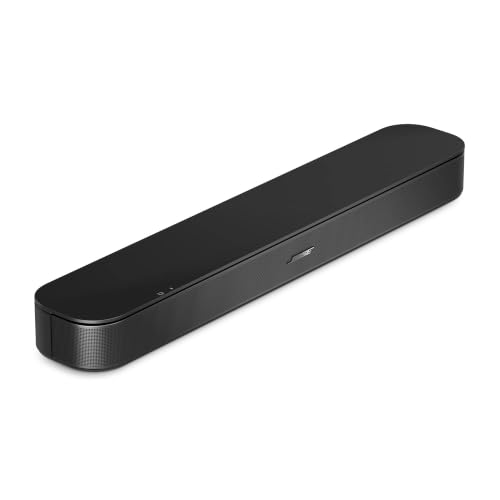
The Bose TV Speaker is a compact all-in-one soundbar designed to solve the common issue of muffled TV audio. With its focus on simplicity, it delivers clearer speech and more natural sound from a small footprint, making it perfect for anyone tired of straining to hear dialogue over background noise during evening binge sessions or family movie nights.
Targeted at everyday TV enthusiasts, this speaker shines in living rooms where space is at a premium. Its two angled full-range drivers create a wider soundstage, pulling you into the action without needing a full home theater system. Real-world use reveals reliable performance for daily viewing, with Bluetooth adding versatility for casual music streaming.
Setup is a breeze with the included optical cable or optional HDMI-ARC, and the remote lets you tweak settings on the fly. While it excels at clarity, pairing it with a Bose bass module unlocks even more potential. Overall, it's a smart, no-fuss upgrade for better TV sound that punches above its size.
Verdict: Highly recommended for straightforward TV audio improvement, especially if dialogue clarity is your top priority.
Bose prioritizes vocal clarity with dedicated dialogue enhancement, ensuring crisp pronunciation even in noisy scenes. The two angled full-range drivers produce wide, natural sound that feels spatial and realistic, elevating standard TV broadcasts to a more engaging level without distortion at normal volumes.
Bass is present but leans light for a compact unit; adding a Bose Bass Module 500 or 700 via a simple cable delivers the depth needed for action movies. Volume levels fill small to medium rooms effectively, and Bluetooth connectivity is stable for streaming music or podcasts from up to three devices, auto-connecting to the first one powered on.
HDMI-ARC and optical inputs ensure low-latency TV sync, making lip-sync issues a thing of the past for seamless viewing.
At just over 2 inches tall, 23 inches wide, and 4 inches deep, this sleek black soundbar slips easily in front of most TVs or mounts to walls with optional brackets. Its minimalist build complements modern setups, staying out of sight while delivering big audio improvements.
No battery here; it plugs into a standard outlet with a 5-foot power cord for continuous operation, perfect for stationary home use without recharging worries. The included compact remote measures 4.1 by 1.6 inches, fitting comfortably in hand for quick adjustments.
Durability suits everyday living room placement, with expandability via bass modules using a standard 3.5mm cable. Weight is light at under a pound, making repositioning effortless.
Direct Answer and Architecture for Bose Soundbar 700 Expansion
A Bose Soundbar 700 connects to a maximum of three companion audio hardware units within a dedicated home theater configuration. Specifically, you can link one pair of rear surround speakers and up to two bass modules directly to the soundbar. This layout creates an authentic 5.1 surround sound environment that distributes spatial audio throughout your seating area. While you can stream to additional smart speakers across separate rooms using Wi-Fi, the soundbar does not support adding extra satellite speakers within the primary theater zone.
Some listeners assume that modern wireless soundbars can link to four, five, or six satellite speakers placed freely around a room. The internal digital sound processor of the Soundbar 700 is engineered specifically to route discrete left and right surround channels behind your listening position. Attempting to add extra surround pairs for front height or side presence is not supported by the software or internal transceivers. Recognizing this configuration boundary saves time and prevents you from investing in incompatible hardware.
Physical Channel Allocation: The 5.1 System Limits
The acoustic foundation of the Soundbar 700 consists of a multi-driver array housed entirely inside the main enclosure. The soundbar incorporates custom low-profile transducers that handle the discrete center channel alongside dedicated front left and front right audio channels. Bose PhaseGuide technology projects directional sound beams off adjacent walls, creating an expansive front soundstage without needing separate external front satellite speakers. This design keeps your television console clean while preserving wide stereo imaging.
When you add the single permitted pair of wireless surround speakers, the soundbar offloads rear effects to those physical enclosures. This discrete routing brings movie soundtracks, ambient gaming audio, and musical mixes to life with precise rear localization. Because the front three channels remain inside the soundbar, pairing more than two rear speakers would conflict with the system timing. The manufacturer restricts home theater pairing to one left rear satellite and one right rear satellite for this reason.
Low-frequency effects and deep bass tones are managed by the connected bass module. Directing sub-bass frequencies away from the main bar allows the smaller soundbar drivers to focus entirely on dialogue clarity and midrange definition. This clean frequency division between the central soundbar, the two rear surround satellites, and the subwoofer creates a unified system. Each component handles its designated frequency band without straining the overall system.
Compatible Rear Surround Speakers: 700 vs Standard Cubes
Bose produces two primary surround speaker models that satisfy the single rear pair allocation for the Soundbar 700. The premium option is the Bose Surround Speakers 700, Black, crafted with custom extruded aluminum enclosures that complement the glass exterior of the soundbar. These slender columns feature dual opposing drivers designed to produce 360-degree omnidirectional sound. This wide dispersion helps fill your rear seating zone with immersive effects that do not localize directly to a single speaker.
A smaller, more discreet alternative is the Bose Surround Sound System for Home Theater, Black, commonly known as the standard Bose Surround Speakers. Standing less than four inches tall, these compact cubes focus sound toward the listening position while occupying minimal visual space. Both models connect wirelessly to the Soundbar 700 using dedicated wireless receivers that eliminate the need for signal wiring across your living room floor. Listeners can choose between these designs depending on room aesthetics and available mounting spots.
Each satellite speaker connects with thin speaker wire to an external wireless receiver module that plugs into a standard wall outlet. While the connection from the Soundbar 700 to the receivers is wireless, each receiver brick requires accessible AC power. Homeowners who value a clutter-free aesthetic often mount these units at ear level using bracket hardware discussed in resources covering on-wall speakers to keep cords concealed behind furniture or inside neat wall channels. Planning your electrical outlet placement beforehand ensures that power cables remain hidden from everyday view.
Subwoofer Configuration: Single and Dual Bass Modules
Bass performance on the Soundbar 700 can be customized to match your room volume and personal listening habits. The soundbar links wirelessly to either a Bose Bass Module 700 or a smaller Bose Bass Module 500. The Bass Module 700 provides deep, resonant bass using an upward-firing driver combined with QuietPort technology to reduce port distortion. The Bass Module 500 offers a more compact footprint that suits smaller dens and apartments.
Listeners with large living spaces or challenging room dimensions can connect up to two wireless bass modules simultaneously. To run dual subwoofers with the Soundbar 700, both units must be the exact same model. The system allows you to pair two Bass Module 700 units or two Bass Module 500 units, but you cannot combine a 500 and a 700 within the same wireless setup. Ensuring matching hardware guarantees that both subwoofers respond with identical timing and acoustic characteristics.
Deploying dual subwoofers smooths out acoustic room modes and eliminates dead spots where low frequencies cancel each other out. Placing subwoofers on opposite sides of a room creates even bass distribution across every seat on your couch. While both bass modules communicate wirelessly with the soundbar, a standard 3.5 millimeter audio cable can be used for a wired link if severe radio interference occurs in your home. Hardwiring remains an option for homes with dense concrete construction or heavy network congestion.
Multi-Room Audio Expansion with Bose SimpleSync
Whole-home audio distribution follows different operational rules than a dedicated 5.1 home theater setup. Using the Bose Music app, the Soundbar 700 can group with other compatible smart speakers over your home Wi-Fi network via Bose SimpleSync. This capability allows you to stream music or television audio simultaneously to speakers in the kitchen, patio, or home office without latency. You can link multiple standalone smart speakers throughout the house to share the same broadcast.
Grouped multi-room speakers mirror the primary audio stream rather than acting as independent surround channels. If you link a portable speaker in the dining area with your living room soundbar, the dining speaker reproduces the complete audio track. This functionality ensures that you can follow live sports or continuous playlists as you move through your home, but it does not expand the physical channel count of your cinema setup. Discrete rear effects remain exclusive to your paired surround satellites in the living room.
SimpleSync also supports a direct one-to-one Bluetooth link with compatible Bose noise-canceling headphones. This feature allows one listener to enjoy television audio privately while the soundbar volume is adjusted independently or completely muted for resting family members. Modern whole-home setups reflect how innovative speaker designs integrate local theater processing with wide wireless network streaming. Having independent volume control between the headphones and soundbar makes late-night movie watching easy without disturbing others.
Bose Soundbar 700 vs Compact Bose TV Speakers
Prospective buyers sometimes confuse the modular Soundbar 700 with compact entry-level units such as the Bose TV Speaker (2nd Gen) and the Bose TV Speaker – Soundbar for TV with Bluetooth. These compact TV soundbars are designed primarily for dialogue clarity and simplified connections in smaller bedrooms or guest spaces. Standing just over two inches tall, they feature angled full-range drivers and a dedicated dialogue enhancement mode to lift vocals above background noise. They provide an all-in-one upgrade over thin television speakers without complex setup menus.
Unlike the Soundbar 700, compact TV soundbars do not support wireless rear surround speakers. Their internal electronics cannot decode discrete multichannel audio or transmit satellite signals to wireless receivers. As a result, the maximum physical speaker count for the Bose TV Speaker lineup is strictly limited to the soundbar itself alongside one optional wired subwoofer. Buyers seeking true rear surround immersion must choose the modular soundbar ecosystem instead.
Subwoofer expansion on a compact Bose TV Speaker requires a physical 3.5 millimeter connection cable to communicate with a Bass Module 500 or 700. In contrast, the Soundbar 700 handles both subwoofer and surround connections wirelessly over high-speed radio frequencies. If your goal is to build an expansive multi-speaker surround environment, choosing a modular soundbar like the Soundbar 700 is necessary to support physical satellite additions. Knowing these distinct model boundaries prevents costly purchasing mistakes when planning your home audio system.
Step-by-Step Wireless Pairing via the Bose Music App
Connecting compatible accessory speakers to your Soundbar 700 is managed entirely through the Bose Music app on your smartphone or tablet. Before opening the mobile application, connect each rear speaker cube to its respective wireless receiver using the supplied color-coded speaker wiring. Plug the receiver power supplies into nearby electrical outlets and verify that the status indicator lights begin blinking amber, indicating ready pairing status. Preparing the hardware first ensures a smooth discovery process inside the setup app.
Open the Bose Music app and choose your Soundbar 700 from the main device dashboard. Tap the settings gear icon in the upper corner of the interface and navigate to the accessory speakers section. Select the option to add new accessory speakers, prompting the app to scan your local wireless frequency bands for active companion receivers. Keep your mobile device close to the soundbar while the discovery scan is underway.
Follow the on-screen instructions to identify your satellite speakers and assign them as the left rear and right rear audio channels. Proper channel designation ensures that directional sound pans accurately across your listening space. Once pairing completes, the receiver status LEDs switch to solid white, confirming an active wireless connection between the soundbar and your satellites. You can then test the channel assignments using the app sound check tool.
Running ADAPTiQ Calibration After Adding Hardware
Whenever you change your physical speaker configuration by adding surround satellites or a bass module, recalibrating the system is essential. The Soundbar 700 includes the proprietary ADAPTiQ audio calibration headset inside the original product packaging. This diagnostic headset measures how sound waves reflect off your room walls, ceiling, windows, and upholstered furniture. Taking the time to run calibration ensures that every speaker channel is balanced for your specific room acoustics.
To begin calibration, connect the ADAPTiQ headset cable to the designated port on the back panel of the soundbar and place the headset on your head. Launch the Bose Music app, select your soundbar, and initiate the ADAPTiQ calibration routine from the audio settings menu. The system will prompt you to sit in five different typical seating spots while the speakers output a sequence of acoustic test sweeps. Remaining completely silent during test playback helps the microphone capture accurate reflections.
The internal processor analyzes the test tones and calculates precise distance delays and volume equalization for each connected speaker. This acoustic tuning ensures that the rear surrounds seamlessly match the output of the soundbar without overpowering dialogue. Skipping calibration often results in unbalanced sound, where rear effects either sound too quiet or distractingly harsh. Recalibrating takes less than ten minutes and significantly improves spatial sound definition.
Diagnosing Wireless Drops and Signal Interference
Because the Soundbar 700 communicates with accessory speakers over radio frequencies, local wireless congestion can sometimes cause audio dropouts. Dual-band home Wi-Fi routers, cordless home phones, and dense building materials located between the units can interrupt data packets. If a surround speaker cuts out or exhibits a faint clicking noise, check the receiver module to see if the LED has reverted to blinking amber. Identifying signal drops early prevents frustrating interruptions during your entertainment time.
Repositioning the wireless receiver modules so they have a clearer path to the soundbar often resolves connection instability immediately. Avoid tucking the receivers inside enclosed metal cabinets or directly behind large television displays that block wireless signals. Keeping your home internet router at least three feet away from both the soundbar and receiver units prevents channel overlap on crowded wireless frequencies. Ensuring adequate airflow around the power bricks also prevents unexpected thermal throttling.
When satellite speakers fail to reconnect automatically, performing a clean hardware restart is an effective troubleshooting measure. Disconnect the power cords from the Soundbar 700, the surround power supplies, and your television for two full minutes. Reconnect the soundbar first to let it establish network communication, then plug in the accessory receivers to restore the wireless connection handshake. This simple sequence clears temporary memory caches and re-initializes encrypted wireless pairing.
Satellite and Subwoofer Placement Strategies
Physical placement plays a major role in how your connected surround hardware performs during movie viewing. Rear surround speakers should ideally be positioned slightly behind and to the sides of your main viewing area, angled toward the center of the room. Mounting the satellites approximately one to two feet above ear level helps prevent the sound from being obstructed by seated family members. Placing speakers at the correct elevation ensures ambient effects travel naturally across the entire listening zone.
Placing your bass modules also requires experimenting with room boundaries to achieve clean bass output. Placing a subwoofer near a corner increases low-frequency impact through acoustic boundary loading, creating intense rumble for action movies. If corner placement produces muddy or boomy resonance, moving the subwoofer slightly along a flat wall produces tighter, more controlled bass reproduction. Testing different positions with familiar movie scenes helps you discover the cleanest bass response for your room.
Take care to route the thin speaker wires cleanly between the satellite cubes and their receiver adapters to avoid pinching under furniture legs. Keeping cables secure maintains electrical integrity and protects against accidental disconnections over years of use. Once your speakers are positioned securely, you can fine-tune bass and surround levels independently within the Bose Music app audio settings. Small level adjustments allow you to tailor the final mix to your personal listening taste.
Final Verification and Expansion Takeaways
The Bose Soundbar 700 provides a structured, modular path for building a dedicated surround system without excessive cable clutter. The system supports a firm limit of one pair of rear surround speakers and up to two matching bass modules for its dedicated home theater channels. This configuration cap ensures that the internal decoders maintain low audio latency and clean frequency separation across all active drivers. Respecting these limits guarantees stable performance without straining the internal audio processor.
For listeners who desire sound coverage across multiple living areas, grouping compatible Wi-Fi speakers through Bose SimpleSync offers extensive flexibility without exceeding home theater hardware limits. Verifying hardware compatibility before ordering and running the ADAPTiQ calibration routine guarantees that your expanded sound system delivers clear, balanced audio tailored to your home. A properly configured system brings theater-grade dynamics to your favorite movies and music every day.





Write Your Review
No reviews yet. Be the first to share your experience!