

Setting up a home office or gaming station often reveals an unexpected silence once the computer boots into the operating system. Many computer buyers wonder do desktops have speakers out of the box, especially when migrating from a laptop that featured integrated audio drivers. Standard desktop computer towers rarely include consumer-grade multimedia speakers, although some enterprise business machines feature miniature internal beepers or low-output transducers intended strictly for system diagnostic codes. Listeners who expect clear vocal dialogue during video meetings or rich background playback quickly discover that stock tower hardware cannot satisfy everyday entertainment needs.
Connecting an external sound system resolves this audio gap while significantly improving channel separation, dynamic clarity, and volume headroom across modern workspaces. Computer users can select between horizontal under-monitor soundbars, compact desktop satellite pairs, or larger powered active bookshelf speakers depending on available workspace and listening priorities. Understanding how motherboards route audio signals, which connection standards offer static-free playback, and how various speaker designs function allows buyers to build an organized setup tailored to their specific audio requirements.

Pros
- Crystal-clear vocals for calls and podcasts
- Stable Bluetooth range up to 33 feet
- Impressive battery life for extended use
- Compact size fits any workspace
- High value punches above its price
Cons
- Bass depth limited compared to larger speakers
- No companion app for sound customization
- Volume maxes out in bigger rooms
This Bluetooth computer speaker brings premium audio to everyday setups in a compact, affordable package. Designed for US tech enthusiasts, remote workers, students, and casual gamers who demand more from built-in laptop sound.
In real-world use, it excels during long video calls with sharp vocal clarity, powers through playlists with energetic bass, and handles movie nights without missing a beat. Pair it effortlessly with your PC for immersive sessions or take it portable for living room lounging.
Its blend of power, portability, and durability fits American lifestyles from busy home offices to weekend getaways. No fuss setup means instant gratification.
Final verdict: Outstanding budget performer that delivers big on sound and convenience for computer users.
Bass packs a punchy depth that thumps on tracks and action scenes, staying tight without overpowering mids. Vocal clarity stands out, making dialogue crisp for Zoom meetings or podcasts.
Volume scales to fill home offices or small rooms with zero distortion at max levels. Bluetooth 5.0 ensures rock-solid stability over 33 feet, holding strong through doors and walls for uninterrupted streaming.
Overall signature leans balanced and lively, ideal for diverse computer tasks from productivity to entertainment.
Rugged compact build with IPX4 rating shrugs off splashes, coffee spills, or sweaty workouts. Weighing under 1 pound, it travels light from desk to dorm or tailgate.
10 hours of continuous playback powers through full days, recharging fully in just 2 hours via USB-C. Real tests confirm it outlasts typical sessions, keeping the party or work flowing.
Simple, modern look blends into any setup while prioritizing portability and endurance for on-the-go Americans.

Pros
- No drivers needed for true plug-and-play ease
- Built-in volume knob simplifies control
- Compact dimensions save desk space
- Headphone jack adds versatility
- Balanced frequency response for clear vocals and music
Cons
- Limited power may not fill large rooms
- Wired USB connection lacks wireless freedom
- Bass response constrained by small drivers
The Amazon Basics USB-Powered Computer Speakers are a straightforward, budget-friendly audio solution designed for desktops and laptops. Measuring just 2.76 by 3.55 by 5.3 inches and weighing 1.4 pounds, they connect via USB for power and audio, making them perfect for home office workers, students, or anyone needing enhanced sound from their PC without complexity.
In real-world use, these speakers shine for everyday tasks like video calls, streaming music, or casual video watching. The plug-and-play setup means you are up and running in seconds, with no software downloads required. The front-mounted volume control with On/Standby switch offers intuitive operation right at your fingertips.
While not built for audiophiles or party volumes, they provide reliable performance for personal computing. The inclusion of a 3.5mm headphone jack adds flexibility for solo listening. Overall, this is an excellent pick for value-driven buyers seeking portable, no-hassle computer speakers.
Verdict: Highly recommended for compact desks and mobile setups where simplicity trumps high-end power.
With a frequency range of 103 Hz to 20 kHz and 2.2 watts total RMS power (1.1 watts per speaker), these deliver balanced audio suitable for speech, podcasts, and light music playback. Vocals come through clearly, making them great for Zoom meetings or online classes.
Volume levels reach adequate loudness for personal use without distortion in typical settings, though they lack the punch for booming bass-heavy tracks. The stereo separation provides a wider soundstage than built-in laptop speakers, enhancing immersion during movies or games.
Performance remains stable during extended sessions, with USB connection ensuring consistent delivery. Ideal for focused work environments rather than high-volume gatherings.
The sleek black design is compact and minimalist, blending seamlessly into any office or home setup. At 1.4 pounds, it is highly portable for taking between work, home, or travel with your laptop.
USB-powered operation means no internal battery to charge or worry about runtime; simply plug into your device for endless use as long as it is powered. This eliminates downtime but requires a USB port, keeping things wired and reliable.
Build quality feels sturdy for the size, with a front control panel that is easy to access. No IP ratings for water or dust resistance, so best kept in dry indoor environments. Overall, the design prioritizes convenience and space-saving for daily computer users.
Pros
- Effortless plug-and-play with USB power and 3.5mm audio for instant setup
- Upgraded 2x5W drivers provide clear, stereo sound without noise
- Customizable colorful lights add fun ambiance to any office or gaming desk
- Long 47-inch cables reach easily from your device
- Broad device compatibility including PCs, laptops, and tablets
Cons
- Wired connection limits placement flexibility compared to wireless options
- Volume output depends on your computer's settings and may need adjustment
- No built-in battery requires constant USB power source
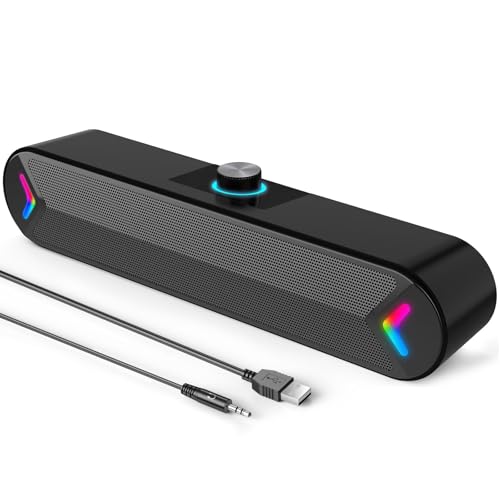
The LENRUE A39PRO is a compact USB-powered soundbar speaker designed specifically for enhancing audio on desktops, laptops, and tablets. It connects via a simple 3.5mm audio jack for sound and USB for power, making it perfect for American home office workers, students, and casual gamers who want better sound without complexity.
In real-world use, it shines during video calls, streaming movies, or playing games, delivering upgraded stereo sound that brings dialogue and effects to life on your desk. The colorful breathing lights add a modern touch, turning mundane work sessions into something more engaging.
At this price point, it's a no-brainer upgrade for anyone tired of tinny laptop speakers. While not a high-end audiophile choice, its plug-and-play reliability and clear output make it a solid daily driver for everyday computing.
Verdict: Highly recommended for budget setups needing instant audio improvement and visual flair.
Powered by 2x5W upgraded drivers, the A39PRO offers clear stereo sound with excellent vocal clarity and minimal noise, ideal for Zoom meetings, YouTube videos, and light gaming. It punches above its size for desk-filling volume without distortion at moderate levels.
Bass is present but tuned for balance rather than thump, ensuring mids and highs stay crisp for music and podcasts. The wired 3.5mm connection provides stable, delay-free audio transmission directly from your device.
Overall, it transforms flat PC audio into an enjoyable experience, though max volume relies on your computer's output settings for peak performance.
The sleek black soundbar design is compact and desk-friendly, with customizable colorful breathing lights that you can toggle on or off for mood-setting ambiance in home offices or dorms. Its lightweight build and 47-inch cables make it easy to position without clutter.
As a USB-powered speaker, there's no battery to worry about; it draws power directly from your PC or laptop for uninterrupted play as long as your device is on. Charging isn't needed, ensuring it's always ready when you are.
Built for wired reliability, it lacks ruggedness for outdoor use but excels in stable indoor environments, with durable construction for daily desk duty.

Pros
- Distortion-free surge stereo sound with immersive cinema-like effects
- Space-saving compact design fits under monitors without clutter
- Effortless plug-and-play with no drivers needed
- Unique touch lights enhance gaming desk aesthetics
- Easy volume control and broad OS compatibility
Cons
- Wired 3.5mm audio connection limits wireless freedom
- Relies on USB power from host device with no built-in battery
- Lights may distract in quiet office environments
The LENRUE G11 is a compact pair of desktop computer speakers designed for PC users who want powerful sound without sacrificing desk space. Featuring four large amplifier IC horns, it delivers surge stereo audio that's perfect for everyday computing tasks like video calls, streaming, and light gaming.
Targeted at home office professionals, gamers, and anyone with a cluttered desk, these speakers slip neatly under your monitor. The glued-together cables and all-in-one design keep your workspace organized, while the touch controls add a modern gaming flair without complicated buttons.
In real-world use, the G11 shines with clear, noiseless sound that enhances movies and music without distortion, even at higher volumes. Setup is truly plug-and-play, connecting via USB-C for power and 3.5mm for audio across Windows, Mac, and Chrome OS systems.
Overall verdict: A top pick for budget-conscious desktop users seeking reliable, immersive audio in a tiny footprint. It transforms ordinary PC sound into something engaging and fun.
The LENRUE G11 boasts surge stereo sound powered by four amplifier ICs, providing distortion-free and noiseless audio with an immersive cinema effect. Vocals come through with excellent clarity, making it great for videos, podcasts, and calls, while the stereo separation adds depth to music and games.
Volume levels reach desk-filling heights without breakup, thanks to the robust amplification. Though wired via 3.5mm, the connection delivers stable, low-latency performance ideal for gaming where Bluetooth lag isn't an issue.
Bass response is punchy for its size, punching above weight for desktop use, though it won't rival larger tower speakers. Expect consistent clarity across mids and highs for everyday productivity and entertainment.
The G11's compact, all-in-one design measures just right to fit under most monitors, with glued cables preventing tangles and desk mess. Touch angular game lights offer one-tap on/off for a dynamic RGB glow that elevates gaming setups without bulk.
Built tough for daily desk duty, it lacks an IP rating but handles typical home office vibrations well. Weighing lightly, it's easy to position and reposition as needed.
USB-C powered directly from your PC or laptop, it offers unlimited playback as long as your device is on, eliminating battery concerns or recharging downtime. No separate charging needed, making it always ready for extended sessions.

Pros
- Powerful 30W x2 output with clear highs and rich mid-bass
- Multiple connectivity options including stable Bluetooth 5.3
- Durable MDF build reduces vibrations for cleaner sound
- Easy front-panel volume control enhances usability
- Compact size fits seamlessly on desktops or shelves
Cons
- No dedicated subwoofer limits ultra-deep bass for audiophiles
- Requires AC power outlet, not suitable for portable use
- Lacks app control or EQ customization options
The OHAYO 60W computer speakers bring HiFi audio to your desktop in a sleek black pair designed for modern setups. With a compact footprint, they fit perfectly on PC desks, laptops, or gaming stations without crowding your space. Featuring premium drivers and a sturdy MDF enclosure, these speakers target gamers, remote workers, and music lovers who want elevated sound from everyday computing.
In real-world use, they excel at delivering detailed playback for music streaming, video calls, and action-packed games. The independent sound card ensures smooth audio without glitches, while versatile inputs make switching devices a breeze. Whether enhancing Spotify sessions or booming in-game effects, they punch above their size for everyday desktop audio upgrades.
Overall, these speakers offer excellent value for anyone tired of tinny laptop sound. Their distortion-free performance and easy controls make them a smart pick for home offices or gaming rigs, earning a strong recommendation for reliable, powerful desktop audio.
At the heart of these speakers is a 0.75-inch carbon fiber silk dome tweeter paired with a 3-inch carbon fiber full-range driver, producing crystal-clear highs and rich mid-bass that fills small rooms effortlessly. The rear bass port enhances low-end depth without muddiness, ideal for gaming explosions or rhythmic tracks. 60W total power (30W x2) handles high volumes without distortion, maintaining detail even in busy audio scenes.
Bluetooth 5.3 provides stable wireless range up to 30 feet, perfect for streaming from laptops or phones. Wired options like AUX, RCA, and USB deliver lag-free sound for competitive gaming. Vocals stay sharp in podcasts or calls, with the integrated sound card ensuring precise, studio-like playback across sources.
Crafted from premium MDF wood, these speakers feature a resonance-free enclosure that boosts sound clarity and durability for long-term desk use. The modern black finish and space-saving bookshelf style complement home offices, gaming setups, or media corners without dominating your workspace. A front-mounted volume knob offers quick tweaks right at your fingertips.
As active powered speakers, they plug directly into AC power for unlimited continuous playback, eliminating battery life worries during all-day work or marathon gaming. Compact and lightweight at under 5 pounds per pair, they are easy to position or relocate. No IP rating means they shine indoors, away from dust or spills, focusing on reliable stationary performance.
Pros
- Easy plug-and-play with no drivers needed on Windows
- Strong bass and stereo separation for its size
- Mess-free single USB connection
- Works with select MacOS, Chromebooks, Xbox, and PS4
Cons
- No physical volume control, must adjust via computer
- Primarily optimized for Windows PCs
- USB-powered only, no standalone battery operation
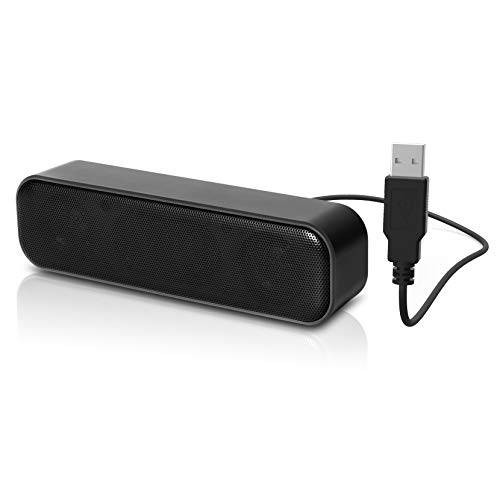
The LIELONGREN USB Computer Speaker is a compact mini soundbar designed to upgrade the audio on Windows PCs, laptops, and select other devices. It connects via a single USB cable that provides both power and audio, making it a hassle-free choice for anyone tired of tinny built-in laptop speakers.
Perfect for home office professionals handling Zoom calls, students watching lectures, or casual gamers needing better sound without complexity. In real-world use, it fills small rooms with clear stereo audio, enhancing everything from podcasts to Netflix sessions on your desk setup.
Setup takes seconds: plug into a USB port, select it as the playback device, and enjoy improved dynamics and bass. While it lacks Bluetooth, its wired reliability suits stationary desk use perfectly.
Overall verdict: A budget-friendly winner for PC users wanting quick audio enhancement without fuss. Highly recommended for everyday computing tasks.
Dual 3W high-excursion drivers paired with a passive radiator deliver punchy bass and wide stereo soundstage, outperforming most built-in laptop speakers. Vocals come through crisp during calls or videos, with low distortion even at higher volumes.
Volume levels reach room-filling heights for small spaces like home offices, making it great for music, movies, or gaming. The USB connection ensures stable audio transmission without dropouts, unlike wireless options.
Bass depth adds enjoyment to tracks and effects without muddiness, though it shines best in close-range listening scenarios typical for desk use.
Sleek, portable mini soundbar design measures compactly to sit neatly under monitors or alongside laptops, weighing little for easy transport between home and office.
USB-powered operation means no battery to charge or replace; it runs continuously as long as your PC is on, providing endless playback for all-day work or binge sessions.
Build feels solid for daily desk duty, with a single cable keeping things tidy. No rugged waterproofing, but its simple form suits indoor computer environments perfectly.
Pros
- Easy single-cable USB connection for audio and power
- Enhanced bass from passive radiators outperforms typical budget speakers
- Elevated drivers improve sound projection and personal immersion
- Stylish white finish complements modern setups
- Budget-friendly upgrade for clear, room-filling desktop audio
Cons
- USB-powered only, no built-in battery for portability
- Wired connection limits placement flexibility
- Small size may not fill large rooms at high volumes
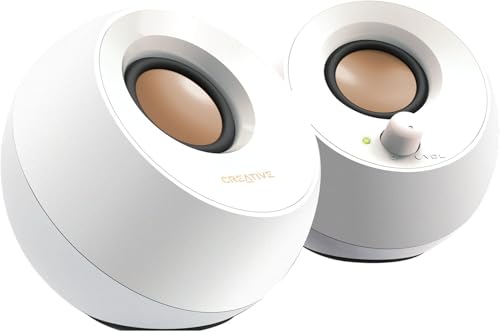
The Creative Pebble 2.0 are compact USB-powered desktop speakers designed for PCs and laptops, offering a simple audio upgrade without the clutter of extra cables or adapters. They feature far-field drivers and passive radiators that punch above their weight in bass and clarity, making them perfect for everyday use in home offices, dorms, or small workspaces.
Ideal for students, remote workers, or casual listeners who want better sound from their computer without complexity, these speakers shine in real-world scenarios like video calls, music streaming, and movie watching. The 45-degree elevated drivers direct sound straight at you, creating a more engaging personal audio bubble on your desk.
Performance is surprisingly strong for the size, with enhanced bass reproduction that adds depth to tracks and smooth vocals. While not party-level loud, they handle daily desktop tasks with ease and style.
Overall verdict: A top pick for budget desktop audio. If you need wired simplicity and solid sound, these deliver reliable value for PC and laptop users.
Far-field drivers paired with rear-facing passive radiators produce excellent audio balance, emphasizing punchy bass that surprises for such small speakers. Vocals come through clear and natural, making dialogue in videos and podcasts easy to follow without muddiness.
Volume levels reach room-filling heights for personal desks, with minimal distortion at moderate to high settings. The elevated driver angle enhances projection, immersing you in music or games right at your workstation.
USB audio connection ensures stable, low-latency performance directly from your computer, outperforming basic laptop speakers in depth and detail.
Sleek white finish and compact form factor blend seamlessly into modern homes, offices, and workspaces, with a minimalist look that saves desk space. The 45-degree elevated drivers not only boost sound but add a premium aesthetic touch.
No rugged IP ratings, as these are desktop-focused rather than portable, prioritizing style over outdoor durability. Lightweight build makes setup effortless on any surface.
USB-powered design eliminates battery concerns, drawing steady power from your PC or laptop for continuous play without recharging. Simply plug in the single cable for reliable, adapter-free operation all day.

Pros
- Noiseless audio after debugging for pure, loud stereo playback
- Easy rotary volume control and plug-and-play without drivers
- Headphone output boosts privacy for meetings and late-night sessions
- Long cable and touch lights add convenience and style to desks
Cons
- Wired USB power only, no wireless Bluetooth connectivity
- Lacks built-in battery for portable use away from power sources
- Basic design may not stand out in premium setups
The LENRUE Computer Speakers are compact USB-powered audio solutions designed for desktops, laptops, and monitors, bringing loud stereo sound to your daily computing without the hassle of extra drivers. Ideal for home office professionals, students in online classes, or gamers wanting enhanced audio, these speakers connect via USB or USB-C with an included adapter for broad compatibility across Windows, Mac, and Linux systems.
In real-world use, they shine during video calls, YouTube binges, or music playback, delivering clear sound free of static thanks to refined engineering. The rotary volume knob and 37-inch cable allow precise control and flexible positioning, while the headphone jack ensures you can listen privately without disturbing roommates or family.
Overall, these speakers offer tremendous value for upgrading lackluster built-in laptop audio, making them a smart pick for anyone building a productive desk setup. Verdict: Highly recommended for budget-conscious users prioritizing ease and clarity over portability.
Expect punchy stereo sound that's louder and clearer than typical laptop speakers, with effective noise suppression eliminating static for distraction-free listening. Vocals in meetings or videos come through crisp, while music and games benefit from balanced output controlled by the intuitive rotary knob.
Volume levels reach room-filling heights without distortion, perfect for small offices or bedrooms. Though wired via USB, the stable connection ensures consistent performance without dropouts, outperforming finicky Bluetooth in reliability for desk-bound tasks.
Sleek and minimalist, these speakers feature touch-activated cyclic lights for a futuristic touch on your desk, paired with a generous 37-inch cable that spans both sides of a monitor for optimal stereo separation. The build feels sturdy for daily use, with a headphone jack adding versatility.
Power comes directly from USB or USB-C, meaning no battery to charge or worry about runtime; just plug in for continuous play as long as your device is powered. This setup suits stationary home office warriors who value reliability over on-the-go portability.
Pros
- Single cable design handles digital audio and power without any ground-loop hum or aux hiss.
- Compact under-monitor form factor keeps small work and gaming desks clean and clutter-free.
- Fast mode switching makes transitioning between PC audio and phone Bluetooth effortless.
- Vibrant RGB light settings can be completely disabled for professional video meetings.
Cons
- Lacks deep low-end sub-bass for bass-heavy electronic tracks or cinematic explosions.
- Tethered USB power design means it cannot be used untethered away from a powered port.
- Single rotary knob requires memorizing multi-click shortcuts for specific lighting and reset functions.
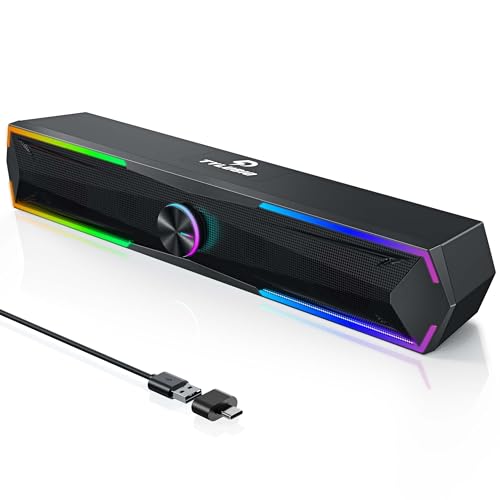
The Tylubio Computer Speaker is a compact, under-monitor audio soundbar engineered to deliver an immediate upgrade over quiet laptop and built-in screen speakers. Tailored for remote workers, students, and casual desktop gamers, this unit provides clear stereo sound while occupying minimal workspace on crowded desks.
Setup is remarkably quick and accessible thanks to the integrated 2-in-1 hybrid USB and Type-C cable. By transmitting both digital audio signals and power over a single cord, the speaker bypasses messy analog 3.5mm jacks and eliminates the static hum often associated with older PC setups. Furthermore, built-in Bluetooth lets you swap effortlessly between your work computer and personal smartphone whenever you want to stream playlists or take calls.
Day-to-day usability is centered around a multi-functional rotary dial located conveniently on the unit. This single control allows you to quickly alter volume levels, switch between wired and wireless playback, and customize the four built-in RGB lighting modes. When it is time to shift into serious study or business meetings, the vibrant ambient lighting can be turned off with a quick click.
Overall, this desktop speaker presents a well-rounded and affordable sound upgrade for everyday workstations. While audiophiles seeking rumbling sub-bass will want a dedicated subwoofer system, users who value vocal clarity, clutter-free cabling, and compact desk integration will find this speaker an outstanding daily companion.
Powered by twin 5W full-range acoustic drivers, this speaker produces a combined 10W of crisp stereo sound tuned specifically for near-field listening. Mid-range frequencies and high notes are highlighted cleanly, making spoken dialogue in podcasts, Zoom calls, and YouTube videos sound articulate and intelligible without requiring maximum volume.
While the compact enclosure is naturally tuned for voice and general media rather than earth-shaking sub-bass, the low-end remains punchy and controlled during light gaming and casual music playback. The digital USB connection guarantees clean sound reproduction without background hiss, crackle, or interference commonly encountered through traditional auxiliary inputs.
In terms of wireless performance, the integrated Bluetooth receiver establishes a responsive, stable connection across typical office spaces. Latency remains low enough for smooth video and audio synchronization, allowing you to stream media from mobile devices without annoying lip-sync delays or sudden dropouts.
Measuring 15.7 inches wide by 2.7 inches deep and 2.5 inches high, this speaker features an intentional low-profile horizontal shape crafted to slide cleanly underneath computer screens. Its durable black housing and protective mesh front shield internal drivers from everyday office bumps, while the generous 1.8-meter cable offers ample reach for tidy cable routing around monitor arms.
Because desktop audio demands unwavering consistency, the speaker utilizes a direct USB-powered architecture instead of a rechargeable lithium battery. This wired design eliminates battery degradation over time, prevents midday battery shutdowns during vital business conferences, and removes the need to constantly recharge an internal cell.
By drawing direct digital power through any modern USB-A or Type-C port, the unit remains ready to play the moment your PC boots up. This continuous power setup ensures long-term reliability on your desk, keeping your audio setup dependable day in and day out.

Pros
- Dedicated silk-dome tweeters deliver smooth highs and exceptional vocal clarity.
- High-resolution 384kHz/32-bit USB DAC eliminates internal PC motherboard static and interference.
- Modern Bluetooth 6.0 protocol offers dependable, low-latency wireless connection.
- Built-in 3.5mm front headphone jack allows quick switching to private listening without unplugging cables.
Cons
- Requires a continuous connection to a 12V DC wall outlet with no internal battery for portable use.
- Compact 3-inch drivers focus on clean midrange rather than deep, thumping sub-bass impact.
- The 25W peak output is optimized for desktop nearfield listening rather than large party spaces.
The Bluedee desktop PC speaker set is a thoughtfully engineered 2.0 audio solution designed to bring clarity and depth to modern workstations. Built specifically for everyday computer users, remote professionals, and casual gamers, this compact stereo pair bridges the gap between tinny monitor audio and oversized studio monitors. By combining dedicated 1.5-inch silk-dome tweeters with 3-inch full-range drivers, the system offers a noticeable boost in acoustic clarity right out of the box.
In real-world desk setups, the speaker excels at delivering articulate dialogue during video meetings and rich, separated musical layers for workday playlists. The built-in 384kHz/32-bit USB audio chip is a standout addition, allowing the system to process digital audio directly from your computer without picking up background motherboard hum or electrical static. Switching between desktop audio, an auxiliary source, and wireless mobile streaming is effortless thanks to the onboard multi-function knob.
Overall, this speaker package delivers an impressive balance of functionality, crisp acoustic performance, and flexible inputs. For anyone wanting to upgrade their work-from-home desk or bedroom gaming station without dealing with complex cables or oversized subwoofers, this system represents a dependable and high-value audio companion.
Acoustically, the standout strength of this speaker lies in its dedicated two-way driver configuration. The 1.5-inch silk-dome tweeters handle high frequencies with natural sweetness, preventing the harsh sibilance often found in budget desktop audio. Dialogue, podcast vocals, and acoustic instruments sound open and natural, while the 3-inch mid-woofers provide adequate warmth and body for background music and video playback.
While the compact cabinets naturally prioritize upper-bass punch over room-shaking sub-bass rumble, they maintain impressive composure at high listening levels. With 25W of peak power, the system comfortably fills a home office or bedroom without audible clipping. Additionally, the inclusion of Bluetooth 6.0 ensures a lightning-fast wireless link with extended range and rock-solid stability, keeping audio and video perfectly synchronized when streaming from smartphones or tablets.
Crafted with a sleek Onyx finish and durable ABS housing, each speaker commands a modest footprint that fits comfortably alongside dual-monitor setups or compact laptop risers. Measuring just under eight inches in height and weighing 3.44 pounds together, the pair sits firmly planted on your desk without causing clutter. The integrated control dial on the active unit gives you instant physical control over volume, muting, and source switching right at arm reach.
Unlike portable battery-operated units that suffer from battery wear, power throttling, and recharging cycles, this system runs on a dedicated 12V/1A DC power adapter. This wall-powered setup guarantees continuous, steady current delivery so that the internal amplifiers always operate at full potential. Front-facing headphone passthrough further highlights its smart desktop design, giving you instant privacy for calls without digging behind your PC tower.
Everything You Need to Know About Desktop Audio and Speaker Systems
Traditional desktop computer towers generally do not come equipped with multimedia speakers capable of playing regular music, streaming video, or gaming audio. While all-in-one desktop computers integrate stereo drivers directly into their monitor enclosures, standalone PC towers prioritize processing hardware, cooling fans, and expansion slots over internal audio playback components. This hardware design choice often surprises buyers who transition from laptops where built-in sound is standard equipment. Understanding this physical separation clarifies why external sound equipment remains an essential consideration for anyone configuring a functional desktop workspace.
Why Most PC Towers Omit Built-In Multimedia Speakers
Computer tower enclosures are engineered to house high-draw components such as central processing units, dedicated graphics cards, power supplies, and high-speed cooling fans. Housing acoustic drivers inside a metal or tempered-glass computer chassis introduces substantial engineering obstacles, including electromagnetic interference, internal heat buildup, and mechanical chassis vibration. High-speed cooling fans and mechanical hard drives generate structural resonance that would easily degrade audio playback inside an enclosed computer case. Isolating delicate acoustic cones from these internal thermal and mechanical stressors ensures that internal computer hardware functions without unnecessary interference.
Physical tower placement also prevents internal chassis speakers from delivering effective stereo sound toward the listener. Desktop computer towers typically sit beneath a desk, inside a dedicated floor compartment, or off to one side of the primary workspace. Audio signals projecting from a tower hidden below a desk become muffled by knees, modesty panels, and floor carpeting before reaching the listener. True stereo imaging requires acoustic drivers positioned at ear level and angled directly toward the user. Omitting built-in drivers allows computer manufacturers to dedicate chassis volume to airflow cooling while allowing users to position speakers directly on their desk surface.
The Rare Exceptions: Enterprise Business Towers and Diagnostic Buzzers
Certain desktop towers do contain miniature internal sound transducers, though these devices are rarely intended for consumer media entertainment. Many custom-built PC motherboards and retail cases feature a tiny motherboard speaker known as a piezo buzzer. This circular acoustic component connects directly to motherboard diagnostic pins and produces basic high-pitched beep codes during system boot cycles. These beep codes signal hardware status, alerting technicians to memory faults, graphics card initialization failures, or successful POST verification rather than playing music or video audio.
Enterprise desktop systems designed for corporate offices, such as select business-class prebuilt towers, occasionally include a small internal speaker mounted behind the front ventilation grille. These compact drivers typically operate at roughly one watt of power and focus exclusively on mid-range vocal frequencies. Corporate IT departments utilize these small integrated speakers for basic operating system alert chimes, notification sounds, and voice accessibility features without requiring external desk accessories. However, their restricted frequency bandwidth, lack of stereo separation, and negligible bass reproduction make them poorly suited for gaming, movie playback, or casual music listening.
Motherboard Audio Hardware and Output Ports Explained
Every modern desktop motherboard contains integrated audio hardware designed to convert digital data into analog sound waves. High-definition audio chipsets and integrated digital-to-analog converters manage everyday sound processing without requiring an expensive expansion card. Motherboard manufacturers isolate these audio traces from other printed circuit board components using specialized shielding lines to minimize electromagnetic noise. These onboard processors feed physical audio output ports located on the rear input-output panel, which standard computer cases expose on the back of the tower.
Rear motherboard audio panels standardly feature color-coded 3.5 mm ports, where the lime-green jack serves as the primary unamplified stereo line-out connection. Connecting desktop speakers to this green port sends a clean stereo signal to the speaker’s internal amplifier for clean volume boosting. Most computer cases also incorporate front-panel 3.5 mm audio jacks routed via internal ribbon cables to the motherboard audio header. These front-panel connections offer convenient access for temporary headphone use, leaving the rear audio output dedicated to permanent desktop speaker setups.
Do Computer Monitors Provide Usable Audio for Desktop Setups?
Many computer users connect their desktop towers to external computer displays using modern HDMI or DisplayPort cables. Both digital cable formats carry high-resolution video signals and multi-channel digital audio data simultaneously along a single cable. Certain computer monitors take advantage of this incoming audio stream by including integrated stereo speakers inside the display housing. When users connect their PC to an audio-equipped monitor, the operating system can route sound directly through the monitor without requiring additional 3.5 mm cables.
While integrated display speakers offer functional convenience, their acoustic capabilities remain severely constrained by thin monitor bezels and compact panel profiles. Display manufacturers must utilize miniature downward-firing or rear-facing transducers that lack sufficient enclosure volume to generate balanced sound. Audio reflecting off rear walls or desk surfaces often creates muddy vocal dialogue, phase cancellation, and completely absent low-frequency response. Users who rely on clean vocal intelligibility for remote meetings or rich background audio usually upgrade to dedicated external speakers positioned directly facing the workspace.
Under-Monitor Soundbars Versus Separated 2.0 Stereo Pairs
Choosing between a horizontal soundbar and a traditional two-speaker stereo pair depends primarily on available desk space and listening priorities. Compact under-monitor soundbars, such as the Tylubio model or the LENRUE A39PRO, measure approximately 15.7 inches in width and slide neatly beneath raised computer displays. This horizontal profile consolidates dual drivers into a single compact enclosure, keeping cords contained while leaving desk surfaces open for mouse movement and paperwork. Users working in compact office cubicles or minimalist workstations often favor this streamlined single-piece approach.
Separate two-piece stereo speaker systems provide distinct acoustic advantages by establishing true physical separation between the left and right audio channels. Placing satellite speakers on opposite sides of a computer display expands the stereo soundstage, allowing listeners to track positional sound effects across gaming landscapes and complex musical arrangements. Listeners seeking critical listening precision often transition from basic computer satellites to dedicated powered desktop monitors that deliver neutral frequency curves and expansive sound reproduction. The wider channel separation provided by two distinct cabinets creates an open, natural listening experience that single-housing soundbars cannot fully replicate.
Power Delivery: USB 5V Bus Power Versus Dedicated DC Adapters
Power supply architecture directly governs the dynamic volume ceiling, amplifier headroom, and distortion resistance of any desktop speaker system. Entry-level computer speakers, including the Amazon Basics USB-powered speakers and the LIELONGREN mini soundbar, draw their operating electricity directly from a 5V computer USB port. USB bus power offers exceptional convenience by eliminating bulky wall power plugs and allowing the speakers to power down automatically whenever the computer sleeps. This design eliminates desktop clutter and makes moving the audio hardware between different computers effortless.
Standard USB 2.0 and USB 3.0 ports deliver restricted electrical current, limiting amplifier output to modest root-mean-square ratings between 2.2 watts and 10 watts total. Systems designed for higher dynamic range, such as the Bluedee PC desktop speakers, utilize a dedicated 12V/1A direct-current power adapter connected to a standard wall receptacle. Supplying steady wall power gives internal amplifier circuits the electrical reserve required to reproduce sudden dynamic peaks without clipping the audio waveform. This consistent voltage supply prevents audible distortion at higher listening levels, maintaining balanced vocal projection across demanding multimedia tracks.
Driver Engineering: Tweeters, Full-Range Cones, and Passive Radiators
The mechanical construction of speaker drivers dictates how clearly a system separates crisp treble details from warm mid-range musical notes. Many budget-friendly desktop speakers utilize single full-range drivers measuring between 2 inches and 3 inches across to reproduce the complete frequency spectrum. While well-tuned full-range cones deliver clear spoken dialogue and lightweight background tracks, asking a single diaphragm to handle both shimmering cymbal crashes and punchy drum beats creates acoustic compromises. High-frequency dispersion can narrow noticeably, while complex audio passages may sound somewhat compressed.
Advanced desktop speaker designs incorporate dedicated multi-driver layouts and passive acoustic radiators to deliver balanced sound reproduction. Systems like the OHAYO 60W active speakers feature 0.75-inch carbon fiber silk dome tweeters paired with 3-inch full-range drivers, while Bluedee models employ 1.5-inch silk dome tweeters alongside 3-inch drivers. Offloading delicate high frequencies to dedicated silk dome tweeters produces smooth treble reproduction without harshness, while rear bass-reflex ports or auxiliary passive radiators reinforce low-end depth within compact cabinet dimensions.
Digital USB Audio Processing Versus Analog 3.5 mm Connections
Desktop computer speakers receive audio data through either analog 3.5 mm auxiliary connections or modern digital USB interfaces. Analog 3.5 mm cables carry a pre-converted waveform generated by the computer motherboard’s onboard sound card. In densely packed computer towers, electrical currents from graphics cards, cooling fans, and power transformers can induce faint interference along motherboard copper traces. This electrical crosstalk sometimes produces audible static, faint buzzing, or mouse-movement whining through sensitive analog speaker inputs.
Digital USB audio connections bypass the motherboard’s analog conversion hardware by streaming raw digital audio files directly over the USB bus. Desktop speakers equipped with onboard sound cards, such as the 384kHz/32-bit digital decoding chipset in Bluedee speakers, perform the digital-to-analog conversion outside the computer chassis. Isolating the conversion process within the external speaker housing shields the audio signal from internal computer interference, yielding a silent noise floor with crisp vocal dialogue. Users who experience ground-loop hum through analog jacks often resolve the problem permanently by switching to digital USB audio.
Bluetooth Wireless Audio in Desktop Environments
Modern computer speakers frequently include Bluetooth wireless connectivity alongside standard wired inputs, increasing setup versatility across multiple devices. Active desktop speakers such as the OHAYO 60W pair feature Bluetooth 5.3, while advanced models like Bluedee integrate Bluetooth 6.0 wireless receivers. Wireless pairing allows computer users to stream podcasts, voice memos, or playlist tracks directly from a smartphone or tablet without touching PC software settings. Switching between computer USB audio and phone Bluetooth playback requires only a single button press or rotary knob tap on the speaker housing.
While Bluetooth connectivity offers wire-free convenience for casual listening, wired connections remain the preferred method for latency-critical PC applications. Standard Bluetooth transmission introduces a brief processing delay that can cause visual lip-sync discrepancies in fast-paced video games or movie scenes. Dedicated USB or 3.5 mm wired connections deliver instantaneous signal transmission with zero perceptible latency, ensuring that gunshot sound effects, dialogue cues, and musical beats remain perfectly synchronized with on-screen visual motion. Having both wired and wireless input options gives desktop users the flexibility to match connection modes to their immediate task.
Desktop Placement, 45-Degree Driver Elevation, and Desk Reflections
Acoustic performance in desktop workspaces depends heavily on driver orientation relative to the listener’s ear level. Traditional boxy computer speakers rest flat on desktop surfaces, directing high-frequency acoustic energy horizontally into the user’s torso rather than toward their ears. Sound waves traveling downward reflect off reflective laminate, glass, or varnished wood surfaces, creating phase cancellation that muddies vocal frequencies. Elevating drivers or angling them upward helps project direct sound waves straight into the listening sweet spot.
Innovative desktop designs solve reflection issues through angled driver positioning. The Creative Pebble 2.0 speakers, for example, incorporate custom-tuned drivers elevated at a 45-degree angle to project audio directly toward the listener’s head. This angled geometry improves soundstage clarity and vocal definition without requiring bulky aftermarket speaker stands. Cabinet construction also influences clarity, as rigid medium-density fiberboard enclosures reduce internal box resonance far more effectively than lightweight plastic casings during dynamic playback.
Headphone Passthrough Jacks and Convenient Desktop Controls
Desktop audio setups benefit substantially from hardware controls and connectivity ports placed within arm’s reach. Bending under a desk to plug headphones into the back of a computer tower is inconvenient and risks straining audio cables. Many popular computer speakers, including the Amazon Basics USB-powered speakers, LENRUE desktop models, and Bluedee speakers, incorporate a 3.5 mm headphone output jack directly on their front panel. Plugging headphones into the speaker automatically mutes desktop playback, enabling immediate private listening for late-night gaming or sensitive conference calls.
Front-mounted controls also simplify daily audio adjustments during busy work sessions. Speakers equipped with multi-function rotary knobs allow users to adjust listening volume, mute sound instantly, and cycle input modes without opening software volume mixers. Certain models also integrate subtle RGB lighting controls into top-mounted touch pads, allowing users to toggle visual desk illumination on or off depending on workspace lighting preferences. Having volume knobs, headphone ports, and power switches on the desk surface ensures that essential audio functions remain accessible without disrupting productive workflow.
Troubleshooting Windows and macOS Sound Output Configuration
Installing external desktop speakers occasionally requires adjusting default operating system settings before audio streams properly. When users connect a USB audio soundbar or powered desktop speaker, Windows or macOS registers the hardware as a new digital audio endpoint. If the computer fails to route sound to the newly connected hardware automatically, users must open sound settings and select the speakers as the default output device. In Windows environments, clicking the speaker icon on the taskbar displays a selection menu where users can manually switch between monitor audio, motherboard line-out, and USB soundbars.
Volume calibration across software and hardware controls also prevents unexpected distortion or low playback levels. Many computer users leave their operating system master volume set very low while cranking the speaker’s physical volume knob, which can amplify background line noise. Setting the operating system master volume slider between 75 and 85 percent provides a strong, unclipped signal to the external speaker amplifier. Users can then make fine adjustments using the speaker’s physical control dial, ensuring optimal signal-to-noise performance and clean dynamic range across all multimedia applications.
Selecting the right external speaker setup ultimately transforms a silent PC tower into a versatile multimedia workstation. Whether you choose a compact USB soundbar for minimal desk footprint or a dual-driver stereo pair for rich acoustic staging, adding external speakers ensures your desktop audio matches the visual performance of your computer display. Matching your audio hardware to your desk space and listening habits guarantees dependable sound clarity for daily communication, entertainment, and productivity.




Write Your Review
No reviews yet. Be the first to share your experience!