


Filling a large living area, workshop, or outdoor patio with rich audio often leads listeners to ask whether a standard mobile device can drive multiple audio outputs simultaneously. The practical answer to can you connect 2 speakers to one phone depends entirely on your phone operating system, Bluetooth transceiver standards, and the physical design of the audio hardware you choose. Many modern smartphones include dedicated software features to route audio streams to two wireless devices at once, though signal synchronization can vary across manufacturers. Other installations solve this challenge at the speaker level by pairing the phone to a primary receiver that distributes sound across multiple connected drivers.
For instance, systems like the MWAU Outdoor Bluetooth Speakers 400w for Garage use proprietary wireless linking that allows one phone connection to broadcast across paired outdoor units. Alternatively, traditional 2.1 setups such as the Acoustic Audio by Goldwood Bluetooth 2.1 Speaker accept a single wireless stream from your phone into a powered subwoofer module, which then feeds wired satellite channels. Understanding how wireless protocols handle multi-device streaming helps you avoid latency issues, dropped signals, and uneven volume balance across your listening zones. Comparing these methods alongside dedicated portable Bluetooth speaker setups ensures you choose the most reliable hardware configuration for your space.
Pros
- Explosive volume fills large spaces like garages and patios
- Seamless wireless pairing links up to 100 units effortlessly
- Flexible mounting brackets adjust for perfect sound direction
- Remote makes control easy without ladders or climbing
- IPX5 protection handles all-weather outdoor use
Cons
- Each speaker requires a dedicated power outlet
- Bluetooth delay prevents use with TVs for video sync
- Remote cannot adjust individual volumes in paired mode
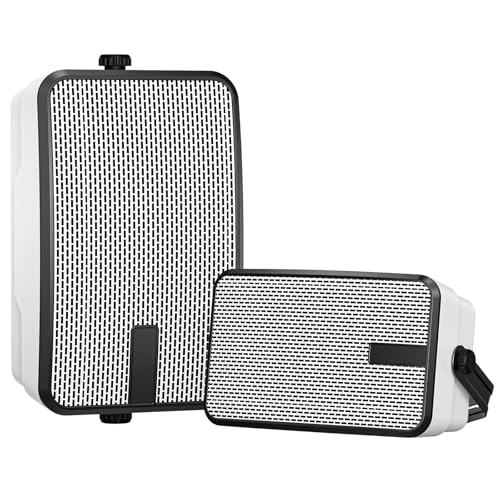
The MWAU outdoor speakers come as a two-pack of wall-mountable units designed for garages, patios, porches, gazebos, soffits, and entertainment rooms. With 400W peak power, they transform any outdoor space into a music zone perfect for barbecues, gatherings, or relaxing evenings.
Targeted at homeowners who want expandable audio without complexity, these speakers link wirelessly up to 100 units for customized coverage. Installation is straightforward with included brackets that adjust to any angle, and the remote handles power, pairing, and volume from a distance.
In real-world use, they blast clear, powerful sound across open areas, standing up to splashes thanks to IPX5 waterproofing. While not ideal for TV due to latency, they excel in pure music playback for lifestyle setups.
Verdict: A smart pick for multi-zone outdoor audio, offering high power and scalability at an accessible entry point.
Boasting 400W peak and 40W RMS power, these speakers push bold, high-volume sound that covers large patios or garages without strain. Expect punchy bass and lively highs suited for party tracks, filling spaces with energy.
Vocal clarity shines through in mids, making lyrics pop during backyard sing-alongs. Bluetooth connectivity is stable for syncing multiple units, though range suits typical yard sizes.
Volume levels handle crowd noise easily, with remote one-click adjustments keeping the vibe perfect from afar. Note minor latency in video sync scenarios, but music performance stays rock-solid.
Rugged build with IPX5 waterproofing shrugs off splashes, spills, and light rain, ideal for exposed patios or porches. Wall-mount brackets with grooves allow precise angling for optimal coverage in any setup.
Compact and lightweight for easy mounting on soffits or gazebos, the design prioritizes durability over portability. No built-in battery; each unit plugs into a power source for unlimited continuous playback.
Charging is irrelevant as AC-powered operation means all-day, all-night use wherever outlets reach, perfect for fixed outdoor installations without runtime worries.

Pros
- Deep, powerful bass from the 12-inch subwoofer
- Versatile connectivity options for any audio source
- Simple illuminated front controls and remote
- Compact satellites for discreet home setup
- Strong 40Hz-20kHz frequency response for full-range sound
Cons
- Satellite speakers require wiring to subwoofer
- Larger subwoofer footprint needs dedicated space
- No wireless satellites for fully cable-free setup
The Acoustic Audio AA2170 is a budget-friendly 2.1-channel home theater speaker system featuring a powered subwoofer and two wired satellite speakers. It packs 350 watts of power into a compact setup ideal for apartments or small living rooms, connecting effortlessly to TVs, gaming consoles, PCs, or DVD players via Bluetooth, optical, RCA, USB, or SD inputs.
Designed for everyday Americans seeking an affordable audio upgrade, it shines in home entertainment scenarios like binge-watching shows or casual gaming. The plug-and-play design with included cables and remote makes setup a breeze, no tech expertise required.
In real-world use, it delivers solid bass punch for action movies and clear dialogue for TV series, outperforming basic TV speakers. While not audiophile-grade, its value stands out for filling rooms with dynamic sound.
Verdict: A smart pick for value-driven buyers wanting home theater immersion without the premium price tag. Grab it if you need easy, powerful sound for daily use.
Bass depth comes from the 12.25-inch powered subwoofer, hitting down to 40Hz for rumbling lows in explosions or music beats, making action films and bass-heavy tracks come alive in small to medium rooms.
Vocal clarity shines through the satellite speakers' highs up to 20kHz, ensuring dialogue cuts through without muddiness. Volume levels reach party-loud without distortion, perfect for family movie nights.
Bluetooth range stays stable up to 30 feet for reliable streaming from phones or laptops, with no dropouts during casual listening. Optical and RCA inputs handle high-quality sources from TVs flawlessly.
The black subwoofer measures 12.25 x 6.75 x 12.5 inches, sturdy for home use but requires floor space. Satellites are compact at 6.75 x 4.125 x 3.75 inches each, easy to mount or place on shelves with 15-foot cables for flexible positioning.
No battery here; it runs continuously on standard 110V wall power, eliminating recharge worries for all-day TV marathons or gaming. The illuminated front panel and remote add user-friendly control in dim rooms.
Build feels solid for the price, with no rugged outdoor rating but reliable for indoor home setups. Weight keeps it stable, avoiding tip-overs during enthusiastic sessions.
How to Connect Two Speakers to One Phone: Protocols, Hardware, and Setup Methods
The direct answer is yes, you can stream audio to two speakers from one phone, but the exact method depends on your phone software and speaker hardware. Standard Bluetooth historically restricted media playback to a single active sink device under legacy A2DP profiles. Modern smartphones now frequently offer built-in dual audio features, while specialized speaker designs utilize proprietary wireless linking or centralized wired amplification. Understanding the technical differences between phone-level broadcasting and speaker-level distribution prevents audio drift, echoing, and frustrating pairing failures.
Native Smartphone Dual Audio Features and Operating System Support
Certain modern mobile devices can transmit independent Bluetooth streams to two separate wireless receivers at the same time. Samsung smartphones equipped with Bluetooth 5.0 or newer offer a native Dual Audio toggle inside the Advanced Bluetooth settings menu. When enabled, this feature lets the user pair two unrelated Bluetooth speakers and output sound to both devices simultaneously. Apple devices provide an Audio Sharing tool, although that feature remains restricted to proprietary wireless headphones rather than standard third-party Bluetooth speakers. If your smartphone lacks native operating system dual audio, connecting to a second speaker will automatically disconnect the first one.
Software-based dual streaming presents noticeable operational limitations during real-world listening. Because your phone must encode and transmit two distinct radio signals concurrently, the handset battery drains much faster than during standard playback. Physical distance and structural obstacles also introduce latency discrepancies, leading to audible echo when both speakers sit in the same room. This timing drift disrupts musical coherence because human ears easily detect delays of even ten milliseconds between acoustic sources. For large entertainment zones, hardware-managed audio distribution offers significantly better stability than native phone streaming.
Hardware-Based Wireless Sync: How Multi-Unit Speaker Linking Works
Hardware-based wireless linking shifts signal coordination away from the smartphone and places it directly inside the speaker circuitry. In this arrangement, your mobile device connects to a single primary speaker using a standard Bluetooth link. The primary speaker then acts as a wireless transmitter, broadcasting the decoded audio stream to one or more companion speakers across a dedicated radio frequency. This architecture protects phone battery life and maintains synchronized playback across multiple cabinets without relying on mobile operating system features.
The MWAU Outdoor Bluetooth Speakers 400w for Garage illustrate this hardware linking concept by enabling wireless synchronization between pairs and supporting links across up to one hundred units. With this system, you pair your phone strictly to the primary cabinet in your mobile Bluetooth menu. The companion speaker links to the master unit automatically once powered on, generating an expansive audio field across garages, porches, patios, or gazebos. Because the inter-speaker wireless link operates on a dedicated protocol, the audio remains synchronized between both cabinets without requiring complicated phone configuration.
Hardware-linked speakers carry specific operational traits that buyers should evaluate before installation. The MWAU system delivers peak power of 400 watts with 40 watts RMS, but the manufacturer notes that wireless synchronization introduces processing delay that makes them unsuitable for television use. When connected to a TV, this latency creates noticeable lip sync mismatch between actor dialogue on screen and acoustic output from the drivers. Furthermore, the included remote control adjusts overall system volume across all linked speakers at once, meaning you cannot adjust individual speaker volume levels independently while paired.
Centralized Amplification with Wired Satellite Distribution
Another reliable way to power two speakers from a single phone is using a powered 2.1 multimedia system with an integrated Bluetooth receiver. Instead of managing multiple wireless connections, your phone pairs with one central amplifier cabinet using standard Bluetooth. The amplifier decodes the stereo signal and distributes high-level electrical power through physical speaker cables directly to passive left and right satellite drivers. This approach completely eliminates wireless synchronization drift because signal routing occurs through hardwired analog connections after Bluetooth decoding.
The Acoustic Audio by Goldwood Bluetooth 2.1 Speaker AA2170 exemplifies this wired satellite architecture for home entertainment and desktop listening spaces. This system pairs with your smartphone via built-in Bluetooth and routes power through an integrated 350-watt system amplifier. The powered subwoofer measures 12.25 inches by 6.75 inches by 12.5 inches with a frequency response spanning 40Hz to 20kHz, while driving two satellite speakers measuring 6.75 inches by 4.125 inches by 3.75 inches each. Because the satellite speakers connect directly to the subwoofer using included 15-foot single RCA cables, listeners gain true stereo separation and balanced bass without wireless dropouts.
For homeowners seeking whole-house distribution, connecting an amplifier to an external stereo speaker distribution switch allows a single phone stream to drive multiple speaker pairs throughout different rooms. A centralized wired setup provides dependable reliability, broad frequency extension, and zero acoustic delay between drivers. However, physical installation requires routing speaker cables along baseboards, behind furniture, or through interior walls. Selecting between wired satellites and wireless-sync cabinets depends largely on whether your room accommodates physical wire routing or requires wire-free cabinet placement.
Stereo Imaging versus Dual-Mono Playback Modes
Listeners connecting two speakers to a single mobile device must evaluate whether their hardware configuration delivers true stereo sound or dual-mono reproduction. True stereo playback routes dedicated left-channel audio information to one speaker and right-channel information to the other, creating natural instrument positioning and depth across the soundstage. Dual-mono playback duplicates identical mixed audio across both enclosures, ensuring every listener hears all musical elements regardless of where they stand. Dual-mono is ideal for wide outdoor entertaining, but it collapses the three-dimensional imaging intended by stereo music recordings.
Different speaker systems implement channel assignments based on their intended acoustic environment and physical cabinet design. The Acoustic Audio by Goldwood AA2170 functions as a dedicated stereo system, sending isolated left and right audio channels to its respective wired satellites while routing low frequencies to the subwoofer. In contrast, outdoor broadcast systems like the MWAU wireless units typically send identical dual-mono audio to each synchronized cabinet. This ensures that someone sitting near a single patio wall mount hears complete vocal and instrumental tracks rather than half of an isolated stereo mix.
Power Supply Needs and Physical Placement Realities
A frequent assumption among smartphone users is that wireless Bluetooth connectivity eliminates all electrical wiring requirements. While Bluetooth replaces physical signal cables between your phone and the speakers, audio amplification still demands continuous electrical current to drive the speaker cones. Both wireless-sync outdoor units and indoor multimedia systems require connection to regular AC electrical outlets to operate. Planning electrical access in your garage, soffit, patio, or home entertainment center is vital before mounting cabinets in elevated positions.
For outdoor installations, the MWAU wall mount speakers require an independent power connection for each individual cabinet. Although the cabinets synchronize audio wirelessly without connecting cables between each other, each unit houses an internal amplifier that must plug into an electrical outlet. These enclosures carry an IPX5 water resistance rating, allowing them to withstand splashing water, rain spills, and light outdoor weather on covered porches or gazebos. Integrated mounting brackets feature grooved slots for multi-angle adjustment, while a wireless remote control provides convenient power and volume adjustments from ground level.
Indoor entertainment systems present a different physical footprint and power distribution profile. The Acoustic Audio by Goldwood AA2170 powers its entire three-cabinet array through a single standard US 110-volt grounded wall plug attached to the subwoofer enclosure. The passive satellite speakers draw all their operational power directly through their fifteen-foot RCA cables, eliminating the need for satellite wall adapters. This central power design simplifies outlet management behind entertainment consoles, computer desks, or media shelving, keeping all high-voltage connections consolidated in one spot.
Transmission Range, Obstacles, and Wireless Interference
Bluetooth signals transmit across the crowded 2.4 GHz radio frequency spectrum, making them vulnerable to physical barriers and interference from Wi-Fi routers. When your phone streams to two speakers simultaneously, maintaining a clean line of sight between devices becomes essential for uninterrupted audio. If you rely on smartphone-level dual audio, your phone radio chip must maintain two concurrent data streams, reducing effective wireless range and increasing dropouts. Moving your phone behind concrete walls, metal framing, or into an adjacent room will quickly cause stuttering in one of the active audio streams.
Hardware-linked speakers offer superior wireless stability because your smartphone only maintains one direct radio connection to the master unit. The master speaker handles the secondary wireless broadcast, using internal antennas that provide stronger transmission power than a handheld phone. For the cleanest performance, position the master cabinet within direct sight of your primary seating area and ensure secondary speakers remain within reliable transmission distance. Keeping all speakers clear of microwave ovens, wireless security hubs, and large metal structures helps maintain clean, uninterrupted multi-speaker streaming.
Step-by-Step Connection Guide for Dual-Speaker Configurations
Setting up dual speakers with one phone requires following a clear sequence to prevent pairing conflicts and connection drops. Begin by disabling Bluetooth on secondary phones, tablets, or computers that were previously paired with your speakers. Background auto-connections from secondary devices represent the most common reason a speaker refuses to enter pairing mode. Once other connections are disabled, power on your speakers and identify whether you are connecting via smartphone dual audio, inter-speaker wireless sync, or a central 2.1 receiver.
To configure a wireless sync system such as the MWAU outdoor pair, turn on the master speaker first and activate its Bluetooth pairing function. Open the Bluetooth menu on your phone, find the master speaker name, and confirm the wireless connection. Next, turn on the secondary speaker and trigger its wireless sync feature to link it directly with the master cabinet. The units will produce an audible tone once linked, allowing any music played on your phone to stream seamlessly through both speakers across your patio or garage.
Setting up a 2.1 system like the Acoustic Audio by Goldwood AA2170 requires completing all physical wiring before pairing your phone. Insert the RCA connectors from both satellite speakers into the corresponding output jacks on the rear of the subwoofer cabinet. Connect the main power cord to a standard 110-volt wall outlet and select Bluetooth input using the front control panel or remote. Finally, locate the AA2170 in your phone Bluetooth device list, tap to connect, and begin streaming your favorite playlists with full stereo separation.
Troubleshooting Synchronization, Dropouts, and Audio Latency
When dual speakers suffer from audio cutouts, desynchronization, or uneven playback, systematic troubleshooting helps isolate the underlying issue. If only one speaker produces sound during smartphone dual audio streaming, check your mobile media output menu to confirm that both speakers remain checked as active outputs. Toggling phone Bluetooth off and on or unpairing and re-pairing both devices will often clear corrupted connection profiles. If one speaker cuts out intermittently, reposition the phone closer to the affected speaker to eliminate physical radio interference.
In hardware-linked systems, temporary power interruptions can occasionally cause the secondary speaker to lose its wireless handshake with the master unit. Reset both cabinets by turning off their power switches for thirty seconds, then power the master unit on before starting the secondary unit. Ensure that you do not attempt to pair your phone directly with the secondary speaker, as this breaks the inter-speaker sync relationship. Similar connectivity checks apply when evaluating powered desktop monitor systems to ensure source signals feed both active channels correctly.
Choosing the Best Multi-Speaker Approach for Your Listening Needs
Selecting the best method to connect two speakers to your phone depends on your room layout, acoustic preferences, and aesthetic goals. If you need wide, weather-resistant background coverage for outdoor gatherings or workshop tasks, an expandable wireless-sync speaker pair delivers flexible placement without running long audio cables. If your priority is authentic stereo separation, deep bass response, and zero latency for indoor desktop or TV use, an integrated 2.1 multimedia system provides dependable performance. Understanding these hardware distinctions ensures you achieve clean, powerful sound tailored directly to your listening environment.





Write Your Review
No reviews yet. Be the first to share your experience!